traction control LINCOLN NAUTILUS 2021 Owner's Manual
[x] Cancel search | Manufacturer: LINCOLN, Model Year: 2021, Model line: NAUTILUS, Model: LINCOLN NAUTILUS 2021Pages: 579, PDF Size: 6.9 MB
Page 376 of 579
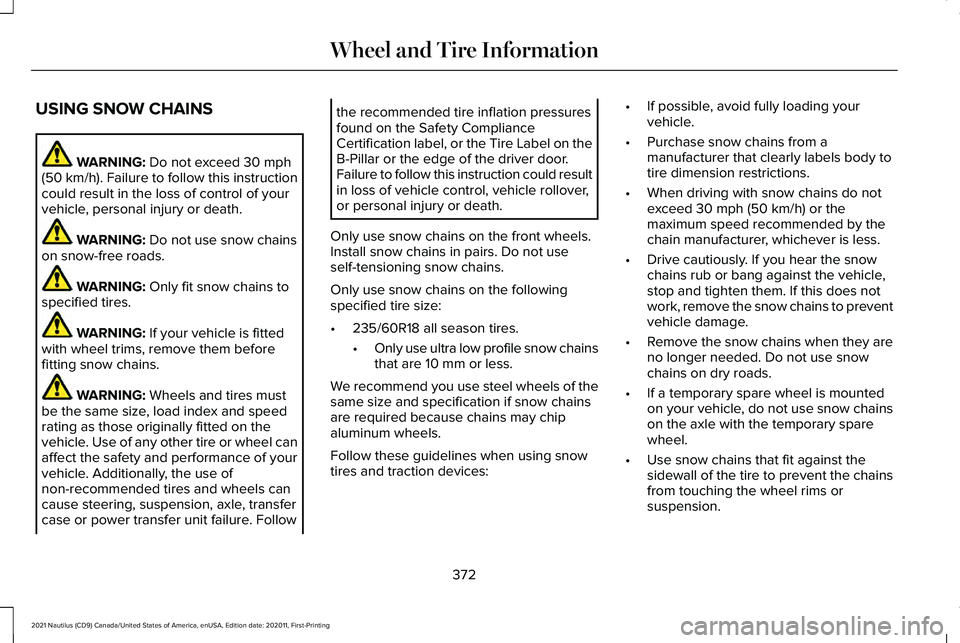
USING SNOW CHAINS
WARNING: Do not exceed 30 mph
(50 km/h). Failure to follow this instruction
could result in the loss of control of your
vehicle, personal injury or death. WARNING:
Do not use snow chains
on snow-free roads. WARNING:
Only fit snow chains to
specified tires. WARNING:
If your vehicle is fitted
with wheel trims, remove them before
fitting snow chains. WARNING:
Wheels and tires must
be the same size, load index and speed
rating as those originally fitted on the
vehicle. Use of any other tire or wheel can
affect the safety and performance of your
vehicle. Additionally, the use of
non-recommended tires and wheels can
cause steering, suspension, axle, transfer
case or power transfer unit failure. Follow the recommended tire inflation pressures
found on the Safety Compliance
Certification label, or the Tire Label on the
B-Pillar or the edge of the driver door.
Failure to follow this instruction could result
in loss of vehicle control, vehicle rollover,
or personal injury or death.
Only use snow chains on the front wheels.
Install snow chains in pairs. Do not use
self-tensioning snow chains.
Only use snow chains on the following
specified tire size:
• 235/60R18 all season tires.
•Only use ultra low profile snow chains
that are 10 mm or less.
We recommend you use steel wheels of the
same size and specification if snow chains
are required because chains may chip
aluminum wheels.
Follow these guidelines when using snow
tires and traction devices: •
If possible, avoid fully loading your
vehicle.
• Purchase snow chains from a
manufacturer that clearly labels body to
tire dimension restrictions.
• When driving with snow chains do not
exceed
30 mph (50 km/h) or the
maximum speed recommended by the
chain manufacturer, whichever is less.
• Drive cautiously. If you hear the snow
chains rub or bang against the vehicle,
stop and tighten them. If this does not
work, remove the snow chains to prevent
vehicle damage.
• Remove the snow chains when they are
no longer needed. Do not use snow
chains on dry roads.
• If a temporary spare wheel is mounted
on your vehicle, do not use snow chains
on the axle with the temporary spare
wheel.
• Use snow chains that fit against the
sidewall of the tire to prevent the chains
from touching the wheel rims or
suspension.
372
2021 Nautilus (CD9) Canada/United States of America, enUSA, Edition date: 202011, First-Printing Wheel and Tire Information
Page 476 of 579
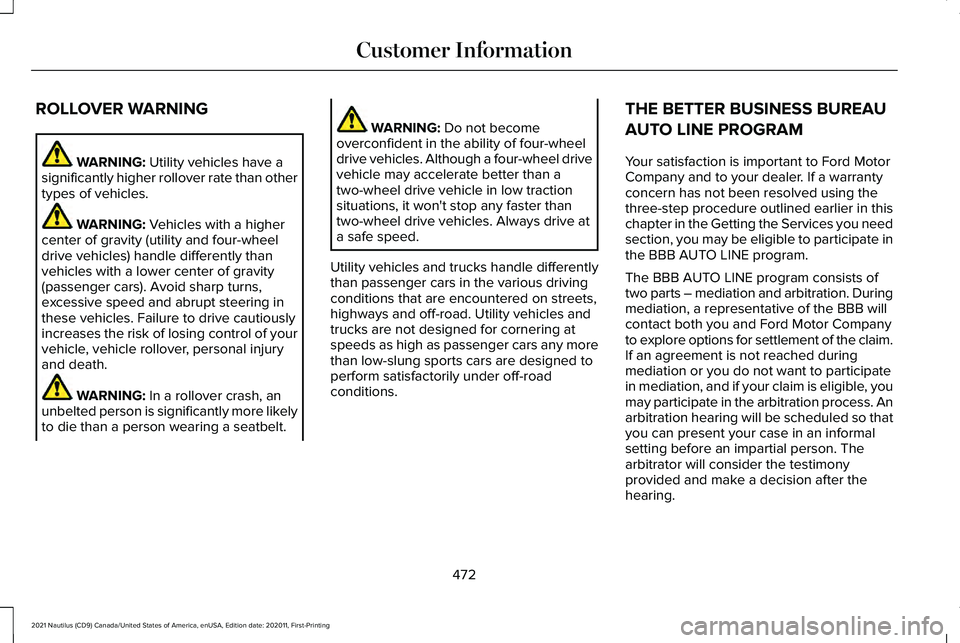
ROLLOVER WARNING
WARNING: Utility vehicles have a
significantly higher rollover rate than other
types of vehicles. WARNING:
Vehicles with a higher
center of gravity (utility and four-wheel
drive vehicles) handle differently than
vehicles with a lower center of gravity
(passenger cars). Avoid sharp turns,
excessive speed and abrupt steering in
these vehicles. Failure to drive cautiously
increases the risk of losing control of your
vehicle, vehicle rollover, personal injury
and death. WARNING:
In a rollover crash, an
unbelted person is significantly more likely
to die than a person wearing a seatbelt. WARNING:
Do not become
overconfident in the ability of four-wheel
drive vehicles. Although a four-wheel drive
vehicle may accelerate better than a
two-wheel drive vehicle in low traction
situations, it won't stop any faster than
two-wheel drive vehicles. Always drive at
a safe speed.
Utility vehicles and trucks handle differently
than passenger cars in the various driving
conditions that are encountered on streets,
highways and off-road. Utility vehicles and
trucks are not designed for cornering at
speeds as high as passenger cars any more
than low-slung sports cars are designed to
perform satisfactorily under off-road
conditions. THE BETTER BUSINESS BUREAU
AUTO LINE PROGRAM
Your satisfaction is important to Ford Motor
Company and to your dealer. If a warranty
concern has not been resolved using the
three-step procedure outlined earlier in this
chapter in the Getting the Services you need
section, you may be eligible to participate in
the BBB AUTO LINE program.
The BBB AUTO LINE program consists of
two parts – mediation and arbitration. During
mediation, a representative of the BBB will
contact both you and Ford Motor Company
to explore options for settlement of the claim.
If an agreement is not reached during
mediation or you do not want to participate
in mediation, and if your claim is eligible, you
may participate in the arbitration process. An
arbitration hearing will be scheduled so that
you can present your case in an informal
setting before an impartial person. The
arbitrator will consider the testimony
provided and make a decision after the
hearing.
472
2021 Nautilus (CD9) Canada/United States of America, enUSA, Edition date: 202011, First-Printing Customer Information
Page 525 of 579
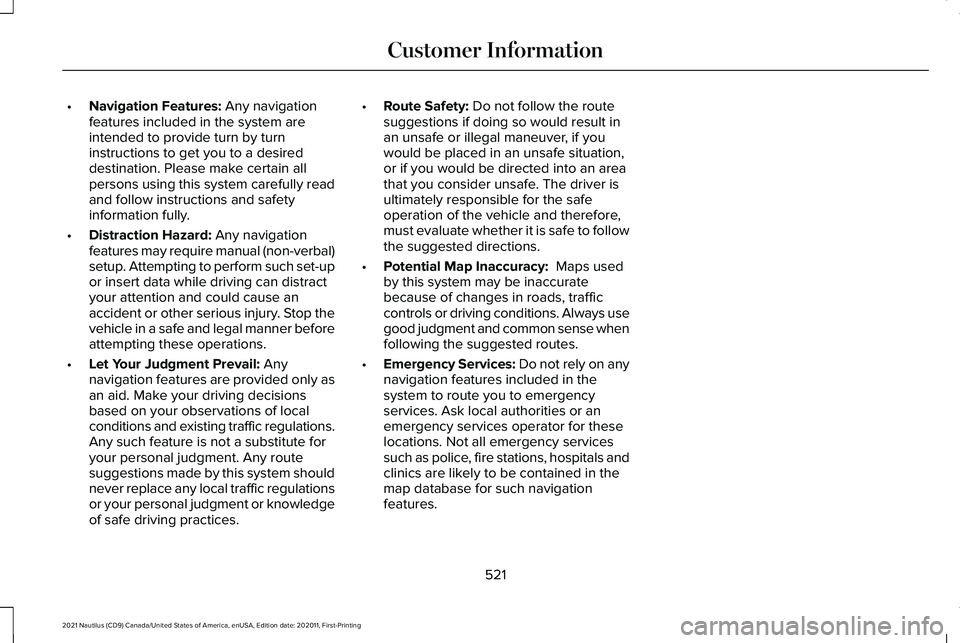
•
Navigation Features: Any navigation
features included in the system are
intended to provide turn by turn
instructions to get you to a desired
destination. Please make certain all
persons using this system carefully read
and follow instructions and safety
information fully.
• Distraction Hazard:
Any navigation
features may require manual (non-verbal)
setup. Attempting to perform such set-up
or insert data while driving can distract
your attention and could cause an
accident or other serious injury. Stop the
vehicle in a safe and legal manner before
attempting these operations.
• Let Your Judgment Prevail:
Any
navigation features are provided only as
an aid. Make your driving decisions
based on your observations of local
conditions and existing traffic regulations.
Any such feature is not a substitute for
your personal judgment. Any route
suggestions made by this system should
never replace any local traffic regulations
or your personal judgment or knowledge
of safe driving practices. •
Route Safety:
Do not follow the route
suggestions if doing so would result in
an unsafe or illegal maneuver, if you
would be placed in an unsafe situation,
or if you would be directed into an area
that you consider unsafe. The driver is
ultimately responsible for the safe
operation of the vehicle and therefore,
must evaluate whether it is safe to follow
the suggested directions.
• Potential Map Inaccuracy:
Maps used
by this system may be inaccurate
because of changes in roads, traffic
controls or driving conditions. Always use
good judgment and common sense when
following the suggested routes.
• Emergency Services:
Do not rely on any
navigation features included in the
system to route you to emergency
services. Ask local authorities or an
emergency services operator for these
locations. Not all emergency services
such as police, fire stations, hospitals and
clinics are likely to be contained in the
map database for such navigation
features.
521
2021 Nautilus (CD9) Canada/United States of America, enUSA, Edition date: 202011, First-Printing Customer Information
Page 563 of 579
Cruise Control Indicators...........................252
Cup Holders....................................................184
Cup Holder Precautions....................................184
Customer Information..................................472
Radio Frequency Certification Labels...........476
Customizing the Instrument Cluster Display
...........................................................147
D
Data Privacy
.....................................................22
Services That Third Parties Provide.................23
Services That We Provide..................................22
Declaration of Conformity
..........................476
Radio Frequency Statement............................476
Department of Transportation Uniform Tire Quality Grades
...........................................363
Temperature A B C.............................................364
Traction AA A B C...............................................363
Treadwear............................................................363
Digital Radio
..................................................426
Digital Radio Indicators.....................................427
Digital Radio Limitations...................................427
How Does Digital Radio Work.........................426
Switching Digital Radio Reception On and
Off......................................................................427
What Is Digital Radio.........................................426 Directing the Flow of Air.............................155
Directing Air to the Footwell Air Vents..........156
Directing Air to the Instrument Panel Air
Vents..................................................................155
Directing Air to the Windshield Air Vents..................................................................155
Disposing of Airbags......................................72
Distance Alert................................................283 Adjusting the Sensitivity of Distance
Alert...................................................................283
What Is Distance Alert.......................................283
Distance Indication......................................282 Distance Indication Indicator...........................
283
Switching Distance Indication On and Off......................................................................283
What Is Distance Indication.............................282
Doors and Locks Audible Warnings
...........91
Door Ajar Audible Warning.................................91
Doors and Locks.............................................89 Autolock...................................................................91
Autounlock.............................................................90
Doors and Locks – Troubleshooting................91
Mislock......................................................................91
Operating the Doors From Inside Your
Vehicle................................................................90
Operating the Doors From Outside Your Vehicle................................................................89 Doors and Locks – Troubleshooting..........91
Doors and Locks – Information
Messages...........................................................92
Doors and Locks – Warning Lamps..................91
Drive Belt Routing Overview - 2.0L.........345
Drive Belt Routing Overview - 2.7L..........345
Drive Mode Control.....................................264 Drive Modes........................................................264
Drive Modes
..................................................264
Comfort.................................................................264
Normal...................................................................264
Sport......................................................................264
Driver Alert.....................................................287 Driver Alert – Troubleshooting.......................288
Driver Alert Limitations...............................288
Driver Alert Precautions.............................287
Driver Alert – Troubleshooting.................288 Driver Alert – Information Messages............288
Driving Economically
...................................306
Driving Hints..................................................305
Driving Through Water...............................305
E
Easy Entry and Exit.........................................99
Electric Parking Brake Audible Warning........................................................222
559
2021 Nautilus (CD9) Canada/United States of America, enUSA, Edition date: 202011, First-Printing Index
Page 566 of 579
Garage Door Opener Radio
Frequencies.................................................176
FCC and RSS-210 Industry Canada Compliance.......................................................176
General Maintenance Information...........459 Multi-Point Inspection........................................462
Owner Checks and Services...........................460
Protecting Your Investment.............................459
Why Maintain Your Vehicle?............................459
Why Maintain Your Vehicle at Your Dealership?......................................................459
Glasses Holder
..............................................185
Locating the Glasses Holder............................185
Global Opening and Closing......................130 Switching Global Closing On and Off............130
Switching Global Opening On and Off..........130
Using Global Closing..........................................130
Using Global Opening.......................................130
What Is Global Opening and Closing.............130
Glossary of Tire Terminology
....................369
H
Headlamp Adjusting See: Adjusting the Headlamps.......................348
Headlamps.......................................................119 Headlamp Indicators...........................................119 Switching Headlamp Exit Delay On and
Off........................................................................\
119
Using the High Beam Headlamps...................119
Headlamps – Troubleshooting..................120 Headlamps – Frequently Asked
Questions.........................................................120
Heated Seats..................................................163 Heated Seat Precautions..................................163
Switching the Heated Seats On and Off.......164
Heating See: Climate Control..........................................154
Hill Start Assist
..............................................225
Hill Start Assist – Troubleshooting................225
Hill Start Assist Precautions......................225
Hill Start Assist – Troubleshooting..........225 Hill Start Assist – Information
Messages.........................................................225
Hood Lock See: Opening and Closing the Hood............332
Horn...................................................................113
How Does 911 Assist Work
...........................73
How Does Active Park Assist Work.........246
How Does Adaptive Cruise Control With Stop and Go Work.....................................253
How Does All-Wheel Drive Work..............214
How Does Auto Hold Work
.......................226
How Does Blind Spot Information System Work..............................................................273 How Does Cross Traffic Alert Work.........276
How Does Drive Mode Control
Work..............................................................264
How Does Driver Alert Work.....................287
How Does Easy Entry and Exit Work.........99
How Does Hill Start Assist Work..............225
How Does Pre-Collision Assist Work......279
How Does Stability Control Work............229 Electronic Stability Control..............................
229
How Does the 360 Degree Camera Work..............................................................243
How Does the Garage Door Opener Work...............................................................173
How Does the Lane Keeping System Work..............................................................265
How Does the Memory Function Work................................................................171
How Does the Personal Safety System Work................................................................62
How Does the Rear Occupant Alert System Work
...............................................................169
How Does the Safety Canopy™ Work........65
How Does Traction Control Work
............228
How Does Trailer Sway Control Work..............................................................304
How Do Personal Profiles Work................447 Recalling and Changing a Profile...................447
How Do the Front Airbags Work................63
562
2021 Nautilus (CD9) Canada/United States of America, enUSA, Edition date: 202011, First-Printing Index
Page 567 of 579
How Do the Knee Airbags Work.................64
How Do the Side Airbags Work..................63
I
Identifying Fuse Types
.................................331
Identifying the Audio Unit..........................429
Identifying the Climate Control Unit.........154
Inflating the Tires
..........................................374
Information and Entertainment Display Limitations....................................................431
Speed-restricted Features................................431
Information and Entertainment Display Overview.......................................................431
Information and Entertainment Display Precautions..................................................431
Information On Demand Screen..............433
Information on the Tire Sidewall..............364 Information on P Type Tires............................364
Inspecting the Tire for Damage................375 Safety Practices..................................................375
Inspecting the Tire for Wear......................375
Inspecting the Wheel Valve Stems..........376
Installing and Removing the Luggage Compartment Cargo Net.........................295
Installing and Removing the Luggage Compartment Cover
.................................295
Installing the Luggage Cover..........................296 Removing the Luggage Cover........................296
Installing Child Restraints..............................44 Combining the Seatbelt and Lower Anchors
for Attaching Child Restraints........................
47
Installing a Child Restraint in a Center Seat......................................................................47
Using Lower Anchors and Tethers for Children..............................................................46
Using Seatbelts.....................................................44
Using Tether Straps..............................................48
Instrument Cluster Display..........................143 Personalized Settings.........................................148
Trip Computer......................................................145
Instrument Cluster Display Main Menu..............................................................144
Instrument Cluster Indicators
......................141
Adaptive Cruise Control.....................................141
Adaptive Steering.................................................141
Airbag......................................................................141
Auto Hold...............................................................141
Automatic High Beam.........................................141
Auto Start-Stop......................................................141
Blind Spot Information System.........................141
Cruise Control.......................................................141
Front Fog Lamp....................................................142
Headlamp High Beam........................................142
Hill Start Assist.....................................................142
Parking Lamps......................................................142 Stability and Traction Control...........................
142
Turn Signal............................................................142
Instrument Cluster
.........................................137
Fuel Gauge............................................................138
Instrument Cluster Overview......................137
Instrument Cluster Warning Lamps
..........139
Anti-Lock Brake System....................................139
Battery....................................................................139
Brake System.......................................................140
Door Ajar...............................................................140
Electric Parking Brake........................................140
Engine Coolant Temperature...........................140
Fasten Seatbelt....................................................140
Hood Ajar..............................................................140
Liftgate Ajar...........................................................140
Low Beam Warning.............................................140
Low Fuel Level.....................................................140
Low Tire Pressure...............................................140
Low Washer Fluid Level.....................................140
Malfunction Indicator Lamp...............................141
Oil Pressure...........................................................141
Powertrain Fault....................................................141
Instrument Panel
.............................................29
Interior Air Quality.........................................158
Interior Bulbs.................................................353
Interior Bulb Specification Chart....................353
563
2021 Nautilus (CD9) Canada/United States of America, enUSA, Edition date: 202011, First-Printing Index
Page 576 of 579
Switching Cross Traffic Alert On and
Off..................................................................277
Switching Cruise Control On and Off......251 Switching Cruise Control Off............................251
Switching Cruise Control On............................251
Switching Driver Alert On and Off...........288 Resetting Driver Alert........................................288
Switching Easy Entry and Exit On and Off....................................................................99
Switching From Adaptive Cruise Control to Cruise Control.......................................260
Switching Maximum Cooling On and Off...................................................................154
Switching Maximum Defrost On and Off...................................................................154
Switching Parking Aid On and Off...........235
Switching Rear Occupant Alert System On and Off...........................................................170
Semiannual Reminder........................................170
Switching Recirculated Air On and Off...................................................................154
Switching Repeat Mode On and Off.......424
Switching Shuffle Mode On and Off........424
Switching Stability Control On and Off
..................................................................230
Switching Text Message Notification On and Off
..........................................................442
Android.................................................................442 iOS........................................................................\
..442
Switching the Audio Unit On and Off..................................................................423
Switching the Display On and Off............426 Audio Unit............................................................426
Touchscreen........................................................426
Switching the Front Interior Lamps On and Off...................................................................127
Individual Map Lamps.........................................127
Switching the Hazard Flashers On and Off..................................................................309
Switching the Heated Mirrors On and Off...................................................................155
Switching the Heated Rear Window On and Off
..........................................................155
Switching the Heated Steering Wheel On and Off
............................................................113
Switching the Lane Keeping System Mode.............................................................266
Switching the Lane Keeping System On and Off.........................................................266
Switching the Rear Interior Lamps On and Off...................................................................127
Switching the Rear Window Wiper On and Off....................................................................115
Switching Traction Control On and Off
..................................................................228
Using a Switch....................................................228 Switching Trailer Sway Control On and
Off..................................................................304
Symbols Glossary
............................................19
Symbols Used on Your Vehicle....................19
T
Technical Specifications See: Capacities and Specifications...............398
Temporary Neutral Mode
...........................208
Entering Temporary Neutral Mode................209
Exiting Temporary Neutral Mode...................209
Temporary Neutral Mode Limitations...........208
What Is Temporary Neutral Mode..................208
The Better Business Bureau Auto Line Program........................................................472
The Mediation and Arbitration Program........................................................473
Tire Care
.........................................................374
Tire Pressure Monitoring System Limitations ....................................................
387
Tire Pressure Monitoring System Overview......................................................385
Tire Pressure Monitoring System Precautions.................................................386
Tire Pressure Monitoring System.............385 Tire Pressure Monitoring System –
Troubleshooting.............................................388
572
2021 Nautilus (CD9) Canada/United States of America, enUSA, Edition date: 202011, First-Printing Index
Page 577 of 579
Tire Pressure Monitoring System –
Troubleshooting.........................................388
Tire Pressure Monitoring System – Information Messages..................................390
Tire Pressure Monitoring System – Warning Lamps................................................................388
Tire Replacement Requirements.............369 Age........................................................................\
..371
Tire Rotation...................................................376
Tire Rotation Diagram........................................377
Tire Sealant and Inflator Kit Components...............................................379
Tire Sealant and Inflator Kit Precautions..................................................378
Tire Sealant and Inflator Kit.......................378
Towing a Trailer Limitations.......................300
Towing a Trailer Precautions.....................299
Towing a Trailer............................................299 Towing Weights and Dimensions...................302
Towing Weights and Dimensions.............302 Calculating the Maximum Loaded Trailer
Weight for Your Vehicle................................
303
Recommended Towing Weights....................302
What Is the Maximum Loaded Trailer Weight ........................................................................\
....303
Towing Your Vehicle Precautions..............314
Towing Your Vehicle.....................................314
Traction Control Indicator
..........................228 Traction Control
............................................228
Traction Control – Troubleshooting..............228
Traction Control – Troubleshooting........228 Traction Control – Warning Lamps................228
Trailer Brake Precautions...........................299
Trailer Sway Control Precautions
.............304
Trailer Sway Control....................................304
Trailer Towing Hints
.....................................300
Transporting the Vehicle.............................312
Trip Computer
................................................145
Accessing the Trip Computer...........................145
Resetting the Individual Trip Values................147
Resetting the Trip Computer............................146
U
Under Floor Storage.....................................184 Locating the Rear Under Floor Storage........184
Under Hood Fuse Box
.................................316
Accessing the Under Hood Fuse Box...........316
Identifying the Fuses in the Under Hood Fuse
Box......................................................................318
Locating the Under Hood Fuse Box...............316
Under Hood Overview - 2.0L....................334
Under Hood Overview - 2.7L.....................336 Updating the Vehicle Systems
Wirelessly....................................................452
Applying a Vehicle System Software Update..............................................................452
Scheduling an Update......................................452
System Update Requirements........................452
Viewing Update Details....................................453
USB Ports
.........................................................178
Using Auto Hold...........................................226
Using Keyless Entry........................................93 Locking the Doors................................................93
Opening the Liftgate with the Remote
Control
................................................................94
Unlocking the Doors............................................93
Using MyKey With Remote Start Systems..........................................................87
Using Snow Chains......................................372
Using the Backup Start Passcode...............81 System Lockout.....................................................82
Using the Instrument Cluster Display Controls.........................................................143
Button.....................................................................143
Quick Action Menu Buttons..............................143
Return Button........................................................143
Status Indicator....................................................144
Toggle Buttons.....................................................143
Using the Keyless Entry Keypad.................97 Locking the Doors.................................................97
573
2021 Nautilus (CD9) Canada/United States of America, enUSA, Edition date: 202011, First-Printing Index