light LINCOLN NAUTILUS 2021 Repair Manual
[x] Cancel search | Manufacturer: LINCOLN, Model Year: 2021, Model line: NAUTILUS, Model: LINCOLN NAUTILUS 2021Pages: 579, PDF Size: 6.9 MB
Page 310 of 579
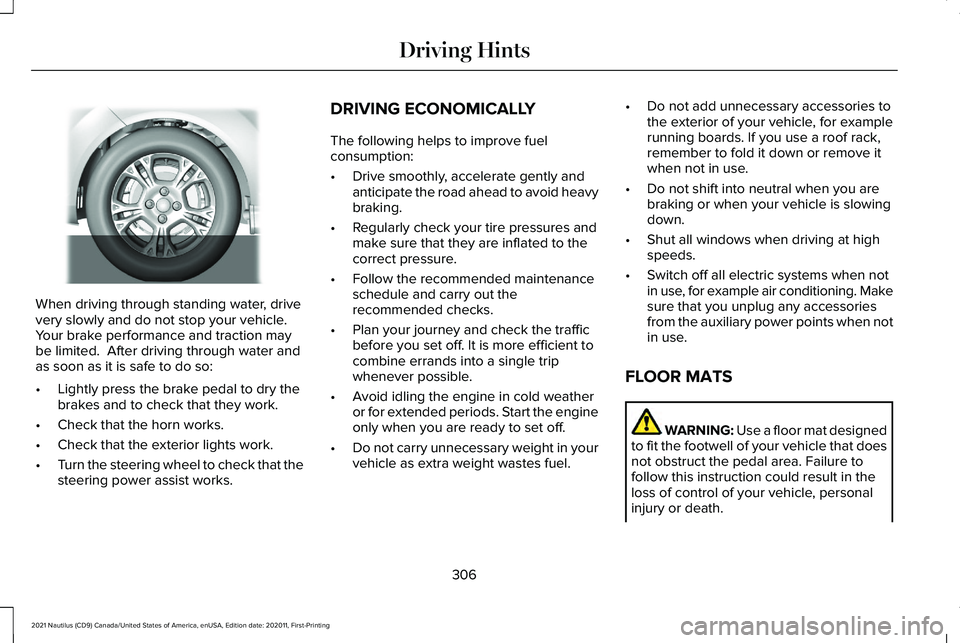
When driving through standing water, drive
very slowly and do not stop your vehicle.
Your brake performance and traction may
be limited. After driving through water and
as soon as it is safe to do so:
•
Lightly press the brake pedal to dry the
brakes and to check that they work.
• Check that the horn works.
• Check that the exterior lights work.
• Turn the steering wheel to check that the
steering power assist works. DRIVING ECONOMICALLY
The following helps to improve fuel
consumption:
•
Drive smoothly, accelerate gently and
anticipate the road ahead to avoid heavy
braking.
• Regularly check your tire pressures and
make sure that they are inflated to the
correct pressure.
• Follow the recommended maintenance
schedule and carry out the
recommended checks.
• Plan your journey and check the traffic
before you set off. It is more efficient to
combine errands into a single trip
whenever possible.
• Avoid idling the engine in cold weather
or for extended periods. Start the engine
only when you are ready to set off.
• Do not carry unnecessary weight in your
vehicle as extra weight wastes fuel. •
Do not add unnecessary accessories to
the exterior of your vehicle, for example
running boards. If you use a roof rack,
remember to fold it down or remove it
when not in use.
• Do not shift into neutral when you are
braking or when your vehicle is slowing
down.
• Shut all windows when driving at high
speeds.
• Switch off all electric systems when not
in use, for example air conditioning. Make
sure that you unplug any accessories
from the auxiliary power points when not
in use.
FLOOR MATS WARNING: Use a floor mat designed
to fit the footwell of your vehicle that does
not obstruct the pedal area. Failure to
follow this instruction could result in the
loss of control of your vehicle, personal
injury or death.
306
2021 Nautilus (CD9) Canada/United States of America, enUSA, Edition date: 202011, First-Printing Driving HintsE259345
Page 313 of 579
If you need to arrange roadside assistance
for yourself, Lincoln Motor Company
reimburses a reasonable amount for towing
to the nearest Lincoln dealership within
100 mi (160 km). To obtain reimbursement
information, United States clients, call
1-800-521-4140. Clients need to submit their
original receipts.
Vehicles Sold in Canada: Getting
Roadside Assistance
To fully assist you should you have a vehicle
concern, Lincoln Motor Company offers a
complimentary roadside assistance program.
This program is eligible within Canada or the
continental United States.
The service is available 24 hours a day,
seven days a week.
This program is separate from the New
Vehicle Limited Warranty, beginning from
the original warranty start date and lasts the
life of the vehicle for the original owner.
Subsequent owners receive coverage that
is concurrent with the 6 years or
70,000 mi
(110,000 km), whichever occurs first,
powertrain warranty coverage period. Note:
Canadian roadside coverage and
benefits may differ from the U.S. coverage.
For complete program coverage details,
review your warranty guide, contact your
dealer, call us in Canada at 1-800-387-9333,
or visit our website at
www.lincolncanada.com.
If you purchased your vehicle in Canada and
require roadside assistance, please call
1-800-387-9333 or contact Roadside
Assistance using the Lincoln Way mobile
app.
Note: For quick reference, complete the
roadside assistance identification card found
in the glove compartment of your vehicle
and place it in your wallet.
SWITCHING THE HAZARD
FLASHERS ON AND OFF The hazard flasher button is on the
instrument panel. Press the button
to switch the hazard flashers on if
your vehicle is creating a safety hazard for
other road users. When you switch the hazard flashers on, all
front and rear direction indicators flash.
Note:
The hazard flashers operate when the
ignition is in any position, or if the key is not
in the ignition. The battery loses charge and
could have insufficient power to restart your
vehicle.
Press the button again to switch them off.
JUMP STARTING THE VEHICLE
Jump Starting Precautions WARNING:
Batteries normally
produce explosive gases which can cause
personal injury. Therefore, do not allow
flames, sparks or lighted substances to
come near the battery. When working near
the battery, always shield your face and
protect your eyes. Always provide correct
ventilation.
309
2021 Nautilus (CD9) Canada/United States of America, enUSA, Edition date: 202011, First-Printing Crash and Breakdown Information
Page 324 of 579
Protected Component
Fuse Rating
Fuse Number
Not used.
—
13
Not used.
—
14
Run-start relay.
—
15
Power outlet 2 - back of console.
20 A
16
Power outlet 4 - luggage compartment.
20 A
17
Not used.
—
18
Run-start electronic power assist steering.
10 A
19
Run/start lighting.
10 A
20
Not used.
—
21
Air conditioner clutch solenoid.
10 A
22
Front split view camera.
15 A
23
Rear view camera.
Forward looking radar.
360° camera module.
Blind spot information system.
Voltage quality module (start/stop).
Not used (spare).
10 A
24
Run-start anti-lock brake system.
10 A
25
320
2021 Nautilus (CD9) Canada/United States of America, enUSA, Edition date: 202011, First-Printing Fuses
Page 336 of 579
MAINTENANCE PRECAUTIONS
Service your vehicle regularly to help
maintain its roadworthiness and resale value.
There is a large network of authorized
dealers that are there to help you with their
professional servicing expertise. We believe
that their specially trained technicians are
best qualified to service your vehicle properly
and expertly. They are supported by a wide
range of highly specialized tools developed
specifically for servicing your vehicle.
If your vehicle requires professional service,
an authorized dealer can provide the
necessary parts and service. Check your
warranty information to find out which parts
and services are covered.
Use only recommended fuels, lubricants,
fluids and service parts conforming to
specifications. See Capacities and
Specifications (page 398).
• Do not work on a hot engine.
• Make sure that nothing gets caught in
moving parts. •
Do not work on a vehicle with the engine
running in an enclosed space, unless you
are sure you have enough ventilation.
• Keep all open flames and other burning
material, such as cigarettes, away from
the battery and all fuel related parts.
• Set the parking brake, shift the
transmission to park (P) and block the
wheels.
OPENING AND CLOSING THE
HOOD
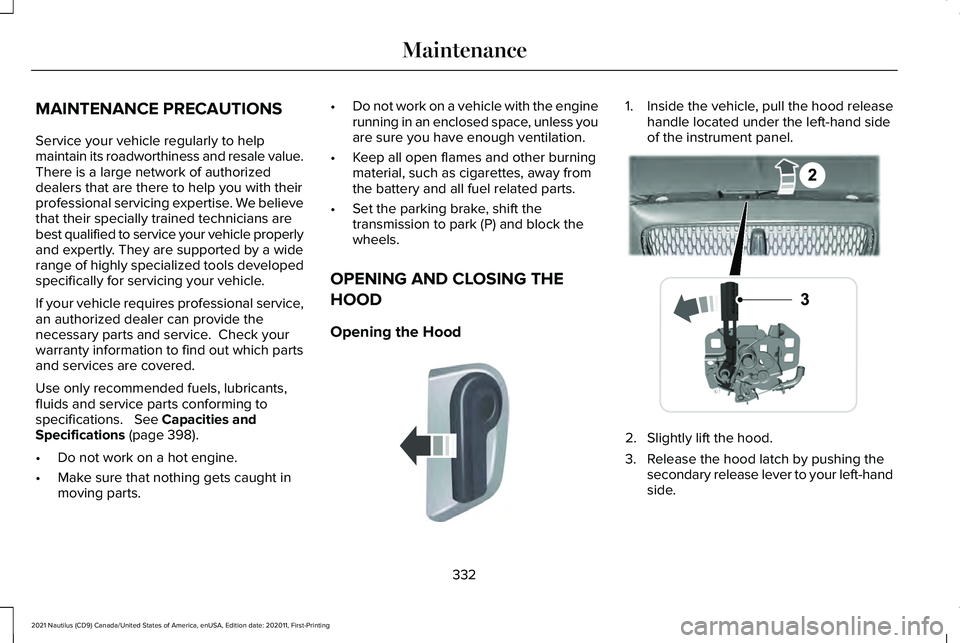
Opening the Hood 1. Inside the vehicle, pull the hood release
handle located under the left-hand side
of the instrument panel. 2. Slightly lift the hood.
3. Release the hood latch by pushing the
secondary release lever to your left-hand
side.
332
2021 Nautilus (CD9) Canada/United States of America, enUSA, Edition date: 202011, First-Printing MaintenanceE142457 E267365
Page 349 of 579
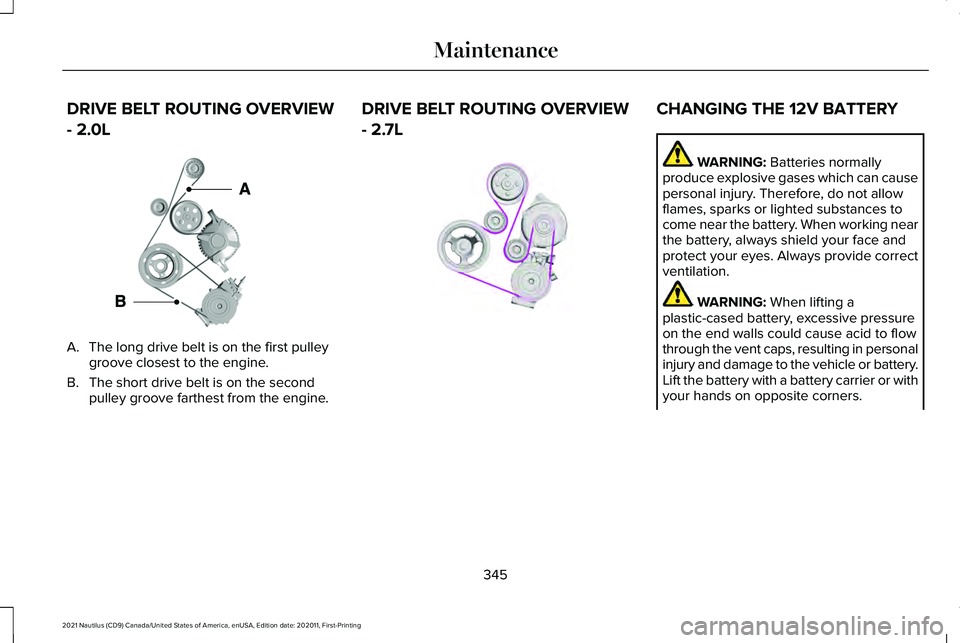
DRIVE BELT ROUTING OVERVIEW
- 2.0L
A. The long drive belt is on the first pulley
groove closest to the engine.
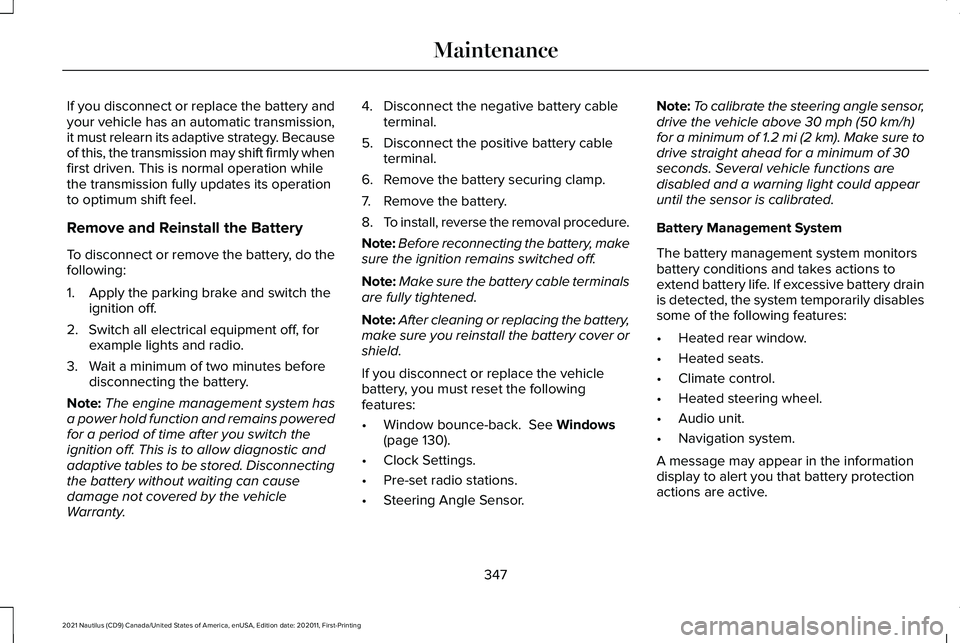
B. The short drive belt is on the second pulley groove farthest from the engine. DRIVE BELT ROUTING OVERVIEW
- 2.7L CHANGING THE 12V BATTERY
WARNING: Batteries normally
produce explosive gases which can cause
personal injury. Therefore, do not allow
flames, sparks or lighted substances to
come near the battery. When working near
the battery, always shield your face and
protect your eyes. Always provide correct
ventilation. WARNING:
When lifting a
plastic-cased battery, excessive pressure
on the end walls could cause acid to flow
through the vent caps, resulting in personal
injury and damage to the vehicle or battery.
Lift the battery with a battery carrier or with
your hands on opposite corners.
345
2021 Nautilus (CD9) Canada/United States of America, enUSA, Edition date: 202011, First-Printing Maintenance E161383 E191903
Page 351 of 579
If you disconnect or replace the battery and
your vehicle has an automatic transmission,
it must relearn its adaptive strategy. Because
of this, the transmission may shift firmly when
first driven. This is normal operation while
the transmission fully updates its operation
to optimum shift feel.
Remove and Reinstall the Battery
To disconnect or remove the battery, do the
following:
1. Apply the parking brake and switch the
ignition off.
2. Switch all electrical equipment off, for example lights and radio.
3. Wait a minimum of two minutes before disconnecting the battery.
Note: The engine management system has
a power hold function and remains powered
for a period of time after you switch the
ignition off. This is to allow diagnostic and
adaptive tables to be stored. Disconnecting
the battery without waiting can cause
damage not covered by the vehicle
Warranty. 4. Disconnect the negative battery cable
terminal.
5. Disconnect the positive battery cable terminal.
6. Remove the battery securing clamp.
7. Remove the battery.
8. To install, reverse the removal procedure.
Note: Before reconnecting the battery, make
sure the ignition remains switched off.
Note: Make sure the battery cable terminals
are fully tightened.
Note: After cleaning or replacing the battery,
make sure you reinstall the battery cover or
shield.
If you disconnect or replace the vehicle
battery, you must reset the following
features:
• Window bounce-back. See Windows
(page 130).
• Clock Settings.
• Pre-set radio stations.
• Steering Angle Sensor. Note:
To calibrate the steering angle sensor,
drive the vehicle above
30 mph (50 km/h)
for a minimum of 1.2 mi (2 km). Make sure to
drive straight ahead for a minimum of 30
seconds. Several vehicle functions are
disabled and a warning light could appear
until the sensor is calibrated.
Battery Management System
The battery management system monitors
battery conditions and takes actions to
extend battery life. If excessive battery drain
is detected, the system temporarily disables
some of the following features:
• Heated rear window.
• Heated seats.
• Climate control.
• Heated steering wheel.
• Audio unit.
• Navigation system.
A message may appear in the information
display to alert you that battery protection
actions are active.
347
2021 Nautilus (CD9) Canada/United States of America, enUSA, Edition date: 202011, First-Printing Maintenance
Page 352 of 579
After battery replacement, or in some cases
after charging the battery with an external
charger, the battery management system
requires eight hours of vehicle sleep time to
relearn the battery state of charge. During
this time your vehicle must remain fully
locked with the ignition off.
Note:
If you add electrical accessories or
components to the vehicle, it may adversely
affect battery performance and durability.
This may also affect the performance of
other electrical systems in the vehicle.
Battery Disposal Make sure that you dispose of old
batteries in an environmentally
friendly way. Seek advice from
your local authority about recycling old
batteries. ADJUSTING THE HEADLAMPS
Vertical Aim Adjustment
The headlamps on your vehicle are properly
aimed at the assembly plant. If your vehicle
has been involved in a crash, have the aim
of the headlamp beam checked by an
authorized dealer.
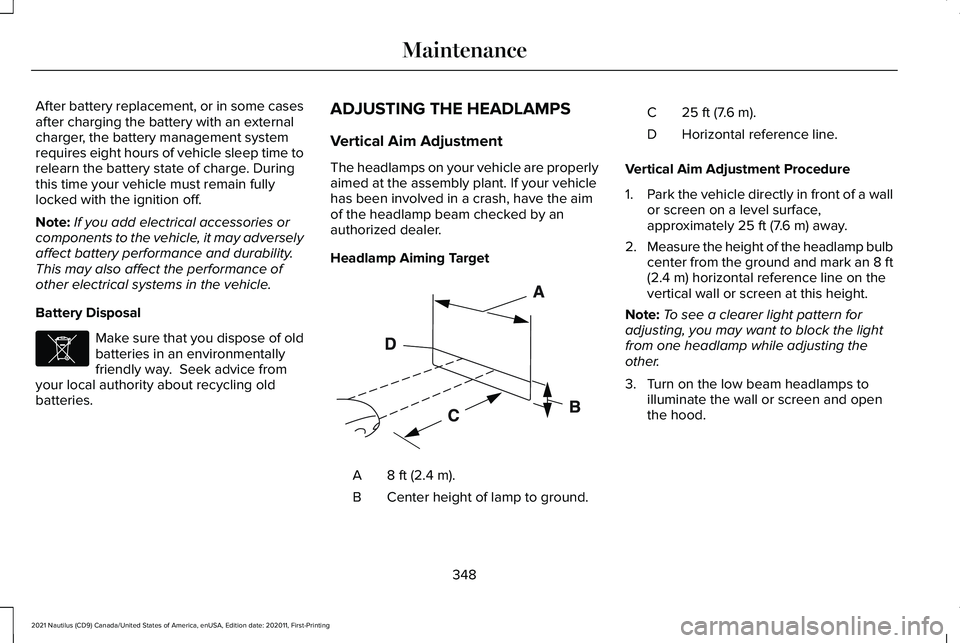
Headlamp Aiming Target
8 ft (2.4 m).
A
Center height of lamp to ground.
B 25 ft (7.6 m).
C
Horizontal reference line.
D
Vertical Aim Adjustment Procedure
1. Park the vehicle directly in front of a wall
or screen on a level surface,
approximately 25 ft (7.6 m) away.
2. Measure the height of the headlamp bulb
center from the ground and mark an 8 ft
(2.4 m)
horizontal reference line on the
vertical wall or screen at this height.
Note: To see a clearer light pattern for
adjusting, you may want to block the light
from one headlamp while adjusting the
other.
3. Turn on the low beam headlamps to illuminate the wall or screen and open
the hood.
348
2021 Nautilus (CD9) Canada/United States of America, enUSA, Edition date: 202011, First-Printing MaintenanceE107998 E142592
Page 353 of 579
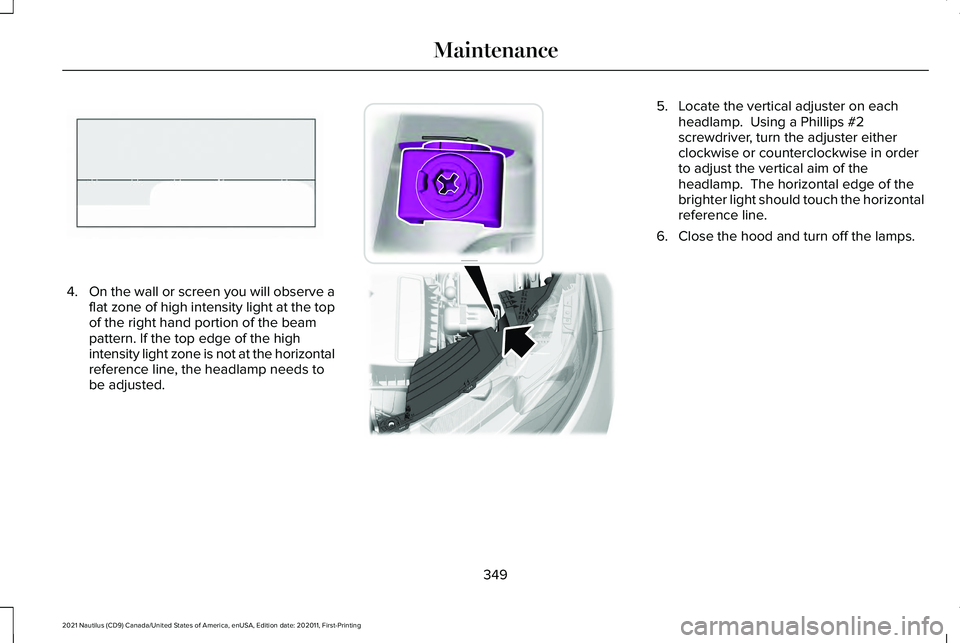
4.
On the wall or screen you will observe a
flat zone of high intensity light at the top
of the right hand portion of the beam
pattern. If the top edge of the high
intensity light zone is not at the horizontal
reference line, the headlamp needs to
be adjusted. 5. Locate the vertical adjuster on each
headlamp. Using a Phillips #2
screwdriver, turn the adjuster either
clockwise or counterclockwise in order
to adjust the vertical aim of the
headlamp. The horizontal edge of the
brighter light should touch the horizontal
reference line.
6. Close the hood and turn off the lamps.
349
2021 Nautilus (CD9) Canada/United States of America, enUSA, Edition date: 202011, First-Printing MaintenanceE142465 E194757
Page 361 of 579
WAXING
Wax the high-gloss painted surface of your
prewashed vehicle once or twice a year.
We recommend that you only use an
approved quality wax that does not contain
abrasives. For additional information and
assistance, we recommend that you contact
an authorized dealer.
When washing and waxing, park your vehicle
in a shaded area out of direct sunlight.
Note:
Avoid waxing unpainted or low-gloss
black colored parts, they discolor over time.
CLEANING THE INTERIOR
Cleaning the Instrument Panel WARNING: Do not use chemical
solvents or strong detergents when
cleaning the steering wheel or instrument
panel to avoid contamination of the airbag
system. We recommend that you only clean the
instrument panel and cluster lens with a
damp soft cloth. Dry the area with a clean,
soft cloth.
For additional information and assistance,
we recommend that you contact an
authorized dealer.
Note:
Avoid cleaners or polishes that
increase the gloss of the upper portion of
the instrument panel. The dull finish in this
area helps protect you from undesirable
windshield reflection.
Cleaning Plastic
We recommend that you only use a mild
soap and water solution on a soft cloth. Dry
the area with a clean, soft cloth.
Cleaning Displays and Screens
We recommend that you only use a
microfiber cloth in a circular motion to clean
off the fingerprint or dust. If dirt or fingerprints are still on the screen,
apply a small amount of alcohol to the cloth
and try to clean it again.
Note:
Do not pour or spray alcohol onto the
touchscreen.
Note: Do not use detergent or any type of
solvent to clean the touchscreen.
Cleaning Leather and Vinyl
We recommend that you only clean the
leather and vinyl surfaces in the following
way:
1. Remove dust and loose dirt with a vacuum cleaner.
2. Wipe the surface with a soft, damp cloth
and a mild soap and water solution. Dry
the area with a clean, soft cloth.
3. Make sure the leather is dry, then apply a small amount of conditioner to a clean,
dry cloth.
357
2021 Nautilus (CD9) Canada/United States of America, enUSA, Edition date: 202011, First-Printing Vehicle Care
Page 365 of 579
PREPARING YOUR VEHICLE FOR
STORAGE
If you plan on storing your vehicle for 30
days or more, the following maintenance
recommendations ensures your vehicle stays
in good operating condition.
Under various conditions, long-term storage
may lead to degraded engine performance
or failure unless you use specific precautions
to preserve your vehicle.
General
•
Store all vehicles in a dry, ventilated
place.
• If vehicles are stored outside, they
require regular maintenance to protect
against rust and weather damage.
• Make sure all linkages, cables, levers and
pins under your vehicle are covered with
grease to prevent rust. •
Move vehicles at least 25 ft (7.5 m) every
15 days to lubricate working parts and
prevent corrosion.
• Fill the fuel tank with high-quality fuel
until the first automatic shutoff of the fuel
pump nozzle.
Engine
• Change the engine oil and filter prior to
storage because used engine oil contains
contaminants which may cause engine
damage.
• Start the engine every 15 days for a
minimum of 15 minutes. Run at fast idle
with the climate controls set to defrost
until the engine reaches normal
operating temperature.
• With your foot on the brake, shift through
all the gears while the engine is running. Body
•
Wash your vehicle thoroughly to remove
dirt, grease, oil, tar or mud from exterior
surfaces, rear-wheel housings and the
underside of front fenders.
• Periodically wash your vehicle if it is
stored in exposed locations.
• Touch-up exposed or primed metal to
prevent rust.
• Cover chrome and stainless steel parts
with a thick coat of auto wax to prevent
discoloration. Re-wax as necessary when
you wash your vehicle.
• Lubricate all hood, door and luggage
compartment hinges and latches with a
light grade oil.
• Cover interior trim to prevent fading.
• Keep all rubber parts free from oil and
solvents.
361
2021 Nautilus (CD9) Canada/United States of America, enUSA, Edition date: 202011, First-Printing Storing Your Vehicle