change wheel LINCOLN NAUTILUS 2022 User Guide
[x] Cancel search | Manufacturer: LINCOLN, Model Year: 2022, Model line: NAUTILUS, Model: LINCOLN NAUTILUS 2022Pages: 586, PDF Size: 13.97 MB
Page 272 of 586
WHAT IS DRIVE MODE CONTROL
Your vehicle has various drive modes thatyou can select for different drivingconditions. Depending on the drive modethat you select, the system adjusts variousvehicle settings.
HOW DOES DRIVE MODE
CONTROL WORK
Drive mode control adjusts your vehicleconfiguration for each mode you select.
Changing the drive mode changes thefunctionality of the steering system to adjustthe steering effort and feel.
Active noise control utilizes your vehicleelectronics to enhance the acousticexperience.
The stability and traction control assist yourvehicle control in adverse conditions orhigh-performance driving.
Throttle control enhances the powertrainresponse, transmission controls becomeoptimized with shift schedules, andfour-wheel drive settings are optimized andtuned to each mode.
Note:The system has diagnostic checks thatcontinuously monitor the system for properoperation. If a mode is unavailable due to asystem fault, the mode defaults to normal.
SELECTING A DRIVE MODE
You can configure which of the drive controlmodes are active when your vehicle is indrive (D) or in sport (S). The configurationremains active until modified from the mainmenu on the instrument cluster display. SeeInstrument Cluster Display Main Menu(page 146).
Note:Not all settings may be available.
Note:Drive mode changes may not beavailable when the ignition is off.
DRIVE MODES
COMFORT
Provides a more relaxed driving experience,maximizing comfort. Your steering effortdecreases and the suspension movement ismore fluid. Comfort mode is ideal when youdesire enhanced traveling comfort.
NORMAL
Delivers a balanced combination of acomfortable, controlled ride and confidenthandling. This mode provides an engagingdriving experience and a direct connectionto the road without sacrificing any of thecomposure demanded from a luxury vehicle.
SPORT
Provides a sportier driving experience. Thesuspension stiffens, with an emphasis onhandling and control. The engine respondsmore directly to your inputs and takes on amore powerful tone. This mode is ideal foruse during more spirited driving.
268
2022 Nautilus (CD9) Canada/United States of America, enUSA, Edition date: 202108, First-PrintingDrive Mode Control
Page 274 of 586
LANE KEEPING SYSTEM
LIMITATIONS
The lane keeping system only operates whenthe vehicle speed is greater than 40 mph(64 km/h).
The system works when the camera candetect at least one lane marking.
The lane keeping system may not correctlyoperate in any of the following conditions:
•The lane keeping system does not detectat least one lane marking.
•You switch the turn signal on.
•You apply direct steering, accelerate fastor brake hard.
•The vehicle speed is less than 40 mph(64 km/h).
•The anti-lock brake, stability control ortraction control system activates.
•The lane is too narrow.
•Something is obscuring the camera or itis unable to detect the lane markings dueto environment, traffic or vehicleconditions.
The lane keeping system may not correctlane positioning in any of the followingconditions:
•High winds.
•Uneven road surfaces.
•Heavy or uneven loads.
•Incorrect tire pressure.
SWITCHING THE LANE KEEPING
SYSTEM ON AND OFF
To activate the lane keepingsystem, press the button on theturn signal lever.
Note:The system stores the on or off settinguntil manually changed, unless it detects aMyKey™. If the system detects a MyKey™, itdefaults to on and the mode is set to alert.
Note: If the system detects a MyKey™,pressing the button does not affect the onor off status of the system. You can onlychange the mode and intensity settings.
SWITCHING THE LANE KEEPING
SYSTEM MODE
The lane keeping system has differentsettings that you can view or adjust usingthe information display.
The system stores the last known selectionfor each of these settings. You do not needto readjust your settings each time youswitch on the system.
To change the lane keeping system mode,use the instrument cluster display:
1.Using the instrument cluster displaycontrols on the steering wheel, selectSETTINGS.
2.Select Driver assistance.
3.Select Lane keeping system.
4.Select Mode.
5.Select a mode.
Note:The system remembers the last settingwhen you start your vehicle. If the systemdetects a MyKey™, it defaults to the lastsetting for that MyKey™.
270
2022 Nautilus (CD9) Canada/United States of America, enUSA, Edition date: 202108, First-PrintingLane Keeping SystemE308131
Page 275 of 586
LANE KEEPING SYSTEM SETTINGS
To change the steering wheel vibration, usethe instrument cluster display:
1.Using the instrument cluster displaycontrols on the steering wheel, selectDriver Assist.
2.Select Lane Keeping Sys.
3.Select Alert Intensity.
4.Select a setting.
ALERT MODE
WHAT IS ALERT MODE
Alert mode vibrates the steering wheel whenit detects an unintended lane departure.
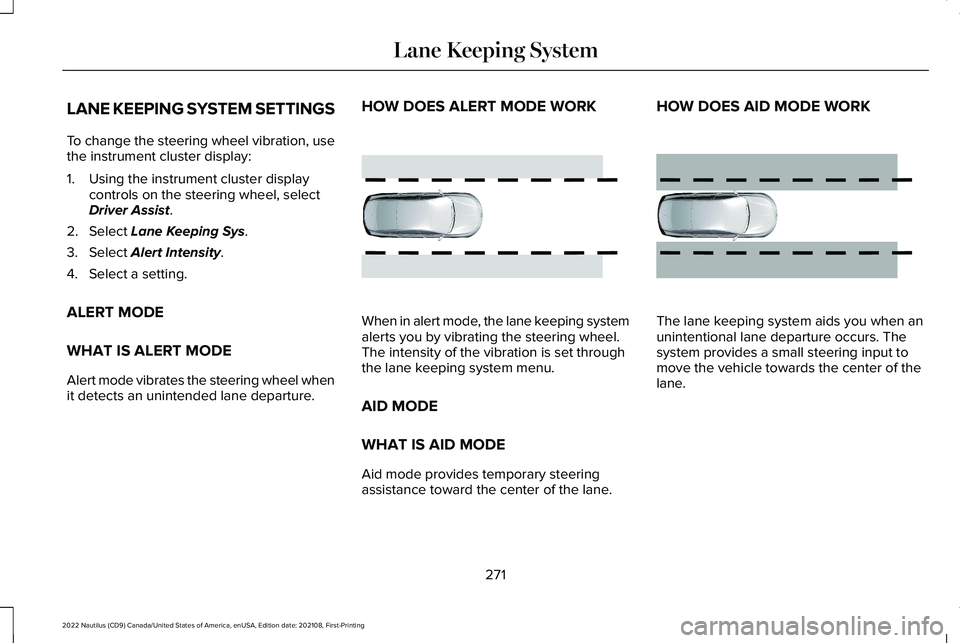
HOW DOES ALERT MODE WORK
When in alert mode, the lane keeping systemalerts you by vibrating the steering wheel.The intensity of the vibration is set throughthe lane keeping system menu.
AID MODE
WHAT IS AID MODE
Aid mode provides temporary steeringassistance toward the center of the lane.
HOW DOES AID MODE WORK
The lane keeping system aids you when anunintentional lane departure occurs. Thesystem provides a small steering input tomove the vehicle towards the center of thelane.
271
2022 Nautilus (CD9) Canada/United States of America, enUSA, Edition date: 202108, First-PrintingLane Keeping SystemE165515 E165516
Page 289 of 586
The system is active at speeds above 3 mph(5 km/h)
Note:The pre-collision assist systemdisables when you select four-wheel drivelow or manually disable AdvanceTrac™.
Note:Brake support and automaticemergency braking are active at speeds upto 80 mph (130 km/h). If the vehicle has aradar sensor included with adaptive cruisecontrol, then brake support and automaticemergency braking are active up to themaximum speed of the vehicle.
Pedestrian Detection Limitations
Pedestrian detection is active at speeds upto 50 mph (80 km/h).
Pedestrian detection functions optimallywhen detected hazards are clearlyidentifiable. System performance may reducein situations where pedestrians are running,partly obscured, have a complexbackground, or cannot be distinguished froma group.
LOCATING THE PRE-COLLISION
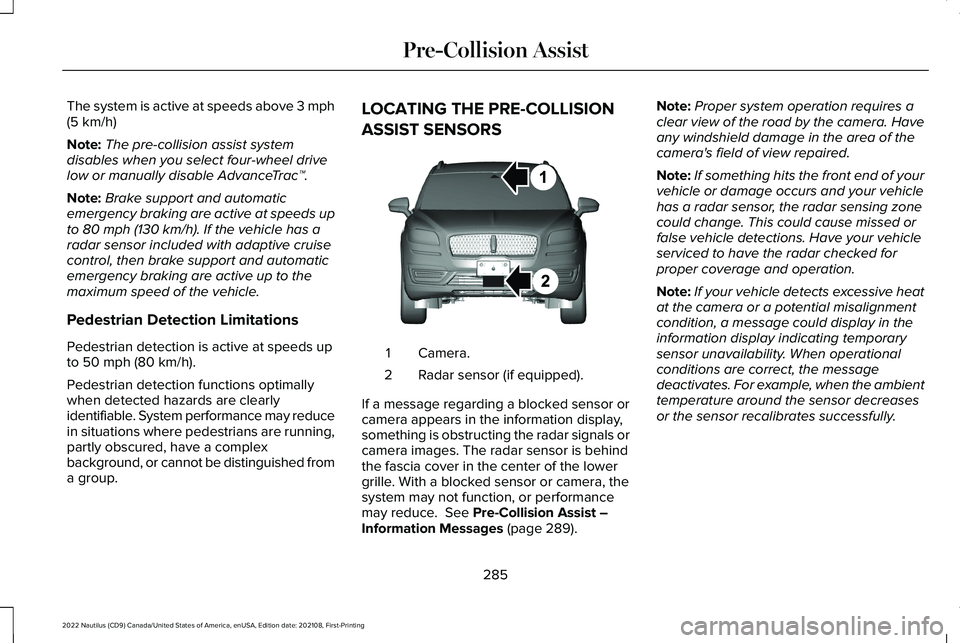
ASSIST SENSORS
Camera.1
Radar sensor (if equipped).2
If a message regarding a blocked sensor orcamera appears in the information display,something is obstructing the radar signals orcamera images. The radar sensor is behindthe fascia cover in the center of the lowergrille. With a blocked sensor or camera, thesystem may not function, or performancemay reduce. See Pre-Collision Assist –Information Messages (page 289).
Note:Proper system operation requires aclear view of the road by the camera. Haveany windshield damage in the area of thecamera's field of view repaired.
Note:If something hits the front end of yourvehicle or damage occurs and your vehiclehas a radar sensor, the radar sensing zonecould change. This could cause missed orfalse vehicle detections. Have your vehicleserviced to have the radar checked forproper coverage and operation.
Note:If your vehicle detects excessive heatat the camera or a potential misalignmentcondition, a message could display in theinformation display indicating temporarysensor unavailability. When operationalconditions are correct, the messagedeactivates. For example, when the ambienttemperature around the sensor decreasesor the sensor recalibrates successfully.
285
2022 Nautilus (CD9) Canada/United States of America, enUSA, Edition date: 202108, First-PrintingPre-Collision AssistE268024
Page 315 of 586
•Do not add unnecessary accessories tothe exterior of your vehicle, for examplerunning boards. If you use a roof rack,remember to fold it down or remove itwhen not in use.
•Do not shift into neutral when you arebraking or when your vehicle is slowingdown.
•Shut all windows when driving at highspeeds.
•Switch off all electric systems when notin use, for example air conditioning. Makesure that you unplug any accessoriesfrom the auxiliary power points when notin use.
DRIVING IN SPECIAL CONDITIONS
EMERGENCY MANEUVERS
In an unavoidable emergency where youmust make a sudden sharp maneuver, turnthe steering wheel only as rapidly and as faras required to avoid the emergency. Applysmooth pressure to the accelerator pedal orbrake pedal as needed. Avoid abrupt
steering, acceleration and braking changes.Abrupt changes could increase the risk ofvehicle roll over, loss of vehicle control andpersonal injury. If possible, use any availableroad surfaces to bring your vehicle undercontrol.
DRIVING THROUGH MUD AND WATER
Mud
Be cautious of sudden changes in vehiclespeed or direction when you are driving inmud. Even all-wheel drive and four-wheeldrive vehicles can lose traction in mud. Ifyour vehicle slides, steer in the direction ofthe slide until you regain control of yourvehicle. After driving through mud, clean offresidue stuck to rotating driveshafts and tires.Excess residue can cause an imbalance thatcould damage drive components.
Note:If your vehicle gets stuck in mud, itcould be rocked out by shifting betweenforward and reverse gears, stoppingbetween shifts in a steady pattern. Presslightly on the accelerator in each gear.
Note:Do not rock your vehicle if the engineis not at normal operating temperature, asdamage to the transmission could occur.
Note:Do not rock your vehicle for more thana minute, as damage to the transmissionand tires could occur or the engine couldoverheat.
Water
If you must drive though deep water, driveslowly. The water could limit traction or brakecapability. See Driving Through ShallowWater (page 313).
When driving though water, determine thedepth and avoid water higher than the centerof the wheel.
Once through water, always try the brakes.Wet brakes do not stop your vehicle asquickly as dry brakes. Apply light pressureto the brake pedal while slowly moving thevehicle to dry the brakes.
311
2022 Nautilus (CD9) Canada/United States of America, enUSA, Edition date: 202108, First-PrintingDriving Hints
Page 316 of 586
Note:Driving through deep water couldcause damage to the transmission. If thefront or rear axle is submerged in water,have the axle lubricant and power transferunit lubricant checked and changed ifnecessary.
DRIVING ON HILLY OR SLOPINGTERRAIN
WARNING: Extreme care should beused when steering the vehicle in reversedown a slope so as not to cause thevehicle to swerve out of control.
Although natural obstacles could make itnecessary to travel diagonally up or down ahill or steep incline, you should try to drivestraight up or straight down.
Note:Avoid turning on steep slopes or hills.A danger lies in losing traction, slippingsideways and possible vehicle roll over.Whenever driving on a hill, determinebeforehand the route you can use. Do notdrive over the crest of a hill without seeingwhat conditions are on the other side. Donot drive in reverse over a hill without theaid of an observer.
Apply just enough power to the wheels toclimb the hill. Too much power causes thetires to slip, spin or lose traction, and youcould lose control of your vehicle. Whendescending a steep hill, do not descend thehill in neutral. Avoid sudden hard braking tokeep the front wheels rolling and to maintainyour vehicle's steering.
Note:Your vehicle has anti-lock brakes,apply the brakes steadily. Do not pump thebrakes.
Note:If your vehicle gets stuck driving onhilly or sloping terrain, it could be rocked outby shifting between forward and reversegears, stopping between shifts in a steadypattern. Press lightly on the accelerator ineach gear.
Note:Do not rock your vehicle if the engineis not at normal operating temperature, asdamage to the transmission could occur.
Note:Do not rock your vehicle for more thana minute, as damage to the transmissionand tires could occur or the engine couldoverheat.
DRIVING IN SAND
When driving over sand, try to keep all fourwheels on the most solid area of the trail. Steadily drive through the terrain. Apply theaccelerator slowly and avoid excessivewheel slip. Do not drive your vehicle in deepsand for an extended period of time. Thiscould overheat the system. A messageappears in the instrument cluster display.
Note:If your vehicle gets stuck driving onhilly or sloping terrain, it could be rocked outby shifting between forward and reversegears, stopping between shifts in a steadypattern. Press lightly on the accelerator ineach gear.
312
2022 Nautilus (CD9) Canada/United States of America, enUSA, Edition date: 202108, First-PrintingDriving Hints
Page 350 of 586
ADDING ENGINE OIL
WARNING: Do not remove the fillercap when the engine is running.
WARNING: Do not add engine oilwhen the engine is hot. Failure to followthis instruction could result in personalinjury.
Do not use supplemental engine oil additivesbecause they are unnecessary and couldlead to engine damage that the vehiclewarranty may not cover.
1.Clean the area surrounding the engineoil filler cap before you remove it.
2.Remove the engine oil filler cap.
3.Add engine oil that meets ourspecifications. See Capacities andSpecifications (page 404).
4.Reinstall the engine oil filler cap. Turn itclockwise until you feel a strongresistance.
Note: Do not add oil further than themaximum mark. Oil levels above themaximum mark may cause engine damage.
Note:Immediately soak up any oil spillagewith an absorbent cloth.
RESETTING THE ENGINE OIL CHANGEREMINDER
Use the information display controls on thesteering wheel to reset the oil changeindicator.
From the main menu scroll to:
Action and descriptionMessage
Press the right arrow button,then from this menu scroll tothe following message.
Settings
Press the right arrow button,then from this menu scroll tothe following message.
Vehicle
Press the right arrow button,then from this menu scroll tothe following message.
Oil Life
Action and descriptionMessage
Press and hold the OK buttonuntil the instrument clusterdisplays the followingmessage.
Hold OK toReset
Reset Successful
When the oil change indicatorresets the instrument clusterdisplays 100%.
Remaining Life
{00}%
If the instrument clusterdisplays one of the followingmessages, repeat theprocess.
Not Reset
Reset Cancelled
346
2022 Nautilus (CD9) Canada/United States of America, enUSA, Edition date: 202108, First-PrintingMaintenance
Page 373 of 586
PREPARING YOUR VEHICLE FOR
STORAGE
If you plan on storing your vehicle for 30days or more, the following maintenancerecommendations ensures your vehicle staysin good operating condition.
Under various conditions, long-term storagemay lead to degraded engine performanceor failure unless you use specific precautionsto preserve your vehicle.
General
•Store all vehicles in a dry, ventilatedplace.
•If vehicles are stored outside, theyrequire regular maintenance to protectagainst rust and weather damage.
•Make sure all linkages, cables, levers andpins under your vehicle are covered withgrease to prevent rust.
•Move vehicles at least 25 ft (7.5 m) every15 days to lubricate working parts andprevent corrosion.
•Fill the fuel tank with high-quality fueluntil the first automatic shutoff of the fuelpump nozzle.
Engine
•Change the engine oil and filter prior tostorage because used engine oil containscontaminants which may cause enginedamage.
•Start the engine every 15 days for aminimum of 15 minutes. Run at fast idlewith the climate controls set to defrostuntil the engine reaches normaloperating temperature.
•With your foot on the brake, shift throughall the gears while the engine is running.
Body
•Wash your vehicle thoroughly to removedirt, grease, oil, tar or mud from exteriorsurfaces, rear-wheel housings and theunderside of front fenders.
•Periodically wash your vehicle if it isstored in exposed locations.
•Touch-up exposed or primed metal toprevent rust.
•Cover chrome and stainless steel partswith a thick coat of auto wax to preventdiscoloration. Re-wax as necessary whenyou wash your vehicle.
•Lubricate all hood, door and luggagecompartment hinges and latches with alight grade oil.
•Cover interior trim to prevent fading.
•Keep all rubber parts free from oil andsolvents.
369
2022 Nautilus (CD9) Canada/United States of America, enUSA, Edition date: 202108, First-PrintingStoring Your Vehicle
Page 374 of 586
Hybrid Battery Systems
We recommend the following actions for yourvehicle:
•When storing your vehicle for greaterthan 30 days the state of charge shouldbe approximately 50%. Additionally werecommend disconnecting the 12Vbattery which will reduce system loadson the HV battery.
12 Volt Battery
•Check and recharge as necessary. Keepconnections clean.
Note:It is necessary to reset memoryfeatures if you disconnect the battery cables.
Brakes
Make sure the brakes and parking brakerelease fully.
Note:If you intend on parking your vehiclefor an extended period after cleaning thewheels with a wheel cleaner, drive yourvehicle for a few minutes before doing so toreduce the risk of increased corrosion of thebrake discs, brake pads and linings.
Tires
•Maintain recommended air pressure.
Note:If you intend on parking your vehiclefor an extended period after cleaning thewheels with a wheel cleaner, drive yourvehicle for a few minutes before doing so.This reduces the risk of corrosion of thebrake discs, brake pads and linings.
REMOVING YOUR VEHICLE FROM
STORAGE
When your vehicle is ready to come out ofstorage, do the following:
•We recommend that you change theengine oil before you use your vehicleagain.
•Wash your vehicle to remove any dirt orgrease film build-up on window surfaces.
•Check windshield wipers for anydeterioration.
•Check under the hood for any foreignmaterial that may have collected duringstorage such as mice or squirrel nests.
•Check the exhaust for any foreignmaterial that may have collected duringstorage.
•Check tire pressures and set tire inflationper the Tire Label.
•Check brake pedal operation. Drive yourvehicle 15 ft (4.5 m) back and forth toremove rust build-up.
•Check fluid levels (including coolant, oiland gas) to make sure there are no leaks,and fluids are at recommended levels.
•If you remove the battery, clean thebattery cable ends and check fordamage.
Contact an authorized dealer if you have anyconcerns or issues.
370
2022 Nautilus (CD9) Canada/United States of America, enUSA, Edition date: 202108, First-PrintingStoring Your Vehicle
Page 377 of 586
A. P: Indicates a tire, designated by theTire and Rim Association, that may beused for service on cars, sport utilityvehicles, minivans and light trucks. Note:If your tire size does not begin with aletter this may mean it is designated byeither the European Tire and RimTechnical Organization or the Japan TireManufacturing Association.
B. 215: Indicates the nominal width ofthe tire in millimeters from sidewall edgeto sidewall edge. In general, the largerthe number, the wider the tire.
C. 65: Indicates the aspect ratio whichgives the tire's ratio of height to width.
D. R: Indicates a radial type tire.
E. 15: Indicates the wheel or rim
diameter in inches. If you change yourwheel size, you will have to purchasenew tires to match the new wheeldiameter.
F. 95: Indicates the tire's load index. Itis an index that relates to how muchweight a tire can carry. You may find thisinformation in your owner’s manual. Ifnot, contact a local tire dealer.
Note:You may not find this informationon all tires because it is not required byfederal law.
G. H: Indicates the tire's speed rating.The speed rating denotes the speed atwhich a tire is designed to be driven forextended periods of time under astandard condition of load and inflationpressure. The tires on your vehicle mayoperate at different conditions for loadand inflation pressure. These speedratings may need to be adjusted for thedifference in conditions. The ratings
range from 81 mph (130 km/h) to186 mph (299 km/h). These ratings arelisted in the following chart.
Note:You may not find this informationon all tires because it is not required byfederal law.
Speed ratingLetter rating
81 mph (130 km/h)M
87 mph (140 km/h)N
99 mph (159 km/h)Q
106 mph (171 km/h)R
112 mph (180 km/h)S
118 mph (190 km/h)T
124 mph (200 km/h)U
130 mph (210 km/h)H
149 mph (240 km/h)V
373
2022 Nautilus (CD9) Canada/United States of America, enUSA, Edition date: 202108, First-PrintingWheel and Tire Information