transmission LINCOLN NAUTILUS 2022 Owner's Manual
[x] Cancel search | Manufacturer: LINCOLN, Model Year: 2022, Model line: NAUTILUS, Model: LINCOLN NAUTILUS 2022Pages: 586, PDF Size: 13.97 MB
Page 218 of 586
•Door ajar indicator does not illuminatewith the driver door open.
•Door ajar indicator illuminates with thedriver door closed.
•Transmission not in park messageappears with the driver door closed, afteryou shift out of park (P).
MANUAL PARK RELEASE
WHAT IS MANUAL PARK RELEASE
Manual park release allows you to move yourtransmission out of the park (P) position inthe event of an electrical malfunction oremergency.
MANUAL PARK RELEASEPRECAUTIONS
WARNING: When doing thisprocedure, you need to take thetransmission out of park (P) which meansyour vehicle can roll freely. To avoidunwanted vehicle movement, always fullyapply the parking brake prior to doing thisprocedure. Use wheels chocks ifappropriate.
WARNING: If the parking brake isfully released, but the brake warning lampremains illuminated, the brakes may notbe working properly. Have your vehiclechecked as soon as possible.
WARNING: Do not drive your vehicleuntil you verify that the stoplamps areworking.
USING MANUAL PARK RELEASE
Activating the Manual Park ReleaseCable
1.Apply the parking brake. See ElectricParking Brake (page 223).
Note:If vehicle battery has run out of charge,use an external power source to apply theparking brake.
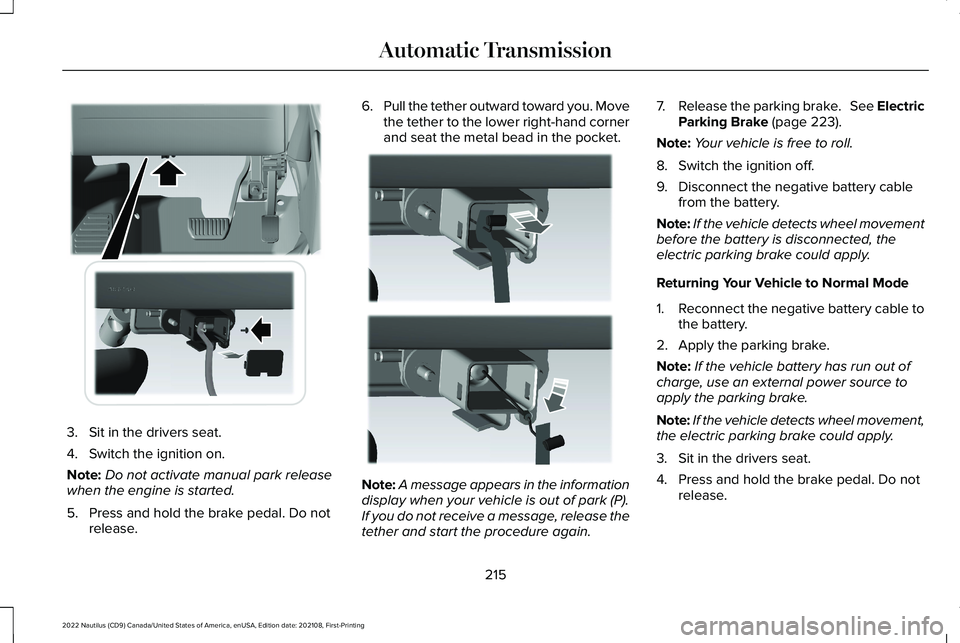
2.Remove the access cover. The cover islocated under the dash below thesteering wheel. Do not pull the tether.
214
2022 Nautilus (CD9) Canada/United States of America, enUSA, Edition date: 202108, First-PrintingAutomatic Transmission
Page 219 of 586
3.Sit in the drivers seat.
4.Switch the ignition on.
Note:Do not activate manual park releasewhen the engine is started.
5.Press and hold the brake pedal. Do notrelease.
6.Pull the tether outward toward you. Movethe tether to the lower right-hand cornerand seat the metal bead in the pocket.
Note:A message appears in the informationdisplay when your vehicle is out of park (P).If you do not receive a message, release thetether and start the procedure again.
7.Release the parking brake. See ElectricParking Brake (page 223).
Note:Your vehicle is free to roll.
8.Switch the ignition off.
9.Disconnect the negative battery cablefrom the battery.
Note:If the vehicle detects wheel movementbefore the battery is disconnected, theelectric parking brake could apply.
Returning Your Vehicle to Normal Mode
1.Reconnect the negative battery cable tothe battery.
2.Apply the parking brake.
Note:If the vehicle battery has run out ofcharge, use an external power source toapply the parking brake.
Note:If the vehicle detects wheel movement,the electric parking brake could apply.
3.Sit in the drivers seat.
4.Press and hold the brake pedal. Do notrelease.
215
2022 Nautilus (CD9) Canada/United States of America, enUSA, Edition date: 202108, First-PrintingAutomatic TransmissionE307294 E307295
Page 220 of 586
5.Pull the tether outward toward you. Movetether left and into the stowed position.
6.Start your vehicle. Confirm the instrumentcluster displays park (P).
Note:If the instrument cluster does notdisplay park (P) or if Park Not Available,Transmission Not In Park or Shift SystemFault message appears in the informationdisplay, contact an authorized dealer forservice. Switch the ignition off and apply theparking brake before you leave your vehicle.
7.Reinstall the access cover.
AUTOMATIC TRANSMISSION
AUDIBLE WARNINGS
Transmission Not In Park (P) AudibleWarning
Sounds if you open the driver door beforeshifting into park (P).
Park (P) Selection Audible Warning
Sounds when you shift into park (P).
AUTOMATIC TRANSMISSION –
TROUBLESHOOTING
AUTOMATIC TRANSMISSION –INFORMATION MESSAGES
You switched theengine off and shiftselect lever is in anyposition other thanpark (P).
Shift to Park
Transmission is toocold. Wait for it towarm up before youdrive.
TransmissionWarming Up PleaseWait
The transmission isoverheating andneeds to cool. Stopin a safe place assoon as it’s possible.
Transmission OverTemperature StopSafely
Have systemchecked as soon aspossible.
TransmissionService Required
The transmission isoverheating andneeds to cool. Stopin a safe place assoon as it’s possible.
Transmission TooHot Press Brake
The transmission haslimited functionality. Have systemchecked as soon aspossible.
Transmission LimitedFunction See Manual
A reminder to shiftinto park. In addition,this message istypical after recon-necting or rechar-ging the battery untilyou cycle the igni-tion to the on mode.See Changing the12V Battery (page353).
Transmission Not inPark
216
2022 Nautilus (CD9) Canada/United States of America, enUSA, Edition date: 202108, First-PrintingAutomatic Transmission
Page 221 of 586
Displays when thesystem requiresservice. Have yourvehicle checked assoon as possible.
SHIFT SYS FAULTConfirm Park BrakeApply Before Exitingthe Vehicle
Have systemchecked as soon aspossible.
SHIFT SYS FAULTService Required
Displays when thesystem requiresservice. Have yourvehicle checked assoon as possible.
SHIFT SYS FAULTVehicle is Shifting toPark
Displays when thesystem requiresservice. Have yourvehicle checked assoon as possible.
SHIFT SYS FAULTReverse UnavailableService Required
Have systemchecked as soon aspossible.
SHIFT SYS FAULTDrive UnavailableSelect S for DriveService Required
Have systemchecked as soon aspossible.
SHIFT SYS FAULTNeutral UnavailableService Required
Have systemchecked as soon aspossible.
SHIFT SYS FAULTSport UnavailableService Required
Displays when aninvalid gear hasbeen selected.
Invalid Gear Selec-tion
Displays when thebrake pedal needsto be depressed toenable the transmis-sion to shift frompark.
Depress Brake toShift from Park
Displays whenneutral hold isactive.
Stay in Neutral ModeEngaged
Displays when theneutral button Nneeds to be pressedagain to enterneutral hold.
To Stay in NeutralWhen ExitingVehicle Select NAgain
217
2022 Nautilus (CD9) Canada/United States of America, enUSA, Edition date: 202108, First-PrintingAutomatic Transmission
Page 224 of 586
BRAKE PRECAUTIONS
WARNING: Driving your vehicle withthe warning lamp on is dangerous. Asignificant decrease in brakingperformance may occur. It may take youlonger to stop your vehicle. Have yourvehicle checked as soon as possible.Driving extended distances with theparking brake engaged can cause brakefailure and the risk of personal injury.
Wet brakes result in reduced brakingefficiency. Gently press the brake pedal afew times when leaving a car wash or drivingfrom standing water to dry the brakes.
Note:Depending on applicable laws andregulations in the country for which yourvehicle was originally built, the stoplampscould flash during heavy braking. Followingthis the hazard warning flashers could alsoturn on when your vehicle comes to a stop.
ANTI-LOCK BRAKING SYSTEM
ANTI-LOCK BRAKING SYSTEMLIMITATIONS
The anti-lock braking system does noteliminate the risk of crash when:
•You drive too closely to the vehicle infront of you.
•Your vehicle is hydroplaning.
•You take corners too fast.
•The road surface is poor.
Note: If the system activates, the brakepedal could pulse and travel further. Maintain pressure on the brake pedal.
BRAKE OVER ACCELERATOR
In the event the accelerator pedal becomesstuck or entrapped, apply steady and firmpressure to the brake pedal to slow thevehicle and reduce engine power. If youexperience this condition, apply the brakesand bring your vehicle to a safe stop. Move
the transmission to park (P), switch theengine off and apply the parking brake.Inspect the accelerator pedal for anyinterference. If none are found and thecondition persists, have your vehicle towedto the nearest authorized dealer.
LOCATING THE BRAKE FLUID
RESERVOIR
See Under Hood Overview (page 341).
CHECKING THE BRAKE FLUID
WARNING: Do not use any fluid otherthan the recommended brake fluid as thiswill reduce brake efficiency. Use ofincorrect fluid could result in the loss ofvehicle control, serious personal injury ordeath.
220
2022 Nautilus (CD9) Canada/United States of America, enUSA, Edition date: 202108, First-PrintingBrakes
Page 227 of 586
WHAT IS THE ELECTRIC PARKING
BRAKE
The electric parking brake is used to holdyour vehicle on slopes and flat roads.
APPLYING THE ELECTRIC
PARKING BRAKE
WARNING: Always fully apply theparking brake and make sure you shift intopark (P). Failure to follow this instructioncould result in personal injury or death.
WARNING: If you drive extendeddistances with the parking brake applied,you could cause damage to the brakesystem.
The switch is on the lower part ofthe instrument panel.
1.Pull the switch up.
The red warning lamp flashes duringoperation and illuminates when the parkingbrake is applied.
Note:You can apply the electric parkingbrake when the ignition is off.
Note:The electric parking brake could applywhen the transmission selector is in park (P).See Park (P) (page 210).
APPLYING THE ELECTRIC
PARKING BRAKE IN AN
EMERGENCY
You can use the electric parking brake toslow or stop your vehicle in an emergency.
1.Pull the switch up and hold it.
The electric parking brake continues to slowyour vehicle down unless you release theswitch.
The red warning lamp illuminates, a tonesounds and the stoplamps turn on when youuse the electric parking brake in anemergency.
Note:Do not apply the electric parking brakewhen your vehicle is moving, except in anemergency. If you repeatedly use the electricparking brake to slow or stop your vehicle,you could cause damage to the brakesystem.
MANUALLY RELEASING THE
ELECTRIC PARKING BRAKE
1.Switch the ignition on.
2.Press and hold the brake pedal.
3.Push the switch down.
The red warning lamp turns off.
Pulling Away on a Hill When Towing aTrailer
1.Press and hold the brake pedal.
2.Pull the switch upward and hold it.
3.Shift into gear.
4.Press the accelerator pedal until enginehas developed sufficient torque toprevent your vehicle from rolling downthe hill.
223
2022 Nautilus (CD9) Canada/United States of America, enUSA, Edition date: 202108, First-PrintingElectric Parking BrakeE267156
Page 236 of 586
Curve Control
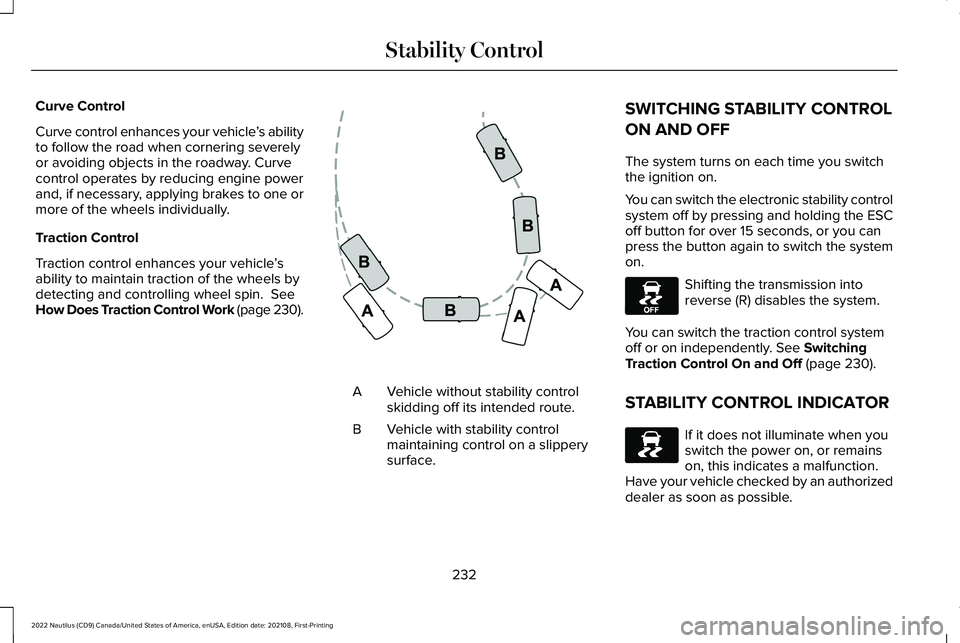
Curve control enhances your vehicle’s abilityto follow the road when cornering severelyor avoiding objects in the roadway. Curvecontrol operates by reducing engine powerand, if necessary, applying brakes to one ormore of the wheels individually.
Traction Control
Traction control enhances your vehicle’sability to maintain traction of the wheels bydetecting and controlling wheel spin. SeeHow Does Traction Control Work (page 230).
Vehicle without stability controlskidding off its intended route.A
Vehicle with stability controlmaintaining control on a slipperysurface.
B
SWITCHING STABILITY CONTROL
ON AND OFF
The system turns on each time you switchthe ignition on.
You can switch the electronic stability controlsystem off by pressing and holding the ESCoff button for over 15 seconds, or you canpress the button again to switch the systemon.
Shifting the transmission intoreverse (R) disables the system.
You can switch the traction control systemoff or on independently. See SwitchingTraction Control On and Off (page 230).
STABILITY CONTROL INDICATOR
If it does not illuminate when youswitch the power on, or remainson, this indicates a malfunction. Have your vehicle checked by an authorizeddealer as soon as possible.
232
2022 Nautilus (CD9) Canada/United States of America, enUSA, Edition date: 202108, First-PrintingStability ControlE72903 E130458 E138639
Page 243 of 586
FRONT PARKING AID AUDIBLEWARNINGS
A warning tone sounds when there is anobject within 28 in (70 cm) from the frontbumper. As your vehicle moves closer to anobject, the rate of the tone increases.
The warning tone continuously sounds whenan object is 12 in (30 cm) or less from thefront bumper.
Note:If the detected object is 12 in (30 cm)or less from your vehicle, visual indicationremains on.
SIDE PARKING AID
WHAT IS THE SIDE PARKING AID
The front and rear outermost parking aidsensors map objects that are near to thesides of your vehicle.
SIDE PARKING AID LIMITATIONS
The sensor coverage is up to 24 in (60 cm)from the sides of your vehicle.
The side parking aid may not function if:
•Your vehicle remains stationary for overtwo minutes.
•The anti-lock brake system activates.
•The traction control system activates.
•Your vehicle is in park (P).
•The steering wheel angle information isnot available. You must drive at least492 ft (150 m) above 19 mph (30 km/h) toreset the steering wheel angleinformation.
Note:If you switch traction control off, theside sensing system also turns off.
To reinitialize the system, drive the length ofyour vehicle.
The side parking aid does not detect anobject that is moving toward the side of yourvehicle, for example another vehicle movingat a low speed, if it does not pass a front orrear parking aid sensor.
If the transmission is in reverse (R), the sidesensing system provides audible warnings.When your vehicle is moving slowly,obstacles are detected within 24 in (60 cm)and are inside the driving path of yourvehicle. If your vehicle remains stationary fora few seconds, the audible warning turns off.Visual indication is always present in reverse(R).
If your vehicle is in neutral (N), the sidesensing system provides visual indicationonly when your vehicle is moving slowly andthere is a front or rear parking aid obstacledetected, and the side obstacle is within24 in (60 cm) from the side of your vehicle.If your vehicle remains stationary for a fewseconds, the visual indication turns off.
If the transmission is in drive (D) or any otherforward gear, the side sensing systemprovides audible and visual warnings. Whenyour vehicle is moving slowly, obstacles aredetected within 24 in (60 cm) and are insidethe driving path of your vehicle. If yourvehicle remains stationary for a few seconds,the visual indication and audible warningturns off.
239
2022 Nautilus (CD9) Canada/United States of America, enUSA, Edition date: 202108, First-PrintingParking Aids
Page 246 of 586
WHAT IS THE REAR VIEW CAMERA
The rear view camera provides a videoimage of the area behind your vehicle whenthe transmission is in reverse (R).
REAR VIEW CAMERA
PRECAUTIONS
WARNING: The rear view camerasystem is a reverse aid supplement devicethat still requires the driver to use it inconjunction with the interior and exteriormirrors for maximum coverage.
WARNING: Objects that are close toeither corner of the bumper or under thebumper, might not be seen on the screendue to the limited coverage of the camerasystem.
WARNING: Reverse your vehicleslowly. Failure to follow this instructioncould result in the loss of control of yourvehicle, personal injury or death.
WARNING: Use caution when therear cargo door is ajar. If the rear cargodoor is ajar, the camera will be out ofposition and the video image could beincorrect. All guide lines disappear whenthe rear cargo door is ajar. Failure to followthis instruction could result in personalinjury.
WARNING: Use caution when turningcamera features on or off when thetransmission is not in park (P). Make sureyour vehicle is not moving.
Note: When towing, the camera only seeswhat you are towing. This might not provideadequate coverage and you might not seesome objects. In some vehicles, the guidelines may disappear when you connect thetrailer tow connector.
LOCATING THE REAR VIEW
CAMERA
The rear view camera is located on the cargodoor. It provides a video image of the areabehind your vehicle.
REAR VIEW CAMERA GUIDE LINES
Note:Active guide lines and fixed guide linesare only available when the transmission isin reverse (R).
Note:The centerline is only available if theactive or fixed guide lines are on.
242
2022 Nautilus (CD9) Canada/United States of America, enUSA, Edition date: 202108, First-PrintingRear View Camera
Page 248 of 586
This allows you to get a closer view of anobject behind your vehicle. The zoomedimage keeps the bumper in the image toprovide a reference. The zoom is only activewhile the transmission is in reverse (R).
Note:Manual zoom is only available whenthe transmission is in reverse (R).
Note:Only the centerline shows when youenable manual zoom.
SWITCHING REAR VIEW CAMERADELAY ON AND OFF
1.Press Settings.
2.Press Vehicle Settings.
3.Press Rear View Camera.
4.Switch Rear View Camera Delay on oroff.
When shifting the transmission out of reverse(R) and into any gear other than park (P), thecamera image remains in the display until:
•Your vehicle speed reachesapproximately 5 mph (8 km/h).
•You shift your vehicle into park (P).
244
2022 Nautilus (CD9) Canada/United States of America, enUSA, Edition date: 202108, First-PrintingRear View Camera