transmission LINCOLN NAUTILUS 2022 Workshop Manual
[x] Cancel search | Manufacturer: LINCOLN, Model Year: 2022, Model line: NAUTILUS, Model: LINCOLN NAUTILUS 2022Pages: 586, PDF Size: 13.97 MB
Page 473 of 586
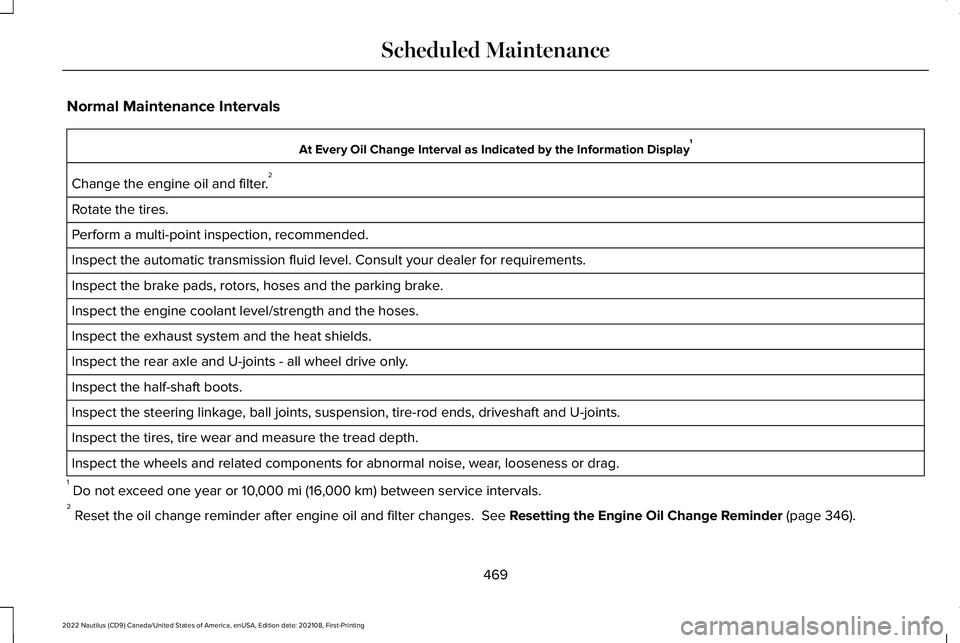
Normal Maintenance Intervals
At Every Oil Change Interval as Indicated by the Information Display1
Change the engine oil and filter.2
Rotate the tires.
Perform a multi-point inspection, recommended.
Inspect the automatic transmission fluid level. Consult your dealer for requirements.
Inspect the brake pads, rotors, hoses and the parking brake.
Inspect the engine coolant level/strength and the hoses.
Inspect the exhaust system and the heat shields.
Inspect the rear axle and U-joints - all wheel drive only.
Inspect the half-shaft boots.
Inspect the steering linkage, ball joints, suspension, tire-rod ends, driveshaft and U-joints.
Inspect the tires, tire wear and measure the tread depth.
Inspect the wheels and related components for abnormal noise, wear, looseness or drag.
1 Do not exceed one year or 10,000 mi (16,000 km) between service intervals.2 Reset the oil change reminder after engine oil and filter changes. See Resetting the Engine Oil Change Reminder (page 346).
469
2022 Nautilus (CD9) Canada/United States of America, enUSA, Edition date: 202108, First-PrintingScheduled Maintenance
Page 474 of 586
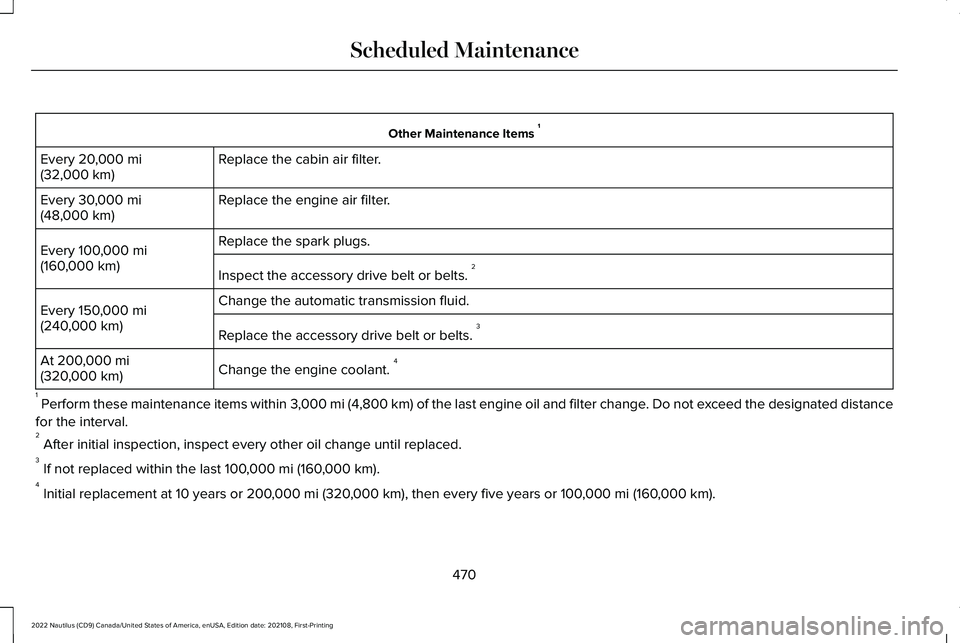
Other Maintenance Items 1
Replace the cabin air filter.Every 20,000 mi(32,000 km)
Replace the engine air filter.Every 30,000 mi(48,000 km)
Replace the spark plugs.Every 100,000 mi(160,000 km)Inspect the accessory drive belt or belts. 2
Change the automatic transmission fluid.Every 150,000 mi(240,000 km)Replace the accessory drive belt or belts. 3
Change the engine coolant. 4At 200,000 mi(320,000 km)
1 Perform these maintenance items within 3,000 mi (4,800 km) of the last engine oil and filter change. Do not exceed the designated distance
for the interval.2 After initial inspection, inspect every other oil change until replaced.3 If not replaced within the last 100,000 mi (160,000 km).4 Initial replacement at 10 years or 200,000 mi (320,000 km), then every five years or 100,000 mi (160,000 km).
470
2022 Nautilus (CD9) Canada/United States of America, enUSA, Edition date: 202108, First-PrintingScheduled Maintenance
Page 476 of 586
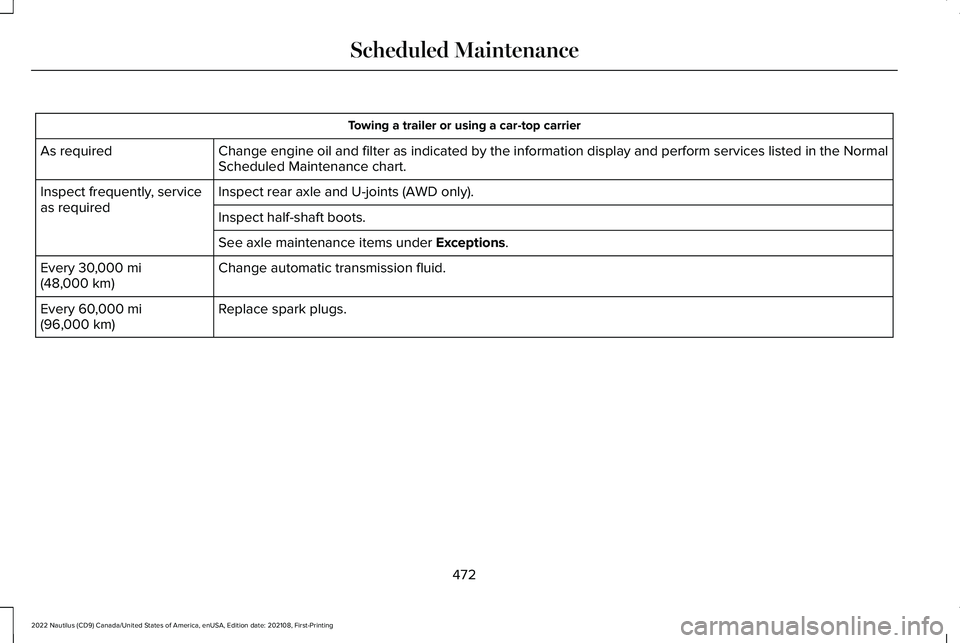
Towing a trailer or using a car-top carrier
Change engine oil and filter as indicated by the information display and perform services listed in the NormalScheduled Maintenance chart.As required
Inspect rear axle and U-joints (AWD only).Inspect frequently, serviceas requiredInspect half-shaft boots.
See axle maintenance items under Exceptions.
Change automatic transmission fluid.Every 30,000 mi(48,000 km)
Replace spark plugs.Every 60,000 mi(96,000 km)
472
2022 Nautilus (CD9) Canada/United States of America, enUSA, Edition date: 202108, First-PrintingScheduled Maintenance
Page 477 of 586
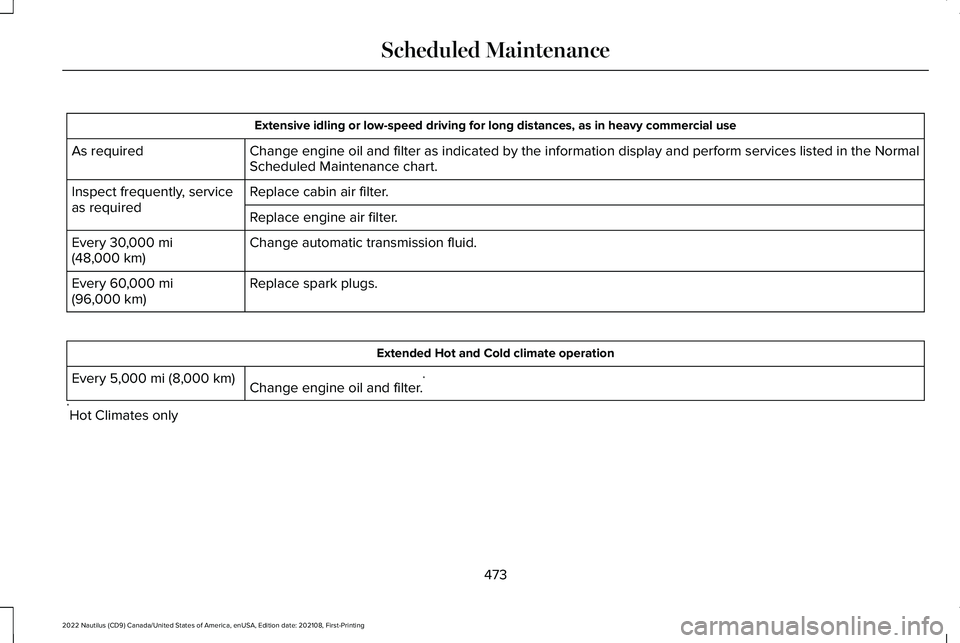
Extensive idling or low-speed driving for long distances, as in heavy commercial use
Change engine oil and filter as indicated by the information display and perform services listed in the NormalScheduled Maintenance chart.As required
Replace cabin air filter.Inspect frequently, serviceas requiredReplace engine air filter.
Change automatic transmission fluid.Every 30,000 mi(48,000 km)
Replace spark plugs.Every 60,000 mi(96,000 km)
Extended Hot and Cold climate operation
Change engine oil and filter.*Every 5,000 mi (8,000 km)
*Hot Climates only
473
2022 Nautilus (CD9) Canada/United States of America, enUSA, Edition date: 202108, First-PrintingScheduled Maintenance
Page 478 of 586
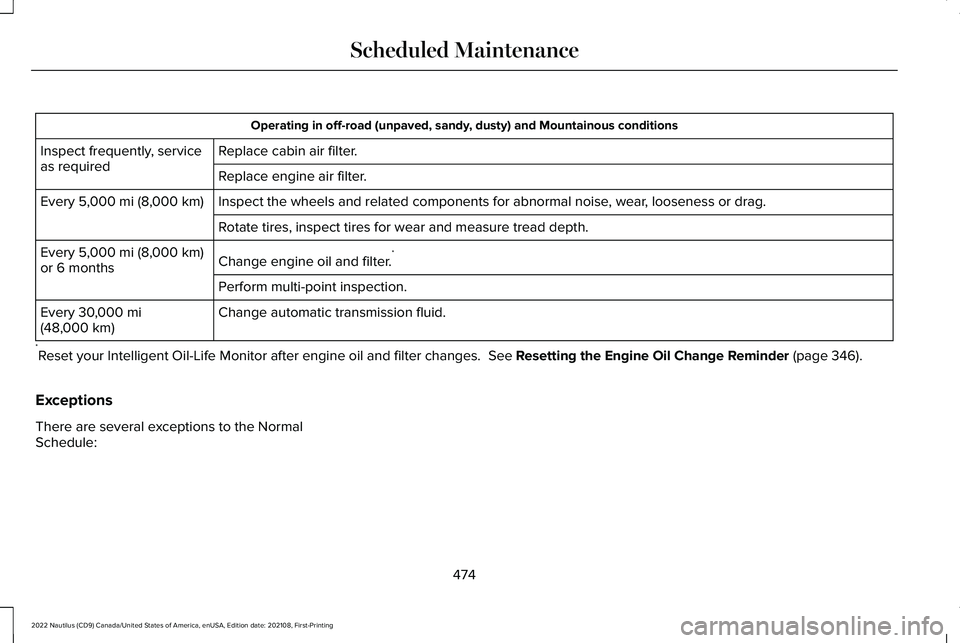
Operating in off-road (unpaved, sandy, dusty) and Mountainous conditions
Replace cabin air filter.Inspect frequently, serviceas requiredReplace engine air filter.
Inspect the wheels and related components for abnormal noise, wear, looseness or drag.Every 5,000 mi (8,000 km)
Rotate tires, inspect tires for wear and measure tread depth.
Change engine oil and filter.*Every 5,000 mi (8,000 km)or 6 months
Perform multi-point inspection.
Change automatic transmission fluid.Every 30,000 mi(48,000 km)
*Reset your Intelligent Oil-Life Monitor after engine oil and filter changes. See Resetting the Engine Oil Change Reminder (page 346).
Exceptions
There are several exceptions to the NormalSchedule:
474
2022 Nautilus (CD9) Canada/United States of America, enUSA, Edition date: 202108, First-PrintingScheduled Maintenance
Page 531 of 586
•Links to Third Party Sites: TheSOFTWARE may provide you with theability to link to third party sites. The thirdparty sites are not under the control ofFORD MOTOR COMPANY, its affiliatesand/or its designated agent. NeitherFORD MOTOR COMPANY nor itsaffiliates nor its designated agent areresponsible for (I) the contents of anythird party sites, any links contained inthird party sites, or any changes orupdates to third party sites, or (ii)webcasting or any other form oftransmission received from any thirdparty sites. If the SOFTWARE provideslinks to third party sites, those links areprovided to you only as a convenience,and the inclusion of any link does notimply an endorsement of the third partysite by FORD MOTOR COMPANY, itsaffiliates and/or its designated agent.
•Obligation to Drive Responsibly: Yourecognize your obligation to driveresponsibly and keep attention on theroad. You will read and abide with theDEVICES operating instructionsparticularly as they pertain to safety andyou agree to assume any risk associated
with the use of the DEVICES.
UPGRADES AND RECOVERY MEDIA: If theSOFTWARE is provided by FORD MOTORCOMPANY separate from the DEVICES onmedia such as a ROM chip, CD ROM disk(s)or via web download or other means, and islabeled "For Upgrade Purposes Only" or "ForRecovery Purposes Only" you may install one(1) copy of such SOFTWARE onto theDEVICES as a replacement copy for theexisting SOFTWARE, and use it inaccordance with this EULA, including anyadditional EULA terms accompanying theupgrade SOFTWARE.
INTELLECTUAL PROPERTY RIGHTS: Alltitle and intellectual property rights in and tothe SOFTWARE (including but not limited toany images, photographs, animations, video,audio, music, text and "applets" incorporatedinto the SOFTWARE), the accompanyingprinted materials, and any copies of theSOFTWARE, are owned by FORD MOTORCOMPANY, or its affiliates or suppliers. TheSOFTWARE is licensed, not sold. You maynot copy the printed materials accompanyingthe SOFTWARE. All title and intellectualproperty rights in and to the content which
may be accessed through use of theSOFTWARE is the property of the respectivecontent owner and may be protected byapplicable copyright or other intellectualproperty laws and treaties. This EULA grantsyou no rights to use such content outside itsintended use. All rights not specificallygranted under this EULA are reserved byFORD MOTOR COMPANY, its affiliates, andthird party software and service providersand suppliers. Use of any on-line serviceswhich may be accessed through theSOFTWARE may be governed by therespective terms of use relating to suchservices. If this SOFTWARE containsdocumentation that is provided only inelectronic form, you may print one copy ofsuch electronic documentation.
527
2022 Nautilus (CD9) Canada/United States of America, enUSA, Edition date: 202108, First-PrintingCustomer Information
Page 552 of 586
(ii) END USER AGREES TO INDEMNIFY ANDHOLD HARMLESS THE UNDERLYINGWIRELESS SERVICE CARRIER AND ITSOFFICERS, EMPLOYEES, AND AGENTSAGAINST ANY AND ALL CLAIMS,INCLUDING WITHOUT LIMITATION CLAIMSFOR LIBEL, SLANDER, OR ANY PROPERTYDAMAGE, PERSONAL INJURY OR DEATH,ARISING IN ANY WAY, DIRECTLY ORINDIRECTLY, IN CONNECTION WITH THISAGREEMENT OR THE USE, FAILURE TO USE,OR INABILITY TO USE THE DEVICE EXCEPTWHERE THE CLAIMS RESULT FROM THEUNDERLYING CARRIER’S GROSSNEGLIGENCE OR WILLFUL MISCONDUCT.THIS INDEMNITY WILL SURVIVE THETERMINATION OF THE AGREEMENT.
(iii) END USER HAS NO PROPERTY RIGHTIN ANY NUMBER ASSIGNED TO THEDEVICE.
(iv) END USER UNDERSTANDS THAT FORDAND THE UNDERLYING CARRIER CANNOTGUARANTY THE SECURITY OF WIRELESSTRANSMISSIONS, AND WILL NOT BE LIABLEFOR ANY LACK OF SECURITY RELATINGTO THE USE OF THE SERVICES
THE SERVICE IS FOR [END USER’S] USEONLY AND END USER MAY NOT RESELLTHE SERVICE TO ANY OTHER PARTY ENDUSER UNDERSTANDS THAT THEUNDERLYING CARRIER DOES NOTGUARANTEE ANY END USERUNINTERRUPTED SERVICE OR COVERAGE.THE UNDERLYING CARRIER DOES NOTWARRANT THAT END USERS CAN OR WILLBE LOCATED USING THE SERVICE. THEUNDERLYING CARRIER MAKES NOWARRANTY, EXPRESS OR IMPLIED, OFMERCHANTABILITY OR FITNESS FOR APARTICULAR PURPOSE, SUITABILITY, ORPERFORMANCE REGARDING ANY SERVICESOR GOODS, AND IN NO EVENT SHALLAT&T BE LIABLE, WHETHER OR NOT DUETO ITS OWN NEGLIGENCE, FOR ANY: (A)ACT OR OMISSION OF A THIRD PARTY; (B)MISTAKES, OMISSIONS, INTERRUPTIONS,ERRORS, FAILURES TO TRANSMIT, DELAYS,OR DEFECTS IN THE SERVICE PROVIDEDBY OR THROUGH THE UNDERLYINGCARRIER; (C) DAMAGE OR INJURY CAUSEDBY SUSPENSION OR TERMINATION BY THEUNDERLYING CARRIER; OR (D) DAMAGE ORINJURY CAUSED BY A FAILURE OR DELAYIN CONNECTING A CALL TO ANY ENTITY,
INCLUDING 911 OR ANY OTHEREMERGENCY SERVICE. TO THE FULLEXTENT ALLOWED BY LAW, THE END USERRELEASES, INDEMNIFIES AND HOLDS THEUNDERLYING CARRIER HARMLESS FROMAND AGAINST ANY AND ALL CLAIMS OFANY PERSON OR ENTITY FOR DAMAGESOF ANY NATURE ARISING IN ANY WAYFROM OR RELATING TO, DIRECTLY ORINDIRECTLY, SERVICES PROVIDED BY THEUNDERLYING CARRIER OR ANY PERSON’SUSE THEREOF, INCLUDING CLAIMS ARISINGIN WHOLE OR IN PART FROM THE ALLEGEDNEGLIGENCE OF THE UNDERLYINGCARRIER.
VII. China Territory
Personal Use Only
You agree to use this Data together with[insert name of Client Application] for thesolely personal, non-commercial purposesfor which you were licensed, and not forservice bureau, time-sharing or other similarpurposes. Accordingly, but subject to therestrictions set forth in the followingparagraphs, you may copy this Data only asnecessary for your personal use to (i) view
548
2022 Nautilus (CD9) Canada/United States of America, enUSA, Edition date: 202108, First-PrintingCustomer Information
Page 567 of 586
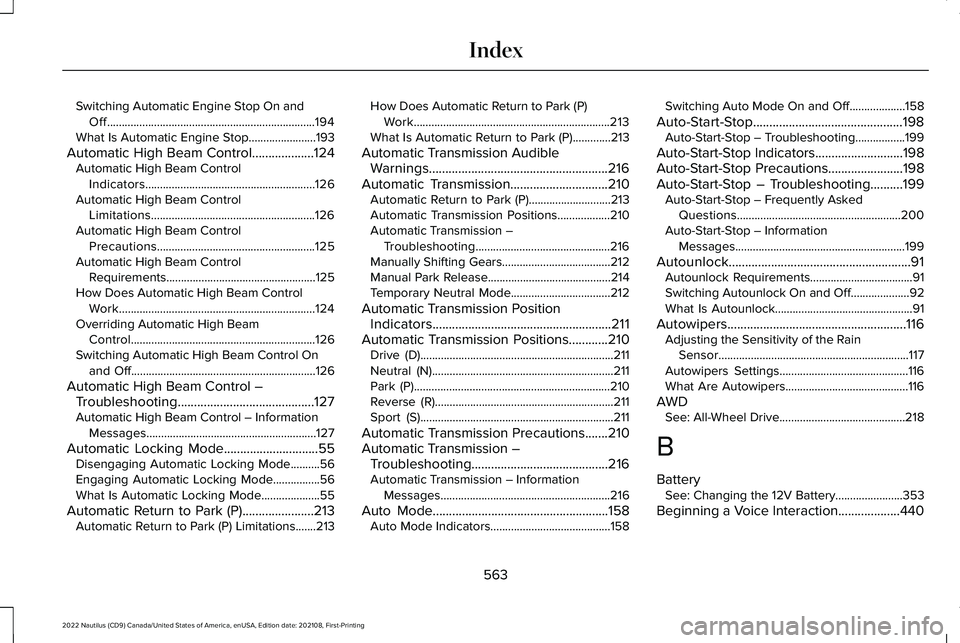
Switching Automatic Engine Stop On andOff.......................................................................194What Is Automatic Engine Stop.......................193
Automatic High Beam Control...................124Automatic High Beam ControlIndicators..........................................................126Automatic High Beam ControlLimitations........................................................126Automatic High Beam ControlPrecautions......................................................125Automatic High Beam ControlRequirements...................................................125How Does Automatic High Beam ControlWork...................................................................124Overriding Automatic High BeamControl...............................................................126Switching Automatic High Beam Control Onand Off...............................................................126
Automatic High Beam Control –Troubleshooting..........................................127Automatic High Beam Control – InformationMessages..........................................................127
Automatic Locking Mode.............................55Disengaging Automatic Locking Mode..........56Engaging Automatic Locking Mode................56What Is Automatic Locking Mode....................55
Automatic Return to Park (P)......................213Automatic Return to Park (P) Limitations.......213
How Does Automatic Return to Park (P)Work...................................................................213What Is Automatic Return to Park (P).............213
Automatic Transmission AudibleWarnings.......................................................216Automatic Transmission..............................210Automatic Return to Park (P)............................213Automatic Transmission Positions..................210Automatic Transmission –Troubleshooting..............................................216Manually Shifting Gears.....................................212Manual Park Release..........................................214Temporary Neutral Mode..................................212
Automatic Transmission PositionIndicators.......................................................211Automatic Transmission Positions............210Drive (D)..................................................................211Neutral (N)..............................................................211Park (P)...................................................................210Reverse (R).............................................................211Sport (S)..................................................................211
Automatic Transmission Precautions.......210Automatic Transmission –Troubleshooting..........................................216Automatic Transmission – InformationMessages..........................................................216
Auto Mode......................................................158Auto Mode Indicators.........................................158
Switching Auto Mode On and Off...................158
Auto-Start-Stop..............................................198Auto-Start-Stop – Troubleshooting.................199
Auto-Start-Stop Indicators...........................198Auto-Start-Stop Precautions.......................198Auto-Start-Stop – Troubleshooting..........199Auto-Start-Stop – Frequently AskedQuestions........................................................200Auto-Start-Stop – InformationMessages..........................................................199
Autounlock........................................................91Autounlock Requirements...................................91Switching Autounlock On and Off....................92What Is Autounlock...............................................91
Autowipers.......................................................116Adjusting the Sensitivity of the RainSensor.................................................................117Autowipers Settings............................................116What Are Autowipers..........................................116
AWDSee: All-Wheel Drive...........................................218
B
BatterySee: Changing the 12V Battery.......................353
Beginning a Voice Interaction...................440
563
2022 Nautilus (CD9) Canada/United States of America, enUSA, Edition date: 202108, First-PrintingIndex
Page 582 of 586
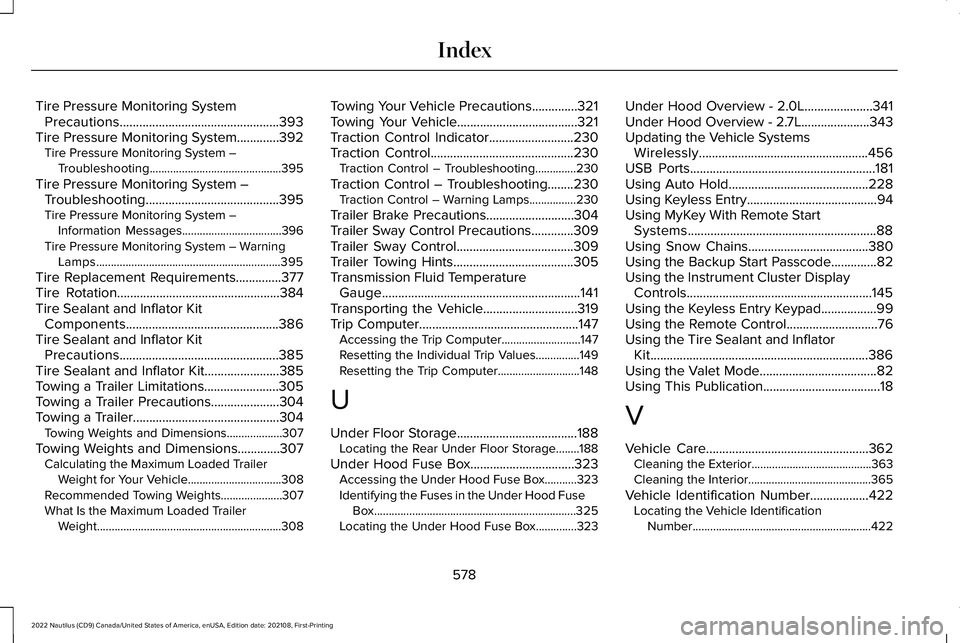
Tire Pressure Monitoring SystemPrecautions.................................................393Tire Pressure Monitoring System.............392Tire Pressure Monitoring System –Troubleshooting.............................................395
Tire Pressure Monitoring System –Troubleshooting.........................................395Tire Pressure Monitoring System –Information Messages..................................396Tire Pressure Monitoring System – WarningLamps...............................................................395
Tire Replacement Requirements..............377Tire Rotation..................................................384Tire Sealant and Inflator KitComponents...............................................386Tire Sealant and Inflator KitPrecautions.................................................385Tire Sealant and Inflator Kit.......................385Towing a Trailer Limitations.......................305Towing a Trailer Precautions.....................304Towing a Trailer.............................................304Towing Weights and Dimensions...................307
Towing Weights and Dimensions.............307Calculating the Maximum Loaded TrailerWeight for Your Vehicle................................308Recommended Towing Weights.....................307What Is the Maximum Loaded TrailerWeight...............................................................308
Towing Your Vehicle Precautions..............321Towing Your Vehicle.....................................321Traction Control Indicator..........................230Traction Control............................................230Traction Control – Troubleshooting..............230
Traction Control – Troubleshooting........230Traction Control – Warning Lamps................230
Trailer Brake Precautions...........................304Trailer Sway Control Precautions.............309Trailer Sway Control....................................309Trailer Towing Hints.....................................305Transmission Fluid TemperatureGauge.............................................................141Transporting the Vehicle.............................319Trip Computer.................................................147Accessing the Trip Computer...........................147Resetting the Individual Trip Values...............149Resetting the Trip Computer............................148
U
Under Floor Storage.....................................188Locating the Rear Under Floor Storage........188
Under Hood Fuse Box................................323Accessing the Under Hood Fuse Box...........323Identifying the Fuses in the Under Hood FuseBox.....................................................................325Locating the Under Hood Fuse Box..............323
Under Hood Overview - 2.0L.....................341Under Hood Overview - 2.7L.....................343Updating the Vehicle SystemsWirelessly....................................................456USB Ports.........................................................181Using Auto Hold...........................................228Using Keyless Entry........................................94Using MyKey With Remote StartSystems..........................................................88Using Snow Chains.....................................380Using the Backup Start Passcode..............82Using the Instrument Cluster DisplayControls.........................................................145Using the Keyless Entry Keypad.................99Using the Remote Control............................76Using the Tire Sealant and InflatorKit...................................................................386Using the Valet Mode....................................82Using This Publication....................................18
V
Vehicle Care..................................................362Cleaning the Exterior.........................................363Cleaning the Interior..........................................365
Vehicle Identification Number..................422Locating the Vehicle IdentificationNumber.............................................................422
578
2022 Nautilus (CD9) Canada/United States of America, enUSA, Edition date: 202108, First-PrintingIndex