brake LINCOLN NAUTILUS 2022 Service Manual
[x] Cancel search | Manufacturer: LINCOLN, Model Year: 2022, Model line: NAUTILUS, Model: LINCOLN NAUTILUS 2022Pages: 586, PDF Size: 13.97 MB
Page 230 of 586
ActionMessage
Numerous park brake applies have overheated the system. Wait 2 minutes before attemptingto apply again.Park Brake System Overheated
226
2022 Nautilus (CD9) Canada/United States of America, enUSA, Edition date: 202108, First-PrintingElectric Parking Brake
Page 231 of 586
WHAT IS HILL START ASSIST
Hill Start Assist makes it easier for you to pullaway when your vehicle is on a slope withoutusing the parking brake.
HOW DOES HILL START ASSIST
WORK
When the system activates, your vehicleremains stationary for a few seconds afteryou release the brake pedal. This gives youtime to move your foot from the brake pedalto the accelerator pedal. The brakes releasewhen the engine has developed sufficienttorque to prevent your vehicle from rollingdown the slope.
HILL START ASSIST PRECAUTIONS
WARNING: The system does notreplace the parking brake. When you leaveyour vehicle, always apply the parkingbrake.
WARNING: You must remain in yourvehicle when the system turns on. At alltimes, you are responsible for controllingyour vehicle, supervising the system andintervening, if required. Failure to take caremay result in the loss of control of yourvehicle, serious personal injury or death.
WARNING: The system will turn offif a malfunction is apparent. Failure to takecare may result in the loss of control ofyour vehicle, serious personal injury ordeath.
HILL START ASSIST –
TROUBLESHOOTING
HILL START ASSIST – INFORMATIONMESSAGES
ActionMessage
Displays whensystem is not avail-able. Have yourvehicle checked assoon as possible.
Hill Start Assist NotAvailable
227
2022 Nautilus (CD9) Canada/United States of America, enUSA, Edition date: 202108, First-PrintingHill Start Assist
Page 232 of 586
HOW DOES AUTO HOLD WORK
Auto Hold applies the brakes to hold yourvehicle after you stop it and release thebrake pedal. This can help when waiting ona hill or in traffic.
SWITCHING AUTO HOLD ON AND
OFF
WARNING: The system does notreplace the parking brake. When you leaveyour vehicle, always apply the parkingbrake.
WARNING: You must remain in yourvehicle when the system turns on. At alltimes, you are responsible for controllingyour vehicle, supervising the system andintervening, if required. Failure to take caremay result in the loss of control of yourvehicle, serious personal injury or death.
WARNING: The system will turn offif a malfunction is apparent. Failure to takecare may result in the loss of control ofyour vehicle, serious personal injury ordeath.
Select the drive assist menu in the centerdisplay screen to switch auto hold on andoff.
Note:You can only switch the system onafter you close the driver door, fasten yourseatbelt and start the engine.
Note:The system remembers the last settingwhen you start your vehicle.
Make sure you switch the system off beforetowing with your vehicle or before using anautomatic car wash.
USING AUTO HOLD
1.Bring your vehicle to a complete stop.The auto hold active indicator illuminatesin the information display.
2.Release the brake pedal. The systemholds your vehicle at a standstill. Theauto hold active indicator remainsilluminated in the information display.
3.Pull away in the normal manner. Thesystem releases the brakes and the autohold active indicator switches off.
Note:The system only activates if you applyenough brake pressure on the brake pedal.
Note:Under certain conditions, the systemcould apply the electric parking brake. Thebrake system warning lamp illuminates. Theelectric parking brake releases when youpress the accelerator pedal. SeeAutomatically Releasing the ElectricParking Brake (page 224).
Note:The system switches off if you shiftinto reverse (R) and press the brake pedal.
There could be actions that can cause theauto hold system not to work when thefollowing occur:
•When you use active park assist.
•Your vehicle is in stay in neutral mode.
•The driver door is open.
228
2022 Nautilus (CD9) Canada/United States of America, enUSA, Edition date: 202108, First-PrintingAuto Hold
Page 234 of 586
HOW DOES TRACTION CONTROL
WORK
If your vehicle begins to slide, the systemapplies the brakes to individual wheels and,when needed, reduces power at the sametime. If the wheels spin when acceleratingon slippery or loose surfaces, the systemreduces power in order to increase traction.
SWITCHING TRACTION CONTROL
ON AND OFF
WARNING: Operating your vehiclewith the traction control disabled couldlead to an increased risk of loss of vehiclecontrol, vehicle rollover, personal injuryand death.
When you switch the system off or on, amessage appears in the information displayshowing system status.
You can switch the system off with thetraction control switch.
Using a Switch
Use the traction control switch on theinstrument panel to switch the system off oron.
TRACTION CONTROL INDICATOR
TRACTION CONTROL –
TROUBLESHOOTING
TRACTION CONTROL – WARNING
LAMPS
System Messages
The traction control lighttemporarily illuminates on start-upand flashes when activated by adriving condition.
The traction control off light temporarilyilluminates on start-up and stays on:
•When you switch the traction controlsystem off.
•When you select an alternative stabilitycontrol mode.
•If a problem occurs in the system.
230
2022 Nautilus (CD9) Canada/United States of America, enUSA, Edition date: 202108, First-PrintingTraction ControlE138639 E130458 E138639
Page 235 of 586
HOW DOES STABILITY CONTROL
WORK
WARNING: Vehicle modificationsinvolving braking system, aftermarket roofracks, suspension, steering system, tireconstruction and wheel and tire size maychange the handling characteristics of yourvehicle and may adversely affect theperformance of the electronic stabilitycontrol system. In addition, installing anystereo loudspeakers may interfere withand adversely affect the electronic stabilitycontrol system. Install any aftermarketstereo loudspeaker as far as possible fromthe front center console, the tunnel, andthe front seats in order to minimize the riskof interfering with the electronic stabilitycontrol sensors. Reducing theeffectiveness of the electronic stabilitycontrol system could lead to an increasedrisk of loss of vehicle control, vehiclerollover, personal injury and death.
WARNING: Remember that evenadvanced technology cannot defy the lawsof physics. It's always possible to losecontrol of a vehicle due to inappropriatedriver input for the conditions. Aggressivedriving on any road condition can causeyou to lose control of your vehicleincreasing the risk of personal injury orproperty damage. Activation of theelectronic stability control system is anindication that at least some of the tireshave exceeded their ability to grip theroad; this could reduce the operator'sability to control the vehicle potentiallyresulting in a loss of vehicle control, vehiclerollover, personal injury and death. If yourelectronic stability control system activates,SLOW DOWN.
If a driving condition activates either thestability control or the traction control systemyou may experience the following conditions:
•The stability and traction control lightflashes.
•Your vehicle slows down.
•Reduced engine power.
The stability control system has severalfeatures built into it to help you maintaincontrol of your vehicle:
Electronic Stability Control
Electronic stability control enhances yourvehicle’s ability to prevent skids or lateralslides by applying brakes to one or more ofthe wheels individually and, if necessary,reducing engine power.
Roll Stability Control
Roll stability control enhances your vehicle’sability to prevent rollovers by detecting yourvehicle’s roll motion and the rate at which itchanges by applying the brakes to one ormore wheels individually.
231
2022 Nautilus (CD9) Canada/United States of America, enUSA, Edition date: 202108, First-PrintingStability Control
Page 236 of 586
Curve Control
Curve control enhances your vehicle’s abilityto follow the road when cornering severelyor avoiding objects in the roadway. Curvecontrol operates by reducing engine powerand, if necessary, applying brakes to one ormore of the wheels individually.
Traction Control
Traction control enhances your vehicle’sability to maintain traction of the wheels bydetecting and controlling wheel spin. SeeHow Does Traction Control Work (page 230).
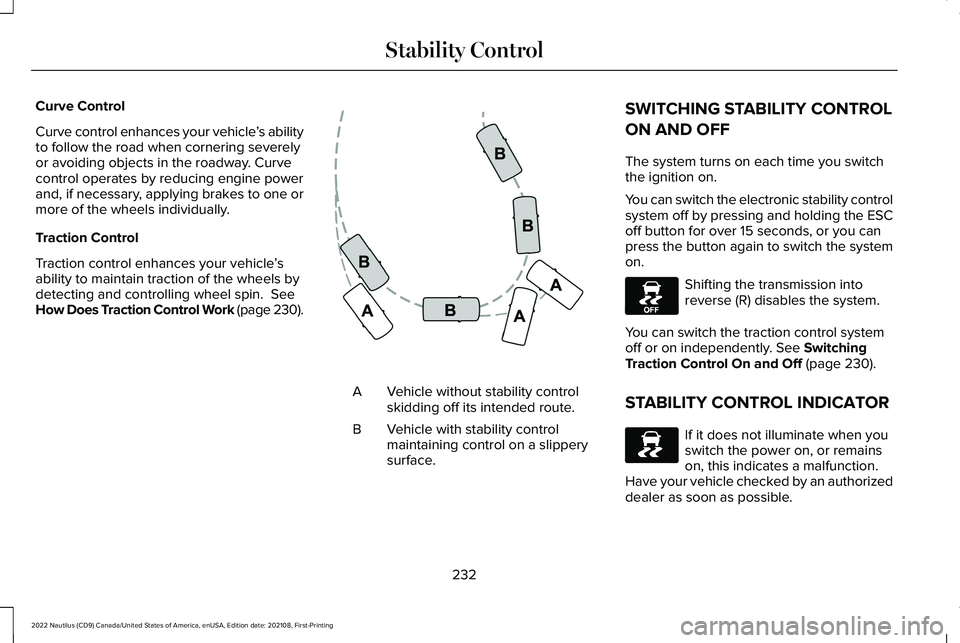
Vehicle without stability controlskidding off its intended route.A
Vehicle with stability controlmaintaining control on a slipperysurface.
B
SWITCHING STABILITY CONTROL
ON AND OFF
The system turns on each time you switchthe ignition on.
You can switch the electronic stability controlsystem off by pressing and holding the ESCoff button for over 15 seconds, or you canpress the button again to switch the systemon.
Shifting the transmission intoreverse (R) disables the system.
You can switch the traction control systemoff or on independently. See SwitchingTraction Control On and Off (page 230).
STABILITY CONTROL INDICATOR
If it does not illuminate when youswitch the power on, or remainson, this indicates a malfunction. Have your vehicle checked by an authorizeddealer as soon as possible.
232
2022 Nautilus (CD9) Canada/United States of America, enUSA, Edition date: 202108, First-PrintingStability ControlE72903 E130458 E138639
Page 240 of 586
PARKING AID PRECAUTIONS
WARNING: To help avoid personalinjury, always use caution when in reverse(R) and when using the sensing system.
WARNING: The system may notdetect objects with surfaces that absorbreflection. Always drive with due care andattention. Failure to take care may resultin a crash.
WARNING: Traffic control systems,fluorescent lamps, inclement weather, airbrakes, external motors and fans mayaffect the correct operation of the sensingsystem. This may cause reducedperformance or false alerts.
WARNING: The system may notdetect small or moving objects, particularlythose close to the ground.
WARNING: The parking aid systemcan only assist you to detect objects whenyour vehicle is moving at parking speeds.To help avoid personal injury you musttake care when using the parking aidsystem.
WARNING: The system may notfunction if the sensor is blocked.
WARNING: In cold and severeweather conditions the system may notfunction. Rain, snow and spray can all limitsensor performance.
WARNING: If damage occurs in theimmediate area surrounding the sensor,have your vehicle checked as soon aspossible.
Note:If your vehicle sustains damageleaving the sensors misaligned, this willcause inaccurate measurements or falsealerts.
When you connect a trailer to your vehicle,the rear parking aid detects the trailer andprovides an alert. Disable the parking aidwhen you connect a trailer to prevent thealert.
Note:Certain add-on devices installedaround the bumper or fascia may createfalse alerts, for example, large trailer hitches,bike or surfboard racks, license platebrackets, bumper covers or any other devicethat could block the normal detection zoneof the parking aid system. Aftermarket sparetires or spare tire covers mounted to the reartailgate could cause false alerts from thepark aid system. Remove the add-on deviceto prevent false alerts.
Note: Keep the sensors free from snow, iceand large accumulations of dirt. If thesensors are covered, the system's accuracycan be affected.
Do not clean the sensors with sharp objects.
Note: When using a programmed MyKey,you cannot switch the parking aids off. SeeMyKey™ (page 85).
236
2022 Nautilus (CD9) Canada/United States of America, enUSA, Edition date: 202108, First-PrintingParking Aids
Page 243 of 586
FRONT PARKING AID AUDIBLEWARNINGS
A warning tone sounds when there is anobject within 28 in (70 cm) from the frontbumper. As your vehicle moves closer to anobject, the rate of the tone increases.
The warning tone continuously sounds whenan object is 12 in (30 cm) or less from thefront bumper.
Note:If the detected object is 12 in (30 cm)or less from your vehicle, visual indicationremains on.
SIDE PARKING AID
WHAT IS THE SIDE PARKING AID
The front and rear outermost parking aidsensors map objects that are near to thesides of your vehicle.
SIDE PARKING AID LIMITATIONS
The sensor coverage is up to 24 in (60 cm)from the sides of your vehicle.
The side parking aid may not function if:
•Your vehicle remains stationary for overtwo minutes.
•The anti-lock brake system activates.
•The traction control system activates.
•Your vehicle is in park (P).
•The steering wheel angle information isnot available. You must drive at least492 ft (150 m) above 19 mph (30 km/h) toreset the steering wheel angleinformation.
Note:If you switch traction control off, theside sensing system also turns off.
To reinitialize the system, drive the length ofyour vehicle.
The side parking aid does not detect anobject that is moving toward the side of yourvehicle, for example another vehicle movingat a low speed, if it does not pass a front orrear parking aid sensor.
If the transmission is in reverse (R), the sidesensing system provides audible warnings.When your vehicle is moving slowly,obstacles are detected within 24 in (60 cm)and are inside the driving path of yourvehicle. If your vehicle remains stationary fora few seconds, the audible warning turns off.Visual indication is always present in reverse(R).
If your vehicle is in neutral (N), the sidesensing system provides visual indicationonly when your vehicle is moving slowly andthere is a front or rear parking aid obstacledetected, and the side obstacle is within24 in (60 cm) from the side of your vehicle.If your vehicle remains stationary for a fewseconds, the visual indication turns off.
If the transmission is in drive (D) or any otherforward gear, the side sensing systemprovides audible and visual warnings. Whenyour vehicle is moving slowly, obstacles aredetected within 24 in (60 cm) and are insidethe driving path of your vehicle. If yourvehicle remains stationary for a few seconds,the visual indication and audible warningturns off.
239
2022 Nautilus (CD9) Canada/United States of America, enUSA, Edition date: 202108, First-PrintingParking Aids
Page 254 of 586
Note:The system detects other vehicles andcurbs to find a parking space.
3.Use the turn signal lever to search for aparking space on the driver or passengerside of your vehicle.
Note:The system defaults to searching fora parking spot on the passenger side of yourvehicle if you do not use the turn signal lever.
4.Drive your vehicle approximately 3 ft (1 m)away from and parallel to the otherparked vehicles when searching for aparking space.
Note:A tone sounds and a messageappears in the information andentertainment display when active parkassist finds a parking space.
5.Press and hold the brake pedal.
6.Release the steering wheel and shift intoreverse (R).
7.Use the accelerator and brake to controlyour vehicle's speed when parking. Youare responsible for stopping your vehicle.
8.Active park assist is a multi-step processand requires you to shift the transmissionmultiple times. Follow the onscreeninstructions until parking is complete.
Note:You can slow down your vehicle atany time by pressing the brake pedal.
Note:When parallel parking betweenobjects, the system will park closer to theobject in front of your vehicle to allow easieraccess to the luggage compartment.
ENTERING A PERPENDICULAR
PARKING SPACE
1.Press the active park assist button.
2.Select perpendicular parking.
Note:Active park assist does not recognizeparking space lines and centers your vehiclebetween objects.
Note:Active park assist backs your vehicleinto parking spaces.
3.Use the turn signal lever to search for aparking space on the driver or passengerside of your vehicle.
Note:The system defaults to searching fora parking spot on the passenger side of yourvehicle if you do not use the turn signal lever.
4.Drive your vehicle approximately 3 ft (1 m)away from and perpendicular to the otherparked vehicles when searching for aparking space.
Note:A tone sounds and a messageappears in the information andentertainment display when active parkassist finds a parking space.
5.Press and hold the brake pedal.
6.Release the steering wheel and shift intoreverse (R).
7.Use the accelerator and brake to controlyour vehicle's speed when parking. Youare responsible for stopping your vehicle.
8.Active park assist is a multi-step processand requires you to shift the transmissionmultiple times. Follow the onscreeninstructions until parking is complete.
Note:Active park assist aligns the front-endof your vehicle with the lane side of theobject next to it.
250
2022 Nautilus (CD9) Canada/United States of America, enUSA, Edition date: 202108, First-PrintingActive Park Assist (If Equipped)
Page 255 of 586
Note:When only one object is detected, thesystem allows enough distance to open thedoor on either side.
Note:You can slow down your vehicle atany time by pressing the brake pedal.
EXITING A PARKING SPACE
Active park assist only assists leaving parallelparking spaces.
1.Press the active park assist button.
2.Select parallel park exit.
3.Use the turn signal to choose thedirection to exit the parking space.
4.Press and hold the brake pedal.
5.Release the steering wheel and shift intothe instructed gear.
6.Release the parking brake.
7.Use the accelerator and brake to controlyour vehicle's speed when exiting theparking space. You are responsible forstopping your vehicle.
8.Active park assist is multi-step processand requires you to shift the transmissionmultiple times. Follow the onscreeninstructions until operation is complete.
Note:After active park assist drives yourvehicle to a position where you can exit theparking space in a forward movement, amessage appears instructing you to take fullcontrol of your vehicle.
9.Take control of your vehicle.
Note:You can slow down your vehicle atany time by pressing the brake pedal.
ACTIVE PARK ASSIST –
TROUBLESHOOTING
ACTIVE PARK ASSIST – INFORMATIONMESSAGES
ActionMessage
The system requiresservice. Have yourvehicle checked assoon as possible.
Active Park Fault
ACTIVE PARK ASSIST – FREQUENTLYASKED QUESTIONS
Why does active park assist not operatecorrectly?
The system is unable to detect a vehicle,curb or object to park next to or inbetween. The system needs boundaryobjects to operate correctly.
Why does active park assist not search fora parking space?
You have switched traction control off.
251
2022 Nautilus (CD9) Canada/United States of America, enUSA, Edition date: 202108, First-PrintingActive Park Assist (If Equipped)