brake LINCOLN NAUTILUS 2023 Repair Manual
[x] Cancel search | Manufacturer: LINCOLN, Model Year: 2023, Model line: NAUTILUS, Model: LINCOLN NAUTILUS 2023Pages: 606, PDF Size: 13.57 MB
Page 273 of 606
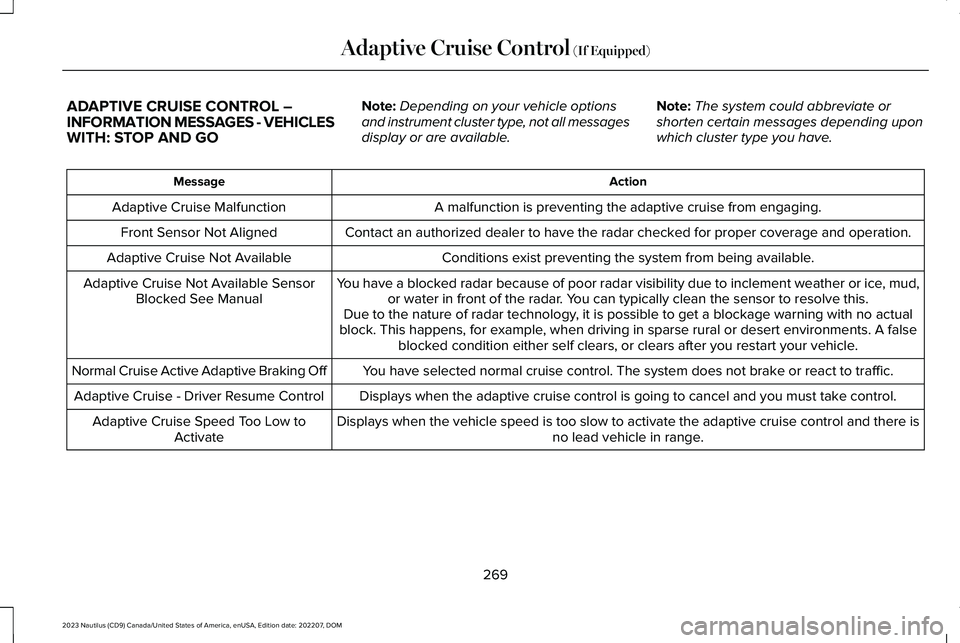
ADAPTIVE CRUISE CONTROL –INFORMATION MESSAGES - VEHICLESWITH: STOP AND GO
Note:Depending on your vehicle optionsand instrument cluster type, not all messagesdisplay or are available.
Note:The system could abbreviate orshorten certain messages depending uponwhich cluster type you have.
ActionMessage
A malfunction is preventing the adaptive cruise from engaging.Adaptive Cruise Malfunction
Front Sensor Not AlignedContact an authorized dealer to have the radar checked for proper coverage and operation.
Conditions exist preventing the system from being available.Adaptive Cruise Not Available
You have a blocked radar because of poor radar visibility due to inclement weather or ice, mud,or water in front of the radar. You can typically clean the sensor to resolve this.Adaptive Cruise Not Available SensorBlocked See ManualDue to the nature of radar technology, it is possible to get a blockage warning with no actualblock. This happens, for example, when driving in sparse rural or desert environments. A falseblocked condition either self clears, or clears after you restart your vehicle.
You have selected normal cruise control. The system does not brake or react to traffic.Normal Cruise Active Adaptive Braking Off
Displays when the adaptive cruise control is going to cancel and you must take control.Adaptive Cruise - Driver Resume Control
Displays when the vehicle speed is too slow to activate the adaptive cruise control and there isno lead vehicle in range.Adaptive Cruise Speed Too Low toActivate
269
2023 Nautilus (CD9) Canada/United States of America, enUSA, Edition date: 202207, DOMAdaptive Cruise Control (If Equipped)
Page 276 of 606
LANE KEEPING SYSTEM
LIMITATIONS
The lane keeping system only operates whenthe vehicle speed is greater than 40 mph(64 km/h).
The system works when the camera candetect at least one lane marking or the edgeof the road.
The lane keeping system may not correctlyoperate in any of the following conditions:
•The lane keeping system does not detectat least one lane marking.
•You switch the turn signal on.
•You apply direct steering, accelerate fastor brake hard.
•The vehicle speed is less than 40 mph(64 km/h).
•The anti-lock brake, stability control ortraction control system activates.
•The lane is too narrow.
•Something is obscuring the camera or itis unable to detect the lane markings dueto environment, traffic or vehicleconditions.
The lane keeping system may not correctlane positioning in any of the followingconditions:
•High winds.
•Uneven road surfaces.
•Heavy or uneven loads.
•Incorrect tire pressure.
SWITCHING THE LANE KEEPING
SYSTEM ON AND OFF
To activate the lane keepingsystem, press the button on theturn signal lever.
Note:The system stores the on or off settinguntil manually changed, unless it detects aMyKey™. If the system detects a MyKey™, itdefaults to on and the mode is set to alert.
Note: If the system detects a MyKey™,pressing the button does not affect the onor off status of the system. You can onlychange the mode and intensity settings.
SWITCHING THE LANE KEEPING
SYSTEM MODE
The lane keeping system has differentsettings that you can view or adjust usingthe information display.
The system stores the last known selectionfor each of these settings. You do not needto readjust your settings each time youswitch on the system.
To change the lane keeping system mode,use the instrument cluster display:
1.Using the instrument cluster displaycontrols on the steering wheel, selectSETTINGS.
2.Select Driver assistance.
3.Select Lane keeping system.
4.Select Mode.
5.Select a mode.
272
2023 Nautilus (CD9) Canada/United States of America, enUSA, Edition date: 202207, DOMLane Keeping SystemE308131
Page 290 of 606
WHAT IS PRE-COLLISION ASSIST
Pre-collision assist detects and warns ofapproaching hazards in the roadway. If yourvehicle is rapidly approaching anotherstationary vehicle, a vehicle traveling in thesame direction as yours, or a pedestrianwithin your driving path, the system providesmultiple levels of assistance to help avoid acollision.
HOW DOES PRE-COLLISION
ASSIST WORK
Pre-Collision Assist with AutomaticEmergency Braking
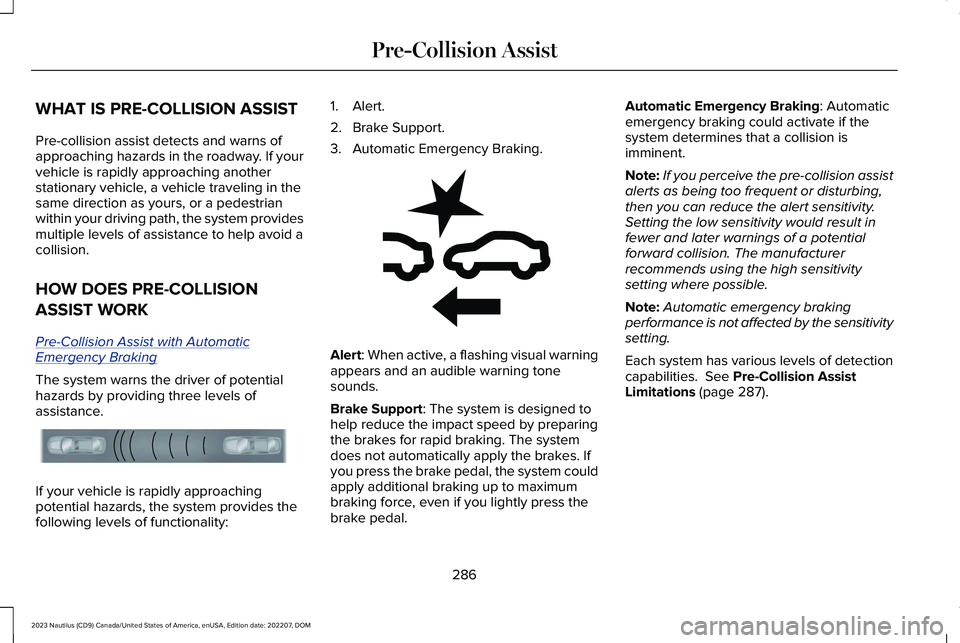
The system warns the driver of potentialhazards by providing three levels ofassistance.
If your vehicle is rapidly approachingpotential hazards, the system provides thefollowing levels of functionality:
1.Alert.
2.Brake Support.
3.Automatic Emergency Braking.
Alert: When active, a flashing visual warningappears and an audible warning tonesounds.
Brake Support: The system is designed tohelp reduce the impact speed by preparingthe brakes for rapid braking. The systemdoes not automatically apply the brakes. Ifyou press the brake pedal, the system couldapply additional braking up to maximumbraking force, even if you lightly press thebrake pedal.
Automatic Emergency Braking: Automaticemergency braking could activate if thesystem determines that a collision isimminent.
Note:If you perceive the pre-collision assistalerts as being too frequent or disturbing,then you can reduce the alert sensitivity.Setting the low sensitivity would result infewer and later warnings of a potentialforward collision. The manufacturerrecommends using the high sensitivitysetting where possible.
Note:Automatic emergency brakingperformance is not affected by the sensitivitysetting.
Each system has various levels of detectioncapabilities. See Pre-Collision AssistLimitations (page 287).
286
2023 Nautilus (CD9) Canada/United States of America, enUSA, Edition date: 202207, DOMPre-Collision AssistE156130 E255268
Page 291 of 606
PRE-COLLISION ASSIST
PRECAUTIONS
WARNING: You are responsible forcontrolling your vehicle at all times. Thesystem is designed to be an aid and doesnot relieve you of your responsibility todrive with due care and attention. Failureto follow this instruction could result in theloss of control of your vehicle, personalinjury or death.
WARNING: The system does notdetect vehicles moving in a differentdirection or animals. Apply the brakeswhen necessary. Failure to follow thisinstruction could result in the loss ofcontrol of your vehicle, personal injury ordeath.
WARNING: The system does notoperate during hard acceleration orsteering. Failure to take care may lead toa crash or personal injury.
WARNING: The system may operatewith reduced function during cold andinclement weather conditions. Snow, ice,rain, spray and fog can adversely affect thesystem. Keep the front camera and radarfree of snow and ice. Failure to follow thisinstruction may result in the loss of controlof your vehicle, serious personal injury ordeath.
WARNING: Take additional care ifyour vehicle is heavily loaded or you aretowing a trailer. These conditions couldresult in reduced performance of thissystem. Failure to follow this instructioncould result in the loss of control of yourvehicle, personal injury or death.
WARNING: The system cannot helpprevent all crashes. Do not rely on thissystem to replace driver judgment and theneed to maintain a safe distance andspeed.
WARNING: System performancecould be reduced in situations where thevehicle camera has limited detectioncapability. These situations include but arenot limited to direct or low sunlight,vehicles at night without tail lights,unconventional vehicle types, andpedestrians and cyclists with complex,partially obscured backgrounds. Failure totake care may result in the loss of controlof your vehicle, personal injury or death.
PRE-COLLISION ASSIST
LIMITATIONS
Pre-collision assist depends on the detectionability of its camera and sensors. Anyobstructions or damage to these areas canlimit detection or prevent the system fromfunctioning. See Locating the Pre-CollisionAssist Sensors (page 288).
The system is active at 3 mph (5 km/h) andabove.
287
2023 Nautilus (CD9) Canada/United States of America, enUSA, Edition date: 202207, DOMPre-Collision Assist
Page 292 of 606
Note:The pre-collision assist systemdisables when you select four-wheel drivelow or manually disable AdvanceTrac™.
Note:Brake support and automaticemergency braking are active at speeds upto 75 mph (120 km/h). If the vehicle has aradar sensor included with adaptive cruisecontrol, then brake support and automaticemergency braking are active up to themaximum speed of the vehicle.
Pedestrian Detection Limitations
Pedestrian detection is active at speeds upto 50 mph (80 km/h).
Pedestrian detection functions optimallywhen detected hazards are clearlyidentifiable. System performance may reducein situations where pedestrians are running,partly obscured, have a complexbackground, or cannot be distinguished froma group.
LOCATING THE PRE-COLLISION
ASSIST SENSORS
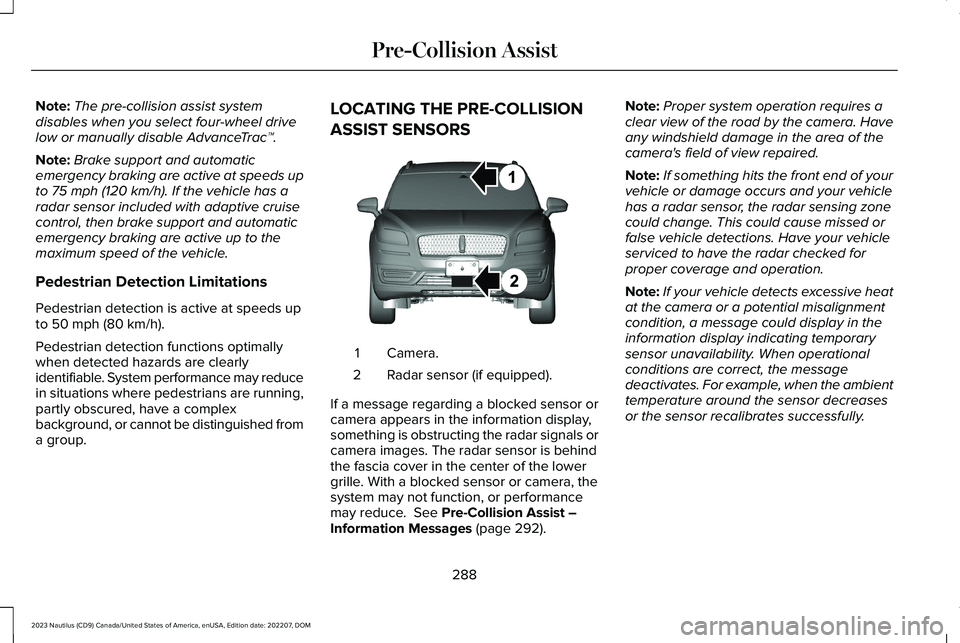
Camera.1
Radar sensor (if equipped).2
If a message regarding a blocked sensor orcamera appears in the information display,something is obstructing the radar signals orcamera images. The radar sensor is behindthe fascia cover in the center of the lowergrille. With a blocked sensor or camera, thesystem may not function, or performancemay reduce. See Pre-Collision Assist –Information Messages (page 292).
Note:Proper system operation requires aclear view of the road by the camera. Haveany windshield damage in the area of thecamera's field of view repaired.
Note:If something hits the front end of yourvehicle or damage occurs and your vehiclehas a radar sensor, the radar sensing zonecould change. This could cause missed orfalse vehicle detections. Have your vehicleserviced to have the radar checked forproper coverage and operation.
Note:If your vehicle detects excessive heatat the camera or a potential misalignmentcondition, a message could display in theinformation display indicating temporarysensor unavailability. When operationalconditions are correct, the messagedeactivates. For example, when the ambienttemperature around the sensor decreasesor the sensor recalibrates successfully.
288
2023 Nautilus (CD9) Canada/United States of America, enUSA, Edition date: 202207, DOMPre-Collision AssistE268024
Page 295 of 606
AUTOMATIC EMERGENCY BRAKING
WHAT IS AUTOMATIC EMERGENCYBRAKING
Automatic emergency braking may activateif the system determines that a collision isimminent. The system may help reduceimpact damage to avoid the crashcompletely.
Automatic emergency braking is onlyavailable up to certain speeds. SeePre-Collision Assist Limitations (page 287).
SWITCHING AUTOMATIC EMERGENCYBRAKING ON AND OFF
To switch the system on or off, use theinstrument cluster display:
1.Using the instrument cluster displaycontrols on the steering wheel, selectSETTINGS.
2.Select Driver assistance.
3.Select Pre-collision.
4.Switch Auto Emergency Braking on oroff.
Note:Automatic emergency brakingswitches on every time you switch theignition on.
EVASIVE STEERING ASSIST (IF EQUIPPED)
WHAT IS EVASIVE STEERING ASSIST
Evasive Steering Assist Video Link
If your vehicle is rapidly approaching a roaduser, evasive steering assist helps you steeraround the road user.
After you turn the steering wheel in anattempt to avoid the crash, the systemapplies additional steering torque to helpyou steer around the road user. After youpass the road user, the system appliessteering torque when you turn the steeringwheel to steer back into the lane. The systemdeactivates after you fully pass the road user.
Note:Road users are defined as a stationaryvehicle or a vehicle in your lane that istraveling in the same direction you aretraveling. See Pre-Collision AssistPrecautions (page 287).
EVASIVE STEERING ASSISTLIMITATIONS
Evasive steering assist only activates whenall the following occur:
•Automatic emergency braking andevasive steering assist are on.
•The system detects a road user aheadand starts to apply the brakes.
•You significantly turn the steering wheelto steer around a road user.
Note:Evasive steering assist does notautomatically steer around a road user. Ifyou do not turn the steering wheel, evasivesteering assist does not activate.
Note:Evasive steering assist does notactivate if the distance to the road userahead is too small and the system cannotavoid a crash.
291
2023 Nautilus (CD9) Canada/United States of America, enUSA, Edition date: 202207, DOMPre-Collision Assist
Page 301 of 606
LOCATING THE SAFETY
COMPLIANCE CERTIFICATION
LABELS
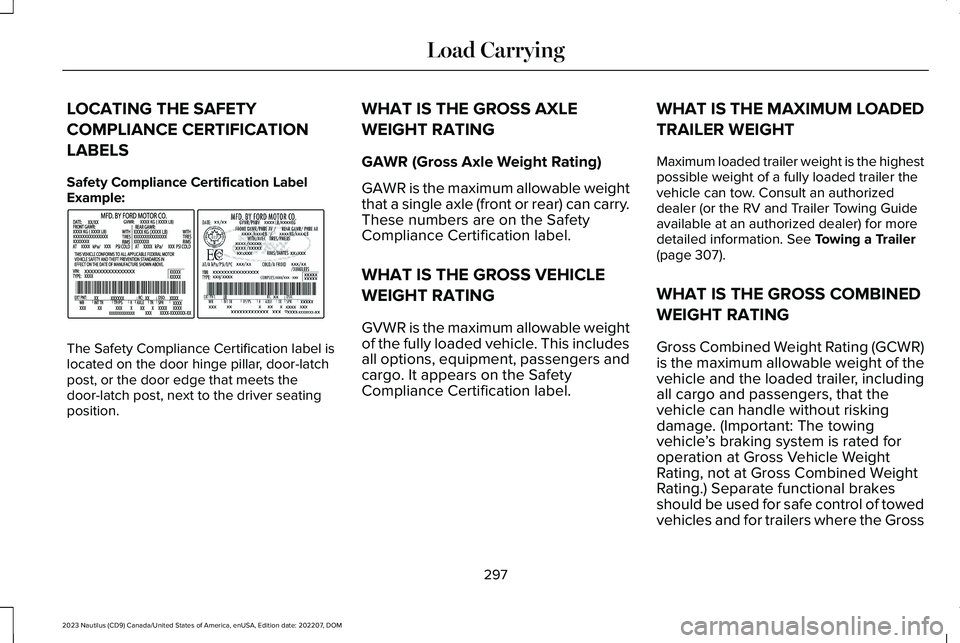
Safety Compliance Certification LabelExample:
The Safety Compliance Certification label islocated on the door hinge pillar, door-latchpost, or the door edge that meets thedoor-latch post, next to the driver seatingposition.
WHAT IS THE GROSS AXLE
WEIGHT RATING
GAWR (Gross Axle Weight Rating)
GAWR is the maximum allowable weightthat a single axle (front or rear) can carry.These numbers are on the SafetyCompliance Certification label.
WHAT IS THE GROSS VEHICLE
WEIGHT RATING
GVWR is the maximum allowable weightof the fully loaded vehicle. This includesall options, equipment, passengers andcargo. It appears on the SafetyCompliance Certification label.
WHAT IS THE MAXIMUM LOADED
TRAILER WEIGHT
Maximum loaded trailer weight is the highestpossible weight of a fully loaded trailer thevehicle can tow. Consult an authorizeddealer (or the RV and Trailer Towing Guideavailable at an authorized dealer) for moredetailed information. See Towing a Trailer(page 307).
WHAT IS THE GROSS COMBINED
WEIGHT RATING
Gross Combined Weight Rating (GCWR)is the maximum allowable weight of thevehicle and the loaded trailer, includingall cargo and passengers, that thevehicle can handle without riskingdamage. (Important: The towingvehicle’s braking system is rated foroperation at Gross Vehicle WeightRating, not at Gross Combined WeightRating.) Separate functional brakes
should be used for safe control of towedvehicles and for trailers where the Gross
297
2023 Nautilus (CD9) Canada/United States of America, enUSA, Edition date: 202207, DOMLoad CarryingE198828
Page 309 of 606
CONNECTING A TRAILER
PRECAUTIONS
Do not tow a trailer until you drive yourvehicle at least 1,000 mi (1,600 km).
Consult your local motor vehicle laws fortowing a trailer.
See the instructions included with towingaccessories for the proper installation andadjustment specifications.
Service your vehicle more frequently if youtow a trailer. See Normal ScheduledMaintenance (page 474).
If you use a rental trailer, follow theinstructions the rental agency gives you.
When attaching the trailer wiring connectorto your vehicle, only use a proper fittingconnector that works with the vehicle andtrailer functions.
Account for the trailer coupler weight as partof your vehicle load when calculating thetotal vehicle weight.
Do not exceed the load limits. SeeCalculating the Load Limit (page 298).
CONNECTING A TRAILER
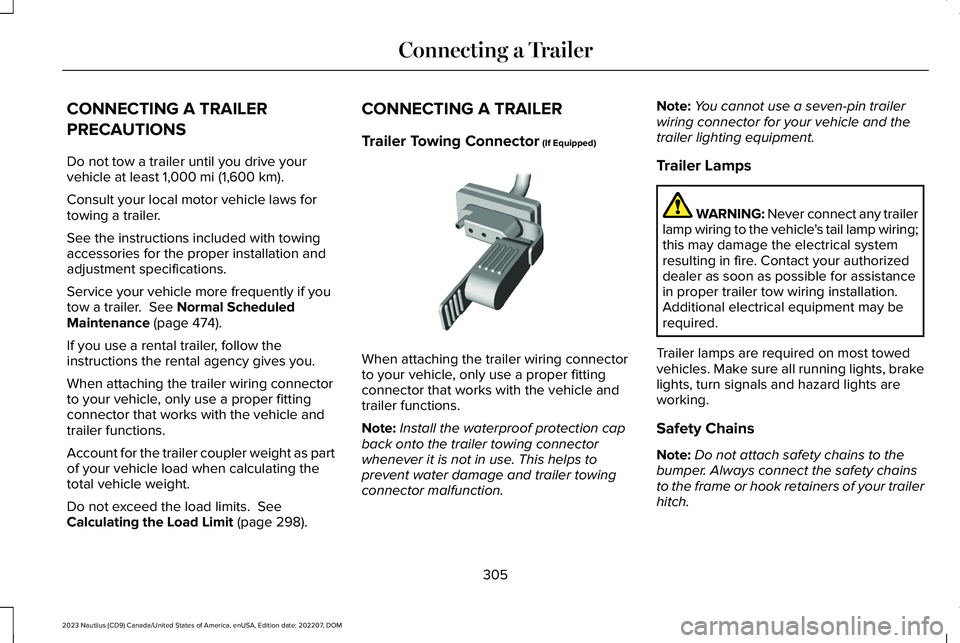
Trailer Towing Connector (If Equipped)
When attaching the trailer wiring connectorto your vehicle, only use a proper fittingconnector that works with the vehicle andtrailer functions.
Note:Install the waterproof protection capback onto the trailer towing connectorwhenever it is not in use. This helps toprevent water damage and trailer towingconnector malfunction.
Note:You cannot use a seven-pin trailerwiring connector for your vehicle and thetrailer lighting equipment.
Trailer Lamps
WARNING: Never connect any trailerlamp wiring to the vehicle's tail lamp wiring;this may damage the electrical systemresulting in fire. Contact your authorizeddealer as soon as possible for assistancein proper trailer tow wiring installation.Additional electrical equipment may berequired.
Trailer lamps are required on most towedvehicles. Make sure all running lights, brakelights, turn signals and hazard lights areworking.
Safety Chains
Note:Do not attach safety chains to thebumper. Always connect the safety chainsto the frame or hook retainers of your trailerhitch.
305
2023 Nautilus (CD9) Canada/United States of America, enUSA, Edition date: 202207, DOMConnecting a Trailer E168683
Page 311 of 606
TOWING A TRAILER PRECAUTIONS
WARNING: Do not exceed theGVWR or the GAWR specified on thecertification label.
WARNING: Towing trailersbeyond the maximum recommendedgross trailer weight exceeds the limitof your vehicle and could result inengine damage, transmission damage,structural damage, loss of vehiclecontrol, vehicle rollover and personalinjury.
WARNING: Do not exceed thelowest rating capacity for your vehicleor trailer hitch. Overloading yourvehicle or trailer hitch can impair yourvehicle stability and handling. Failureto follow this instruction could resultin the loss of control of your vehicle,personal injury or death.
WARNING: Make sure that thevertical load on the tow ball is betweenthe minimum and maximumrecommended weight at all times.Failure to follow this instruction couldresult in the loss of control of yourvehicle, personal injury or death.
WARNING: Do not cut, drill, weldor modify the trailer hitch. Modifyingthe trailer hitch could reduce the hitchrating.
WARNING: The anti-lock brakesystem does not control the trailerbrakes.
TRAILER BRAKE PRECAUTIONS
WARNING: Do not connect a trailer'shydraulic brake system directly to yourvehicle's brake system. Your vehicle maynot have enough braking power and yourchances of having a collision greatlyincrease.
WARNING: Do not tow a trailer fittedwith electric trailer brakes unless yourvehicle is fitted with a compatibleaftermarket electronic trailer brakecontroller. Failure to follow this instructioncould result in the loss of control of yourvehicle, personal injury or death. Foradditional information and assistance, werecommend that you contact an authorizeddealer.
Electric brakes and manual, automatic orsurge-type trailer brakes are safe if you installthem properly and adjust them to themanufacturer's specifications. The trailerbrakes must meet local and federalregulations.
307
2023 Nautilus (CD9) Canada/United States of America, enUSA, Edition date: 202207, DOMTowing a Trailer
Page 312 of 606
The rating for the tow vehicle's brakingsystem operation is at the gross vehicleweight rating, not the gross combined weightrating.
Certain states require functioning trailerbrakes for trailers over a specified weight.Be sure to check state regulations for thisspecified weight.
Ford Motor Company recommends separatefunctioning brake systems for trailersweighing more than 1,500 lb (680 kg) whenloaded.
TOWING A TRAILER LIMITATIONS
The vehicle's load capacity designationis by weight, not by volume, so youcannot necessarily use all availablespace when loading a vehicle or trailer.
Note:Your vehicle could have reducedperformance when operating at highaltitudes and when heavily loaded ortowing a trailer. When driving atelevation, to match driving performanceas perceived at sea level, reduce grossvehicle weight and gross combinationweight by 2% per 1,000 ft (300 m)elevation.
LOADING YOUR TRAILER
To help minimize how trailer movementaffects your vehicle when driving:
•Load the heaviest items closest tothe trailer floor.
•Load the heaviest items centeredbetween the left and right side trailertires.
•Load the heaviest items above thetrailer axles or just slightly forwardtoward the trailer tongue. Do notallow the final trailer tongue weightto go above or below 10-15% of theloaded trailer weight. The trailertongue weight should never exceed10% of the maximum towing capacity.
•Select a ball mount with the correctrise or drop. When both the loadedvehicle and trailer are connected, thetrailer frame should be level, orslightly angled down toward yourvehicle, when viewed from the side.
TRAILER TOWING HINTS
Towing a trailer places an extra load on yourvehicle's engine, transmission, axle, brakes,tires and suspension. Periodically inspectthese components during and after anytowing operation.
When driving with a trailer or payload, a slighttakeoff vibration or shudder may be presentdue to the increased payload weight.
308
2023 Nautilus (CD9) Canada/United States of America, enUSA, Edition date: 202207, DOMTowing a Trailer