reset LINCOLN NAVIGATOR 2010 Owner's Guide
[x] Cancel search | Manufacturer: LINCOLN, Model Year: 2010, Model line: NAVIGATOR, Model: LINCOLN NAVIGATOR 2010Pages: 385, PDF Size: 2.96 MB
Page 139 of 385
Two stage unlocking may be disabled or re-enabled by simultaneously
pressing the
andcontrols on the IKT for four seconds (disabling
two stage unlock allows all vehicle doors to unlock simultaneously). The
parking lamps will flash twice to indicate that two-stage unlock was
enabled or disabled.
Locking the doors
1. Pressand release to lock all the doors. The parking lamps will
illuminate.
2. Press
and release again within three seconds to confirm that all
the doors are closed.Note:The doors will lock again, the horn will chirp
and the turn lamps will illuminate once if all the doors and liftgate are
closed.
Note:If any door or the liftgate is not closed, or if the hood is not
closed in vehicles equipped with the perimeter alarm feature, the horn
will chirp twice and the turn lamps will not flash.
Opening the power liftgate
Presstwice within three seconds to open the power liftgate. This
control will not unlatch the liftgate window.
WARNING:Make sure all persons are clear of the power liftgate
area before using the control.
To close the power liftgate, press the control twice.
If the power liftgate stops mid travel, it may have detected an obstacle,
Check to ensure the power liftgate swing zone is free from obstruction
and reset the power assist by manually closing the power liftgate. Normal
operation can then be resumed.
WARNING:Make sure the power liftgate is closed to prevent
exhaust fumes from being drawn into the vehicle. This will also
prevent passengers and cargo from falling out. If you must drive with
the liftgate open, keep the vents open so outside air comes into the
vehicle.
Car finder
Press
twice within three seconds. The horn will chirp and the turn
lamps will flash. It is recommended that this method be used to locate
your vehicle, rather than using the panic alarm.
Locks and Security
139
2010 Navigator(nav)
Owners Guide(own2002), 1st Printing
USA(fus)
Page 149 of 385
Create a MyKey™
To program MyKey™ on one of the keys programmed to the vehicle,
insert it into the ignition. Turn the ignition on. Use the message center
buttons to do the following:
1. Press SETUP until PRESS RESET TO CREATE MYKEY is displayed.
2. Press and release the RESET button. HOLD RESET TO CONFIRM
MYKEY will be displayed.
3. Press and hold the RESET button for two seconds until MARK THIS
AS RESTRICTED is displayed.
4. Wait until KEY RESTRICTED AT NEXT START is displayed.
MyKey™ is successfully programmed. Make sure you label it so you can
distinguish it from the Admin keys.Note:To program the optional settings
go to step 2 in theProgramming MyKey™ optional settingssection.
Note:The MyKey™ can be cleared within the same key cycle that it was
created, otherwise a standard key (Administrator key) is required to
disable the MyKey™ programming. To clear all MyKeys™ go to step 2 in
theDisable MyKey™section.
Programming MyKey™ Optional Settings
Turn the ignition on using an Admin key. To program the optional
settings, use the message center buttons to do the following:
1. Press SETUP until RESET FOR MYKEY SETUP is displayed.
2. Press and release the RESET button to display MyKey™ setup menus.
The first menu shown is:
MYKEY MAX MPH <80 MPH> OFF
3. If you don’t want to change the maximum speed setting, press the
SETUP button to display the next menu. The remaining menus appear as
follows with the default settings shown:
MYKEY MPH TONES 45 55 65
MYKEY VOLUME LIMIT
MYKEY ADVTRAC CTRL ON
4. On any of the menus press RESET to highlight your choice with the
<…>.
5. Press SETUP to enter your choice. The next optional setting will be
displayed.
6.
Repeat steps 4 and 5 until you are done changing the optional settings.
Locks and Security
149
2010 Navigator(nav)
Owners Guide(own2002), 1st Printing
USA(fus)
Page 150 of 385
Disable MyKey™
To reset all MyKeys™ as Admin keys do the following:
1. Turn the vehicle on using the Admin key.
2. Press SETUP until PRESS RESET TO CLEAR MYKEY is displayed.
3. Press and release the RESET button. HOLD RESET TO CONFIRM
CLEAR is displayed.
4. Press and hold the RESET button for two seconds until ALL MYKEYS
CLEARED is displayed.
Check MyKey™ System Status
The vehicle System Check will provide the status of the following
MyKey™ parameters:
•MYKEY MILES — This odometer only tracks mileage when a MyKey™
is used. If mileage does not accumulate as expected, then the
MyKey™ is not being used by the intended user. The only way to
reset this odometer to zero is by disabling MyKey™. If this odometer
is lower than the last time you checked, then the MyKey™ system has
been recently cleared.
•# MYKEY(S) PROGRAMMED — Indicates how many MyKeys™ are
programmed to the vehicle. Can be used to detect deletion of a
MyKey™.
•# ADMIN KEYS PROGRAMMED — Indicates how many Admin keys
are programmed to the vehicle. Can be used to detect if an additional
spare key has been programmed to the vehicle
Refer toMessage centerin theInstrument Clusterchapter for MyKey™
system warnings displays.
Locks and Security
150
2010 Navigator(nav)
Owners Guide(own2002), 1st Printing
USA(fus)
Page 158 of 385
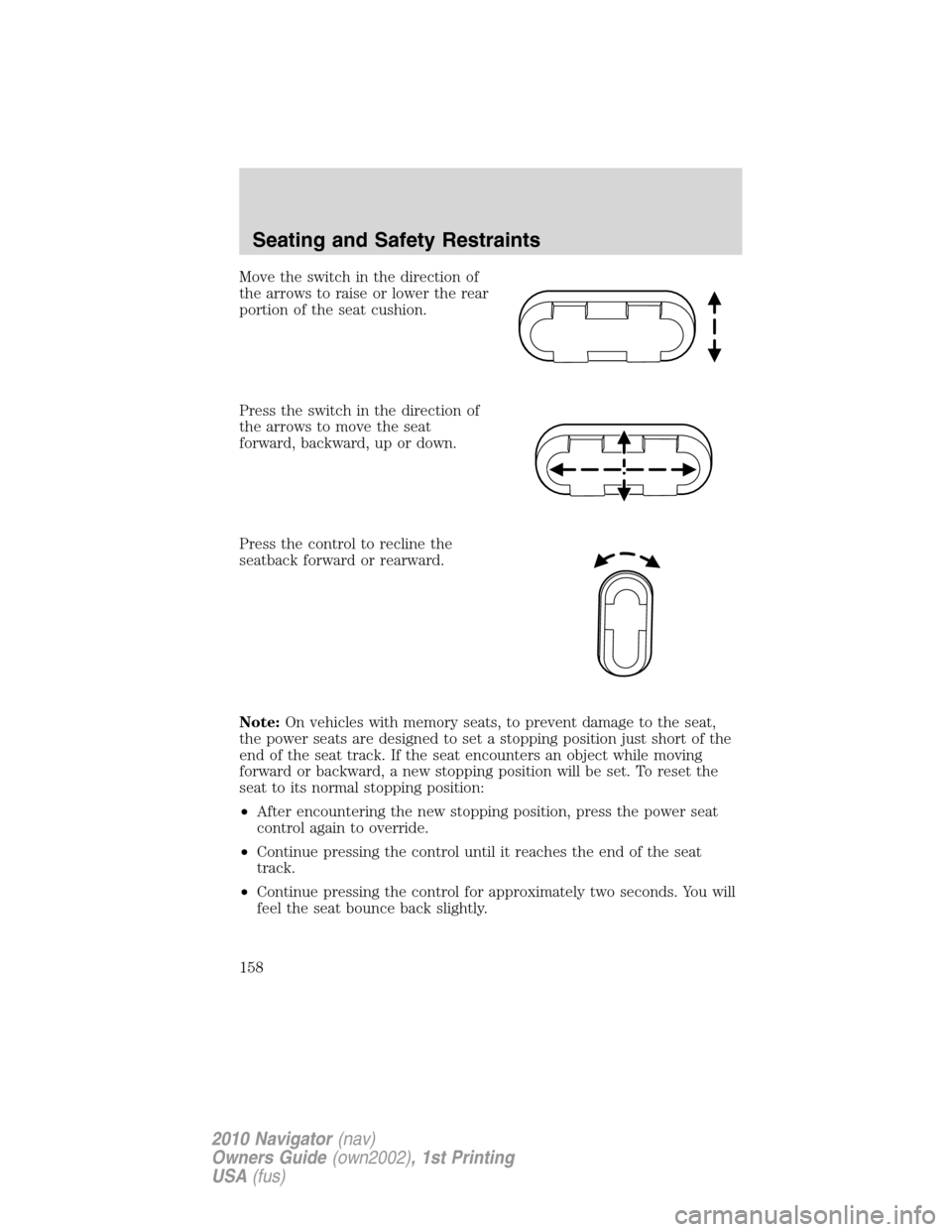
Move the switch in the direction of
the arrows to raise or lower the rear
portion of the seat cushion.
Press the switch in the direction of
the arrows to move the seat
forward, backward, up or down.
Press the control to recline the
seatback forward or rearward.
Note:On vehicles with memory seats, to prevent damage to the seat,
the power seats are designed to set a stopping position just short of the
end of the seat track. If the seat encounters an object while moving
forward or backward, a new stopping position will be set. To reset the
seat to its normal stopping position:
•After encountering the new stopping position, press the power seat
control again to override.
•Continue pressing the control until it reaches the end of the seat
track.
•Continue pressing the control for approximately two seconds. You will
feel the seat bounce back slightly.
Seating and Safety Restraints
158
2010 Navigator(nav)
Owners Guide(own2002), 1st Printing
USA(fus)
Page 170 of 385
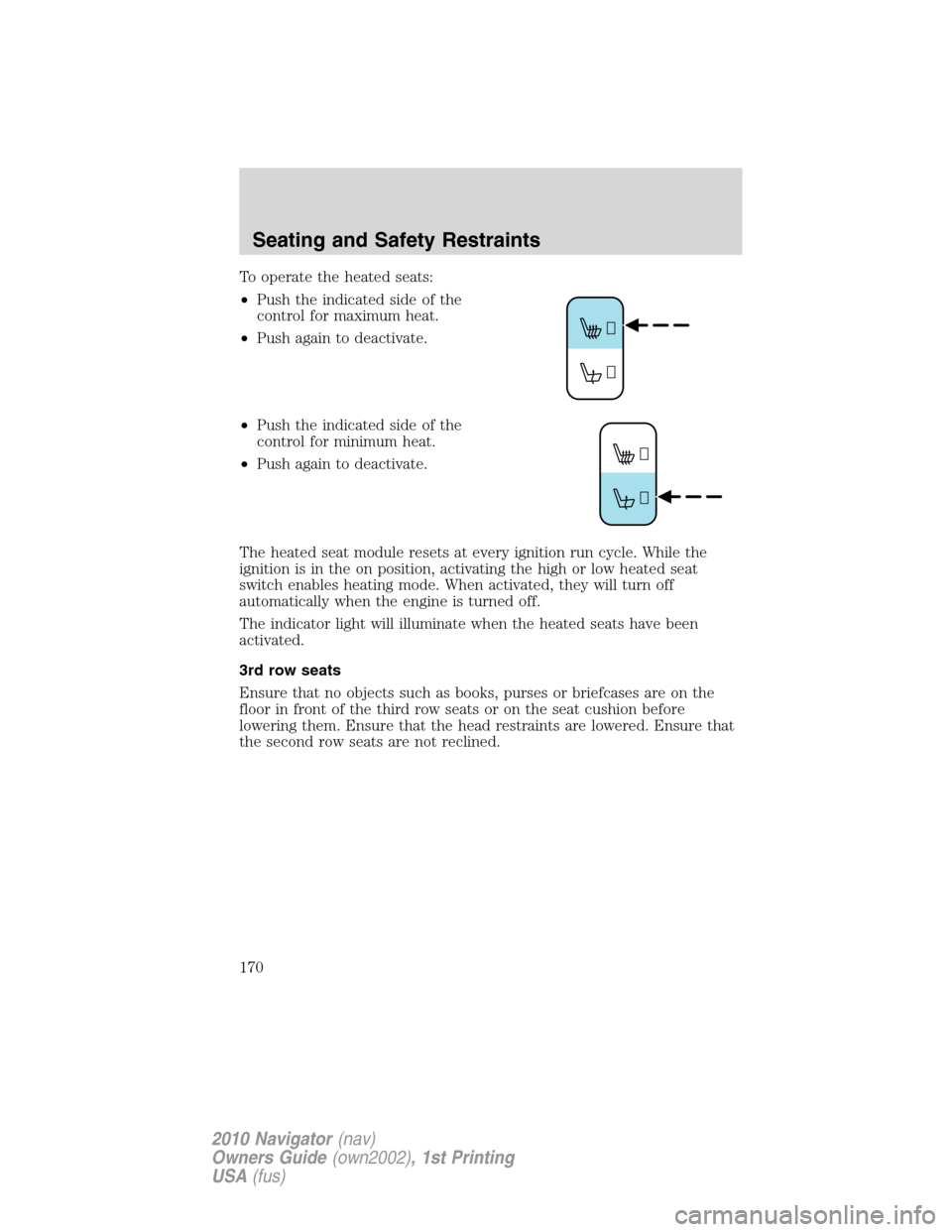
To operate the heated seats:
•Push the indicated side of the
control for maximum heat.
•Push again to deactivate.
•Push the indicated side of the
control for minimum heat.
•Push again to deactivate.
The heated seat module resets at every ignition run cycle. While the
ignition is in the on position, activating the high or low heated seat
switch enables heating mode. When activated, they will turn off
automatically when the engine is turned off.
The indicator light will illuminate when the heated seats have been
activated.
3rd row seats
Ensure that no objects such as books, purses or briefcases are on the
floor in front of the third row seats or on the seat cushion before
lowering them. Ensure that the head restraints are lowered. Ensure that
the second row seats are not reclined.
Seating and Safety Restraints
170
2010 Navigator(nav)
Owners Guide(own2002), 1st Printing
USA(fus)
Page 294 of 385
Note:With extended use, the flasher may run down your battery.
FUEL PUMP SHUT-OFF SWITCH
FUEL
RESET
The fuel pump shut-off switch is a device intended to stop the electric
fuel pump when your vehicle has been involved in a substantial jolt.
After a collision, if the engine cranks but does not start, the fuel pump
shut-off switch may have been activated.
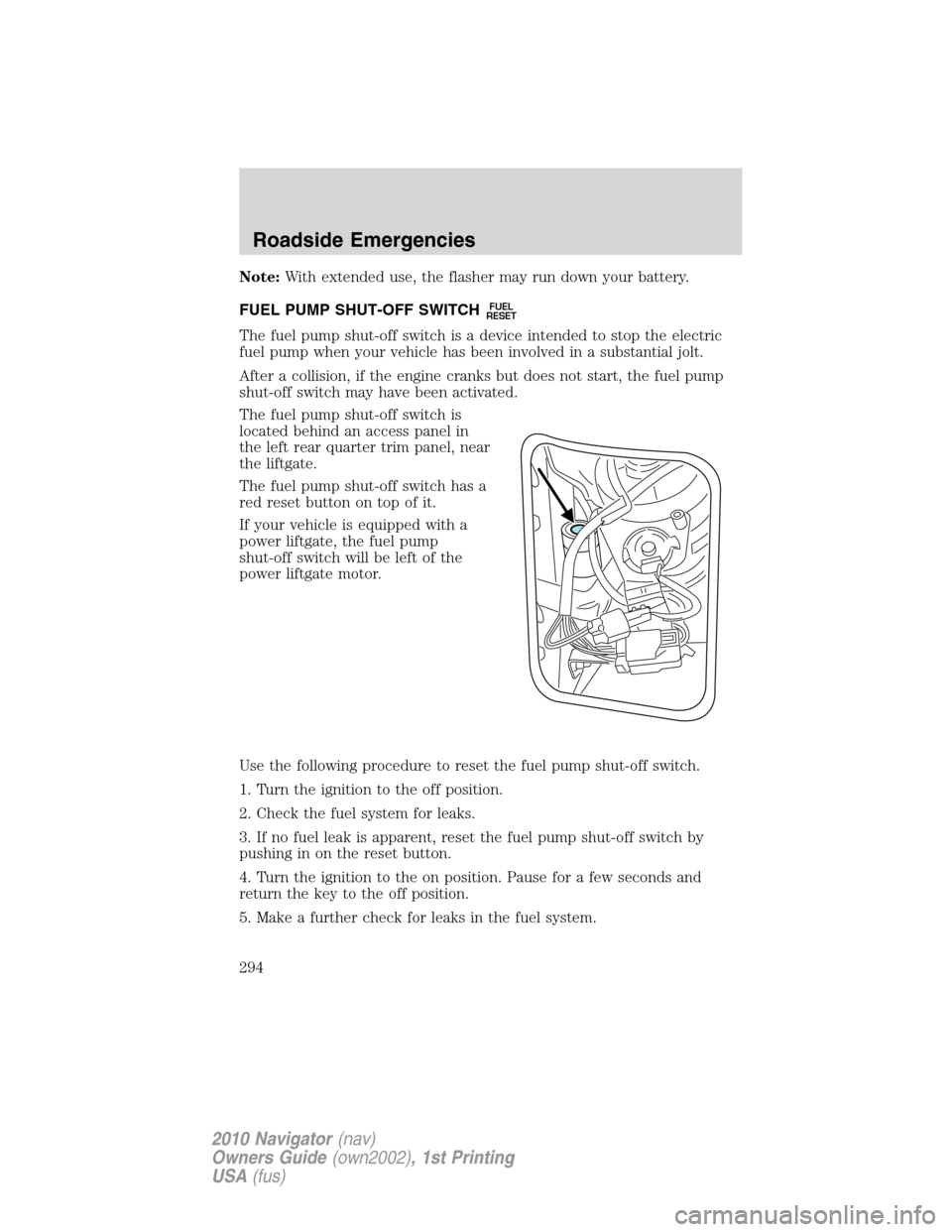
The fuel pump shut-off switch is
located behind an access panel in
the left rear quarter trim panel, near
the liftgate.
The fuel pump shut-off switch has a
red reset button on top of it.
If your vehicle is equipped with a
power liftgate, the fuel pump
shut-off switch will be left of the
power liftgate motor.
Use the following procedure to reset the fuel pump shut-off switch.
1. Turn the ignition to the off position.
2. Check the fuel system for leaks.
3. If no fuel leak is apparent, reset the fuel pump shut-off switch by
pushing in on the reset button.
4. Turn the ignition to the on position. Pause for a few seconds and
return the key to the off position.
5. Make a further check for leaks in the fuel system.
Roadside Emergencies
294
2010 Navigator(nav)
Owners Guide(own2002), 1st Printing
USA(fus)
Page 344 of 385
WARNING:Keep batteries out of reach of children. Batteries
contain sulfuric acid. Avoid contact with skin, eyes or clothing.
Shield your eyes when working near the battery to protect against
possible splashing of acid solution. In case of acid contact with skin or
eyes, flush immediately with water for a minimum of 15 minutes and
get prompt medical attention. If acid is swallowed, call a physician
immediately.
WARNING:Battery posts, terminals and related accessories
contain lead and lead compounds.Wash hands after handling.
Because your vehicle’s engine is electronically controlled by a computer,
some control conditions are maintained by power from the battery. When
the battery is disconnected or a new battery is installed, the engine must
relearn its idle and fuel trim strategy for optimum driveability and
performance. To begin this process:
1. With the vehicle at a complete stop, set the parking brake.
2. Put the gearshift in P (Park), turn off all accessories and start the
engine.
3. Run the engine until it reaches normal operating temperature.
4. Allow the engine to idle for at least one minute.
5. Turn the A/C on and allow the engine to idle for at least one minute.
6. Release the parking brake. With your foot on the brake pedal and with
the A/C on, put the vehicle in D (Drive) and allow the engine to idle for
at least one minute.
7. Drive the vehicle to complete the relearning process.
•The vehicle may need to be driven 10 miles (16 km) or more to
relearn the idle and fuel trim strategy.
•If you do not allow the engine to relearn its idle trim, the idle
quality of your vehicle may be adversely affected until the idle
trim is eventually relearned.
If the battery has been disconnected or a new battery has been installed,
the clock and radio settings must be reset once the battery is
reconnected.
Maintenance and Specifications
344
2010 Navigator(nav)
Owners Guide(own2002), 1st Printing
USA(fus)
Page 349 of 385
•NEVER increase the coolant concentration above 60%.
•Increased engine coolant concentrations above 60% will
decrease the overheat protection characteristics of the engine
coolant and may cause engine damage.
•Refer to the chart on the coolant container to ensure the
coolant concentration in your vehicle will provide adequate
freeze protection at the temperatures in which you drive in the
winter months.
If you drive in extremely hot climates:
•It is still necessary to maintain the coolant concentration
above 40%.
•NEVER decrease the coolant concentration below 40%.
•Decreased engine coolant concentrations below 40% will
decrease the corrosion protection characteristics of the engine
coolant and may cause engine damage.
•Decreased engine coolant concentrations below 40% will
decrease the freeze protection characteristics of the engine
coolant and may cause engine damage.
•Refer to the chart on the coolant container to ensure the
coolant concentration in your vehicle will provide adequate
protection at the temperatures in which you drive.
Vehicles driven year-round in non-extreme climates should use a 50/50
mixture of engine coolant and distilled water for optimum cooling system
and engine protection.
What you should know about fail-safe cooling
If the engine coolant supply is depleted, this feature allows the vehicle to
be driven temporarily before incremental component damage is incurred.
The “fail-safe” distance depends on ambient temperatures, vehicle load
and terrain.
How fail-safe cooling works
If the engine begins to overheat:
•The engine coolant temperature gauge will move to the red (hot)
area.
•The engine coolant temperature
symbol will illuminate.
•The
indicator light will illuminate.
If the engine reaches a preset over-temperature condition, the engine
will automatically switch to alternating cylinder operation. Each disabled
cylinder acts as an air pump and cools the engine.
Maintenance and Specifications
349
2010 Navigator(nav)
Owners Guide(own2002), 1st Printing
USA(fus)
Page 354 of 385
When fueling your vehicle:
1. Turn the engine off.
2. Open the fuel filler door.
3. Slowly insert the fuel filler nozzle fully into the fuel system. Pump fuel
as normal.
4. After you are done pumping fuel, slowly remove the fuel filler
nozzle—allow about five seconds after pumping fuel before removing the
fuel filler nozzle. This allows residual fuel to drain back into the fuel tank
and not spill onto the vehicle.
Note:A fuel spillage concern may occur if overfilling the fuel tank. Do
not overfill the tank to the point that the fuel is able to bypass the fuel
filler nozzle. The overfilled fuel may run down the drain located within
the fuel filler housing and to the ground.
If the Check Fuel Fill Inlet lamp or Check Fuel Fill Inlet message comes
on, the fuel fill inlet may not have properly closed. The inlet may have
stuck open or debris may be preventing the inlet from fully closing. At
the next opportunity, safely pull off the road, turn off the engine, open
the fuel filler door and remove any visible debris from the fuel fill
opening. Insert either the fuel fill nozzle or the fuel fill funnel (see
Refilling with a portable fuel containerfor funnel location) provided
with the vehicle several times to dislodge any debris and/or allow the
inlet to close properly. If this action corrects the problem, the Check
Fuel Fill Inlet lamp or Check Fuel Fill Inlet message may not reset
immediately. It may take several driving cycles for the Check Fuel Fill
Inlet lamp or Check Fuel Fill Inlet message to turn off. A driving cycle
consists of an engine start-up (after four or more hours with the engine
off) followed by city/highway driving. Continuing to drive with the Check
Fuel Fill Inlet lamp or Check Fuel Fill Inlet message on may cause the
Service Engine Soon lamp to turn on as well.
WARNING:The fuel system may be under pressure. If you hear
a hissing sound near the fuel filler door (Easy Fuel™ “no cap”
fuel system), do not refuel until the sound stops. Otherwise, fuel may
spray out, which could cause serious personal injury.
Flex Fuel Vehicle (FFV) fuel fill inlet
Flex fuel vehicles have a yellow bezel placed over the fuel fill inlet.
Choosing the right fuel
Use only UNLEADED FUEL and FUEL ETHANOL (Ed75–Ed85).
Maintenance and Specifications
354
2010 Navigator(nav)
Owners Guide(own2002), 1st Printing
USA(fus)