CD player LINCOLN NAVIGATOR 2014 User Guide
[x] Cancel search | Manufacturer: LINCOLN, Model Year: 2014, Model line: NAVIGATOR, Model: LINCOLN NAVIGATOR 2014Pages: 506, PDF Size: 5.72 MB
Page 355 of 506
•Before playing a disc, clean it with a commercially available cleaning
cloth. Wipe each disc from the center out. Do not use solvents such
as benzene, thinner, commercially available cleaners, or antistatic
spray intended for analog discs.
•Do not use any irregularly shaped discs. If you insert an irregular,
non-round, shaped disc, it may jam in the DVD player or not play
properly.
How to Use the DVD On-screen Display Menus
You can use the on-screen display menu screen to adjust all the settings
on your screen.
General Setup
PressSETUPon the remote control, and then useCH +, CH -, VOL +
andVOL -to navigate the Setup Page. PressENTERto make a
selection, and thenVOL -to return to the submenu.
To exit the Setup Display, pressSETUPagain.
OSD Language
The OSD Lang submenu allows the user to select the language for the
on-screen display. PressVOL +,and then useCH +andCH -on the
remote control to select the desired language. The user can select
English, Simple/Traditional Chinese, French, German, Italian, Spanish,
Portuguese or Korean. PressENTERto make a selection, and thenVOL
-to return to the submenu.
Angle Mark
The angle mark is an option for different viewing angles on the DVD.
PressVOL +andVOL -to turn the angle mark setting off and on. Press
ENTERto make a selection, and thenVOL -to return to the submenu.
Audio Setup
PressSETUPon the remote control, and then useCH +, CH -, VOL +
andVOL -to navigate the Setup Page. PressENTERto make a
selection, and thenVOL -to return to the submenu.
Speaker Setup
PressSETUPon the remote control and then useVOL +to navigate to
the Audio Setup Page. PressENTERto navigate to the submenu. Use
CH +, CH -, VOL +andVOL -to navigate the submenus. PressENTER
orVOL +to make a selection, and thenVOL +andVOL -to see the
selection items. PressENTERto make a selection, and thenVOL -to
return to the submenu.
354Audio System
2014 Navigator(nav)
Owners Guide gf, 1st Printing, June 2013
USA(fus)
Page 358 of 506
Playing an Audio CD
When playing an audio CD, the DISPLAY banner appears automatically.
It displays the current track and the amount of time the track has been
playing, the total amount of time on the disc and the current time
running on the disc.
PressDISPLAYon the remote control to see the DISPLAY banner.
•PressDISPLAYonce: Single Elapsed appears along with the current
track playing and the time of that track.
•PressDISPLAYtwice: Single Remain appears along with the current
track playing and the amount of time left.
•PressDISPLAYthree times: Total Elapsed appears along with the
current track playing and the total time playing on CD.
•PressDISPLAYfour times: Total Remain appears along with the
current track playing and the amount of time left on CD.
Press theREPEATon the remote control to repeat either the currently
playing track or the entire CD.
Playing an MP3 Disc
MP3 is a format for storing digital audio. An audio CD-quality song
compressed into the MP3 format has very little loss of quality, while
taking up much less space. You can play CD-R discs encoded in MP3
format in your DVD player.
Selecting Folders and Songs
When you insert an MP3 disc in the player, an MP3 audio-navigation
screen appears automatically. You can change folders and songs by
navigating the file system. The DVD player plays the songs in the order
you burned them to the disc.
1. If a disc is playing, pressDISPLAYon the remote control, and then
pressCH +andCH -to go through the folder list on the left side of
the navigation screen.
2. Highlight the folder you want, and then pressENTER.
3. PressCH +andCH -to go through the song list and highlight the
song you want. PressENTERto begin playing the highlighted song.
Skipping Songs
PressNEXTon the remote control to move to the next song. Press
PREVto move to the beginning of the currently playing song. Press
PREVtwice to move to the previous song.
Audio System357
2014 Navigator(nav)
Owners Guide gf, 1st Printing, June 2013
USA(fus)
Page 360 of 506
Connecting an MP3 Device
Using a USB Cable
Plug the MP3 Dock Connector to USB cable into a high-power USB port
on your DVD-headrest module, and then connect the other end to the
player.
See the documentation that came with your device for more information.
Charging the MP3 Player Battery
After you turn the DVD-headrest module on, connect the device to the
USB port on your DVD-headrest module
Note:Not all devices are able to charge when connected to the USB
port.
Using an A/V Cable
1. Connect the device to the headphone port using an A/V cable.Note:
Use the A/V cable made specifically for the device. Other similar
RCA-type cables might not work.
2. Connect the video and audio connectors to the AV-IN ports on
your DVD-headrest module, matching the yellow, red and white
connectors to the appropriate jacks.
Troubleshooting
Symptom Possible cause
The device does not
power on.Your vehicle ignition is not on.
The remote control does not have batteries
installed.
The infrared sensor is
inoperative.The batteries in the remote control are not
working.
The remote sensor eye is blocked.
The infrared transmitter is blocking the sensor
eye of the component to be controlled
The disc does not play. You inserted the disc backward.
The disc is defective. Try another disc.
The disc is not compatible with the
entertainment system.
The device code and disc region code do not
match. This device is set to Region 1.
Audio System359
2014 Navigator(nav)
Owners Guide gf, 1st Printing, June 2013
USA(fus)
Page 361 of 506
Symptom Possible cause
The disc plays, but
then immediately
stops.The disc is dirty and needs cleaning.
Condensation has formed inside the device.
Allow the player to dry out.
There is no picture. The signal source is not connected.
The setting may be in the wrong status. Match
the monitor mode with the source correctly.
There is a distorted
picture.The disc may be dirty. Check the disc for
fingerprints and clean with a soft cloth, wiping
from center to edge.
Sometimes a small amount of picture
distortion may appear. This is not a
malfunction.
I cannot advance
through a movie.You cannot advance through the opening
credits and warning information that appears
at the beginning of movies because the disc
prohibits that action.
There is no sound, or
there is distorted
sound.You did not connect the DVD player properly.
You did not attach the cables securely into the
appropriate jacks.
If you are using the wireless headphones,
make sure you turn them on.
The headphone volume is too low.
Something may be blocking the signal between
the monitor and the headphones.
The device feels warm. If the device is in use for a long time, it does
become warm. This is normal.
The player does not
respond to all
commands during
playback.The disc prohibits some operations.
Refer to the instructions in the disc inlay.
360Audio System
2014 Navigator(nav)
Owners Guide gf, 1st Printing, June 2013
USA(fus)
Page 365 of 506
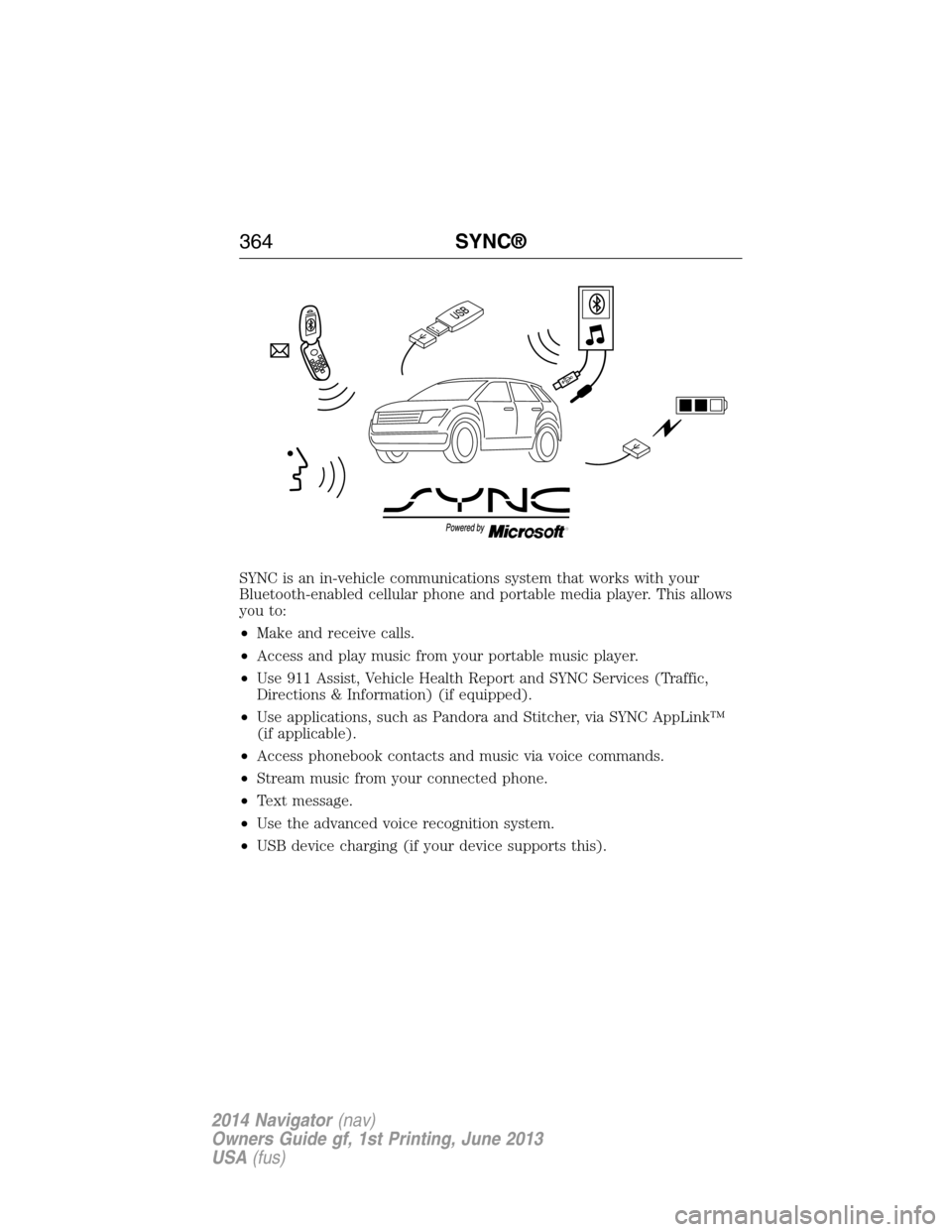
SYNC is an in-vehicle communications system that works with your
Bluetooth-enabled cellular phone and portable media player. This allows
you to:
•Make and receive calls.
•Access and play music from your portable music player.
•Use 911 Assist, Vehicle Health Report and SYNC Services (Traffic,
Directions & Information) (if equipped).
•Use applications, such as Pandora and Stitcher, via SYNC AppLink™
(if applicable).
•Access phonebook contacts and music via voice commands.
•Stream music from your connected phone.
•Text message.
•Use the advanced voice recognition system.
•USB device charging (if your device supports this).
364SYNC®
2014 Navigator(nav)
Owners Guide gf, 1st Printing, June 2013
USA(fus)
Page 367 of 506
When using SYNC:
•Do not operate playing devices if the power cords or cables are
broken, split or damaged. Place cords and cables out of the way,
so they do not interfere with the operation of pedals, seats,
compartments or safe driving abilities.
•Do not leave playing devices in your vehicle during extreme conditions
as it could cause them damage. See your device’s manual for further
information.
•Do not attempt to service or repair the system. See your authorized
dealer.
For your safety, some SYNC functions are speed-dependent. Their use is
limited to when your vehicle is traveling at speeds under 3 mph (5 km/h).
Make sure that you review your device’s manual before using it with
SYNC.
Privacy Information
When a cellular phone is connected to SYNC, the system creates a
profile within your vehicle that is linked to that cellular phone. This
profile is created in order to offer you more cellular features and to
operate more efficiently. Among other things, this profile may contain
data about your cellular phone book, text messages (read and unread),
and call history, including history of calls when your cell phone was not
connected to the system. In addition, if you connect a media device,
the system creates and retains an index of supported media content.
The system also records a short development log of approximately
10 minutes of all recent system activity. The log profile and other system
data may be used to improve the system and help diagnose any problems
that may occur.
The cellular profile, media device index, and development log remain in
the vehicle unless you delete them and are generally accessible only in
the vehicle when the cellular phone or media player is connected. If you
no longer plan to use the system or the vehicle, we recommend you
perform a Master Reset to erase all stored information.
366SYNC®
2014 Navigator(nav)
Owners Guide gf, 1st Printing, June 2013
USA(fus)
Page 394 of 506
To Access Using Voice Commands
1. Press the voice icon.
2. When prompted, say “Mobile Apps”.
3. Say the name of the application after the tone.
4. The app should start. While an app is running through SYNC, you can
press the voice button and speak commands specific to the app, such
as “Play Station Quickmix”. Say “Help” to discover available voice
commands.
USING SYNC WITH YOUR MEDIA PLAYER
You can access and play music from your digital music player over the
vehicle’s speaker system using the system’s media menu or voice
commands. You can also sort and play your music by specific categories,
such as artists, albums, etc.
SYNC is capable of hosting nearly any digital media player including:
iPod, Zune™, Plays from device players, and most USB drives. SYNC also
supports audio formats such as MP3, WMA, WAV and ACC.
Connecting Your Digital Media Player via the USB Port
Note:If your digital media player has a power switch, ensure that the
device is turned on.
To connect using voice commands:
1. Plug the device into the vehicle’s USB port.
2. Press the voice icon and when prompted, say “USB”.
3. You can now play music by saying any of the appropriate voice
commands. See the media voice commands.
To connect using the system menu:
1. Plug the device into the vehicle’s USB port.
2. Press AUX and then MENU to enter the Media Menu.
3. Scroll until Select Source appears and press OK.
4. Scroll to select USB and press OK.
5. Depending on how many digital media files are on your connected
device, Indexing may appear in the radio display. When indexing is
complete, the screen returns to the Play Menu.
6. Press OK and scroll through selections of:
•Play All
•Artists
•Albums
•Genres
•Playlists
•Tracks
SYNC®393
2014 Navigator(nav)
Owners Guide gf, 1st Printing, June 2013
USA(fus)
Page 396 of 506
“USB”
“Repeat off”
“Repeat on”
“Search album
1,3
“Search artist
“Search genre
“Search song
“Search track
“Shuffle off”
“Shuffle on”
“Similar music”
“What’s playing?”
1“
desired group, artist, etc.
2Voice commands which are only available in folder mode.3Voice commands which are not available until indexing is complete.
Voice command guide
“Autoplay”Turn on to listen to music which has already
been randomly indexed during the indexing
process.
Turn off and the system does not begin to play
any of your music until all media has all been
indexed. Indexing times can vary from device to
device and also with regard to the number of
songs being indexed.
“Search/Play Genre”The system searches all the data from your
indexed music and, if available, begins to play
the chosen type of music. You can only play
genres of music which are present in the
GENRE metadata tags that you have on your
digital media player.
“Similar Music”The system compiles a playlist and then plays
similar music to what is currently playing from
the USB port using indexed metadata
information.
“Search/Play
Artist/Track/Album”The system searches for a specific
artist/track/album from the music indexed
through the USB port.
SYNC®395
2014 Navigator(nav)
Owners Guide gf, 1st Printing, June 2013
USA(fus)
Page 398 of 506
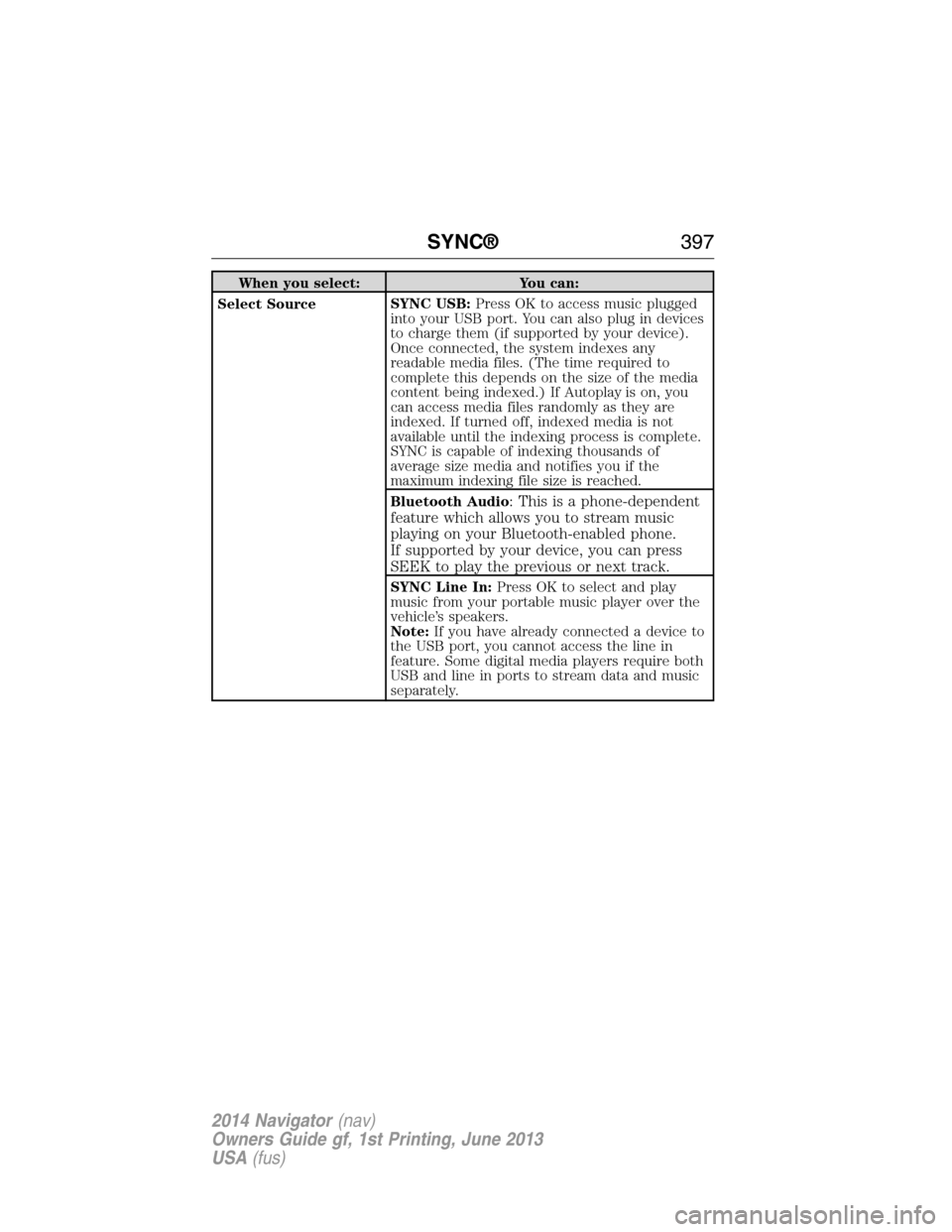
When you select: You can:
Select SourceSYNC USB:Press OK to access music plugged
into your USB port. You can also plug in devices
to charge them (if supported by your device).
Once connected, the system indexes any
readable media files. (The time required to
complete this depends on the size of the media
content being indexed.) If Autoplay is on, you
can access media files randomly as they are
indexed. If turned off, indexed media is not
available until the indexing process is complete.
SYNC is capable of indexing thousands of
average size media and notifies you if the
maximum indexing file size is reached.
Bluetooth Audio
: This is a phone-dependent
feature which allows you to stream music
playing on your Bluetooth-enabled phone.
If supported by your device, you can press
SEEK to play the previous or next track.
SYNC Line In:Press OK to select and play
music from your portable music player over the
vehicle’s speakers.
Note:If you have already connected a device to
the USB port, you cannot access the line in
feature. Some digital media players require both
USB and line in ports to stream data and music
separately.
SYNC®397
2014 Navigator(nav)
Owners Guide gf, 1st Printing, June 2013
USA(fus)
Page 399 of 506
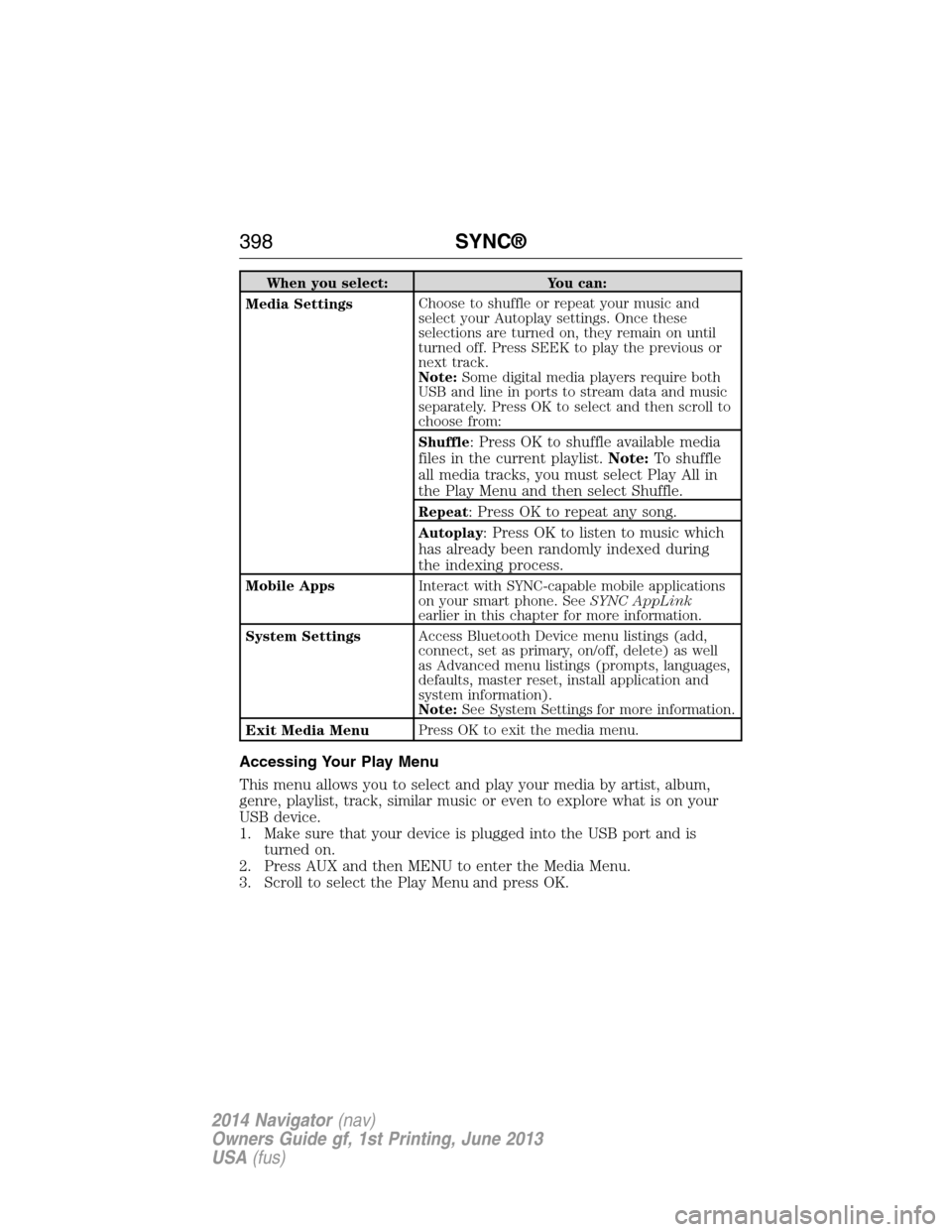
When you select: You can:
Media SettingsChoose to shuffle or repeat your music and
select your Autoplay settings. Once these
selections are turned on, they remain on until
turned off. Press SEEK to play the previous or
next track.
Note:Some digital media players require both
USB and line in ports to stream data and music
separately. Press OK to select and then scroll to
choose from:
Shuffle
: Press OK to shuffle available media
files in the current playlist.Note:To shuffle
all media tracks, you must select Play All in
the Play Menu and then select Shuffle.
Repeat: Press OK to repeat any song.
Autoplay: Press OK to listen to music which
has already been randomly indexed during
the indexing process.
Mobile AppsInteract with SYNC-capable mobile applications
on your smart phone. SeeSYNC AppLink
earlier in this chapter for more information.
System SettingsAccess Bluetooth Device menu listings (add,
connect, set as primary, on/off, delete) as well
as Advanced menu listings (prompts, languages,
defaults, master reset, install application and
system information).
Note:See System Settings for more information.
Exit Media MenuPress OK to exit the media menu.
Accessing Your Play Menu
This menu allows you to select and play your media by artist, album,
genre, playlist, track, similar music or even to explore what is on your
USB device.
1. Make sure that your device is plugged into the USB port and is
turned on.
2. Press AUX and then MENU to enter the Media Menu.
3. Scroll to select the Play Menu and press OK.
398SYNC®
2014 Navigator(nav)
Owners Guide gf, 1st Printing, June 2013
USA(fus)