fuel pump LINCOLN NAVIGATOR 2014 User Guide
[x] Cancel search | Manufacturer: LINCOLN, Model Year: 2014, Model line: NAVIGATOR, Model: LINCOLN NAVIGATOR 2014Pages: 506, PDF Size: 5.72 MB
Page 250 of 506
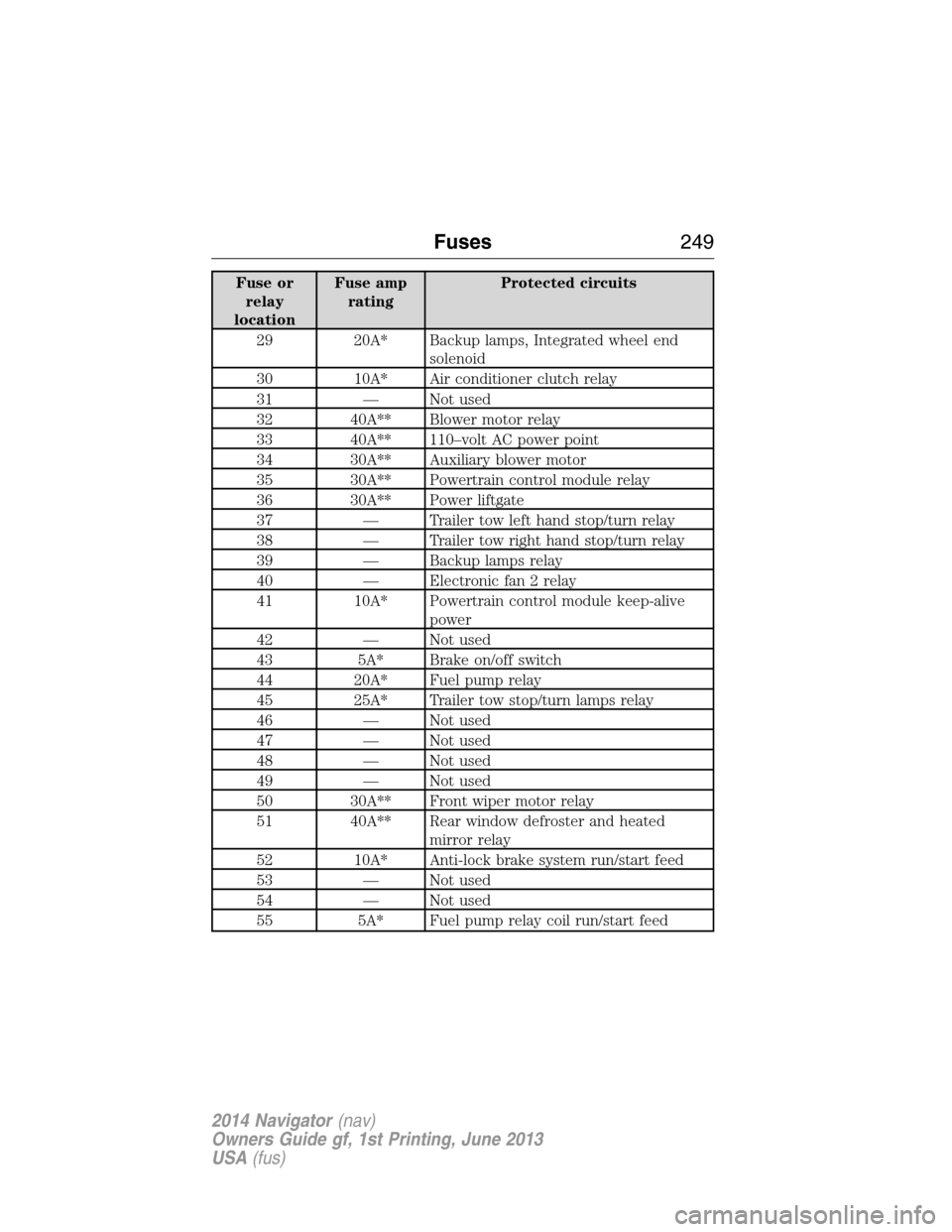
Fuse or
relay
locationFuse amp
ratingProtected circuits
29 20A* Backup lamps, Integrated wheel end
solenoid
30 10A* Air conditioner clutch relay
31 — Not used
32 40A** Blower motor relay
33 40A** 110–volt AC power point
34 30A** Auxiliary blower motor
35 30A** Powertrain control module relay
36 30A** Power liftgate
37 — Trailer tow left hand stop/turn relay
38 — Trailer tow right hand stop/turn relay
39 — Backup lamps relay
40 — Electronic fan 2 relay
41 10A* Powertrain control module keep-alive
power
42 — Not used
43 5A* Brake on/off switch
44 20A* Fuel pump relay
45 25A* Trailer tow stop/turn lamps relay
46 — Not used
47 — Not used
48 — Not used
49 — Not used
50 30A** Front wiper motor relay
51 40A** Rear window defroster and heated
mirror relay
52 10A* Anti-lock brake system run/start feed
53 — Not used
54 — Not used
55 5A* Fuel pump relay coil run/start feed
Fuses249
2014 Navigator(nav)
Owners Guide gf, 1st Printing, June 2013
USA(fus)
Page 251 of 506
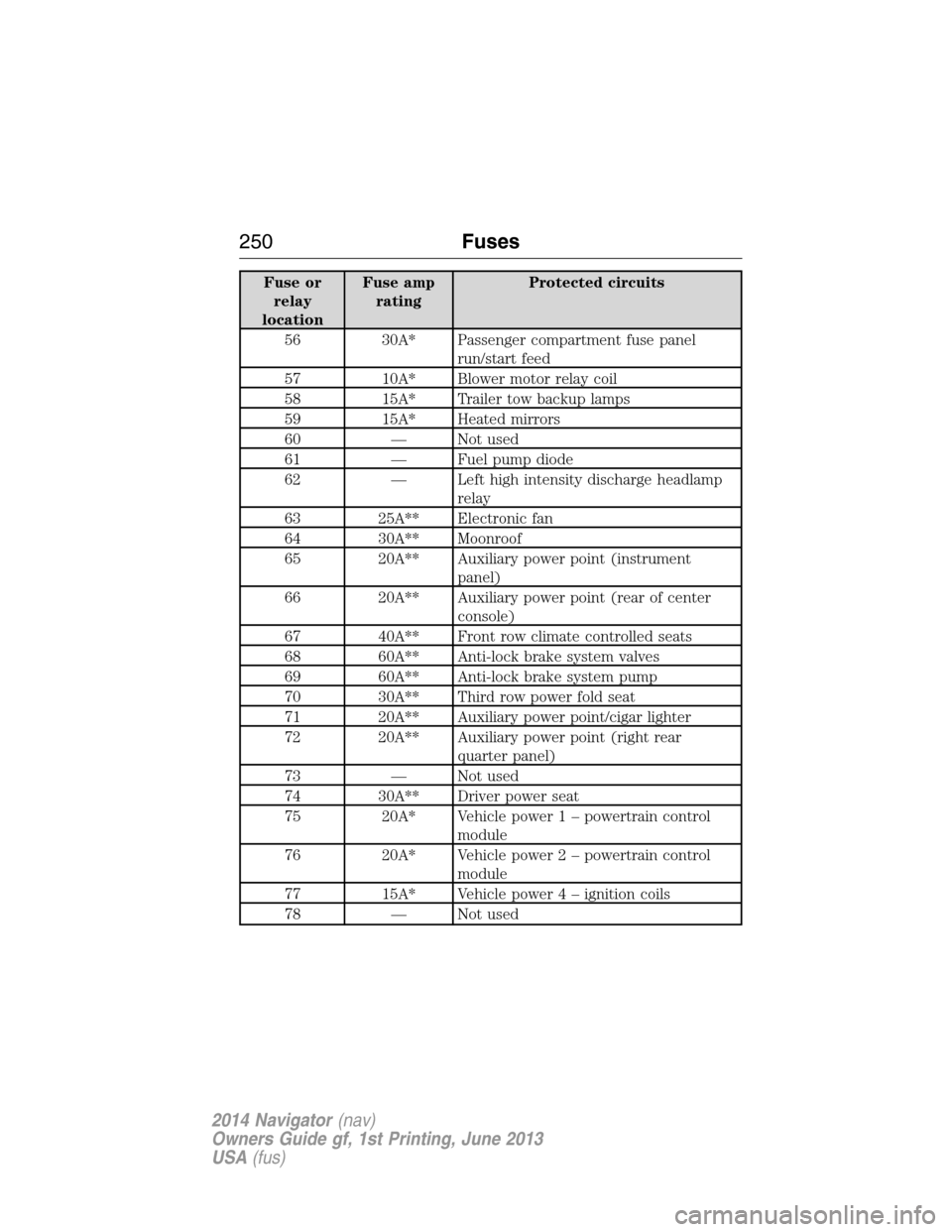
Fuse or
relay
locationFuse amp
ratingProtected circuits
56 30A* Passenger compartment fuse panel
run/start feed
57 10A* Blower motor relay coil
58 15A* Trailer tow backup lamps
59 15A* Heated mirrors
60 — Not used
61 — Fuel pump diode
62 — Left high intensity discharge headlamp
relay
63 25A** Electronic fan
64 30A** Moonroof
65 20A** Auxiliary power point (instrument
panel)
66 20A** Auxiliary power point (rear of center
console)
67 40A** Front row climate controlled seats
68 60A** Anti-lock brake system valves
69 60A** Anti-lock brake system pump
70 30A** Third row power fold seat
71 20A** Auxiliary power point/cigar lighter
72 20A** Auxiliary power point (right rear
quarter panel)
73 — Not used
74 30A** Driver power seat
75 20A* Vehicle power 1 – powertrain control
module
76 20A* Vehicle power 2 – powertrain control
module
77 15A* Vehicle power4–ignition coils
78 — Not used
250Fuses
2014 Navigator(nav)
Owners Guide gf, 1st Printing, June 2013
USA(fus)
Page 286 of 506
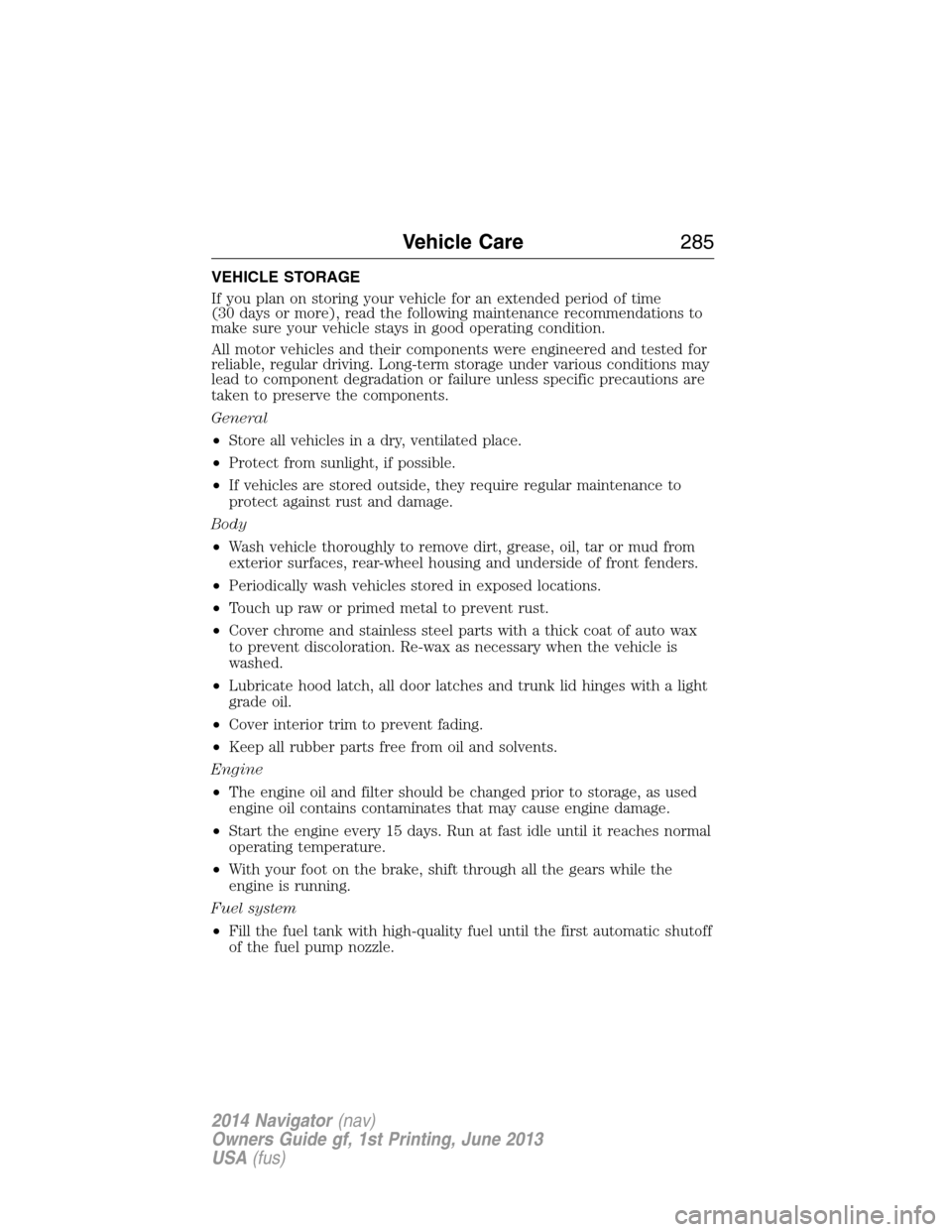
VEHICLE STORAGE
If you plan on storing your vehicle for an extended period of time
(30 days or more), read the following maintenance recommendations to
make sure your vehicle stays in good operating condition.
All motor vehicles and their components were engineered and tested for
reliable, regular driving. Long-term storage under various conditions may
lead to component degradation or failure unless specific precautions are
taken to preserve the components.
General
•Store all vehicles in a dry, ventilated place.
•Protect from sunlight, if possible.
•If vehicles are stored outside, they require regular maintenance to
protect against rust and damage.
Body
•Wash vehicle thoroughly to remove dirt, grease, oil, tar or mud from
exterior surfaces, rear-wheel housing and underside of front fenders.
•Periodically wash vehicles stored in exposed locations.
•Touch up raw or primed metal to prevent rust.
•Cover chrome and stainless steel parts with a thick coat of auto wax
to prevent discoloration. Re-wax as necessary when the vehicle is
washed.
•Lubricate hood latch, all door latches and trunk lid hinges with a light
grade oil.
•Cover interior trim to prevent fading.
•Keep all rubber parts free from oil and solvents.
Engine
•The engine oil and filter should be changed prior to storage, as used
engine oil contains contaminates that may cause engine damage.
•Start the engine every 15 days. Run at fast idle until it reaches normal
operating temperature.
•With your foot on the brake, shift through all the gears while the
engine is running.
Fuel system
•Fill the fuel tank with high-quality fuel until the first automatic shutoff
of the fuel pump nozzle.
Vehicle Care285
2014 Navigator(nav)
Owners Guide gf, 1st Printing, June 2013
USA(fus)
Page 385 of 506
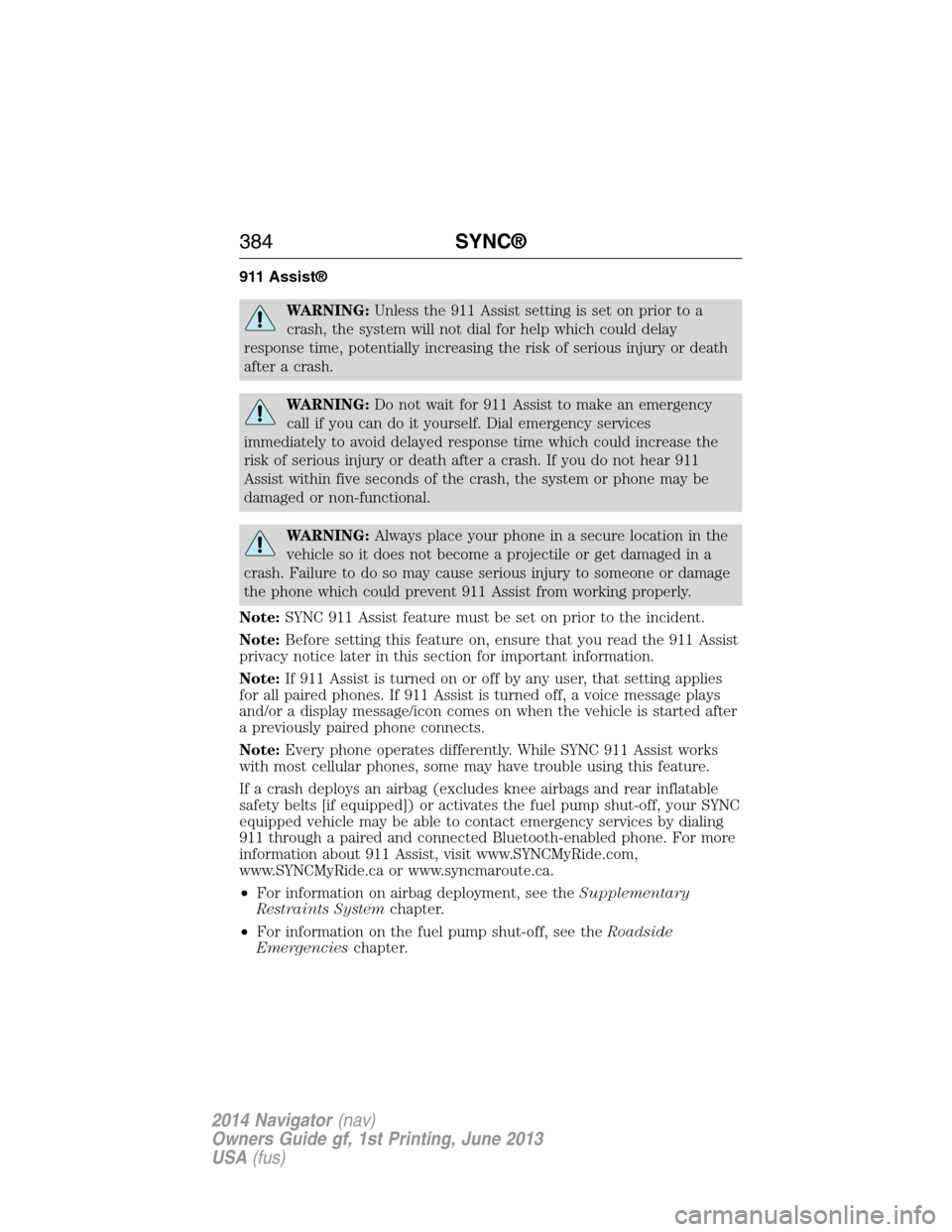
911 Assist®
WARNING:Unless the 911 Assist setting is set on prior to a
crash, the system will not dial for help which could delay
response time, potentially increasing the risk of serious injury or death
after a crash.
WARNING:Do not wait for 911 Assist to make an emergency
call if you can do it yourself. Dial emergency services
immediately to avoid delayed response time which could increase the
risk of serious injury or death after a crash. If you do not hear 911
Assist within five seconds of the crash, the system or phone may be
damaged or non-functional.
WARNING:Always place your phone in a secure location in the
vehicle so it does not become a projectile or get damaged in a
crash. Failure to do so may cause serious injury to someone or damage
the phone which could prevent 911 Assist from working properly.
Note:SYNC 911 Assist feature must be set on prior to the incident.
Note:Before setting this feature on, ensure that you read the 911 Assist
privacy notice later in this section for important information.
Note:If 911 Assist is turned on or off by any user, that setting applies
for all paired phones. If 911 Assist is turned off, a voice message plays
and/or a display message/icon comes on when the vehicle is started after
a previously paired phone connects.
Note:Every phone operates differently. While SYNC 911 Assist works
with most cellular phones, some may have trouble using this feature.
If a crash deploys an airbag (excludes knee airbags and rear inflatable
safety belts [if equipped]) or activates the fuel pump shut-off, your SYNC
equipped vehicle may be able to contact emergency services by dialing
911 through a paired and connected Bluetooth-enabled phone. For more
information about 911 Assist, visit www.SYNCMyRide.com,
www.SYNCMyRide.ca or www.syncmaroute.ca.
•For information on airbag deployment, see theSupplementary
Restraints Systemchapter.
•For information on the fuel pump shut-off, see theRoadside
Emergencieschapter.
384SYNC®
2014 Navigator(nav)
Owners Guide gf, 1st Printing, June 2013
USA(fus)
Page 386 of 506
Setting 911 Assist On
Perform the following:
1. Press the phone button to enter the Phone Menu.
2. Scroll until 911 Assist is selected.
3. Press OK to confirm and enter the 911 Assist menu.
4. Scroll to select between On and Off selections.
5. Press OK when the desired option appears in the radio display.
Set On or Set Off appears in the display as confirmation.
Off selections include: Off with reminder and Off without reminder.
Off with reminder provides a display and voice reminder at phone
connection at vehicle start. Off without reminder provides a display
reminder only without a voice reminder at phone connection.
To make sure that 911 Assist works properly:
•SYNC must be powered and working properly at the time of the
incident and throughout feature activation and use.
•SYNC 911 Assist feature must be set on prior to the incident.
•A Bluetooth-enabled and compatible phone has to be paired and
connected to SYNC.
•A connected Bluetooth-enabled phone must have the ability to make
and maintain an outgoing call at the time of the incident.
•A connected Bluetooth-enabled phone must have adequate network
coverage, battery power and signal strength.
•The vehicle must have battery power and be located in the United
States, Canada or in a territory in which 911 is the emergency
number.
In the Event of a Crash
Not all crashes deploy an airbag or activate the fuel pump shut-off
(which would activate 911 Assist); however, if 911 Assist is triggered,
SYNC tries to contact emergency services. If a connected phone is
damaged or loses connection to SYNC, SYNC searches for, and tries to
connect to, any available previously paired phone and tries to make the
call to 911.
Before making the call:
•
SYNC provides a short window of time (about 10 seconds) to cancel the
call. Failure to cancel the call results in SYNC attempting to dial 911.
•SYNC says the following, or a similar message: “SYNC will attempt to call
911, to cancel the call, press Cancel on your screen or press and hold the
phone button on your steering wheel.”
SYNC®385
2014 Navigator(nav)
Owners Guide gf, 1st Printing, June 2013
USA(fus)
Page 387 of 506
If the call is not cancelled and a successful call is made, a pre-recorded
message is played for the 911 operator, then the occupant(s) in the
vehicle is able to talk with the operator. Be prepared to provide your
name, phone number and location immediately, because not all 911
systems are capable of receiving this information electronically.
911 Assist May Not Work If
•Your cellular phone or 911 Assist hardware was damaged in a crash.
•The vehicle’s battery or SYNC system has no power.
•The phone(s) paired and connected to the system was thrown from
the vehicle.
911 Assist Privacy Notice
Once 911 Assist is set on, it may disclose to emergency services that the
vehicle has been in a crash involving the deployment of an airbag or
activation of the fuel pump shut-off. Certain versions or updates to 911
Assist may also be capable of electronically or verbally disclosing to 911
operators the vehicle location, and/or other details about the vehicle or
crash to assist 911 operators to provide the most appropriate emergency
services. If you do not want to disclose this information, do not turn the
feature on.
Vehicle Health Report
WARNING:Always follow scheduled maintenance instructions,
regularly inspect your vehicle, and seek repair for any damage or
problem you suspect. Vehicle Health Report supplements, but cannot
replace normal maintenance and vehicle inspection. Vehicle Health
Report only monitors certain systems that are electronically monitored
by the vehicle and will not monitor or report the status of any other
system, (i.e., brake lining wear). Failure to perform scheduled
maintenance and regularly inspect your vehicle may result in vehicle
damage and serious injury.
Note:Your Vehicle Health Report feature requires activation prior to
use. Visit www.SYNCMyRide.com to register. There is no fee or
subscription associated with Vehicle Health Report, but you must register
to use this feature.
Note:This feature may not function properly if you have enabled caller
ID blocking on your mobile phone. Before running a report, review the
Vehicle Health Report privacy notice.
386SYNC®
2014 Navigator(nav)
Owners Guide gf, 1st Printing, June 2013
USA(fus)
Page 501 of 506
Dual automatic temperature
control (DATC) .................119, 121
DVD (if equipped) ....................344
DVD region coding ...................353
DVD system ...............................344
E
Electronic message center .......109
Electronic stability control ......194
Emergencies, roadside
jump-starting ..........................235
running out of fuel .................168
Emission control system ..........172
End user license agreement ....468
Engine ........................................319
cleaning ...................................281
coolant .....................................259
fail-safe cooling .......................262
idle speed control ...................265
lubrication specifications .......320
refill capacities ........................320
service points ..........................257
starting after a collision .........234
Engine block heater .................163
Engine oil
checking and adding ..............258
dipstick ....................................258
filter, specifications ................324
refill capacities ........................320
specifications ..........................320
Event data recording ..................12
Exhaust fumes ..........................162
F
Fail safe cooling ........................262
Fleet MyKey programming ........62Floor mats .................................230
Fluid capacities .........................320
Fog lamps ....................................91
Forward and reverse sensing
system ........................................196
Four-Wheel Drive vehicles .......182
description ..............................183
driving off road .......................184
indicator light .........................182
Fuel
cap ...........................................170
capacity ...................................320
choosing the right fuel ...166–167
filler funnel .............................168
filling your vehicle with fuel ..170
filter, specifications ................264
fuel pump shut-off switch .....234
octane rating ...................167, 319
quality ......................................166
running out of fuel .................168
safety information relating to
automotive fuels .....................165
Fuel - flex fuel
vehicle (FFV) ....................166–167
Fuses ..........................246–247, 251
G
Garage door opener ..........145, 149
Gas cap (see Fuel cap) ............170
Gauges .......................................102
H
Hazard flashers .........................233
HD Radio™ ...............................426
Headlamps ...................................89
aiming ......................................271
autolamp system .......................90
500Index
2014 Navigator(nav)
Owners Guide gf, 1st Printing, June 2013
USA(fus)