tow LINCOLN NAVIGATOR 2015 User Guide
[x] Cancel search | Manufacturer: LINCOLN, Model Year: 2015, Model line: NAVIGATOR, Model: LINCOLN NAVIGATOR 2015Pages: 475, PDF Size: 5.13 MB
Page 99 of 475
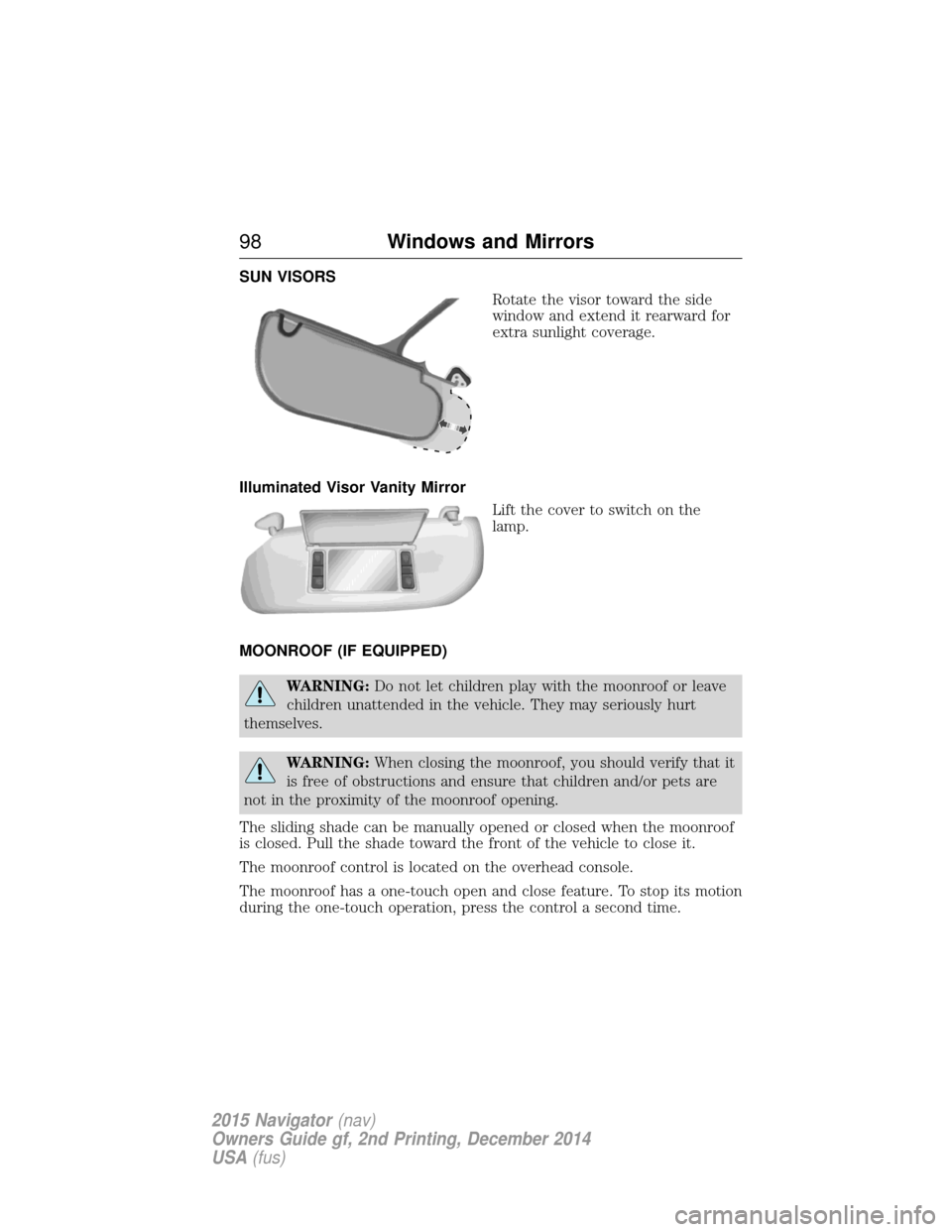
SUN VISORSRotate the visor toward the side
window and extend it rearward for
extra sunlight coverage.
Illuminated Visor Vanity Mirror Lift the cover to switch on the
lamp.
MOONROOF (IF EQUIPPED)
WARNING: Do not let children play with the moonroof or leave
children unattended in the vehicle. They may seriously hurt
themselves.
WARNING: When closing the moonroof, you should verify that it
is free of obstructions and ensure that children and/or pets are
not in the proximity of the moonroof opening.
The sliding shade can be manually opened or closed when the moonroof
is closed. Pull the shade toward the front of the vehicle to close it.
The moonroof control is located on the overhead console.
The moonroof has a one-touch open and close feature. To stop its motion
during the one-touch operation, press the control a second time.
98 Windows and Mirrors
2015 Navigator (nav)
Owners Guide gf, 2nd Printing, December 2014
USA (fus)
Page 105 of 475
WARNING:Under engine misfire conditions, excessive exhaust
temperatures could damage the catalytic converter, the fuel
system, interior floor coverings or other vehicle components, possibly
causing a fire. Have an authorized dealer service your vehicle
immediately.
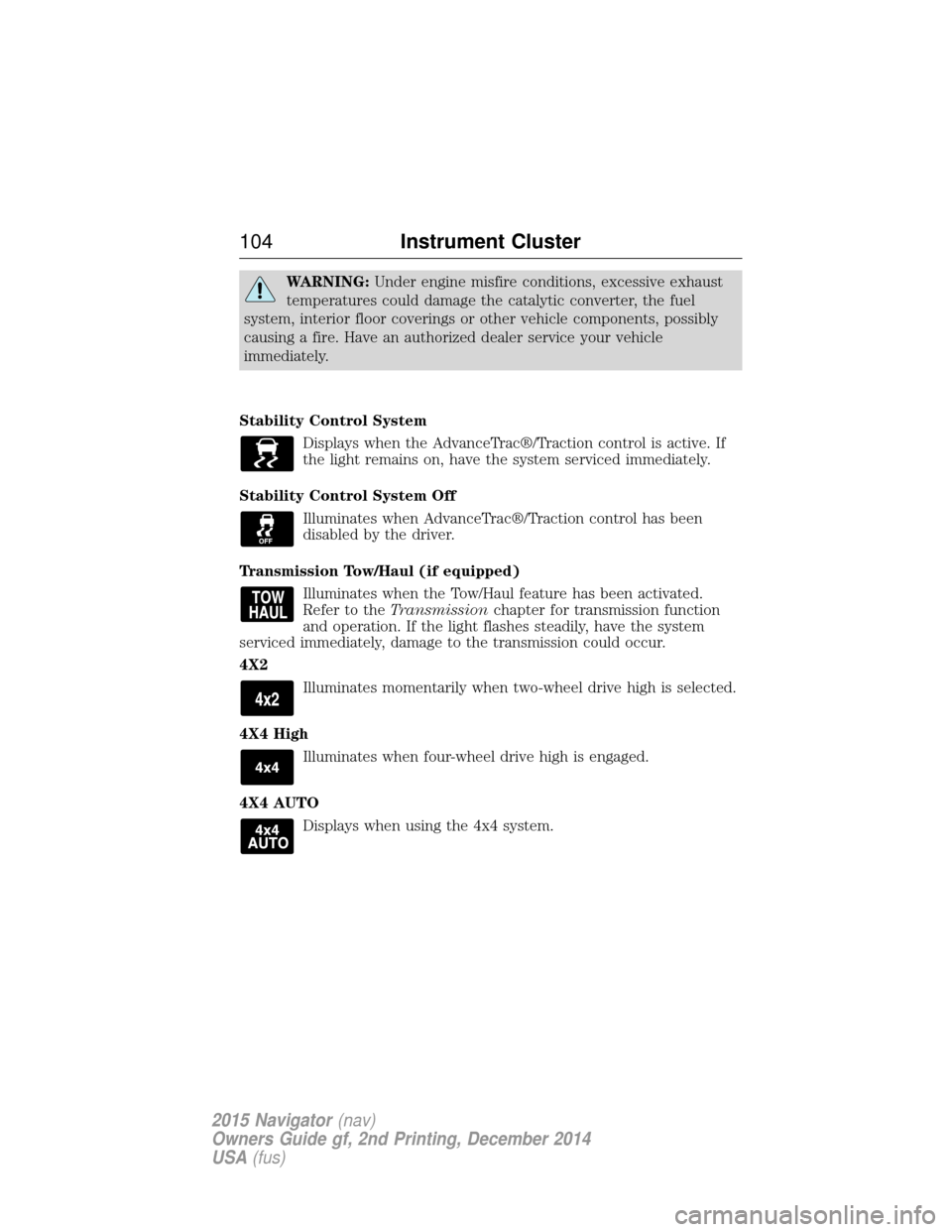
Stability Control System Displays when the AdvanceTrac®/Traction control is active. If
the light remains on, have the system serviced immediately.
Stability Control System Off Illuminates when AdvanceTrac®/Traction control has been
disabled by the driver.
Transmission Tow/Haul (if equipped) Illuminates when the Tow/Haul feature has been activated.
Refer to the Transmission chapter for transmission function
and operation. If the light flashes steadily, have the system
serviced immediately, damage to the transmission could occur.
4X2
Illuminates momentarily when two-wheel drive high is selected.
4X4 High Illuminates when four-wheel drive high is engaged.
4X4 AUTO Displays when using the 4x4 system.
104 Instrument Cluster
2015 Navigator(nav)
Owners Guide gf, 2nd Printing, December 2014
USA (fus)
Page 107 of 475
GENERAL INFORMATION
WARNING:Driving while distracted can result in loss of vehicle
control, crash and injury. We strongly recommend that you use
extreme caution when using any device that may take your focus off
the road. Your primary responsibility is the safe operation of your
vehicle. We recommend against the use of any handheld device while
driving and encourage the use of voice-operated systems when possible.
Make sure you are aware of all applicable local laws that may affect the
use of electronic devices while driving.
Various systems on your vehicle can be controlled using the information
display controls on the steering wheel. Corresponding information is
displayed in the information display.
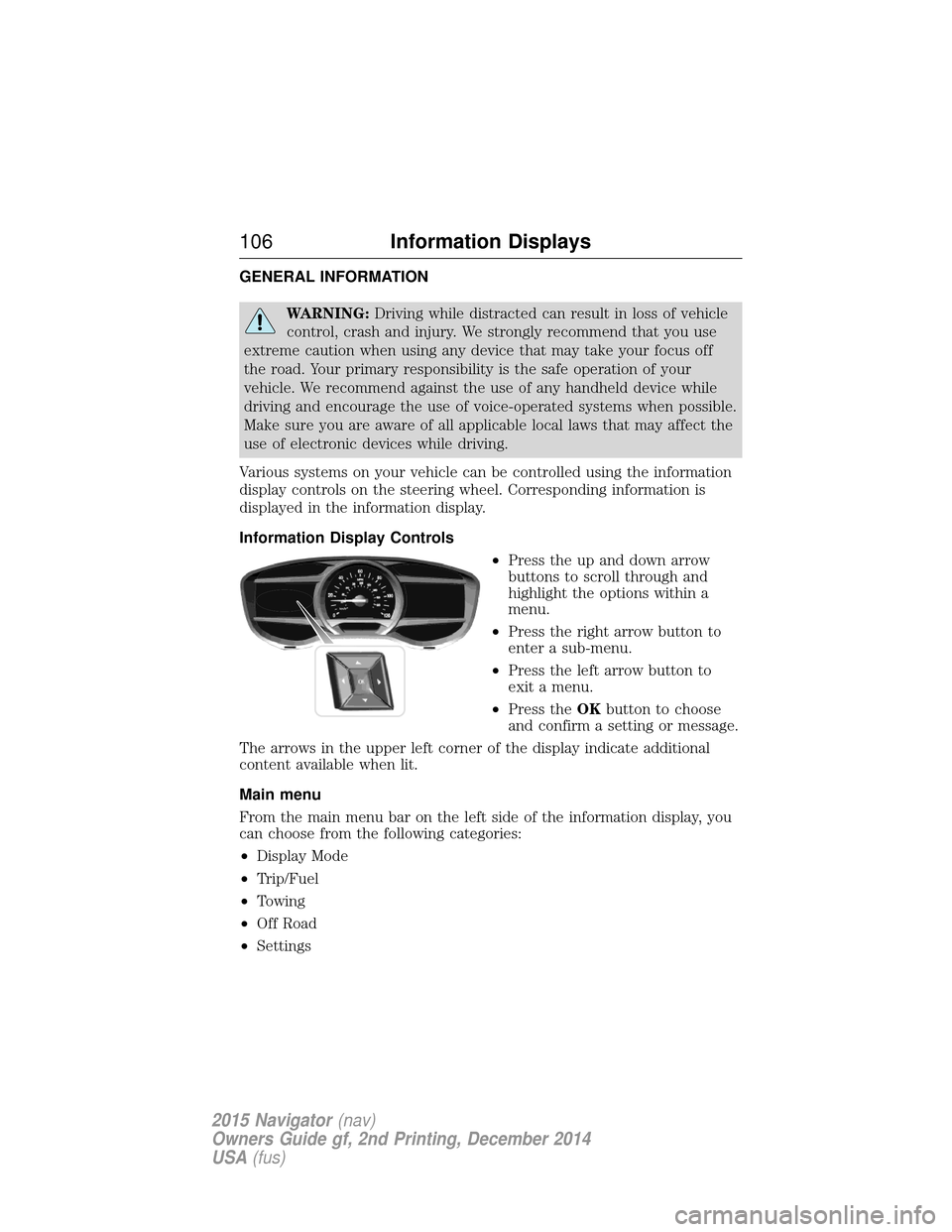
Information Display Controls •Press the up and down arrow
buttons to scroll through and
highlight the options within a
menu.
• Press the right arrow button to
enter a sub-menu.
• Press the left arrow button to
exit a menu.
• Press the OKbutton to choose
and confirm a setting or message.
The arrows in the upper left corner of the display indicate additional
content available when lit.
Main menu
From the main menu bar on the left side of the information display, you
can choose from the following categories:
• Display Mode
• Trip/Fuel
• Towing
• Off Road
• Settings
106 Information Displays
2015 Navigator (nav)
Owners Guide gf, 2nd Printing, December 2014
USA (fus)
Page 109 of 475
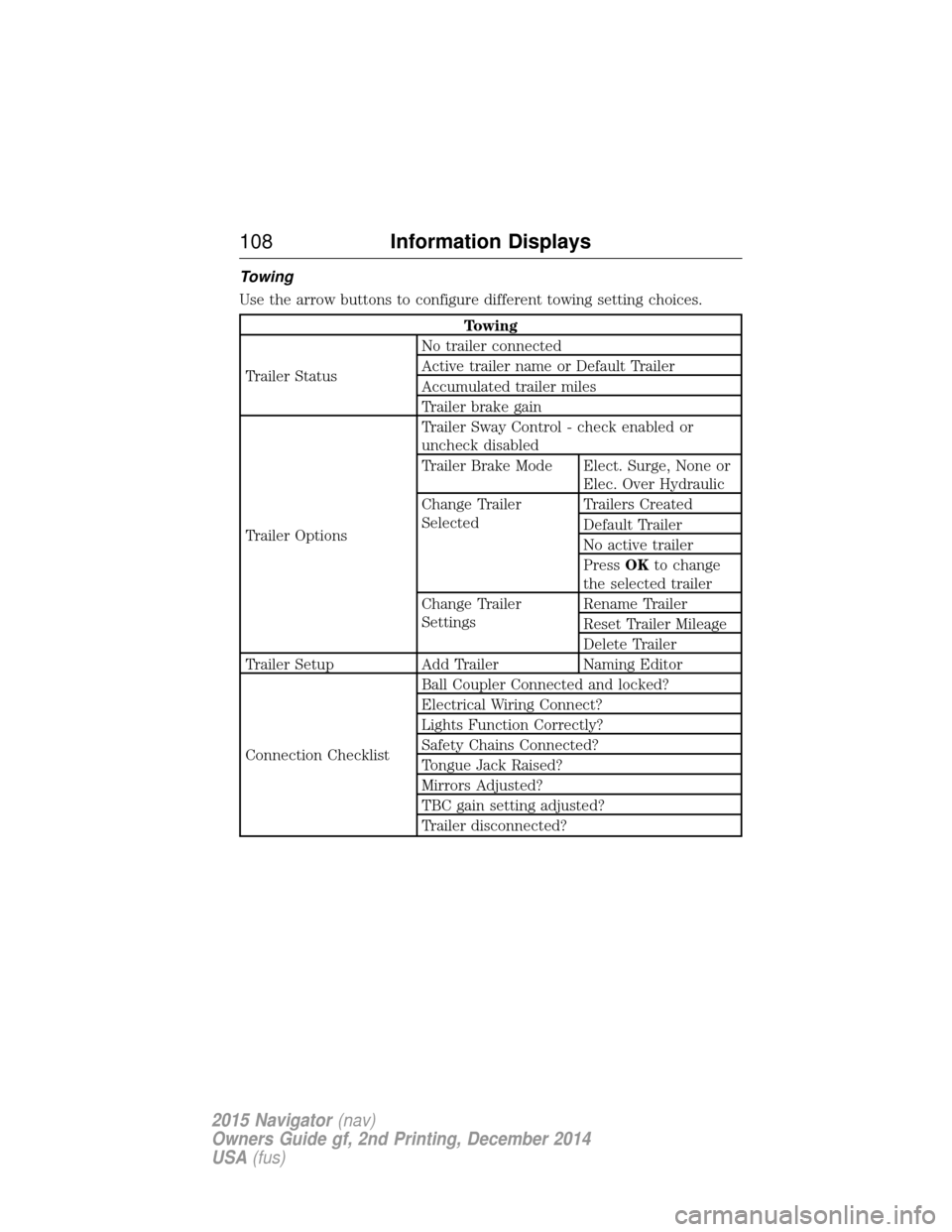
Towing
Use the arrow buttons to configure different towing setting choices.
Towing
Trailer Status No trailer connected
Active trailer name or Default Trailer
Accumulated trailer miles
Trailer brake gain
Trailer Options Trailer Sway Control - check enabled or
uncheck disabled
Trailer Brake Mode Elect. Surge, None or
Elec. Over Hydraulic
Change Trailer
Selected Trailers Created
Default Trailer
No active trailer
Press
OKto change
the selected trailer
Change Trailer
Settings Rename Trailer
Reset Trailer Mileage
Delete Trailer
Trailer Setup Add Trailer Naming Editor
Connection Checklist Ball Coupler Connected and locked?
Electrical Wiring Connect?
Lights Function Correctly?
Safety Chains Connected?
Tongue Jack Raised?
Mirrors Adjusted?
TBC gain setting adjusted?
Trailer disconnected?
108
Information Displays
2015 Navigator (nav)
Owners Guide gf, 2nd Printing, December 2014
USA (fus)
Page 110 of 475
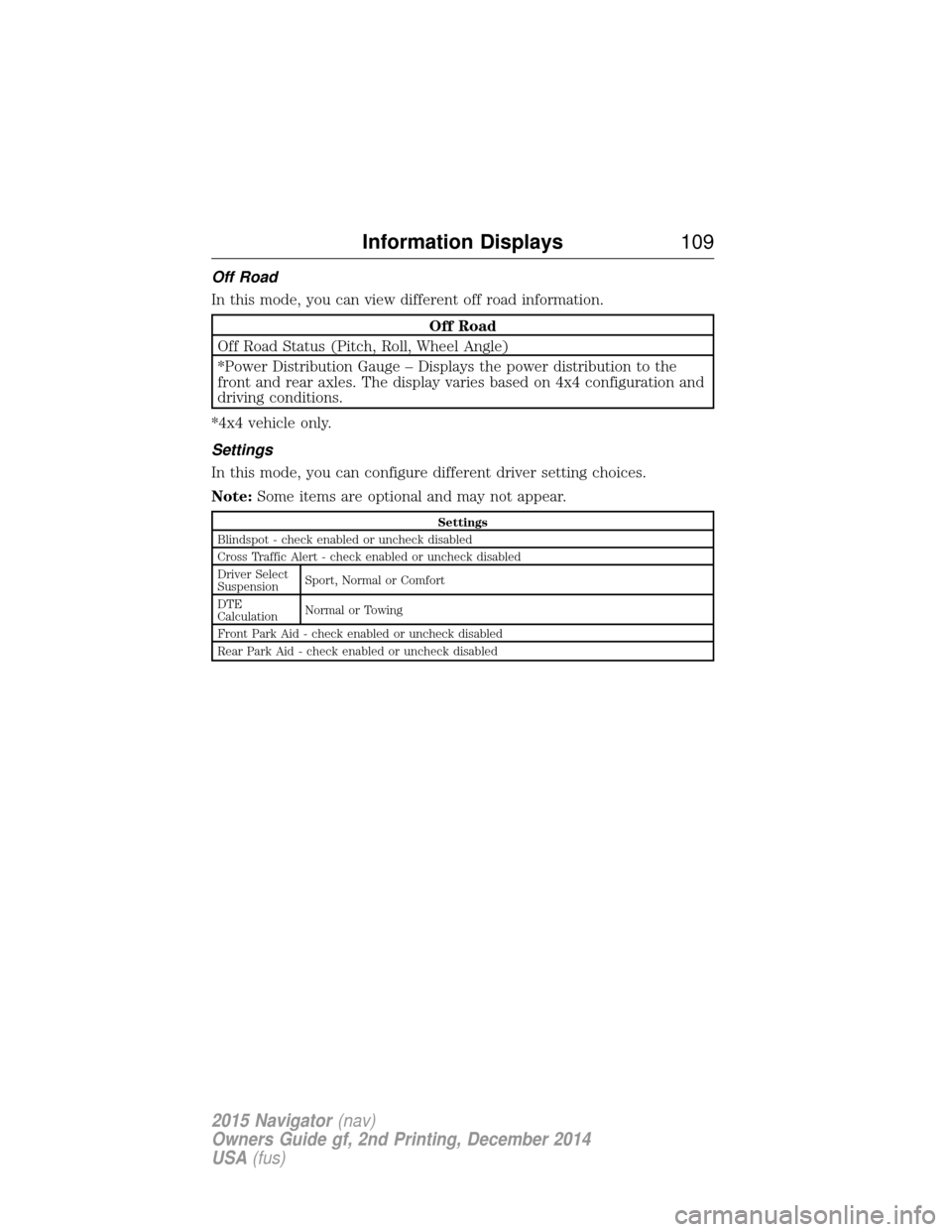
Off Road
In this mode, you can view different off road information.
Off Road
Off Road Status (Pitch, Roll, Wheel Angle)
*Power Distribution Gauge – Displays the power distribution to the
front and rear axles. The display varies based on 4x4 configuration and
driving conditions.
*4x4 vehicle only.
Settings
In this mode, you can configure different driver setting choices.
Note: Some items are optional and may not appear.
Settings
Blindspot - check enabled or uncheck disabled
Cross Traffic Alert - check enabled or uncheck disabled
Driver Select
Suspension Sport, Normal or Comfort
DTE
Calculation Normal or Towing
Front Park Aid - check enabled or uncheck disabled
Rear Park Aid - check enabled or uncheck disabled
Information Displays 109
2015 Navigator(nav)
Owners Guide gf, 2nd Printing, December 2014
USA (fus)
Page 121 of 475
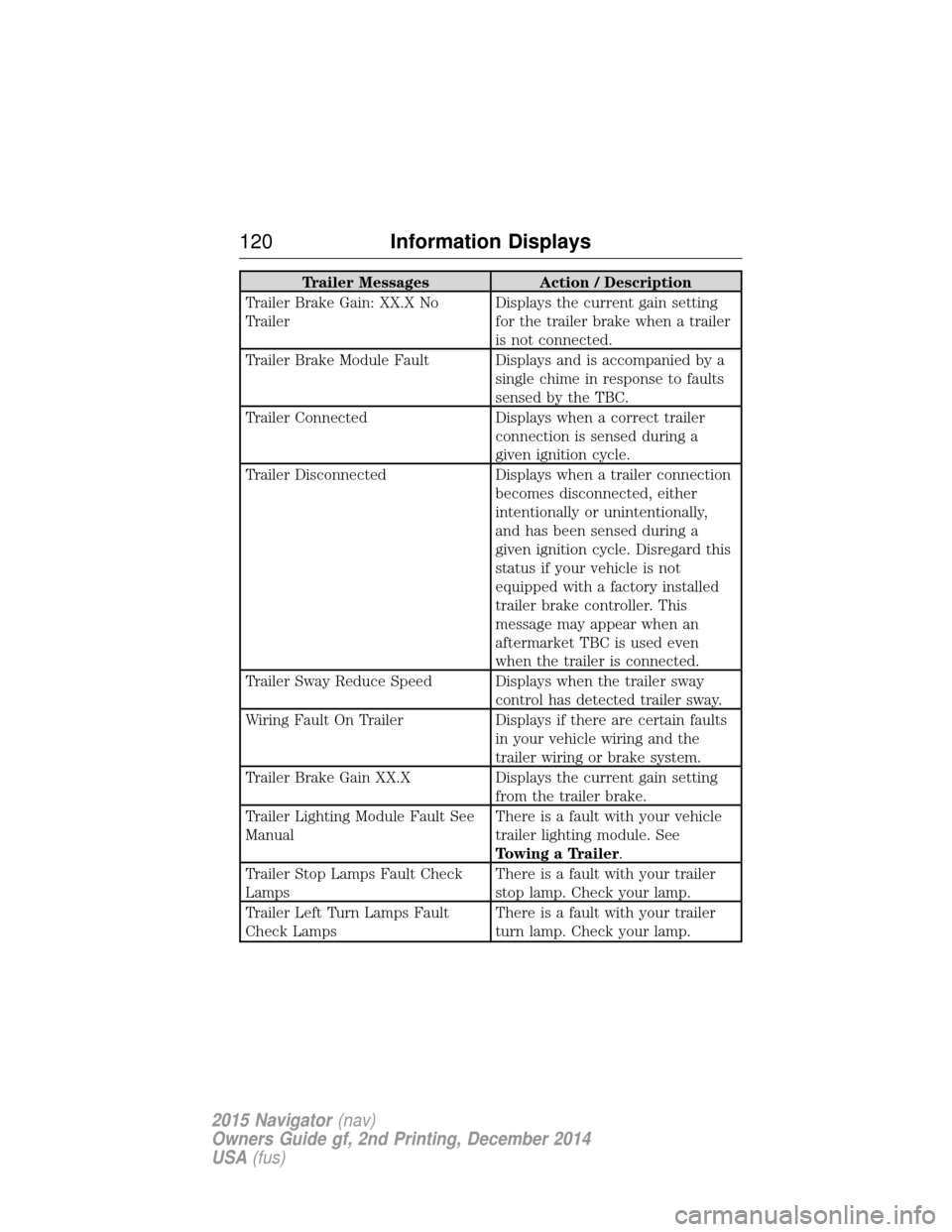
Trailer MessagesAction / Description
Trailer Brake Gain: XX.X No
Trailer Displays the current gain setting
for the trailer brake when a trailer
is not connected.
Trailer Brake Module Fault Displays and is accompanied by a single chime in response to faults
sensed by the TBC.
Trailer Connected Displays when a correct trailer
connection is sensed during a
given ignition cycle.
Trailer Disconnected Displays when a trailer connection
becomes disconnected, either
intentionally or unintentionally,
and has been sensed during a
given ignition cycle. Disregard this
status if your vehicle is not
equipped with a factory installed
trailer brake controller. This
message may appear when an
aftermarket TBC is used even
when the trailer is connected.
Trailer Sway Reduce Speed Displays when the trailer sway control has detected trailer sway.
Wiring Fault On Trailer Displays if there are certain faults
in your vehicle wiring and the
trailer wiring or brake system.
Trailer Brake Gain XX.X Displays the current gain setting
from the trailer brake.
Trailer Lighting Module Fault See
Manual There is a fault with your vehicle
trailer lighting module. See
Towing a Trailer.
Trailer Stop Lamps Fault Check
Lamps There is a fault with your trailer
stop lamp. Check your lamp.
Trailer Left Turn Lamps Fault
Check Lamps There is a fault with your trailer
turn lamp. Check your lamp.
120
Information Displays
2015 Navigator (nav)
Owners Guide gf, 2nd Printing, December 2014
USA (fus)
Page 122 of 475
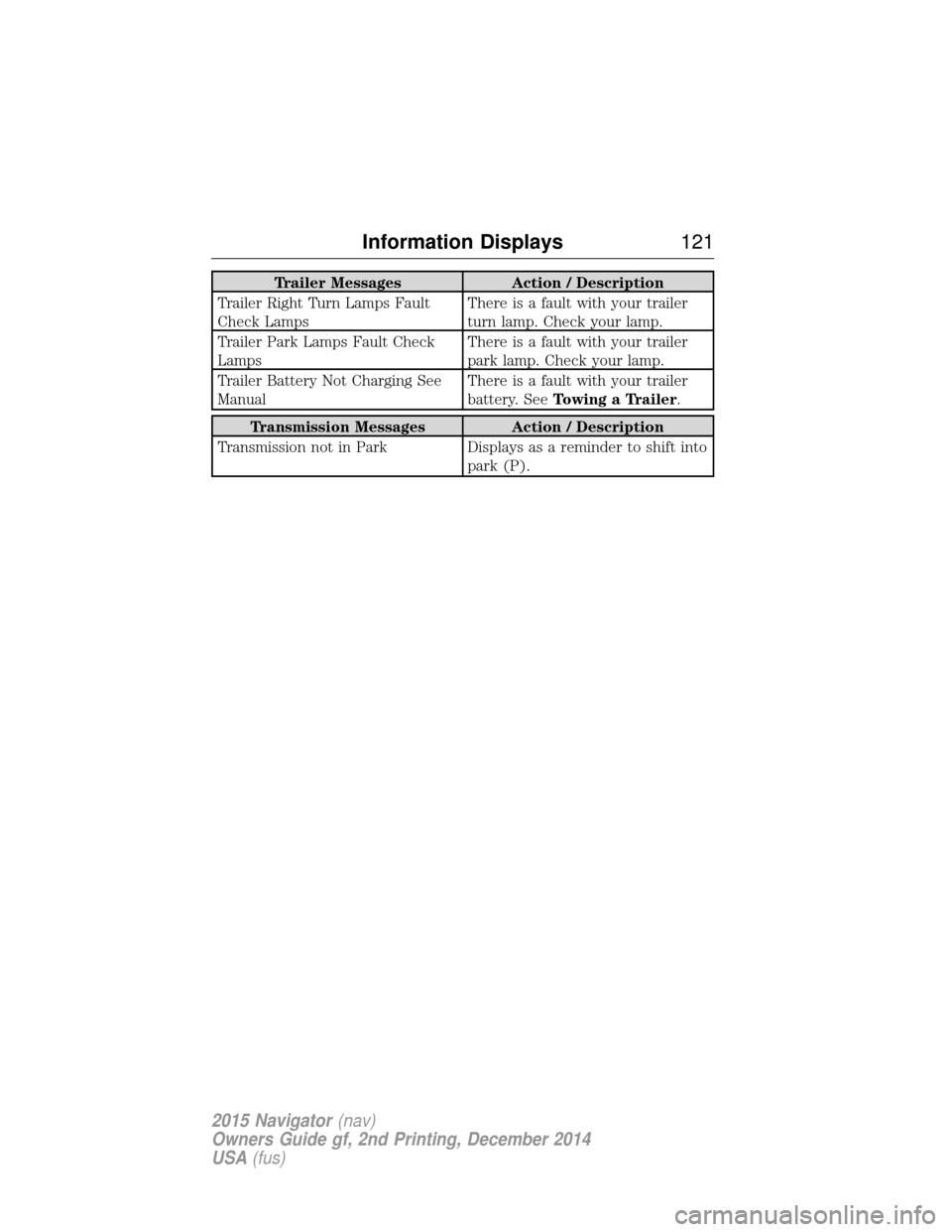
Trailer MessagesAction / Description
Trailer Right Turn Lamps Fault
Check Lamps There is a fault with your trailer
turn lamp. Check your lamp.
Trailer Park Lamps Fault Check
Lamps There is a fault with your trailer
park lamp. Check your lamp.
Trailer Battery Not Charging See
Manual There is a fault with your trailer
battery. See
Towing a Trailer.
Transmission Messages Action / Description
Transmission not in Park Displays as a reminder to shift into
park (P).
Information Displays 121
2015 Navigator(nav)
Owners Guide gf, 2nd Printing, December 2014
USA (fus)
Page 127 of 475
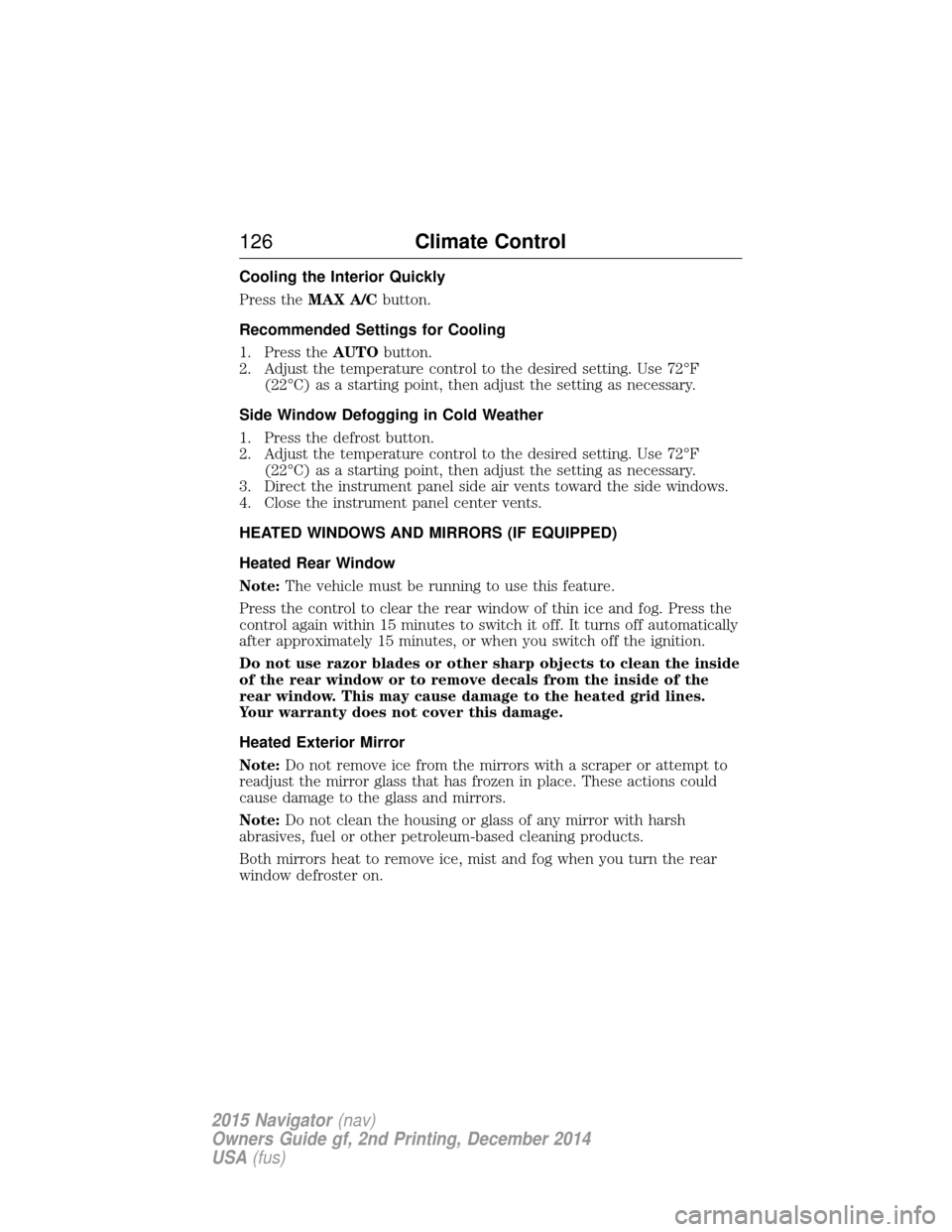
Cooling the Interior Quickly
Press theMAX A/C button.
Recommended Settings for Cooling
1. Press the AUTObutton.
2. Adjust the temperature control to the desired setting. Use 72°F (22°C) as a starting point, then adjust the setting as necessary.
Side Window Defogging in Cold Weather
1. Press the defrost button.
2. Adjust the temperature control to the desired setting. Use 72°F (22°C) as a starting point, then adjust the setting as necessary.
3. Direct the instrument panel side air vents toward the side windows.
4. Close the instrument panel center vents.
HEATED WINDOWS AND MIRRORS (IF EQUIPPED)
Heated Rear Window
Note: The vehicle must be running to use this feature.
Press the control to clear the rear window of thin ice and fog. Press the
control again within 15 minutes to switch it off. It turns off automatically
after approximately 15 minutes, or when you switch off the ignition.
Do not use razor blades or other sharp objects to clean the inside
of the rear window or to remove decals from the inside of the
rear window. This may cause damage to the heated grid lines.
Your warranty does not cover this damage.
Heated Exterior Mirror
Note: Do not remove ice from the mirrors with a scraper or attempt to
readjust the mirror glass that has frozen in place. These actions could
cause damage to the glass and mirrors.
Note: Do not clean the housing or glass of any mirror with harsh
abrasives, fuel or other petroleum-based cleaning products.
Both mirrors heat to remove ice, mist and fog when you turn the rear
window defroster on.
126 Climate Control
2015 Navigator(nav)
Owners Guide gf, 2nd Printing, December 2014
USA (fus)
Page 138 of 475
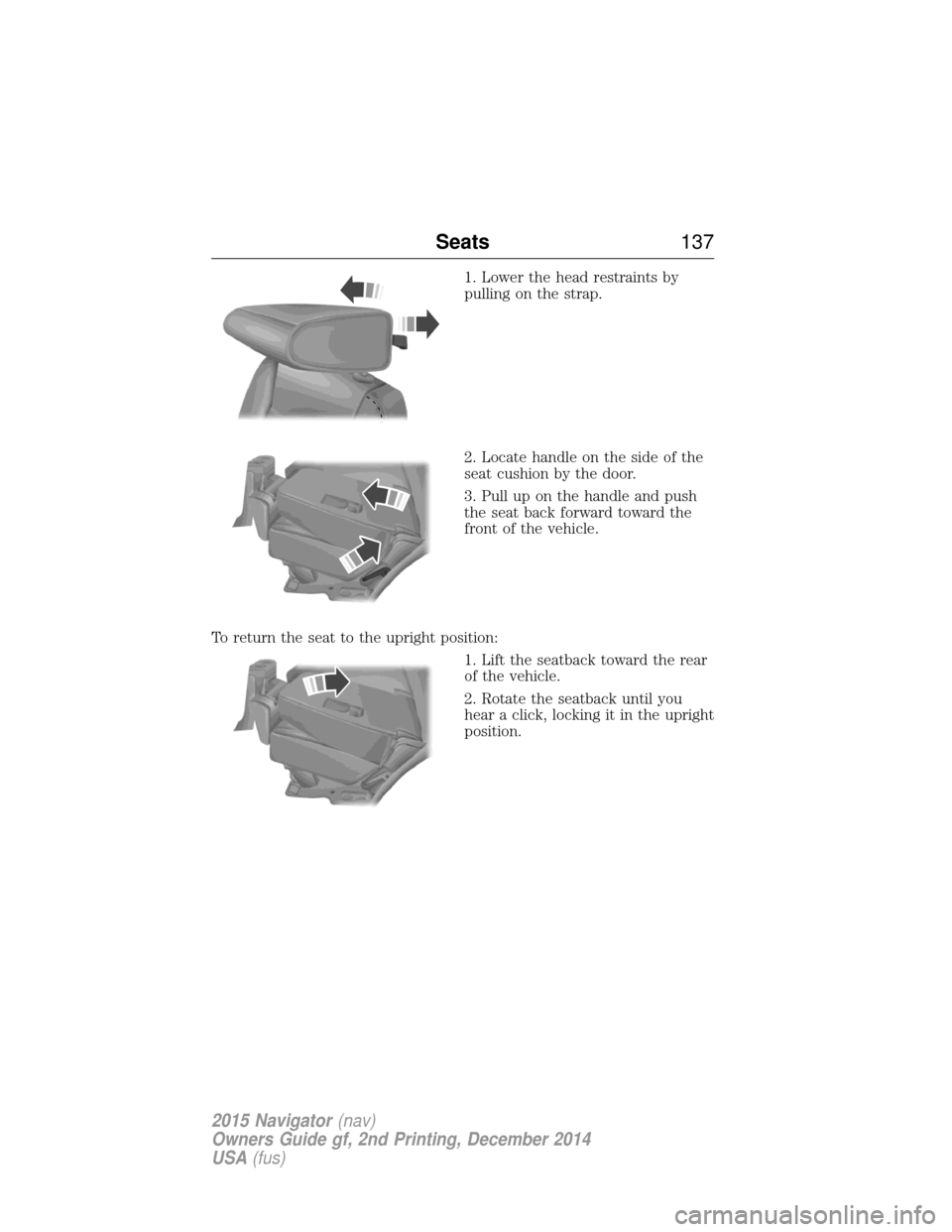
1. Lower the head restraints by
pulling on the strap.
2. Locate handle on the side of the
seat cushion by the door.
3. Pull up on the handle and push
the seat back forward toward the
front of the vehicle.
To return the seat to the upright position: 1. Lift the seatback toward the rear
of the vehicle.
2. Rotate the seatback until you
hear a click, locking it in the upright
position.
Seats137
2015 Navigator(nav)
Owners Guide gf, 2nd Printing, December 2014
USA (fus)
Page 142 of 475
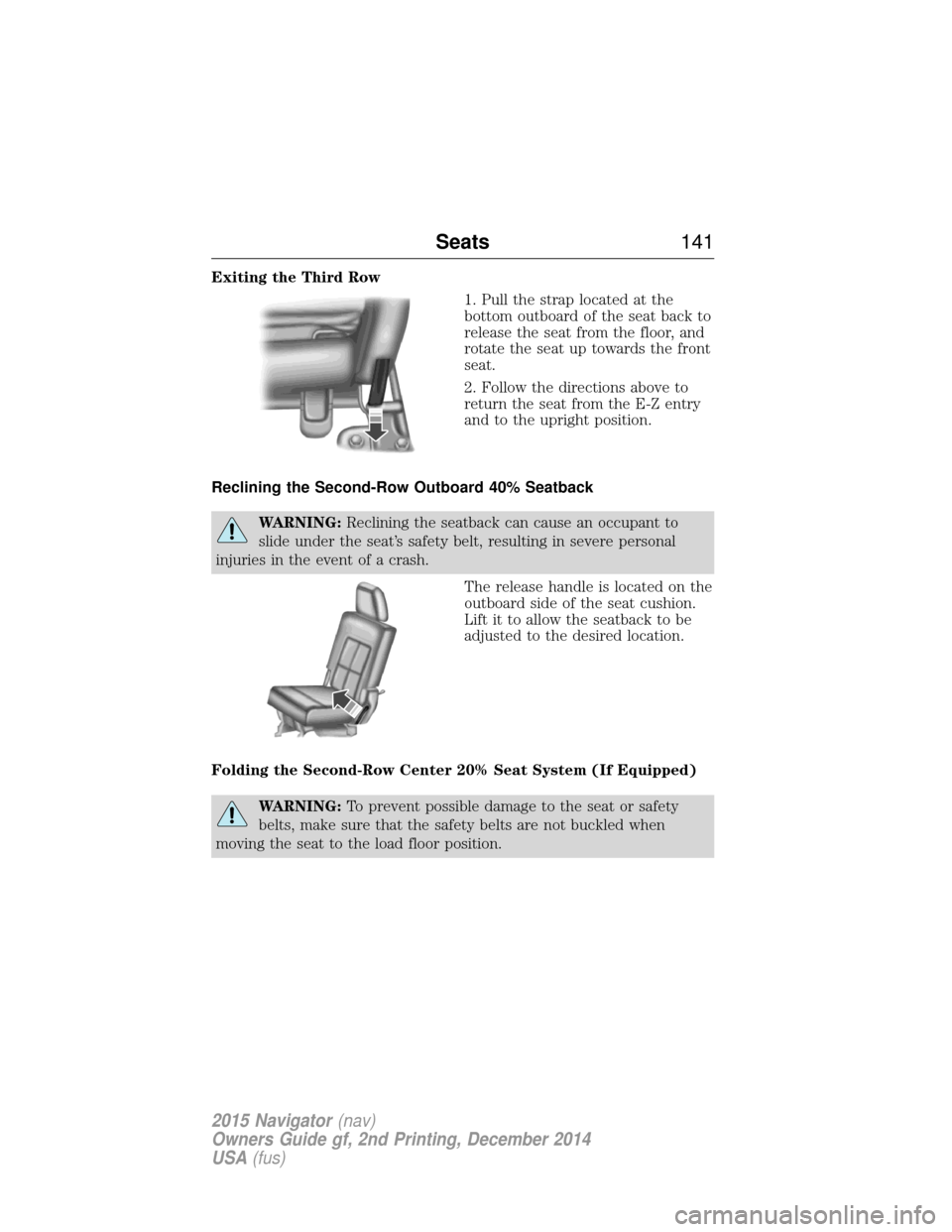
Exiting the Third Row1. Pull the strap located at the
bottom outboard of the seat back to
release the seat from the floor, and
rotate the seat up towards the front
seat.
2. Follow the directions above to
return the seat from the E-Z entry
and to the upright position.
Reclining the Second-Row Outboard 40% Seatback
WARNING: Reclining the seatback can cause an occupant to
slide under the seat’s safety belt, resulting in severe personal
injuries in the event of a crash.
The release handle is located on the
outboard side of the seat cushion.
Lift it to allow the seatback to be
adjusted to the desired location.
Folding the Second-Row Center 20% Seat System (If Equipped)
WARNING: To prevent possible damage to the seat or safety
belts, make sure that the safety belts are not buckled when
moving the seat to the load floor position.
Seats 141
2015 Navigator(nav)
Owners Guide gf, 2nd Printing, December 2014
USA (fus)