Lock unlock LINCOLN NAVIGATOR 2015 Owner's Manual
[x] Cancel search | Manufacturer: LINCOLN, Model Year: 2015, Model line: NAVIGATOR, Model: LINCOLN NAVIGATOR 2015Pages: 475, PDF Size: 5.13 MB
Page 168 of 475
When fueling your vehicle:
1. Turn the engine off.
2. Open the fuel door by pulling the indent on the door.
3. Insert the fuel plug key (if equipped) into the locking plug and turn it
counterclockwise to unlock it.
4. Slowly insert the fuel filler nozzle fully into the fuel system, and leave
the nozzle fully inserted until you are done pumping.
5. After you are done pumping fuel, slowly remove the fuel filler
nozzle—allow about ten seconds after pumping fuel before removing the
fuel filler nozzle. This allows residual fuel to drain back into the fuel tank
and not spill onto the vehicle.
6. Reinstall the plug (if equipped) into the fuel fill inlet and turn the key
clockwise to lock.
Note:Do not overfill the tank or fuel spillage will occur.
If the fuel fill inlet was not properly closed, a Check Fuel Fill Inlet
message may appear on the information display. See the Information
Displays chapter for more information.
At the next opportunity, do the following:
1. Safely pull off the road.
2. Turn off the engine.
3. Open the fuel filler door and remove any visible debris from the fuel
fill opening.
4. Insert either the fuel fill nozzle or the fuel fill funnel provided with the
vehicle several times to dislodge any debris and/or allow the inlet to
close properly.
If this action corrects the problem, the message may not reset
immediately. It may take several driving cycles for the message to turn
off. A driving cycle consists of an engine start-up (after four or more
hours with the engine off) followed by city/highway driving. Continuing
to drive with the message on may cause the service engine soon lamp to
turn on as well.
Fuel and Refueling 167
2015 Navigator(nav)
Owners Guide gf, 2nd Printing, December 2014
USA (fus)
Page 177 of 475
In order to prevent the engine from running at too low an RPM, which
may cause it to stall, the SST will still automatically make some
downshifts if it has determined that you have not downshifted in time.
Although the SST will make some downshifts for you, it will still allow
you to downshift at any time as long as the SST determines that the
engine will not be damaged from over-revving.
The SST will not automatically upshift, even if the engine is approaching
the RPM limit. It must be shifted manually by pressing the + button.
Engine damage may occur if excessive engine revving is held without
shifting.
PRS (Progressive Range Selection)
With the gearshift lever in D (Drive), press the – button to active PRS.
The available and selected gears will be indicated on the instrument
cluster.
All available gears will be displayed with the current gear indicated.
Press the – button again to lock out gears beginning with the highest
gear. Example: press the – button twice to lock out 6th and 5th gears.
Only the available gears will be displayed and the transmission will
automatically shift between the available gears. Press the + button to
unlock gears to allow the transmission to shift to higher gears. The
transmission will shift automatically within the gear range you select.
Automatic Transmission Adaptive Learning
This feature is designed to increase durability and provide consistent
shift feel over the life of the vehicle. A new vehicle or transmission may
have firm shifts, soft shifts or both. This operation is considered normal
and will not affect function or durability of the transmission. Over time,
the adaptive learning process will fully update transmission operation.
Additionally, whenever the battery is disconnected or a new battery
installed, the strategy must be relearned.
Brake-Shift Interlock – Floor-Shifter Assembly
WARNING:Do not drive your vehicle until you verify that the
brakelamps are working.
WARNING: When doing this procedure, you will be taking the
vehicle out of park which means the vehicle can roll freely. To
avoid unwanted vehicle movement, always fully set the parking brake
prior to doing this procedure. Use wheel chocks if appropriate.
176 Transmission
2015 Navigator(nav)
Owners Guide gf, 2nd Printing, December 2014
USA (fus)
Page 262 of 475
The fuses are coded as follows:
Fuse or relaylocation Fuse amp
rating Protected circuits
1 30A Driver window
2 15A Rear seat control, multimedia gateway module
3 30A Passenger window
4 10A Demand lamps
5 20A Amplifier
6 5A Rear electronic automatic temperature control
7 7.5A Power mirror, driver seat memory switch
8 — Not used
9 10A SYNC, power lift gate, electric finish panel, display
10 10A Run accessory relay
11 10A Passive entry/start module
12 15A Interior lighting, puddle lamps
13 15A Right turn and stop/turn signals
14 15A Left turn and stop/turn signals
15 15A Reverse lamp, center high mount stop lamp, EC mirror
16 10A Right front low beam
17 10A Left front low beam
18 10A Brake shift interlock/start button LED/keypad illumination, third
row power folding seat, passive
entry touch start
19 20A Subwoofer amplifier, THX amplifier
20 20A Lock/unlock relays
21 — Not used
22 20A Horn
Fuses 261
2015 Navigator(nav)
Owners Guide gf, 2nd Printing, December 2014
USA (fus)
Page 278 of 475
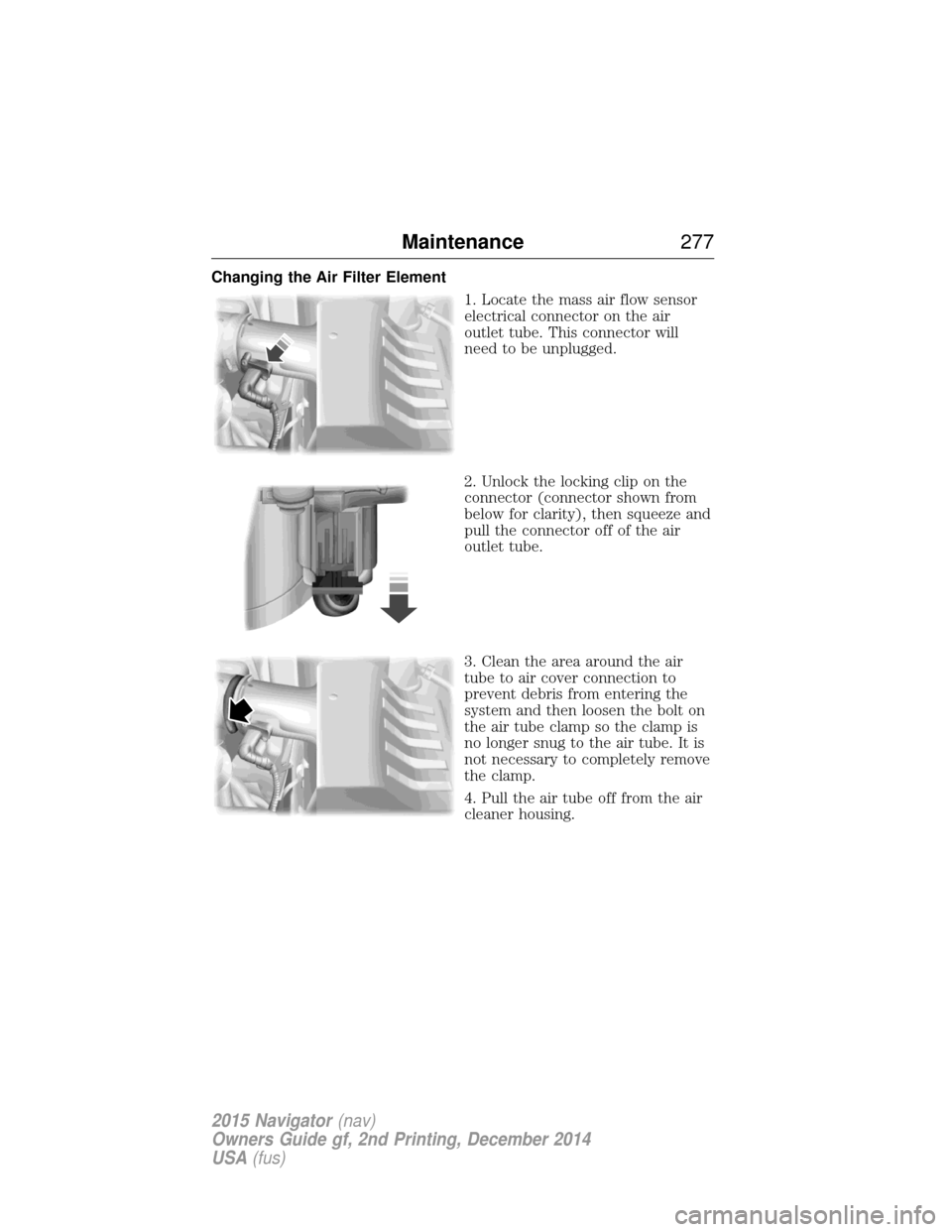
Changing the Air Filter Element1. Locate the mass air flow sensor
electrical connector on the air
outlet tube. This connector will
need to be unplugged.
2. Unlock the locking clip on the
connector (connector shown from
below for clarity), then squeeze and
pull the connector off of the air
outlet tube.
3. Clean the area around the air
tube to air cover connection to
prevent debris from entering the
system and then loosen the bolt on
the air tube clamp so the clamp is
no longer snug to the air tube. It is
not necessary to completely remove
the clamp.
4. Pull the air tube off from the air
cleaner housing.
Maintenance277
2015 Navigator(nav)
Owners Guide gf, 2nd Printing, December 2014
USA (fus)
Page 374 of 475
Parental Lockoutallows you to lock and unlock channels, change or
reset your PIN or unlock all channels. To use this feature, you need your
initial PIN, which is 1234.
Artist/Title/Team Alerts allows you to select Artists, Titles and Teams
that you would like the system to alert you to when they are playing on
other channels. Press Edit Alertsto delete or turn off alerts. You can
also set all alerts to on or off. When an alert appears on the screen, you
can choose to Tune to the channel, to Cancel the alert or to Disable
Alerts. If you are listening to a sporting event, you can save your favorite
teams so that the system can alert you when they are playing on a
satellite radio channel.
Note: Sirius does not support the Alert feature on all channels. Ford
Motor Company shall not be responsible for Alert feature variation.
Electronic Serial Number (ESN) is required when you need to
activate, modify or track your satellite radio account. The ESN is on the
System Information Screen (SR ESN: XXXXXXXXXXXX). To access your
ESN, press the bottom left corner of the touchscreen, then SIRIUS>
Options.
Direct Tune
Touch this button to manually enter the desired satellite channel
number. Touch Enterwhen you are done.
Browse
Touch this button to view a list of all available stations. Scroll to see
more categories. Touch the station you want to listen to.
Touch Skipif you want to skip this channel.
Touch Lockif you do not want anyone to listen to this channel.
Touch Ti t l eorArtist to see song and artists on other stations.
Satellite Radio Voice Commands If you are listening to Sirius satellite radio, press the voice
button on the steering wheel control. When prompted, say any
of the commands in the following chart.
If you are not listening to Sirius satellite radio, press the voice button
and, after the tone, say “Sirius”, then any of the commands in the
following chart.
MyLincoln Touch™ 373
2015 Navigator(nav)
Owners Guide gf, 2nd Printing, December 2014
USA (fus)
Page 407 of 475
Door Keypad Code
To change the keypad code for your keyless entry keypad system:
1. Press the Settings icon >Vehicle>Door Keypad Code.
2. Enter your current factory code, then, when prompted, enter your new code.
Camera Settings
This menu allows you to access settings for your rear view camera.
Press the Settings icon > Vehicle>Camera Settings, then select from
the following settings:
• Enhanced Park Aids.
• Rear Camera Delay.
Enable Valet Mode
Valet mode allows you to lock the system. No information is accessible
until the system is unlocked with the correct PIN.
1. Press the Settings icon > Vehicle>Enable Valet Mode.
2. Enter a four-digit pin twice, as prompted.
After you press Continue, the system locks until you enter the PIN again.
Note: If the system locks, and you need to reset the PIN, enter 3681 and
the system unlocks.
Settings
Access and adjust system settings, voice features, as well as phone,
navigation and wireless settings.
System
Press the Settings icon > Settings>System, then select from
the following:
System
Language Select to have the touchscreen display in
English, Spanish or French.
Distance Select to display units in kilometers or miles.
Temperature Select to display units in Celsius or
Fahrenheit.
System Prompt
Volume Adjust the volume of voice prompts from the
system.
Touch Screen Button
Beep Select to have the system beep to confirm
choices made through the touchscreen.
406
MyLincoln Touch™
2015 Navigator(nav)
Owners Guide gf, 2nd Printing, December 2014
USA (fus)
Page 472 of 475
How to use voice commands ...361
I
Ignition .......................................327
Illuminated visor mirror .............98
Inspection/maintenance (I/M)
testing ........................................171
Instrument panelcleaning ...................................289
cluster ......................................100
lighting up panel and interior..89
Intelligent Access Key ................54
J
Jack ............................................318 positioning ...............................318
storage .....................................318
Jump-starting your vehicle ......244
K
Keyless entry system autolock .....................................68
keypad .......................................74
locking and unlocking doors ....75
programming entry code .........74
L
Lamps ..........................................87 autolamp system .................88–89
bulb replacement
specifications chart ................282
daytime running light ...............89
headlamps .................................87
headlamps, flash to pass ..........87
instrument panel, dimming .....89
interior lamps ...........................91
replacing bulbs ...............281–282 Lane change indicator
(see Turn signal) ........................91
LATCH anchors ...........................22
Liftgate ........................................70
Lights, warning and indicator ..100
Listening to music ....................364
Loading instructions .................220
Load limits .................................213
Locks
autolock .....................................68
childproof ..................................33
doors ..........................................67
Lubricant specifications ...........328
Lug nuts ....................................325
M
Making and receiving calls .......386
MAP DVD - Loading and
Unloading ..................................386
Map icons ..................................426
Map mode ..................................424
Map preferences .......................422
Map updates ......................359, 428
Master lighting switch ................87
Message center warning messages ...................111
Mirrors ...................................94, 96 programmable memory ............55
side view mirrors (power) .......94
signal ...................................95–96
Moon roof ....................................98
Motorcraft® parts .............284, 333
MyFord Touch™ system ..........352
MyKey ..........................................60
Index 471
2015 Navigator(nav)
Owners Guide gf, 2nd Printing, December 2014
USA (fus)
Page 473 of 475
N
Navigation features ...................418
Navigation voice commands ....428
Notifications ..............................398
O
Octane rating ............................164
P
Pairing other phones ................385
Pairing your phone ...................385
Pairing your phone for the first
time ............................................385
Parental MyKey programming ...60
Parking brake ............................188
Parts
(see Motorcraft® parts) ..........333
Phone settings ..................389, 411
Phone voice commands ............390
POI categories ...........................420
Point of Interest (POI) .............420
Power deployable running
boards ........................................222
Power distribution box
(see Fuses) .......................255, 260
Power door locks ........................67
Power liftgate ..............................70
Power mirrors .............................94
Powerpoint ................................152
Power steering ..........................210fluid, checking and adding ....272
fluid, refill capacity ................328
fluid, specifications .................328 Power Windows ...........................93
Privacy information ..................358
Push button start system .........156
Q
Quick touch buttons .................427
R
Radio ..........................................343
AM/FM .....................................366
Single CD ................................343
Radio reception .........................341
Radio voice commands .............371
Rear heated seats .....................143
Rear view camera display..198, 406
Rear window defroster .............122
Receiving a text message .........388
Recommendations for
attaching safety restraints for
children ........................................18
Relays ........................................255
Remote entry system illuminated entry ................69–70
locking/unlocking doors ...........67
replacing the batteries .............55
Remote start climate
operation ...................................127
Roadside assistance ..................241
Roll stability control .................192
Roof rack ...................................213
Route preferences ....................422
S
Safety Belt Maintenance ............42
472 Index
2015 Navigator(nav)
Owners Guide gf, 2nd Printing, December 2014
USA (fus)