instrument cluster LINCOLN NAVIGATOR 2015 Owner's Manual
[x] Cancel search | Manufacturer: LINCOLN, Model Year: 2015, Model line: NAVIGATOR, Model: LINCOLN NAVIGATOR 2015Pages: 475, PDF Size: 5.13 MB
Page 291 of 475
Note:Follow the same procedure as cleaning leather seats for cleaning
leather instrument panels and leather interior trim surfaces. See
Cleaning Leather Seats in this chapter.
Clean the instrument panel and cluster lens with a clean, damp, white,
cotton cloth, then use a clean and dry, white, cotton cloth to dry these
areas.
• Avoid cleaners or polishes that increase the gloss of the upper portion
of the instrument panel. The dull finish in this area helps protect the
driver from undesirable windshield reflection.
• Be certain to wash or wipe your hands clean if you have been in
contact with certain products, such as insect repellent and suntan
lotion, in order to avoid possible damage to the interior painted
surfaces.
• Do not use household or glass cleaners as these may damage the
finish of the instrument panel, interior trim and cluster lens.
• Do not allow air fresheners and hand sanitizers to spill on interior
surfaces. If a spill occurs, wipe off immediately. Damage may not be
covered by your warranty.
If a staining liquid like coffee or juice has been spilled on the instrument
panel or on interior trim surfaces, clean as follows:
1. Wipe up spilled liquid using a clean, white, cotton cloth.
2. Use Motorcraft Premium Leather and Vinyl Cleaner or a commercially
available leather cleaning product for automotive interiors. Test any
cleaner or stain remover on an inconspicuous area.
3. Alternatively, wipe the surface with a damp, clean, white, cotton cloth
and a mild soap and water solution. Dry the area with a clean, soft cloth.
4. If necessary, apply more soap and water solution or cleaning product
to a clean, white, cotton cloth and press the cloth onto the soiled area.
Allow this to set at room temperature for 30 minutes.
5. Remove the soaked cloth, then with a clean, damp cloth, use a rubbing
motion for 60 seconds on the soiled area.
6. Following this, wipe area dry with a clean, white, cotton cloth.
CLEANING LEATHER SEATS (IF EQUIPPED)
Note: Follow the same procedure as cleaning leather seats for cleaning
leather instrument panels and leather interior trim surfaces.
For routine cleaning, wipe the surface with a soft, damp cloth and a mild
soap and water solution. Dry the area with a clean, soft cloth.
290 Vehicle Care
2015 Navigator(nav)
Owners Guide gf, 2nd Printing, December 2014
USA (fus)
Page 361 of 475
ACCESSING AND ADJUSTING MODES THROUGH YOUR RIGHT
VEHICLE INFORMATION DISPLAY
The display is located on the right side of your instrument cluster. You
can use your steering wheel controls to view and make minor
adjustments to active modes without taking your hands off the wheel.
For example:
•In Entertainment mode, you can view what is now playing, change
the audio source (such as AM, FM and CD) and scroll through
memory presets.
• In Phone mode, you can accept or reject an incoming call, or make a
call by choosing from select menus within the Phone menu.
• If your vehicle is equipped with Navigation, you can view the current
route or cancel a route.
Note: If your vehicle is not equipped with Navigation, Compass appears
in the display instead of Navigation. If you press the right arrow to go
into the Compass menu, you can see the compass graphic. The compass
displays the direction in which the vehicle is traveling, not true direction.
(For example, if the vehicle is traveling west, the middle of the compass
graphic displays west; north displays to the left of west though its true
direction is to the right of west).
Audio Sources and Memory Presets
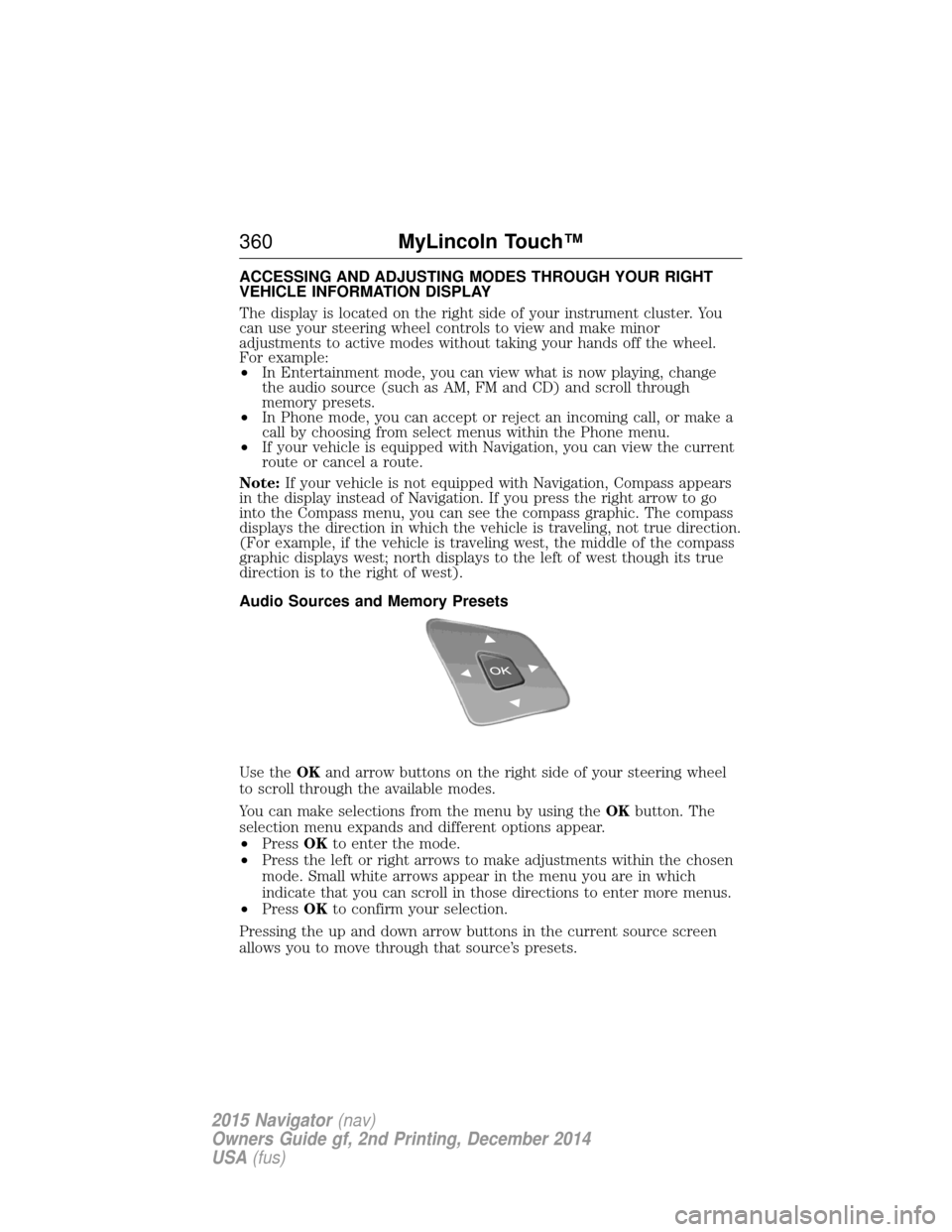
Use the OKand arrow buttons on the right side of your steering wheel
to scroll through the available modes.
You can make selections from the menu by using the OKbutton. The
selection menu expands and different options appear.
• Press OKto enter the mode.
• Press the left or right arrows to make adjustments within the chosen
mode. Small white arrows appear in the menu you are in which
indicate that you can scroll in those directions to enter more menus.
• Press OKto confirm your selection.
Pressing the up and down arrow buttons in the current source screen
allows you to move through that source’s presets.
360 MyLincoln Touch™
2015 Navigator(nav)
Owners Guide gf, 2nd Printing, December 2014
USA (fus)
Page 457 of 475
Normal scheduled maintenance*
At every oil change
interval as indicated by
the information displayChange engine oil and filter.**
Rotate tires, inspect tire wear and measure
tread depth.
Perform multi-point inspection
(recommended).
Inspect automatic transmission fluid level (if
equipped with dipstick). Consult dealer for
requirements.
Inspect brake pads, shoes, rotors, drums,
brake linings, hoses and parking brake.
Inspect engine cooling system strength and
hoses.
Inspect exhaust system and heat shields.
Inspect front axle and U-joints. Lubricate if
equipped with grease fittings (Four–wheel
drive vehicles).
Inspect half-shaft boots (if equipped).
Inspect steering linkage, ball joints,
suspension, tie-rod ends, driveshaft and
U-joints. Lubricate if equipped with grease
fittings.
Inspect wheels and related components for
abnormal noise, wear, looseness or drag.
*Do not exceed one year or 10000 miles (16000 kilometers) between
service intervals.
**Reset your Intelligent Oil-Life Monitor after each engine oil and filter
change. See the Instrument Cluster chapter.
456Scheduled Maintenance
2015 Navigator (nav)
Owners Guide gf, 2nd Printing, December 2014
USA (fus)
Page 463 of 475
Extensive idling or low-speed driving for long distances as inheavy commercial use (such as delivery, taxi, patrol car or livery)
As required Change engine oil and filter as indicated by the information display and perform services
listed in the Normal Scheduled Maintenance
chart.
Inspect frequently,
service as required Replace engine air filter.
Every 60000 miles
(96000 km) Replace spark plugs.
Change transfer case fluid (Four–wheel drive
vehicles).
Operating in dusty or sandy conditions such as unpaved or
dusty roads
Inspect frequently,
service as required Replace engine air filter.
Every 5000 miles
(8000 km) Inspect the wheels and related components for
abnormal noise, wear, looseness or drag.
Rotate tires, inspect tires for wear and
measure tread depth.
Every 5000 miles
(8000 km) or six
months Change engine oil and filter.
*
Every 60000 miles
(96000 km)
Change transfer case fluid (Four–wheel drive
vehicles).
*Reset your Intelligent Oil-Life Monitor after each engine oil and filter
change. See the Instrument Cluster chapter.
462Scheduled Maintenance
2015 Navigator (nav)
Owners Guide gf, 2nd Printing, December 2014
USA (fus)
Page 464 of 475
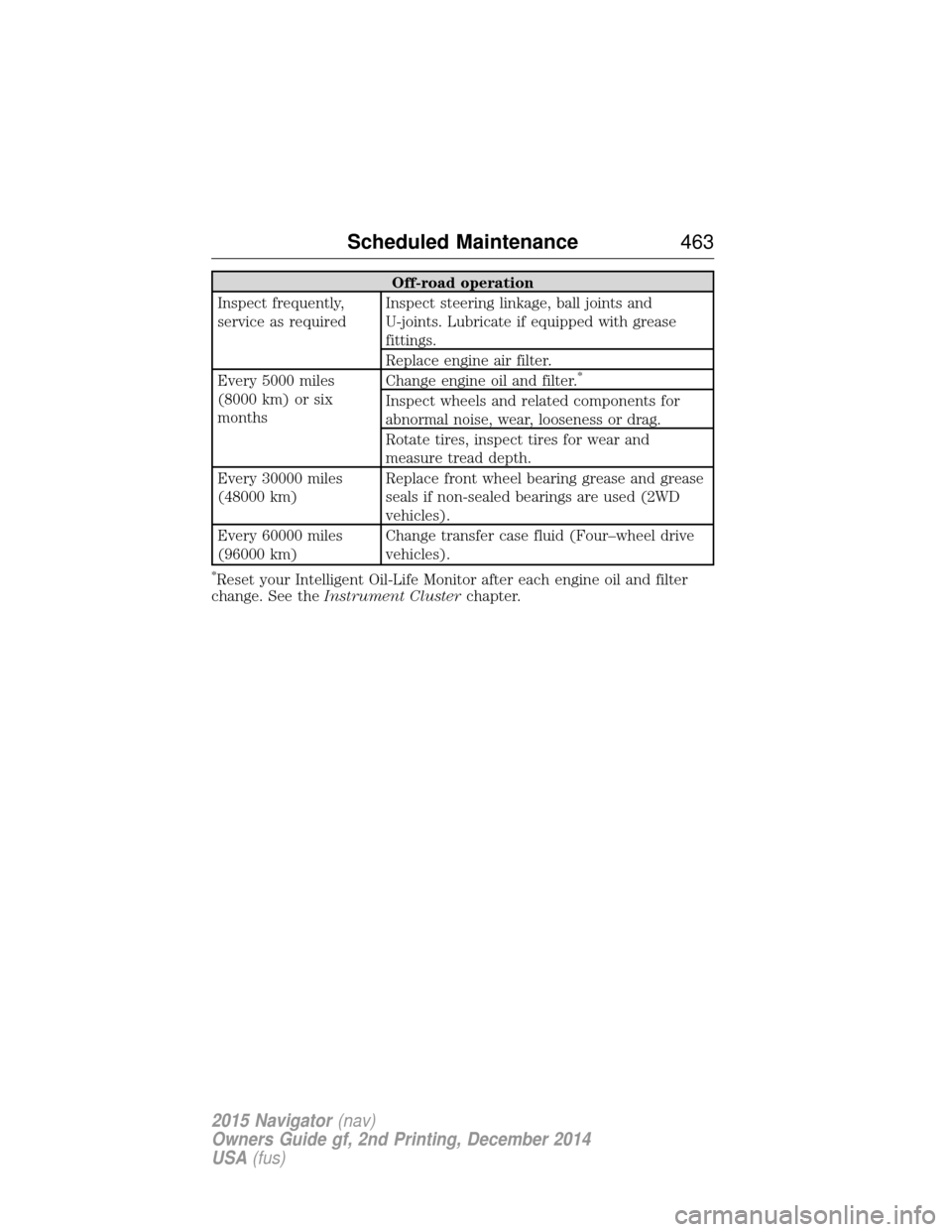
Off-road operation
Inspect frequently,
service as required Inspect steering linkage, ball joints and
U-joints. Lubricate if equipped with grease
fittings.
Replace engine air filter.
Every 5000 miles
(8000 km) or six
months Change engine oil and filter.
*
Inspect wheels and related components for
abnormal noise, wear, looseness or drag.
Rotate tires, inspect tires for wear and
measure tread depth.
Every 30000 miles
(48000 km) Replace front wheel bearing grease and grease
seals if non-sealed bearings are used (2WD
vehicles).
Every 60000 miles
(96000 km) Change transfer case fluid (Four–wheel drive
vehicles).
*Reset your Intelligent Oil-Life Monitor after each engine oil and filter
change. See the Instrument Cluster chapter.
Scheduled Maintenance 463
2015 Navigator(nav)
Owners Guide gf, 2nd Printing, December 2014
USA (fus)
Page 472 of 475
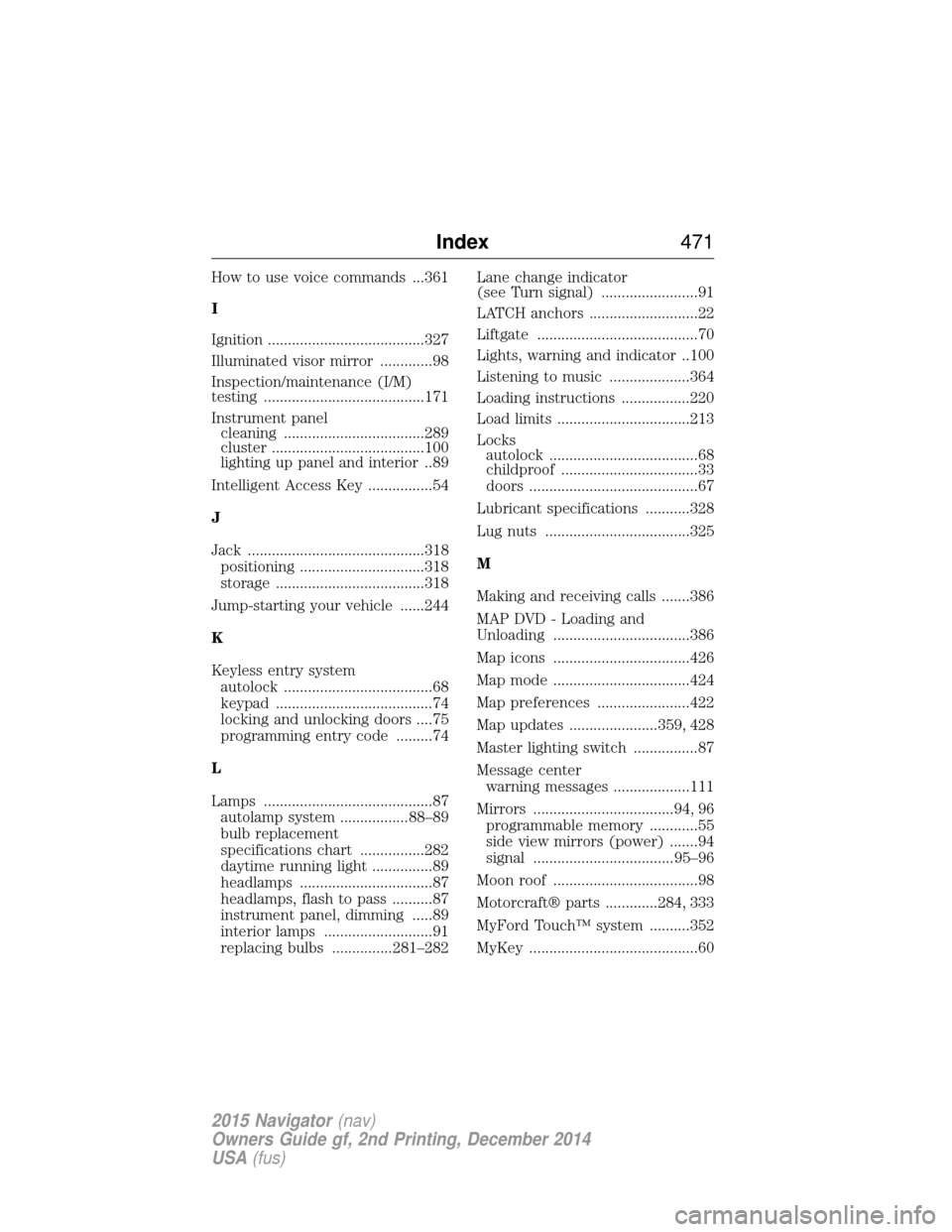
How to use voice commands ...361
I
Ignition .......................................327
Illuminated visor mirror .............98
Inspection/maintenance (I/M)
testing ........................................171
Instrument panelcleaning ...................................289
cluster ......................................100
lighting up panel and interior..89
Intelligent Access Key ................54
J
Jack ............................................318 positioning ...............................318
storage .....................................318
Jump-starting your vehicle ......244
K
Keyless entry system autolock .....................................68
keypad .......................................74
locking and unlocking doors ....75
programming entry code .........74
L
Lamps ..........................................87 autolamp system .................88–89
bulb replacement
specifications chart ................282
daytime running light ...............89
headlamps .................................87
headlamps, flash to pass ..........87
instrument panel, dimming .....89
interior lamps ...........................91
replacing bulbs ...............281–282 Lane change indicator
(see Turn signal) ........................91
LATCH anchors ...........................22
Liftgate ........................................70
Lights, warning and indicator ..100
Listening to music ....................364
Loading instructions .................220
Load limits .................................213
Locks
autolock .....................................68
childproof ..................................33
doors ..........................................67
Lubricant specifications ...........328
Lug nuts ....................................325
M
Making and receiving calls .......386
MAP DVD - Loading and
Unloading ..................................386
Map icons ..................................426
Map mode ..................................424
Map preferences .......................422
Map updates ......................359, 428
Master lighting switch ................87
Message center warning messages ...................111
Mirrors ...................................94, 96 programmable memory ............55
side view mirrors (power) .......94
signal ...................................95–96
Moon roof ....................................98
Motorcraft® parts .............284, 333
MyFord Touch™ system ..........352
MyKey ..........................................60
Index 471
2015 Navigator(nav)
Owners Guide gf, 2nd Printing, December 2014
USA (fus)