instrument panel LINCOLN NAVIGATOR 2015 Owner's Manual
[x] Cancel search | Manufacturer: LINCOLN, Model Year: 2015, Model line: NAVIGATOR, Model: LINCOLN NAVIGATOR 2015Pages: 475, PDF Size: 5.13 MB
Page 290 of 475
Note:Lincoln Black Label vehicles may have Alcantara microfiber fabric
on the seats, headliner, floor mats and door panels.
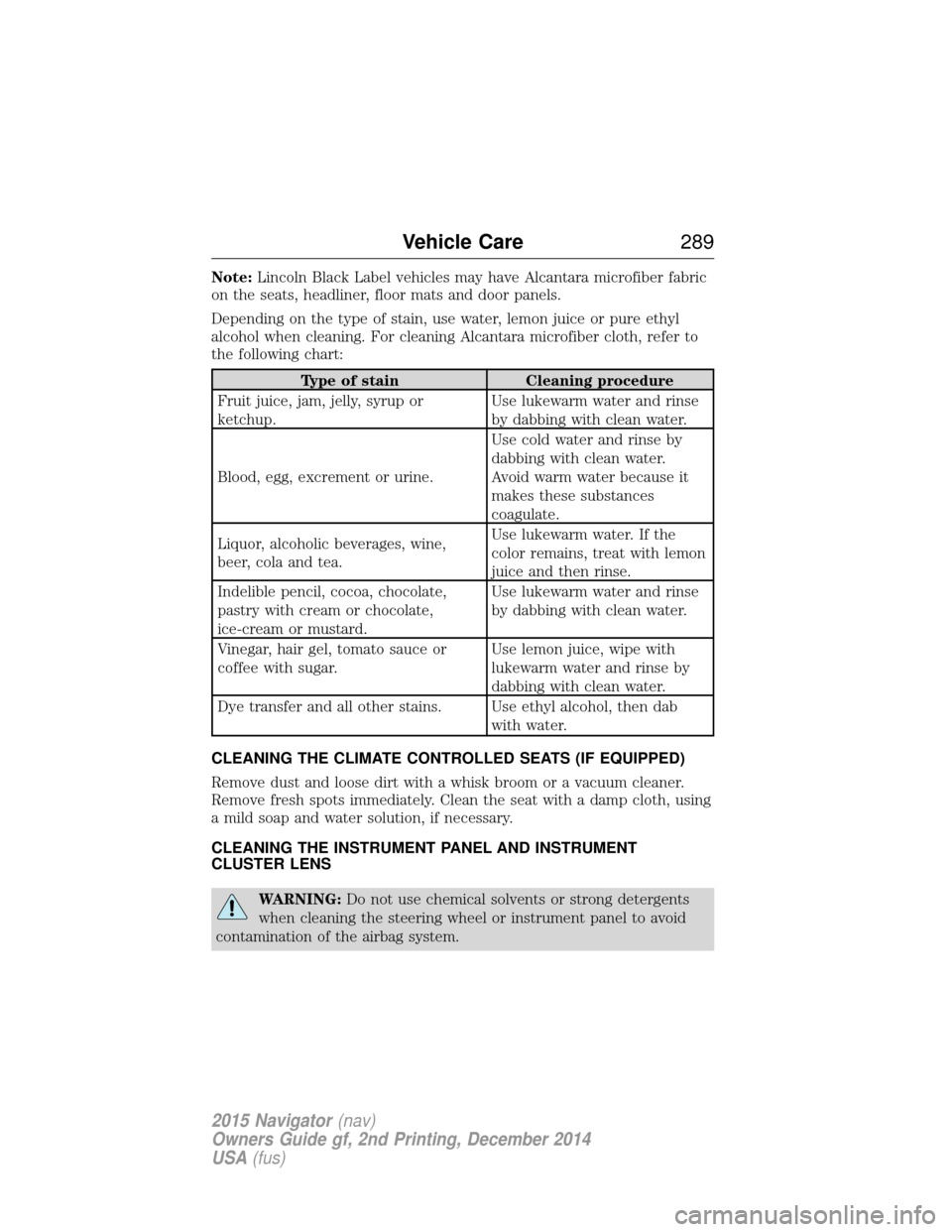
Depending on the type of stain, use water, lemon juice or pure ethyl
alcohol when cleaning. For cleaning Alcantara microfiber cloth, refer to
the following chart:
Type of stain Cleaning procedure
Fruit juice, jam, jelly, syrup or
ketchup. Use lukewarm water and rinse
by dabbing with clean water.
Blood, egg, excrement or urine. Use cold water and rinse by
dabbing with clean water.
Avoid warm water because it
makes these substances
coagulate.
Liquor, alcoholic beverages, wine,
beer, cola and tea. Use lukewarm water. If the
color remains, treat with lemon
juice and then rinse.
Indelible pencil, cocoa, chocolate,
pastry with cream or chocolate,
ice-cream or mustard. Use lukewarm water and rinse
by dabbing with clean water.
Vinegar, hair gel, tomato sauce or
coffee with sugar. Use lemon juice, wipe with
lukewarm water and rinse by
dabbing with clean water.
Dye transfer and all other stains. Use ethyl alcohol, then dab with water.
CLEANING THE CLIMATE CONTROLLED SEATS (IF EQUIPPED)
Remove dust and loose dirt with a whisk broom or a vacuum cleaner.
Remove fresh spots immediately. Clean the seat with a damp cloth, using
a mild soap and water solution, if necessary.
CLEANING THE INSTRUMENT PANEL AND INSTRUMENT
CLUSTER LENS
WARNING: Do not use chemical solvents or strong detergents
when cleaning the steering wheel or instrument panel to avoid
contamination of the airbag system.
Vehicle Care 289
2015 Navigator(nav)
Owners Guide gf, 2nd Printing, December 2014
USA (fus)
Page 291 of 475
Note:Follow the same procedure as cleaning leather seats for cleaning
leather instrument panels and leather interior trim surfaces. See
Cleaning Leather Seats in this chapter.
Clean the instrument panel and cluster lens with a clean, damp, white,
cotton cloth, then use a clean and dry, white, cotton cloth to dry these
areas.
• Avoid cleaners or polishes that increase the gloss of the upper portion
of the instrument panel. The dull finish in this area helps protect the
driver from undesirable windshield reflection.
• Be certain to wash or wipe your hands clean if you have been in
contact with certain products, such as insect repellent and suntan
lotion, in order to avoid possible damage to the interior painted
surfaces.
• Do not use household or glass cleaners as these may damage the
finish of the instrument panel, interior trim and cluster lens.
• Do not allow air fresheners and hand sanitizers to spill on interior
surfaces. If a spill occurs, wipe off immediately. Damage may not be
covered by your warranty.
If a staining liquid like coffee or juice has been spilled on the instrument
panel or on interior trim surfaces, clean as follows:
1. Wipe up spilled liquid using a clean, white, cotton cloth.
2. Use Motorcraft Premium Leather and Vinyl Cleaner or a commercially
available leather cleaning product for automotive interiors. Test any
cleaner or stain remover on an inconspicuous area.
3. Alternatively, wipe the surface with a damp, clean, white, cotton cloth
and a mild soap and water solution. Dry the area with a clean, soft cloth.
4. If necessary, apply more soap and water solution or cleaning product
to a clean, white, cotton cloth and press the cloth onto the soiled area.
Allow this to set at room temperature for 30 minutes.
5. Remove the soaked cloth, then with a clean, damp cloth, use a rubbing
motion for 60 seconds on the soiled area.
6. Following this, wipe area dry with a clean, white, cotton cloth.
CLEANING LEATHER SEATS (IF EQUIPPED)
Note: Follow the same procedure as cleaning leather seats for cleaning
leather instrument panels and leather interior trim surfaces.
For routine cleaning, wipe the surface with a soft, damp cloth and a mild
soap and water solution. Dry the area with a clean, soft cloth.
290 Vehicle Care
2015 Navigator(nav)
Owners Guide gf, 2nd Printing, December 2014
USA (fus)
Page 334 of 475
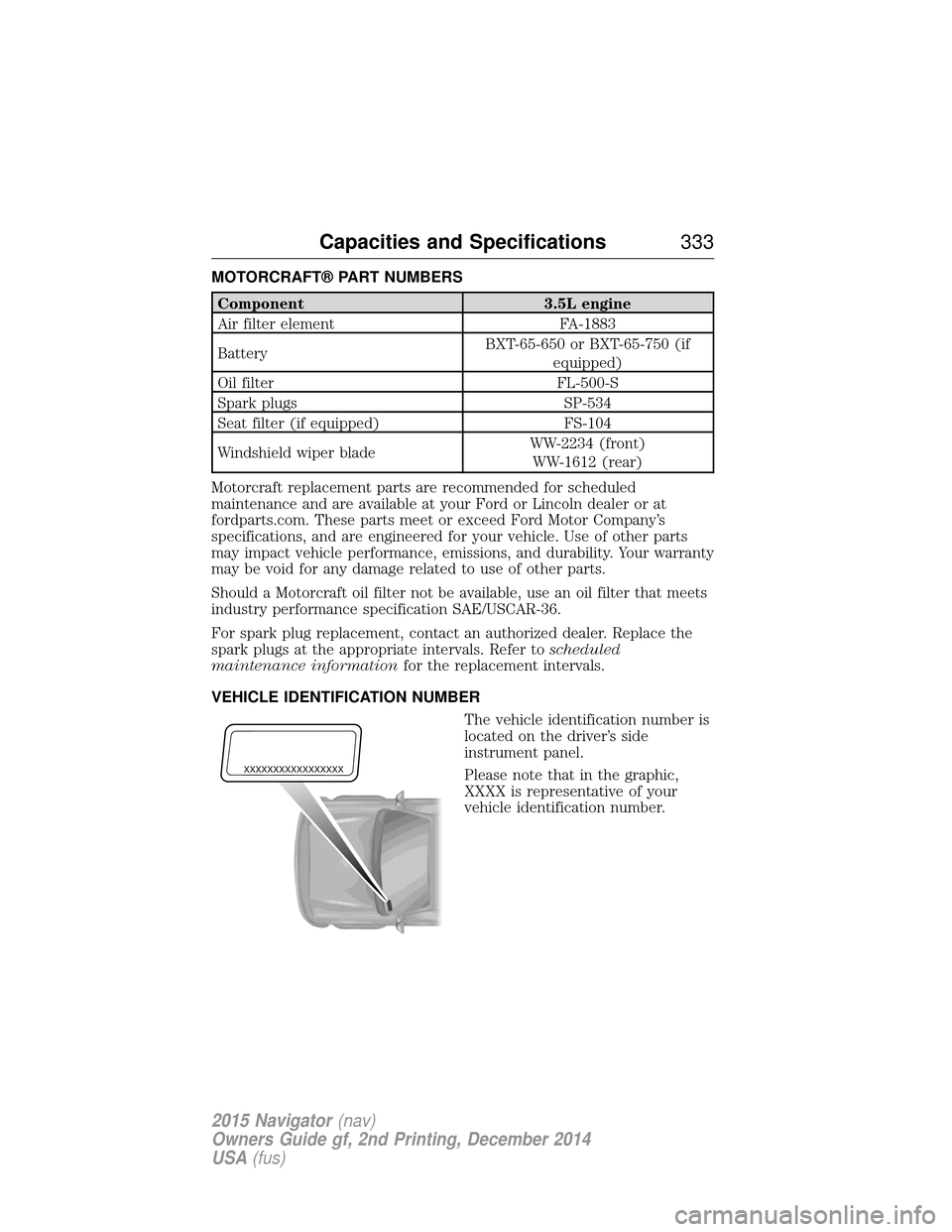
MOTORCRAFT® PART NUMBERS
Component3.5L engine
Air filter element FA-1883
Battery BXT-65-650 or BXT-65-750 (if
equipped)
Oil filter FL-500-S
Spark plugs SP-534
Seat filter (if equipped) FS-104
Windshield wiper blade WW-2234 (front)
WW-1612 (rear)
Motorcraft replacement parts are recommended for scheduled
maintenance and are available at your Ford or Lincoln dealer or at
fordparts.com. These parts meet or exceed Ford Motor Company’s
specifications, and are engineered for your vehicle. Use of other parts
may impact vehicle performance, emissions, and durability. Your warranty
may be void for any damage related to use of other parts.
Should a Motorcraft oil filter not be available, use an oil filter that meets
industry performance specification SAE/USCAR-36.
For spark plug replacement, contact an authorized dealer. Replace the
spark plugs at the appropriate intervals. Refer to scheduled
maintenance information for the replacement intervals.
VEHICLE IDENTIFICATION NUMBER The vehicle identification number is
located on the driver’s side
instrument panel.
Please note that in the graphic,
XXXX is representative of your
vehicle identification number.
XXXXXXXXXXXXXXXXX
Capacities and Specifications 333
2015 Navigator(nav)
Owners Guide gf, 2nd Printing, December 2014
USA (fus)
Page 379 of 475
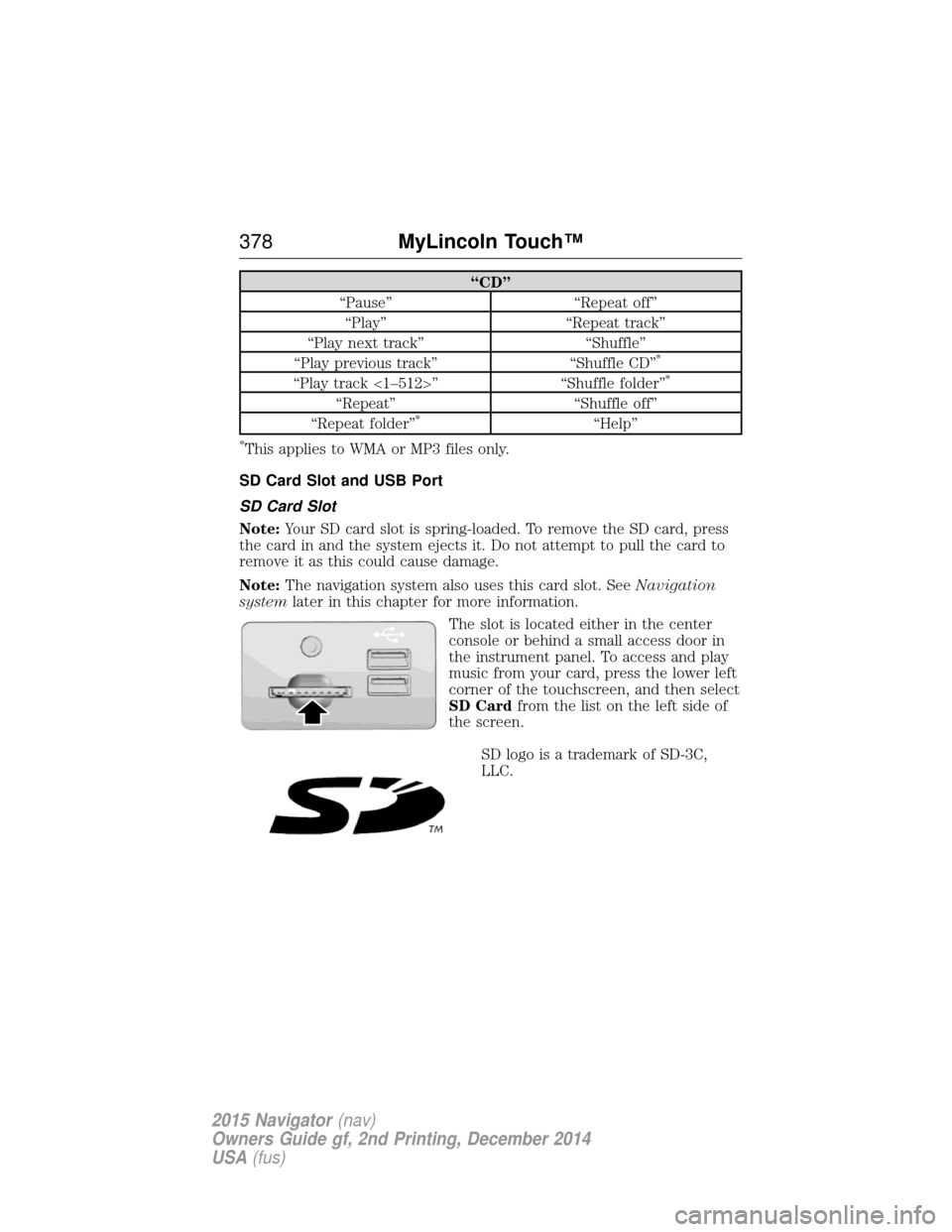
“CD”
“Pause” “Repeat off” “Play” “Repeat track”
“Play next track” “Shuffle”
“Play previous track” “Shuffle CD”
*
“Play track <1–512>” “Shuffle folder”*
“Repeat”“Shuffle off”
“Repeat folder”*“Help”
*This applies to WMA or MP3 files only.
SD Card Slot and USB Port
SD Card Slot
Note: Your SD card slot is spring-loaded. To remove the SD card, press
the card in and the system ejects it. Do not attempt to pull the card to
remove it as this could cause damage.
Note: The navigation system also uses this card slot. See Navigation
system later in this chapter for more information.
The slot is located either in the center
console or behind a small access door in
the instrument panel. To access and play
music from your card, press the lower left
corner of the touchscreen, and then select
SD Cardfrom the list on the left side of
the screen.
SD logo is a trademark of SD-3C,
LLC.
378 MyLincoln Touch™
2015 Navigator(nav)
Owners Guide gf, 2nd Printing, December 2014
USA (fus)
Page 380 of 475
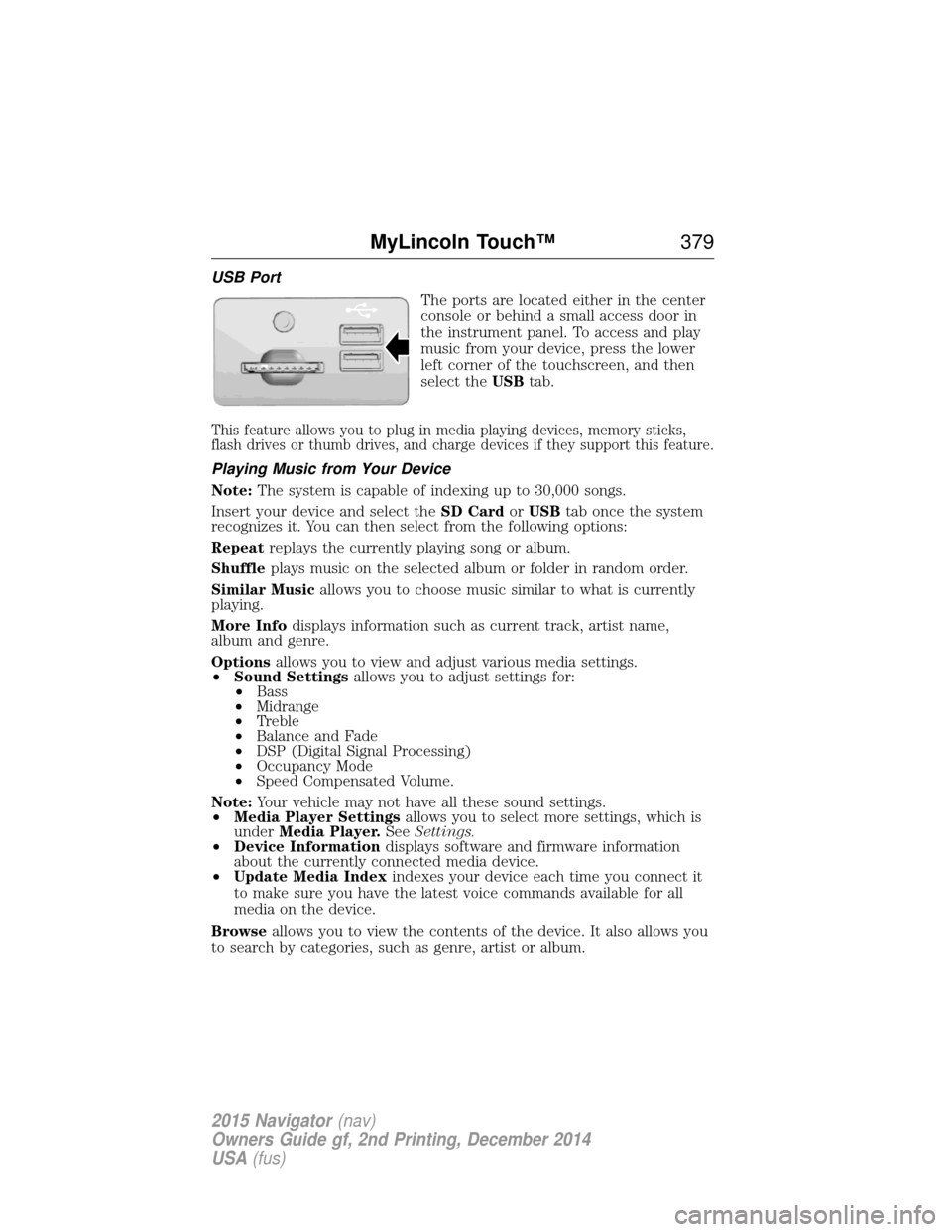
USB PortThe ports are located either in the center
console or behind a small access door in
the instrument panel. To access and play
music from your device, press the lower
left corner of the touchscreen, and then
select theUSBtab.
This feature allows you to plug in media playing devices, memory sticks,
flash drives or thumb drives, and charge devices if they support this feature.
Playing Music from Your Device
Note: The system is capable of indexing up to 30,000 songs.
Insert your device and select the SD CardorUSB tab once the system
recognizes it. You can then select from the following options:
Repeat replays the currently playing song or album.
Shuffle plays music on the selected album or folder in random order.
Similar Music allows you to choose music similar to what is currently
playing.
More Info displays information such as current track, artist name,
album and genre.
Options allows you to view and adjust various media settings.
• Sound Settings allows you to adjust settings for:
• Bass
• Midrange
• Treble
• Balance and Fade
• DSP (Digital Signal Processing)
• Occupancy Mode
• Speed Compensated Volume.
Note: Your vehicle may not have all these sound settings.
• Media Player Settings allows you to select more settings, which is
under Media Player. SeeSettings.
• Device Information displays software and firmware information
about the currently connected media device.
• Update Media Index indexes your device each time you connect it
to make sure you have the latest voice commands available for all
media on the device.
Browse allows you to view the contents of the device. It also allows you
to search by categories, such as genre, artist or album.
MyLincoln Touch™ 379
2015 Navigator(nav)
Owners Guide gf, 2nd Printing, December 2014
USA (fus)
Page 405 of 475
You can also turn the outside air temperature display on and off. It
appears at the top center of the touchscreen, next to the time and date.
The system automatically saves any updates you make to the settings.
Display
You can adjust the touchscreen display through the touchscreen or by
pressing the voice button on your steering wheel controls and when
prompted, say, “Display settings”.Press the Settings icon > Display,to access and make
adjustments using the touchscreen.
• Brightness allows you to make the screen display brighter or
dimmer.
• Auto DIM, when set to On,lets you use the Auto Dim Manual Offset
feature. When set to Off,screen brightness does not change.
• Mode allows you to set the screen to a certain brightness or have the
system automatically change based on the outside light level, or turn
the display off.
• If you select AUTOorNIGHT, you have the options of turning
the display’s Auto Dim feature on or off and changing the Auto
Dim Manual Offset feature.
• Auto Dim Manual Offset allows you to adjust screen dimming as
the outside lighting conditions change from day to night. This feature
also allows you to adjust screen brightness using the instrument panel
dimming control.
Edit Wallpaper
• You can have your touchscreen display the default photo or upload
your own.
Uploading Photos for Your Home Screen Wallpaper
Note: You cannot load photos directly from your camera. You must
access the photos either from your USB mass storage device or from an
SD card.
Note: Photographs with extremely large dimensions (such as 2048 x
1536) may not be compatible and appear as a blank (black) image on the
display.
Your system allows you to upload and view up to 32 photos.
To access, press the Settings icon > Display>Edit Wallpaper, and
then follow the system prompts to upload your photographs.
404 MyLincoln Touch™
2015 Navigator(nav)
Owners Guide gf, 2nd Printing, December 2014
USA (fus)
Page 417 of 475
Note:When the system is controlling the fan speed automatically, all
the fan speed indicators turn off.
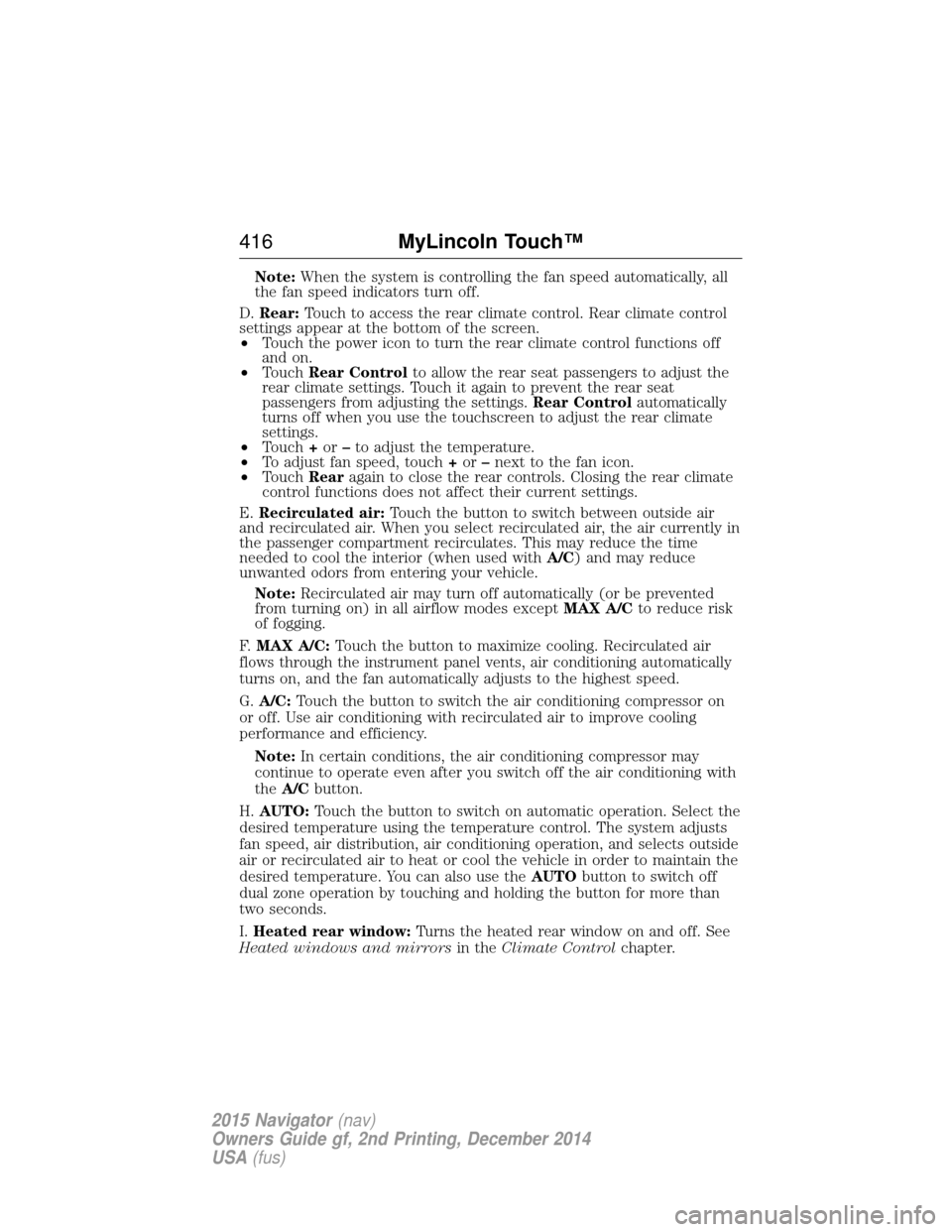
D. Rear: Touch to access the rear climate control. Rear climate control
settings appear at the bottom of the screen.
• Touch the power icon to turn the rear climate control functions off
and on.
• Touch Rear Control to allow the rear seat passengers to adjust the
rear climate settings. Touch it again to prevent the rear seat
passengers from adjusting the settings. Rear Controlautomatically
turns off when you use the touchscreen to adjust the rear climate
settings.
• Touch +or –to adjust the temperature.
• To adjust fan speed, touch +or –next to the fan icon.
• Touch Rearagain to close the rear controls. Closing the rear climate
control functions does not affect their current settings.
E. Recirculated air: Touch the button to switch between outside air
and recirculated air. When you select recirculated air, the air currently in
the passenger compartment recirculates. This may reduce the time
needed to cool the interior (when used with A/C) and may reduce
unwanted odors from entering your vehicle.
Note: Recirculated air may turn off automatically (or be prevented
from turning on) in all airflow modes except MAX A/Cto reduce risk
of fogging.
F. MAX A/C: Touch the button to maximize cooling. Recirculated air
flows through the instrument panel vents, air conditioning automatically
turns on, and the fan automatically adjusts to the highest speed.
G. A/C: Touch the button to switch the air conditioning compressor on
or off. Use air conditioning with recirculated air to improve cooling
performance and efficiency.
Note: In certain conditions, the air conditioning compressor may
continue to operate even after you switch off the air conditioning with
the A/C button.
H. AUTO: Touch the button to switch on automatic operation. Select the
desired temperature using the temperature control. The system adjusts
fan speed, air distribution, air conditioning operation, and selects outside
air or recirculated air to heat or cool the vehicle in order to maintain the
desired temperature. You can also use the AUTObutton to switch off
dual zone operation by touching and holding the button for more than
two seconds.
I. Heated rear window: Turns the heated rear window on and off. See
Heated windows and mirrors in theClimate Control chapter.
416 MyLincoln Touch™
2015 Navigator(nav)
Owners Guide gf, 2nd Printing, December 2014
USA (fus)
Page 418 of 475
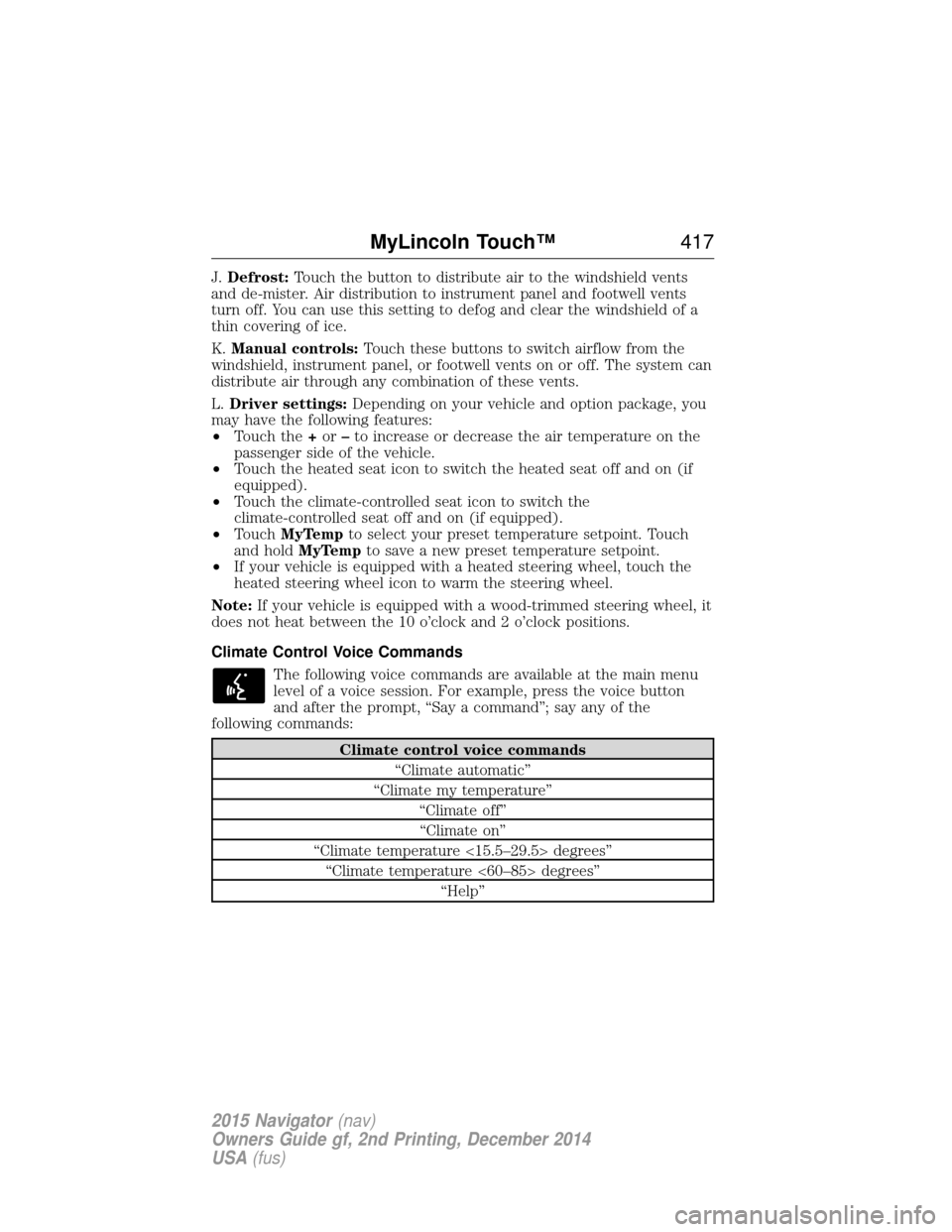
J.Defrost: Touch the button to distribute air to the windshield vents
and de-mister. Air distribution to instrument panel and footwell vents
turn off. You can use this setting to defog and clear the windshield of a
thin covering of ice.
K. Manual controls: Touch these buttons to switch airflow from the
windshield, instrument panel, or footwell vents on or off. The system can
distribute air through any combination of these vents.
L. Driver settings: Depending on your vehicle and option package, you
may have the following features:
• Touch the +or –to increase or decrease the air temperature on the
passenger side of the vehicle.
• Touch the heated seat icon to switch the heated seat off and on (if
equipped).
• Touch the climate-controlled seat icon to switch the
climate-controlled seat off and on (if equipped).
• Touch MyTemp to select your preset temperature setpoint. Touch
and hold MyTemp to save a new preset temperature setpoint.
• If your vehicle is equipped with a heated steering wheel, touch the
heated steering wheel icon to warm the steering wheel.
Note: If your vehicle is equipped with a wood-trimmed steering wheel, it
does not heat between the 10 o’clock and 2 o’clock positions.
Climate Control Voice Commands
The following voice commands are available at the main menu
level of a voice session. For example, press the voice button
and after the prompt, “Say a command”; say any of the
following commands:
Climate control voice commands
“Climate automatic”
“Climate my temperature” “Climate off”“Climate on”
“Climate temperature <15.5–29.5> degrees” “Climate temperature <60–85> degrees” “Help”
MyLincoln Touch™ 417
2015 Navigator(nav)
Owners Guide gf, 2nd Printing, December 2014
USA (fus)
Page 470 of 475
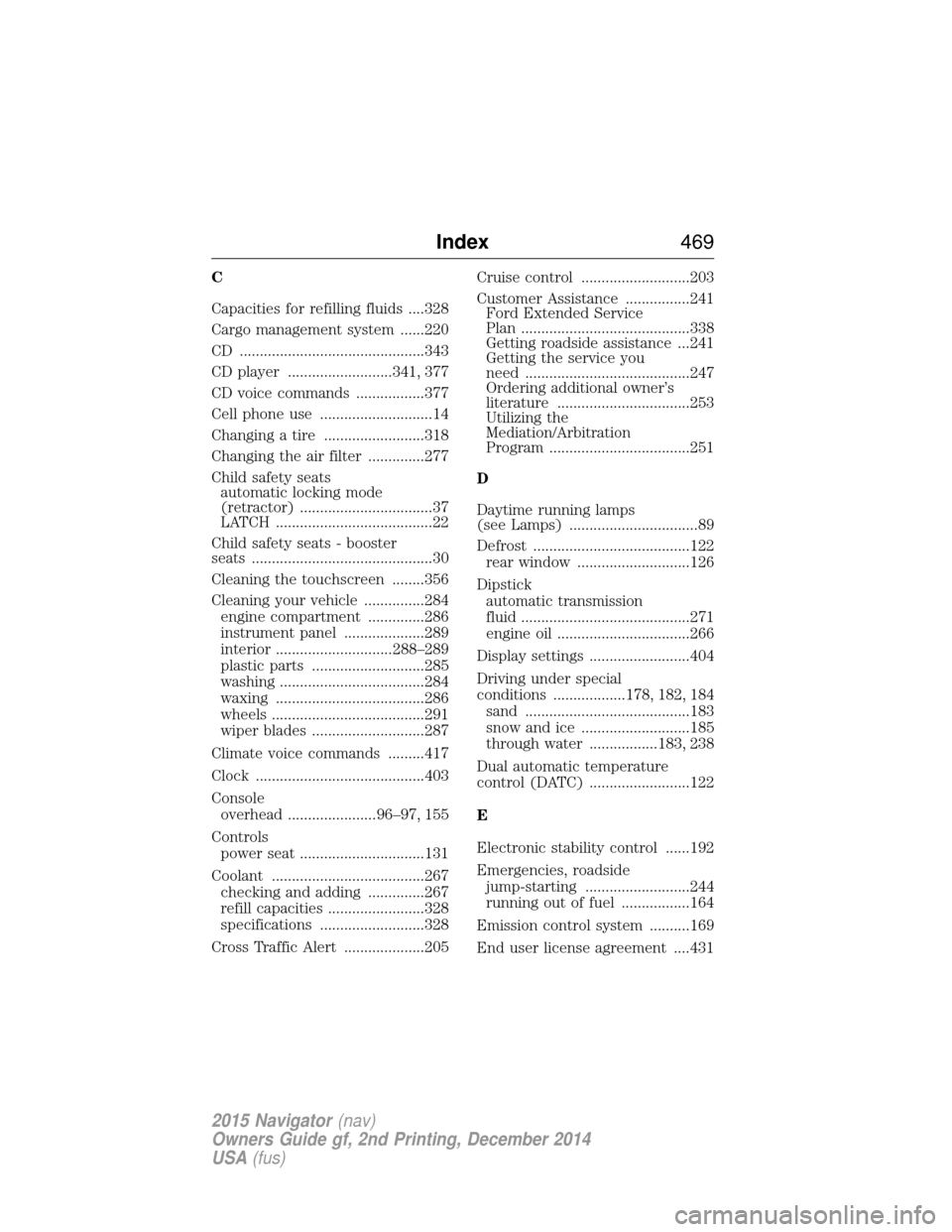
C
Capacities for refilling fluids ....328
Cargo management system ......220
CD ..............................................343
CD player ..........................341, 377
CD voice commands .................377
Cell phone use ............................14
Changing a tire .........................318
Changing the air filter ..............277
Child safety seatsautomatic locking mode
(retractor) .................................37
LATCH .......................................22
Child safety seats - booster
seats .............................................30
Cleaning the touchscreen ........356
Cleaning your vehicle ...............284 engine compartment ..............286
instrument panel ....................289
interior .............................288–289
plastic parts ............................285
washing ....................................284
waxing .....................................286
wheels ......................................291
wiper blades ............................287
Climate voice commands .........417
Clock ..........................................403
Console overhead ......................96–97, 155
Controls power seat ...............................131
Coolant ......................................267 checking and adding ..............267
refill capacities ........................328
specifications ..........................328
Cross Traffic Alert ....................205 Cruise control ...........................203
Customer Assistance ................241
Ford Extended Service
Plan ..........................................338
Getting roadside assistance ...241
Getting the service you
need .........................................247
Ordering additional owner’s
literature .................................253
Utilizing the
Mediation/Arbitration
Program ...................................251
D
Daytime running lamps
(see Lamps) ................................89
Defrost .......................................122 rear window ............................126
Dipstick automatic transmission
fluid ..........................................271
engine oil .................................266
Display settings .........................404
Driving under special
conditions ..................178, 182, 184 sand .........................................183
snow and ice ...........................185
through water .................183, 238
Dual automatic temperature
control (DATC) .........................122
E
Electronic stability control ......192
Emergencies, roadside jump-starting ..........................244
running out of fuel .................164
Emission control system ..........169
End user license agreement ....431
Index 469
2015 Navigator(nav)
Owners Guide gf, 2nd Printing, December 2014
USA (fus)
Page 472 of 475
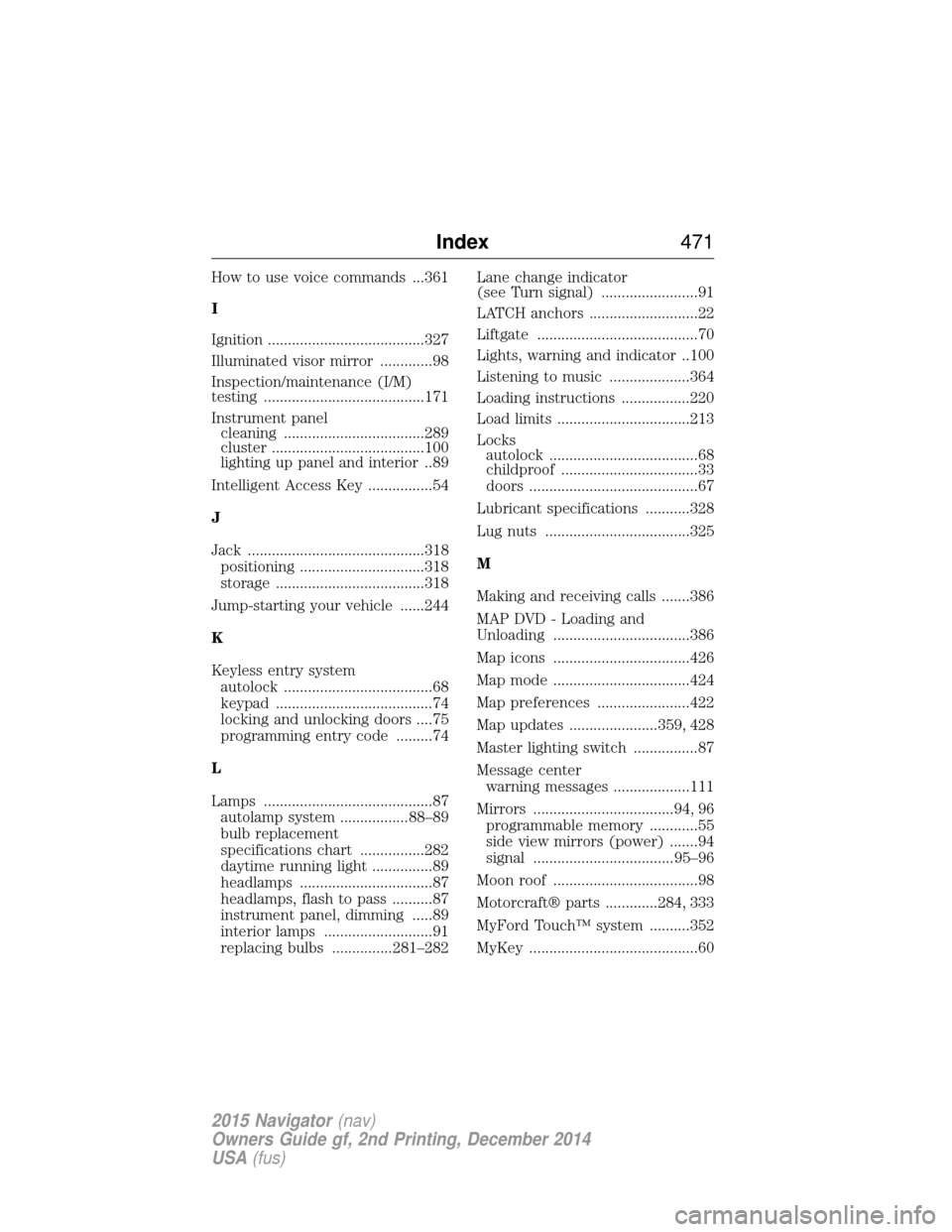
How to use voice commands ...361
I
Ignition .......................................327
Illuminated visor mirror .............98
Inspection/maintenance (I/M)
testing ........................................171
Instrument panelcleaning ...................................289
cluster ......................................100
lighting up panel and interior..89
Intelligent Access Key ................54
J
Jack ............................................318 positioning ...............................318
storage .....................................318
Jump-starting your vehicle ......244
K
Keyless entry system autolock .....................................68
keypad .......................................74
locking and unlocking doors ....75
programming entry code .........74
L
Lamps ..........................................87 autolamp system .................88–89
bulb replacement
specifications chart ................282
daytime running light ...............89
headlamps .................................87
headlamps, flash to pass ..........87
instrument panel, dimming .....89
interior lamps ...........................91
replacing bulbs ...............281–282 Lane change indicator
(see Turn signal) ........................91
LATCH anchors ...........................22
Liftgate ........................................70
Lights, warning and indicator ..100
Listening to music ....................364
Loading instructions .................220
Load limits .................................213
Locks
autolock .....................................68
childproof ..................................33
doors ..........................................67
Lubricant specifications ...........328
Lug nuts ....................................325
M
Making and receiving calls .......386
MAP DVD - Loading and
Unloading ..................................386
Map icons ..................................426
Map mode ..................................424
Map preferences .......................422
Map updates ......................359, 428
Master lighting switch ................87
Message center warning messages ...................111
Mirrors ...................................94, 96 programmable memory ............55
side view mirrors (power) .......94
signal ...................................95–96
Moon roof ....................................98
Motorcraft® parts .............284, 333
MyFord Touch™ system ..........352
MyKey ..........................................60
Index 471
2015 Navigator(nav)
Owners Guide gf, 2nd Printing, December 2014
USA (fus)