fuel LINCOLN NAVIGATOR 2015 Workshop Manual
[x] Cancel search | Manufacturer: LINCOLN, Model Year: 2015, Model line: NAVIGATOR, Model: LINCOLN NAVIGATOR 2015Pages: 475, PDF Size: 5.13 MB
Page 328 of 475
ENGINE SPECIFICATIONS
Engine3.5L V6 EcoBoost
Cubic inches 214
Fuel Minimum 87 octane
Firing order 1–4–2–5–3–6
Ignition system Coil on plug
Spark plug gap 0.030–0.033 inch (0.75 – 0.85 mm)
Compression ratio 10.0:1
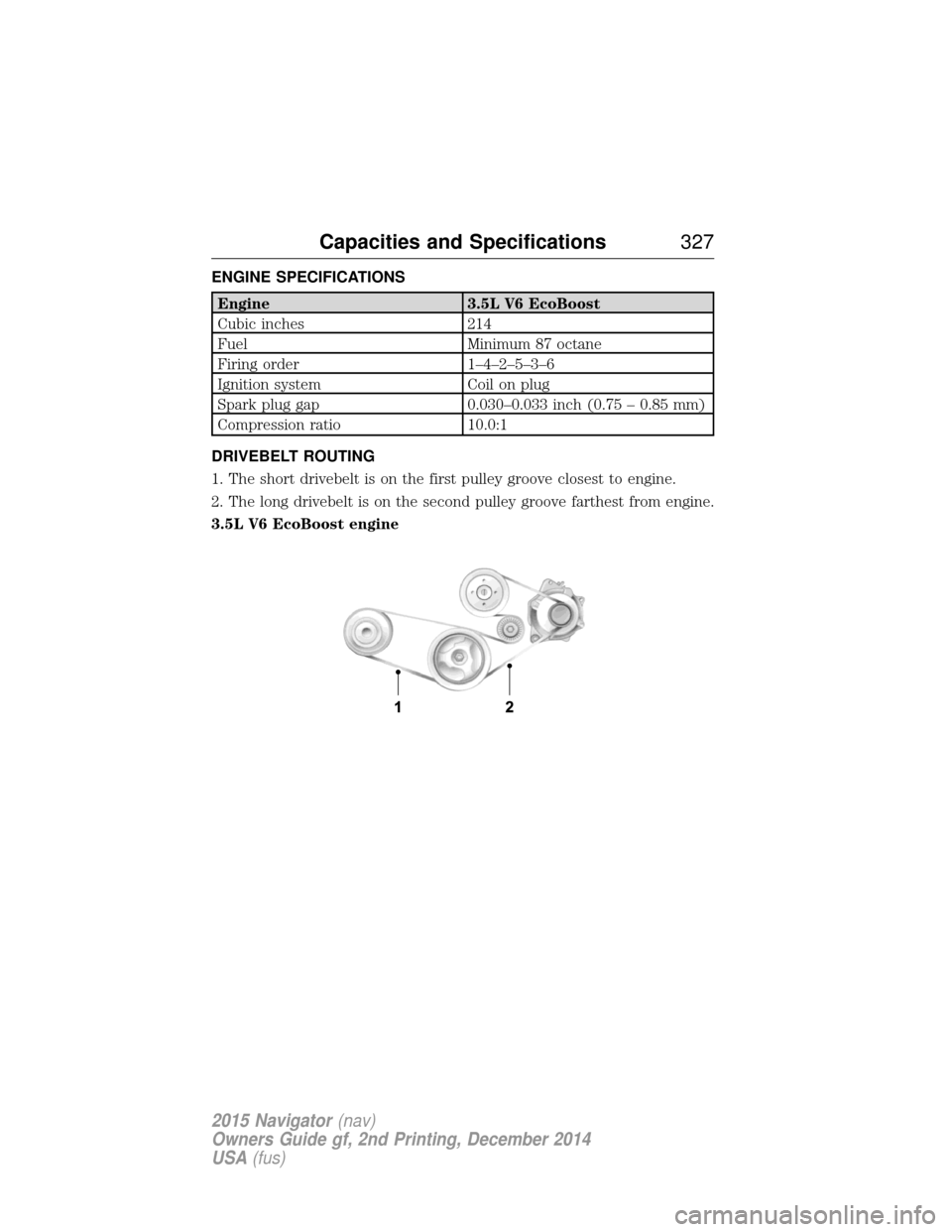
DRIVEBELT ROUTING
1. The short drivebelt is on the first pulley groove closest to engine.
2. The long drivebelt is on the second pulley groove farthest from engine.
3.5L V6 EcoBoost engine
Capacities and Specifications 327
2015 Navigator(nav)
Owners Guide gf, 2nd Printing, December 2014
USA (fus)
Page 329 of 475
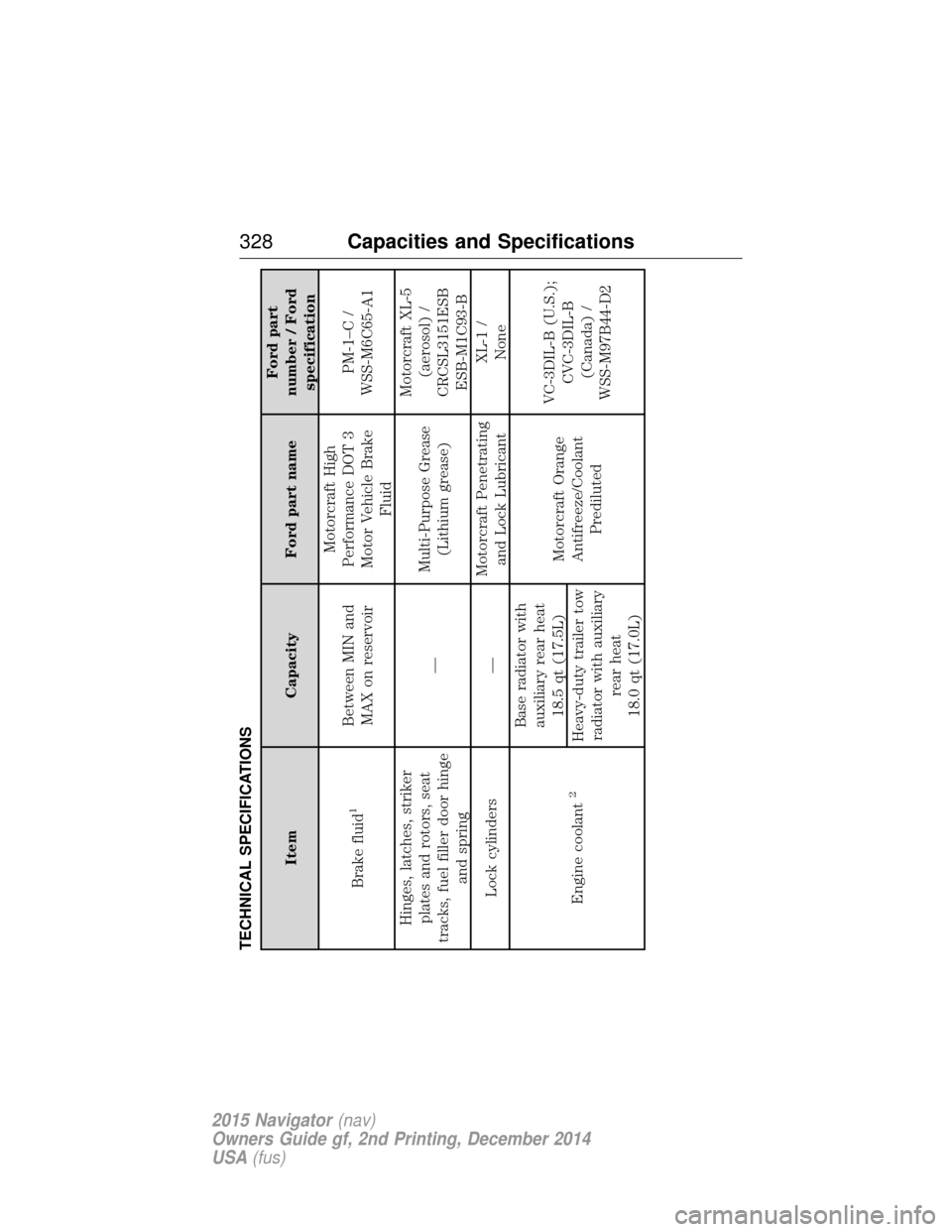
TECHNICAL SPECIFICATIONS
ItemCapacity Ford part name Ford part
number / Ford specification
Brake fluid
1
Between MIN and MAX on reservoir Motorcraft High
Performance DOT 3
Motor Vehicle Brake Fluid PM-1–C /
WSS-M6C65-A1
Hinges, latches, striker plates and rotors, seat
tracks, fuel filler door hinge and spring —
Multi-Purpose Grease
(Lithium grease) Motorcraft XL-5
(aerosol) /
CRCSL3151ESB ESB-M1C93-B
Lock cylinders — Motorcraft Penetrating
and Lock Lubricant XL-1 /
None
Engine coolant
2
Base radiator with auxiliary rear heat 18.5 qt (17.5L) Motorcraft Orange
Antifreeze/Coolant Prediluted VC-3DIL-B (U.S.);
CVC-3DIL-B(Canada) /
WSS-M97B44-D2
Heavy-duty trailer tow
radiator with auxiliary rear heat
18.0 qt (17.0L)
328 Capacities and Specifications
2015 Navigator (nav)
Owners Guide gf, 2nd Printing, December 2014
USA (fus)
Page 331 of 475
ItemCapacity Ford part name Ford part
number / Ford specification
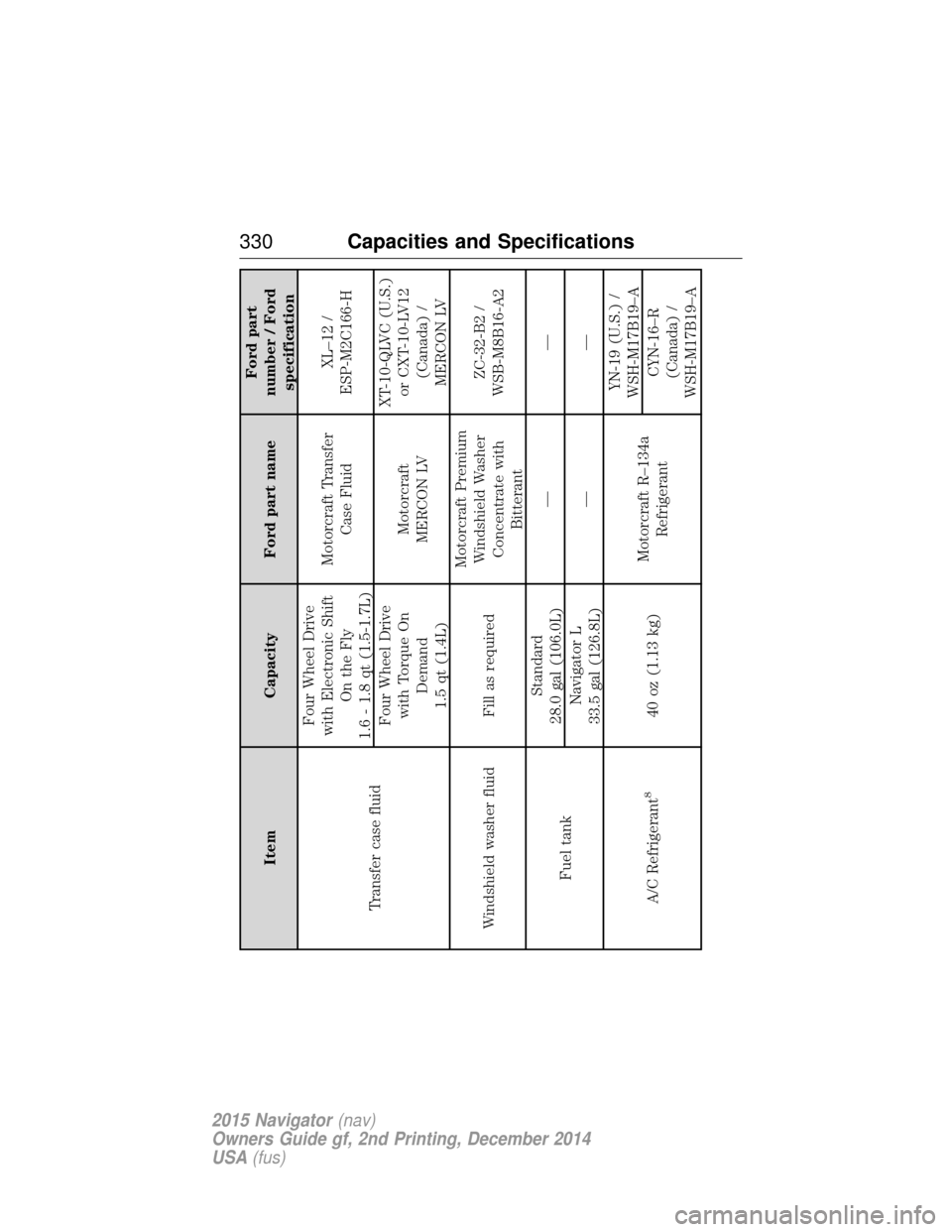
Transfer case fluid Four Wheel Drive
with Electronic Shift On the Fly
1.6 - 1.8 qt (1.5-1.7L) Motorcraft Transfer
Case Fluid XL–12 /
ESP-M2C166-H
Four Wheel Drive with Torque On Demand
1.5 qt (1.4L) Motorcraft
MERCON LV XT-10-QLVC (U.S.)
or CXT-10-LV12 (Canada) /
MERCON LV
Windshield washer fluid Fill as required Motorcraft Premium
Windshield Washer Concentrate with Bitterant ZC-32-B2 /
WSB-M8B16-A2
Fuel tank Standard
28.0 gal (106.0L) ——
Navigator L
33.5 gal (126.8L) ——
A/C Refrigerant
8
40 oz (1.13 kg) Motorcraft R–134a
Refrigerant YN-19 (U.S.) /
WSH-M17B19–A
CYN-16–R
(Canada) /
WSH-M17B19–A
330 Capacities and Specifications
2015 Navigator (nav)
Owners Guide gf, 2nd Printing, December 2014
USA (fus)
Page 332 of 475
ItemCapacity Ford part name Ford part
number / Ford specification
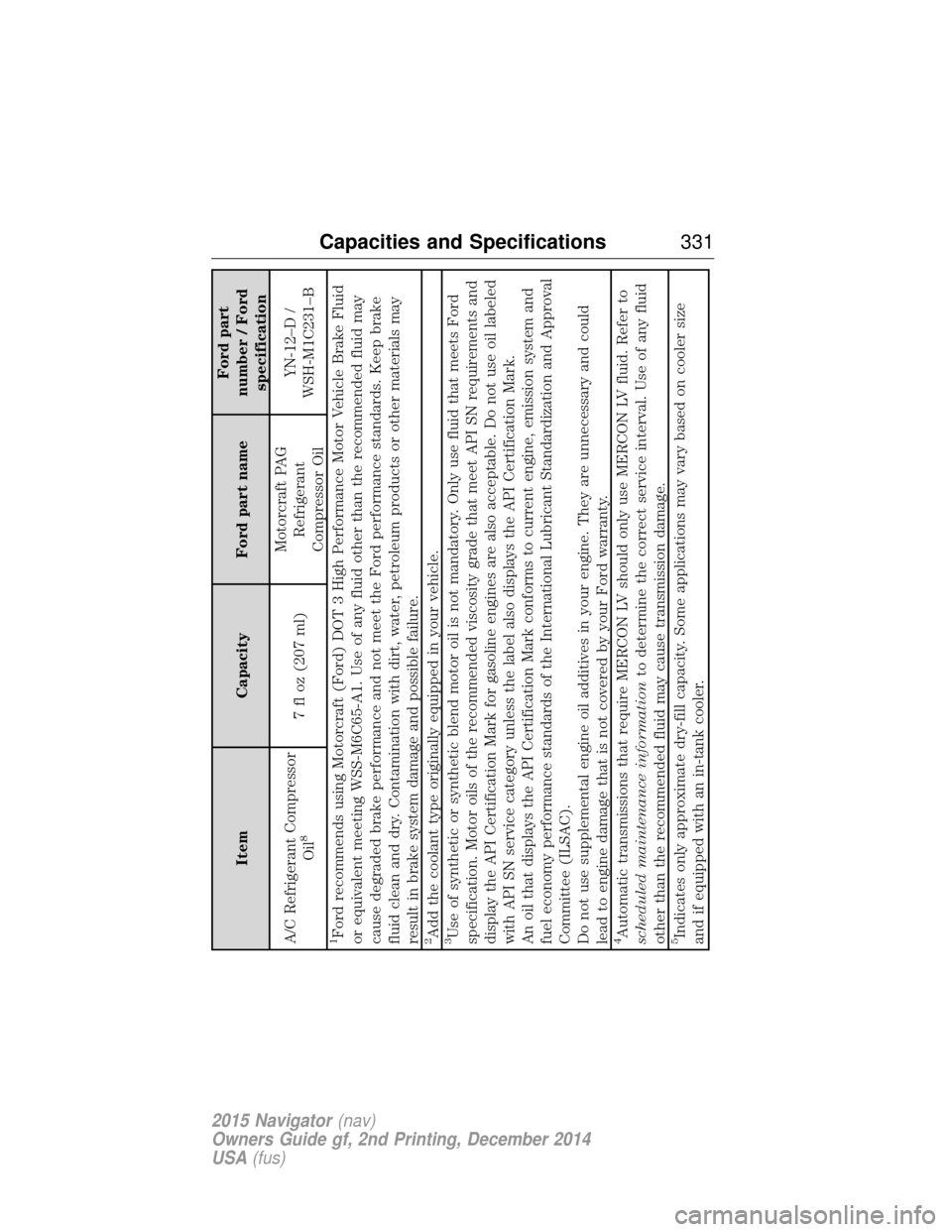
A/C Refrigerant Compressor Oil
8
7 fl oz (207 ml) Motorcraft PAG
Refrigerant
Compressor Oil YN-12–D /
WSH-M1C231–B
1Ford recommends using Motorcraft (Ford) DOT 3 High Performance Motor Vehicle Brake Fluid
or equivalent meeting WSS-M6C65-A1. Use of any fluid other than the recommended fluid may
cause degraded brake performance and not meet the Ford performance standards. Keep brake
fluid clean and dry. Contamination with dirt, water, petroleum products or other materials may
result in brake system damage and possible failure.2Add the coolant type originally equipped in your vehicle.3Use of synthetic or synthetic blend motor oil is not mandatory. Only use fluid that meets Ford
specification. Motor oils of the recommended viscosity grade that meet API SN requirements and
display the API Certification Mark for gasoline engines are also acceptable. Do not use oil labeled
with API SN service category unless the label also displays the API Certification Mark.
An oil that displays the API Certification Mark conforms to current engine, emission system and
fuel economy performance standards of the International Lubricant Standardization and Approval
Committee (ILSAC).
Do not use supplemental engine oil additives in your engine. They are unnecessary and could
lead to engine damage that is not covered by your Ford warranty.4Automatic transmissions that require MERCON LV should only use MERCON LV fluid. Refer to
scheduled maintenance information to determine the correct service interval. Use of any fluid
other than the recommended fluid may cause transmission damage.5Indicates only approximate dry-fill capacity. Some applications may vary based on cooler size
and if equipped with an in-tank cooler.
Capacities and Specifications 331
2015 Navigator(nav)
Owners Guide gf, 2nd Printing, December 2014
USA (fus)
Page 340 of 475
Roadside Assistance
Exclusive 24/7 roadside assistance, including:
•Towing, flat-tire change and battery jump starts.
• Out of fuel and lock-out assistance.
• Travel expense reimbursement for lodging, meals and rental car.
• Destination assistance for taxi, shuttle, rental car coverage and
emergency transportation.
Transferable Coverage
If you sell your vehicle before your Lincoln Extended Service Plan
coverage expires, you can transfer any remaining coverage to the new
owner. Whenever you sell your vehicle, prospective buyers may have a
higher degree of confidence that vehicle was properly maintained with
Lincoln ESP, thereby improving resale value.
Avoid the Rising Cost of Properly Maintaining Your Vehicle!
Lincoln Extended Service Plan also offers a Premium Maintenance Plan
that covers all scheduled maintenance, and select items that routinely
wear out. The coverage is prepaid, so you never have to worry about
affording your vehicle maintenance. It covers regular checkups, routine
inspections, preventive care and replacement of select items that require
periodic attention for normal wear:
• Windshield wiper blades.
• Spark plugs (except in California).
• The clutch disc.
• Brake pads and linings.
• Shock absorbers.
• Belts and hoses.
• Diesel exhaust fluid replenishment.
Interest Free Finance Options Available
Take advantage of our interest free installment payment plan. Just a 10%
down payment will provide you with an affordable, no interest, no fee
payment program allowing you all the security and benefits Lincoln ESP
has to offer while paying over time. You are pre-approved with no credit
checks, no hassles! To learn more, call our Lincoln ESP specialists at
800-367-3377.
Lincoln ESP
P.O. Box 8072
Royal Oak, MI 48068-0039
Extended Service Plan 339
2015 Navigator(nav)
Owners Guide gf, 2nd Printing, December 2014
USA (fus)
Page 397 of 475
If your vehicle is equipped with Navigation, touch the i
(Information) button to access these features. If your vehicle is
not equipped with Navigation, touch the corner of the
touchscreen with the green tab.
Traffic On Route and Traffic Nearby
Touch these buttons to identify traffic incidents on your route, nearby
your vehicle’s current location or near any of your favorite places, if
programmed.
Fuel Prices
Touch this button to view fuel prices at stations close to your vehicle’s
location or on an active navigation route.
Movie Listings
Touch this button to view nearby movie theaters and their show times, if
available.
Weather
Touch this button to view the nearby weather, current weather, or the
five day forecast for the chosen area. Select Mapto see the weather
map, which can show storms, radar information, charts and winds. Select
Area to select from a listing of weather locations.
Sports Info
Touch this button to view scores and schedules from a variety of sports.
You can also save up to 10 favorite teams for easier access. The score
automatically refreshes when a game is in progress.
Ski Conditions
Touch this button to view ski conditions for a specific area.
Sirius Travel Link Voice Commands
Note: In order to use Sirius Travel Link, your vehicle must be equipped
with navigation and your navigation SD card must be in the SD card slot.
396 MyLincoln Touch™
2015 Navigator(nav)
Owners Guide gf, 2nd Printing, December 2014
USA (fus)
Page 398 of 475
Press the voice button on the steering wheel controls and, when
prompted, say any of the following:
Travel Link voice commands
“5–day weather forecast” “Sports scores”*
“Fuel prices”“Traffic”
“Movie listings” “Travel Link”**
“Sports headlines”*“Weather”
“Sports schedule”*“Weather map”
*If you have said, “Sports headlines”, “Sports schedule” or “Sports
scores”, you may say any of the commands in the “Sports headlines,
Sports schedules and Sports scores” commands chart:
**If you have said, “Travel Link”, you may say any of the commands in
the “Travel Link” chart:
Sports headlines, sports schedules and sports scores voice
commands
“Baseball” “My teams”
“College basketball” “NBA” “College football” “NFL” “Golf” “NHL”
“MLS” “WNBA”
“Motor sports”
“TRAVEL LINK”
“5–day weather forecast” “Golf schedule” “NBA scores”
“Baseball headlines” “MLS headlines” “NFL headlines” “Baseball schedule” “MLS schedule” “NFL schedule” “Baseball scores” “MLS scores” “NFL scores”
“College basketball headlines” “Motor sports” “NHL headlines”
“College basketball schedule” “Motor sports order” “NHL schedule”
“College basketball scores” “Motor sports
schedule” “NHL scores”
MyLincoln Touch™
397
2015 Navigator(nav)
Owners Guide gf, 2nd Printing, December 2014
USA (fus)
Page 399 of 475
“TRAVEL LINK”
“College football headlines” “Movie listings” “Traffic”
“College football schedule” “My team headlines” “Weather”
“College football scores” “My teams schedule” “Weather map”
“Fuel prices” “My teams scores” “WNBA headlines”
“Golf headlines” “NBA headlines” “WNBA schedule”
“Golf leaderboard” “NBA schedule” “WNBA scores”
Alerts If your vehicle is equipped with Navigation, touch the i
(Information) button to access these features. If your vehicle is
not equipped with Navigation, touch the corner of the
touchscreen with the green tab.
Press Alerts, and then choose from any of the following services:
• Vi e w the message.
• Delete the message.
• Delete All messages.
This screen displays any system messages (such as an SD card fault).
Note: The system alerts you to any messages by turning the information
icon yellow. After you read or delete the messages, the icon returns to
white.
Calendar
If your vehicle is equipped with Navigation, touch the i
(Information) button to access these features. If your vehicle is
not equipped with Navigation, touch the corner of the
touchscreen with the green tab.
Press Calendar. You can view the current calendar by day, week or
month.
911 Assist® (If Equipped)
WARNING: Unless the 911 Assist setting is set on before a
crash, the system will not dial for help, which could delay
response time, potentially increasing the risk of serious injury or death
after a crash.
398 MyLincoln Touch™
2015 Navigator(nav)
Owners Guide gf, 2nd Printing, December 2014
USA (fus)
Page 400 of 475
WARNING:Do not wait for 911 Assist to make an emergency
call if you can do it yourself. Dial emergency services
immediately to avoid delayed response time, which could increase the
risk of serious injury or death after a crash. If you do not hear 911
Assist within five seconds of the crash, the system or phone may be
damaged or non-functional.
WARNING: Always place your phone in a secure location in your
vehicle so it does not become a projectile or damaged in a crash.
Failure to do so may cause serious injury to someone or damage the
phone, which could prevent 911 Assist from working properly.
Note: The SYNC 911 Assist feature must be set on prior to the incident.
Note: Before setting this feature on, make sure that you read the 911
Assist privacy notice later in this section for important information.
Note: If any user turns 911 Assist on or off, that setting applies for all
paired phones. If 911 Assist is turned off, either a voice message plays or
a display message (or icon) comes on (or both) when your vehicle is
started after a previously paired phone connects.
Note: Every phone operates differently. While SYNC 911 Assist works
with most cellular phones, some may have trouble using this feature.
If a crash deploys an airbag (excludes knee airbags and rear inflatable
safety belts [if equipped]) or activates the fuel pump shut-off, your
SYNC-equipped vehicle may be able to contact emergency services by
dialing 911 through a paired and connected Bluetooth-enabled phone.
You can learn more about the 911 Assist feature, visit
www.SYNCMyRide.com, www.SYNCMyRide.ca or www.syncmaroute.ca.
• For information on airbag deployment, see the Supplementary
Restraints System chapter.
• For information on the fuel pump shut-off, see the Roadside
Emergencies chapter.
MyLincoln Touch™ 399
2015 Navigator(nav)
Owners Guide gf, 2nd Printing, December 2014
USA (fus)
Page 401 of 475
Setting 911 Assist OnIf your vehicle is equipped with Navigation, touch the i
(Information) button to access these features. If your vehicle is
not equipped with Navigation, touch the corner of the
touchscreen with the green tab.
Press Apps >911 Assist, >On.
You can also access 911 Assist by: •Pressing the Settings icon > Settings>Phone >911
Assist, or
• Pressing the Settings icon > Help>911 Assist.
To Make Sure that 911 Assist Works Properly
• SYNC must be powered and working properly at the time of the
incident and throughout feature activation and use.
• The 911 Assist feature must be set on before the incident.
• You must pair and connect a Bluetooth-enabled and compatible phone
to SYNC.
• A connected Bluetooth-enabled phone must have the ability to make
and maintain an outgoing call at the time of the incident.
• A connected Bluetooth-enabled phone must have adequate network
coverage, battery power and signal strength.
•
The vehicle must have battery power and be located in the United States, Canada or in a territory in which 911 is the emergency number.
In the Event of a Crash
Not all crashes deploy an airbag or activate the fuel pump shut-off
(which would trigger 911 Assist); however, SYNC tries to contact
emergency services if 911 Assist triggers. If a connected phone sustains
damage or loses connection to SYNC, SYNC searches for, and tries to
connect to, any available previously paired phone and tries to make the
call to 911.
Before making the call:
• SYNC provides a short window of time (about 10 seconds) to cancel
the call. If you fail to cancel the call, SYNC attempts to dial 911.
• SYNC says the following, or a similar message: “SYNC will attempt to
call 911, to cancel the call, press Cancel on your screen or press and
hold the phone button on your steering wheel.”
400 MyLincoln Touch™
2015 Navigator(nav)
Owners Guide gf, 2nd Printing, December 2014
USA (fus)