brake LINCOLN NAVIGATOR 2015 Manual PDF
[x] Cancel search | Manufacturer: LINCOLN, Model Year: 2015, Model line: NAVIGATOR, Model: LINCOLN NAVIGATOR 2015Pages: 475, PDF Size: 5.13 MB
Page 319 of 475
CHANGING A ROAD WHEEL
WARNING:The use of tire sealant may damage your tire
pressure monitoring system and should only be used in roadside
emergencies. If you must use a sealant, the Ford Tire Mobility Kit
sealant should be used. The tire pressure monitoring system sensor and
valve stem on the wheel must be replaced by an authorized dealer after
use of the sealant.
WARNING: SeeTire Pressure Monitoring System in this
chapter for important information. If the tire pressure monitoring
sensor becomes damaged, it will no longer function.
Note: The tire pressure monitoring system indicator light will illuminate
when the spare tire is in use. To restore the full function of the
monitoring system, all road wheels equipped with tire pressure
monitoring sensors must be mounted on this vehicle.
If you get a flat tire while driving, do not apply the brake heavily.
Instead, gradually decrease your speed. Hold the steering wheel firmly
and slowly move to a safe place on the side of the road.
Have a flat serviced by an authorized dealer in order to prevent damage
to the system sensors. See Tire Pressure Monitoring System earlier in
this chapter. Replace the spare tire with a road tire as soon as possible.
During repairing or replacing of the flat tire, have the authorized dealer
inspect the tire pressure monitoring system sensor for damage.
Dissimilar Spare Tire and Wheel Assembly Information
WARNING: Failure to follow these guidelines could result in an
increased risk of loss of vehicle control, injury or death.
If you have a dissimilar spare tire and wheel assembly, then it is intended
for temporary use only. This means that if you need to use it, you should
replace it as soon as possible with a road tire and wheel assembly that is
the same size and type as the road tires and wheels that were originally
provided by Ford. If the dissimilar spare tire or wheel is damaged, it
should be replaced rather than repaired.
318 Wheels and Tires
2015 Navigator(nav)
Owners Guide gf, 2nd Printing, December 2014
USA (fus)
Page 321 of 475
The usage of a full-size dissimilar spare tire and wheel assembly can lead
to impairment of the following:
•Handling, stability and braking performance
• Comfort and noise
• Ground clearance and parking at curbs
• Winter weather driving capability
• Wet weather driving capability
• All-wheel driving capability (if applicable)
• Load leveling adjustment (if applicable)
When driving with the full-size dissimilar spare tire and wheel assembly,
additional caution should be given to:
• towing a trailer.
• driving vehicles equipped with a camper body.
• driving vehicles with a load on the cargo rack.
Drive cautiously when using a full-size dissimilar spare tire and wheel,
and seek service as soon as possible.
Tire Change Procedure
WARNING: When one of the front wheels is off the ground, the
transmission alone will not prevent the vehicle from moving or
slipping off the jack, even if the transmission is in park (P).
WARNING: To help prevent the vehicle from moving when you
change a tire, be sure to place the transmission in park (P), set
the parking brake and block (in both directions) the wheel that is
diagonally opposite (other side and end of the vehicle) to the tire being
changed.
WARNING: Never get underneath a vehicle that is supported
only by a jack. If the vehicle slips off the jack, you or someone
else could be seriously injured.
320 Wheels and Tires
2015 Navigator(nav)
Owners Guide gf, 2nd Printing, December 2014
USA (fus)
Page 322 of 475
WARNING:Do not attempt to change a tire on the side of the
vehicle close to moving traffic. Pull far enough off the road to
avoid the danger of being hit when operating the jack or changing the
wheel.
WARNING: Always use the jack provided as original equipment
with your vehicle. If using a jack other than the one provided as
original equipment with your vehicle, make sure the jack capacity is
adequate for the vehicle weight, including any vehicle cargo or
modifications.
WARNING: Disable the power running boards before jacking,
lifting, or placing any object under the vehicle. Never place your
hand between the power running board and vehicle as extended power
running boards will retract when the doors are closed. Failure to follow
these instructions may result in personal injury.
Note: Passengers should not remain in the vehicle when the vehicle is
being jacked.
Park on a level surface, set the parking brake, and activate the hazard
flashers. Place the transmission in park (P) and turn the engine off.
Location of the Spare Tire and Tools
The spare tire and tools for your vehicle are stowed in the following
locations:
Item Location
Spare tire Under the vehicle, just forward of
the rear bumper
Jack tools Under the access panel located in
the floor compartment behind the
rear seat
Wheels and Tires 321
2015 Navigator(nav)
Owners Guide gf, 2nd Printing, December 2014
USA (fus)
Page 326 of 475
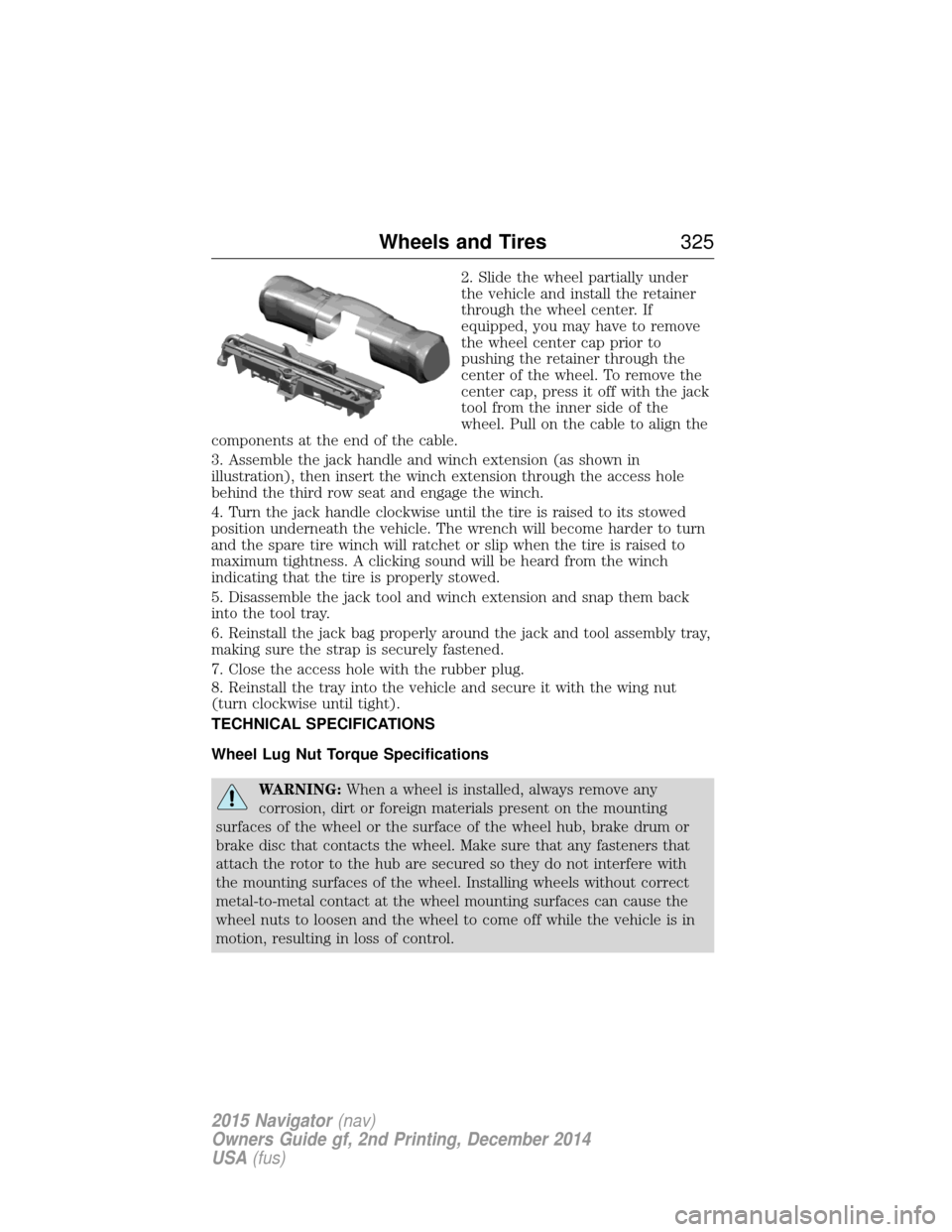
2. Slide the wheel partially under
the vehicle and install the retainer
through the wheel center. If
equipped, you may have to remove
the wheel center cap prior to
pushing the retainer through the
center of the wheel. To remove the
center cap, press it off with the jack
tool from the inner side of the
wheel. Pull on the cable to align the
components at the end of the cable.
3. Assemble the jack handle and winch extension (as shown in
illustration), then insert the winch extension through the access hole
behind the third row seat and engage the winch.
4. Turn the jack handle clockwise until the tire is raised to its stowed
position underneath the vehicle. The wrench will become harder to turn
and the spare tire winch will ratchet or slip when the tire is raised to
maximum tightness. A clicking sound will be heard from the winch
indicating that the tire is properly stowed.
5. Disassemble the jack tool and winch extension and snap them back
into the tool tray.
6. Reinstall the jack bag properly around the jack and tool assembly tray,
making sure the strap is securely fastened.
7. Close the access hole with the rubber plug.
8. Reinstall the tray into the vehicle and secure it with the wing nut
(turn clockwise until tight).
TECHNICAL SPECIFICATIONS
Wheel Lug Nut Torque Specifications
WARNING: When a wheel is installed, always remove any
corrosion, dirt or foreign materials present on the mounting
surfaces of the wheel or the surface of the wheel hub, brake drum or
brake disc that contacts the wheel. Make sure that any fasteners that
attach the rotor to the hub are secured so they do not interfere with
the mounting surfaces of the wheel. Installing wheels without correct
metal-to-metal contact at the wheel mounting surfaces can cause the
wheel nuts to loosen and the wheel to come off while the vehicle is in
motion, resulting in loss of control.
Wheels and Tires 325
2015 Navigator(nav)
Owners Guide gf, 2nd Printing, December 2014
USA (fus)
Page 329 of 475
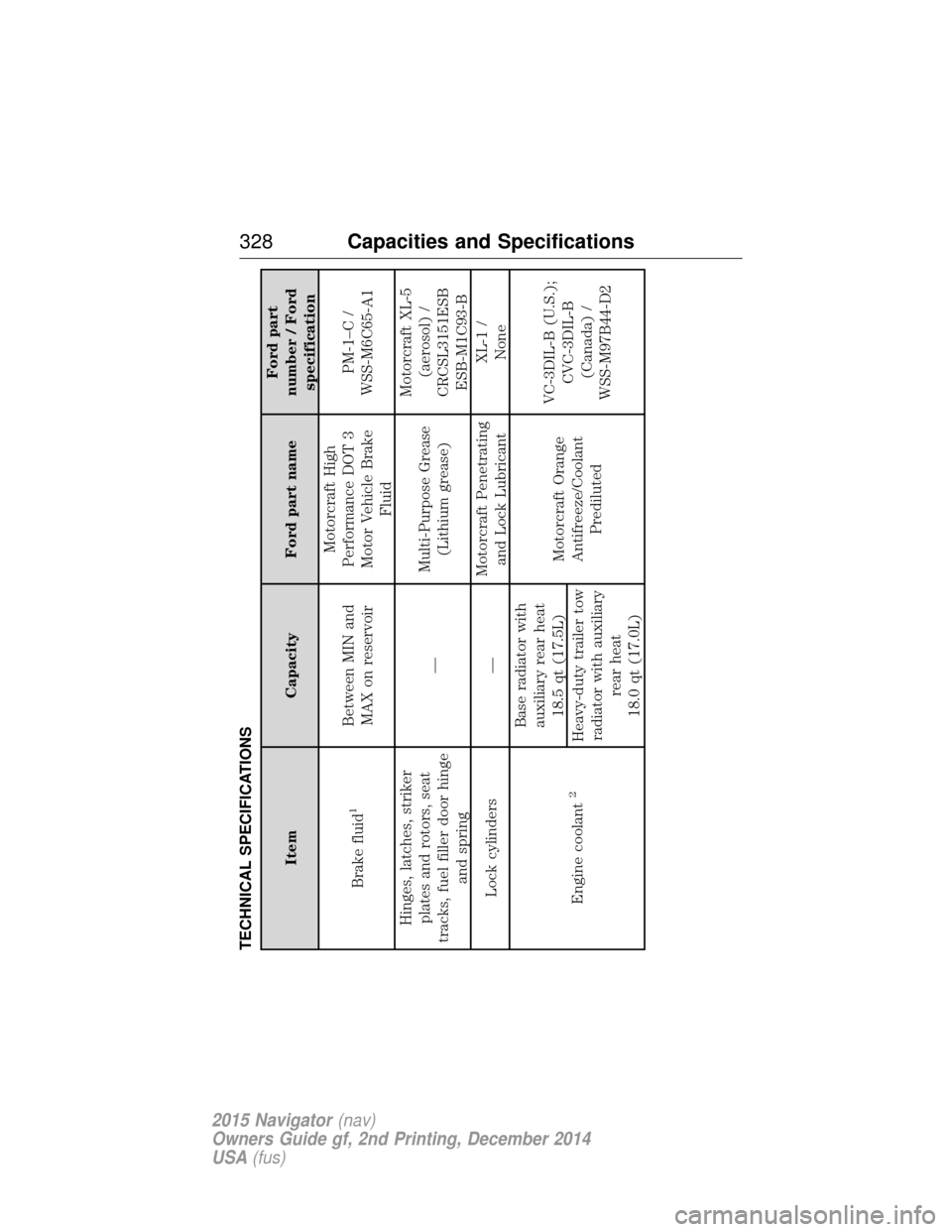
TECHNICAL SPECIFICATIONS
ItemCapacity Ford part name Ford part
number / Ford specification
Brake fluid
1
Between MIN and MAX on reservoir Motorcraft High
Performance DOT 3
Motor Vehicle Brake Fluid PM-1–C /
WSS-M6C65-A1
Hinges, latches, striker plates and rotors, seat
tracks, fuel filler door hinge and spring —
Multi-Purpose Grease
(Lithium grease) Motorcraft XL-5
(aerosol) /
CRCSL3151ESB ESB-M1C93-B
Lock cylinders — Motorcraft Penetrating
and Lock Lubricant XL-1 /
None
Engine coolant
2
Base radiator with auxiliary rear heat 18.5 qt (17.5L) Motorcraft Orange
Antifreeze/Coolant Prediluted VC-3DIL-B (U.S.);
CVC-3DIL-B(Canada) /
WSS-M97B44-D2
Heavy-duty trailer tow
radiator with auxiliary rear heat
18.0 qt (17.0L)
328 Capacities and Specifications
2015 Navigator (nav)
Owners Guide gf, 2nd Printing, December 2014
USA (fus)
Page 332 of 475
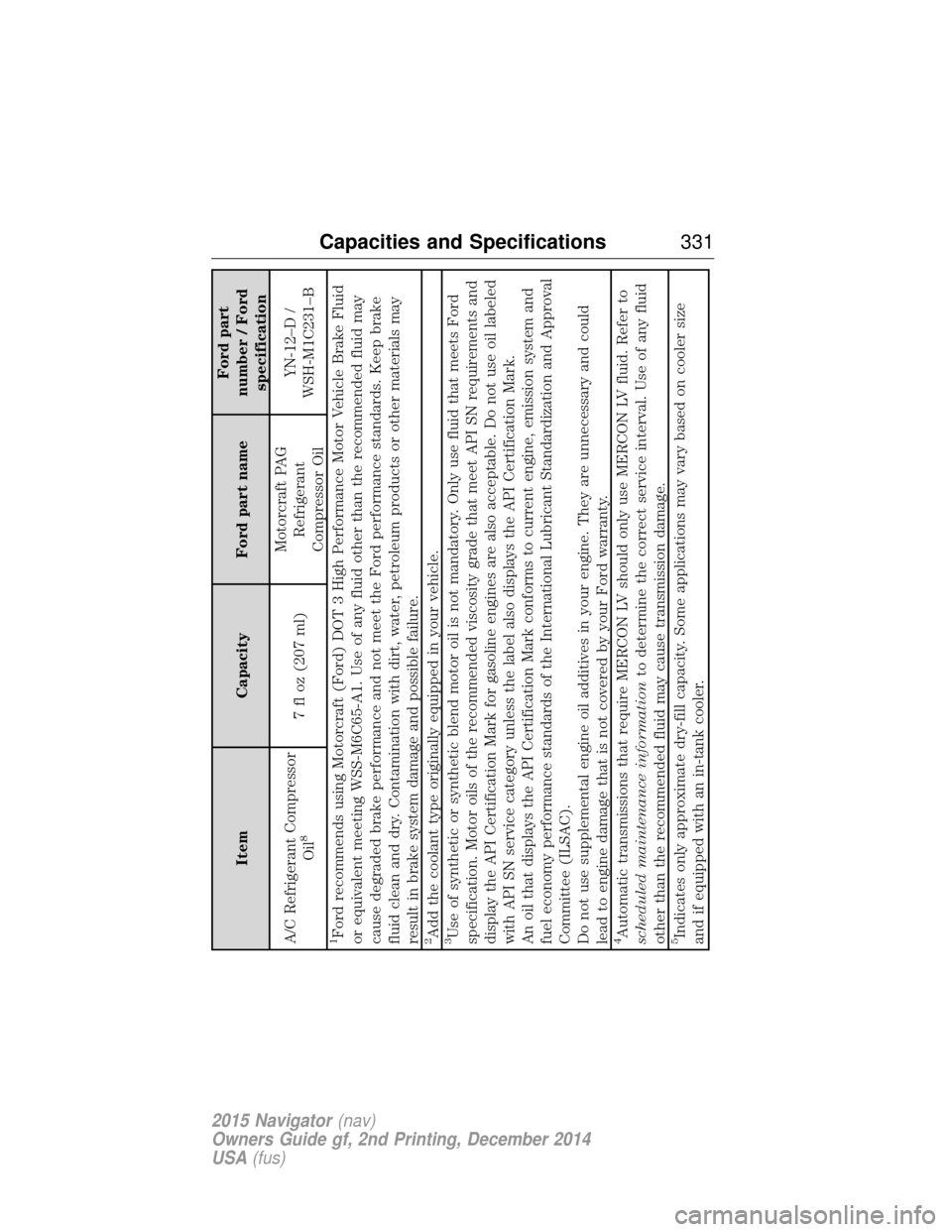
ItemCapacity Ford part name Ford part
number / Ford specification
A/C Refrigerant Compressor Oil
8
7 fl oz (207 ml) Motorcraft PAG
Refrigerant
Compressor Oil YN-12–D /
WSH-M1C231–B
1Ford recommends using Motorcraft (Ford) DOT 3 High Performance Motor Vehicle Brake Fluid
or equivalent meeting WSS-M6C65-A1. Use of any fluid other than the recommended fluid may
cause degraded brake performance and not meet the Ford performance standards. Keep brake
fluid clean and dry. Contamination with dirt, water, petroleum products or other materials may
result in brake system damage and possible failure.2Add the coolant type originally equipped in your vehicle.3Use of synthetic or synthetic blend motor oil is not mandatory. Only use fluid that meets Ford
specification. Motor oils of the recommended viscosity grade that meet API SN requirements and
display the API Certification Mark for gasoline engines are also acceptable. Do not use oil labeled
with API SN service category unless the label also displays the API Certification Mark.
An oil that displays the API Certification Mark conforms to current engine, emission system and
fuel economy performance standards of the International Lubricant Standardization and Approval
Committee (ILSAC).
Do not use supplemental engine oil additives in your engine. They are unnecessary and could
lead to engine damage that is not covered by your Ford warranty.4Automatic transmissions that require MERCON LV should only use MERCON LV fluid. Refer to
scheduled maintenance information to determine the correct service interval. Use of any fluid
other than the recommended fluid may cause transmission damage.5Indicates only approximate dry-fill capacity. Some applications may vary based on cooler size
and if equipped with an in-tank cooler.
Capacities and Specifications 331
2015 Navigator(nav)
Owners Guide gf, 2nd Printing, December 2014
USA (fus)
Page 335 of 475
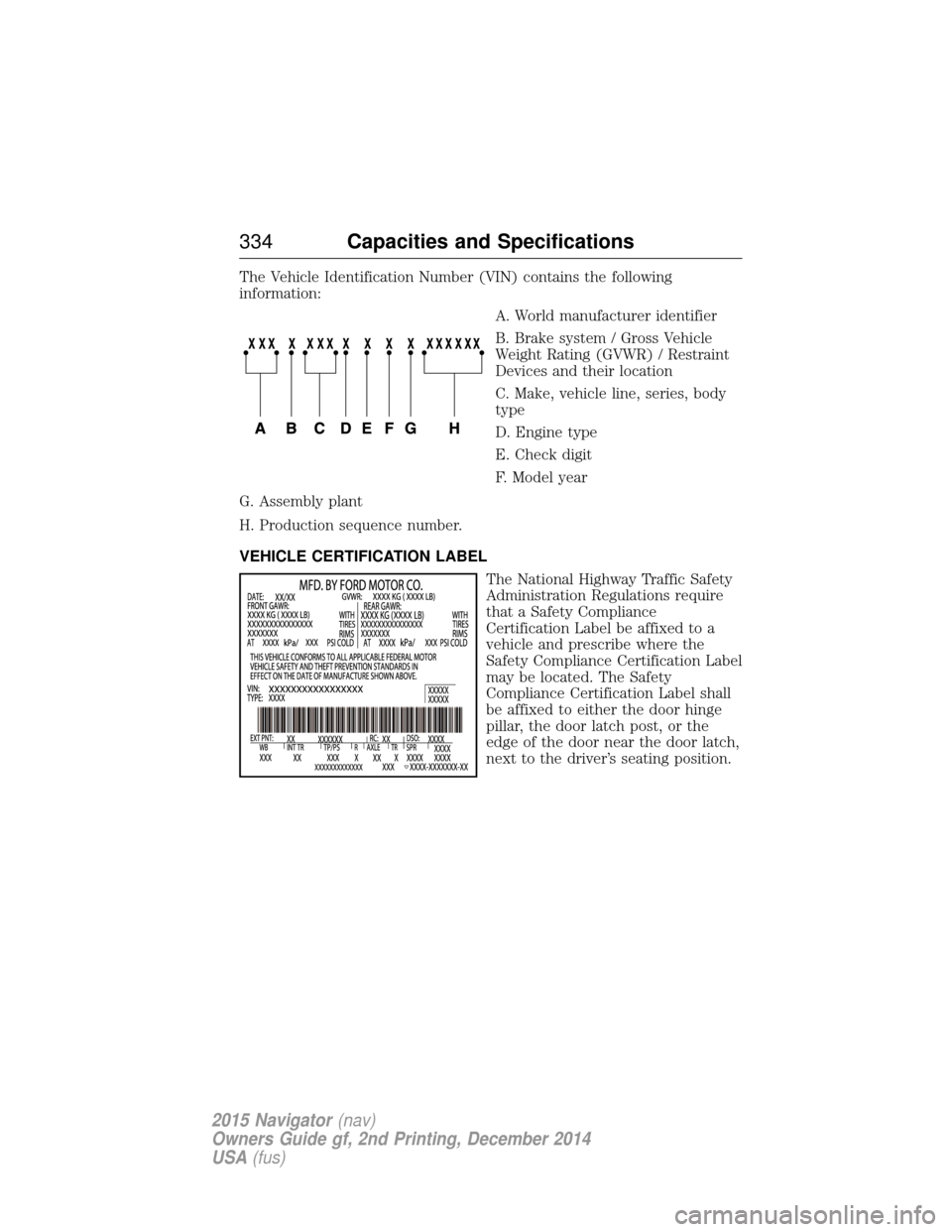
The Vehicle Identification Number (VIN) contains the following
information:A. World manufacturer identifier
B. Brake system / Gross Vehicle
Weight Rating (GVWR) / Restraint
Devices and their location
C. Make, vehicle line, series, body
type
D. Engine type
E. Check digit
F. Model year
G. Assembly plant
H. Production sequence number.
VEHICLE CERTIFICATION LABEL The National Highway Traffic Safety
Administration Regulations require
that a Safety Compliance
Certification Label be affixed to a
vehicle and prescribe where the
Safety Compliance Certification Label
may be located. The Safety
Compliance Certification Label shall
be affixed to either the door hinge
pillar, the door latch post, or the
edge of the door near the door latch,
next to the driver’s seating position.
334Capacities and Specifications
2015 Navigator (nav)
Owners Guide gf, 2nd Printing, December 2014
USA (fus)
Page 340 of 475
Roadside Assistance
Exclusive 24/7 roadside assistance, including:
•Towing, flat-tire change and battery jump starts.
• Out of fuel and lock-out assistance.
• Travel expense reimbursement for lodging, meals and rental car.
• Destination assistance for taxi, shuttle, rental car coverage and
emergency transportation.
Transferable Coverage
If you sell your vehicle before your Lincoln Extended Service Plan
coverage expires, you can transfer any remaining coverage to the new
owner. Whenever you sell your vehicle, prospective buyers may have a
higher degree of confidence that vehicle was properly maintained with
Lincoln ESP, thereby improving resale value.
Avoid the Rising Cost of Properly Maintaining Your Vehicle!
Lincoln Extended Service Plan also offers a Premium Maintenance Plan
that covers all scheduled maintenance, and select items that routinely
wear out. The coverage is prepaid, so you never have to worry about
affording your vehicle maintenance. It covers regular checkups, routine
inspections, preventive care and replacement of select items that require
periodic attention for normal wear:
• Windshield wiper blades.
• Spark plugs (except in California).
• The clutch disc.
• Brake pads and linings.
• Shock absorbers.
• Belts and hoses.
• Diesel exhaust fluid replenishment.
Interest Free Finance Options Available
Take advantage of our interest free installment payment plan. Just a 10%
down payment will provide you with an affordable, no interest, no fee
payment program allowing you all the security and benefits Lincoln ESP
has to offer while paying over time. You are pre-approved with no credit
checks, no hassles! To learn more, call our Lincoln ESP specialists at
800-367-3377.
Lincoln ESP
P.O. Box 8072
Royal Oak, MI 48068-0039
Extended Service Plan 339
2015 Navigator(nav)
Owners Guide gf, 2nd Printing, December 2014
USA (fus)
Page 384 of 475
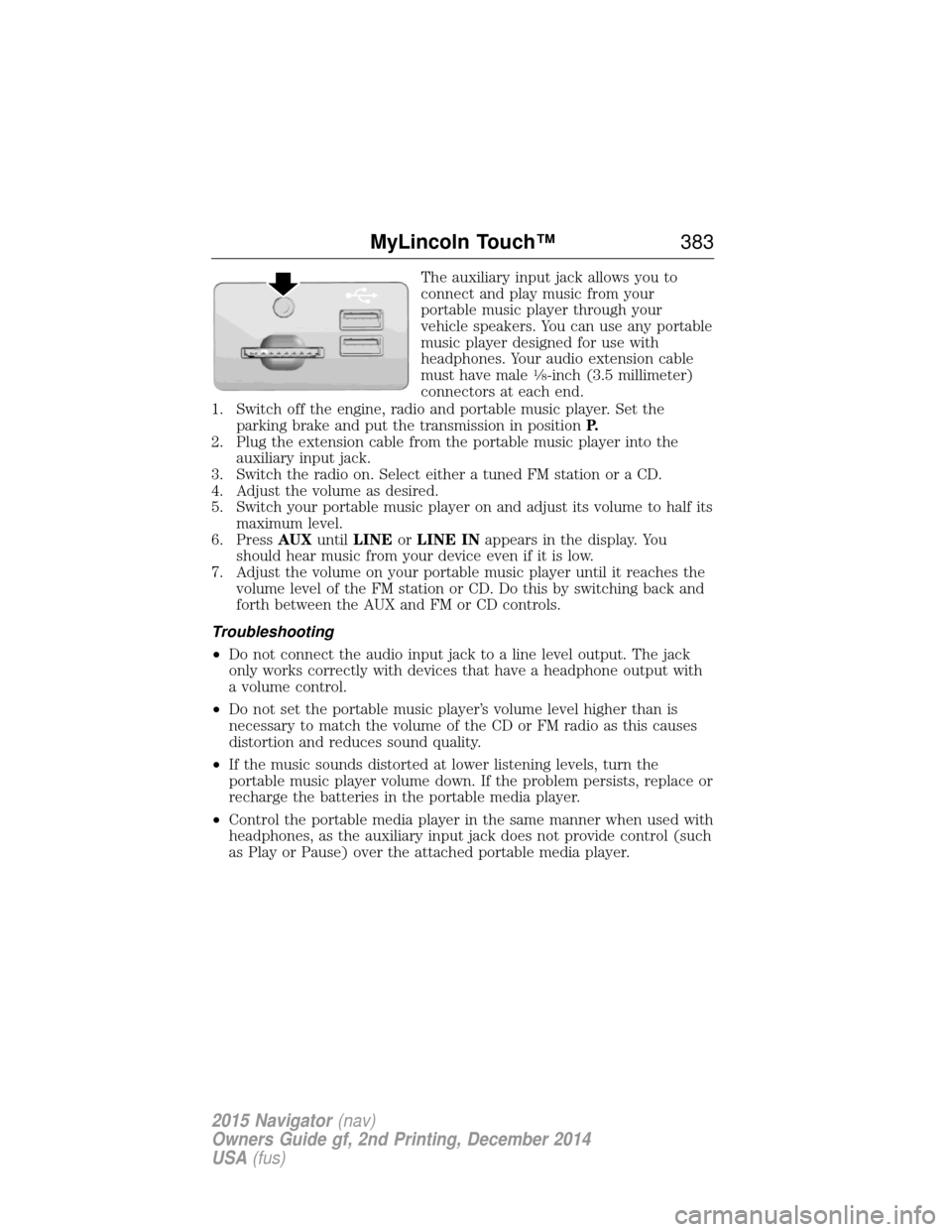
The auxiliary input jack allows you to
connect and play music from your
portable music player through your
vehicle speakers. You can use any portable
music player designed for use with
headphones. Your audio extension cable
must have male
18-inch (3.5 millimeter)
connectors at each end.
1. Switch off the engine, radio and portable music player. Set the parking brake and put the transmission in position P.
2. Plug the extension cable from the portable music player into the auxiliary input jack.
3. Switch the radio on. Select either a tuned FM station or a CD.
4. Adjust the volume as desired.
5. Switch your portable music player on and adjust its volume to half its maximum level.
6. Press AUXuntilLINE orLINE IN appears in the display. You
should hear music from your device even if it is low.
7. Adjust the volume on your portable music player until it reaches the volume level of the FM station or CD. Do this by switching back and
forth between the AUX and FM or CD controls.
Troubleshooting
• Do not connect the audio input jack to a line level output. The jack
only works correctly with devices that have a headphone output with
a volume control.
• Do not set the portable music player’s volume level higher than is
necessary to match the volume of the CD or FM radio as this causes
distortion and reduces sound quality.
• If the music sounds distorted at lower listening levels, turn the
portable music player volume down. If the problem persists, replace or
recharge the batteries in the portable media player.
• Control the portable media player in the same manner when used with
headphones, as the auxiliary input jack does not provide control (such
as Play or Pause) over the attached portable media player.
MyLincoln Touch™ 383
2015 Navigator(nav)
Owners Guide gf, 2nd Printing, December 2014
USA (fus)
Page 402 of 475
If you do not cancel the call, and SYNC makes a successful call, a
pre-recorded message plays for the 911 operator, and then the
occupant(s) in your vehicle is able to talk with the operator. Be prepared
to provide your name, phone number and location immediately, because
not all 911 systems are capable of receiving this information
electronically.
911 Assist May Not Work If
•Your cellular phone or 911 Assist hardware sustains damage in a
crash.
• The vehicle’s battery or SYNC system has no power.
• The phones(s) previously paired or connected to the system are
thrown from the vehicle.
911 Assist Privacy Notice
When you turn on 911 Assist, it may disclose to emergency services that
your vehicle has been in a crash involving the deployment of an airbag or
activation of the fuel pump shut-off. Certain versions or updates to 911
Assist may also be capable of electronically or verbally disclosing to 911
operators your vehicle location or other details about your vehicle or
crash to assist 911 operators to provide the most appropriate emergency
services. If you do not want to disclose this information, do not turn the
feature on.
Vehicle Health Report (If Equipped, United States Only)
WARNING: Always follow scheduled maintenance instructions,
regularly inspect your vehicle, and seek repair for any damage or
problem you suspect. Vehicle Health Report supplements, but cannot
replace, normal maintenance and vehicle inspection. Vehicle Health
Report only monitors certain systems electronically monitored by your
vehicle and will not monitor or report the status of any other system,
(such as brake lining wear). Failure to perform scheduled maintenance
and regularly inspect your vehicle may result in vehicle damage and
serious injury.
Note: Your Vehicle Health Report feature requires activation prior to
use. Visit www.SYNCMyRide.com to register. There is no fee or
subscription associated with Vehicle Health Report, but you must register
to use this feature.
Note: This feature may not function properly if you have enabled caller
ID blocking on your mobile phone. Before running a report, review the
Vehicle Health Report Privacy Notice.
MyLincoln Touch™ 401
2015 Navigator(nav)
Owners Guide gf, 2nd Printing, December 2014
USA (fus)