brake LINCOLN NAVIGATOR 2015 Workshop Manual
[x] Cancel search | Manufacturer: LINCOLN, Model Year: 2015, Model line: NAVIGATOR, Model: LINCOLN NAVIGATOR 2015Pages: 475, PDF Size: 5.13 MB
Page 244 of 475
HAZARD WARNING FLASHERSThe hazard flasher control is located on the instrument panel
by the radio. Use it when your vehicle is disabled and is
creating a safety hazard for other motorists.
•
Press the flasher control and all front and rear direction signals will flash.
• Press the flasher control again to turn them off.
Note:
With extended use, the flashers may run down your 12–volt battery.
FUEL SHUTOFF
WARNING: Failure to inspect and, if necessary, repair fuel leaks
after a collision may increase the risk of fire and serious injury.
Ford Motor Company recommends that the fuel system be inspected by
an authorized dealer after any collision.
In the event of a moderate to severe collision, this vehicle includes a fuel
pump shut-off feature that stops the flow of fuel to the engine. Not every
impact will cause a shut off.
Should your vehicle shut off after a collision, you may restart your
vehicle by doing the following:
1. Switch off the ignition.
2. Switch on the ignition.
3. Repeat Steps 1 and 2 to re-enable the fuel pump.
For vehicles equipped with a push button start system:
1. Press the START/STOP button to switch off the ignition.
2. Press the brake pedal and press the START/STOP button to start the
vehicle.
3. Remove your foot from the brake pedal and press the START/STOP
button to switch off the ignition.
4. You can either attempt to start the engine by pressing the brake pedal
and the START/STOP button, or switch on the ignition only by pressing
the START/STOP button without pressing the brake pedal. Both ways
re-enable the fuel system.
Note: When you try to restart your vehicle after a fuel shutoff, the
vehicle makes sure that various systems are safe to restart. Once your
vehicle determines that the systems are safe, then the vehicle will allow
you to restart.
Note: In the event that your vehicle does not restart after your third
attempt, contact an authorized dealer.
Roadside Emergencies 243
2015 Navigator(nav)
Owners Guide gf, 2nd Printing, December 2014
USA (fus)
Page 245 of 475
JUMP-STARTING THE VEHICLE
WARNING:The gases around the battery can explode if exposed
to flames, sparks, or lit cigarettes. An explosion could result in
injury or vehicle damage.
WARNING: Batteries contain sulfuric acid which can burn skin,
eyes and clothing, if contacted.
Do not attempt to push-start your automatic transmission vehicle.
Automatic transmissions do not have push-start capability. Attempting to
push-start a vehicle with an automatic transmission may cause
transmission damage.
When the battery is disconnected or a new battery is installed, the
automatic transmission must relearn its shift strategy. As a result, the
transmission may exhibit a combination of firm and soft shifts. This
operation is considered normal and will not affect function or durability
of the transmission. Over time, the adaptive learning process will fully
update transmission operation.
Preparing Your Vehicle
Note: Use only a 12–volt supply to start your vehicle.
Note: Do not disconnect the battery of the disabled vehicle as this could
damage the vehicle’s electrical system.
1. Park the booster vehicle close to the hood of the disabled vehicle
making sure the two vehicles do not touch. Set the parking brake on
both vehicles and stay clear of the engine cooling fan and other moving
parts.
2. Check all battery terminals. Remove the positive terminal cover (if
equipped) and any excessive corrosion before you attach the battery
cables. Ensure that vent caps are tight and level.
3. Turn the heater fan on in both vehicles to protect from any electrical
surges. Turn all other accessories off.
244 Roadside Emergencies
2015 Navigator (nav)
Owners Guide gf, 2nd Printing, December 2014
USA (fus)
Page 258 of 475
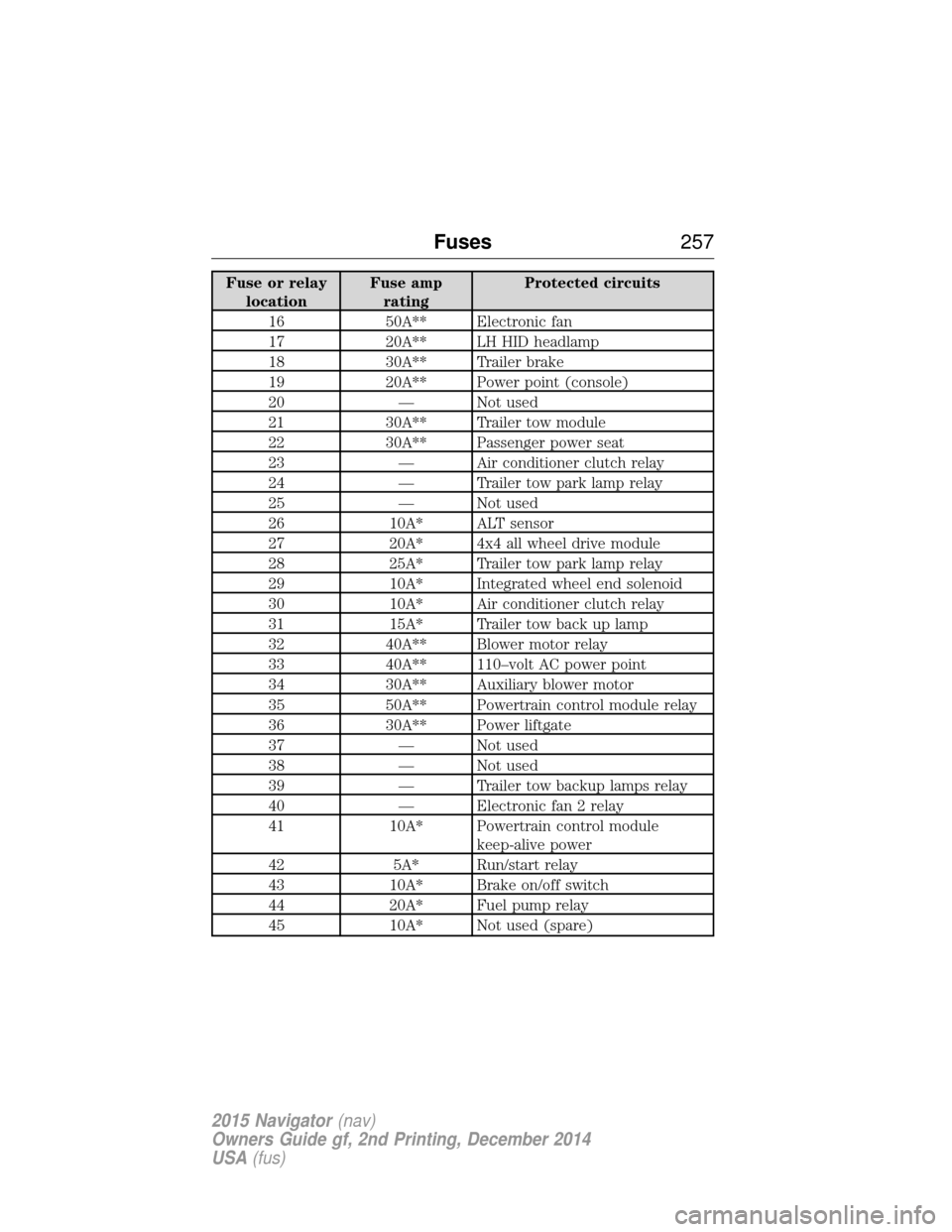
Fuse or relaylocation Fuse amp
rating Protected circuits
16 50A** Electronic fan
17 20A** LH HID headlamp
18 30A** Trailer brake
19 20A** Power point (console)
20 — Not used
21 30A** Trailer tow module
22 30A** Passenger power seat
23 — Air conditioner clutch relay
24 — Trailer tow park lamp relay
25 — Not used
26 10A* ALT sensor
27 20A* 4x4 all wheel drive module
28 25A* Trailer tow park lamp relay
29 10A* Integrated wheel end solenoid
30 10A* Air conditioner clutch relay
31 15A* Trailer tow back up lamp
32 40A** Blower motor relay
33 40A** 110–volt AC power point
34 30A** Auxiliary blower motor
35 50A** Powertrain control module relay
36 30A** Power liftgate
37 — Not used
38 — Not used
39 — Trailer tow backup lamps relay
40 — Electronic fan 2 relay
41 10A* Powertrain control module keep-alive power
42 5A* Run/start relay
43 10A* Brake on/off switch
44 20A* Fuel pump relay
45 10A* Not used (spare)
Fuses 257
2015 Navigator(nav)
Owners Guide gf, 2nd Printing, December 2014
USA (fus)
Page 259 of 475
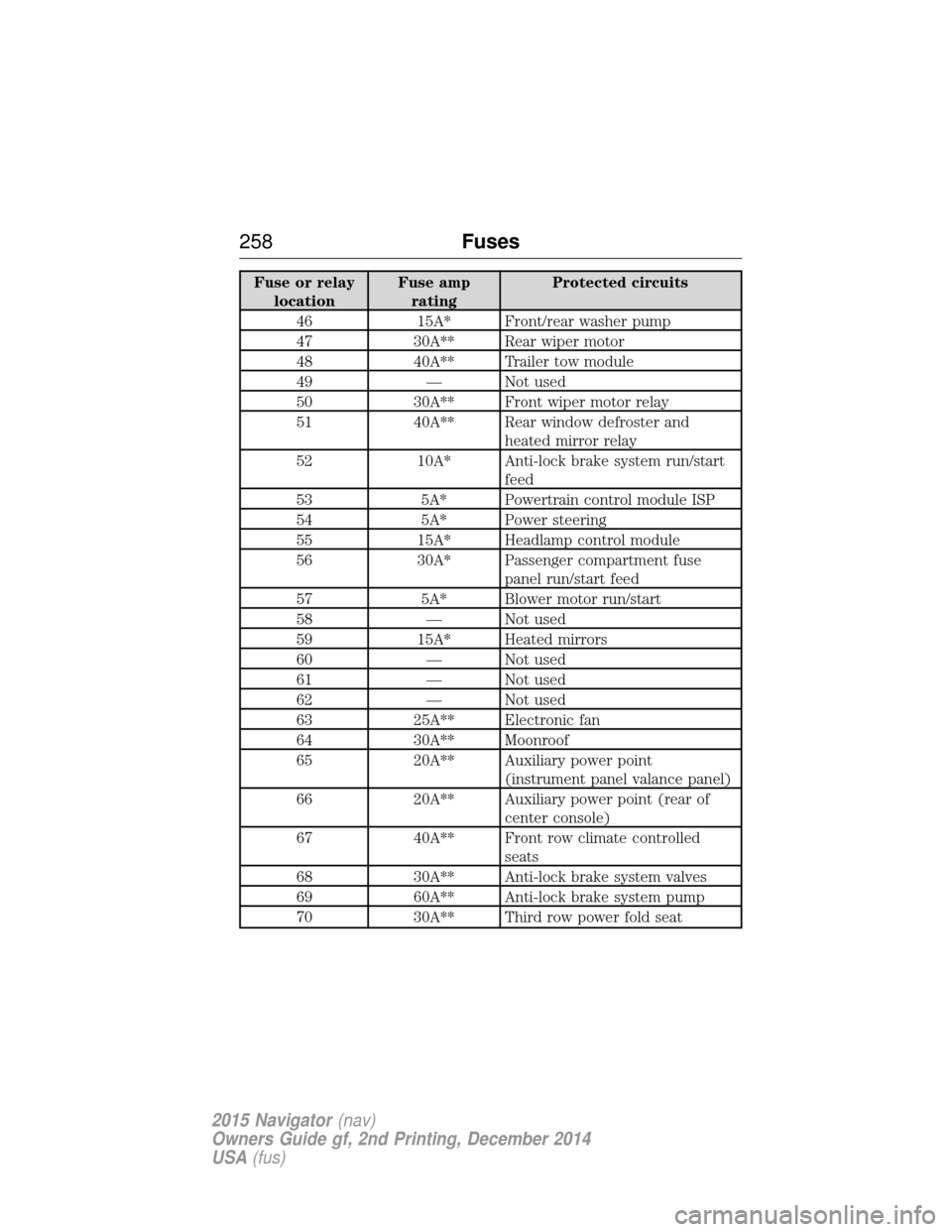
Fuse or relaylocation Fuse amp
rating Protected circuits
46 15A* Front/rear washer pump
47 30A** Rear wiper motor
48 40A** Trailer tow module
49 — Not used
50 30A** Front wiper motor relay
51 40A** Rear window defroster and heated mirror relay
52 10A* Anti-lock brake system run/start feed
53 5A* Powertrain control module ISP
54 5A* Power steering
55 15A* Headlamp control module
56 30A* Passenger compartment fuse panel run/start feed
57 5A* Blower motor run/start
58 — Not used
59 15A* Heated mirrors
60 — Not used
61 — Not used
62 — Not used
63 25A** Electronic fan
64 30A** Moonroof
65 20A** Auxiliary power point (instrument panel valance panel)
66 20A** Auxiliary power point (rear of center console)
67 40A** Front row climate controlled seats
68 30A** Anti-lock brake system valves
69 60A** Anti-lock brake system pump
70 30A** Third row power fold seat
258 Fuses
2015 Navigator(nav)
Owners Guide gf, 2nd Printing, December 2014
USA (fus)
Page 262 of 475
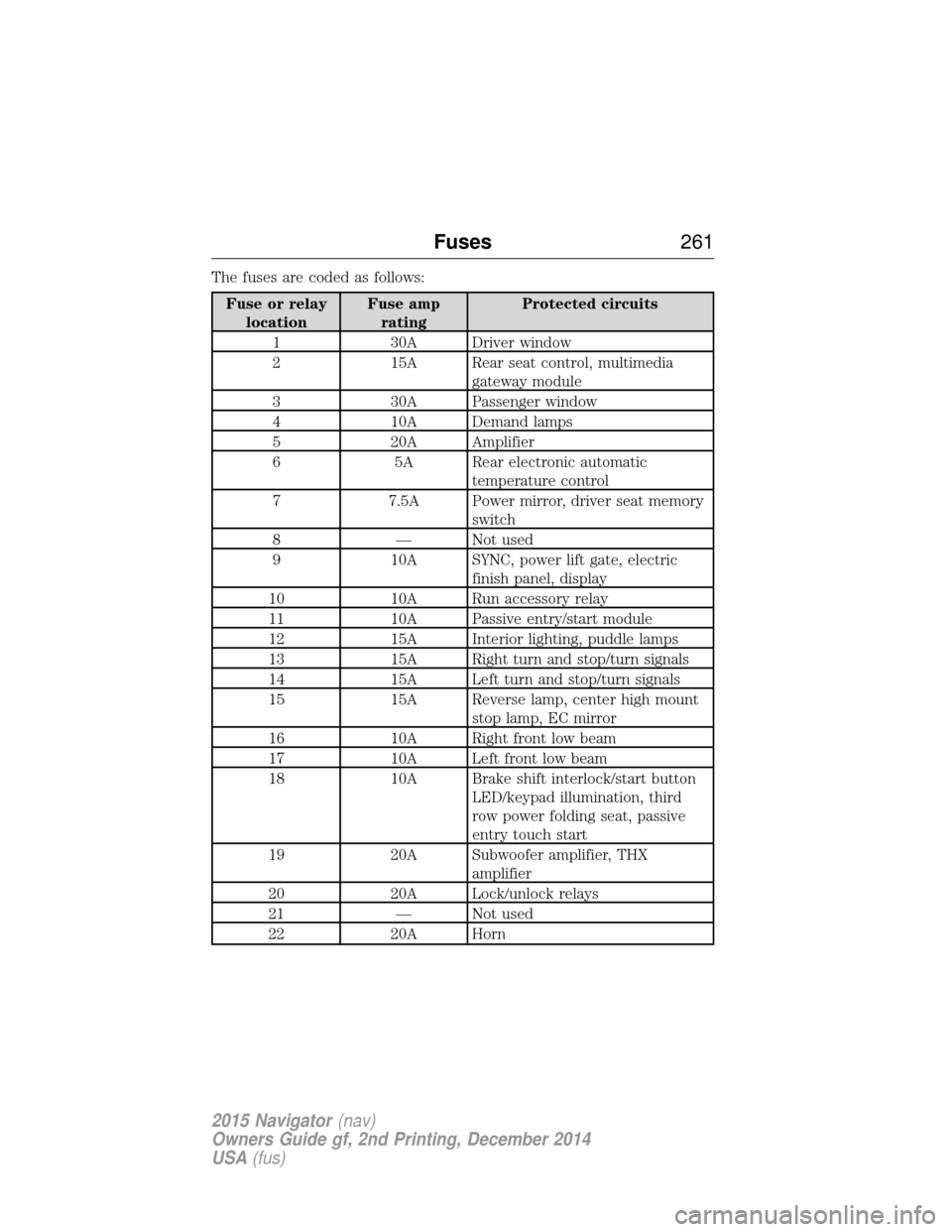
The fuses are coded as follows:
Fuse or relaylocation Fuse amp
rating Protected circuits
1 30A Driver window
2 15A Rear seat control, multimedia gateway module
3 30A Passenger window
4 10A Demand lamps
5 20A Amplifier
6 5A Rear electronic automatic temperature control
7 7.5A Power mirror, driver seat memory switch
8 — Not used
9 10A SYNC, power lift gate, electric finish panel, display
10 10A Run accessory relay
11 10A Passive entry/start module
12 15A Interior lighting, puddle lamps
13 15A Right turn and stop/turn signals
14 15A Left turn and stop/turn signals
15 15A Reverse lamp, center high mount stop lamp, EC mirror
16 10A Right front low beam
17 10A Left front low beam
18 10A Brake shift interlock/start button LED/keypad illumination, third
row power folding seat, passive
entry touch start
19 20A Subwoofer amplifier, THX amplifier
20 20A Lock/unlock relays
21 — Not used
22 20A Horn
Fuses 261
2015 Navigator(nav)
Owners Guide gf, 2nd Printing, December 2014
USA (fus)
Page 263 of 475
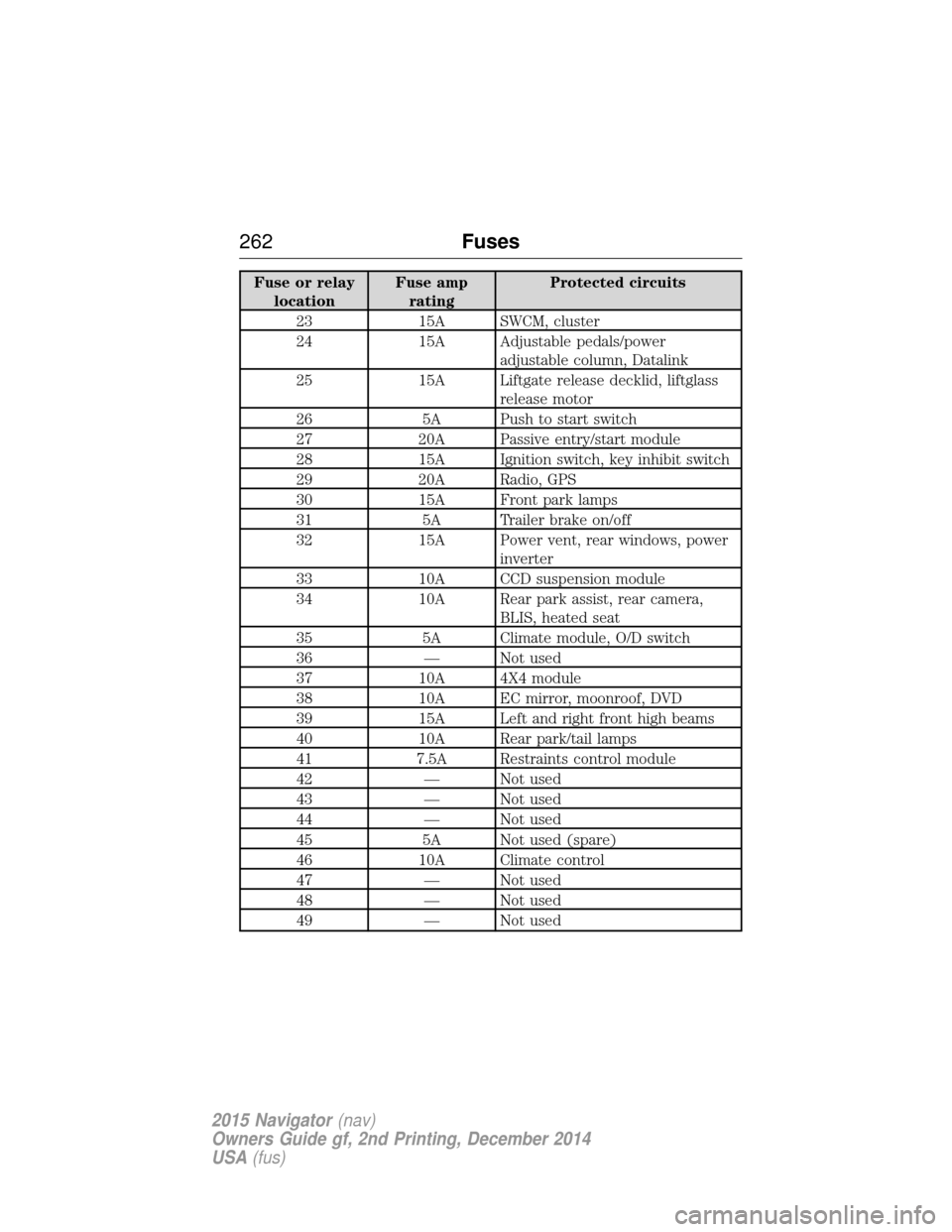
Fuse or relaylocation Fuse amp
rating Protected circuits
23 15A SWCM, cluster
24 15A Adjustable pedals/power adjustable column, Datalink
25 15A Liftgate release decklid, liftglass release motor
26 5A Push to start switch
27 20A Passive entry/start module
28 15A Ignition switch, key inhibit switch
29 20A Radio, GPS
30 15A Front park lamps
31 5A Trailer brake on/off
32 15A Power vent, rear windows, power inverter
33 10A CCD suspension module
34 10A Rear park assist, rear camera, BLIS, heated seat
35 5A Climate module, O/D switch
36 — Not used
37 10A 4X4 module
38 10A EC mirror, moonroof, DVD
39 15A Left and right front high beams
40 10A Rear park/tail lamps
41 7.5A Restraints control module
42 — Not used
43 — Not used
44 — Not used
45 5A Not used (spare)
46 10A Climate control
47 — Not used
48 — Not used
49 — Not used
262 Fuses
2015 Navigator(nav)
Owners Guide gf, 2nd Printing, December 2014
USA (fus)
Page 264 of 475
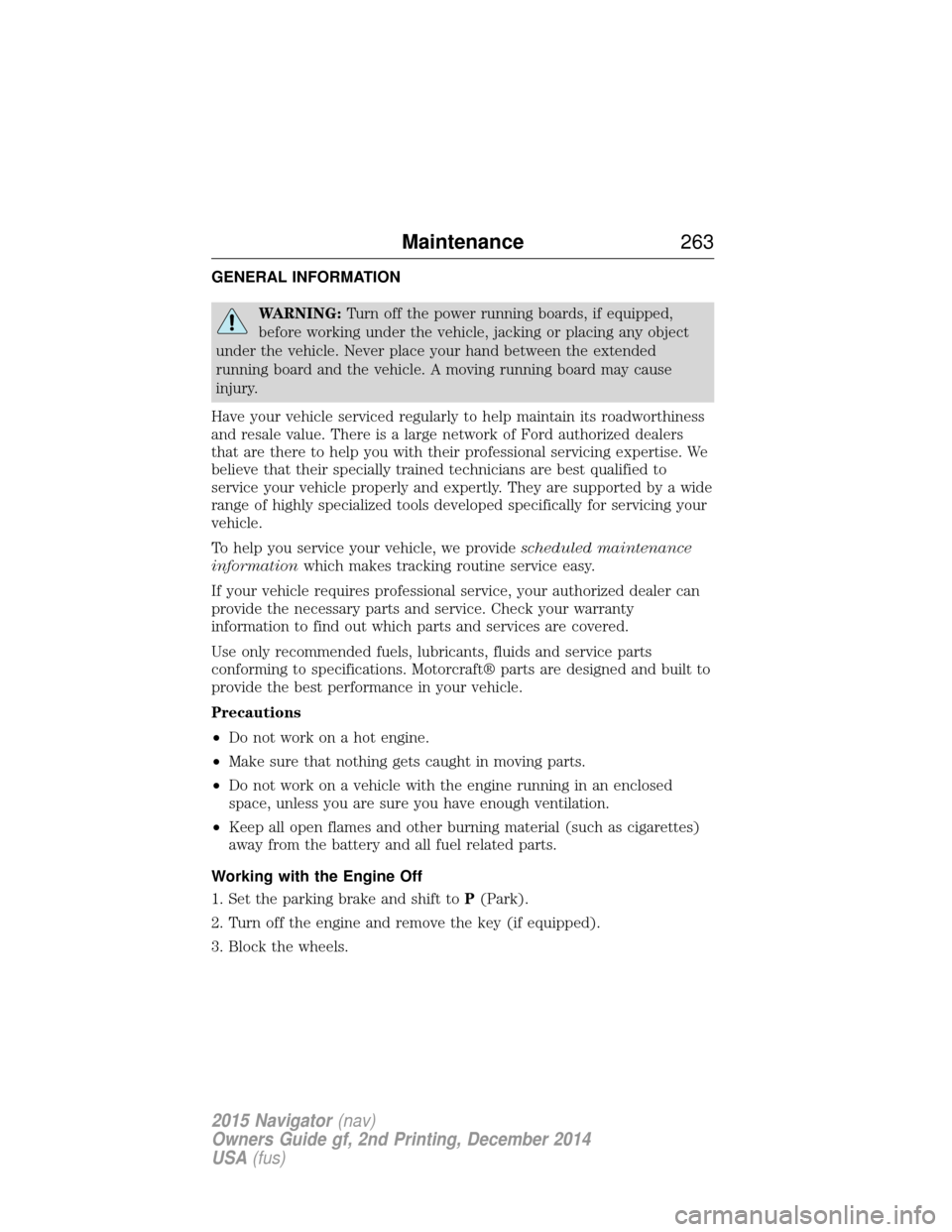
GENERAL INFORMATION
WARNING:Turn off the power running boards, if equipped,
before working under the vehicle, jacking or placing any object
under the vehicle. Never place your hand between the extended
running board and the vehicle. A moving running board may cause
injury.
Have your vehicle serviced regularly to help maintain its roadworthiness
and resale value. There is a large network of Ford authorized dealers
that are there to help you with their professional servicing expertise. We
believe that their specially trained technicians are best qualified to
service your vehicle properly and expertly. They are supported by a wide
range of highly specialized tools developed specifically for servicing your
vehicle.
To help you service your vehicle, we provide scheduled maintenance
information which makes tracking routine service easy.
If your vehicle requires professional service, your authorized dealer can
provide the necessary parts and service. Check your warranty
information to find out which parts and services are covered.
Use only recommended fuels, lubricants, fluids and service parts
conforming to specifications. Motorcraft® parts are designed and built to
provide the best performance in your vehicle.
Precautions
• Do not work on a hot engine.
• Make sure that nothing gets caught in moving parts.
• Do not work on a vehicle with the engine running in an enclosed
space, unless you are sure you have enough ventilation.
• Keep all open flames and other burning material (such as cigarettes)
away from the battery and all fuel related parts.
Working with the Engine Off
1. Set the parking brake and shift to P(Park).
2. Turn off the engine and remove the key (if equipped).
3. Block the wheels.
Maintenance 263
2015 Navigator(nav)
Owners Guide gf, 2nd Printing, December 2014
USA (fus)
Page 265 of 475
Working with the Engine On
WARNING:To reduce the risk of vehicle damage or personal
burn injuries, do not start your engine with the air cleaner
removed and do not remove it while the engine is running.
1. Set the parking brake and shift to position P(Park) .
2. Block the wheels.
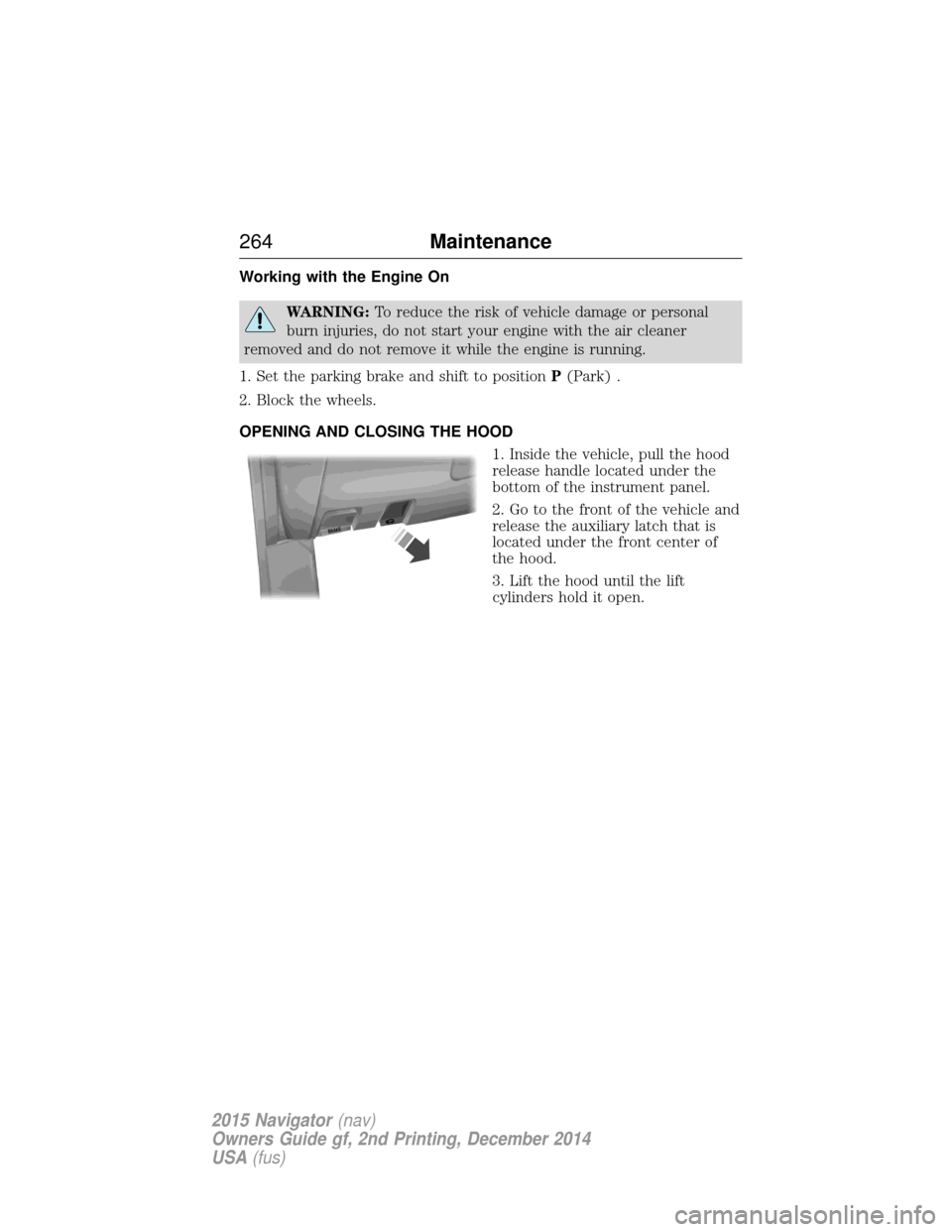
OPENING AND CLOSING THE HOOD 1. Inside the vehicle, pull the hood
release handle located under the
bottom of the instrument panel.
2. Go to the front of the vehicle and
release the auxiliary latch that is
located under the front center of
the hood.
3. Lift the hood until the lift
cylinders hold it open.
BRAKE
264 Maintenance
2015 Navigator(nav)
Owners Guide gf, 2nd Printing, December 2014
USA (fus)
Page 266 of 475
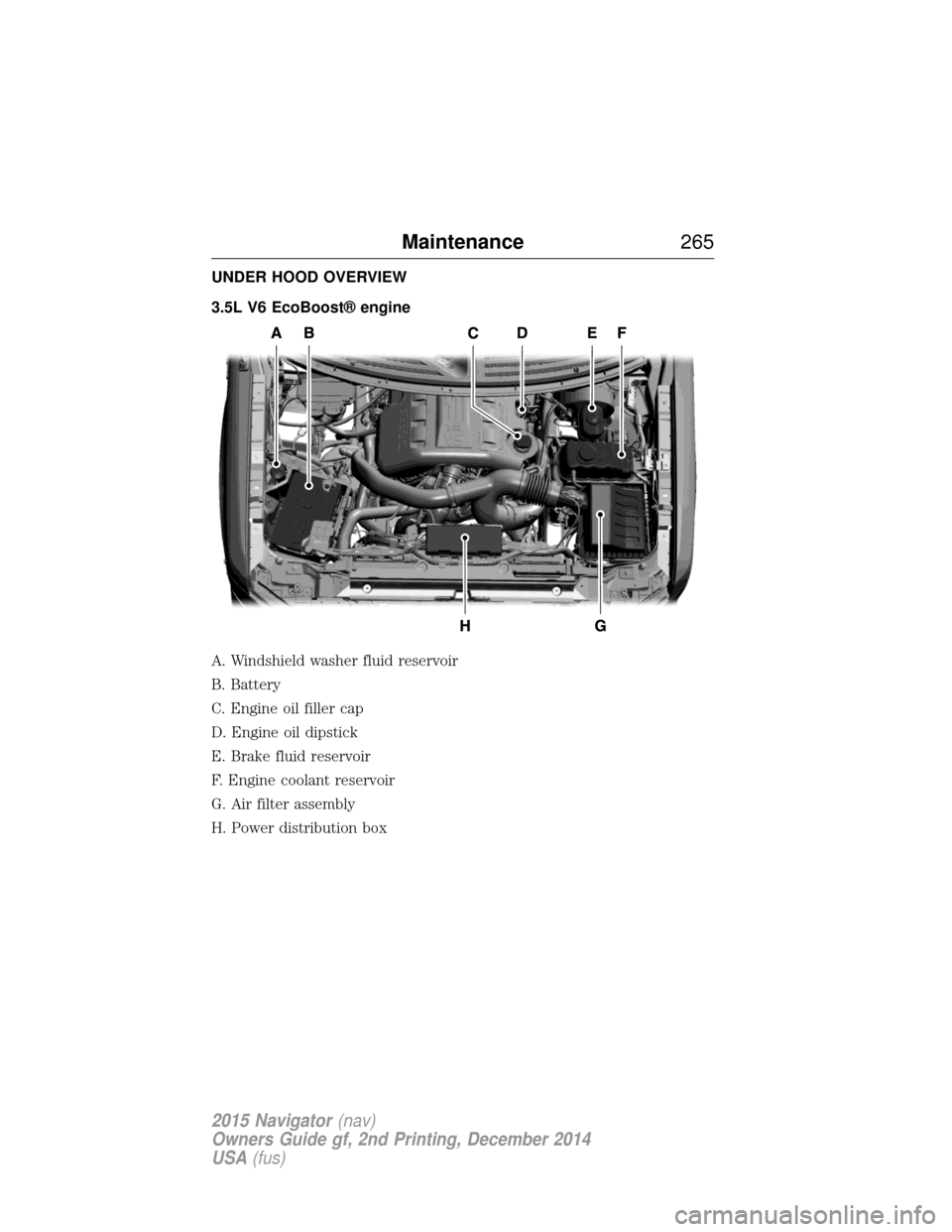
UNDER HOOD OVERVIEW
3.5L V6 EcoBoost® engine
A. Windshield washer fluid reservoir
B. Battery
C. Engine oil filler cap
D. Engine oil dipstick
E. Brake fluid reservoir
F. Engine coolant reservoir
G. Air filter assembly
H. Power distribution box
Maintenance265
2015 Navigator(nav)
Owners Guide gf, 2nd Printing, December 2014
USA (fus)
Page 267 of 475
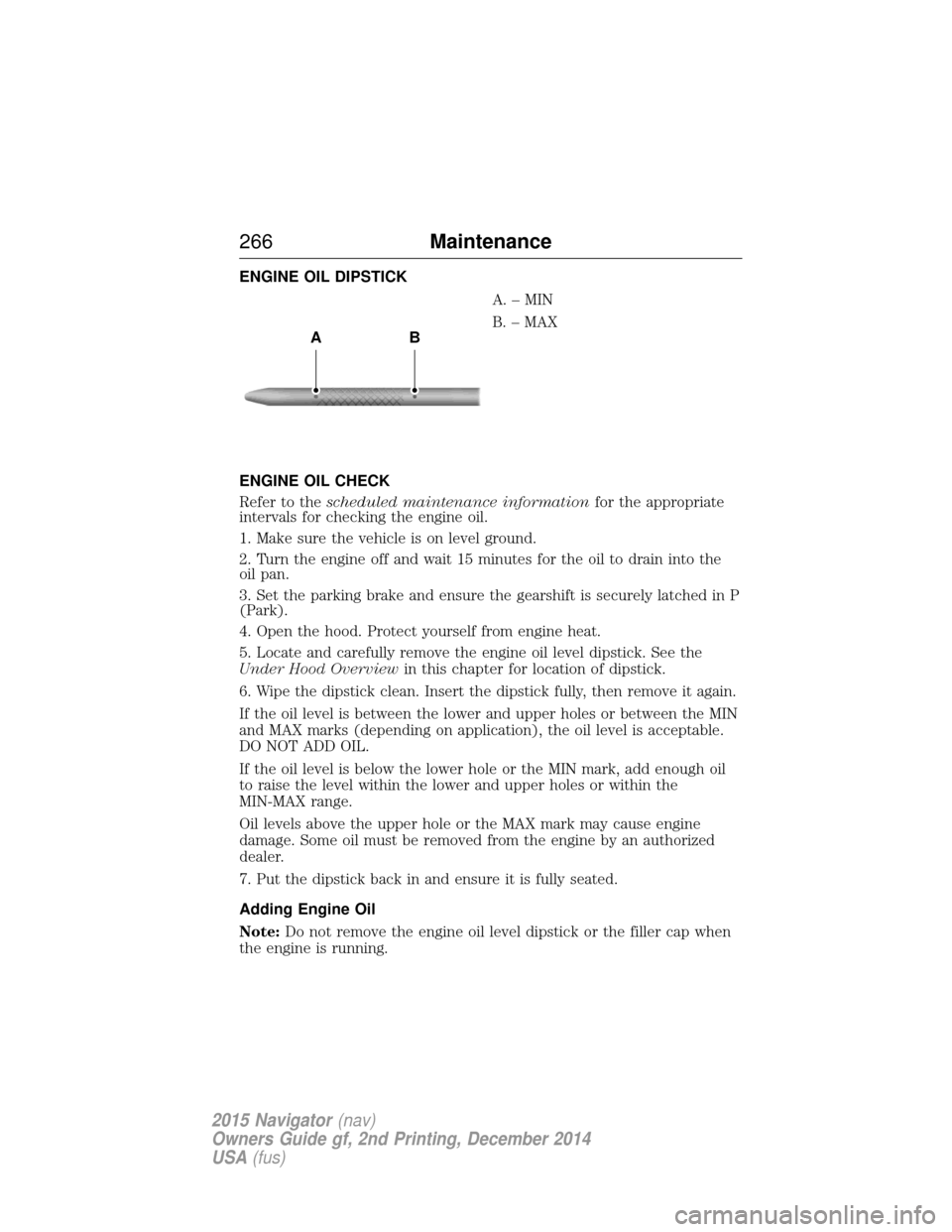
ENGINE OIL DIPSTICKA.–MIN
B. – MAX
ENGINE OIL CHECK
Refer to the scheduled maintenance information for the appropriate
intervals for checking the engine oil.
1. Make sure the vehicle is on level ground.
2. Turn the engine off and wait 15 minutes for the oil to drain into the
oil pan.
3. Set the parking brake and ensure the gearshift is securely latched in P
(Park).
4. Open the hood. Protect yourself from engine heat.
5. Locate and carefully remove the engine oil level dipstick. See the
Under Hood Overview in this chapter for location of dipstick.
6. Wipe the dipstick clean. Insert the dipstick fully, then remove it again.
If the oil level is between the lower and upper holes or between the MIN
and MAX marks (depending on application), the oil level is acceptable.
DO NOT ADD OIL.
If the oil level is below the lower hole or the MIN mark, add enough oil
to raise the level within the lower and upper holes or within the
MIN-MAX range.
Oil levels above the upper hole or the MAX mark may cause engine
damage. Some oil must be removed from the engine by an authorized
dealer.
7. Put the dipstick back in and ensure it is fully seated.
Adding Engine Oil
Note: Do not remove the engine oil level dipstick or the filler cap when
the engine is running.
AB
266 Maintenance
2015 Navigator(nav)
Owners Guide gf, 2nd Printing, December 2014
USA (fus)