ABS LINCOLN NAVIGATOR 2015 Owners Manual
[x] Cancel search | Manufacturer: LINCOLN, Model Year: 2015, Model line: NAVIGATOR, Model: LINCOLN NAVIGATOR 2015Pages: 475, PDF Size: 5.13 MB
Page 102 of 475
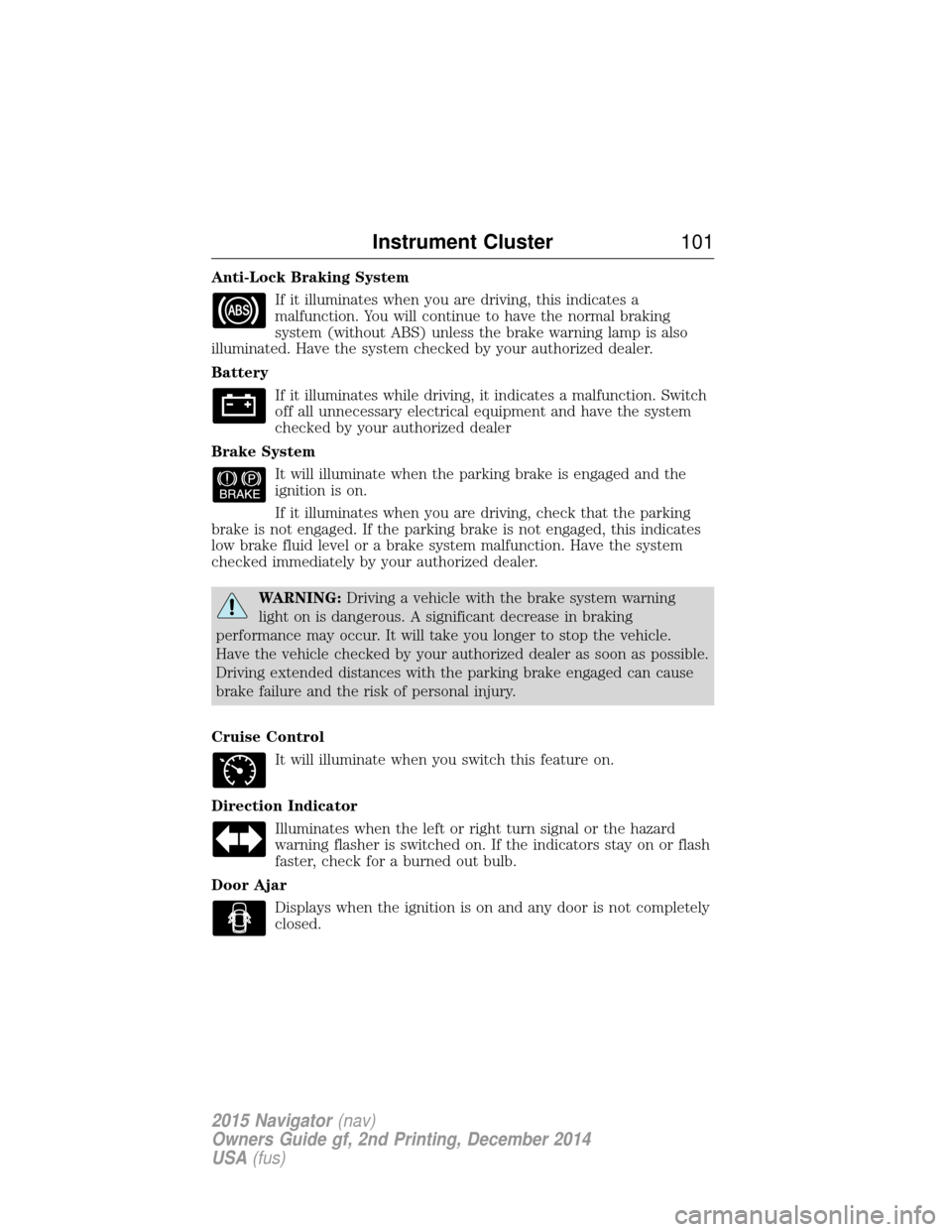
Anti-Lock Braking SystemIf it illuminates when you are driving, this indicates a
malfunction. You will continue to have the normal braking
system (without ABS) unless the brake warning lamp is also
illuminated. Have the system checked by your authorized dealer.
Battery
If it illuminates while driving, it indicates a malfunction. Switch
off all unnecessary electrical equipment and have the system
checked by your authorized dealer
Brake System It will illuminate when the parking brake is engaged and the
ignition is on.
If it illuminates when you are driving, check that the parking
brake is not engaged. If the parking brake is not engaged, this indicates
low brake fluid level or a brake system malfunction. Have the system
checked immediately by your authorized dealer.
WARNING: Driving a vehicle with the brake system warning
light on is dangerous. A significant decrease in braking
performance may occur. It will take you longer to stop the vehicle.
Have the vehicle checked by your authorized dealer as soon as possible.
Driving extended distances with the parking brake engaged can cause
brake failure and the risk of personal injury.
Cruise Control It will illuminate when you switch this feature on.
Direction Indicator Illuminates when the left or right turn signal or the hazard
warning flasher is switched on. If the indicators stay on or flash
faster, check for a burned out bulb.
Door Ajar Displays when the ignition is on and any door is not completely
closed.
Instrument Cluster 101
2015 Navigator(nav)
Owners Guide gf, 2nd Printing, December 2014
USA (fus)
Page 130 of 475
Make sure that your driving position is comfortable and that you can
maintain full control of your vehicle.
HEAD RESTRAINTS
WARNING:Fully adjust the head restraint before you sit in or
operate your vehicle. This will help minimize the risk of neck
injury in the event of a crash. Do not adjust the head restraint when
your vehicle is moving.
WARNING: The adjustable head restraint is a safety device.
Whenever possible, it should be installed and properly adjusted
when the seat is occupied. Failure to adjust the head restraint properly
could reduce its effectiveness during certain impacts.
WARNING: Install the head restraint properly to minimize the
risk of neck injury in the event of a crash.
Note: Adjust the seatback to an upright driving position before adjusting
any head restraint. Properly adjust the head restraint so that the top of
the head restraint is even with the top of your head and positioned as
close as possible to the back of your head. For occupants of extremely
tall stature, adjust the head restraint to its full up position.
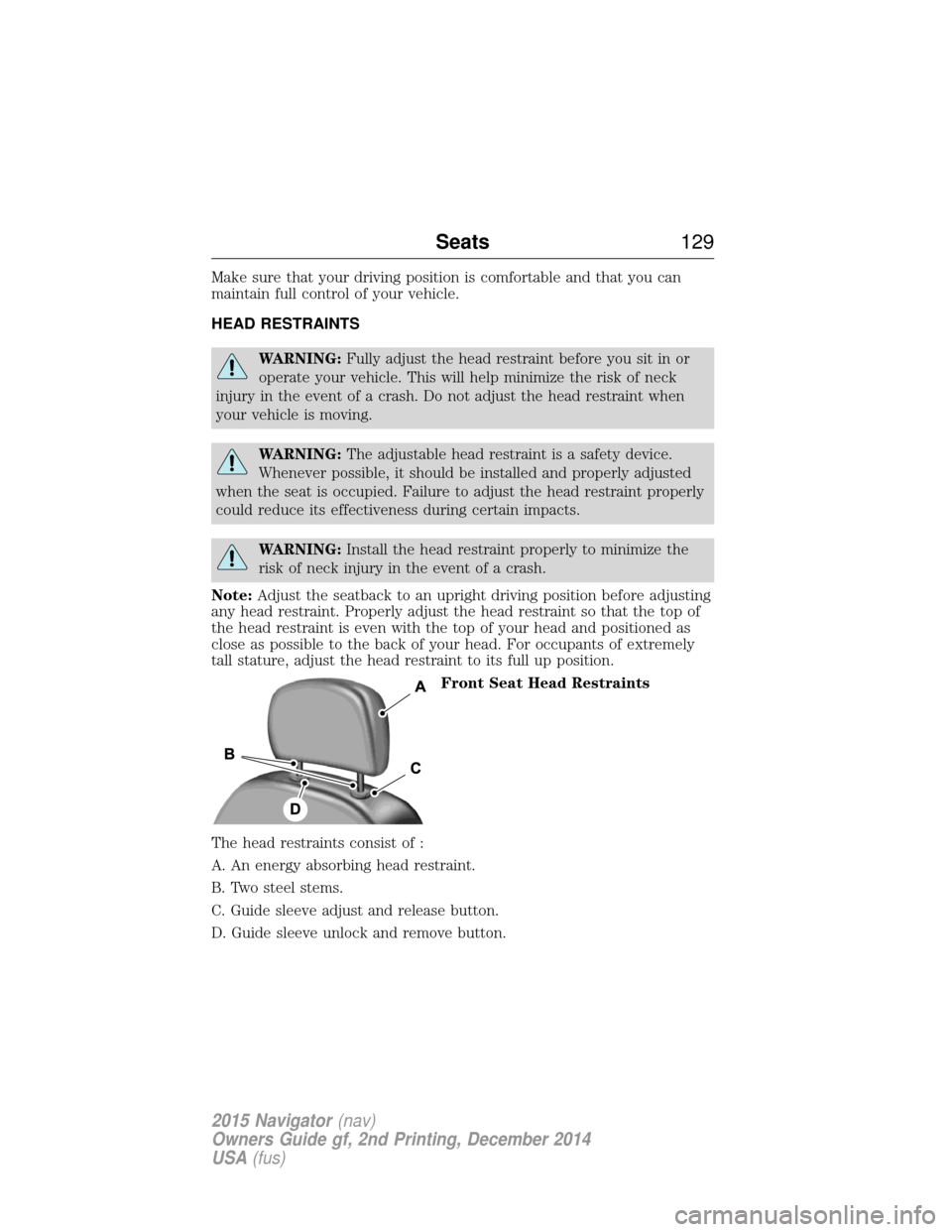
Front Seat Head Restraints
The head restraints consist of :
A. An energy absorbing head restraint.
B. Two steel stems.
C. Guide sleeve adjust and release button.
D. Guide sleeve unlock and remove button.
Seats 129
2015 Navigator(nav)
Owners Guide gf, 2nd Printing, December 2014
USA (fus)
Page 131 of 475
Adjusting the Head Restraint
Raise: Pull up the head restraint.
Lower:
1. Press and hold button C.
2. Push down on the head restraint.
Remove:
1. Pull up the head restraint until it reaches the highest adjustment
position.
2. Press and hold buttons C and D.
3. Pull up the head restraint.
Reinstall Align the steel stems into the guide sleeves and push the head
restraint down until it locks.
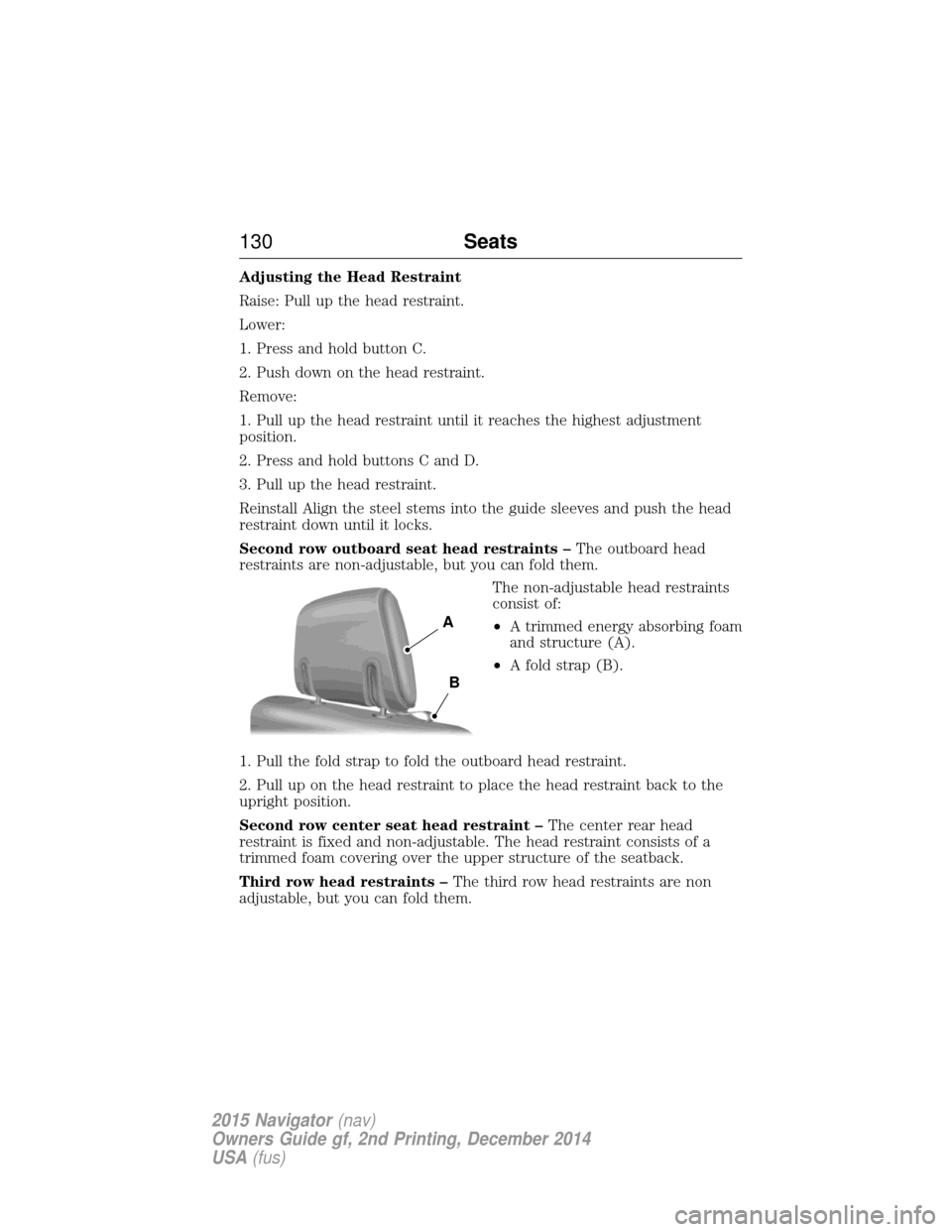
Second row outboard seat head restraints –The outboard head
restraints are non-adjustable, but you can fold them.
The non-adjustable head restraints
consist of:
•A trimmed energy absorbing foam
and structure (A).
• A fold strap (B).
1. Pull the fold strap to fold the outboard head restraint.
2. Pull up on the head restraint to place the head restraint back to the
upright position.
Second row center seat head restraint – The center rear head
restraint is fixed and non-adjustable. The head restraint consists of a
trimmed foam covering over the upper structure of the seatback.
Third row head restraints – The third row head restraints are non
adjustable, but you can fold them.
A
B
130 Seats
2015 Navigator(nav)
Owners Guide gf, 2nd Printing, December 2014
USA (fus)
Page 132 of 475
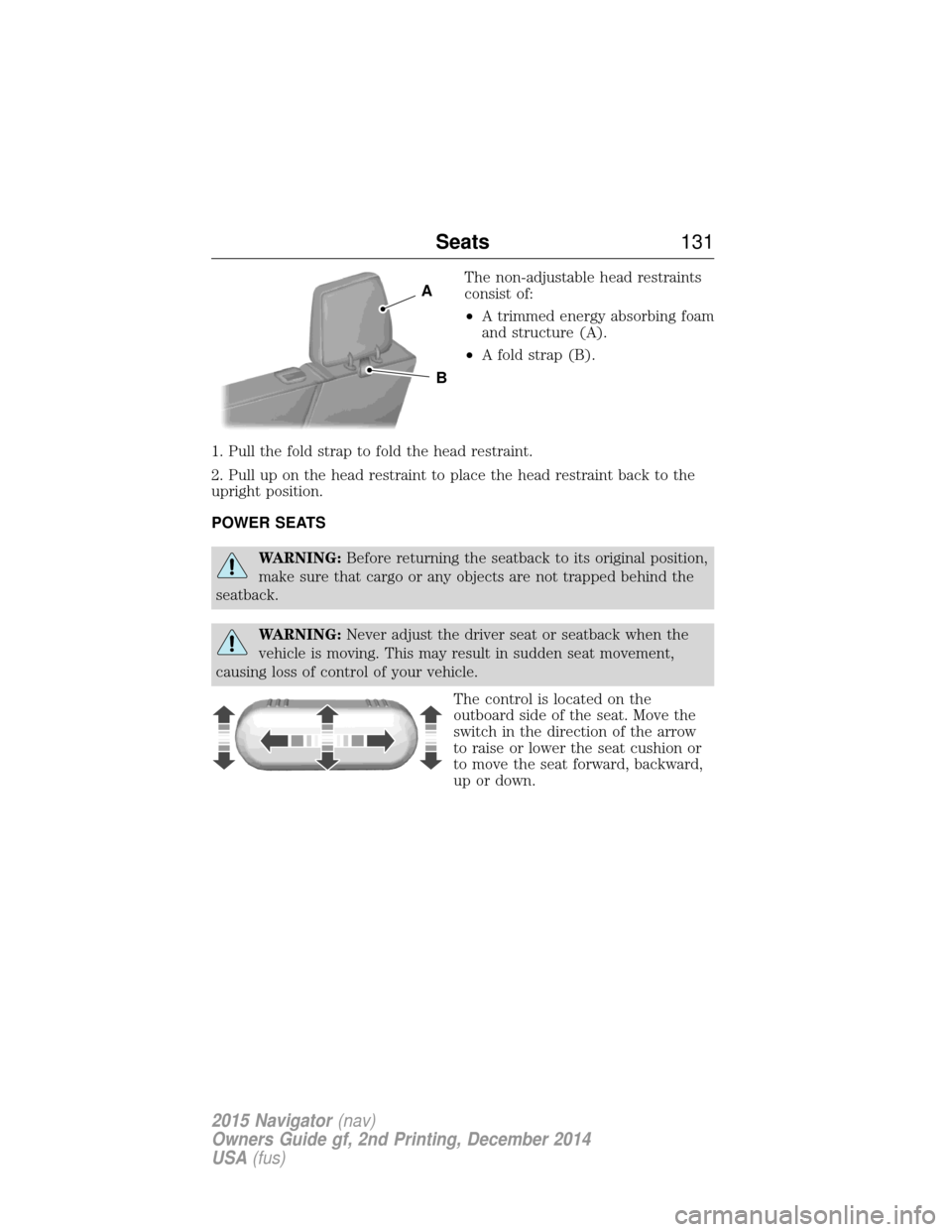
The non-adjustable head restraints
consist of:
•A trimmed energy absorbing foam
and structure (A).
• A fold strap (B).
1. Pull the fold strap to fold the head restraint.
2. Pull up on the head restraint to place the head restraint back to the
upright position.
POWER SEATS
WARNING: Before returning the seatback to its original position,
make sure that cargo or any objects are not trapped behind the
seatback.
WARNING: Never adjust the driver seat or seatback when the
vehicle is moving. This may result in sudden seat movement,
causing loss of control of your vehicle.
The control is located on the
outboard side of the seat. Move the
switch in the direction of the arrow
to raise or lower the seat cushion or
to move the seat forward, backward,
up or down.
A
B
Seats131
2015 Navigator(nav)
Owners Guide gf, 2nd Printing, December 2014
USA (fus)
Page 136 of 475
Cooled Seats
The cooled seats will only function when the engine is running.
To operate the cooled seats:Press the cooled seat symbol to cycle through the various
cooling settings and off. Cooler settings are indicated by
more indicator lights.
If the engine falls below 350 RPM while the cooled seats are on, the
feature will turn itself off. You will need to reactivate it.
Climate Controlled Seats Air Filter Replacement (If Equipped)
The climate controlled seat system includes air filters. You must replace
them periodically. See scheduled maintenance information for more
information.
There is a filter located under each front seat. You can access the filter
from the second row seat. Move the front seats all the way forward and
up to ease access.
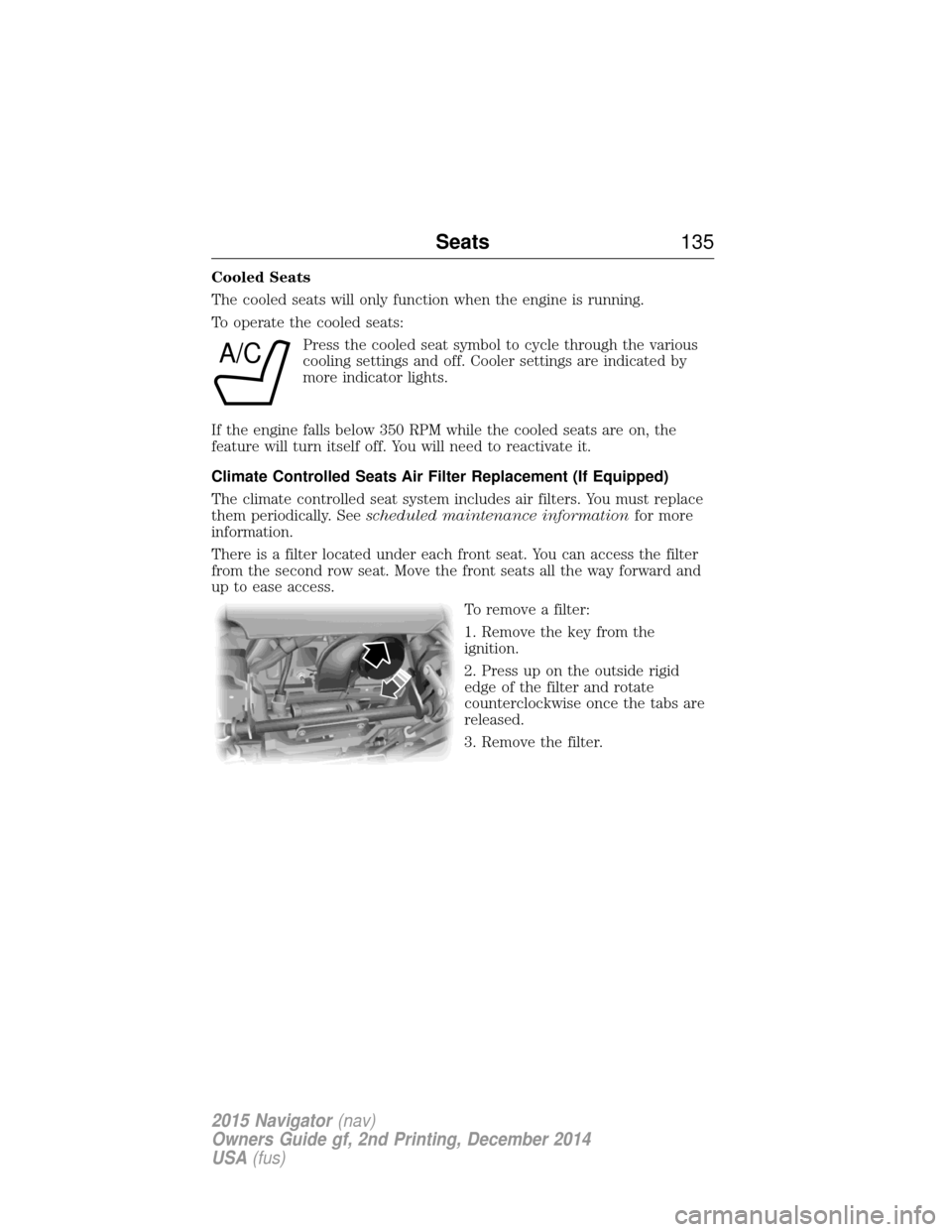
To remove a filter:
1. Remove the key from the
ignition.
2. Press up on the outside rigid
edge of the filter and rotate
counterclockwise once the tabs are
released.
3. Remove the filter.
A/C
Seats135
2015 Navigator(nav)
Owners Guide gf, 2nd Printing, December 2014
USA (fus)
Page 164 of 475
•Avoid inhaling fuel vapors. Inhaling too much fuel vapor of any kind
can lead to eye and respiratory tract irritation. In severe cases,
excessive or prolonged breathing of fuel vapor can cause serious
illness and permanent injury.
• Avoid getting fuel liquid in your eyes. If fuel is splashed in the eyes,
remove contact lenses (if worn), flush with water for 15 minutes and
seek medical attention. Failure to seek proper medical attention could
lead to permanent injury.
• Fuels can also be harmful if absorbed through the skin. If fuel is
splashed on the skin or clothing, promptly remove contaminated
clothing and wash skin thoroughly with soap and water. Repeated or
prolonged skin contact with fuel liquid or vapor causes skin irritation.
• Be particularly careful if you are taking Antabuse or other forms of
disulfiram for the treatment of alcoholism. Breathing gasoline vapors,
or skin contact could cause an adverse reaction. In sensitive
individuals, serious personal injury or sickness may result. If fuel is
splashed on the skin, promptly wash skin thoroughly with soap and
water. Consult a physician immediately if you experience an adverse
reaction.
FUEL QUALITY
Note: Use of any fuel other than those recommended may cause
powertrain damage and a loss of vehicle performance; repairs may not be
covered under warranty.
Choosing the Right Fuel (Gasoline Vehicles)
Use only UNLEADED gasoline or UNLEADED gasoline blended with a
maximum of 15% ethanol in your gasoline vehicle. If your vehicle is a Flex
Fuel Vehicle (FFV), it will have a yellow bezel placed over the fuel fill inlet.
Do not use:
• Fuels containing more than 15% ethanol or E-85 fuel.
• Fuels containing methanol.
• Fuels containing metallic based additives, including manganese-based
compounds.
• Fuels containing the octane booster additive, methylcyclopentadienyl
manganese tricarbonyl (MMT).
• Leaded-fuel (The use of leaded fuel is prohibited by law).
Fuel and Refueling 163
2015 Navigator(nav)
Owners Guide gf, 2nd Printing, December 2014
USA (fus)
Page 187 of 475
Avoid sudden braking as well. Although a 4WD vehicle may accelerate
better than a two-wheel drive vehicle in snow and ice, it won’t stop any
faster, because as in other vehicles, braking occurs at all four wheels. Do
not become overconfident as to road conditions.
Make sure you allow sufficient distance between you and other vehicles
for stopping. Drive slower than usual and consider using one of the lower
gears. In emergency stopping situations, apply the brake steadily. Do not
pump the brakes. Refer to theBrakessection of this chapter for
additional information on the operation of the Anti-lock Brake System
(ABS).
Maintenance and modifications
The suspension and steering systems on your vehicle have been designed
and tested to provide predictable performance whether loaded or empty
and durable load carrying capability. For this reason, Ford Motor
Company strongly recommends that you do not make modifications such
as adding or removing parts (such as lift kits or stabilizer bars) or by
using replacement parts not equivalent to the original factory equipment.
Any modifications to a vehicle that raise the center of gravity can make
it more likely the vehicle will roll over as a result of a loss of control.
Ford Motor Company recommends that caution be used with any vehicle
equipped with a high load or device (such as ladder racks or pickup box
cover).
Failure to maintain your vehicle properly may void the warranty, increase
your repair cost, reduce vehicle performance and operational capabilities
and adversely affect driver and passenger safety. Frequent inspection of
vehicle chassis components is recommended if the vehicle is subjected to
heavy off-road usage.
186 Four-Wheel Drive (If Equipped)
2015 Navigator (nav)
Owners Guide gf, 2nd Printing, December 2014
USA (fus)
Page 196 of 475
Note:Noise from the ABS pump motor may be observed during hill
descent control operation. This is a normal characteristic of the ABS and
should be no reason for concern.
Hill descent modes
• At speeds below 20 mph (32 km/h): When the HDC button is pressed
and HDC is active, HILL DESCENT CONTROL ACTIVE will appear in
the message center for several seconds.
• At speeds below 20 mph (32 km/h): When the HDC button is pressed
and conditions are not correct for hill descent activation, the HDC
system will be enabled, the light on the button will be on solid and
HILL DESCENT CONTROL READY will be displayed in the message
center for several seconds.
• At speeds above 20 mph (32 km/h): When the HDC button is pressed,
the HDC system will be enabled, the light on the button will be
illuminated, and FOR HILL CNTRL, 20 MPH OR LESS will be
displayed in the message center for several seconds.
• For HDC to enable, the vehicle must be in a drive gear or (R)
Reverse. If the vehicle is in P (Park) or N (Neutral) and the HDC
button is pressed, FOR HILL CNTRL, SELECT GEAR will be displayed
in the message center for several seconds.
Refer to Warning lamps and indicators in theInstrument Cluster
chapter for hill descent control messages.
Terrain Response 195
2015 Navigator(nav)
Owners Guide gf, 2nd Printing, December 2014
USA (fus)
Page 229 of 475
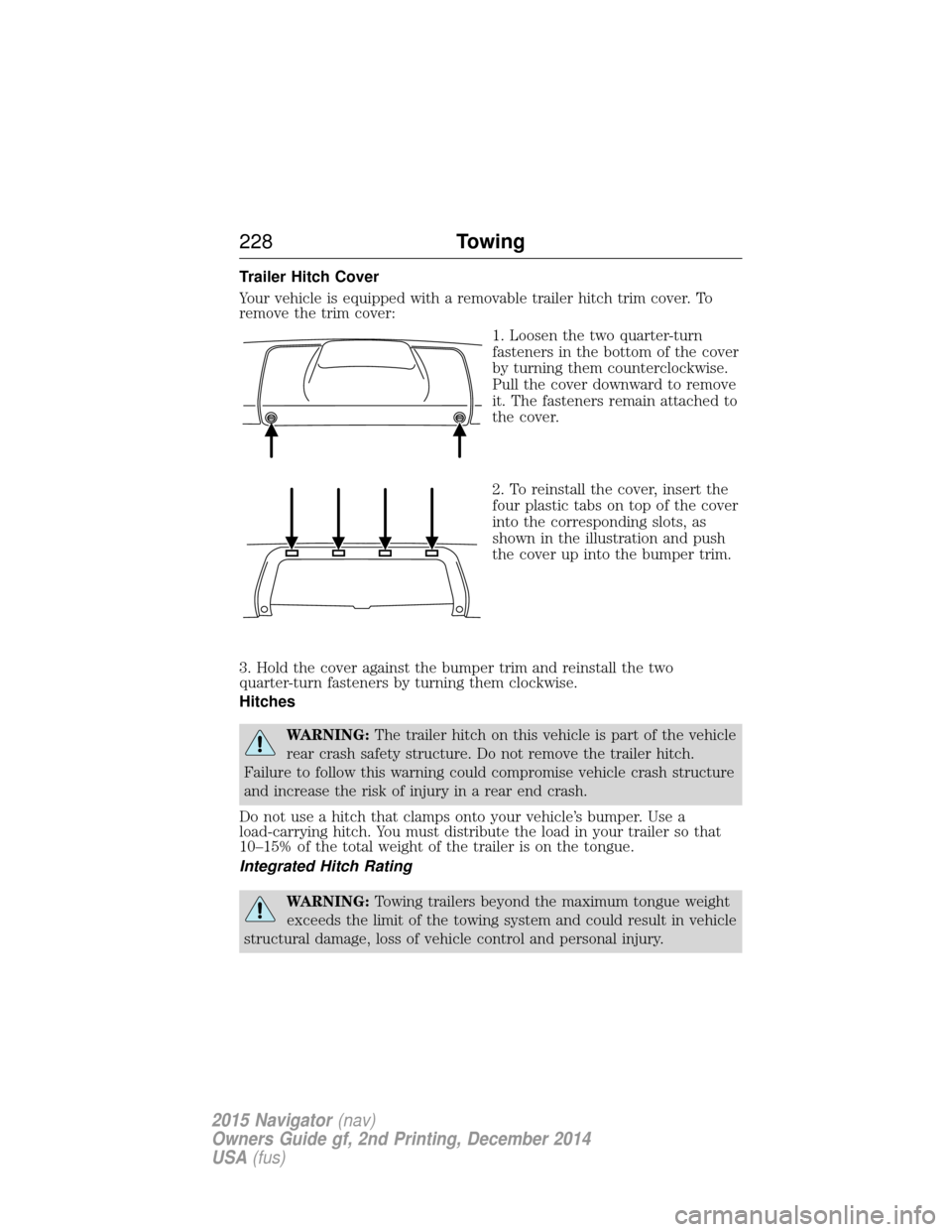
Trailer Hitch Cover
Your vehicle is equipped with a removable trailer hitch trim cover. To
remove the trim cover:1. Loosen the two quarter-turn
fasteners in the bottom of the cover
by turning them counterclockwise.
Pull the cover downward to remove
it. The fasteners remain attached to
the cover.
2. To reinstall the cover, insert the
four plastic tabs on top of the cover
into the corresponding slots, as
shown in the illustration and push
the cover up into the bumper trim.
3. Hold the cover against the bumper trim and reinstall the two
quarter-turn fasteners by turning them clockwise.
Hitches
WARNING: The trailer hitch on this vehicle is part of the vehicle
rear crash safety structure. Do not remove the trailer hitch.
Failure to follow this warning could compromise vehicle crash structure
and increase the risk of injury in a rear end crash.
Do not use a hitch that clamps onto your vehicle’s bumper. Use a
load-carrying hitch. You must distribute the load in your trailer so that
10–15% of the total weight of the trailer is on the tongue.
Integrated Hitch Rating
WARNING: Towing trailers beyond the maximum tongue weight
exceeds the limit of the towing system and could result in vehicle
structural damage, loss of vehicle control and personal injury.
228 Towing
2015 Navigator(nav)
Owners Guide gf, 2nd Printing, December 2014
USA (fus)
Page 235 of 475
Recovery Hooks
WARNING:Using recovery hooks is dangerous and should only
be done by a person familiar with proper vehicle recovery safety
practices. Improper use of recovery hooks may cause hook failure or
separation from the vehicle and could result in serious injury or death.
WARNING: Always slowly remove the slack from the recovery
strap prior to pulling. Failure to do so can introduce significantly
higher loads which can cause the recovery hooks to break off, or the
recovery strap to fail which can cause serious injury or death.
WARNING: Never link two straps together with a clevis pin.
These heavy metal objects could become projectiles if the strap
breaks and can cause serious injury or death.
Your vehicle may come equipped with frame-mounted front recovery
hooks. These hooks should never have a load applied to them greater
than the gross vehicle weight rating of your vehicle.
Before using recovery hooks:
• Make sure all attaching points are secure and capable of withstanding
the applied load.
• Never use chains, cables or tow straps with metal hook ends.
• Only use recovery straps that have a minimum breaking strength two
to three times the gross vehicle weight of the stuck vehicle.
• Make sure the recovery strap is in good condition and free of visible
cuts, tears or damage.
• Use a damper device such as a tarp, heavy blanket or piece of carpet
draped over the recovery strap to help absorb the energy in the event
the strap breaks.
• Make sure the stuck vehicle is not loaded heavier than its gross
vehicle weight rating specified on the certification label.
• Always align the tow vehicle and stuck vehicle in a straight line
(within 10 degrees).
• Keep bystanders to the sidesof the vehicle, at a distance of at least
twice the length of the recovery strap. This helps avoid injury from
the hazard of a recovery hook or strap breaking, or a vehicle lurching
into their path.
234 Towing
2015 Navigator(nav)
Owners Guide gf, 2nd Printing, December 2014
USA (fus)