ABS LINCOLN NAVIGATOR 2015 User Guide
[x] Cancel search | Manufacturer: LINCOLN, Model Year: 2015, Model line: NAVIGATOR, Model: LINCOLN NAVIGATOR 2015Pages: 475, PDF Size: 5.13 MB
Page 261 of 475
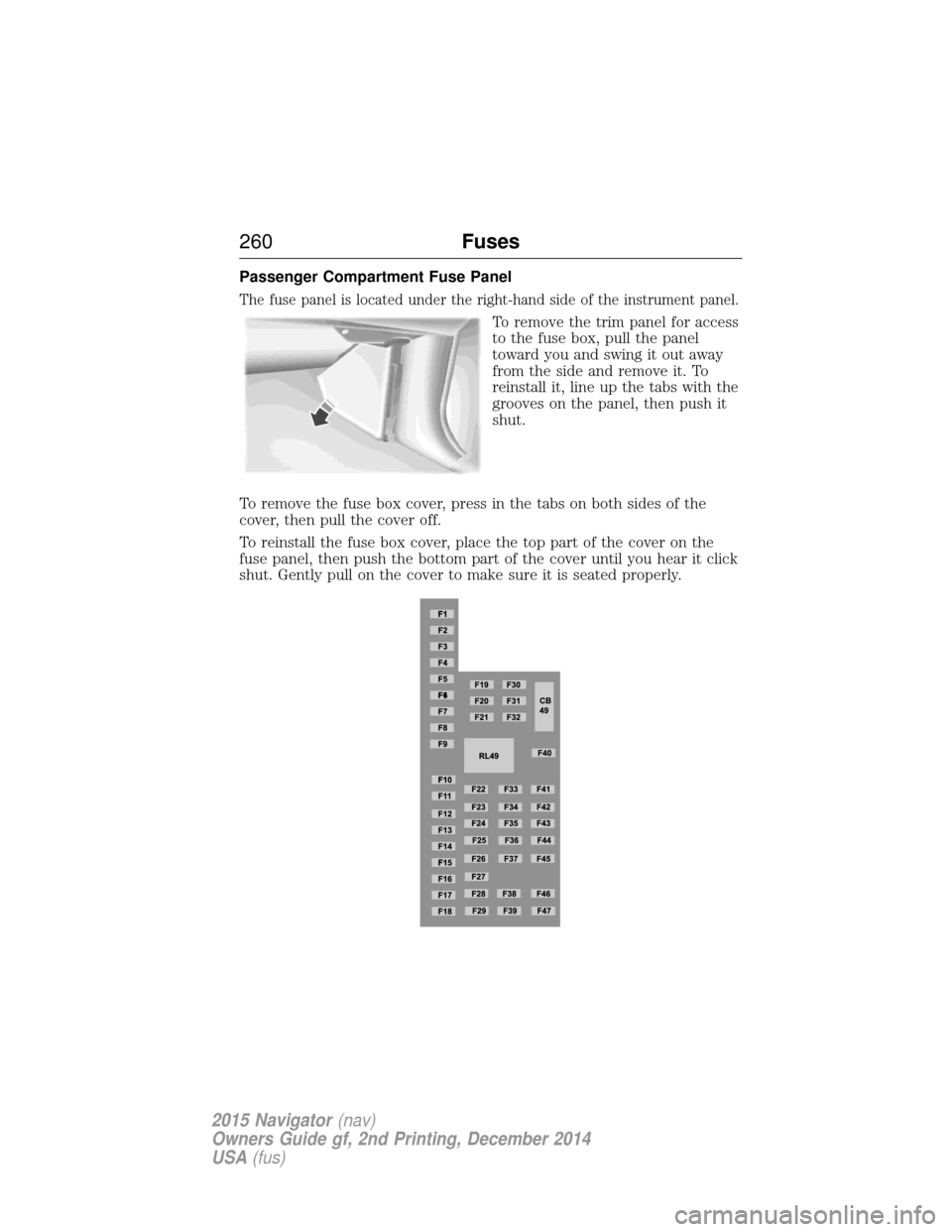
Passenger Compartment Fuse Panel
The fuse panel is located under the right-hand side of the instrument panel.
To remove the trim panel for access
to the fuse box, pull the panel
toward you and swing it out away
from the side and remove it. To
reinstall it, line up the tabs with the
grooves on the panel, then push it
shut.
To remove the fuse box cover, press in the tabs on both sides of the
cover, then pull the cover off.
To reinstall the fuse box cover, place the top part of the cover on the
fuse panel, then push the bottom part of the cover until you hear it click
shut. Gently pull on the cover to make sure it is seated properly.
260 Fuses
2015 Navigator(nav)
Owners Guide gf, 2nd Printing, December 2014
USA (fus)
Page 279 of 475
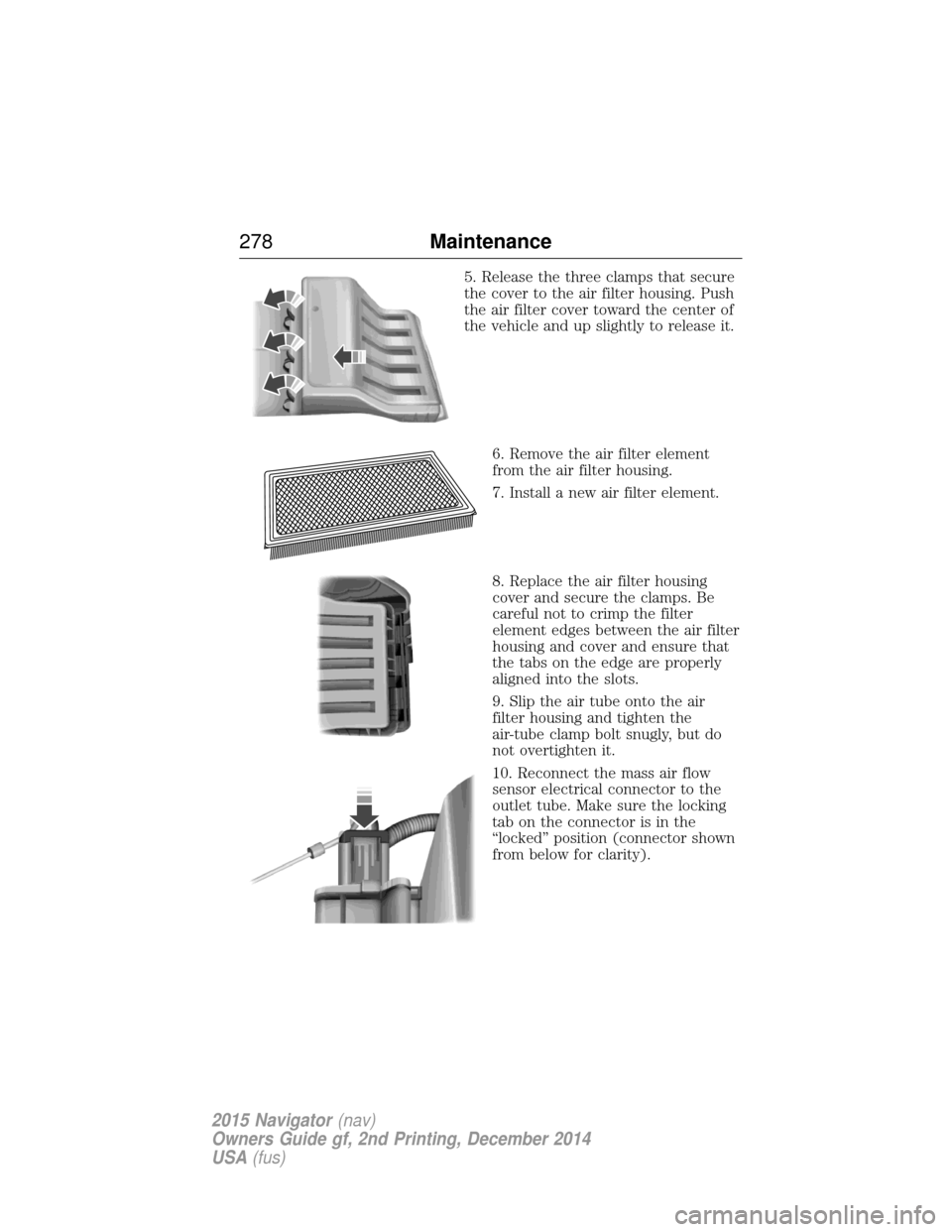
5. Release the three clamps that secure
the cover to the air filter housing. Push
the air filter cover toward the center of
the vehicle and up slightly to release it.6. Remove the air filter element
from the air filter housing.
7. Install a new air filter element.
8. Replace the air filter housing
cover and secure the clamps. Be
careful not to crimp the filter
element edges between the air filter
housing and cover and ensure that
the tabs on the edge are properly
aligned into the slots.
9. Slip the air tube onto the air
filter housing and tighten the
air-tube clamp bolt snugly, but do
not overtighten it.
10. Reconnect the mass air flow
sensor electrical connector to the
outlet tube. Make sure the locking
tab on the connector is in the
“locked” position (connector shown
from below for clarity).
278 Maintenance
2015 Navigator(nav)
Owners Guide gf, 2nd Printing, December 2014
USA (fus)
Page 283 of 475
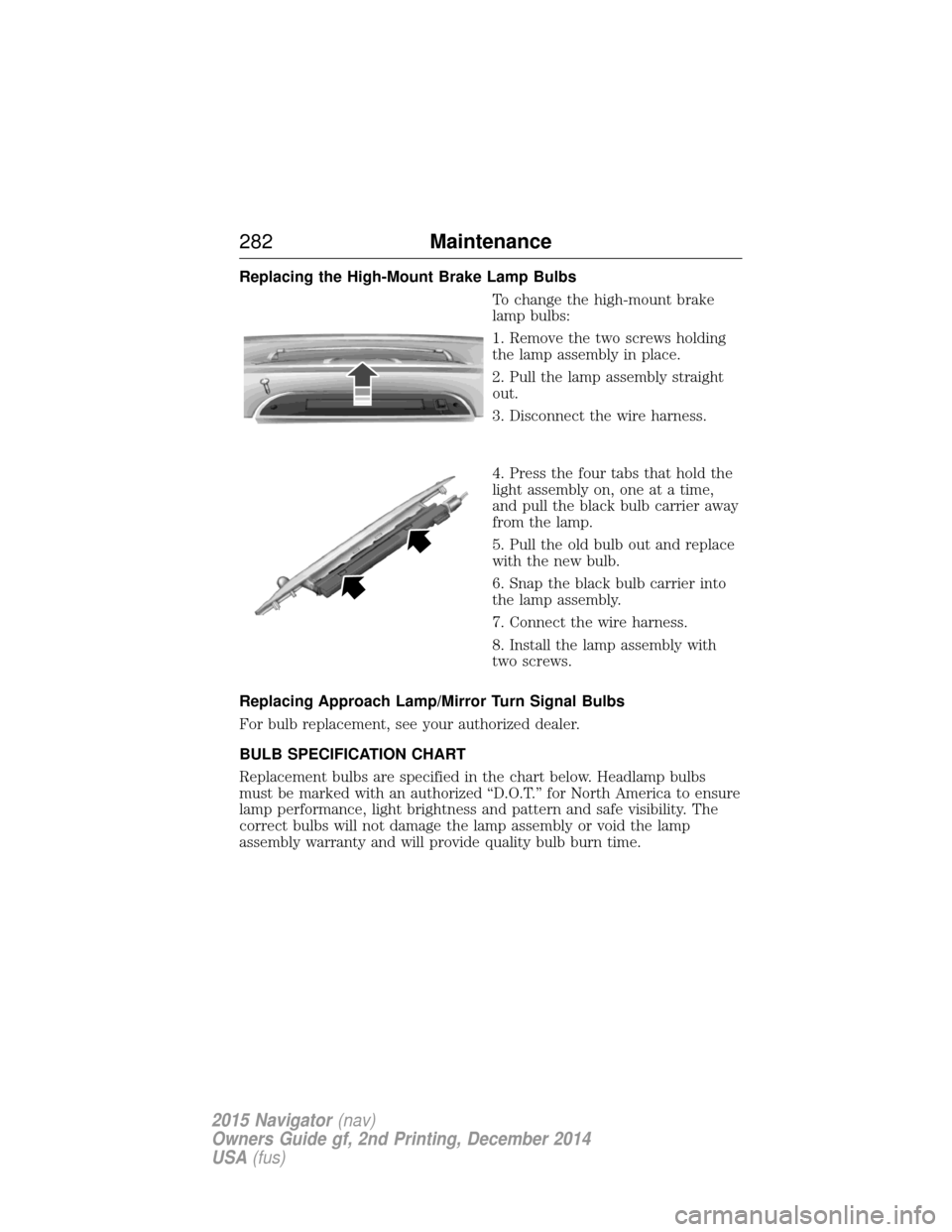
Replacing the High-Mount Brake Lamp BulbsTo change the high-mount brake
lamp bulbs:
1. Remove the two screws holding
the lamp assembly in place.
2. Pull the lamp assembly straight
out.
3. Disconnect the wire harness.
4. Press the four tabs that hold the
light assembly on, one at a time,
and pull the black bulb carrier away
from the lamp.
5. Pull the old bulb out and replace
with the new bulb.
6. Snap the black bulb carrier into
the lamp assembly.
7. Connect the wire harness.
8. Install the lamp assembly with
two screws.
Replacing Approach Lamp/Mirror Turn Signal Bulbs
For bulb replacement, see your authorized dealer.
BULB SPECIFICATION CHART
Replacement bulbs are specified in the chart below. Headlamp bulbs
must be marked with an authorized “D.O.T.” for North America to ensure
lamp performance, light brightness and pattern and safe visibility. The
correct bulbs will not damage the lamp assembly or void the lamp
assembly warranty and will provide quality bulb burn time.
282 Maintenance
2015 Navigator(nav)
Owners Guide gf, 2nd Printing, December 2014
USA (fus)
Page 340 of 475
Roadside Assistance
Exclusive 24/7 roadside assistance, including:
•Towing, flat-tire change and battery jump starts.
• Out of fuel and lock-out assistance.
• Travel expense reimbursement for lodging, meals and rental car.
• Destination assistance for taxi, shuttle, rental car coverage and
emergency transportation.
Transferable Coverage
If you sell your vehicle before your Lincoln Extended Service Plan
coverage expires, you can transfer any remaining coverage to the new
owner. Whenever you sell your vehicle, prospective buyers may have a
higher degree of confidence that vehicle was properly maintained with
Lincoln ESP, thereby improving resale value.
Avoid the Rising Cost of Properly Maintaining Your Vehicle!
Lincoln Extended Service Plan also offers a Premium Maintenance Plan
that covers all scheduled maintenance, and select items that routinely
wear out. The coverage is prepaid, so you never have to worry about
affording your vehicle maintenance. It covers regular checkups, routine
inspections, preventive care and replacement of select items that require
periodic attention for normal wear:
• Windshield wiper blades.
• Spark plugs (except in California).
• The clutch disc.
• Brake pads and linings.
• Shock absorbers.
• Belts and hoses.
• Diesel exhaust fluid replenishment.
Interest Free Finance Options Available
Take advantage of our interest free installment payment plan. Just a 10%
down payment will provide you with an affordable, no interest, no fee
payment program allowing you all the security and benefits Lincoln ESP
has to offer while paying over time. You are pre-approved with no credit
checks, no hassles! To learn more, call our Lincoln ESP specialists at
800-367-3377.
Lincoln ESP
P.O. Box 8072
Royal Oak, MI 48068-0039
Extended Service Plan 339
2015 Navigator(nav)
Owners Guide gf, 2nd Printing, December 2014
USA (fus)
Page 360 of 475
system creates and retains an index of supported media content. The
system also records a short development log of approximately
10 minutes of all recent system activity. The log profile and other system
data may be used to improve the system and help diagnose any problems
that may occur.
The cellular profile, media device index, and development log remain in
the vehicle unless you delete them and are generally accessible only in
the vehicle when the cellular phone or media player is connected. If you
no longer plan to use the system or the vehicle, we recommend you
perform a Master Reset to erase all stored information.
System data cannot be accessed without special equipment and access to
the vehicle’s SYNC module. Ford Motor Company and Ford of Canada do
not access the system data for any purpose other than as described
absent consent, a court order, or where required by law enforcement,
other government authorities, or other third parties acting with lawful
authority. Other parties may seek to access the information
independently of Ford Motor Company and Ford of Canada. For further
privacy information, see the sections on 911 Assist, Vehicle Health
Report, and Traffic, Directions and Information.
Privacy Notice for GPS Mapping with MyLincoln Mobile in the
United States and Canada
MyLincoln Mobile allows for GPS mapping when a vehicle is registered to
a MyLincoln Mobile account. To remove the vehicle from the account,
thereby removing GPS mapping ability, a Master Reset can be performed
in the vehicle. SeeSettingsin the MyLincoln Touch chapter.
Prior to transferring ownership of a vehicle, owners may choose to
execute a Master Reset or Factory Reset (completed via the MyLincoln
Mobile website). Either method will remove the vehicle from all
MyLincoln Mobile accounts.
It is recommended that new owners conduct a Master Reset upon taking
possession of the vehicle to remove it from any existing MyLincoln
Mobile accounts. The new owner can activate a MyLincoln Mobile
account by going to
http://support.lincoln.com/owner-services/mylincoln-mobile-app and
following the registration process.
MyLincoln Touch™ 359
2015 Navigator(nav)
Owners Guide gf, 2nd Printing, December 2014
USA (fus)
Page 453 of 475
Oils, Fluids and Flushing
In many cases, fluid discoloration is a normal operating characteristic
and, by itself, does not necessarily indicate a concern or that the fluid
needs to be changed. However, discolored fluids that also show signs of
overheating and foreign material contamination should be inspected
immediately by a qualified expert, such as the factory-trained technicians
at your dealership. Your vehicle’s oils and fluids should be changed at the
specified intervals or in conjunction with a repair. Flushing is a viable
way to change fluid for many vehicle sub-systems during scheduled
maintenance. It is critical that systems are flushed only with new fluid
that is the same as that required to fill and operate the system, or using
a Ford-approved flushing chemical.
Owner Checks and Services
Certain basic maintenance checks and inspections should be performed
every month or at six month intervals.
Check every month
Engine oil level.
Function of all interior and exterior lights.
Tires (including spare) for wear and proper pressure.
Windshield washer fluid level.
Check every six months
Battery connections. Clean if necessary.
Body and door drain holes for obstructions. Clean if necessary.
Cooling system fluid level and coolant strength.
Door weatherstrips for wear. Lubricate if necessary.
Hinges, latches and outside locks for proper operation. Lubricate if
necessary.
Parking brake for proper operation.
Safety belts and seat latches for wear and function.
Safety warning lamps (brake, ABS, airbag, safety belt) for operation.
Washer spray and wiper operation. Clean or replace blades as
necessary.
452 Scheduled Maintenance
2015 Navigator (nav)
Owners Guide gf, 2nd Printing, December 2014
USA (fus)
Page 469 of 475
911 Assist™ ..............................398
A
ABS (see Brakes) .....................187
Accessing and using your USB
port ............................................378
Accessing your calendar ..........398
Accessory delay ..........................94
Adding (pairing) a phone ........385
Airbag supplemental restraint
system ..........................................45and child safety seats ..............47
description ................................45
disposal ......................................52
driver airbag ..............................45
passenger airbag .......................45
side airbag ...........................45, 47
Air cleaner filter .......276–277, 333
Air filter .............................277, 333
All Wheel Drive (AWD),
driving off road .........................179
Ambient mood/lighting .............405
Ambulance packages ..................14
AM/FM .......................................366
Antifreeze
(see Engine coolant) ................267
Anti-lock brake system
(see Brakes) ..............................187
Anti-theft system ..................76–77 arming the system ..............76–77
disarming a triggered system ..77
Audio system Single CD ................................343 Audio system (see Radio) .......343
Automatic transmission
driving an automatic
overdrive .................................172
fluid, adding ............................271
fluid, checking ........................271
fluid, refill capacities ..............328
fluid, specification ..................328
Selectshift (SST) ....................175
Auxiliary Input Jack .................375
Auxiliary powerpoint ................152
A/V inputs ..........................351, 382
Axle lubricant specifications ..........328
refill capacities ........................328
B
Battery .......................................273 acid, treating emergencies .....273
jumping a disabled battery ....244
maintenance-free ....................273
replacement, specifications ...333
servicing ..................................273
Blind Spot Information
System .......................................205
Booster seats ...............................30
Brakes ........................................187 anti-lock ...................................187
anti-lock brake system (ABS)
warning light ...........................187
brake warning light ................187
fluid, checking and adding ....272
fluid, refill capacities ..............328
fluid, specifications .................328
lubricant specifications ..........328
parking ....................................188
shift interlock ..........................176
trailer .......................................231
468 Index
2015 Navigator(nav)
Owners Guide gf, 2nd Printing, December 2014
USA (fus)