clock LINCOLN NAVIGATOR 2017 User Guide
[x] Cancel search | Manufacturer: LINCOLN, Model Year: 2017, Model line: NAVIGATOR, Model: LINCOLN NAVIGATOR 2017Pages: 532, PDF Size: 3.9 MB
Page 326 of 532
2.
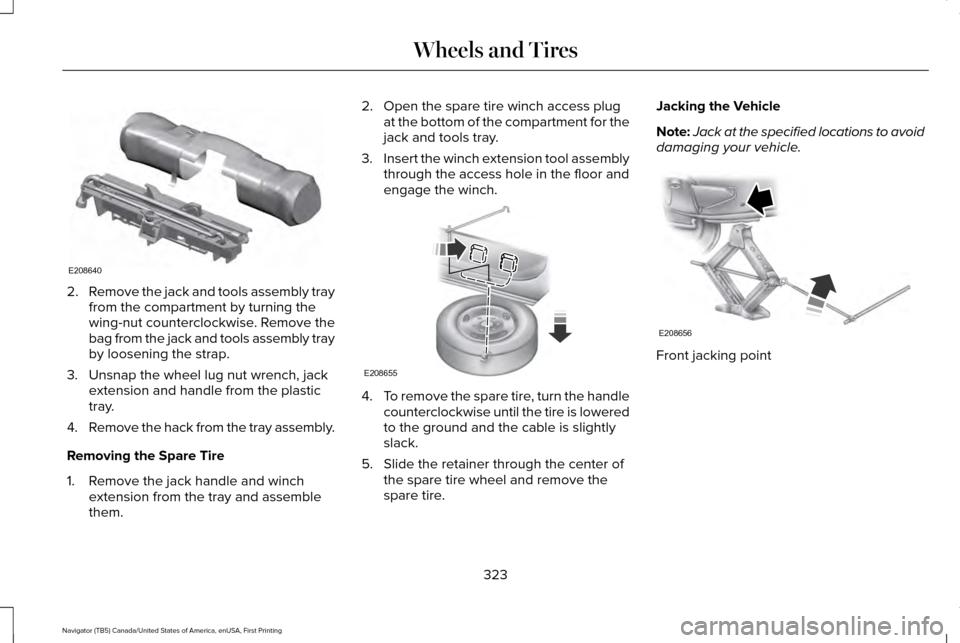
Remove the jack and tools assembly tray
from the compartment by turning the
wing-nut counterclockwise. Remove the
bag from the jack and tools assembly tray
by loosening the strap.
3. Unsnap the wheel lug nut wrench, jack extension and handle from the plastic
tray.
4. Remove the hack from the tray assembly.
Removing the Spare Tire
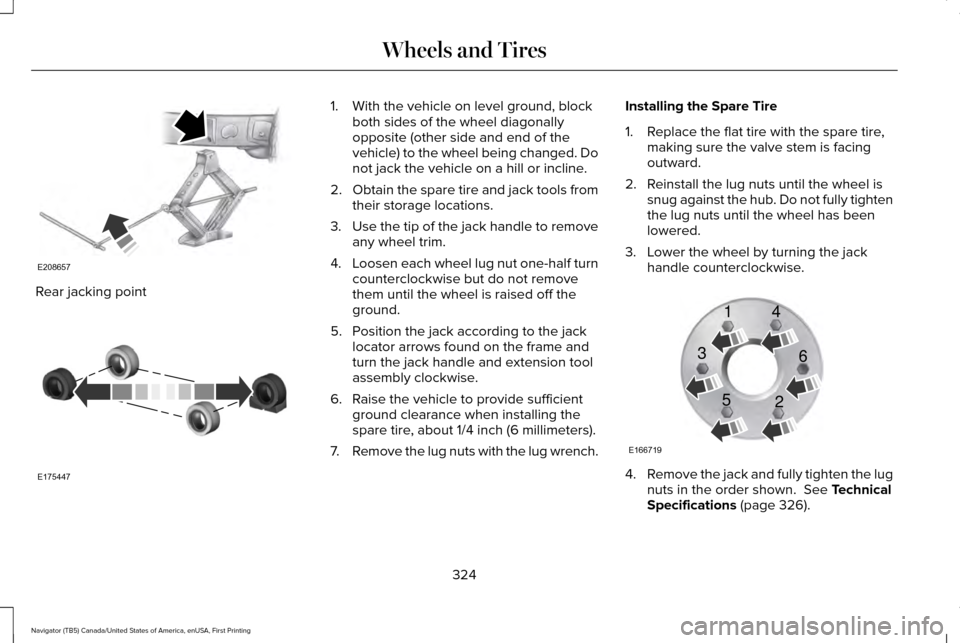
1. Remove the jack handle and winch extension from the tray and assemble
them. 2. Open the spare tire winch access plug
at the bottom of the compartment for the
jack and tools tray.
3. Insert the winch extension tool assembly
through the access hole in the floor and
engage the winch. 4.
To remove the spare tire, turn the handle
counterclockwise until the tire is lowered
to the ground and the cable is slightly
slack.
5. Slide the retainer through the center of the spare tire wheel and remove the
spare tire. Jacking the Vehicle
Note:
Jack at the specified locations to avoid
damaging your vehicle. Front jacking point
323
Navigator (TB5) Canada/United States of America, enUSA, First Printing Wheels and TiresE208640 E208655 E208656
Page 327 of 532
Rear jacking point 1. With the vehicle on level ground, block
both sides of the wheel diagonally
opposite (other side and end of the
vehicle) to the wheel being changed. Do
not jack the vehicle on a hill or incline.
2. Obtain the spare tire and jack tools from
their storage locations.
3. Use the tip of the jack handle to remove
any wheel trim.
4. Loosen each wheel lug nut one-half turn
counterclockwise but do not remove
them until the wheel is raised off the
ground.
5. Position the jack according to the jack locator arrows found on the frame and
turn the jack handle and extension tool
assembly clockwise.
6. Raise the vehicle to provide sufficient ground clearance when installing the
spare tire, about 1/4 inch (6 millimeters).
7. Remove the lug nuts with the lug wrench. Installing the Spare Tire
1. Replace the flat tire with the spare tire,
making sure the valve stem is facing
outward.
2. Reinstall the lug nuts until the wheel is snug against the hub. Do not fully tighten
the lug nuts until the wheel has been
lowered.
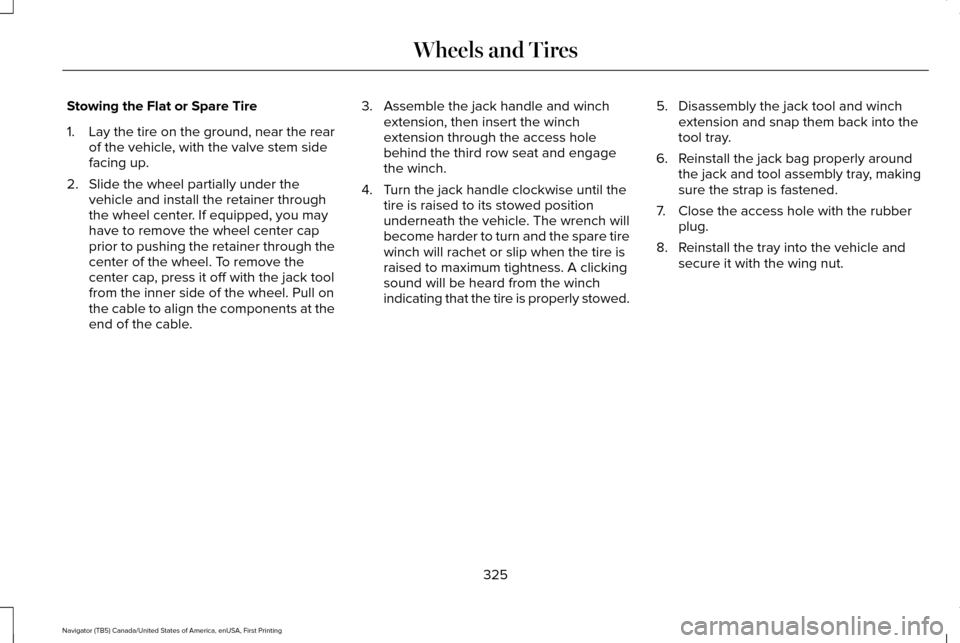
3. Lower the wheel by turning the jack handle counterclockwise. 4.
Remove the jack and fully tighten the lug
nuts in the order shown. See Technical
Specifications (page 326).
324
Navigator (TB5) Canada/United States of America, enUSA, First Printing Wheels and TiresE208657 E175447 E166719
1
3
5 4
6
2
Page 328 of 532
Stowing the Flat or Spare Tire
1.
Lay the tire on the ground, near the rear
of the vehicle, with the valve stem side
facing up.
2. Slide the wheel partially under the vehicle and install the retainer through
the wheel center. If equipped, you may
have to remove the wheel center cap
prior to pushing the retainer through the
center of the wheel. To remove the
center cap, press it off with the jack tool
from the inner side of the wheel. Pull on
the cable to align the components at the
end of the cable. 3. Assemble the jack handle and winch
extension, then insert the winch
extension through the access hole
behind the third row seat and engage
the winch.
4. Turn the jack handle clockwise until the tire is raised to its stowed position
underneath the vehicle. The wrench will
become harder to turn and the spare tire
winch will rachet or slip when the tire is
raised to maximum tightness. A clicking
sound will be heard from the winch
indicating that the tire is properly stowed. 5. Disassembly the jack tool and winch
extension and snap them back into the
tool tray.
6. Reinstall the jack bag properly around the jack and tool assembly tray, making
sure the strap is fastened.
7. Close the access hole with the rubber plug.
8. Reinstall the tray into the vehicle and secure it with the wing nut.
325
Navigator (TB5) Canada/United States of America, enUSA, First Printing Wheels and Tires
Page 346 of 532
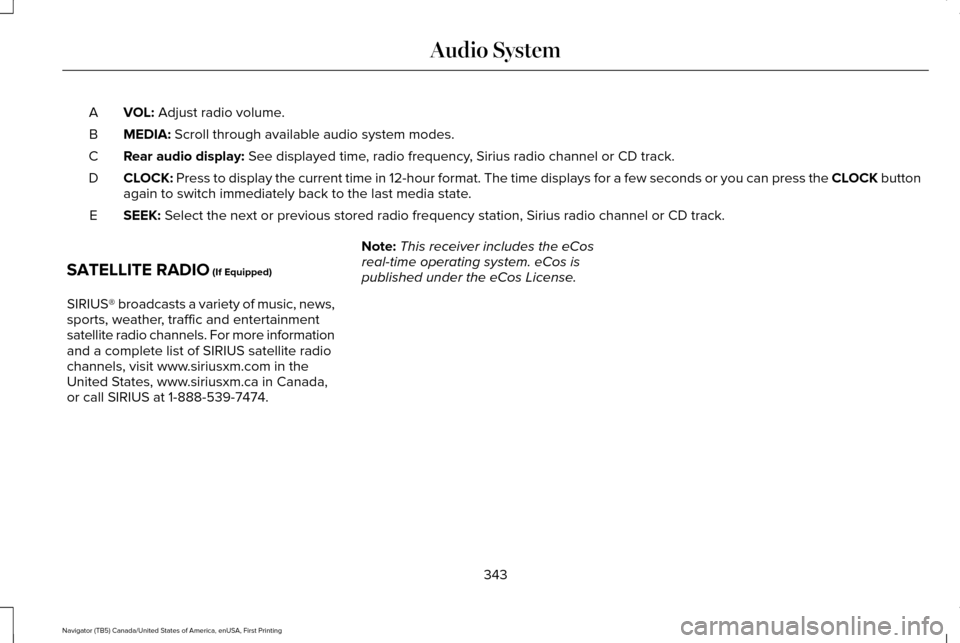
VOL: Adjust radio volume.
A
MEDIA:
Scroll through available audio system modes.
B
Rear audio display:
See displayed time, radio frequency, Sirius radio channel or CD track.
C
CLOCK:
Press to display the current time in 12-hour format. The time displays \
for a few seconds or you can press the CLOCK button
again to switch immediately back to the last media state.
D
SEEK:
Select the next or previous stored radio frequency station, Sirius radi\
o channel or CD track.
E
SATELLITE RADIO
(If Equipped)
SIRIUS® broadcasts a variety of music, news,
sports, weather, traffic and entertainment
satellite radio channels. For more information
and a complete list of SIRIUS satellite radio
channels, visit www.siriusxm.com in the
United States, www.siriusxm.ca in Canada,
or call SIRIUS at 1-888-539-7474. Note:
This receiver includes the eCos
real-time operating system. eCos is
published under the eCos License.
343
Navigator (TB5) Canada/United States of America, enUSA, First Printing Audio System
Page 353 of 532

Action and Description
Menu Item
Item
This bar displays icons and messages pertaining to current system activi\
ties including climate
settings, voice commands and phone functions such as text messages.
Status Bar
A
This button is available on the main screens. Pressing it takes you to the home screen view.
Home
B
This shows the current time. You can set the clock manually or have it controlled by the vehicle's
GPS location. See Settings (page 417).
Clock
C
This displays the current outside temperature.
Outside Temperature
D
You can touch any of the buttons on this bar to select a feature.
Feature Bar
E
The touchscreen allows you quick access to
all of your comfort, navigation,
communication and entertainment options.
Using the status and feature bar you can
quickly select the feature you want to use. Note:
Your system is equipped with a feature
that allows you to access and control audio
features for 10 minutes after you switch the
ignition off (and no doors open). The Status Bar
Additional icons also display in the status bar
depending on market, vehicle options and
current operation. If a feature is not active,
the icon does not display. Certain icons may
move to the left or right depending on what
options are active.
350
Navigator (TB5) Canada/United States of America, enUSA, First Printing SYNC™ 3
Page 396 of 532
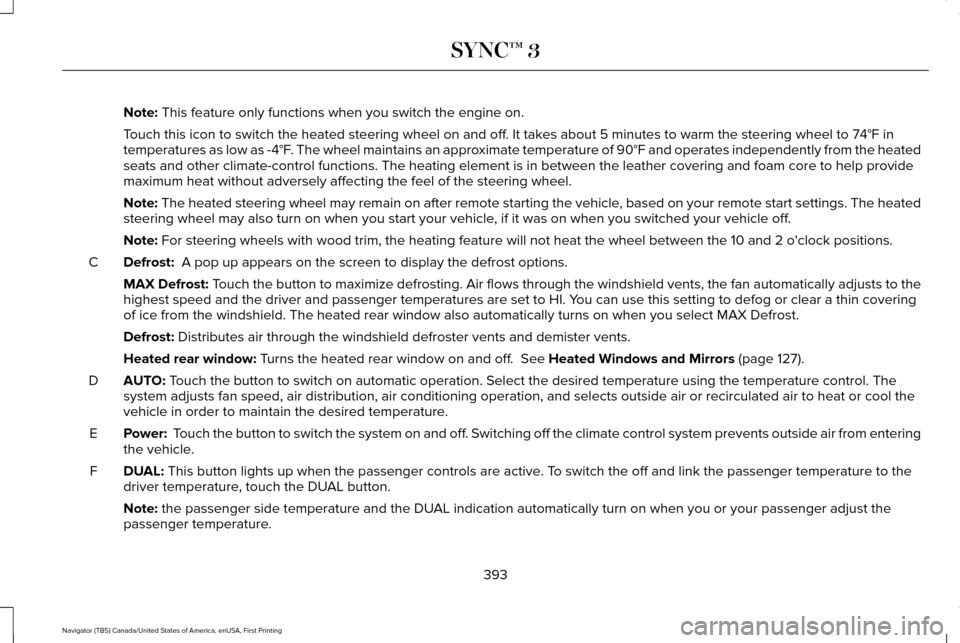
Note: This feature only functions when you switch the engine on.
Touch this icon to switch the heated steering wheel on and off. It takes about 5 minutes to warm the steering wheel to 74°F in
temperatures as low as -4°F. The wheel maintains an approximate temperature of 90°F and operates independently from the heated\
seats and other climate-control functions. The heating element is in bet\
ween the leather covering and foam core to help provide
maximum heat without adversely affecting the feel of the steering wheel.\
Note:
The heated steering wheel may remain on after remote starting the vehic\
le, based on your remote start settings. The heated
steering wheel may also turn on when you start your vehicle, if it was on when you switched your vehicle off.
Note:
For steering wheels with wood trim, the heating feature will not heat t\
he wheel between the 10 and 2 o'clock positions.
Defrost:
A pop up appears on the screen to display the defrost options.
C
MAX Defrost: Touch the button to maximize defrosting. Air flows through the windshield\
vents, the fan automatically adjusts to the
highest speed and the driver and passenger temperatures are set to HI. Y\
ou can use this setting to defog or clear a thin covering
of ice from the windshield. The heated rear window also automatically tu\
rns on when you select MAX Defrost.
Defrost:
Distributes air through the windshield defroster vents and demister vent\
s.
Heated rear window:
Turns the heated rear window on and off. See Heated Windows and Mirrors (page 127).
AUTO:
Touch the button to switch on automatic operation. Select the desired tem\
perature using the temperature control. The
system adjusts fan speed, air distribution, air conditioning operation, \
and selects outside air or recirculated air to heat or cool the
vehicle in order to maintain the desired temperature.
D
Power:
Touch the button to switch the system on and off. Switching off the climate control system prevents outside air from enteri\
ng
the vehicle.
E
DUAL:
This button lights up when the passenger controls are active. To switch the off and link the passenger temperature to the
driver temperature, touch the DUAL button.
F
Note:
the passenger side temperature and the DUAL indication automatically turn on when you or your passenger adjust th\
e
passenger temperature.
393
Navigator (TB5) Canada/United States of America, enUSA, First Printing SYNC™ 3
Page 423 of 532
Clock
To adjust the time, select the up and down
arrows on either side of the screen. The
arrows on the left adjust the hour and arrows
on the right adjust the minute. You can then
select AM or PM.
You can adjust the following features: Action and Description
Menu Item
Select how time displays.
Clock Format
When active, the clock adjusts to time zone changes.
Auto Time Zone Update
This feature is only available in vehicles with navigation.
When selected, the vehicle clock resets to GPS satellite time.
Reset Clock to GPS Time
The system automatically saves any updates
you make to the settings. Bluetooth
Pressing this button allows you to access the
following: Action
Menu Item
On
Bluetooth
Off
You must activate Bluetooth to pair a
Bluetooth-enabled device. The processes of pairing a Bluetooth device
is the same as pairing a phone. See Pairing
a Device in Phone settings for how to pair a
device and the available options.
420
Navigator (TB5) Canada/United States of America, enUSA, First Printing SYNC™ 3
Page 529 of 532
Remote Start...................................................127
Automatic Settings..............................................128
Repairing Minor Paint Damage
.................292
Replacement Parts Recommendation........12 Collision Repairs.....................................................13
Scheduled Maintenance and Mechanical
Repairs.................................................................12
Warranty on Replacement Parts.........................
13
Replacing a Lost Key or Remote Control............................................................53
Reporting Safety Defects (Canada Only)..............................................................244
Reporting Safety Defects (U.S. Only).......244
Roadside Assistance
....................................231
Vehicles Sold in Canada: Getting Roadside
Assistance.......................................................232
Vehicles Sold in Canada: Roadside Assistance Program Coverage........................................232
Vehicles Sold in Canada: Using Roadside Assistance.......................................................232
Vehicles Sold in the United States: Getting Roadside Assistance......................................231
Vehicles Sold in the United States: Using Roadside Assistance......................................231
Roadside Emergencies
................................231
Roof Racks and Load Carriers...................210 Adjusting the Crossbar......................................210 Running-In
See: Breaking-In.................................................228
Running Out of Fuel......................................161 Adding Fuel From a Portable Fuel
Container...........................................................161
Filling a Portable Fuel Container......................161
S
Safety Canopy™...............................................45
Safety Precautions........................................159
Satellite Radio
...............................................343
Satellite Radio Electronic Serial Number
(ESN)..................................................................345
Satellite Radio Reception Factors..................344
SIRIUS® Satellite Radio Service......................344
Troubleshooting..................................................345
Scheduled Maintenance Record..............468
Scheduled Maintenance............................456
Seatbelt Extension.........................................39
Seatbelt Height Adjustment.........................35 Second Row Comfort Guide..............................36
Seatbelt Reminder
..........................................37
Belt-Minder™...........................................................37
Seatbelts...........................................................32 Principle of Operation..........................................32 Seatbelt Warning Lamp and Indicator
Chime..............................................................36
Conditions of operation.......................................37
Seats.................................................................129
Security..............................................................70
Self-Leveling Suspension
..........................208
Settings............................................................417 911 Assist...............................................................424
Ambient Lighting................................................432
Bluetooth..............................................................420
Clock......................................................................420
Display...................................................................433
General.................................................................430
Media Player.........................................................418
Mobile Apps.........................................................428
Navigation............................................................426
Phone.....................................................................421
Radio......................................................................425
Sound......................................................................417
Valet Mode...........................................................434
Vehicle...................................................................432
Voice Control.......................................................433
Wi-Fi........................................................................\
431
Side Airbags
.....................................................44
Sitting in the Correct Position....................129
Snow Chains See: Using Snow Chains...................................312
526
Navigator (TB5) Canada/United States of America, enUSA, First Printing Index