light LINCOLN NAVIGATOR 2017 Owner's Manual
[x] Cancel search | Manufacturer: LINCOLN, Model Year: 2017, Model line: NAVIGATOR, Model: LINCOLN NAVIGATOR 2017Pages: 532, PDF Size: 3.9 MB
Page 100 of 532
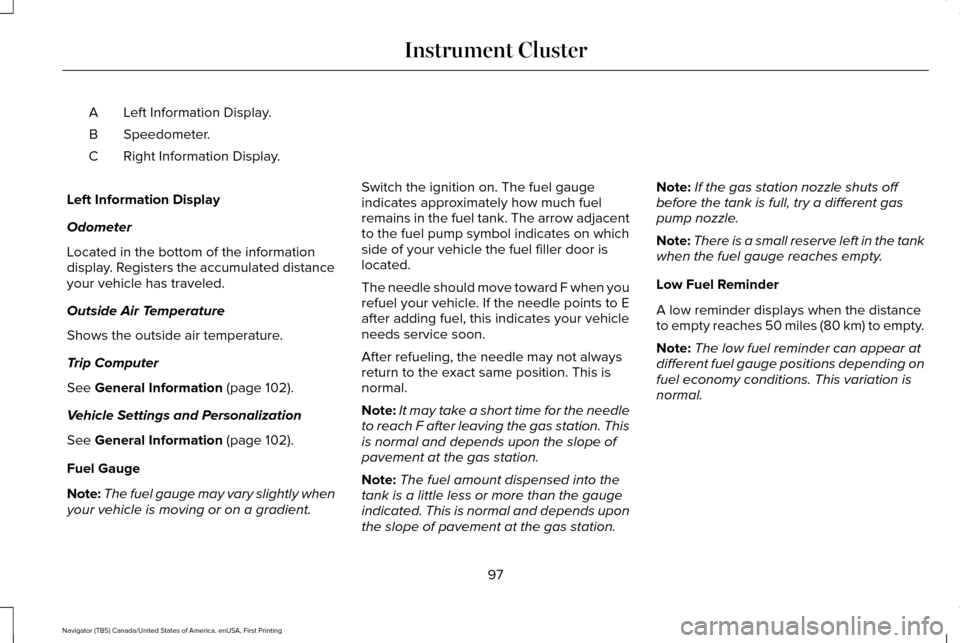
Left Information Display.
A
Speedometer.
B
Right Information Display.
C
Left Information Display
Odometer
Located in the bottom of the information
display. Registers the accumulated distance
your vehicle has traveled.
Outside Air Temperature
Shows the outside air temperature.
Trip Computer
See General Information (page 102).
Vehicle Settings and Personalization
See
General Information (page 102).
Fuel Gauge
Note: The fuel gauge may vary slightly when
your vehicle is moving or on a gradient. Switch the ignition on. The fuel gauge
indicates approximately how much fuel
remains in the fuel tank. The arrow adjacent
to the fuel pump symbol indicates on which
side of your vehicle the fuel filler door is
located.
The needle should move toward F when you
refuel your vehicle. If the needle points to E
after adding fuel, this indicates your vehicle
needs service soon.
After refueling, the needle may not always
return to the exact same position. This is
normal.
Note:
It may take a short time for the needle
to reach F after leaving the gas station. This
is normal and depends upon the slope of
pavement at the gas station.
Note: The fuel amount dispensed into the
tank is a little less or more than the gauge
indicated. This is normal and depends upon
the slope of pavement at the gas station. Note:
If the gas station nozzle shuts off
before the tank is full, try a different gas
pump nozzle.
Note: There is a small reserve left in the tank
when the fuel gauge reaches empty.
Low Fuel Reminder
A low reminder displays when the distance
to empty reaches 50 miles (80 km) to empty.
Note: The low fuel reminder can appear at
different fuel gauge positions depending on
fuel economy conditions. This variation is
normal.
97
Navigator (TB5) Canada/United States of America, enUSA, First Printing Instrument Cluster
Page 102 of 532
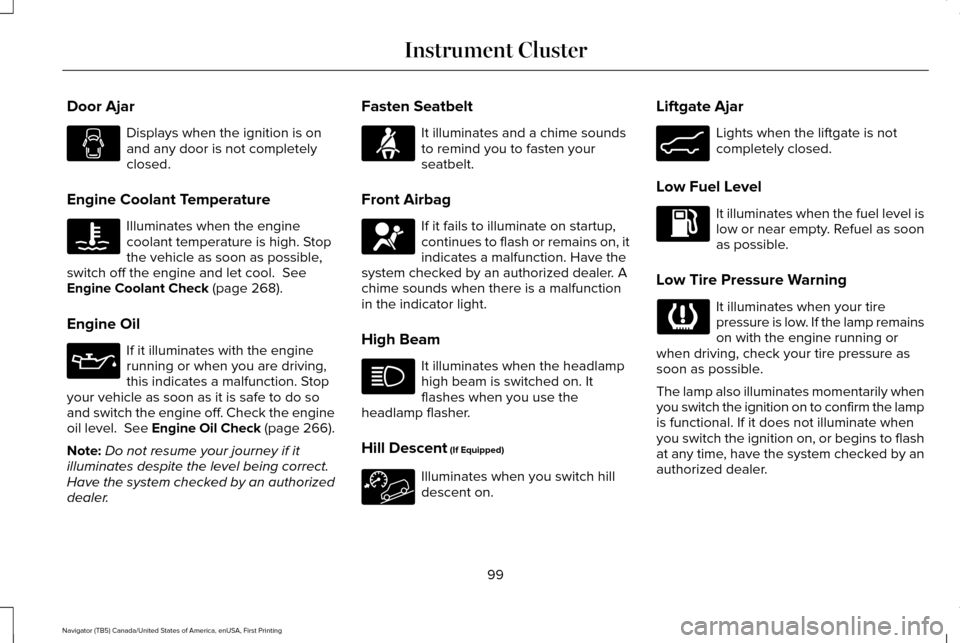
Door Ajar
Displays when the ignition is on
and any door is not completely
closed.
Engine Coolant Temperature Illuminates when the engine
coolant temperature is high. Stop
the vehicle as soon as possible,
switch off the engine and let cool. See
Engine Coolant Check (page 268).
Engine Oil If it illuminates with the engine
running or when you are driving,
this indicates a malfunction. Stop
your vehicle as soon as it is safe to do so
and switch the engine off. Check the engine
oil level. See Engine Oil Check (page 266).
Note: Do not resume your journey if it
illuminates despite the level being correct.
Have the system checked by an authorized
dealer. Fasten Seatbelt It illuminates and a chime sounds
to remind you to fasten your
seatbelt.
Front Airbag If it fails to illuminate on startup,
continues to flash or remains on, it
indicates a malfunction. Have the
system checked by an authorized dealer. A
chime sounds when there is a malfunction
in the indicator light.
High Beam It illuminates when the headlamp
high beam is switched on. It
flashes when you use the
headlamp flasher.
Hill Descent
(If Equipped) Illuminates when you switch hill
descent on.Liftgate Ajar Lights when the liftgate is not
completely closed.
Low Fuel Level It illuminates when the fuel level is
low or near empty. Refuel as soon
as possible.
Low Tire Pressure Warning It illuminates when your tire
pressure is low. If the lamp remains
on with the engine running or
when driving, check your tire pressure as
soon as possible.
The lamp also illuminates momentarily when
you switch the ignition on to confirm the lamp
is functional. If it does not illuminate when
you switch the ignition on, or begins to flash
at any time, have the system checked by an
authorized dealer.
99
Navigator (TB5) Canada/United States of America, enUSA, First Printing Instrument Cluster E162453
Page 103 of 532
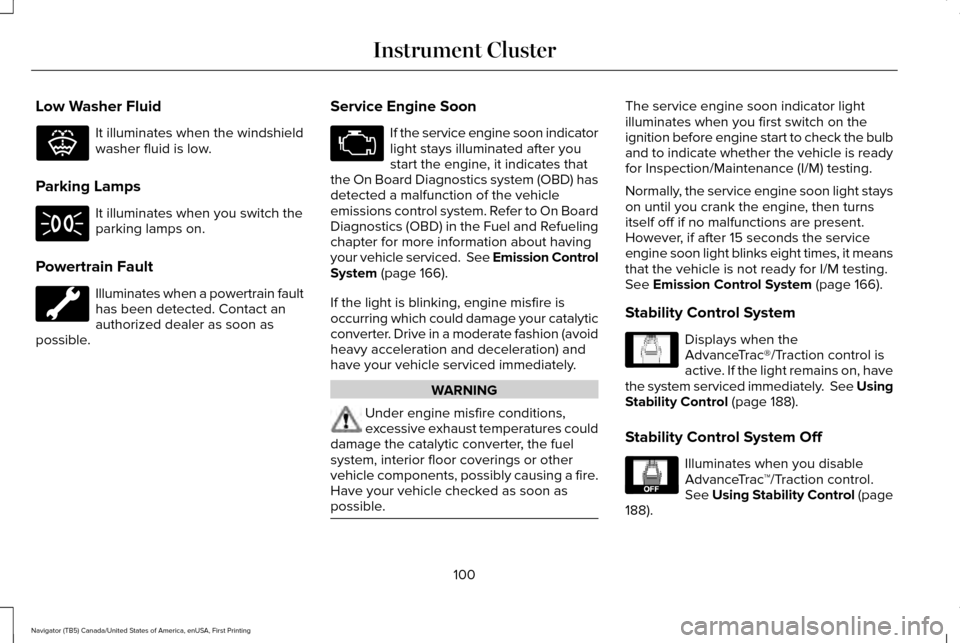
Low Washer Fluid
It illuminates when the windshield
washer fluid is low.
Parking Lamps It illuminates when you switch the
parking lamps on.
Powertrain Fault Illuminates when a powertrain fault
has been detected. Contact an
authorized dealer as soon as
possible. Service Engine Soon If the service engine soon indicator
light stays illuminated after you
start the engine, it indicates that
the On Board Diagnostics system (OBD) has
detected a malfunction of the vehicle
emissions control system. Refer to On Board
Diagnostics (OBD) in the Fuel and Refueling
chapter for more information about having
your vehicle serviced. See Emission Control
System (page 166).
If the light is blinking, engine misfire is
occurring which could damage your catalytic
converter. Drive in a moderate fashion (avoid
heavy acceleration and deceleration) and
have your vehicle serviced immediately. WARNING
Under engine misfire conditions,
excessive exhaust temperatures could
damage the catalytic converter, the fuel
system, interior floor coverings or other
vehicle components, possibly causing a fire.
Have your vehicle checked as soon as
possible. The service engine soon indicator light
illuminates when you first switch on the
ignition before engine start to check the bulb
and to indicate whether the vehicle is ready
for Inspection/Maintenance (I/M) testing.
Normally, the service engine soon light stays
on until you crank the engine, then turns
itself off if no malfunctions are present.
However, if after 15 seconds the service
engine soon light blinks eight times, it means
that the vehicle is not ready for I/M testing.
See Emission Control System (page 166).
Stability Control System Displays when the
AdvanceTrac®/Traction control is
active. If the light remains on, have
the system serviced immediately. See Using
Stability Control
(page 188).
Stability Control System Off Illuminates when you disable
AdvanceTrac
™/Traction control.
See
Using Stability Control (page
188).
100
Navigator (TB5) Canada/United States of America, enUSA, First Printing Instrument ClusterE132353 E138639 E130458
Page 104 of 532
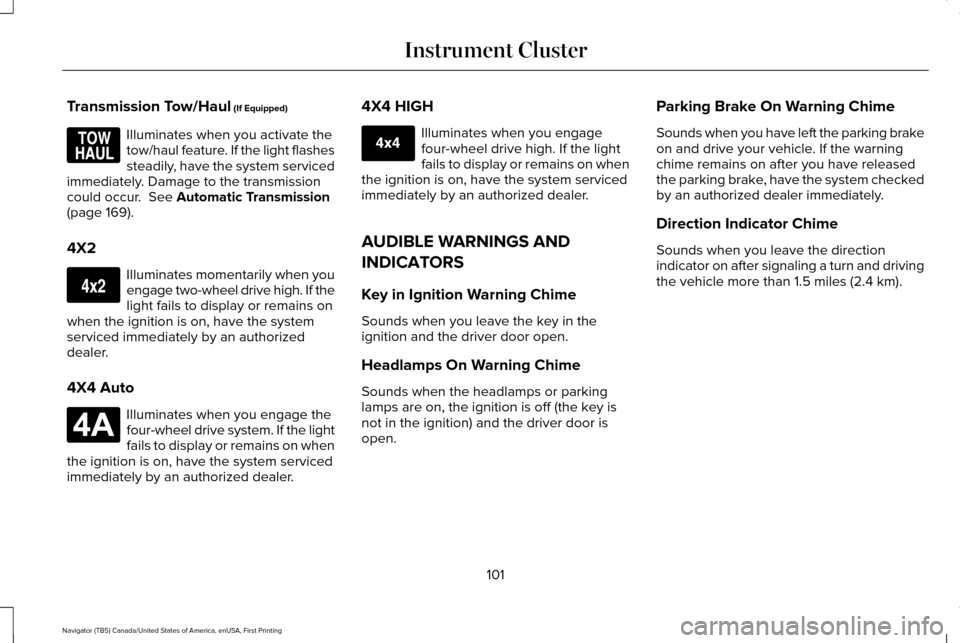
Transmission Tow/Haul (If Equipped)
Illuminates when you activate the
tow/haul feature. If the light flashes
steadily, have the system serviced
immediately. Damage to the transmission
could occur.
See Automatic Transmission
(page 169).
4X2 Illuminates momentarily when you
engage two-wheel drive high. If the
light fails to display or remains on
when the ignition is on, have the system
serviced immediately by an authorized
dealer.
4X4 Auto Illuminates when you engage the
four-wheel drive system. If the light
fails to display or remains on when
the ignition is on, have the system serviced
immediately by an authorized dealer. 4X4 HIGH Illuminates when you engage
four-wheel drive high. If the light
fails to display or remains on when
the ignition is on, have the system serviced
immediately by an authorized dealer.
AUDIBLE WARNINGS AND
INDICATORS
Key in Ignition Warning Chime
Sounds when you leave the key in the
ignition and the driver door open.
Headlamps On Warning Chime
Sounds when the headlamps or parking
lamps are on, the ignition is off (the key is
not in the ignition) and the driver door is
open. Parking Brake On Warning Chime
Sounds when you have left the parking brake
on and drive your vehicle. If the warning
chime remains on after you have released
the parking brake, have the system checked
by an authorized dealer immediately.
Direction Indicator Chime
Sounds when you leave the direction
indicator on after signaling a turn and driving
the vehicle more than 1.5 miles (2.4 km).
101
Navigator (TB5) Canada/United States of America, enUSA, First Printing Instrument ClusterE161509 E163173 E181781 E207351
Page 105 of 532
GENERAL INFORMATION
WARNING
Driving while distracted can result in
loss of vehicle control, crash and injury.
We strongly recommend that you use
extreme caution when using any device that
may take your focus off the road. Your
primary responsibility is the safe operation
of your vehicle. We recommend against the
use of any handheld device while driving and
encourage the use of voice-operated
systems when possible. Make sure you are
aware of all applicable local laws that may
affect the use of electronic devices while
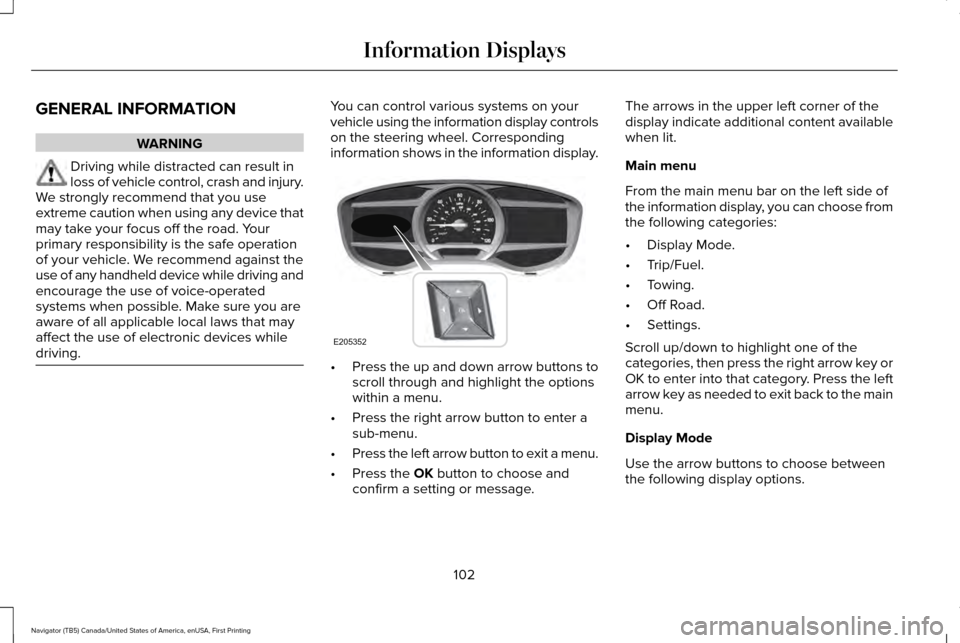
driving. You can control various systems on your
vehicle using the information display controls
on the steering wheel. Corresponding
information shows in the information display.
•
Press the up and down arrow buttons to
scroll through and highlight the options
within a menu.
• Press the right arrow button to enter a
sub-menu.
• Press the left arrow button to exit a menu.
• Press the OK button to choose and
confirm a setting or message. The arrows in the upper left corner of the
display indicate additional content available
when lit.
Main menu
From the main menu bar on the left side of
the information display, you can choose from
the following categories:
•
Display Mode.
• Trip/Fuel.
• Towing.
• Off Road.
• Settings.
Scroll up/down to highlight one of the
categories, then press the right arrow key or
OK to enter into that category. Press the left
arrow key as needed to exit back to the main
menu.
Display Mode
Use the arrow buttons to choose between
the following display options.
102
Navigator (TB5) Canada/United States of America, enUSA, First Printing Information DisplaysE205352
Page 107 of 532
•
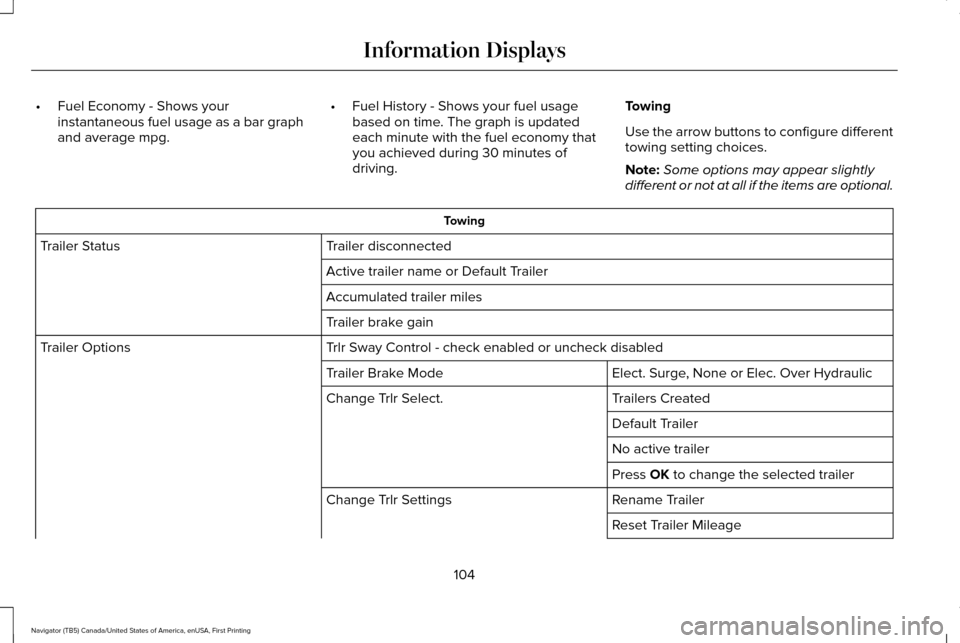
Fuel Economy - Shows your
instantaneous fuel usage as a bar graph
and average mpg. •
Fuel History - Shows your fuel usage
based on time. The graph is updated
each minute with the fuel economy that
you achieved during 30 minutes of
driving. Towing
Use the arrow buttons to configure different
towing setting choices.
Note:
Some options may appear slightly
different or not at all if the items are optional. Towing
Trailer disconnected
Trailer Status
Active trailer name or Default Trailer
Accumulated trailer miles
Trailer brake gain
Trlr Sway Control - check enabled or uncheck disabled
Trailer Options
Elect. Surge, None or Elec. Over Hydraulic
Trailer Brake Mode
Trailers Created
Change Trlr Select.
Default Trailer
No active trailer
Press OK to change the selected trailer
Rename Trailer
Change Trlr Settings
Reset Trailer Mileage
104
Navigator (TB5) Canada/United States of America, enUSA, First Printing Information Displays
Page 108 of 532
Towing
Delete Trailer
Add Trailer
Naming Editor
Add Trailer
Trailer Setup
Ball Coupler Connected and locked?
Connect'n Checklist
Electrical Wiring Connect?
Lights Function Correctly?
Safety Chains Connected?
Tongue Jack Raised?
Mirrors Adjusted?
TBC gain setting adjusted?
Trailer disconnected?
Off Road
In this mode, you can view different off road
information.
105
Navigator (TB5) Canada/United States of America, enUSA, First Printing Information Displays
Page 109 of 532

Power Distribution Gauge – Displays the power distribution to the front and rear axles. The displa\
y varies based on 4x4 configuration and
drivin")
Off Road
Off Road Status (Pitch, Roll, Wheel Angle)
Power Distribution Gauge – Displays the power distribution to the front and rear axles. The displa\
y varies based on 4x4 configuration and
driving conditions.
Settings
In this mode, you can configure different
driver setting choices. Note:
Some items are optional and may not
appear. Blindspot - check enabled or uncheck disabled
Cross Traffic Alert - check enabled or uncheck disabled
Sport, Normal or Comfort
Drive Control
Normal or Towing
DTE Calculation
Front Park Aid - check enabled or uncheck disabled
Rear Park Aid - check enabled or uncheck disabled
Easy Entry / Exit - check enabled or uncheck disabled
Vehicle
Advanced Settings
Select time interval
Autolamp Delay
Lighting
Autolock - check enabled or uncheck disabled
Locks
106
Navigator (TB5) Canada/United States of America, enUSA, First Printing Information Displays
Page 124 of 532

Action
Message
Displays when the trailer sway control detects trailer sway.
Trailer Sway Reduce Speed
Displays if there are certain faults in your vehicle wiring and the trai\
ler wiring orbrake system.
Wiring Fault On Trailer
Displays the current gain setting from the trailer brake.
Trailer Brake Gain XX.X
There is a fault with your vehicle trailer lighting module. See Towing a Trailer
(page 216).
Trailer Lighting Module Fault See Manual
There is a fault with your trailer stop lamp. Check your lamp.
Trailer Stop Lamps Fault Check Lamps
There is a fault with your trailer turn lamp. Check your lamp.
Trailer Left Turn Lamps Fault Check Lamps
There is a fault with your trailer turn lamp. Check your lamp.
Trailer Right Turn Lamps Fault Check Lamps
There is a fault with your trailer park lamp. Check your lamp.
Trailer Park Lamps Fault Check Lamps
There is a fault with your trailer battery.
See Towing a Trailer (page 216).
Trailer Battery Not Charging See Manual
Transmission Messages Action
Message
Displays as a reminder to shift into park (P).
Transmission not in Park
121
Navigator (TB5) Canada/United States of America, enUSA, First Printing Information Displays
Page 132 of 532
SITTING IN THE CORRECT
POSITION
WARNINGS
Sitting improperly, out of position or
with the seatback reclined too far can
take weight off the seat cushion and affect
the decision of the passenger sensing
system, resulting in serious injury or death
in the event of a crash. Always sit upright
against your seat back, with your feet on the
floor. Do not recline the seatback as this can
cause the occupant to slide under the
safety belt, resulting in serious injury in the
event of a crash. Do not place objects higher than the
seatback to reduce the risk of serious
injury in the event of a crash or during heavy
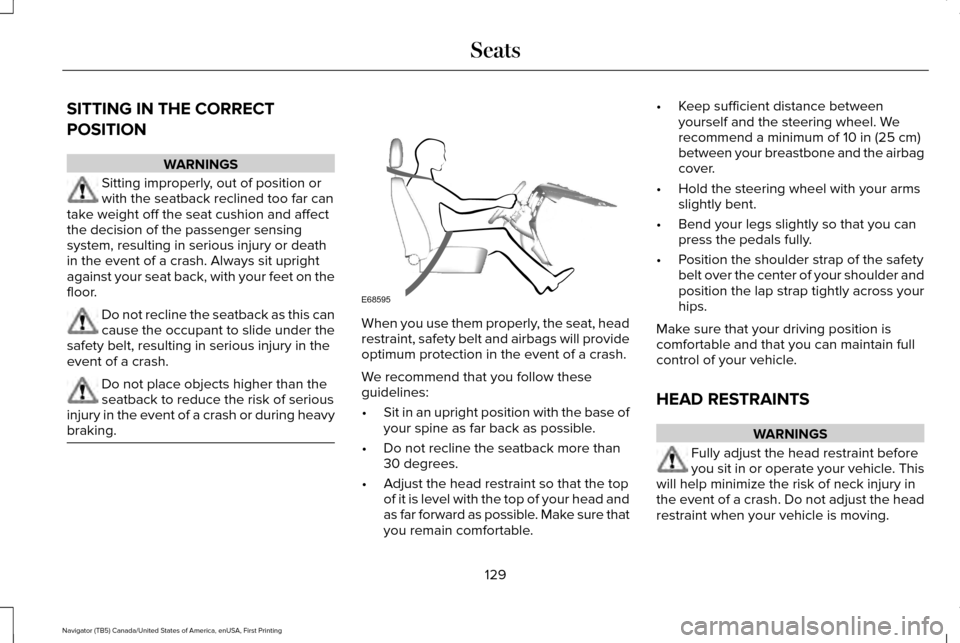
braking. When you use them properly, the seat, head
restraint, safety belt and airbags will provide
optimum protection in the event of a crash.
We recommend that you follow these
guidelines:
•
Sit in an upright position with the base of
your spine as far back as possible.
• Do not recline the seatback more than
30 degrees.
• Adjust the head restraint so that the top
of it is level with the top of your head and
as far forward as possible. Make sure that
you remain comfortable. •
Keep sufficient distance between
yourself and the steering wheel. We
recommend a minimum of 10 in (25 cm)
between your breastbone and the airbag
cover.
• Hold the steering wheel with your arms
slightly bent.
• Bend your legs slightly so that you can
press the pedals fully.
• Position the shoulder strap of the safety
belt over the center of your shoulder and
position the lap strap tightly across your
hips.
Make sure that your driving position is
comfortable and that you can maintain full
control of your vehicle.
HEAD RESTRAINTS WARNINGS
Fully adjust the head restraint before
you sit in or operate your vehicle. This
will help minimize the risk of neck injury in
the event of a crash. Do not adjust the head
restraint when your vehicle is moving.
129
Navigator (TB5) Canada/United States of America, enUSA, First Printing SeatsE68595