Rear LINCOLN NAVIGATOR 2017 Repair Manual
[x] Cancel search | Manufacturer: LINCOLN, Model Year: 2017, Model line: NAVIGATOR, Model: LINCOLN NAVIGATOR 2017Pages: 532, PDF Size: 3.9 MB
Page 184 of 532
LIMITED SLIP DIFFERENTIAL
This axle provides added traction on slippery
surfaces, particularly when one wheel is on
a poor traction surface. Under normal
conditions, the limited-slip axle functions like
a standard rear axle. The axle may exhibit a
slight noise or vibration during tight turns
with low vehicle speed. This is normal
behavior and indicates the axle is working.
181
Navigator (TB5) Canada/United States of America, enUSA, First Printing Rear Axle
Page 196 of 532
PRINCIPLE OF OPERATION
WARNINGS
To help avoid personal injury, please
read and understand the limitations of
the system as contained in this section.
Sensing is only an aid for some (generally
large and fixed) objects when moving on a
flat surface at parking speeds. Certain
objects with surfaces that absorb ultrasonic
waves, surrounding vehicle's parking aid
systems, traffic control systems, fluorescent
lamps, inclement weather, air brakes, and
external motors and fans may also affect the
function of the sensing system; this may
include reduced performance or a false
activation. To help avoid personal injury, always
use caution when in reverse (R) and
when using the sensing system. WARNINGS
This system is not designed to prevent
contact with small or moving objects.
The system is designed to provide a warning
to assist the driver in detecting large
stationary objects to avoid damaging your
vehicle. The system may not detect smaller
objects, particularly those close to the
ground. Certain add-on devices such as large
trailer hitches, bike or surfboard racks
and any device that may block the normal
detection zone of the system, may create
false beeps. Note:
Keep the sensors, located on the
bumper or fascia, free from snow, ice and
large accumulations of dirt. If the sensors
are covered, the system’ s accuracy can be
affected. Do not clean the sensors with sharp
objects.
Note: If your vehicle sustains damage to the
bumper or fascia, leaving it misaligned or
bent, the sensing zone may be altered
causing inaccurate measurement of
obstacles or false alarms. Note:
The sensing system cannot be turned
off when a MyKey is present. See Principle
of Operation (page 54).
Note: If you attach certain add-on devices
such as a trailer or bike rack, the rear
sensing system may detect that add-on
device and therefore provide warnings. It is
suggested that you disable the rear sensing
system when you attach an add-on device
to your vehicle to prevent these warnings.
The sensing system warns the driver of
obstacles within a certain range of your
vehicle. The system turns on automatically
whenever you switch the ignition on. You can turn the system on or off
by pressing the parking aid button.
If your vehicle does not have a
parking aid button, the system can be
switched off through the information display
menu or from the pop-up message that
appears once you shift the transmission into
reverse (R).
See General Information (page
102).
If a fault is present in the system, a warning
message appears in the information display.
See
Information Messages (page 108).
193
Navigator (TB5) Canada/United States of America, enUSA, First Printing Parking AidsE139213
Page 197 of 532
REAR PARKING AID
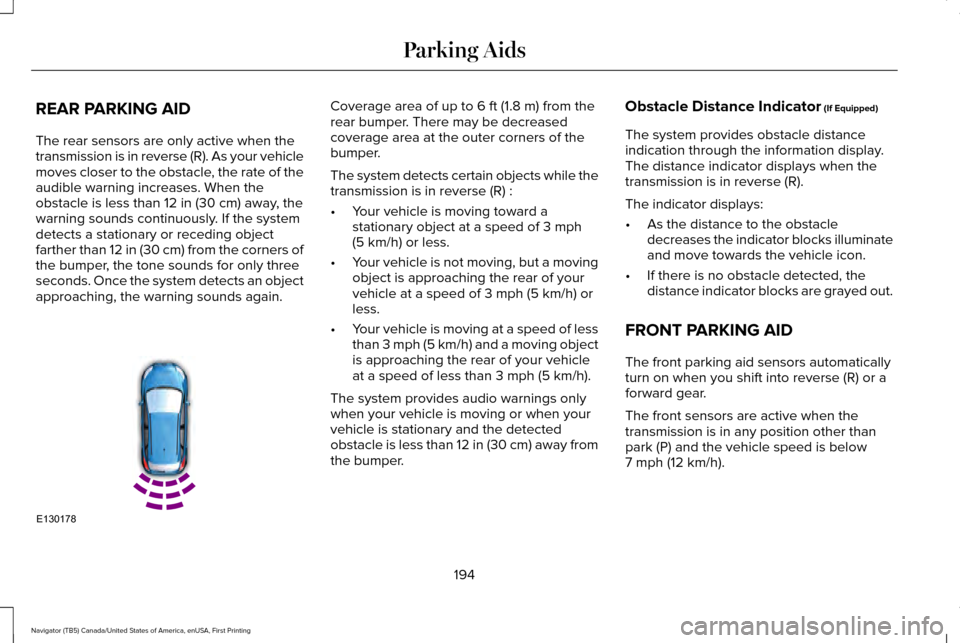
The rear sensors are only active when the
transmission is in reverse (R). As your vehicle
moves closer to the obstacle, the rate of the
audible warning increases. When the
obstacle is less than 12 in (30 cm) away, the
warning sounds continuously. If the system
detects a stationary or receding object
farther than
12 in (30 cm) from the corners of
the bumper, the tone sounds for only three
seconds. Once the system detects an object
approaching, the warning sounds again. Coverage area of up to
6 ft (1.8 m) from the
rear bumper. There may be decreased
coverage area at the outer corners of the
bumper.
The system detects certain objects while the
transmission is in reverse (R) :
• Your vehicle is moving toward a
stationary object at a speed of
3 mph
(5 km/h) or less.
• Your vehicle is not moving, but a moving
object is approaching the rear of your
vehicle at a speed of
3 mph (5 km/h) or
less.
• Your vehicle is moving at a speed of less
than 3 mph (5 km/h) and a moving object
is approaching the rear of your vehicle
at a speed of less than
3 mph (5 km/h).
The system provides audio warnings only
when your vehicle is moving or when your
vehicle is stationary and the detected
obstacle is less than 12 in (30 cm) away from
the bumper. Obstacle Distance Indicator
(If Equipped)
The system provides obstacle distance
indication through the information display.
The distance indicator displays when the
transmission is in reverse (R).
The indicator displays:
• As the distance to the obstacle
decreases the indicator blocks illuminate
and move towards the vehicle icon.
• If there is no obstacle detected, the
distance indicator blocks are grayed out.
FRONT PARKING AID
The front parking aid sensors automatically
turn on when you shift into reverse (R) or a
forward gear.
The front sensors are active when the
transmission is in any position other than
park (P) and the vehicle speed is below
7 mph (12 km/h)
.
194
Navigator (TB5) Canada/United States of America, enUSA, First Printing Parking AidsE130178
Page 198 of 532
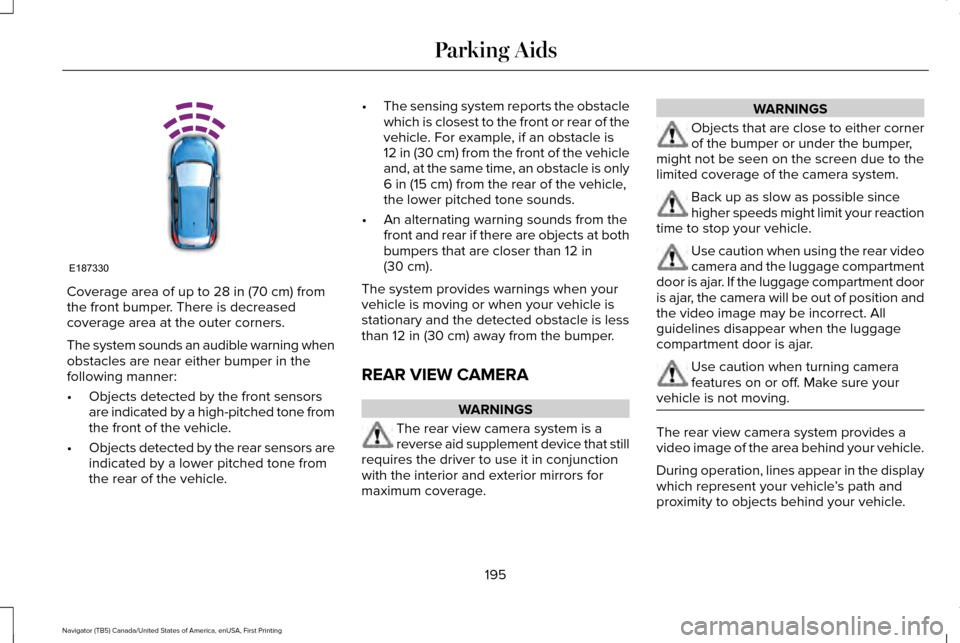
Coverage area of up to 28 in (70 cm) from
the front bumper. There is decreased
coverage area at the outer corners.
The system sounds an audible warning when
obstacles are near either bumper in the
following manner:
• Objects detected by the front sensors
are indicated by a high-pitched tone from
the front of the vehicle.
• Objects detected by the rear sensors are
indicated by a lower pitched tone from
the rear of the vehicle. •
The sensing system reports the obstacle
which is closest to the front or rear of the
vehicle. For example, if an obstacle is
12 in (30 cm) from the front of the vehicle
and, at the same time, an obstacle is only
6 in (15 cm)
from the rear of the vehicle,
the lower pitched tone sounds.
• An alternating warning sounds from the
front and rear if there are objects at both
bumpers that are closer than
12 in
(30 cm).
The system provides warnings when your
vehicle is moving or when your vehicle is
stationary and the detected obstacle is less
than
12 in (30 cm) away from the bumper.
REAR VIEW CAMERA WARNINGS
The rear view camera system is a
reverse aid supplement device that still
requires the driver to use it in conjunction
with the interior and exterior mirrors for
maximum coverage. WARNINGS
Objects that are close to either corner
of the bumper or under the bumper,
might not be seen on the screen due to the
limited coverage of the camera system. Back up as slow as possible since
higher speeds might limit your reaction
time to stop your vehicle. Use caution when using the rear video
camera and the luggage compartment
door is ajar. If the luggage compartment door
is ajar, the camera will be out of position and
the video image may be incorrect. All
guidelines disappear when the luggage
compartment door is ajar. Use caution when turning camera
features on or off. Make sure your
vehicle is not moving. The rear view camera system provides a
video image of the area behind your vehicle.
During operation, lines appear in the display
which represent your vehicle
’s path and
proximity to objects behind your vehicle.
195
Navigator (TB5) Canada/United States of America, enUSA, First Printing Parking AidsE187330
Page 199 of 532
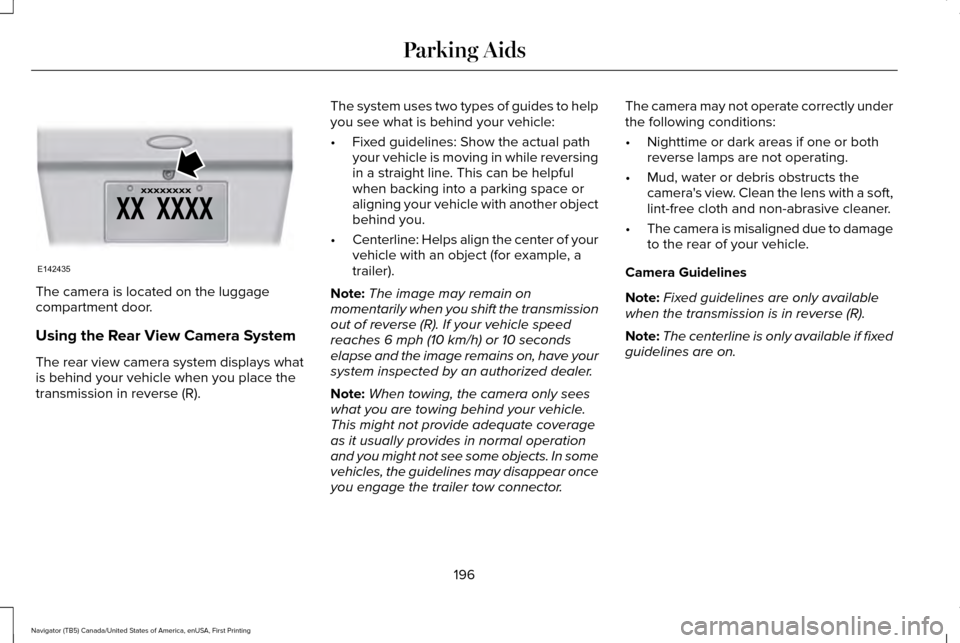
The camera is located on the luggage
compartment door.
Using the Rear View Camera System
The rear view camera system displays what
is behind your vehicle when you place the
transmission in reverse (R).
The system uses two types of guides to help
you see what is behind your vehicle:
•
Fixed guidelines: Show the actual path
your vehicle is moving in while reversing
in a straight line. This can be helpful
when backing into a parking space or
aligning your vehicle with another object
behind you.
• Centerline: Helps align the center of your
vehicle with an object (for example, a
trailer).
Note: The image may remain on
momentarily when you shift the transmission
out of reverse (R). If your vehicle speed
reaches 6 mph (10 km/h) or 10 seconds
elapse and the image remains on, have your
system inspected by an authorized dealer.
Note: When towing, the camera only sees
what you are towing behind your vehicle.
This might not provide adequate coverage
as it usually provides in normal operation
and you might not see some objects. In some
vehicles, the guidelines may disappear once
you engage the trailer tow connector. The camera may not operate correctly under
the following conditions:
•
Nighttime or dark areas if one or both
reverse lamps are not operating.
• Mud, water or debris obstructs the
camera's view. Clean the lens with a soft,
lint-free cloth and non-abrasive cleaner.
• The camera is misaligned due to damage
to the rear of your vehicle.
Camera Guidelines
Note: Fixed guidelines are only available
when the transmission is in reverse (R).
Note: The centerline is only available if fixed
guidelines are on.
196
Navigator (TB5) Canada/United States of America, enUSA, First Printing Parking AidsE142435
Page 200 of 532
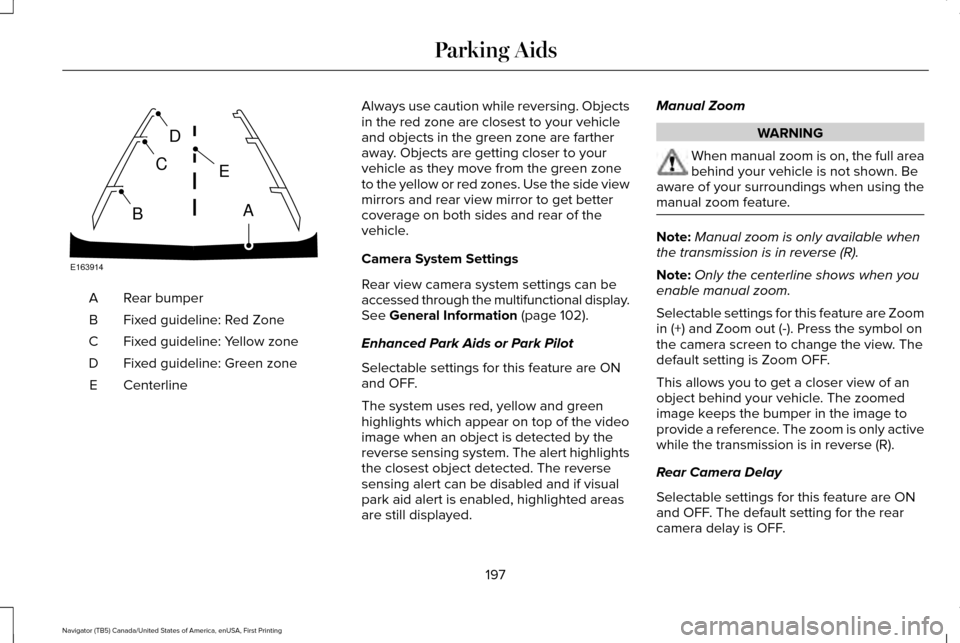
Rear bumper
A
Fixed guideline: Red Zone
B
Fixed guideline: Yellow zone
C
Fixed guideline: Green zone
D
Centerline
E Always use caution while reversing. Objects
in the red zone are closest to your vehicle
and objects in the green zone are farther
away. Objects are getting closer to your
vehicle as they move from the green zone
to the yellow or red zones. Use the side view
mirrors and rear view mirror to get better
coverage on both sides and rear of the
vehicle.
Camera System Settings
Rear view camera system settings can be
accessed through the multifunctional display.
See General Information (page 102).
Enhanced Park Aids or Park Pilot
Selectable settings for this feature are ON
and OFF.
The system uses red, yellow and green
highlights which appear on top of the video
image when an object is detected by the
reverse sensing system. The alert highlights
the closest object detected. The reverse
sensing alert can be disabled and if visual
park aid alert is enabled, highlighted areas
are still displayed. Manual Zoom WARNING
When manual zoom is on, the full area
behind your vehicle is not shown. Be
aware of your surroundings when using the
manual zoom feature. Note:
Manual zoom is only available when
the transmission is in reverse (R).
Note: Only the centerline shows when you
enable manual zoom.
Selectable settings for this feature are Zoom
in (+) and Zoom out (-). Press the symbol on
the camera screen to change the view. The
default setting is Zoom OFF.
This allows you to get a closer view of an
object behind your vehicle. The zoomed
image keeps the bumper in the image to
provide a reference. The zoom is only active
while the transmission is in reverse (R).
Rear Camera Delay
Selectable settings for this feature are ON
and OFF. The default setting for the rear
camera delay is OFF.
197
Navigator (TB5) Canada/United States of America, enUSA, First Printing Parking AidsE163914
A
E
D
C
B
Page 204 of 532
BLIND SPOT INFORMATION
SYSTEM
WARNING
Never use the Blind Spot Information
System as a replacement for using the
interior and exterior mirrors or looking over
your shoulder before changing lanes. The
Blind Spot Information System is not a
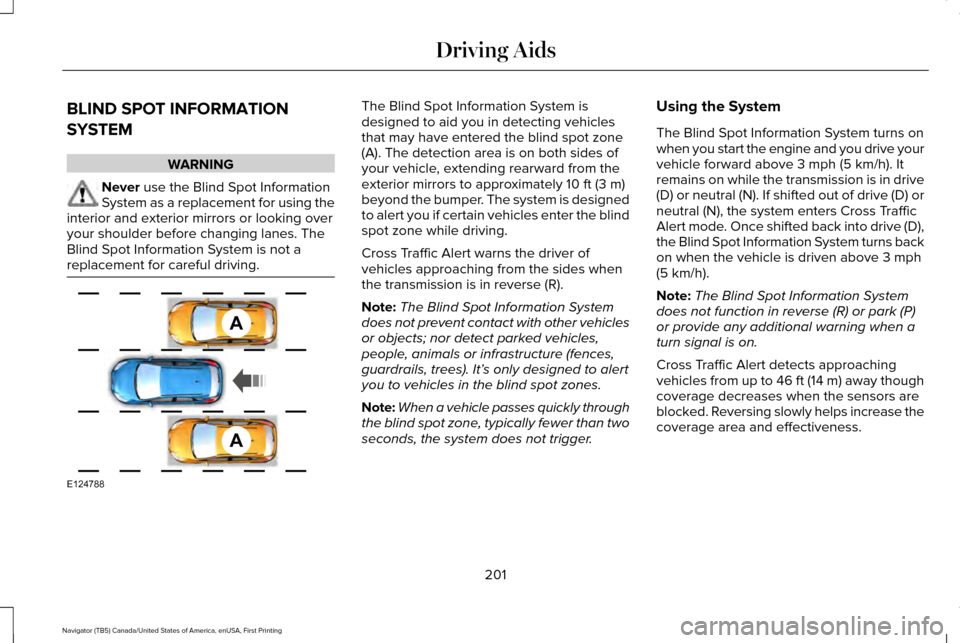
replacement for careful driving. The Blind Spot Information System is
designed to aid you in detecting vehicles
that may have entered the blind spot zone
(A). The detection area is on both sides of
your vehicle, extending rearward from the
exterior mirrors to approximately 10 ft (3 m)
beyond the bumper. The system is designed
to alert you if certain vehicles enter the blind
spot zone while driving.
Cross Traffic Alert warns the driver of
vehicles approaching from the sides when
the transmission is in reverse (R).
Note: The Blind Spot Information System
does not prevent contact with other vehicles
or objects; nor detect parked vehicles,
people, animals or infrastructure (fences,
guardrails, trees). It’ s only designed to alert
you to vehicles in the blind spot zones.
Note: When a vehicle passes quickly through
the blind spot zone, typically fewer than two
seconds, the system does not trigger. Using the System
The Blind Spot Information System turns on
when you start the engine and you drive your
vehicle forward above
3 mph (5 km/h). It
remains on while the transmission is in drive
(D) or neutral (N). If shifted out of drive (D) or
neutral (N), the system enters Cross Traffic
Alert mode. Once shifted back into drive (D),
the Blind Spot Information System turns back
on when the vehicle is driven above
3 mph
(5 km/h).
Note: The Blind Spot Information System
does not function in reverse (R) or park (P)
or provide any additional warning when a
turn signal is on.
Cross Traffic Alert detects approaching
vehicles from up to 46 ft (14 m) away though
coverage decreases when the sensors are
blocked. Reversing slowly helps increase the
coverage area and effectiveness.
201
Navigator (TB5) Canada/United States of America, enUSA, First Printing Driving AidsA
A
E124788
Page 207 of 532
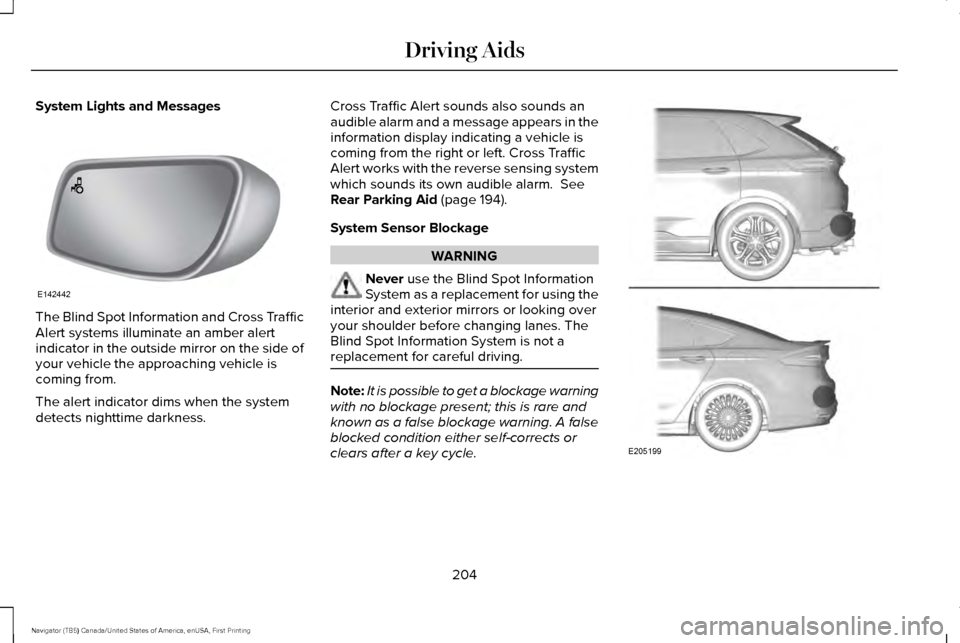
System Lights and Messages
The Blind Spot Information and Cross Traffic
Alert systems illuminate an amber alert
indicator in the outside mirror on the side of
your vehicle the approaching vehicle is
coming from.
The alert indicator dims when the system
detects nighttime darkness. Cross Traffic Alert sounds also sounds an
audible alarm and a message appears in the
information display indicating a vehicle is
coming from the right or left. Cross Traffic
Alert works with the reverse sensing system
which sounds its own audible alarm. See
Rear Parking Aid (page 194).
System Sensor Blockage WARNING
Never
use the Blind Spot Information
System as a replacement for using the
interior and exterior mirrors or looking over
your shoulder before changing lanes. The
Blind Spot Information System is not a
replacement for careful driving. Note:
It is possible to get a blockage warning
with no blockage present; this is rare and
known as a false blockage warning. A false
blocked condition either self-corrects or
clears after a key cycle. 204
Navigator (TB5) Canada/United States of America, enUSA, First Printing Driving AidsE142442 E205199
Page 211 of 532
The configuration remains active until
modified from the main menu on the
information display. See General
Information (page 102).
Modes:
• Comfort – Provides a more relaxed
driving experience, maximizing comfort.
Your steering effort decreases and the
suspension movement is more fluid.
Comfort mode is ideal when you desire
enhanced traveling comfort.
• Normal – Delivers a balanced
combination of comfortable, controlled
ride and confident handling. This mode
provides an engaging drive experience
and a direct connection to the road
without sacrificing any of the composure
demanded from your vehicle.
• Sport – Provides a sportier driving
experience. The suspension stiffens, with
an emphasis on handling and control.
The engine responds more directly to
your inputs. Sport mode is ideal for use
during more spirited driving. SELF-LEVELING SUSPENSION
The self-leveling suspension system is
designed to improve ride, handling and
general vehicle performance during:
•
Certain road conditions
• Steering maneuvers
• Braking
• Acceleration
• Towing
This system keeps the rear of your vehicle
at a constant level through a hydraulic pump
inside each rear shock. Depending on the
payload or road surface conditions it will take
approximately
2 mi (3.2 km) for the leveling
to complete.
If the loaded vehicle is not moved for
approximately 12 hours, the leveling system
may bleed down to a lower height. This can
be especially apparent if a trailer is left
attached to the parked vehicle for long
periods of time. You must drive your vehicle
in order to re-level the suspension. If a self-equalizing hitch is used, your vehicle
should be driven approximately 2 mi (3.2 km)
with the trailer prior to adjusting (leveling)
the hitch.
208
Navigator (TB5) Canada/United States of America, enUSA, First Printing Driving Aids
Page 212 of 532
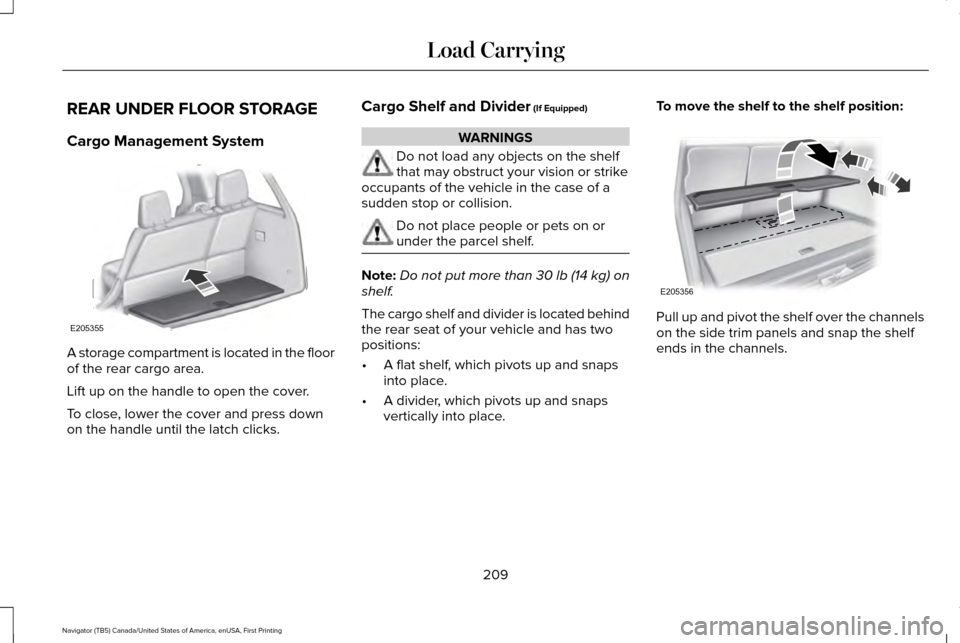
REAR UNDER FLOOR STORAGE
Cargo Management System
A storage compartment is located in the floor
of the rear cargo area.
Lift up on the handle to open the cover.
To close, lower the cover and press down
on the handle until the latch clicks. Cargo Shelf and Divider (If Equipped) WARNINGS
Do not load any objects on the shelf
that may obstruct your vision or strike
occupants of the vehicle in the case of a
sudden stop or collision. Do not place people or pets on or
under the parcel shelf.
Note:
Do not put more than
30 lb (14 kg) on
shelf.
The cargo shelf and divider is located behind
the rear seat of your vehicle and has two
positions:
• A flat shelf, which pivots up and snaps
into place.
• A divider, which pivots up and snaps
vertically into place. To move the shelf to the shelf position:
Pull up and pivot the shelf over the channels
on the side trim panels and snap the shelf
ends in the channels.
209
Navigator (TB5) Canada/United States of America, enUSA, First Printing Load CarryingE205355 E205356