warning LINCOLN NAVIGATOR 2018 Owners Manual
[x] Cancel search | Manufacturer: LINCOLN, Model Year: 2018, Model line: NAVIGATOR, Model: LINCOLN NAVIGATOR 2018Pages: 649, PDF Size: 4.96 MB
Page 294 of 649
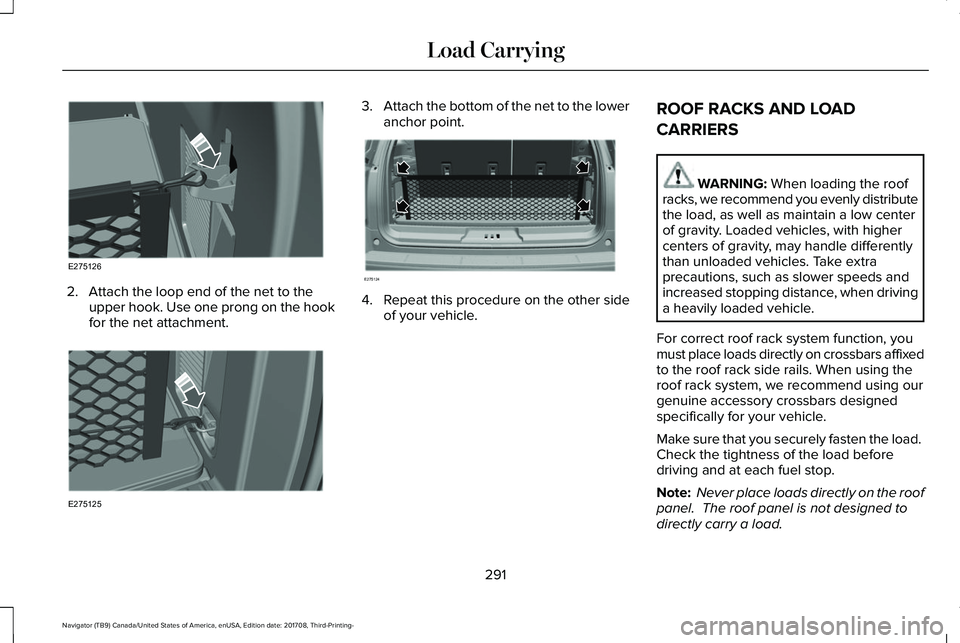
2. Attach the loop end of the net to theupper hook. Use one prong on the hookfor the net attachment.
3.Attach the bottom of the net to the loweranchor point.
4. Repeat this procedure on the other sideof your vehicle.
ROOF RACKS AND LOAD
CARRIERS
WARNING: When loading the roofracks, we recommend you evenly distributethe load, as well as maintain a low centerof gravity. Loaded vehicles, with highercenters of gravity, may handle differentlythan unloaded vehicles. Take extraprecautions, such as slower speeds andincreased stopping distance, when drivinga heavily loaded vehicle.
For correct roof rack system function, youmust place loads directly on crossbars affixedto the roof rack side rails. When using theroof rack system, we recommend using ourgenuine accessory crossbars designedspecifically for your vehicle.
Make sure that you securely fasten the load. Check the tightness of the load beforedriving and at each fuel stop.
Note: Never place loads directly on the roofpanel. The roof panel is not designed todirectly carry a load.
291
Navigator (TB9) Canada/United States of America, enUSA, Edition date: 201708, Third-Printing-
Load CarryingE275126 E275125 E275124
Page 297 of 649
WARNING: The appropriateloading capacity of your vehicle canbe limited either by volume capacity(how much space is available) or bypayload capacity (how much weightthe vehicle should carry). Once youhave reached the maximum payloadof your vehicle, do not add morecargo, even if there is space available.Overloading or improperly loadingyour vehicle can contribute to loss ofvehicle control and vehicle rollover.
GAWR (Gross Axle Weight Rating)
GAWR is the maximum allowable weightthat a single axle (front or rear) can carry.These numbers are on the SafetyCompliance Certification label. The labelis located on the door hinge pillar,door-latch post, or the door edge thatmeets the door-latch post, next to thedriver seating position.
The total load on each axle must neverexceed its Gross Axle Weight Rating.
GVWR (Gross Vehicle Weight Rating)
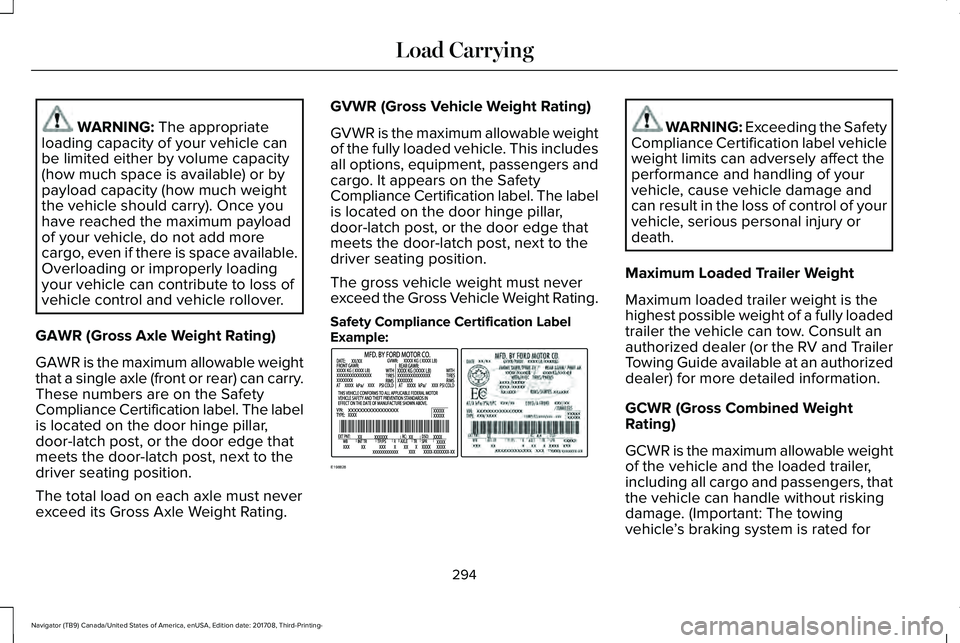
GVWR is the maximum allowable weightof the fully loaded vehicle. This includesall options, equipment, passengers andcargo. It appears on the SafetyCompliance Certification label. The labelis located on the door hinge pillar,door-latch post, or the door edge thatmeets the door-latch post, next to thedriver seating position.
The gross vehicle weight must neverexceed the Gross Vehicle Weight Rating.
Safety Compliance Certification LabelExample:
WARNING: Exceeding the SafetyCompliance Certification label vehicleweight limits can adversely affect theperformance and handling of yourvehicle, cause vehicle damage andcan result in the loss of control of yourvehicle, serious personal injury ordeath.
Maximum Loaded Trailer Weight
Maximum loaded trailer weight is thehighest possible weight of a fully loadedtrailer the vehicle can tow. Consult anauthorized dealer (or the RV and TrailerTowing Guide available at an authorizeddealer) for more detailed information.
GCWR (Gross Combined WeightRating)
GCWR is the maximum allowable weightof the vehicle and the loaded trailer,including all cargo and passengers, thatthe vehicle can handle without riskingdamage. (Important: The towingvehicle’s braking system is rated for
294
Navigator (TB9) Canada/United States of America, enUSA, Edition date: 201708, Third-Printing-
Load CarryingE198828
Page 298 of 649
operation at Gross Vehicle WeightRating, not at Gross Combined WeightRating.) Separate functional brakesshould be used for safe control of towedvehicles and for trailers where the GrossCombined Weight of the towing vehicleplus the trailer exceed the Gross VehicleWeight Rating of the towing vehicle.
The gross combined weight must neverexceed the Gross Combined WeightRating.
Note: For trailer towing informationrefer to the RV and Trailer Towing Guideavailable at an authorized dealer.
WARNING: Do not exceed theGVWR or the GAWR specified on thecertification label.
WARNING: Do not usereplacement tires with lower loadcarrying capacities than the originaltires because they may lower yourvehicle's GVWR and GAWR limitations.Replacement tires with a higher limitthan the original tires do not increasethe GVWR and GAWR limitations.
WARNING: Exceeding anyvehicle weight rating can adverselyaffect the performance and handlingof your vehicle, cause vehicle damageand can result in the loss of control ofyour vehicle, serious personal injuryor death.
Steps for determining the correct loadlimit:
1.Locate the statement "The combinedweight of occupants and cargoshould never exceed XXX kg or XXXlb." on your vehicle’s placard.
2.Determine the combined weight ofthe driver and passengers that willbe riding in your vehicle.
3.Subtract the combined weight of thedriver and passengers from XXX kgor XXX lb.
4. The resulting figure equals theavailable amount of cargo andluggage load capacity. For example,if the “XXX” amount equals 1,400 lb.and there will be five 150 lb.passengers in your vehicle, theamount of available cargo andluggage load capacity is 650 lb.(1400-750 (5 x 150) = 650 lb.)
5.Determine the combined weight ofluggage and cargo being loaded onthe vehicle. That weight may not
safely exceed the available cargoand luggage load capacity calculatedin Step 4.
295
Navigator (TB9) Canada/United States of America, enUSA, Edition date: 201708, Third-Printing-
Load Carrying
Page 300 of 649
Special Loading Instructions forOwners of Pick-up Trucks and Utility-type Vehicles
WARNING: When loading theroof racks, we recommend you evenlydistribute the load, as well as maintaina low center of gravity. Loadedvehicles, with higher centers of gravity,may handle differently than unloadedvehicles. Take extra precautions, suchas slower speeds and increasedstopping distance, when driving aheavily loaded vehicle.
297
Navigator (TB9) Canada/United States of America, enUSA, Edition date: 201708, Third-Printing-
Load Carrying
Page 301 of 649
TOWING A TRAILER
WARNING: Towing trailersbeyond the maximum recommendedgross trailer weight exceeds the limitof your vehicle and could result inengine damage, transmission damage,structural damage, loss of vehiclecontrol, vehicle rollover and personalinjury.
WARNING: Do not exceed theGVWR or the GAWR specified on thecertification label.
Note: See Recommended TowingWeights (page 310).
Your vehicle may have electrical items,such as fuses or relays, related totowing. See Fuses (page 342).
Your vehicle's load capacity designationis by weight, not by volume, so youcannot necessarily use all availablespace when loading a vehicle or trailer.
Towing a trailer places an extra load onyour vehicle's engine, transmission, axle,brakes, tires and suspension. Inspectthese components periodically during,and after, any towing operation.
Load Placement
To help minimize how trailer movementaffects your vehicle when driving:
•Load the heaviest items closest tothe trailer floor.
•Load the heaviest items centeredbetween the left and right side trailertires.
•Load the heaviest items above thetrailer axles or just slightly forwardtoward the trailer tongue. Do notallow the final trailer tongue weightto go above or below 10-15% of theloaded trailer weight.
•Select a ball mount with the correctrise or drop and load capacity. Whenboth the loaded vehicle and trailerare connected, the trailer frameshould be level, or slightly angleddown toward your vehicle, whenviewed from the side.
When driving with a trailer or payload, aslight takeoff vibration or shudder maybe present due to the increased payloadweight. Additional information regardingproper trailer loading and setting yourvehicle up for towing is located inanother chapter of this manual. SeeLoad Limit (page 293).
You can also find information in the RV& Trailer Towing Guide available at yourauthorized dealer, or online.
298
Navigator (TB9) Canada/United States of America, enUSA, Edition date: 201708, Third-Printing-
Towing
Page 302 of 649
RV & Trailer Towing Guide Online
http://www.fleet.ford.com/towing-guides/Website
TRAILER REVERSING AIDS
Pro Trailer Backup Assist™
WARNING: Driving while distractedcan result in loss of vehicle control, crashand injury. We strongly recommend thatyou use extreme caution when using anydevice that may take your focus off theroad. Your primary responsibility is the safeoperation of your vehicle. We recommendagainst the use of any hand-held devicewhile driving and encourage the use ofvoice-operated systems when possible.Make sure you are aware of all applicablelocal laws that may affect the use ofelectronic devices while driving.
WARNING: This system is an extradriving aid. It does not replace yourattention and judgment, or the need toapply the brakes. This system does NOTautomatically brake your vehicle. If you failto press the brake pedal when necessary,you may collide with another vehicle.
Note:The system is not a substitute for safedriving practices.
Note:You must always be aware of thevehicle and trailer combination and thesurrounding environment.
Note:The system does not detect or preventthe vehicle or trailer from making contactwith obstacles in the surroundingenvironment.
Note:Keep in mind that the front end of thevehicle swings out when changing thedirection of the trailer.
Note:The system relies on usermeasurements to determine stickerplacement and system limits. It is critical totake the key measurements correctly.Incorrect measurements can result in theimproper function of the system up to andincluding contact between the vehicle andtrailer.
Note:The system limits vehicle speed whenbacking up. The system is not a replacementfor proper use of the throttle and brakepedals.
Principle of Operation
This feature helps you to steer your vehiclewhen reversing with a trailer attached. Turnand hold the control knob in the directionyou want the trailer to go and the systemtakes over the steering. This allows you tofocus on checking the mirrors and operatingthe brake and accelerator.
299
Navigator (TB9) Canada/United States of America, enUSA, Edition date: 201708, Third-Printing-
Towing
Page 308 of 649
Setup
The system is designed to be used with awide variety of trailers. However there aresome trailers that do not have a propersurface and location to mount the sticker.These trailers are not supported. Attemptsto place the sticker on a surface that doesnot meet the sticker placement requirementlisted in Step 3 of the setup instruction orentering inaccurate measurements toproceed through setup can result in impropersystem function.
Accurate measurements are critical to correctsystem function. If you need to checkmeasurements entered or change them youcan access them through the trailer menusin the instrument cluster. Choose the optionto change the sticker from the change trailersettings menu. It is not necessary to removethe sticker if you are just reviewing orchanging measurements.
The following menu warnings or difficultiesmay occur during setup. Tips to resolve themare listed below.
Note:If you still experience issues with thesystem's ability to detect the sticker, see theinformation in the next section regardingsticker lost during system operation.
Measurement A has reached maximum orminimum value:
•The system is designed to work withdrawbars that have a bumper to hitch ballcenter measurement of 4 in (10 cm) to11 in (28 cm) when installed. Do notattempt to use drawbars that have alength outside this range as the systemperformance will be degraded and couldcause improper system function.
•Make sure that the measurement beingmade is the horizontal distance only frombumper and the hitch ball center. Astraight line distance that includes anyvertical rise or drop will increase themeasurement and make it inaccurate.Inaccurate measurements will degradesystem performance and could causeimproper system function. See step 4 ofthe setup instruction to reviewmeasurement instructions.
Measurement B has reached maximum orminimum value:
•Make sure that the sticker placementinstruction in step 3 of the setup hasbeen followed. Stickers placed outsidethe allowed zone will adversely affect thesystem performance and could causeimproper feature function.
•Make sure that the measurement beingmade is the horizontal distance only fromcenter of sticker to the hitch ball center.A straight line distance that includes anyvertical rise or drop will increase themeasurement and cause an inaccuratevalue to be entered into the system. Seestep 4 of the setup for additionalmeasurement instructions.
Measurement C has reached maximum orminimum value:
•Make sure that the sticker placementinstructions in step 3 of the setup havebeen followed. Stickers placed outsidethe allowed zone will adversely affect thesystem performance and could causeimproper feature function. If you havemet all the criteria for sticker placementand you see this message this sticker is
305
Navigator (TB9) Canada/United States of America, enUSA, Edition date: 201708, Third-Printing-
Towing
Page 309 of 649
either too far below or too close to thecamera to properly recognize the sticker.In order for the system to operatecorrectly the sticker height must belowered if you receive the minimumwarning or the sticker height must beraised if you receive the maximumwarning.
•Only one sticker can be placed on thetrailer for correct system function. Theprevious sticker must be removed orcovered so only one sticker is visible tothe camera.
•Measurement B and C must be measuredagain if a new sticker is placed on thetrailer.
Measurement D has reached maximum orminimum value:
•Make sure that the measurement beingmade is the horizontal distance only fromthe bumper to the center of the singleaxle or the center of all the axles on thetrailer. See step 4 of the setup foradditional measurement instructions. TheTBA system does not support trailerlengths outside the range allowed by theinformation display.
System is circling something beside thesticker or system cannot find the sticker:
•Make sure the rear camera is clean andthe sticker is clearly visible in the cameraimage. Clean the camera and sticker ifnecessary.
•The camera system uses the enteredmeasurements to help locate the sticker.Inaccurate sticker measurements willdegrade the system’s ability to locate thesticker. Verify the measurements enteredinto the system are accurate.
•Remove the incorrectly circled label ordecal if possible.
•If you cannot resolve the issue a newsticker location should be tried. Thesticker location must still meet therequirements noted in step 3 of the setupinstructions. Only one sticker can beplaced on the trailer for correct systemfunction. The previous sticker must beremoved or covered so only one stickeris visible to the camera.
Calibration
The system monitors various vehicleparameters to ensure your vehicle is beingdriven straight and the trailer straight behindyour vehicle. Any steering input or trailermovement will pause the calibration.
For best results:
•Use a long, straight, smooth and levelroad when attempting to calibrate.
•Drive straight forward.
•Drive between 4 mph (6 km/h) and24 mph (39 km/h).
System Operation
The following warnings or difficulties mayoccur during feature operation. Tips toresolve them are listed below.
306
Navigator (TB9) Canada/United States of America, enUSA, Edition date: 201708, Third-Printing-
Towing
Page 311 of 649
•You can change your sticker location bygoing into the Towing menu, selectingtrailer options, selecting change trailersettings and then selecting the changesticker option. The previous sticker mustbe removed. ONLY ONE STICKERSHOULD BE PLACED ON THE TRAILERFOR CORRECT SYSTEM FUNCTION.
•The camera system uses the enteredmeasurements to help locate the sticker.Inaccurate measurements will reduce thesystem’s ability to locate the sticker.Check the measurements entered intothe system are correct. Refer to the step4 of Pro trailer backup Assist setup forinstructions on measurements.
•You can change your measurement bygoing into the Towing menu, selectingtrailer options, selecting change trailersetting and then selecting the changesticker option. Disregard the prompt toremove this sticker and continue to thenext step if you only plan to update themeasurements for the current stickerlocation.
System will not backup straight:
•Factors such as the drawbar connectionto the hitch receiver, road camber, roadgrade and compliance in the trailersuspension can influence how straightthe system is able to back your trailerwhen the knob is not turned. You cancompensate for the trailer drifting to theright or left by slowly turning the ProTrailer Backup Assist knob until the traileris following your desired path and thenholding the knob in that position. If youwould like to recalibrate the system forstraight backing, you can do so with thefollowing procedure.
•Go into the Towing menu, select traileroptions, select change trailer setting andthen select the change sticker option.Your saved measurements will bedisplayed. Do not change them butcontinue to confirm measurements. Onceyou confirm the measurements, thesystem will then prompt you to performthe calibration procedure.
System consistently shows Stop Now Maxtrailer angle reached warning:
•The system uses your measurements todetermine sticker position and establishsystem limits. Accurate sticker placementand trailer measurements will provide thebest system performance. If you areconsistently receiving this warning it islikely there is an issue with stickerplacement or the entered measurements.Make sure that the sticker is placedcorrectly based on steps 3 and themeasurements were made correctlyaccording to Step 4. The troubleshootingguide for trailer measurements can alsobe reviewed for help in makingmeasurements.
•To change sticker location or changetrailer measurements, go into the Towingmenu, select trailer options, selectchange trailer setting and then select thechange sticker option.
308
Navigator (TB9) Canada/United States of America, enUSA, Edition date: 201708, Third-Printing-
Towing
Page 312 of 649
•If the sticker location needs to bechanged, the previous sticker must beremoved and a new sticker needs to beplaced on the trailer. ONLY ONESTICKER SHOULD BE PLACED ON THETRAILER FOR PROPER SYSTEMFUNCTION.
•Disregard the prompt to remove thissticker and continue to the next step ifyou only plan to update themeasurements for the current stickerlocation.
System consistently shows Stop now takecontrol of steering warning:
•The system displays this warning whenit can no longer steer the vehicle and youmust take over steering. There are fourreasons why this warning displays andadditional information regarding thereason for the warning is available on thecenter display.
•The steering wheel is touched while thesystem is controlling it. Avoid touchingthe wheel during system operation.
•The maximum speed for featureoperation is exceeded. Systemperformance is optimized at slowerspeeds. Backup slowly.
•The sticker was lost by the camerasystem. Once your vehicle is stoppedadditional warnings will indicate thesticker was lost. Refer to sticker losttrouble shooting tips.
•An internal condition for systemoperation was not met which requiresyour vehicle return to manual control ofthe steering.
Note:The system is designed to be usedwith the same trailer connection every timethe trailer is chosen from the selection menu.Using a different drawbar or a different pinhole (on drawbars with more than one) whenconnecting the drawbar to your vehicleaffects the trailer measurements. Take themeasurements again and update if required.
TRAILER SWAY CONTROL
WARNING: Turning off trailer swaycontrol increases the risk of loss of vehiclecontrol, serious injury or death. Ford doesnot recommend disabling this featureexcept in situations where speed reductionmay be detrimental (such as hill climbing),the driver has significant trailer towingexperience, and can control trailer swayand maintain safe operation.
Note:This feature does not prevent trailersway, but reduces it once it begins.
Note:This feature cannot stop all trailersfrom swaying.
Note:In some cases, if vehicle speed is toohigh, the system may activate multiple times,gradually reducing vehicle speed.
309
Navigator (TB9) Canada/United States of America, enUSA, Edition date: 201708, Third-Printing-
Towing