heating LINCOLN NAVIGATOR 2018 User Guide
[x] Cancel search | Manufacturer: LINCOLN, Model Year: 2018, Model line: NAVIGATOR, Model: LINCOLN NAVIGATOR 2018Pages: 649, PDF Size: 4.96 MB
Page 264 of 649
Changing the Set Speed
•Press RES+ or SET- to change the setspeed in small increments.
•Press the accelerator or brake pedal untilyou reach the desired speed. Press RES+or SET-.
•Press and hold RES+ or SET- to changethe set speed in large increments.Release the control when you reach thedesired speed.
The system may apply the brakes to slowthe vehicle to the new set speed. The setspeed displays continuously in theinformation display when the system isactive.
Canceling the Set Speed
Press CAN or tap the brake pedal. The setspeed does not erase.
Resuming the Set Speed
Note:Only use resume if you are aware ofthe set speed and intend to return to it.
Press RES+. Your vehicle speed returns tothe previously set speed and gap setting. The set speed displays continuously in theinformation display when the system isactive.
Automatic Cancellation
Automatic cancellation can also occur if:
•The tires lose traction.
•You apply the parking brake.
Park Brake Application
Automatic parking brake application andcancellation occurs if:
•You unbuckle the seatbelt and open thedoor after you stop the vehicle.
•You hold the vehicle at a stopcontinuously for more than three minutes.
Hilly Condition and Trailer Tow Usage
Note:An audible alarm sounds and thesystem shuts down if it applies brakes for anextended period of time. This allows thebrakes to cool. The system functionsnormally again after the brakes cool.
Note:When towing with adaptive cruisecontrol, switch on Tow/Haul Mode.
Note:Tow/Haul mode increases the timegaps and allows more distance for braking.
Select a lower gear when the system isactive in situations such as prolongeddownhill driving on steep grades, forexample in mountainous areas. The systemneeds additional engine braking in thesesituations to reduce the load on the vehicle’sregular brake system to prevent it fromoverheating.
Switching Adaptive Cruise Control Off
Note:You erase the set speed and gapsetting when you switch the system off.
Press OFF when the system is in standbymode, or switch the ignition off.
261
Navigator (TB9) Canada/United States of America, enUSA, Edition date: 201708, Third-Printing-
Cruise Control
Page 283 of 649
Note:The system turns on each time youswitch the ignition on and you shift intoreverse (R). If you temporarily switch thesystem off, it turns on the next time youswitch the ignition on.
Note:The system may not correctly operatewhen towing a trailer. For vehicles with atrailer tow module and tow bar approved byus, the system turns off when you attach atrailer. For vehicles with an aftermarkettrailer tow module or tow bar, werecommend that you switch the system offwhen you attach a trailer.
To permanently switch the system off,contact an authorized dealer.
STEERING
Electric Power Steering
WARNING: The electric powersteering system has diagnostic checks thatcontinuously monitor the system. If a faultis detected, a message displays in theinformation display. Stop your vehicle assoon as it is safe to do so. Switch theignition off. After at least 10 seconds,switch the ignition on and watch theinformation display for a steering systemwarning message. If a steering systemwarning message returns, have the systemchecked by an authorized dealer.
WARNING: If the system detects anerror, you may not feel a difference in thesteering, however a serious condition mayexist. Obtain immediate service from anauthorized dealer, failure to do so mayresult in loss of steering control.
Your vehicle has an electric power steeringsystem. There is no fluid reservoir. Nomaintenance is required.
If your vehicle loses electrical power whileyou are driving, electric power steeringassistance is lost. The steering system stilloperates and you can steer your vehiclemanually. Manually steering your vehiclerequires more effort.
Extreme continuous steering may increasethe effort required for you to steer yourvehicle. This increased effort preventsoverheating and permanent damage to thesteering system. You do not lose the abilityto steer your vehicle manually. Typicalsteering and driving maneuvers allow thesystem to cool and return to normaloperation.
Steering Tips
If the steering wanders or pulls, check for:
•Correct tire pressures.
•Uneven tire wear.
•Loose or worn suspension components.
•Loose or worn steering components.
•Improper vehicle alignment.
280
Navigator (TB9) Canada/United States of America, enUSA, Edition date: 201708, Third-Printing-
Driving Aids
Page 327 of 649
BREAKING-IN
You need to break in new tires forapproximately 300 mi (480 km). During thistime, your vehicle may exhibit some unusualdriving characteristics.
Avoid driving too fast during the first 1,000 mi(1,600 km). Vary your speed frequently andchange up through the gears early. Do notlabor the engine.
Do not tow during the first 1,000 mi(1,600 km).
REDUCED ENGINE PERFORMANCE
WARNING: If you continue to driveyour vehicle when the engine isoverheating, the engine could stop withoutwarning. Failure to follow this instructioncould result in the loss of control of yourvehicle.
If the engine coolant temperature gaugeneedle moves to the upper limit position, theengine is overheating. See Gauges (page112).
You must only drive your vehicle for a shortdistance if the engine overheats. Thedistance you can travel depends on ambienttemperature, vehicle load and terrain. Theengine continues to operate with limitedpower for a short period of time.
If the engine temperature continues to rise,the fuel supply to the engine reduces. Theair conditioning switches off and the enginecooling fan operates continually.
1. Gradually reduce your speed and stopyour vehicle as soon as it is safe to doso.
2. Immediately switch the engine off toprevent severe engine damage.
3. Wait for the engine to cool down.
4. Check the coolant level. See EngineCoolant Check (page 366).
5. Have your vehicle checked as soon aspossible.
ECONOMICAL DRIVING
Fuel economy is affected by several thingssuch as how you drive, the conditions youdrive under and how you maintain yourvehicle.
There are some things to keep in mind thatmay improve your fuel economy:
•Accelerate and slow down in a smooth,moderate fashion.
•Drive at steady speeds.
•Anticipate stops; slowing down mayeliminate the need to stop.
•Combine errands and minimizestop-and-go driving (When runningerrands, go to the furthest destinationfirst and then work your way back home).
•Close the windows for high-speeddriving.
•Drive at reasonable speeds.
•Keep the tires properly inflated and useonly the recommended size.
•Use the recommended engine oil.
•Perform all regularly scheduledmaintenance.
324
Navigator (TB9) Canada/United States of America, enUSA, Edition date: 201708, Third-Printing-
Driving Hints
Page 359 of 649
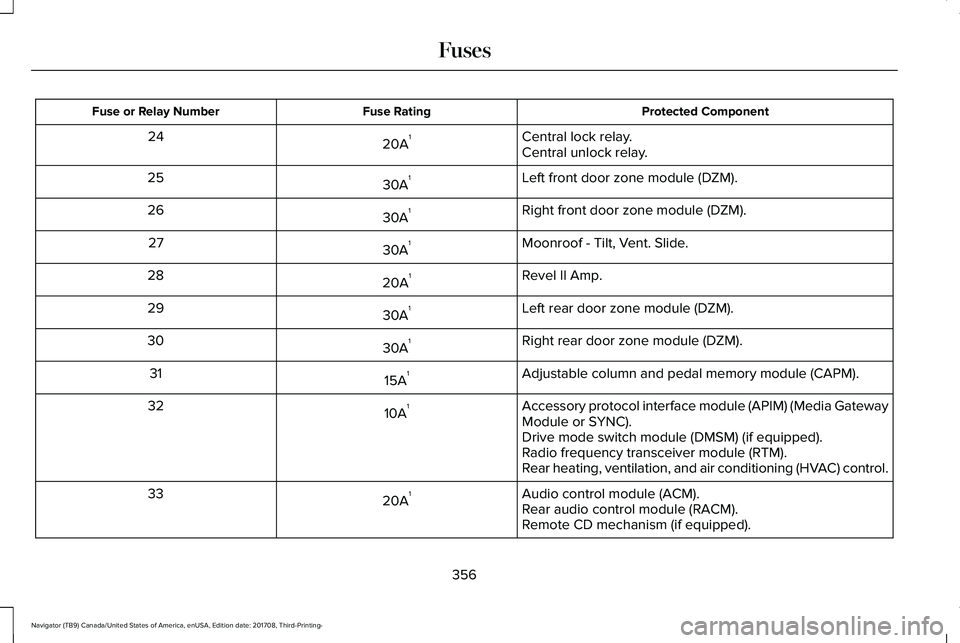
Protected ComponentFuse RatingFuse or Relay Number
Central lock relay.20A124Central unlock relay.
Left front door zone module (DZM).30A125
Right front door zone module (DZM).30A126
Moonroof - Tilt, Vent. Slide.30A127
Revel II Amp.20A128
Left rear door zone module (DZM).30A129
Right rear door zone module (DZM).30A130
Adjustable column and pedal memory module (CAPM).15A131
Accessory protocol interface module (APIM) (Media GatewayModule or SYNC).10A132
Drive mode switch module (DMSM) (if equipped).Radio frequency transceiver module (RTM).Rear heating, ventilation, and air conditioning (HVAC) control.
Audio control module (ACM).20A133Rear audio control module (RACM).Remote CD mechanism (if equipped).
356
Navigator (TB9) Canada/United States of America, enUSA, Edition date: 201708, Third-Printing-
Fuses
Page 370 of 649
Maintain coolant concentration within 48%to 50%, which equates to a freeze pointbetween -29°F (-34°C) and -35°F (-37°C).Coolant concentration should be checkedusing a refractometer. We do not recommendthe use of hydrometers or coolant test stripsfor measuring coolant concentration.
Adding Coolant
WARNING: Do not add enginecoolant when the engine is hot. Failure tofollow this instruction could result inpersonal injury.
WARNING: Do not remove thecoolant reservoir cap when the coolingsystem is hot. Wait 10 minutes for thecooling system to cool down. Cover thecoolant reservoir cap with a thick cloth toprevent the possibility of scalding andslowly remove the cap. Failure to followthis instruction could result in personalinjury.
Note: Automotive fluids are notinterchangeable. Take care not to putengine coolant in the windshield washer fluidreservoir or windshield washer fluid in theengine coolant reservoir.
Note: Do not use stop leak pellets, coolingsystem sealants, or non-specified additivesas they can cause damage to the enginecooling or heating systems. Resultingcomponent damage may not be covered bythe vehicle Warranty.
It is very important to use prediluted coolantapproved to the correct specification in orderto avoid plugging the small passageways inthe engine cooling system. See Capacitiesand Specifications (page 422). Do not mixdifferent colors or types of coolant in yourvehicle. Mixing of engine coolants or usingan incorrect coolant may harm the engine orcooling system components and may not becovered by the vehicle Warranty.
Note:If prediluted coolant is not available,use the approved concentrated coolantdiluting it to 50/50 with distilled water. SeeCapacities and Specifications (page 422).Using water that has not been deionisedmay contribute to deposit formation,corrosion and plugging of the small coolingsystem passageways.
Note: Coolants marketed for all makes andmodels may not be approved to ourspecifications and may cause damage tothe cooling system. Resulting componentdamage may not be covered by the vehicleWarranty.
If the coolant level is at or below theminimum mark, add prediluted coolantimmediately.
To top up the coolant level do the following:
1. Unscrew the cap slowly. Any pressureescapes as you unscrew the cap.
2. Add prediluted coolant approved to thecorrect specification. See Capacities andSpecifications (page 422).
3.Add enough prediluted coolant to reachthe correct level.
367
Navigator (TB9) Canada/United States of America, enUSA, Edition date: 201708, Third-Printing-
Maintenance
Page 371 of 649
4. Replace the coolant reservoir cap, turnit clockwise until you feel a strongresistance.
5. Check the coolant level in the coolantreservoir the next few times you driveyour vehicle. If necessary, add enoughprediluted engine coolant to bring thecoolant level to the correct level.
If you have to add more than 1.1 qt (1 L) ofengine coolant per month, have your vehiclechecked as soon as possible. Operating anengine with a low level of coolant can resultin engine overheating and possible enginedamage.
Note:If your vehicle has orange coolant,during normal vehicle operation, the coolantmay change color from orange to pink orlight red. As long as the coolant is clear anduncontaminated, this color change does notindicate the coolant has degraded nor doesit require the coolant to be drained, thesystem to be flushed, or the coolant to bereplaced.
In case of emergency, you can add a largeamount of water without engine coolant inorder to reach a vehicle service location. Inthis instance, qualified personnel:
1. Must drain the cooling system.
2. Chemically clean the coolant system.
3. Refill with engine coolant as soon aspossible.
Water alone, without engine coolant, cancause engine damage from corrosion,overheating or freezing.
Do not use the following as a coolantsubstitute:
•Alcohol.
•Methanol.
•Brine.
•Any coolant mixed with alcohol ormethanol antifreeze.
Alcohol and other liquids can cause enginedamage from overheating or freezing.
Do not add extra inhibitors or additives tothe coolant. These can be harmful andcompromise the corrosion protection of thecoolant.
Recycled Coolant
We do not recommend the use of recycledcoolant as an approved recycling process isnot yet available.
Dispose of used engine coolant in anappropriate manner. Follow yourcommunity's regulations and standards forrecycling and disposing of automotive fluids.
Severe Climates
If you drive in extremely cold climates:
•It may be necessary to increase thecoolant concentration above 50%.
•A coolant concentration of 60% providesimproved freeze point protection. Coolant concentrations above 60%decrease the overheat protectioncharacteristics of the coolant and maycause engine damage.
368
Navigator (TB9) Canada/United States of America, enUSA, Edition date: 201708, Third-Printing-
Maintenance
Page 373 of 649
Your vehicle has limited engine power whenin the fail-safe mode, drive your vehicle withcaution. Your vehicle does not maintainhigh-speed operation and the engine mayoperate poorly.
Remember that the engine is capable ofautomatically shutting down to preventengine damage. In this situation:
1. Pull off the road as soon as safelypossible and switch the engine off.
2. If you are a member of a roadsideassistance program, we recommend thatyou contact your roadside assistanceservice provider.
3.If this is not possible, wait a short periodfor the engine to cool.
4. Check the coolant level. If the coolantlevel is at or below the minimum mark,add prediluted coolant immediately.
5.When the engine temperature cools, youcan re-start the engine. Have your vehiclechecked as soon as possible to minimizeengine damage.
Note:Driving your vehicle without repairincreases the chance of engine damage.
Engine Coolant TemperatureManagement (If Equipped)
WARNING: To reduce the risk ofcrash and injury, be prepared that thevehicle speed may reduce and the vehiclemay not be able to accelerate with fullpower until the coolant temperaturereduces.
If you tow a trailer with your vehicle, theengine may temporarily reach a highertemperature during severe operatingconditions, for example ascending a long orsteep grade in high ambient temperatures.
At this time, you may notice the coolanttemperature gauge moves toward the redzone and a message may appear in theinformation display.
You may notice a reduction in vehicle speedcaused by reduced engine power in orderto manage the engine coolant temperature. Your vehicle may enter this mode if certainhigh-temperature and high-load conditionstake place. The amount of speed reductiondepends on vehicle loading, grade andambient temperature. If this occurs, there isno need to stop your vehicle. You cancontinue to drive.
The air conditioning may automatically turnon and off during severe operatingconditions to protect the engine fromoverheating. When the coolant temperaturedecreases to the normal operatingtemperature, the air conditioning turns on.
If the coolant temperature gauge moves fullyinto the red zone, or if the coolanttemperature warning or service engine soonmessages appear in your information display,do the following:
1.Stop your vehicle as soon as it is safe todo so. Fully apply the parking brake, shiftinto park (P) or neutral (N).
370
Navigator (TB9) Canada/United States of America, enUSA, Edition date: 201708, Third-Printing-
Maintenance
Page 556 of 649
Your vehicle is equipped with the IntelligentOil-Life Monitor system, which displays amessage in the information display at theproper oil change interval. This interval maybe up to one year or 10,000 mi (16,000 km).
When the oil change message appears inthe information display, it is time for an oilchange. Make sure you perform the oilchange within two weeks or 500 mi (800 km)of the message appearing. Make sure youreset the Intelligent Oil-Life Monitor aftereach oil change. See Oil Change IndicatorReset (page 365).
If your information display resets prematurelyor becomes inoperative, you should performthe oil change interval at six months or5,000 mi (8,000 km) from your last oilchange. Never exceed one year or 10,000 mi(16,000 km) between oil change intervals.
Your vehicle is very sophisticated and builtwith multiple, complex, performance systems.Every manufacturer develops these systemsusing different specifications andperformance features. That is why it isimportant to rely upon your dealership toproperly diagnose and repair your vehicle.
Ford Motor Company has recommendedmaintenance intervals for various parts andcomponent systems based upon engineeringtesting. Ford Motor Company relies upon thistesting to determine the most appropriatemileage for replacement of oils and fluids toprotect your vehicle at the lowest overall costto you and recommends againstmaintenance schedules that deviate fromthe scheduled maintenance information.
We strongly recommend the use of onlygenuine Ford, Motorcraft or Ford-authorizedre-manufactured replacement partsengineered for your vehicle.
Additives and Chemicals
This owner's manual and the Ford WorkshopManual list the recommended additives andchemicals for your vehicle. We do notrecommend using chemicals or additives notapproved by us as part of your vehicle’snormal maintenance. Please consult yourwarranty information.
Oils, Fluids and Flushing
In many cases, fluid discoloration is a normaloperating characteristic and, by itself, doesnot necessarily indicate a concern or that thefluid needs to be changed. However, aqualified expert, such as the factory-trainedtechnicians at your dealership, shouldinspect discolored fluids that also show signsof overheating or foreign materialcontamination immediately.
Make sure to change your vehicle’s oils andfluids at the specified intervals or inconjunction with a repair. Flushing is a viableway to change fluid for many vehiclesub-systems during scheduled maintenance.It is critical that systems are flushed only withnew fluid that is the same as that requiredto fill and operate the system or using aFord-approved flushing chemical.
Owner Checks and Services
Make sure you perform the following basicmaintenance checks and inspections everymonth or at six-month intervals.
553
Navigator (TB9) Canada/United States of America, enUSA, Edition date: 201708, Third-Printing-
Scheduled Maintenance
Page 641 of 649
Rear Seats.............................................................178
Heated Steering Wheel................................92Heated Windows and Mirrors....................156Heated Exterior Mirrors.....................................156Heated Rear Window.........................................156Windshield Wiper De-icer.................................156
HeatingSee: Climate Control...........................................151
Hill Descent Control....................................236Principle of Operation.......................................236
Hill Start Assist..............................................228Switching the System On and Off..................229Using Hill Start Assist........................................229
Hints on Controlling the InteriorClimate..........................................................153Defogging the Side Windows in ColdWeather.............................................................154General Hints........................................................153Quickly Cooling the Interior..............................154Quickly Heating the Interior.............................154Recommended Settings for Cooling..............154Recommended Settings for Heating..............154
Hints on Driving With Anti-LockBrakes..........................................................226Home Screen.................................................461Hood LockSee: Opening and Closing the Hood.............361
I
In California (U.S. Only)...............................335Information Display Control..........................91Information Displays......................................119General Information.............................................119
Information Messages..................................124Active Park............................................................125Adaptive Cruise Control....................................125Adaptive Headlamps..........................................126Alarm......................................................................126Automatic Engine Shutdown............................126Battery and Charging System..........................127Blind Spot Information and Cross Traffic AlertSystem...............................................................128Doors and Locks..................................................129Driver Alert............................................................129Drivetrain...............................................................130Four-Wheel Drive..................................................131Fuel.........................................................................132Hill Start Assist.....................................................133Keys and Intelligent Access..............................133Lane Keeping System.........................................134Maintenance.........................................................135MyKey.....................................................................136Off Road.................................................................137Park Aid..................................................................137Park Brake.............................................................138
Power Steering....................................................139Pre-Collision Assist.............................................140Pro Trailer Backup Assist™.................................140Remote Start.........................................................142Seats.......................................................................142Stability Control....................................................142Starting System ...................................................143Tire Pressure Monitoring System....................143Trailer......................................................................144Transmission.........................................................145
Installing Child Restraints..............................21Child Seats..............................................................21Combining Seatbelt and LATCH LowerAnchors for Attaching Child SafetySeats....................................................................29Using Lap and Shoulder Belts............................21Using Lower Anchors and Tethers forCHildren (LATCH).............................................27Using Tether Straps..............................................29
Instrument Cluster..........................................112Instrument Lighting Dimmer........................98Instrument Panel Overview...........................17Interior Lamps................................................102Front Interior Lamp.............................................102Rear Interior Lamps.............................................103
Interior Mirror..................................................107Auto-Dimming Mirror..........................................107
Introduction.........................................................7
638
Navigator (TB9) Canada/United States of America, enUSA, Edition date: 201708, Third-Printing-
Index