battery LINCOLN NAVIGATOR 2018 Owner's Guide
[x] Cancel search | Manufacturer: LINCOLN, Model Year: 2018, Model line: NAVIGATOR, Model: LINCOLN NAVIGATOR 2018Pages: 649, PDF Size: 4.96 MB
Page 217 of 649
Brake-Shift Interlock Override
WARNING: When doing thisprocedure, you need to take thetransmission out of park (P) which meansyour vehicle can roll freely. To avoidunwanted vehicle movement, always fullyapply the parking brake prior to doing thisprocedure. Use wheels chocks ifappropriate.
WARNING: Do not drive your vehicleuntil you verify that the stoplamps areworking.
WARNING: If the parking brake isfully released, but the brake warning lampremains illuminated, the brakes may notbe working properly. Have your vehiclechecked as soon as possible.
Note:See your authorized dealer as soonas possible if this procedure is used.
Note:For some markets this feature isdisabled.
Note:This feature only functions if your12-volt battery has power.
Use the brake-shift interlock override tomove your transmission from the parkposition in the event of an electricalmalfunction.
1. Apply the parking brake and start theengine before performing this procedure.
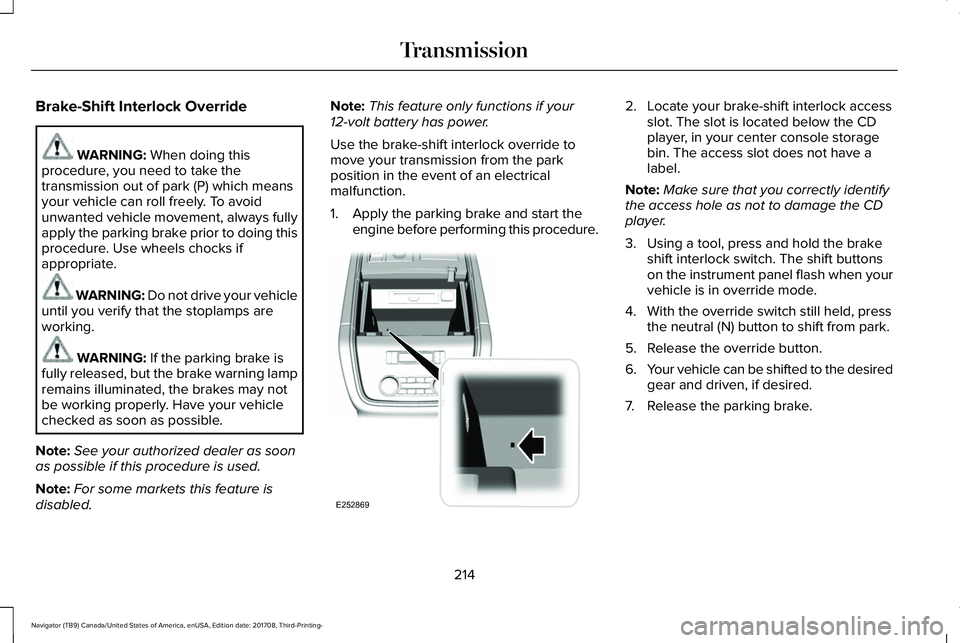
2. Locate your brake-shift interlock accessslot. The slot is located below the CDplayer, in your center console storagebin. The access slot does not have alabel.
Note:Make sure that you correctly identifythe access hole as not to damage the CDplayer.
3. Using a tool, press and hold the brakeshift interlock switch. The shift buttonson the instrument panel flash when yourvehicle is in override mode.
4. With the override switch still held, pressthe neutral (N) button to shift from park.
5. Release the override button.
6.Your vehicle can be shifted to the desiredgear and driven, if desired.
7. Release the parking brake.
214
Navigator (TB9) Canada/United States of America, enUSA, Edition date: 201708, Third-Printing-
TransmissionE252869
Page 231 of 649
The electric parking brake automaticallyreleases if:
•You close the driver door.
•You put the transmission in a forward orreverse gear.
•You press the accelerator pedal.
When you release the electric parking brake,the brake system warning lamp turns off.
Note:If the electric parking brake warninglamp stays lit, the electric parking brake willnot automatically release. You must releasethe electric parking brake using the electricparking brake switch.
Note:The electric parking brake drive awayrelease makes starting on a hill easier. Thisfeature releases the parking brakeautomatically when the vehicle has sufficientdrive force to move up the hill.
Driving With a Trailer
When parked on a hill with the weight of thetrailer, your vehicle and trailer may rollslightly when you put the transmission ingear.
To prevent this from happening, do thefollowing:
1. Pull and hold the electric parking brakeswitch.
2. Put the transmission in gear.
3.Press the accelerator pedal until you feelthat the engine has developed enoughpower to move the vehicle, then releasethe electric parking brake switch.
Battery With No Charge
WARNING: You will not be able toapply or release the electric parking brakeif the battery is low or has no charge.
If the battery is low or has no charge, usejumper cables and a booster battery.
HILL START ASSIST
WARNING: The system does notreplace the parking brake. When you leaveyour vehicle, always apply the parkingbrake and shift the transmission into park(P) for automatic transmission or first gearfor manual transmission.
WARNING: You must remain in yourvehicle when the system turns on. At alltimes, you are responsible for controllingyour vehicle, supervising the system andintervening, if required. Failure to take caremay result in the loss of control of yourvehicle, serious personal injury or death.
Note:If the engine is revved excessively, orif a malfunction is detected, the system willbe deactivated.
The system makes it easier to pull awaywhen your vehicle is on a slope without theneed to use the parking brake.
228
Navigator (TB9) Canada/United States of America, enUSA, Edition date: 201708, Third-Printing-
Brakes
Page 251 of 649
Troubleshooting
Possible CauseSymptom
You may have switched the traction control off.The system does not search for a parking space.
The transmission is in reverse (R). Your vehicle must be moving forward to be able todetect a parking space.
The sensors may be blocked. For example, snow, ice or dirt buildup. Blocked sensorscan affect how the system functions.The system does not offer a parking space.
There is not enough room in the parking space for your vehicle to safely park.
There is not enough space for the parking maneuver on the opposite side of the parkingspace.
The parking space is more than 5 ft (1.5 m) or less than 2 ft (0.5 m) away.
The vehicle speed is greater than 22 mph (35 km/h) for parallel parking or greater than19 mph (30 km/h) for perpendicular parking.
You recently disconnected or replaced the battery. After you reconnect the battery youmust drive your vehicle on a straight road for a short period of time.
Your vehicle is rolling in the opposite direction of the current transmission position. Forexample, rolling forward when in reverse (R).The system does not correctly position your vehiclein a parking space.
An irregular curb along the parking space prevents the system from correctly aligningyour vehicle.
248
Navigator (TB9) Canada/United States of America, enUSA, Edition date: 201708, Third-Printing-
Parking Aids
Page 284 of 649
Note:A high crown in the road or highcrosswinds may also make the steeringseem to wander or pull.
Adaptive Learning
The electronic power steering systemadaptive learning helps correct roadirregularities and improves overall handlingand steering feel. It communicates with thebrake system to help operate advancedstability control and accident avoidancesystems. Additionally, whenever the batteryis disconnected or a new battery installed,you must drive your vehicle a short distancebefore the system relearns the strategy andreactivates all systems.
PRE-COLLISION ASSIST
WARNING: You are responsible forcontrolling your vehicle at all times. Thesystem is designed to be an aid and doesnot relieve you of your responsibility todrive with due care and attention. Failureto follow this instruction could result in theloss of control of your vehicle, personalinjury or death.
WARNING: The system does notdetect vehicles that are driving in adifferent direction, cyclists or animals.Failure to take care may result in the lossof control of your vehicle, serious personalinjury or death.
WARNING: The system does notoperate during hard acceleration orsteering. Failure to take care may lead toa crash or personal injury.
WARNING: The system may fail oroperate with reduced function during coldand severe weather conditions. Snow, ice,rain, spray and fog can adversely affect thesystem. Keep the front camera and radarfree of snow and ice. Failure to take caremay result in the loss of control of yourvehicle, serious personal injury or death.
WARNING: In situations where thevehicle camera has limited detectioncapability, this may reduce systemperformance. These situations include butare not limited to direct or low sunlight,vehicles at night without tail lights,unconventional vehicle types, pedestrianswith complex backgrounds, runningpedestrians, partly obscured pedestrians,or pedestrians that the system cannotdistinguish from a group. Failure to takecare may result in the loss of control ofyour vehicle, serious personal injury ordeath.
281
Navigator (TB9) Canada/United States of America, enUSA, Edition date: 201708, Third-Printing-
Driving Aids
Page 310 of 649
The system is not available:
•The system relies on many sub-systemsin your vehicle to operate correctly. Ifthose sub-systems are not operatingcorrectly the system may not beavailable.
•Low battery voltage is a condition whichwill prevent the system from operating.Please make sure the battery is correctlycharged if the system is not available.
•You may need to drive your vehiclestraight forward above 25 mph (40 km/h)before the system is available again.
•If the message still displays take yourvehicle to an authorized dealer forservice.
Sticker lost:
•If the system cannot initially find thesticker, it may be necessary for you tochange the lighting conditions by movingthe vehicle and trailer or waiting untilconditions change.
•Check for the following if you receive thelost sticker message while using thesystem.
•Stop your vehicle as soon as themessage displays.
•Make sure the sticker is visible and thepattern is discernable in the rear viewcamera image.
•Clean the sticker and camera to makesure they are unobstructed.
•Clean the lens with a soft, lint-free clothand water.
•Clean the sticker with isopropyl rubbingalcohol sprayed directly onto the sticker,and then wipe clean with a soft cloth.
•Remove any items that may be blockingthe view of the sticker. Depending onyour trailer configuration and anyequipment mounted to your trailer it ispossible for the sticker to be blockedfrom view of the camera as it rotates onthe hitch ball but not be blocked duringsetup. Remove the obstruction ifpossible. It will be necessary to removethe sticker from it’s current location if theobstruction cannot be cleared and placea new sticker that will be visible to thecamera in all positions of the trailerbehind your vehicle.
•Placing the sticker on a surface angledaway from the vehicle reducesperformance. Use a drawbar thatpositions the trailer level to the groundwhen attached to vehicle. This typicallyprovides a level surface to mount thesticker. Place the sticker on a bracket orother object when no level surface isavailable.
•Make sure the entire sticker is on a flatsurface that is completely visible to thecamera. Do not fold the sticker over anedge on the trailer frame. This candegrade performance.
•Shadows on the sticker may effecttracking performance under somelighting conditions. Moving the sticker toanother location within the allowedplacement area may improveperformance. Use the change stickeroption in your Towing menu if you movethe sticker.
307
Navigator (TB9) Canada/United States of America, enUSA, Edition date: 201708, Third-Printing-
Towing
Page 315 of 649
ESSENTIAL TOWING CHECKS
Follow these guidelines for safe towing:
•Do not tow a trailer until you drive yourvehicle at least 1,000 mi (1,600 km).
•Consult your local motor vehicle laws fortowing a trailer.
•See any instructions that come withtowing accessories for the properinstallation and adjustment specifications.
•Service your vehicle more frequently ifyou tow a trailer. See ScheduledMaintenance (page 552).
•If you use a rental trailer, follow theinstructions the rental agency gives you.
You can find information on loadspecification terms found on the tire labeland Safety Compliance label as well asinstructions on calculating your vehicle's loadin the Load Carrying chapter. See Load Limit(page 293).
Remember to account for the trailer tongueweight as part of your vehicle load whencalculating the total vehicle weight.
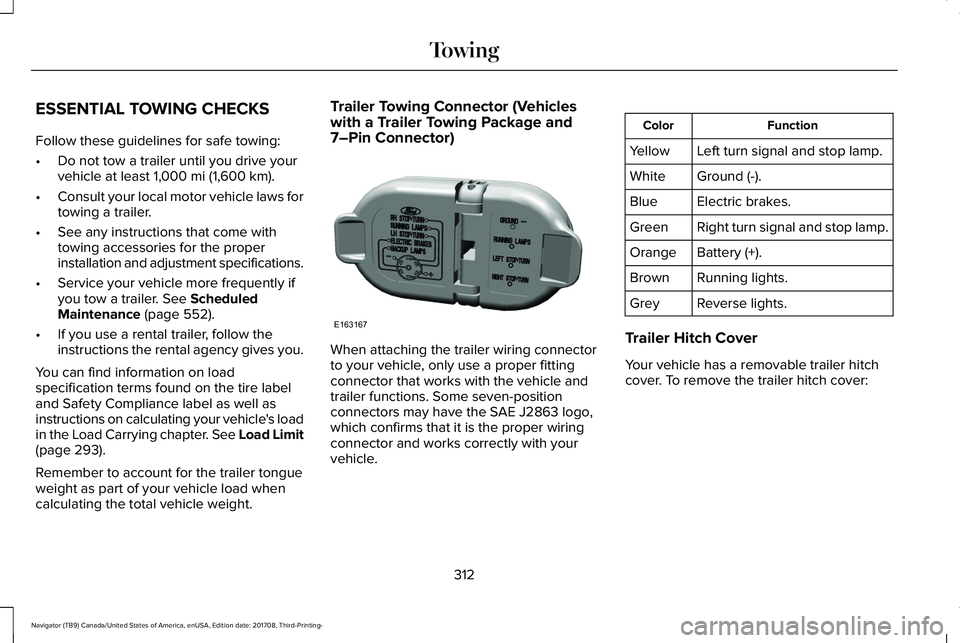
Trailer Towing Connector (Vehicleswith a Trailer Towing Package and7–Pin Connector)
When attaching the trailer wiring connectorto your vehicle, only use a proper fittingconnector that works with the vehicle andtrailer functions. Some seven-positionconnectors may have the SAE J2863 logo,which confirms that it is the proper wiringconnector and works correctly with yourvehicle.
FunctionColor
Left turn signal and stop lamp.Yellow
Ground (-).White
Electric brakes.Blue
Right turn signal and stop lamp.Green
Battery (+).Orange
Running lights.Brown
Reverse lights.Grey
Trailer Hitch Cover
Your vehicle has a removable trailer hitchcover. To remove the trailer hitch cover:
312
Navigator (TB9) Canada/United States of America, enUSA, Edition date: 201708, Third-Printing-
TowingE163167
Page 320 of 649
The gain setting sets the trailer brakecontroller for the specific towing condition.You should change the setting as towingconditions change. Changes to towingconditions include trailer load, vehicle load,road conditions and weather.
The gain should be set to provide themaximum trailer braking assistance whilemaking sure the trailer wheels do not lockwhen using the brakes. Locked trailer wheelsmay lead to trailer instability.
1.Make sure the trailer brakes are in goodworking condition, functioning normallyand properly adjusted. See your trailerdealer if necessary.
2. Hook up the trailer and make theelectrical connections according to thetrailer manufacturer's instructions.
3.When you plug in a trailer with electric orelectric-over-hydraulic brakes, a messageconfirming connection appears in theinformation display.
4.Use the gain adjustment (+ and -) buttonsto increase or decrease the gain settingto the desired starting point. A gainsetting of 6.0 is a good starting point forheavier loads.
5. In a traffic-free environment, tow thetrailer on a dry, level surface at a speedof 20–25 mph (32–40 km/h) andsqueeze the manual control levercompletely.
6.If the trailer wheels lock up, indicated bysquealing tires, reduce the gain setting.If the trailer wheels turn freely, increasethe gain setting. Repeat Steps 5 and 6until the gain setting is at a point justbelow trailer wheel lock-up. If towing aheavier trailer, trailer wheel lock-up maynot be attainable even with the maximumgain setting of 10.
Explanation of Information Display WarningMessages
Note:An authorized dealer can diagnosethe trailer brake controller to determineexactly which trailer fault has occurred.However, your warranty does not cover thisdiagnosis if the fault is with the trailer.
A message indicating a trailer brake modulefault may display in response to faults sensedby the trailer brake controller, accompaniedby a single tone. If this message appears,contact an authorized dealer as soon aspossible for diagnosis and repair. Thecontroller may still function, but performancemay be degraded.
A message indicating a trailer wiring faultmay display when there is a short circuit onthe electric brake output wire. If this messagedisplays, accompanied by a single tone, withno trailer connected, the problem is with yourvehicle wiring between the trailer brakecontroller and the 7-pin connector at thebumper. If the message only displays with atrailer connected, the problem is with thetrailer wiring. Consult your trailer dealer forassistance. This can be a short to ground(such as a chaffed wire), short to voltage(such as a pulled pin on trailer emergencybreakaway battery) or the trailer brakes maybe drawing too much current.
317
Navigator (TB9) Canada/United States of America, enUSA, Edition date: 201708, Third-Printing-
Towing
Page 325 of 649
WARNING: Do not disconnect thebattery during recreational towing. Itprevents the transfer case from shiftingproperly and may cause the vehicle to roll,even if the transmission is in park (P).
WARNING: Shifting the transfer caseto its neutral position for recreationaltowing may cause the vehicle to roll, evenif the transmission is in park (P). It mayinjure the driver and others. Make sure youpress the foot brake and the vehicle is ina secure, safe position when you shift toneutral (N).
Note:Failing to put the transfer case in itsneutral position can damage vehiclecomponents.
Note:You can check four-wheel-downtowing status at any time by opening thedriver's door or turning the ignition to theaccessory or on position. A messageappears in the information display confirmingyour vehicle is in neutral tow.
To exit four-wheel-down towing and returnthe transfer case to its 2H position:
1. With your vehicle still properly securedto the tow vehicle, press the brake pedaland start the engine.
2. Switch your vehicle off by pressing theengine START/STOP button once.
3.Place your vehicle in accessory mode bypressing the start button once withoutpressing the brake pedal.
4. Press the brake pedal.
5.Place the transmission back into park (P).
6. Release the brake pedal.
Note:If completed successfully, theinformation display shows 2H and NeutralTow Disabled.
Note:If the indicator light and message donot display, you must perform the procedureagain from the beginning.
Note:You may hear an audible noise as thetransfer case shifts out of its neutral position,this is normal.
Note:If Shift Delayed Pull Forward displaysin the instrument cluster, transfer case geartooth blockage is present. See theinstructions following this section.
7.Apply the parking brake, then disconnectyour vehicle from the tow vehicle.
8. Release the parking brake, start theengine, and shift the transmission intodrive (D) to make sure the transfer caseis out of the neutral tow position.
9.If the transfer case does not successfullyshift out of neutral (N), set the parkingbrake until you can have your vehicleserviced.
Resolving the Shift Delayed Pull Forwardor To Exit 4x4 LOW Shift to N Message
If the instrument cluster displays thesemessages, perform the following:
1. Press and hold the brake pedal.
2.Put the transmission into neutral (N), thenstart the engine.
3. With the engine running, shift thetransmission into drive (D) and let thevehicle roll forward, up to 3 ft (1 m). Youmay hear an audible noise as the transfercase shifts out of its neutral position. Thisis normal.
322
Navigator (TB9) Canada/United States of America, enUSA, Edition date: 201708, Third-Printing-
Towing
Page 330 of 649
ROADSIDE ASSISTANCE
Vehicles Sold in the United States:Getting Roadside Assistance
To fully assist you should you have a vehicleconcern, Lincoln Motor Company offers acomplimentary roadside assistance program. This program is separate from the NewVehicle Limited Warranty.
The service is available:
•Throughout the life of the vehicle fororiginal owners.
•For six years or 70,000 mi (110,000 km)(whichever comes first) for subsequentowners.
Roadside Assistance covers:
•A flat tire change with a good spare(except vehicles supplied with a tireinflation kit).
•Battery jump start.
•Lock-out assistance (key replacementcost is the client's responsibility).
•Fuel delivery — independent servicecontractors, if not prohibited by state,local or municipal law shall deliver up to2 gal (8 L) of gasoline or 5 gal (20 L) ofdiesel fuel to a disabled vehicle.Roadside Assistance limits fuel deliveryservice to two no-charge occurrenceswithin a 12-month period.
•Winch out — available within 100 ft (30 m)of a paved or county maintained road,no recoveries.
•Towing — independent servicecontractors, if not prohibited by state,local or municipal law shall tow Lincolneligible vehicles to the client's selling orpreferred dealer within 100 mi (160 km)of the disablement location or to thenearest Lincoln dealer. If a client requestsa tow to a selling or preferred dealer thatis more than 100 mi (160 km) from thedisablement location, the client isresponsible for any mileage costs inexcess of 100 mi (160 km).
•Roadside Assistance includes up to $200for a towed trailer if the disabled eligiblevehicle requires service at the nearestauthorized dealer. If the towing vehicleis operational but the trailer is not, thenthe trailer does not qualify for anyroadside services.
Vehicles Sold in the United States:Using Roadside Assistance
United States clients who require roadsideassistance, call 1-800-521-4140.
327
Navigator (TB9) Canada/United States of America, enUSA, Edition date: 201708, Third-Printing-
Roadside Emergencies
Page 331 of 649
If you need to arrange roadside assistancefor yourself, Lincoln Motor Companyreimburses a reasonable amount for towingto the nearest Lincoln dealership within100 mi (160 km). To obtain reimbursementinformation, United States clients, call1-800-521-4140. Clients need to submit theiroriginal receipts.
Vehicles Sold in Canada: GettingRoadside Assistance
To fully assist you should you have a vehicleconcern, Lincoln Motor Company offers acomplimentary roadside assistance program. This program is eligible within Canada or thecontinental United States.
This program is separate from the NewVehicle Limited Warranty, beginning fromthe original warranty start date and lasts thelife of the vehicle for the original owner.Subsequent owners receive coverage thatis concurrent with the 6 years or 70,000 mi(110,000 km) (whichever occurs first)powertrain warranty coverage period.
If you purchased your vehicle in Canada andrequire roadside assistance, please call1-800-387-9333.
Vehicles Sold in Canada: UsingRoadside Assistance
Complete the roadside assistanceidentification card and place it in your walletfor quick reference.
In Canada, this card is found in the WarrantyGuide in the glove compartment of yourvehicle.
Vehicles Sold in Canada: RoadsideAssistance Program Coverage
The service is available 24 hours a day,seven days a week.
Canadian roadside coverage and benefitsmay differ from the U.S. coverage.
For complete program coverage detailsreview your warranty guide, contact yourdealer, call us in Canada at 1-800-387-9333,or visit our website atwww.lincolncanada.com.
HAZARD FLASHERS
Note:The hazard flashers operate when theignition is in any position, or if the key is notin the ignition. If used when the vehicle is notrunning, the battery loses charge. As a result,there may be insufficient power to restartyour vehicle.
The flasher control is on theinstrument panel. Use your hazardflashers when your vehicle iscreating a safety hazard for other motorists.
•Press the flasher control and all front andrear direction indicators flash.
•Press the button again to switch them off.
FUEL SHUTOFF
WARNING: If your vehicle has beeninvolved in a crash, have the fuel systemchecked. Failure to follow this instructioncould result in fire, personal injury or death.
328
Navigator (TB9) Canada/United States of America, enUSA, Edition date: 201708, Third-Printing-
Roadside Emergencies