battery LINCOLN NAVIGATOR 2018 Repair Manual
[x] Cancel search | Manufacturer: LINCOLN, Model Year: 2018, Model line: NAVIGATOR, Model: LINCOLN NAVIGATOR 2018Pages: 649, PDF Size: 4.96 MB
Page 535 of 649
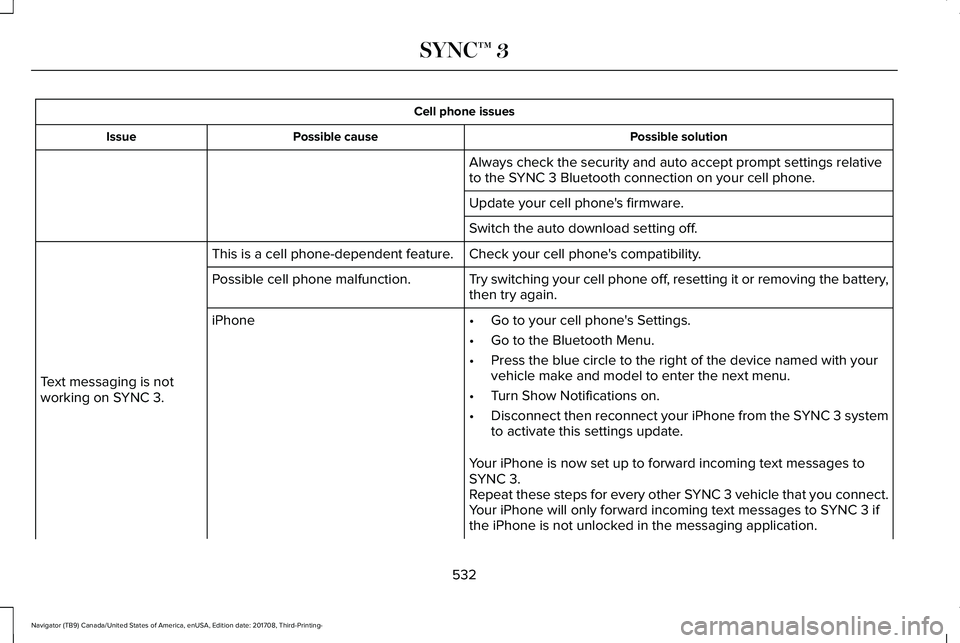
Cell phone issues
Possible solutionPossible causeIssue
Always check the security and auto accept prompt settings relativeto the SYNC 3 Bluetooth connection on your cell phone.
Update your cell phone's firmware.
Switch the auto download setting off.
Check your cell phone's compatibility.This is a cell phone-dependent feature.
Text messaging is notworking on SYNC 3.
Try switching your cell phone off, resetting it or removing the battery,then try again.Possible cell phone malfunction.
iPhone•Go to your cell phone's Settings.
•Go to the Bluetooth Menu.
•Press the blue circle to the right of the device named with yourvehicle make and model to enter the next menu.
•Turn Show Notifications on.
•Disconnect then reconnect your iPhone from the SYNC 3 systemto activate this settings update.
Your iPhone is now set up to forward incoming text messages toSYNC 3.Repeat these steps for every other SYNC 3 vehicle that you connect.Your iPhone will only forward incoming text messages to SYNC 3 ifthe iPhone is not unlocked in the messaging application.
532
Navigator (TB9) Canada/United States of America, enUSA, Edition date: 201708, Third-Printing-
SYNC™ 3
Page 536 of 649
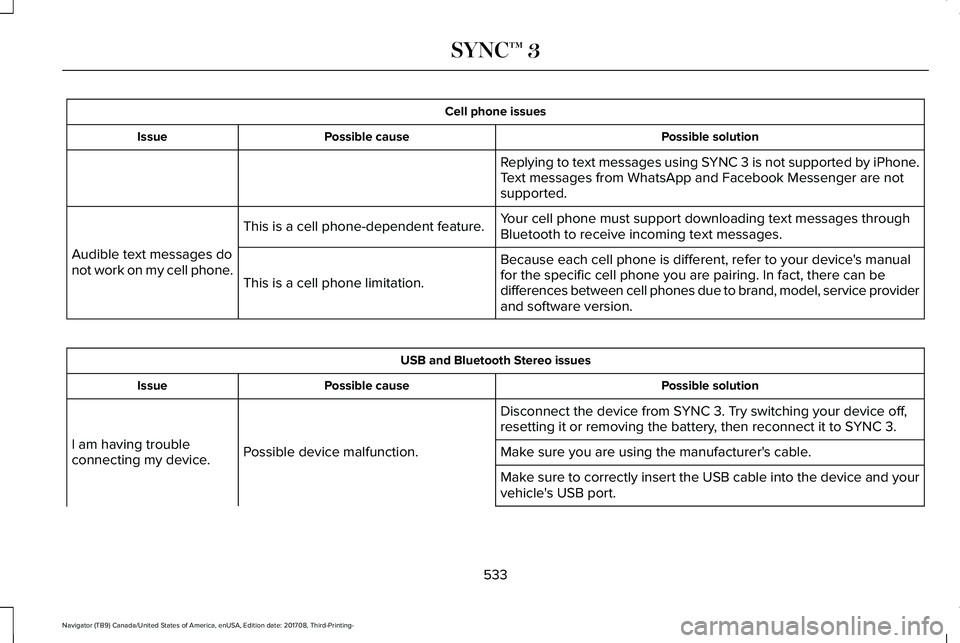
Cell phone issues
Possible solutionPossible causeIssue
Replying to text messages using SYNC 3 is not supported by iPhone.Text messages from WhatsApp and Facebook Messenger are notsupported.
Your cell phone must support downloading text messages throughBluetooth to receive incoming text messages.This is a cell phone-dependent feature.
Audible text messages donot work on my cell phone.Because each cell phone is different, refer to your device's manualfor the specific cell phone you are pairing. In fact, there can bedifferences between cell phones due to brand, model, service providerand software version.
This is a cell phone limitation.
USB and Bluetooth Stereo issues
Possible solutionPossible causeIssue
Disconnect the device from SYNC 3. Try switching your device off,resetting it or removing the battery, then reconnect it to SYNC 3.
Possible device malfunction.I am having troubleconnecting my device.Make sure you are using the manufacturer's cable.
Make sure to correctly insert the USB cable into the device and yourvehicle's USB port.
533
Navigator (TB9) Canada/United States of America, enUSA, Edition date: 201708, Third-Printing-
SYNC™ 3
Page 537 of 649
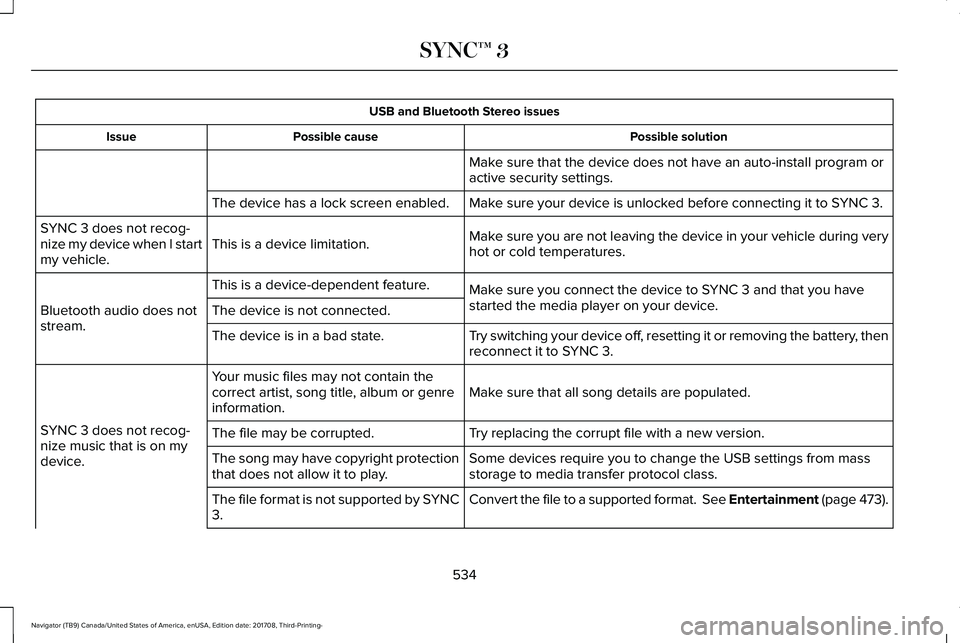
USB and Bluetooth Stereo issues
Possible solutionPossible causeIssue
Make sure that the device does not have an auto-install program oractive security settings.
Make sure your device is unlocked before connecting it to SYNC 3.The device has a lock screen enabled.
Make sure you are not leaving the device in your vehicle during veryhot or cold temperatures.This is a device limitation.SYNC 3 does not recog-nize my device when I startmy vehicle.
Make sure you connect the device to SYNC 3 and that you havestarted the media player on your device.
This is a device-dependent feature.
Bluetooth audio does notstream.The device is not connected.
Try switching your device off, resetting it or removing the battery, thenreconnect it to SYNC 3.The device is in a bad state.
Make sure that all song details are populated.Your music files may not contain thecorrect artist, song title, album or genreinformation.
SYNC 3 does not recog-nize music that is on mydevice.
Try replacing the corrupt file with a new version.The file may be corrupted.
Some devices require you to change the USB settings from massstorage to media transfer protocol class.The song may have copyright protectionthat does not allow it to play.
Convert the file to a supported format. See Entertainment (page 473).The file format is not supported by SYNC3.
534
Navigator (TB9) Canada/United States of America, enUSA, Edition date: 201708, Third-Printing-
SYNC™ 3
Page 538 of 649
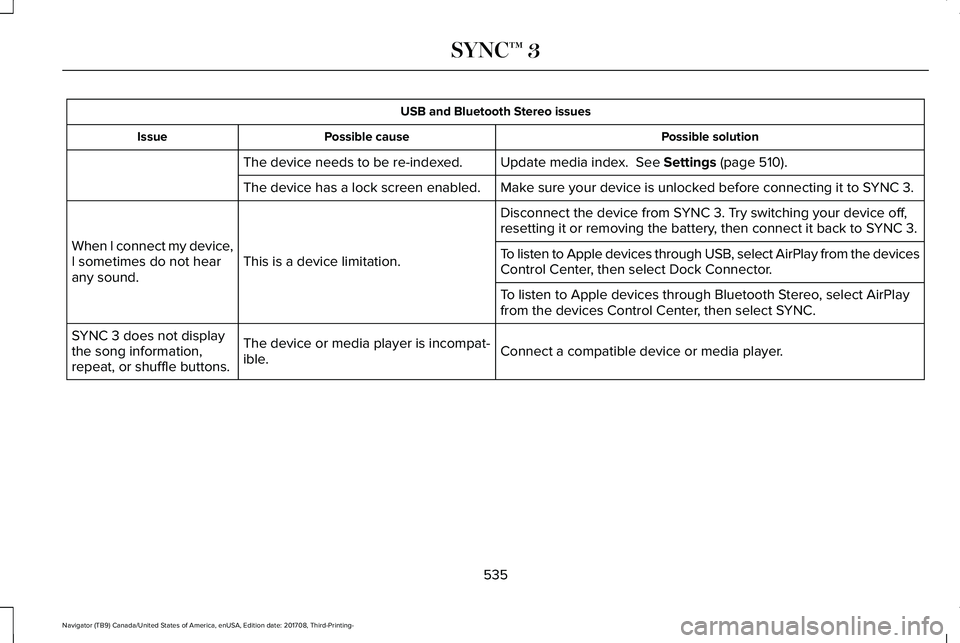
USB and Bluetooth Stereo issues
Possible solutionPossible causeIssue
Update media index. See Settings (page 510).The device needs to be re-indexed.
Make sure your device is unlocked before connecting it to SYNC 3.The device has a lock screen enabled.
Disconnect the device from SYNC 3. Try switching your device off,resetting it or removing the battery, then connect it back to SYNC 3.
This is a device limitation.When I connect my device,I sometimes do not hearany sound.
To listen to Apple devices through USB, select AirPlay from the devicesControl Center, then select Dock Connector.
To listen to Apple devices through Bluetooth Stereo, select AirPlayfrom the devices Control Center, then select SYNC.
Connect a compatible device or media player.The device or media player is incompat-ible.
SYNC 3 does not displaythe song information,repeat, or shuffle buttons.
535
Navigator (TB9) Canada/United States of America, enUSA, Edition date: 201708, Third-Printing-
SYNC™ 3
Page 551 of 649
For maximum vehicle performance, keep thefollowing information in mind when addingaccessories or equipment to your vehicle:
•When adding accessories, equipment,passengers and luggage to your vehicle,do not exceed the total weight capacityof the vehicle or of the front or rear axle(GVWR or GAWR as indicated on theSafety Compliance Certification label). Ask an authorized dealer for specificweight information.
•The Federal CommunicationsCommission (FCC) and Canadian RadioTelecommunications Commission (CRTC)regulate the use of mobilecommunications systems that areequipped with radio transmitters, forexample two-way radios, telephones andtheft alarms. Any such equipmentinstalled in your vehicle should complywith Federal CommunicationsCommission (FCC) and Canadian RadioTelecommunications Commission (CRTC)regulations and should be installed onlyby an authorized dealer.
•Mobile communications systems mayharm the operation of your vehicle,particularly if their manufacturer did notdesign them specifically for automotiveuse.
•If you or an authorized Lincoln dealer addany non-Lincoln electrical or electronicaccessories or components to yourvehicle, you may adversely affect batteryperformance and durability. In addition,you may also adversely affect theperformance of other electrical systemsin the vehicle.
548
Navigator (TB9) Canada/United States of America, enUSA, Edition date: 201708, Third-Printing-
Accessories
Page 552 of 649
PROTECT YOURSELF FROM THE RISINGCOST OF VEHICLE REPAIRS WITHLINCOLN PROTECT EXTENDED SERVICEPLAN.
Lincoln Protect Extended Service Plans(U.S. Only)
Lincoln Protect means peace of mind. It’s theextended service plan backed by the LincolnMotor Company, and provides moreprotection beyond the New Vehicle LimitedWarranty coverage. When you visit yourLincoln Dealer, insist on genuine LincolnProtect extended service plans!
Lincoln Protect Extended Service Plan CanQuickly Pay for Itself
One trip to the Service Center could easilyexceed the price of your Lincoln Protectextended service plan. With Lincoln Protectyou minimize your risk for unexpected repairbills and rising repair costs.
Up to 1000+ Covered Vehicle Components
There are four mechanical Lincoln Protectextended service plans with different levelsof coverage. Ask your authorized dealer fordetails.
1.PremiumCARE - Our most comprehensivecoverage. With over 1,000 coveredcomponents, this plan is so complete it’sprobably easier to list what’s not covered.
2.ExtraCARE - Covers 113 components, andincludes many high-tech items.
3. BaseCARE - Covers 84 components.
4. PowertrainCARE - Covers 29 criticalcomponents.
Lincoln Protect extended service plans arehonored by all authorized Lincoln dealers inthe U.S., Canada and Mexico.
That means you get:
•Reliable, quality service at any Lincoln orFord dealership.
•Repairs performed by factory trainedtechnicians, using genuine parts.
Rental Car Reimbursement
1st day Rental Benefit
If you bring your car into your dealer forservice, we’ll give you a loaner to use for theday.
Extended Rental Benefits
If your vehicle is kept overnight for coveredrepairs, you are eligible for rental carcoverage, including bumper to bumperwarranty repairs, and Field Service Actions.
Roadside Assistance
Exclusive 24/7 roadside assistance, including:
•Towing, flat-tire change and battery jumpstarts.
•Out of fuel and lock-out assistance.
•Travel expense reimbursement forlodging, meals and rental car.
•Assistance for taxi, shuttle, rental carcoverage and other transportation.
549
Navigator (TB9) Canada/United States of America, enUSA, Edition date: 201708, Third-Printing-
Lincoln Protect
Page 557 of 649
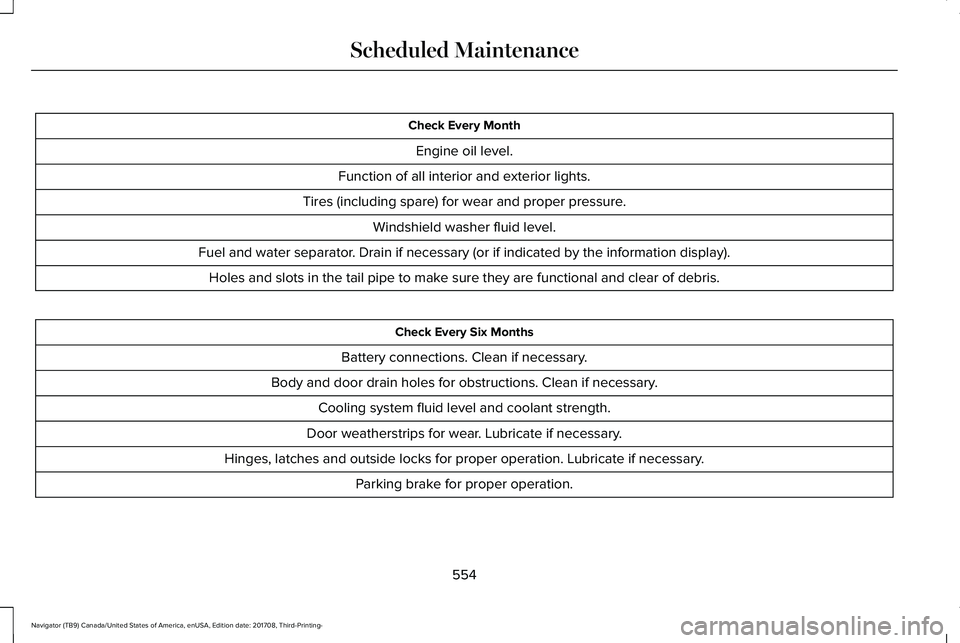
Check Every Month
Engine oil level.
Function of all interior and exterior lights.
Tires (including spare) for wear and proper pressure.
Windshield washer fluid level.
Fuel and water separator. Drain if necessary (or if indicated by the information display).
Holes and slots in the tail pipe to make sure they are functional and clear of debris.
Check Every Six Months
Battery connections. Clean if necessary.
Body and door drain holes for obstructions. Clean if necessary.
Cooling system fluid level and coolant strength.
Door weatherstrips for wear. Lubricate if necessary.
Hinges, latches and outside locks for proper operation. Lubricate if necessary.
Parking brake for proper operation.
554
Navigator (TB9) Canada/United States of America, enUSA, Edition date: 201708, Third-Printing-
Scheduled Maintenance
Page 558 of 649
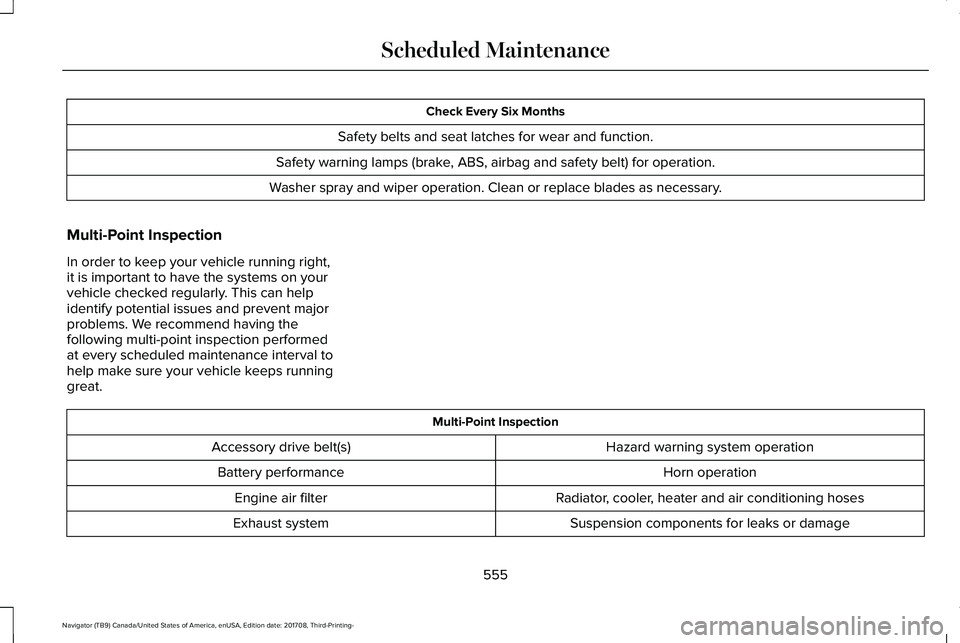
Check Every Six Months
Safety belts and seat latches for wear and function.
Safety warning lamps (brake, ABS, airbag and safety belt) for operation.
Washer spray and wiper operation. Clean or replace blades as necessary.
Multi-Point Inspection
In order to keep your vehicle running right,it is important to have the systems on yourvehicle checked regularly. This can helpidentify potential issues and prevent majorproblems. We recommend having thefollowing multi-point inspection performedat every scheduled maintenance interval tohelp make sure your vehicle keeps runninggreat.
Multi-Point Inspection
Hazard warning system operationAccessory drive belt(s)
Horn operationBattery performance
Radiator, cooler, heater and air conditioning hosesEngine air filter
Suspension components for leaks or damageExhaust system
555
Navigator (TB9) Canada/United States of America, enUSA, Edition date: 201708, Third-Printing-
Scheduled Maintenance
Page 637 of 649
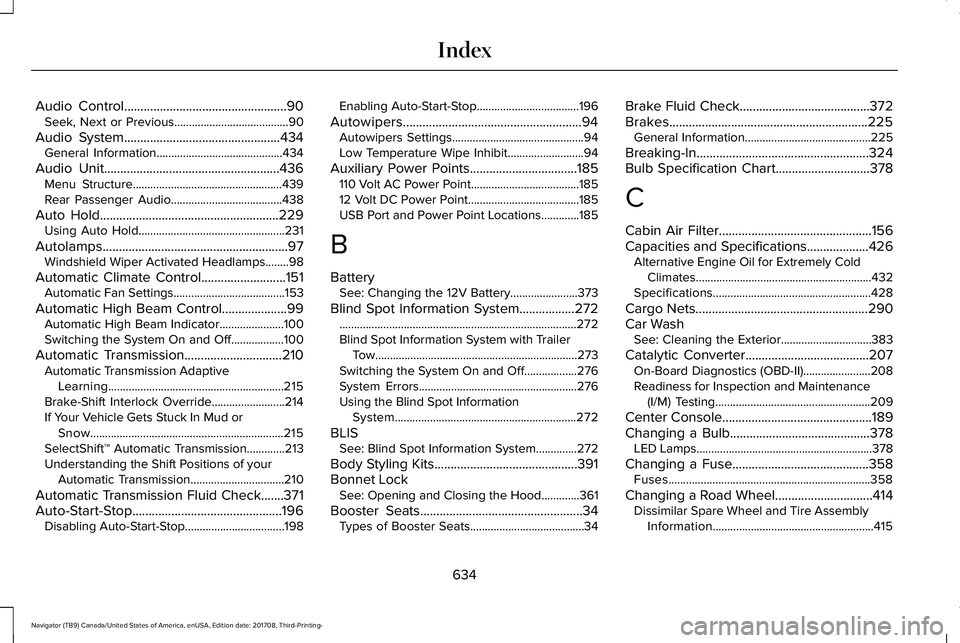
Audio Control..................................................90Seek, Next or Previous.......................................90
Audio System................................................434General Information...........................................434
Audio Unit......................................................436Menu Structure...................................................439Rear Passenger Audio......................................438
Auto Hold.......................................................229Using Auto Hold..................................................231
Autolamps.........................................................97Windshield Wiper Activated Headlamps........98
Automatic Climate Control..........................151Automatic Fan Settings......................................153
Automatic High Beam Control....................99Automatic High Beam Indicator......................100Switching the System On and Off..................100
Automatic Transmission..............................210Automatic Transmission AdaptiveLearning............................................................215Brake-Shift Interlock Override.........................214If Your Vehicle Gets Stuck In Mud orSnow..................................................................215SelectShift™ Automatic Transmission.............213Understanding the Shift Positions of yourAutomatic Transmission................................210
Automatic Transmission Fluid Check.......371Auto-Start-Stop..............................................196Disabling Auto-Start-Stop..................................198
Enabling Auto-Start-Stop...................................196
Autowipers.......................................................94Autowipers Settings.............................................94Low Temperature Wipe Inhibit..........................94
Auxiliary Power Points.................................185110 Volt AC Power Point.....................................18512 Volt DC Power Point......................................185USB Port and Power Point Locations.............185
B
BatterySee: Changing the 12V Battery.......................373
Blind Spot Information System.................272.................................................................................272Blind Spot Information System with TrailerTow.....................................................................273Switching the System On and Off..................276System Errors......................................................276Using the Blind Spot InformationSystem..............................................................272
BLISSee: Blind Spot Information System..............272
Body Styling Kits............................................391Bonnet LockSee: Opening and Closing the Hood.............361
Booster Seats..................................................34Types of Booster Seats.......................................34
Brake Fluid Check........................................372Brakes.............................................................225General Information...........................................225
Breaking-In.....................................................324Bulb Specification Chart.............................378
C
Cabin Air Filter...............................................156Capacities and Specifications...................426Alternative Engine Oil for Extremely ColdClimates............................................................432Specifications......................................................428
Cargo Nets.....................................................290Car WashSee: Cleaning the Exterior...............................383
Catalytic Converter......................................207On-Board Diagnostics (OBD-II).......................208Readiness for Inspection and Maintenance(I/M) Testing.....................................................209
Center Console..............................................189Changing a Bulb...........................................378LED Lamps............................................................378
Changing a Fuse..........................................358Fuses.....................................................................358
Changing a Road Wheel..............................414Dissimilar Spare Wheel and Tire AssemblyInformation.......................................................415
634
Navigator (TB9) Canada/United States of America, enUSA, Edition date: 201708, Third-Printing-
Index
Page 638 of 649
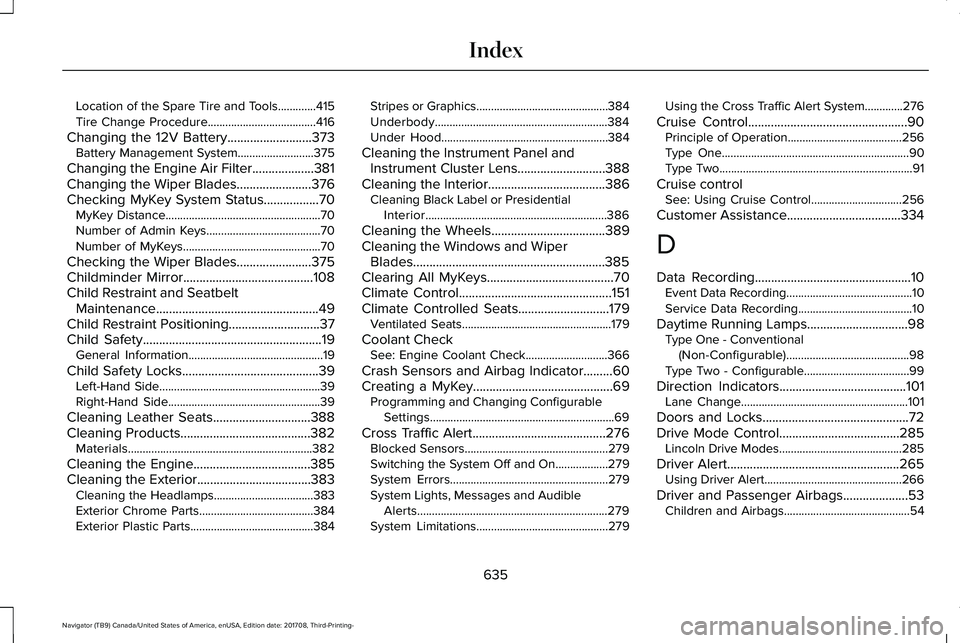
Location of the Spare Tire and Tools.............415Tire Change Procedure.....................................416
Changing the 12V Battery..........................373Battery Management System..........................375
Changing the Engine Air Filter...................381Changing the Wiper Blades.......................376Checking MyKey System Status.................70MyKey Distance.....................................................70Number of Admin Keys.......................................70Number of MyKeys...............................................70
Checking the Wiper Blades.......................375Childminder Mirror........................................108Child Restraint and SeatbeltMaintenance..................................................49Child Restraint Positioning............................37Child Safety.......................................................19General Information..............................................19
Child Safety Locks..........................................39Left-Hand Side.......................................................39Right-Hand Side....................................................39
Cleaning Leather Seats..............................388Cleaning Products........................................382Materials...............................................................382
Cleaning the Engine....................................385Cleaning the Exterior...................................383Cleaning the Headlamps..................................383Exterior Chrome Parts.......................................384Exterior Plastic Parts..........................................384
Stripes or Graphics.............................................384Underbody...........................................................384Under Hood.........................................................384
Cleaning the Instrument Panel andInstrument Cluster Lens...........................388Cleaning the Interior....................................386Cleaning Black Label or PresidentialInterior..............................................................386
Cleaning the Wheels...................................389Cleaning the Windows and WiperBlades...........................................................385Clearing All MyKeys.......................................70Climate Control...............................................151Climate Controlled Seats............................179Ventilated Seats...................................................179
Coolant CheckSee: Engine Coolant Check............................366
Crash Sensors and Airbag Indicator.........60Creating a MyKey...........................................69Programming and Changing ConfigurableSettings...............................................................69
Cross Traffic Alert.........................................276Blocked Sensors.................................................279Switching the System Off and On..................279System Errors......................................................279System Lights, Messages and AudibleAlerts.................................................................279System Limitations.............................................279
Using the Cross Traffic Alert System.............276
Cruise Control.................................................90Principle of Operation.......................................256Type One................................................................90Type Two..................................................................91
Cruise controlSee: Using Cruise Control...............................256
Customer Assistance...................................334
D
Data Recording................................................10Event Data Recording...........................................10Service Data Recording.......................................10
Daytime Running Lamps...............................98Type One - Conventional(Non-Configurable)..........................................98Type Two - Configurable....................................99
Direction Indicators.......................................101Lane Change.........................................................101
Doors and Locks.............................................72Drive Mode Control.....................................285Lincoln Drive Modes..........................................285
Driver Alert.....................................................265Using Driver Alert...............................................266
Driver and Passenger Airbags....................53Children and Airbags...........................................54
635
Navigator (TB9) Canada/United States of America, enUSA, Edition date: 201708, Third-Printing-
Index