brake LINCOLN NAVIGATOR 2018 Owner's Guide
[x] Cancel search | Manufacturer: LINCOLN, Model Year: 2018, Model line: NAVIGATOR, Model: LINCOLN NAVIGATOR 2018Pages: 649, PDF Size: 4.96 MB
Page 201 of 649
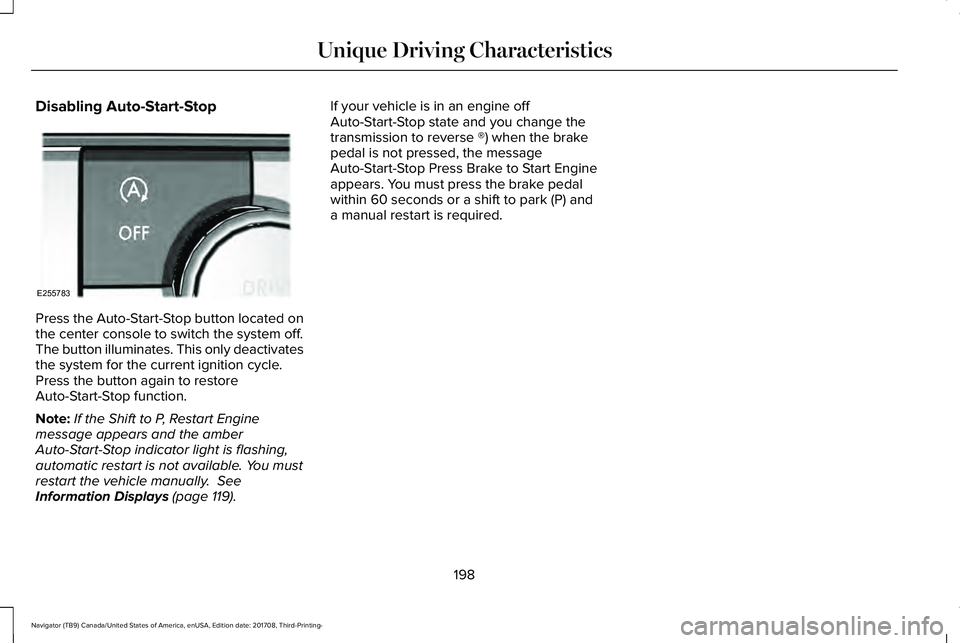
Disabling Auto-Start-Stop
Press the Auto-Start-Stop button located onthe center console to switch the system off.The button illuminates. This only deactivatesthe system for the current ignition cycle.Press the button again to restoreAuto-Start-Stop function.
Note:If the Shift to P, Restart Enginemessage appears and the amberAuto-Start-Stop indicator light is flashing,automatic restart is not available. You mustrestart the vehicle manually. SeeInformation Displays (page 119).
If your vehicle is in an engine offAuto-Start-Stop state and you change thetransmission to reverse ®) when the brakepedal is not pressed, the messageAuto-Start-Stop Press Brake to Start Engineappears. You must press the brake pedalwithin 60 seconds or a shift to park (P) anda manual restart is required.
198
Navigator (TB9) Canada/United States of America, enUSA, Edition date: 201708, Third-Printing-
Unique Driving CharacteristicsE255783
Page 207 of 649
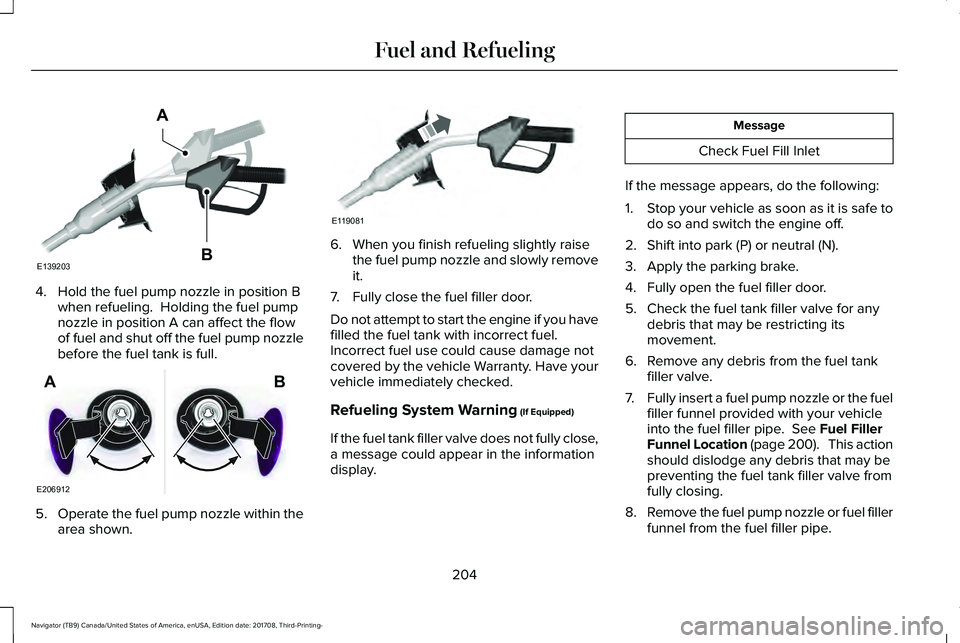
4. Hold the fuel pump nozzle in position Bwhen refueling. Holding the fuel pumpnozzle in position A can affect the flowof fuel and shut off the fuel pump nozzlebefore the fuel tank is full.
5.Operate the fuel pump nozzle within thearea shown.
6. When you finish refueling slightly raisethe fuel pump nozzle and slowly removeit.
7. Fully close the fuel filler door.
Do not attempt to start the engine if you havefilled the fuel tank with incorrect fuel.Incorrect fuel use could cause damage notcovered by the vehicle Warranty. Have yourvehicle immediately checked.
Refueling System Warning (If Equipped)
If the fuel tank filler valve does not fully close,a message could appear in the informationdisplay.
Message
Check Fuel Fill Inlet
If the message appears, do the following:
1.Stop your vehicle as soon as it is safe todo so and switch the engine off.
2. Shift into park (P) or neutral (N).
3. Apply the parking brake.
4. Fully open the fuel filler door.
5. Check the fuel tank filler valve for anydebris that may be restricting itsmovement.
6. Remove any debris from the fuel tankfiller valve.
7.Fully insert a fuel pump nozzle or the fuelfiller funnel provided with your vehicleinto the fuel filler pipe. See Fuel FillerFunnel Location (page 200). This actionshould dislodge any debris that may bepreventing the fuel tank filler valve fromfully closing.
8.Remove the fuel pump nozzle or fuel fillerfunnel from the fuel filler pipe.
204
Navigator (TB9) Canada/United States of America, enUSA, Edition date: 201708, Third-Printing-
Fuel and RefuelingE139203
A
B E206912
AB E119081
Page 213 of 649
AUTOMATIC TRANSMISSION
WARNING: Always fully apply theparking brake and make sure you shift intopark (P). Failure to follow this instructioncould result in personal injury or death.
WARNING: Do not use tow/haulwhen the road surface is slippery. Failureto follow this instruction could result in theloss of control of your vehicle.
WARNING: When your vehicle isstationary, keep the brake pedal fullypressed when shifting gears. Failure tofollow this instruction could result inpersonal injury, death or property damage.
Note:You may not be able to shift out ofpark (P) unless the intelligent access key isinside your vehicle.
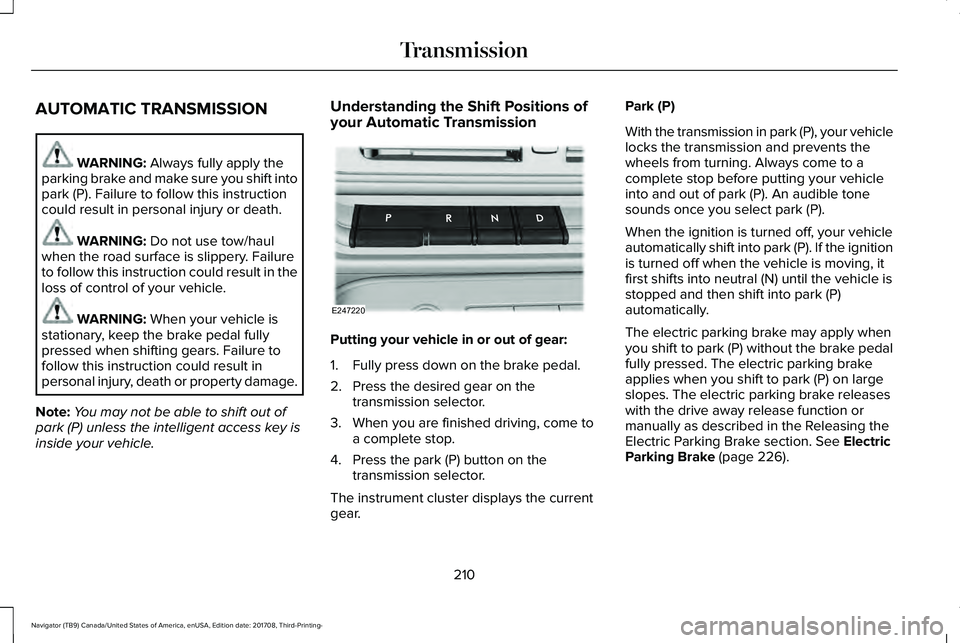
Understanding the Shift Positions ofyour Automatic Transmission
Putting your vehicle in or out of gear:
1. Fully press down on the brake pedal.
2. Press the desired gear on thetransmission selector.
3. When you are finished driving, come toa complete stop.
4. Press the park (P) button on thetransmission selector.
The instrument cluster displays the currentgear.
Park (P)
With the transmission in park (P), your vehiclelocks the transmission and prevents thewheels from turning. Always come to acomplete stop before putting your vehicleinto and out of park (P). An audible tonesounds once you select park (P).
When the ignition is turned off, your vehicleautomatically shift into park (P). If the ignitionis turned off when the vehicle is moving, itfirst shifts into neutral (N) until the vehicle isstopped and then shift into park (P)automatically.
The electric parking brake may apply whenyou shift to park (P) without the brake pedalfully pressed. The electric parking brakeapplies when you shift to park (P) on largeslopes. The electric parking brake releaseswith the drive away release function ormanually as described in the Releasing theElectric Parking Brake section. See ElectricParking Brake (page 226).
210
Navigator (TB9) Canada/United States of America, enUSA, Edition date: 201708, Third-Printing-
TransmissionE247220
Page 214 of 649
Automatic Return to Park
Note:This feature does not operate whenyour vehicle is in Stay in Neutral mode orneutral tow.
Your vehicle has a feature that automaticallyshifts your vehicle into park (P) when any ofthe following conditions occur:
•You turn the vehicle off.
•You open the driver's door with yourseatbelt unlatched with the vehiclestopped.
•You unlatch your seatbelt when thedriver's door is open with the vehiclestopped.
If you turn your vehicle off when moving,your vehicle first shifts into neutral (N) untilit stops and then shift into park (P)automatically.
Note:If you have waited an extended periodof time, 2-15 minutes before starting yourvehicle, unlatching your seatbelt can causethis feature to activate, even with the driverdoor closed.
Note:This feature may not work properly ifthe door ajar switch is malfunctioning. If yourdoor ajar indicator does not illuminate whenyou open the driver’s door or the indicatorilluminates with the driver’s door closed, seeyour authorized dealer.
Reverse (R)
With the selector in reverse (R), your vehiclemoves backward. Always come to acomplete stop before shifting into and outof reverse (R).
Neutral (N)
With the selector in neutral (N), your vehiclecan be started and is free to roll. Hold thebrake pedal down when in this position.
Stay in Neutral Mode
Note:Stay in neutral mode is a temporaryvehicle state with the ignition off. Once inthis mode, sufficient battery voltage must bemaintained or your vehicle returns to park.Extended usage of Stay in Neutral modemay result in a battery voltage reduction toa level where the vehicle may no longerstart. Do not tow your vehicle in this mode.
Note:Always put your vehicle in Stay inNeutral mode when entering an automaticcar wash. Failure to do this could result invehicle damage not covered by warranty.
Stay in Neutral mode allows your vehicle tostay in neutral when you exit your vehicle.Your vehicle must be stationary to enter thismode.
To enter Stay in Neutral mode:
•Press the neutral (N) button on thetransmission selector.
•Press the neutral (N) button again toenter Stay in Neutral mode.
A message appears in your informationdisplay screen when your vehicle hasentered Stay in Neutral mode.
To exit Stay in Neutral mode, apply the brakeand select a different gear.
Stay in Neutral Mode - No Start
Use this to move your transmission from thepark position in the event of a no startsituation. If your vehicle has a dead battery,an external power source is required. Do nottow your vehicle in this mode.
211
Navigator (TB9) Canada/United States of America, enUSA, Edition date: 201708, Third-Printing-
Transmission
Page 215 of 649
Note:This only functions if your 12-voltbattery has power and the starter can spinthe engine. If vehicle battery voltage is notsufficient, an external 12-volt power sourcesuch as jumper cables, battery charger orjump pack may be required for this featureto function.
Note:Once in this mode, sufficient batteryvoltage must be maintained or your vehiclereturns to park.
WARNING: When doing thisprocedure, you need to take thetransmission out of park (P) which meansyour vehicle can roll freely. To avoidunwanted vehicle movement, always fullyapply the parking brake prior to doing thisprocedure. Use wheels chocks ifappropriate.
1. Do not press the brake pedal. Press theSTART/STOP button.
2. Fully press down on the brake pedal.Keep the brakes applied through step 7.
3. Press the accelerator pedal to the floorand hold through step 7.
4. Press the neutral (N) button on thetransmission selector.
5. Press the neutral (N) button again toenter Stay in Neutral mode.
6. Press and release the push to startbutton, the transmission needs aminimum of 2 seconds to exit park.
7. When neutral (N) is displayed, the brakeand accelerator pedals can be released.
To exit Stay in Neutral mode, select adifferent gear.
A message appears in your informationdisplay screen when your vehicle hasentered Stay in Neutral mode.
Drive (D)
Drive (D) is the normal driving position forthe best fuel economy. The overdrivefunction allows automatic upshifts anddownshifts through gears one through ten.
Adaptive Tow/Haul Mode
WARNING: Do not use tow/haulwhen the road surface is slippery. Failureto follow this instruction could result in theloss of control of your vehicle.
Adaptive tow/haul has two modes, automaticthat is enabled by default and off.
To turn adaptive tow/haul off or on, use theinformation display controls. See GeneralInformation (page 119). The indicator lightilluminates in the instrument cluster.
Key adaptive tow/haul features:
•The system remains in the same mode,even after a key cycle.
•Is only available in normal drive modes(Normal 2H and Normal 4A).
The adaptive tow/haul feature improvestransmission operation when towing a traileror a heavy load. All transmission gear rangesare available when using adaptive tow/haul.
For information on towing. See Towing (page298).
212
Navigator (TB9) Canada/United States of America, enUSA, Edition date: 201708, Third-Printing-
Transmission
Page 217 of 649
Brake-Shift Interlock Override
WARNING: When doing thisprocedure, you need to take thetransmission out of park (P) which meansyour vehicle can roll freely. To avoidunwanted vehicle movement, always fullyapply the parking brake prior to doing thisprocedure. Use wheels chocks ifappropriate.
WARNING: Do not drive your vehicleuntil you verify that the stoplamps areworking.
WARNING: If the parking brake isfully released, but the brake warning lampremains illuminated, the brakes may notbe working properly. Have your vehiclechecked as soon as possible.
Note:See your authorized dealer as soonas possible if this procedure is used.
Note:For some markets this feature isdisabled.
Note:This feature only functions if your12-volt battery has power.
Use the brake-shift interlock override tomove your transmission from the parkposition in the event of an electricalmalfunction.
1. Apply the parking brake and start theengine before performing this procedure.
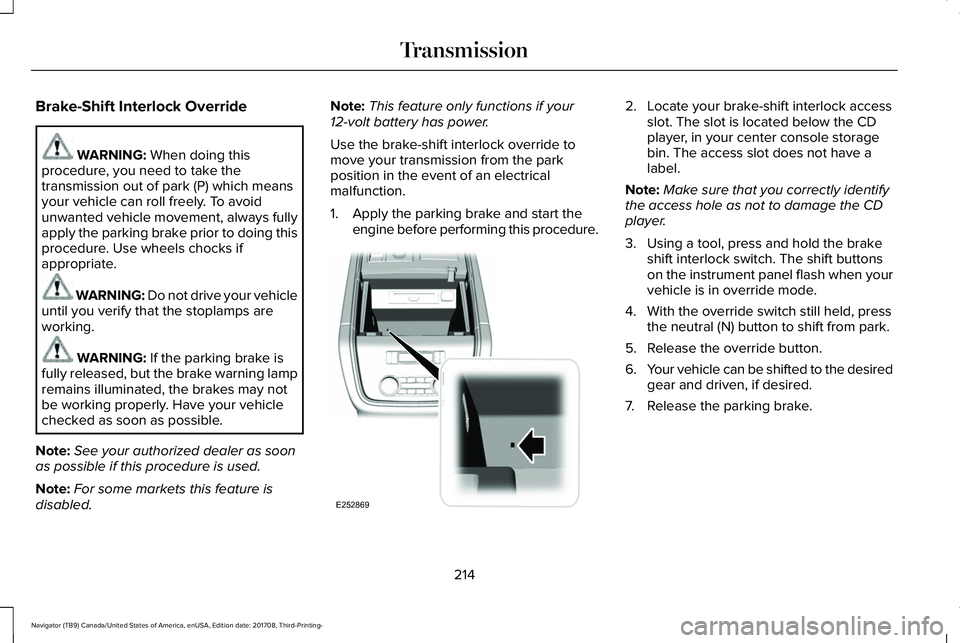
2. Locate your brake-shift interlock accessslot. The slot is located below the CDplayer, in your center console storagebin. The access slot does not have alabel.
Note:Make sure that you correctly identifythe access hole as not to damage the CDplayer.
3. Using a tool, press and hold the brakeshift interlock switch. The shift buttonson the instrument panel flash when yourvehicle is in override mode.
4. With the override switch still held, pressthe neutral (N) button to shift from park.
5. Release the override button.
6.Your vehicle can be shifted to the desiredgear and driven, if desired.
7. Release the parking brake.
214
Navigator (TB9) Canada/United States of America, enUSA, Edition date: 201708, Third-Printing-
TransmissionE252869
Page 223 of 649
Basic Operating Principles
•Do not use SLIPPERY, DEEPCONDITIONS or SLOW CLIMB on dry,hard surfaced roads. Doing so producesexcessive noise, increases tire wear andmay damage drive components. The 4X4system in these modes is only intendedfor consistently slippery or loosesurfaces.
•Drive slower in strong crosswinds whichcan affect the normal steeringcharacteristics of your vehicle.
•When driving your vehicle on surfacesmade slippery by loose sand, water,gravel, snow or ice, proceed with care.
If Your Vehicle leaves the Road
If your vehicle leaves the road, reduce yourvehicle speed and avoid severe braking.When your vehicle speed has been reducedease your vehicle back onto the road. Donot turn the steering wheel sharply whenreturning your vehicle to the road.
It may be safer to stay on the shoulder of theroad and slow down gradually beforereturning to the road. You may lose controlif you do not slow down or if you turn thesteering wheel too sharply or abruptly.
It may be less risky to strike small objects,such as freeway reflectors, with minordamage to your vehicle rather than attempta sudden return to the road which couldcause your vehicle to slide sideways out ofcontrol or roll over. Remember, your safetyand the safety of others should be yourprimary concern.
If your vehicle gets stuck
WARNING: Do not spin the wheelsat over 34 mph (55 km/h). The tires mayfail and injure a passenger or bystander.
Note:Do not rock your vehicle if the engineis not at normal operating temperature,damage to the transmission may occur.
Note:Do not rock your vehicle for more thana minute, damage to the transmission andtires may occur or the engine may overheat.
If your vehicle gets stuck in mud or snow itmay be rocked out by shifting betweenforward and reverse gears, stoppingbetween shifts, in a steady pattern. Presslightly on the accelerator in each gear.
Emergency Maneuvers
In an unavoidable emergency situationwhere a sudden sharp turn must be made,remember to avoid over-driving your vehicle(i.e. turn the steering wheel only as rapidlyand as far as required to avoid theemergency). Excessive steering can resultin loss of vehicle control. Apply smoothpressure to the accelerator pedal or brakepedal when changes in vehicle speed arerequired. Avoid abrupt steering, accelerationand braking. This could result in an increasedrisk of vehicle roll over, loss of vehicle controland personal injury. Use all available roadsurface to bring your vehicle to a safedirection of travel.
In the event of an emergency stop, avoidskidding the tires and do not attempt anysharp steering wheel movements.
220
Navigator (TB9) Canada/United States of America, enUSA, Edition date: 201708, Third-Printing-
Four-Wheel Drive (If Equipped)
Page 224 of 649
If your vehicle goes from one type of surfaceto another (i.e. from concrete to gravel) theremay be a change in the way your vehicleresponds to a maneuver (i.e. steering,acceleration or braking).
Sand
When driving over sand, try to keep all fourwheels on the most solid area of the trail.Avoid reducing the tire pressures but shiftto a lower gear and drive steadily throughthe terrain. Apply the accelerator slowly andavoid excessive wheel slip.
Avoid driving at excessive speeds, thiscauses vehicle momentum to work againstyou and your vehicle could become stuck tothe point that assistance may be requiredfrom another vehicle. Remember, you maybe able to back out the way you came if youproceed with caution.
Mud and Water
Note:Driving through deep water maydamage the vehicle.
If you must drive through high water, driveslowly. Traction or brake capability may belimited.
When driving through water, determine thedepth and avoid water higher than thebottom of the hubs. If the ignition systemgets wet, your vehicle may stall.
Once through water, always try the brakes.Wet brakes do not stop your vehicle aseffectively as dry brakes. Drying can beimproved by applying light pressure to thebrake pedal when moving slowly.
Be cautious of sudden changes in vehiclespeed or direction when you are driving inmud. Even 4X4 vehicles can lose traction inslick mud. As when you are driving oversand, apply the accelerator slowly and avoidspinning your wheels. If the vehicle doesslide, steer in the direction of the slide untilyou regain control of the vehicle.
If the transmission, transfer case or front axleare submerged in water, their fluids shouldbe checked and changed, if necessary.
If the front or rear axle is submerged in water,the axle lubricant should be replaced.
After driving through mud, clean off residuestuck to rotating driveshafts and tires. Excessmud stuck on tires and rotating driveshaftscauses an imbalance that could damagedrive components.
Driving on Hilly or Sloping Terrain
Note:Avoid driving crosswise or turning onsteep slopes or hills.
Note: Avoid turning on steep slopes or hills. A danger lies in losing traction, slippingsideways and possible vehicle roll over. Whenever driving on a hill, determinebeforehand the route you will use. Do notdrive over the crest of a hill without seeingwhat conditions are on the other side. Donot drive in reverse over a hill without theaid of an observer.
Although natural obstacles may make itnecessary to travel diagonally up or down ahill or steep incline, you should always try todrive straight up or straight down.
221
Navigator (TB9) Canada/United States of America, enUSA, Edition date: 201708, Third-Printing-
Four-Wheel Drive (If Equipped)
Page 225 of 649
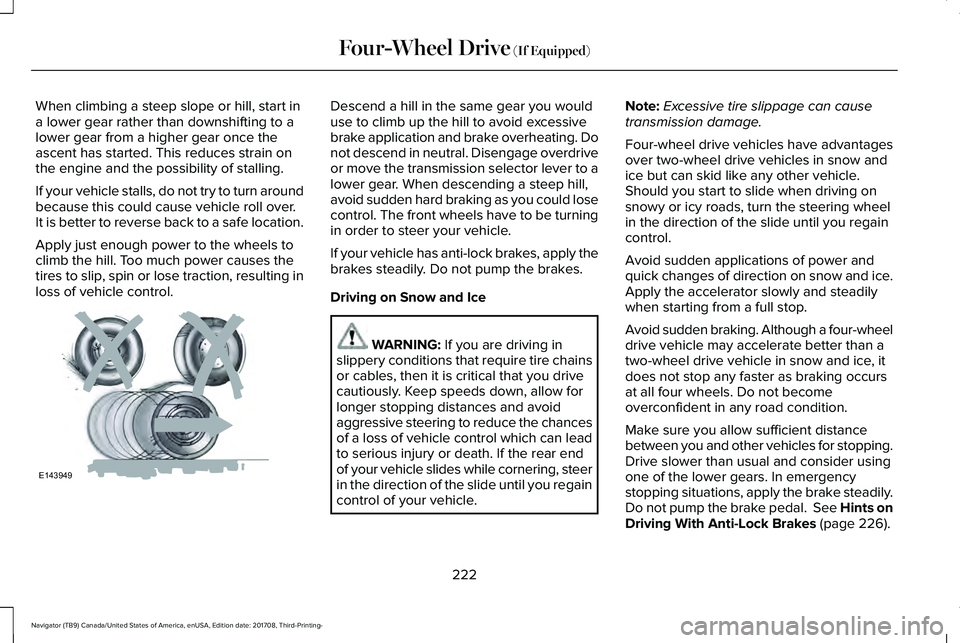
When climbing a steep slope or hill, start ina lower gear rather than downshifting to alower gear from a higher gear once theascent has started. This reduces strain onthe engine and the possibility of stalling.
If your vehicle stalls, do not try to turn aroundbecause this could cause vehicle roll over.It is better to reverse back to a safe location.
Apply just enough power to the wheels toclimb the hill. Too much power causes thetires to slip, spin or lose traction, resulting inloss of vehicle control.
Descend a hill in the same gear you woulduse to climb up the hill to avoid excessivebrake application and brake overheating. Donot descend in neutral. Disengage overdriveor move the transmission selector lever to alower gear. When descending a steep hill,avoid sudden hard braking as you could losecontrol. The front wheels have to be turningin order to steer your vehicle.
If your vehicle has anti-lock brakes, apply thebrakes steadily. Do not pump the brakes.
Driving on Snow and Ice
WARNING: If you are driving inslippery conditions that require tire chainsor cables, then it is critical that you drivecautiously. Keep speeds down, allow forlonger stopping distances and avoidaggressive steering to reduce the chancesof a loss of vehicle control which can leadto serious injury or death. If the rear endof your vehicle slides while cornering, steerin the direction of the slide until you regaincontrol of your vehicle.
Note:Excessive tire slippage can causetransmission damage.
Four-wheel drive vehicles have advantagesover two-wheel drive vehicles in snow andice but can skid like any other vehicle.Should you start to slide when driving onsnowy or icy roads, turn the steering wheelin the direction of the slide until you regaincontrol.
Avoid sudden applications of power andquick changes of direction on snow and ice.Apply the accelerator slowly and steadilywhen starting from a full stop.
Avoid sudden braking. Although a four-wheeldrive vehicle may accelerate better than atwo-wheel drive vehicle in snow and ice, itdoes not stop any faster as braking occursat all four wheels. Do not becomeoverconfident in any road condition.
Make sure you allow sufficient distancebetween you and other vehicles for stopping.Drive slower than usual and consider usingone of the lower gears. In emergencystopping situations, apply the brake steadily.Do not pump the brake pedal. See Hints onDriving With Anti-Lock Brakes (page 226).
222
Navigator (TB9) Canada/United States of America, enUSA, Edition date: 201708, Third-Printing-
Four-Wheel Drive (If Equipped)E143949
Page 228 of 649
GENERAL INFORMATION
Note: Occasional brake noise is normal. Ifa metal-to-metal, continuous grinding orcontinuous squeal sound is present, thebrake linings may be worn-out and anauthorized dealer should check them. If thevehicle has continuous vibration or shudderin the steering wheel while braking, anauthorized dealer should check your vehicle.
Note:Brake dust may accumulate on thewheels, even under normal drivingconditions. Some dust is inevitable as thebrakes wear and does not contribute tobrake noise. See Cleaning the Wheels(page 389).
See Warning Lamps andIndicators (page 113).
Wet brakes result in reduced brakingefficiency. Gently press the brake pedal afew times when driving from a car wash orstanding water to dry the brakes.
Brake Over Accelerator
In the event the accelerator pedal becomesstuck or entrapped, apply steady and firmpressure to the brake pedal to slow thevehicle and reduce engine power. If youexperience this condition, apply the brakesand bring your vehicle to a safe stop. Switchthe engine off, move the transmission to park(P) and apply the parking brake. Inspect theaccelerator pedal and the area around it forany items or debris that may be obstructingits movement.If none are found and thecondition persists, have your vehicle towedto the nearest authorized dealer.
Emergency Brake Assist
Emergency brake assist detects when youbrake heavily by measuring the rate at whichyou press the brake pedal. It providesmaximum braking efficiency as long as youpress the pedal. Emergency brake assistcan reduce stopping distances in criticalsituations.
Anti-lock Brake System
This system helps you maintain steeringcontrol during emergency stops by keepingthe brakes from locking.
This lamp momentarily illuminateswhen you switch the ignition on. Ifthe light does not illuminate duringstart up, remains on or flashes, the anti-lockbraking system may be disabled. Have thesystem checked by an authorized dealer. Ifthe anti-lock brake system is disabled,normal braking is still effective.
If the brake warning lampilluminates with the parking brakereleased, have your brake systemserviced immediately.
It also illuminates momentarily when youswitch the ignition on to confirm the lamp isfunctional. If it does not illuminate when youswitch the ignition on, or begins to flash atany time, have the system checked by anauthorized dealer.
225
Navigator (TB9) Canada/United States of America, enUSA, Edition date: 201708, Third-Printing-
BrakesE138644 E138644