ECO mode LINCOLN NAVIGATOR 2018 Repair Manual
[x] Cancel search | Manufacturer: LINCOLN, Model Year: 2018, Model line: NAVIGATOR, Model: LINCOLN NAVIGATOR 2018Pages: 649, PDF Size: 4.96 MB
Page 532 of 649
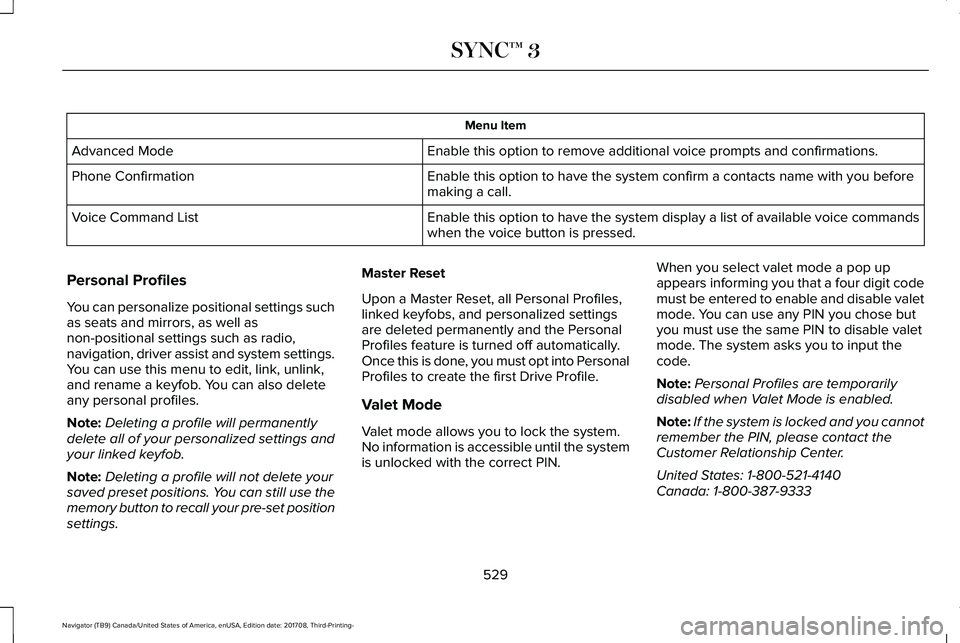
Menu Item
Enable this option to remove additional voice prompts and confirmations.Advanced Mode
Enable this option to have the system confirm a contacts name with you beforemaking a call.Phone Confirmation
Enable this option to have the system display a list of available voice commandswhen the voice button is pressed.Voice Command List
Personal Profiles
You can personalize positional settings suchas seats and mirrors, as well asnon-positional settings such as radio,navigation, driver assist and system settings.You can use this menu to edit, link, unlink,and rename a keyfob. You can also deleteany personal profiles.
Note:Deleting a profile will permanentlydelete all of your personalized settings andyour linked keyfob.
Note:Deleting a profile will not delete yoursaved preset positions. You can still use thememory button to recall your pre-set positionsettings.
Master Reset
Upon a Master Reset, all Personal Profiles,linked keyfobs, and personalized settingsare deleted permanently and the PersonalProfiles feature is turned off automatically.Once this is done, you must opt into PersonalProfiles to create the first Drive Profile.
Valet Mode
Valet mode allows you to lock the system.No information is accessible until the systemis unlocked with the correct PIN.
When you select valet mode a pop upappears informing you that a four digit codemust be entered to enable and disable valetmode. You can use any PIN you chose butyou must use the same PIN to disable valetmode. The system asks you to input thecode.
Note:Personal Profiles are temporarilydisabled when Valet Mode is enabled.
Note:If the system is locked and you cannotremember the PIN, please contact theCustomer Relationship Center.
United States: 1-800-521-4140Canada: 1-800-387-9333
529
Navigator (TB9) Canada/United States of America, enUSA, Edition date: 201708, Third-Printing-
SYNC™ 3
Page 533 of 649
To enable valet mode, enter your chosenPIN. The system then asks to confirm yourPIN by reentering it. The system then locks.
To unlock the system, enter the same pinnumber. The system reconnects to yourphone and all of your options are availableagain.
SYNC™ 3 TROUBLESHOOTING
Your SYNC 3 system is easy to use.However, should questions arise, pleaserefer to the tables below.
To check your cell phone's compatibility,refer to the regional Ford or Lincoln website.
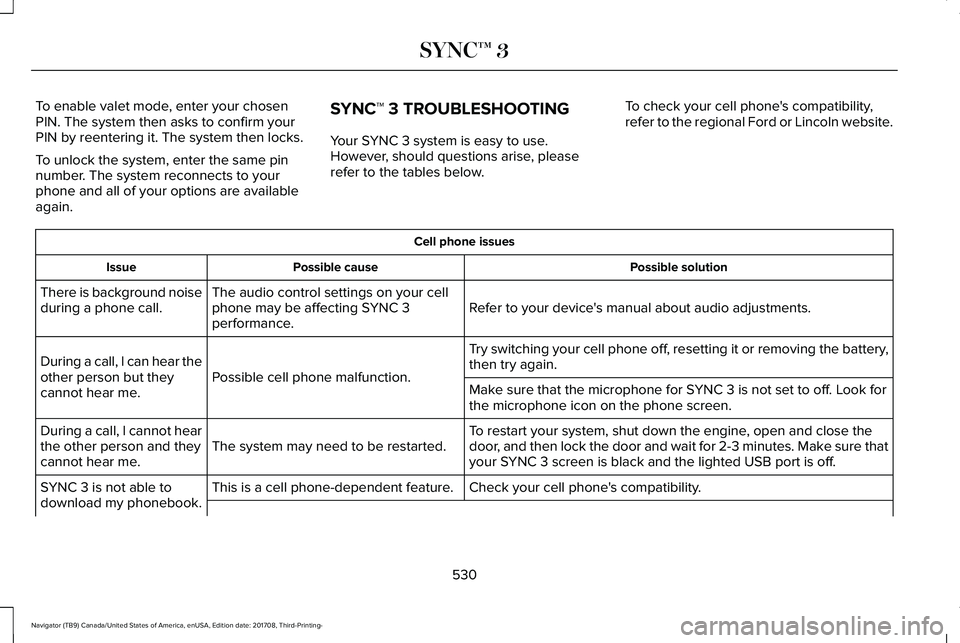
Cell phone issues
Possible solutionPossible causeIssue
Refer to your device's manual about audio adjustments.The audio control settings on your cellphone may be affecting SYNC 3performance.
There is background noiseduring a phone call.
Try switching your cell phone off, resetting it or removing the battery,then try again.Possible cell phone malfunction.During a call, I can hear theother person but theycannot hear me.Make sure that the microphone for SYNC 3 is not set to off. Look forthe microphone icon on the phone screen.
To restart your system, shut down the engine, open and close thedoor, and then lock the door and wait for 2-3 minutes. Make sure thatyour SYNC 3 screen is black and the lighted USB port is off.The system may need to be restarted.During a call, I cannot hearthe other person and theycannot hear me.
Check your cell phone's compatibility.This is a cell phone-dependent feature.SYNC 3 is not able todownload my phonebook.
530
Navigator (TB9) Canada/United States of America, enUSA, Edition date: 201708, Third-Printing-
SYNC™ 3
Page 535 of 649
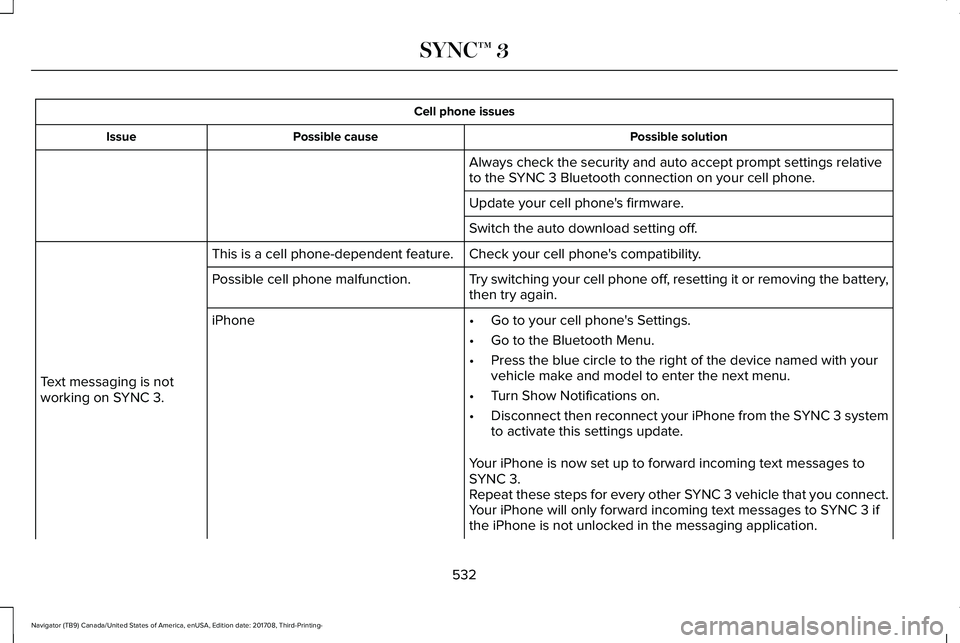
Cell phone issues
Possible solutionPossible causeIssue
Always check the security and auto accept prompt settings relativeto the SYNC 3 Bluetooth connection on your cell phone.
Update your cell phone's firmware.
Switch the auto download setting off.
Check your cell phone's compatibility.This is a cell phone-dependent feature.
Text messaging is notworking on SYNC 3.
Try switching your cell phone off, resetting it or removing the battery,then try again.Possible cell phone malfunction.
iPhone•Go to your cell phone's Settings.
•Go to the Bluetooth Menu.
•Press the blue circle to the right of the device named with yourvehicle make and model to enter the next menu.
•Turn Show Notifications on.
•Disconnect then reconnect your iPhone from the SYNC 3 systemto activate this settings update.
Your iPhone is now set up to forward incoming text messages toSYNC 3.Repeat these steps for every other SYNC 3 vehicle that you connect.Your iPhone will only forward incoming text messages to SYNC 3 ifthe iPhone is not unlocked in the messaging application.
532
Navigator (TB9) Canada/United States of America, enUSA, Edition date: 201708, Third-Printing-
SYNC™ 3
Page 536 of 649
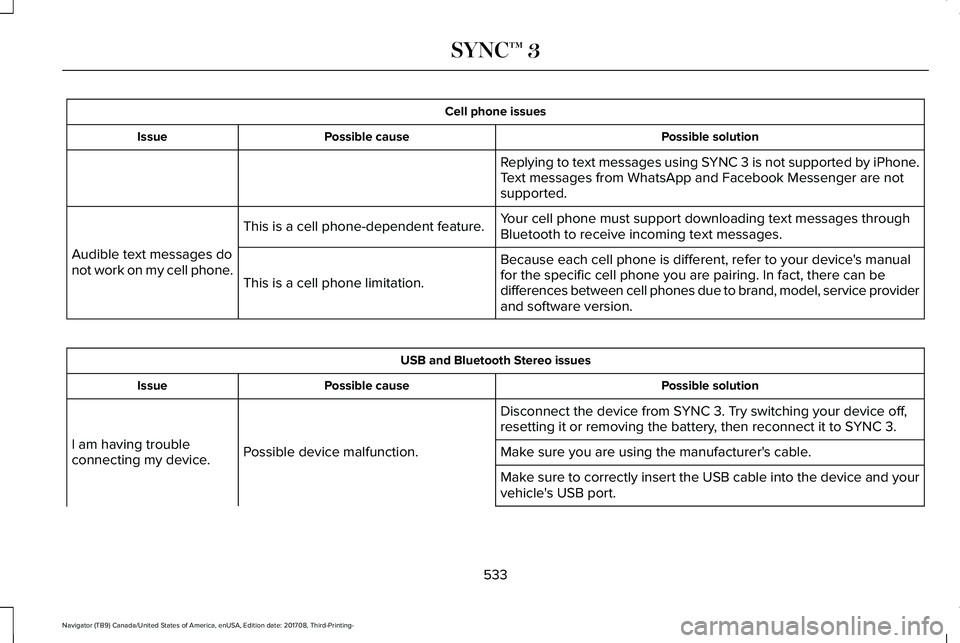
Cell phone issues
Possible solutionPossible causeIssue
Replying to text messages using SYNC 3 is not supported by iPhone.Text messages from WhatsApp and Facebook Messenger are notsupported.
Your cell phone must support downloading text messages throughBluetooth to receive incoming text messages.This is a cell phone-dependent feature.
Audible text messages donot work on my cell phone.Because each cell phone is different, refer to your device's manualfor the specific cell phone you are pairing. In fact, there can bedifferences between cell phones due to brand, model, service providerand software version.
This is a cell phone limitation.
USB and Bluetooth Stereo issues
Possible solutionPossible causeIssue
Disconnect the device from SYNC 3. Try switching your device off,resetting it or removing the battery, then reconnect it to SYNC 3.
Possible device malfunction.I am having troubleconnecting my device.Make sure you are using the manufacturer's cable.
Make sure to correctly insert the USB cable into the device and yourvehicle's USB port.
533
Navigator (TB9) Canada/United States of America, enUSA, Edition date: 201708, Third-Printing-
SYNC™ 3
Page 621 of 649
Taiwan Territory
Note: In accordance with the managementapproach of low-power radio wave radiationmotors:
Article 12: For approved and certifiedlow-power radiation motor models,companies, firms or users must not alter thefrequency, increase the power or change thecharacteristics and functions of the originaldesign without authorization.
Article 14: The usage of low-powerradio-frequency motors must not affectaviation safety and interfere with legaltelecommunications. Should interference bedetected, immediately stop using the deviceand only resume usage after ensuring thatthere is no longer any interference. For thelegal telecommunication and wirelesstelecommunication of the telco, thelow-power radio frequency motor must beable to tolerate legal limits of interferencefrom telecommunication, industrial, scientificand radio wave equipment.
SUNA TRAFFIC CHANNEL – TERMS ANDCONDITIONS
By activating, using and/or accessing theSUNA Traffic Channel, SUNA Predictive orother content or material provided byIntelematics (together, SUNA Productsand/or Services), you must accept certainterms and conditions. The following is a briefsummary of the terms and conditions thatapply to you. To view the full terms andconditions relevant to your use of the SUNAProducts and/or Services, please consult:
Website
www.sunatraffic.com.au/termsandcondi-tions/
1. Acceptance
By using SUNA Products and/or Services,you will be deemed to have accepted andagreed to be bound by the terms andconditions fully detailed at:
Website
www.sunatraffic.com.au/termsandcondi-tions/
2. Intellectual Property
SUNA Products and/or Services are for yourpersonal use. You may not record, orretransmit the content, nor use the contentin association with any other trafficinformation or route guidance service ordevice not approved by Intelematics. Youobtain no right of ownership in anyIntellectual Property Rights (includingcopyright) in the data that is used to provideSUNA Products and/or Services.
3. Appropriate Use
618
Navigator (TB9) Canada/United States of America, enUSA, Edition date: 201708, Third-Printing-
Appendices
Page 638 of 649
Location of the Spare Tire and Tools.............415Tire Change Procedure.....................................416
Changing the 12V Battery..........................373Battery Management System..........................375
Changing the Engine Air Filter...................381Changing the Wiper Blades.......................376Checking MyKey System Status.................70MyKey Distance.....................................................70Number of Admin Keys.......................................70Number of MyKeys...............................................70
Checking the Wiper Blades.......................375Childminder Mirror........................................108Child Restraint and SeatbeltMaintenance..................................................49Child Restraint Positioning............................37Child Safety.......................................................19General Information..............................................19
Child Safety Locks..........................................39Left-Hand Side.......................................................39Right-Hand Side....................................................39
Cleaning Leather Seats..............................388Cleaning Products........................................382Materials...............................................................382
Cleaning the Engine....................................385Cleaning the Exterior...................................383Cleaning the Headlamps..................................383Exterior Chrome Parts.......................................384Exterior Plastic Parts..........................................384
Stripes or Graphics.............................................384Underbody...........................................................384Under Hood.........................................................384
Cleaning the Instrument Panel andInstrument Cluster Lens...........................388Cleaning the Interior....................................386Cleaning Black Label or PresidentialInterior..............................................................386
Cleaning the Wheels...................................389Cleaning the Windows and WiperBlades...........................................................385Clearing All MyKeys.......................................70Climate Control...............................................151Climate Controlled Seats............................179Ventilated Seats...................................................179
Coolant CheckSee: Engine Coolant Check............................366
Crash Sensors and Airbag Indicator.........60Creating a MyKey...........................................69Programming and Changing ConfigurableSettings...............................................................69
Cross Traffic Alert.........................................276Blocked Sensors.................................................279Switching the System Off and On..................279System Errors......................................................279System Lights, Messages and AudibleAlerts.................................................................279System Limitations.............................................279
Using the Cross Traffic Alert System.............276
Cruise Control.................................................90Principle of Operation.......................................256Type One................................................................90Type Two..................................................................91
Cruise controlSee: Using Cruise Control...............................256
Customer Assistance...................................334
D
Data Recording................................................10Event Data Recording...........................................10Service Data Recording.......................................10
Daytime Running Lamps...............................98Type One - Conventional(Non-Configurable)..........................................98Type Two - Configurable....................................99
Direction Indicators.......................................101Lane Change.........................................................101
Doors and Locks.............................................72Drive Mode Control.....................................285Lincoln Drive Modes..........................................285
Driver Alert.....................................................265Using Driver Alert...............................................266
Driver and Passenger Airbags....................53Children and Airbags...........................................54
635
Navigator (TB9) Canada/United States of America, enUSA, Edition date: 201708, Third-Printing-
Index
Page 640 of 649
Power Exterior Mirrors.......................................105Signal Indicator Mirrors......................................107
F
Fastening the Seatbelts.................................41Rear Inflatable Seatbelt.......................................45Seatbelt Locking Modes.....................................43Using Seatbelts During Pregnancy..................43
Flat TireSee: Changing a Road Wheel..........................414
Floor Mats......................................................325Fog Lamps - FrontSee: Front Fog Lamps........................................100
Foot PedalsSee: Adjusting the Pedals..................................93
Four-Wheel Drive..........................................216Front Fog Lamps...........................................100Front Parking Aid..........................................239Obstacle Distance Indicator............................239
Front Passenger Sensing System..............55Fuel and Refueling........................................199Fuel Consumption.......................................205Advertised Capacity..........................................205Fuel Economy.....................................................205
Fuel Filler Funnel Location........................200Fuel Filter........................................................373
Fuel Quality...................................................200Choosing the Right Fuel..................................200
Fuel Shutoff....................................................328Fuses...............................................................342Fuse Specification Chart............................342Passenger Compartment Fuse Panel...........352Power Distribution Box.....................................342
G
Garage Door OpenerSee: Universal Garage Door Opener..............181
Gauges..............................................................112Engine Coolant Temperature Gauge..............113Fuel Gauge.............................................................113Left and Right Information Group.....................113Status Bar...............................................................113
GearboxSee: Transmission...............................................210
General Information on RadioFrequencies..................................................62Intelligent Access.................................................62
General Maintenance Information...........552Multi-Point Inspection.......................................555Owner Checks and Services...........................553Protecting Your Investment.............................552Why Maintain Your Vehicle?............................552
Why Maintain Your Vehicle at YourDealership?.....................................................552
Getting Assistance Outside the U.S. andCanada.........................................................338Getting the Services You Need................334Away From Home...............................................334
Global Opening and Closing......................105Closing the Windows.........................................105Opening the Windows.......................................105
H
Hazard Flashers............................................328Headlamp AdjustingSee: Adjusting the Headlamps.......................376
Headlamp Exit Delay.....................................98HeadrestSee: Head Restraints..........................................159
Head Restraints.............................................159Adjusting the Head Restraint...........................159Front Seat Manual Head Restraints................159
Head Up Display............................................147Configuring The Head Up Display..................148Head Up Display (HUD).....................................147Head Up Display Information...........................147Maintaining Your Head Up Display.................150
Heated Seats..................................................177Front Seats............................................................177
637
Navigator (TB9) Canada/United States of America, enUSA, Edition date: 201708, Third-Printing-
Index
Page 645 of 649
Running-InSee: Breaking-In.................................................324
Running Out of Fuel.....................................201Adding Fuel From a Portable FuelContainer..........................................................201Filling a Portable Fuel Container.....................201
S
Safety Canopy™...............................................58Safety Precautions........................................199Satellite Radio...............................................442Satellite Radio Electronic Serial Number(ESN)..................................................................444Satellite Radio Reception Factors..................443SiriusXM Satellite Radio Service.....................443Troubleshooting..................................................444
Scheduled Maintenance Record..............563Scheduled Maintenance............................552Seatbelt Extension.........................................50Seatbelt Height Adjustment.........................46Seatbelt Reminder..........................................47Belt-Minder™...........................................................47
Seatbelts...........................................................40Principle of Operation.........................................40
Seatbelt Warning Lamp and IndicatorChime..............................................................46Conditions of operation.......................................47
Seats.................................................................158Security..............................................................83Settings............................................................510911 Assist................................................................517Ambient Lighting................................................526Bluetooth...............................................................513Clock.......................................................................512Display..................................................................528General.................................................................523Media Player..........................................................511Mobile Apps........................................................522Navigation.............................................................519Personal Profiles.................................................529Phone.....................................................................513Radio.......................................................................517SiriusXM.................................................................518Sound.....................................................................510Valet Mode...........................................................529Vehicle..................................................................526Voice Control.......................................................528Wi-Fi and Hotspot..............................................524
Side Airbags.....................................................57Side Sensing System..................................240Obstacle Distance Indicator............................240
Sitting in the Correct Position....................158Snow ChainsSee: Using Snow Chains..................................408
Spare WheelSee: Changing a Road Wheel..........................414
Special Notices.................................................13New Vehicle Limited Warranty...........................13On Board Diagnostics Data LinkConnector............................................................14Special Instructions...............................................13
Special Operating Conditions ScheduledMaintenance...............................................560Exceptions............................................................563
Speed ControlSee: Cruise Control...........................................256
Stability Control.............................................233Principle of Operation.......................................233
Starting a Gasoline Engine.........................192Automatic Engine Shutdown............................193Failure to Start......................................................193Guarding Against Exhaust Fumes...................194Important Ventilating Information...................194Stopping the Engine When Your Vehicle isMoving...............................................................194Stopping the Engine When Your Vehicle isStationary..........................................................194
Starting and Stopping the Engine..............191General Information.............................................191
Steering..........................................................280Electric Power Steering....................................280
Steering Wheel................................................89
642
Navigator (TB9) Canada/United States of America, enUSA, Edition date: 201708, Third-Printing-
Index
Page 647 of 649
Unique Driving Characteristics..................196Universal Garage Door Opener.................181HomeLink Wireless Control System................181
USB Port.........................................................445Using Adaptive Cruise Control.................257Automatic Cancellation.....................................261Blocked Sensor...................................................263Canceling the Set Speed..................................261Changing the Set Speed...................................261Detection Issues.................................................262Following a Vehicle...........................................259Following a Vehicle to a CompleteStop...................................................................259Hilly Condition and Trailer Tow Usage..........261Overriding the Set Speed................................260Park Brake Application......................................261Resuming the Set Speed..................................261Setting the Adaptive Cruise Speed...............258Setting the Adaptive Cruise Speed When YourVehicle is Stationary......................................258Setting the Gap Distance.................................259Switching Adaptive Cruise Control Off..........261Switching Adaptive Cruise Control On.........258Switching to Normal Cruise Control..............264System Not Available........................................263
Using Cruise Control...................................256Switching Cruise Control Off...........................257Switching Cruise Control On...........................256
Using Four-Wheel Drive..............................2164X4 Indicator Lights............................................2164X4 Modes............................................................216Driving Off-Road With Truck and UtilityVehicles.............................................................219How Your Vehicle Differs From OtherVehicles.............................................................218Operating 4WD Vehicles With Spare orMismatched Tires...........................................218
Using Hill Descent Control........................236Hill Descent Modes...........................................236
Using MyKey With Remote StartSystems..........................................................70Using Power Running Boards......................87Automatic Power Deploy....................................87Automatic Power Stow........................................87Bounce-back..........................................................88Enabling and Disabling.......................................88Manual Power Deploy.........................................88
Using Snow Chains.....................................408Using Stability Control................................234Stability Control and Traction Control with RollStability Control™ (RSC™)...............................234
Using Traction Control................................232Switching the System On and Off..................232System Indicator Lights and Messages........232
Using Voice Recognition............................463Audio Voice Commands...................................465
Climate Voice Commands...............................466Mobile App Voice Commands.........................471Navigation Voice Commands.........................469Phone Voice Commands..................................466SiriusXM Traffic and Travel Link VoiceCommands........................................................471Voice Settings Commands...............................472
Utilizing the Mediation/Arbitration Program(Canada Only).............................................337
V
Vehicle Care..................................................382General Information...........................................382
Vehicle Certification Label.........................424Vehicle Identification Number..................424Vehicle Storage............................................390Battery....................................................................391Body.......................................................................390Brakes....................................................................391Cooling system....................................................391Engine...................................................................390Fuel system..........................................................390General.................................................................390Miscellaneous......................................................391Removing Vehicle From Storage....................391Tires........................................................................391
644
Navigator (TB9) Canada/United States of America, enUSA, Edition date: 201708, Third-Printing-
Index