ECO mode LINCOLN NAVIGATOR 2018 Workshop Manual
[x] Cancel search | Manufacturer: LINCOLN, Model Year: 2018, Model line: NAVIGATOR, Model: LINCOLN NAVIGATOR 2018Pages: 649, PDF Size: 4.96 MB
Page 394 of 649
Cooling system
•Protect against freezing temperatures.
•When removing your vehicle fromstorage, check coolant fluid level.Confirm that there are no cooling systemleaks and that fluid is at therecommended level.
Battery
•Check and recharge as necessary. Keepconnections clean.
•If storing your vehicle for more than 30days without recharging the battery, werecommend that you disconnect thebattery cables to maintain battery chargefor quick starting.
Note:It is necessary to reset memoryfeatures if battery cables are disconnected.
Brakes
•Make sure the brakes and parking brakerelease fully.
Tires
•Maintain recommended air pressure.
Miscellaneous
•Make sure all linkages, cables, levers andpins under your vehicle are covered withgrease to prevent rust.
•Move vehicles at least 25 ft (7.5 m) every15 days to lubricate working parts andprevent corrosion.
Removing Vehicle From Storage
When your vehicle is ready to come out ofstorage, do the following:
•Wash your vehicle to remove any dirt orgrease film build-up on window surfaces.
•Check windshield wipers for anydeterioration.
•Check under the hood for any foreignmaterial that may have collected duringstorage such as mice or squirrel nests.
•Check the exhaust for any foreignmaterial that may have collected duringstorage.
•Check tire pressures and set tire inflationper the Tire Label.
•Check brake pedal operation. Drive yourvehicle 15 ft (4.5 m) back and forth toremove rust build-up.
•Check fluid levels (including coolant, oiland gas) to make sure there are no leaks,and fluids are at recommended levels.
•If you remove the battery, clean thebattery cable ends and check fordamage.
Contact an authorized dealer if you have anyconcerns or issues.
BODY STYLING KITS
The distance between the underside of yourvehicle and the ground is less than that ofother models. Drive with extreme care toavoid damage to your vehicle.
391
Navigator (TB9) Canada/United States of America, enUSA, Edition date: 201708, Third-Printing-
Vehicle Care
Page 396 of 649
Utility vehicles and trucks handle differentlythan passenger cars in the various drivingconditions that are encountered on streets,highways and off-road. Utility vehicles andtrucks are not designed for cornering atspeeds as high as passenger cars any morethan low-slung sports cars are designed toperform satisfactorily under off-roadconditions.
Study your owner's manual and anysupplements for specific information aboutequipment features, instructions for safedriving and additional precautions to reducethe risk of an accident or serious injury.
Four-wheel drive system (If Equipped)
WARNING: Do not becomeoverconfident in the ability of four-wheeldrive vehicles. Although a four-wheel drivevehicle may accelerate better than atwo-wheel drive vehicle in low tractionsituations, it won't stop any faster thantwo-wheel drive vehicles. Always drive ata safe speed.
A vehicle equipped with four-wheel drive,when selected, has the ability to use all fourwheels to power itself. This increases tractionwhich may enable you to safely drive overterrain and road conditions that aconventional two-wheel drive vehicle cannot.
Power is supplied to all four wheels througha transfer case or power transfer unit.Four-wheel drive vehicles allow you to selectdifferent modes as necessary. Forinformation on transfer case operation andshifting procedures, See Four-Wheel Drive(page 216). For information on transfer casemaintenance, See Maintenance (page 361).You should become thoroughly familiar withthis information before you operate yourvehicle.
On some four-wheel drive vehicles, the initialshift from two-wheel to four-wheel drivewhen the vehicle is moving can cause amomentary clunk and ratcheting sound.These sounds are normal and are not causefor concern.
In four-wheel drive vehicles, the size of thespare tire relative to the remaining tires canhave an effect on the 4x4 system. If there isa significant difference between the size ofa spare and the remaining tires, four-wheeldrive functionality may be limited. See UsingFour-Wheel Drive (page 216).
How your vehicle differs from othervehicles
Sport utility vehicles and trucks can differfrom some other vehicles in a few noticeableways. Your vehicle may be:
393
Navigator (TB9) Canada/United States of America, enUSA, Edition date: 201708, Third-Printing-
Wheels and Tires
Page 409 of 649
•Make sure that you have the correcttire and wheel size.
•Lubricate the tire bead and wheelbead seat area again.
•Stand at a minimum of 12 ft (3.66 m)away from the wheel and tire
assembly.
•Use both eye and ear protection.
WARNING: For a mountingpressure more than 20 psi (1.38 bar)greater than the maximum pressure,a Ford dealer or other tire serviceprofessional should do the mounting.
WARNING: Always inflate steelcarcass tires with a remote air fill withthe person inflating standing at aminimum of 12 ft (3.66 m) away fromthe wheel and tire assembly.
Important: Remember to replace thewheel valve stems when the road tiresare replaced on your vehicle.
The two front tires or two rear tiresshould generally be replaced as a pair,except if the vehicle is equipped withfour wheel drive. Vehicles equipped withfour wheel drive should have all fourtires replaced simultaneously. Unevenlyworn tires, mismatched makes, modelsor brands can be different in size,resulting in potential damage to the fourwheel drive system.
The tire pressure sensors mounted inthe wheels are not designed to be usedin aftermarket wheels.
The use of wheels or tires notrecommended by us may affect theoperation of your tire pressuremonitoring system.
If the tire pressure monitoring system
indicator is flashing, the system ismalfunctioning. Your replacement tiremight be incompatible with your tirepressure monitoring system, or somecomponent of the system may bedamaged.
Safety Practices
WARNING: If your vehicle is stuckin snow, mud or sand, do not rapidlyspin the tires; spinning the tires cantear the tire and cause an explosion.A tire can explode in as little as threeto five seconds.
WARNING: Do not spin thewheels at over 34 mph (55 km/h). Thetires may fail and injure a passengeror bystander.
Driving habits have a great deal to dowith your tire mileage and safety.
*Observe posted speed limits
*Avoid fast starts, stops and turns
*Avoid potholes and objects on the road
*Do not run over curbs or hit the tireagainst a curb when parking
406
Navigator (TB9) Canada/United States of America, enUSA, Edition date: 201708, Third-Printing-
Wheels and Tires
Page 438 of 649
CD and CD Player Information
Note:CD units play commercially pressed4.7 in (12 cm) audio compact discs only. Dueto technical incompatibility, certainrecordable and re-recordable compact discsmay not function correctly when used in thevehicle’s CD player.
Note: Do not insert CDs with homemadepaper (adhesive) labels into the CD playeras the label may peel and cause the CD tobecome jammed. You should use apermanent felt tip marker rather thanadhesive labels on your homemade CDs. Ballpoint pens may damage CDs. Ask anauthorized dealer for more information.
Note:Do not use any irregularly shapeddiscs or discs with a scratch protection filmattached.
Always handle discs by their edges only. Clean the disc with an approved CD cleaneronly. Wipe it from the center of the disctoward the edge. Do not clean in a circularmotion.
Do not expose discs to direct sunlight or heatsources for extended periods.
MP3 and WMA Track and FolderStructure
Audio systems capable of recognizing andplaying MP3 and WMA individual tracks andfolder structures work as follows:
•There are two different modes for MP3and WMA disc playback: MP3 and WMAtrack mode (system default) and MP3 andWMA folder mode.
•MP3 and WMA track mode ignores anyfolder structure on the MP3 and WMAdisc. The player numbers each MP3 andWMA track on the disc (noted by the MP3or WMA file extension) from T001 to amaximum of T255. The maximum numberof playable MP3 and WMA files may beless depending on the structure of theCD and exact model of radio present.
•MP3 and WMA folder mode representsa folder structure consisting of one levelof folders. The CD player numbers allMP3 and WMA tracks on the disc (notedby the MP3 or WMA file extension) andall folders containing MP3 and WMA files,from F001 (folder) T001 (track) to F253T255.
•Creating discs with only one level offolders helps with navigation through thedisc files.
If you are burning your own MP3 and WMAdiscs, it is important to understand how thesystem reads the structures you create. Whilevarious files may be present (files withextensions other than MP3 and WMA), onlyfiles with the MP3 and WMA extension areplayed; other files are ignored by the system.This enables you to use the same MP3 andWMA disc for a variety of tasks on your workcomputer, home computer and yourin-vehicle system.
435
Navigator (TB9) Canada/United States of America, enUSA, Edition date: 201708, Third-Printing-
Audio System
Page 439 of 649
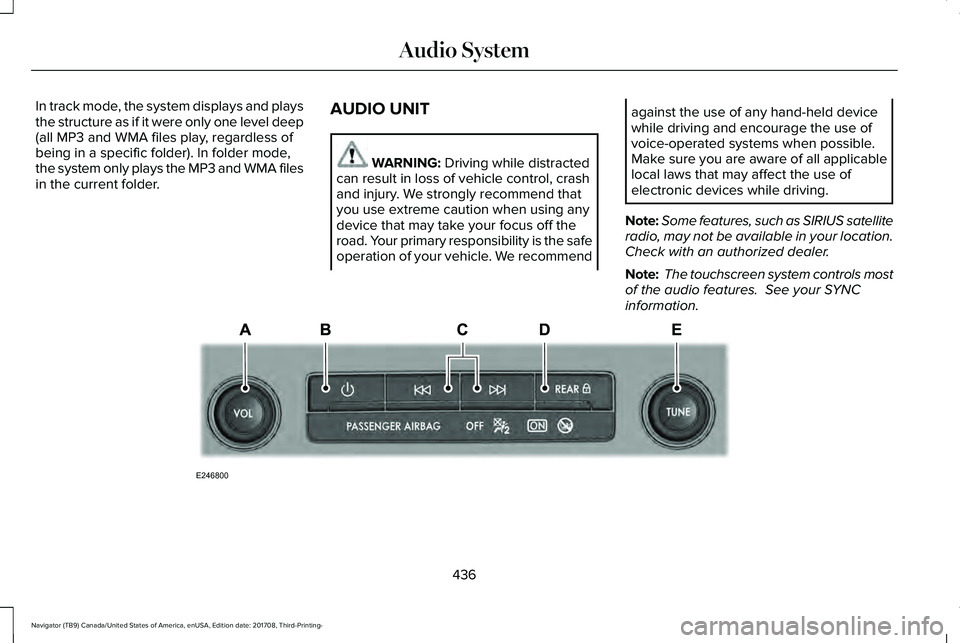
In track mode, the system displays and playsthe structure as if it were only one level deep(all MP3 and WMA files play, regardless ofbeing in a specific folder). In folder mode,the system only plays the MP3 and WMA filesin the current folder.
AUDIO UNIT
WARNING: Driving while distractedcan result in loss of vehicle control, crashand injury. We strongly recommend thatyou use extreme caution when using anydevice that may take your focus off theroad. Your primary responsibility is the safeoperation of your vehicle. We recommend
against the use of any hand-held devicewhile driving and encourage the use ofvoice-operated systems when possible.Make sure you are aware of all applicablelocal laws that may affect the use ofelectronic devices while driving.
Note:Some features, such as SIRIUS satelliteradio, may not be available in your location.Check with an authorized dealer.
Note: The touchscreen system controls mostof the audio features. See your SYNCinformation.
436
Navigator (TB9) Canada/United States of America, enUSA, Edition date: 201708, Third-Printing-
Audio SystemE246800
Page 447 of 649
For more information on extendedsubscription terms (a service fee is required),the online media player and a complete listof SiriusXM satellite radio channels, andother features, please visit www.siriusxm.com
in the United States, www.siriusxm.ca inCanada, or call SiriusXM at 1-888-539-7474.Satellite Radio Electronic SerialNumber (ESN)
You need your ESN to activate, modify ortrack your satellite radio account. When insatellite radio mode, tune to channel 0.
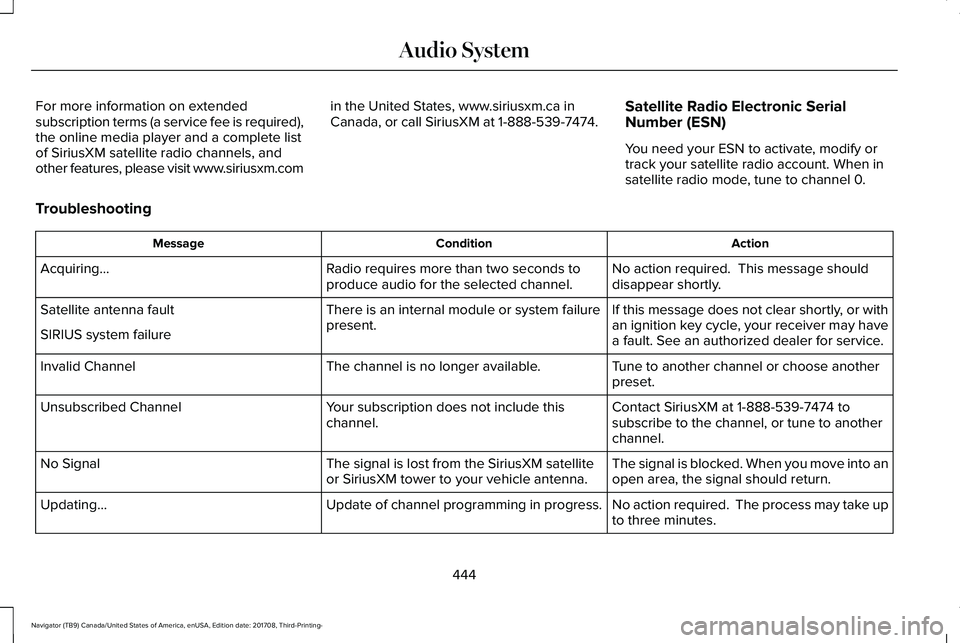
Troubleshooting
ActionConditionMessage
No action required. This message shoulddisappear shortly.Radio requires more than two seconds toproduce audio for the selected channel.Acquiring…
If this message does not clear shortly, or withan ignition key cycle, your receiver may havea fault. See an authorized dealer for service.
There is an internal module or system failurepresent.Satellite antenna fault
SIRIUS system failure
Tune to another channel or choose anotherpreset.The channel is no longer available.Invalid Channel
Contact SiriusXM at 1-888-539-7474 tosubscribe to the channel, or tune to anotherchannel.
Your subscription does not include thischannel.Unsubscribed Channel
The signal is blocked. When you move into anopen area, the signal should return.The signal is lost from the SiriusXM satelliteor SiriusXM tower to your vehicle antenna.No Signal
No action required. The process may take upto three minutes.Update of channel programming in progress.Updating…
444
Navigator (TB9) Canada/United States of America, enUSA, Edition date: 201708, Third-Printing-
Audio System
Page 457 of 649
The selection menu expands and differentoptions appear.
•Press the up and down arrows to scrollthrough the modes.
•Press the right arrow to enter the mode,use the left arrow to exit the mode.
•Press the up and down arrows to makeadjustments within the chosen mode.
•Press OK to confirm your selection.
Note:If your vehicle is not equipped withnavigation, compass appears in the displayinstead of navigation. If you press the rightarrow to go into the compass menu, you cansee the compass graphic. The compassdisplays the direction in which the vehicle istraveling, not true direction (for example, ifthe vehicle is traveling west, the middle ofthe compass graphic displays west; northdisplays to the left of west though its truedirection is to the right of west).
Using the Steering Wheel Controls
Depending on your vehicle and optionpackage, you can use different controls onyour steering wheel to interact with thetouchscreen system in different ways.
VOL: Control the volume of audio output.
Mute: Mute the audio output.
Voice: Press to start a voice session. Pressagain to stop the voice prompt andimmediately begin speaking. Press and holdto end a voice session.
SEEK NEXT:
•While in radio mode, press to seekbetween memory presets.
•While in USB, Bluetooth Audio or CDmode, press to seek between songs orpress and hold to fast seek.
SEEK PREVIOUS:
•While in radio mode, press to seekbetween memory presets.
•While in USB, Bluetooth Audio or CDmode, press to seek between songs orpress and hold to fast seek.
PHONE ACCEPT: Press to answer a call orswitch between calls.
PHONE REJECT: Press to end a call or rejectan incoming call.
Note:On some models, SEEK NEXT may becombined with PHONE REJECT and SEEKPREVIOUS may be combined with PHONEACCEPT.
M: Touch the control repeatedly to switchbetween media sources (modes).
See Steering Wheel (page 89).
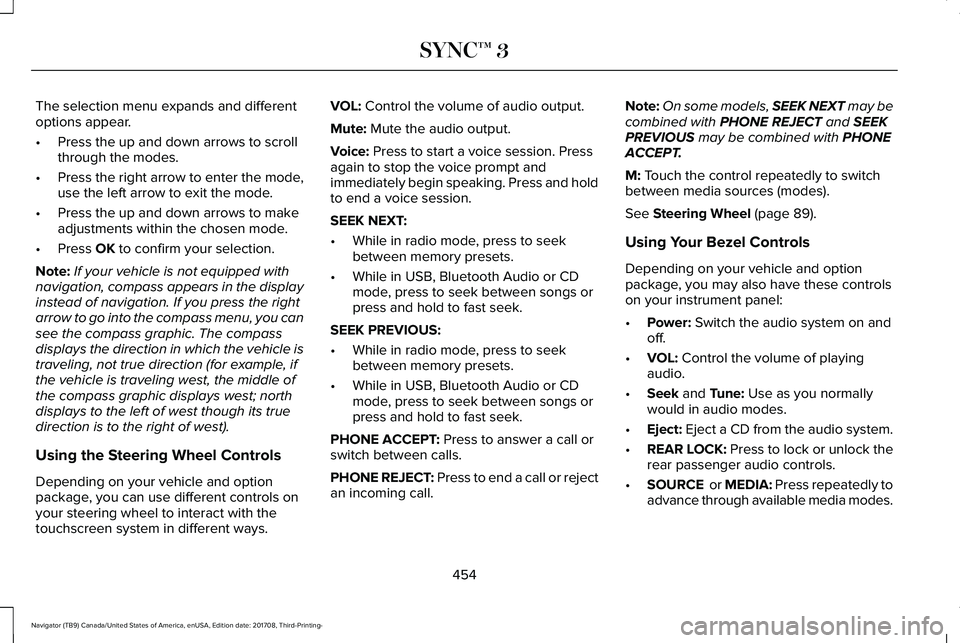
Using Your Bezel Controls
Depending on your vehicle and optionpackage, you may also have these controlson your instrument panel:
•Power: Switch the audio system on andoff.
•VOL: Control the volume of playingaudio.
•Seek and Tune: Use as you normallywould in audio modes.
•Eject: Eject a CD from the audio system.
•REAR LOCK: Press to lock or unlock therear passenger audio controls.
•SOURCE or MEDIA: Press repeatedly toadvance through available media modes.
454
Navigator (TB9) Canada/United States of America, enUSA, Edition date: 201708, Third-Printing-
SYNC™ 3
Page 488 of 649
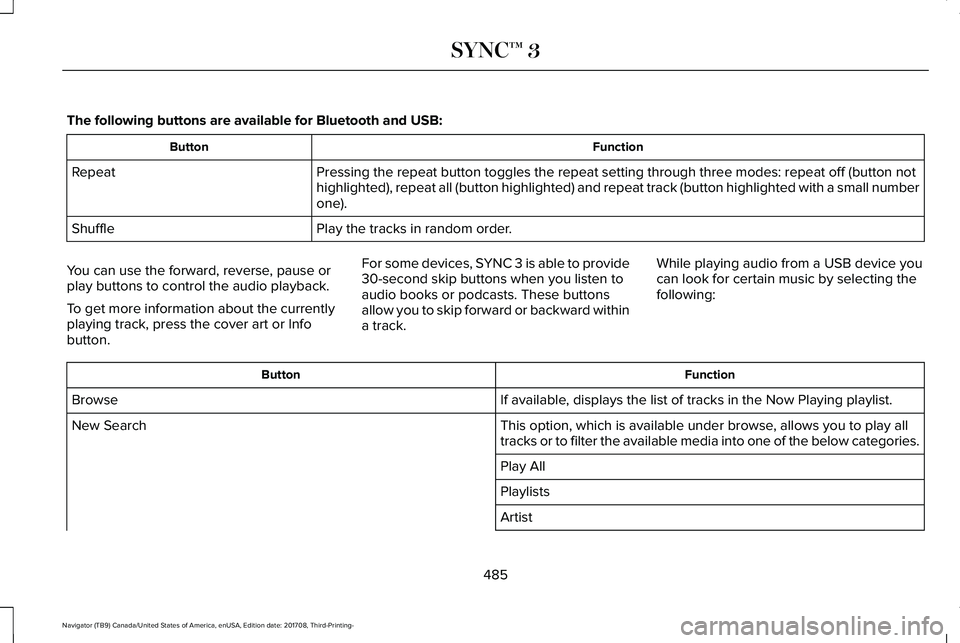
The following buttons are available for Bluetooth and USB:
FunctionButton
Pressing the repeat button toggles the repeat setting through three modes: repeat off (button nothighlighted), repeat all (button highlighted) and repeat track (button highlighted with a small numberone).
Repeat
Play the tracks in random order.Shuffle
You can use the forward, reverse, pause orplay buttons to control the audio playback.
To get more information about the currentlyplaying track, press the cover art or Infobutton.
For some devices, SYNC 3 is able to provide30-second skip buttons when you listen toaudio books or podcasts. These buttonsallow you to skip forward or backward withina track.
While playing audio from a USB device youcan look for certain music by selecting thefollowing:
FunctionButton
If available, displays the list of tracks in the Now Playing playlist.Browse
This option, which is available under browse, allows you to play alltracks or to filter the available media into one of the below categories.New Search
Play All
Playlists
Artist
485
Navigator (TB9) Canada/United States of America, enUSA, Edition date: 201708, Third-Printing-
SYNC™ 3
Page 499 of 649
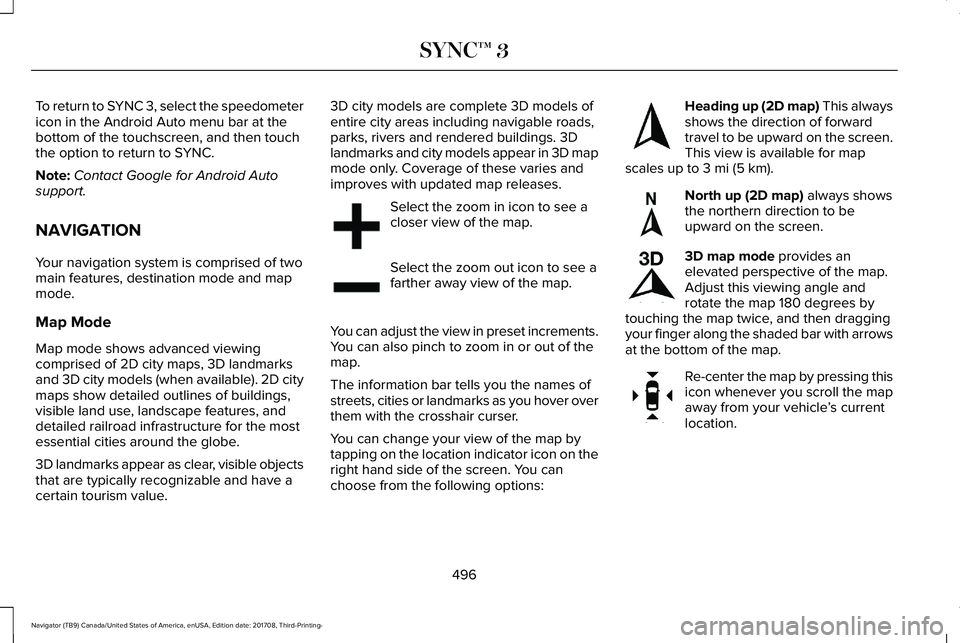
To return to SYNC 3, select the speedometericon in the Android Auto menu bar at thebottom of the touchscreen, and then touchthe option to return to SYNC.
Note:Contact Google for Android Autosupport.
NAVIGATION
Your navigation system is comprised of twomain features, destination mode and mapmode.
Map Mode
Map mode shows advanced viewingcomprised of 2D city maps, 3D landmarksand 3D city models (when available). 2D citymaps show detailed outlines of buildings,visible land use, landscape features, anddetailed railroad infrastructure for the mostessential cities around the globe.
3D landmarks appear as clear, visible objectsthat are typically recognizable and have acertain tourism value.
3D city models are complete 3D models ofentire city areas including navigable roads,parks, rivers and rendered buildings. 3Dlandmarks and city models appear in 3D mapmode only. Coverage of these varies andimproves with updated map releases.
Select the zoom in icon to see acloser view of the map.
Select the zoom out icon to see afarther away view of the map.
You can adjust the view in preset increments.You can also pinch to zoom in or out of themap.
The information bar tells you the names ofstreets, cities or landmarks as you hover overthem with the crosshair curser.
You can change your view of the map bytapping on the location indicator icon on theright hand side of the screen. You canchoose from the following options:
Heading up (2D map) This alwaysshows the direction of forwardtravel to be upward on the screen.This view is available for mapscales up to 3 mi (5 km).
North up (2D map) always showsthe northern direction to beupward on the screen.
3D map mode provides anelevated perspective of the map.Adjust this viewing angle androtate the map 180 degrees bytouching the map twice, and then draggingyour finger along the shaded bar with arrowsat the bottom of the map.
Re-center the map by pressing thisicon whenever you scroll the mapaway from your vehicle’s currentlocation.
496
Navigator (TB9) Canada/United States of America, enUSA, Edition date: 201708, Third-Printing-
SYNC™ 3E207752 E207753 E207750 E207749 E207748 E207751
Page 504 of 649
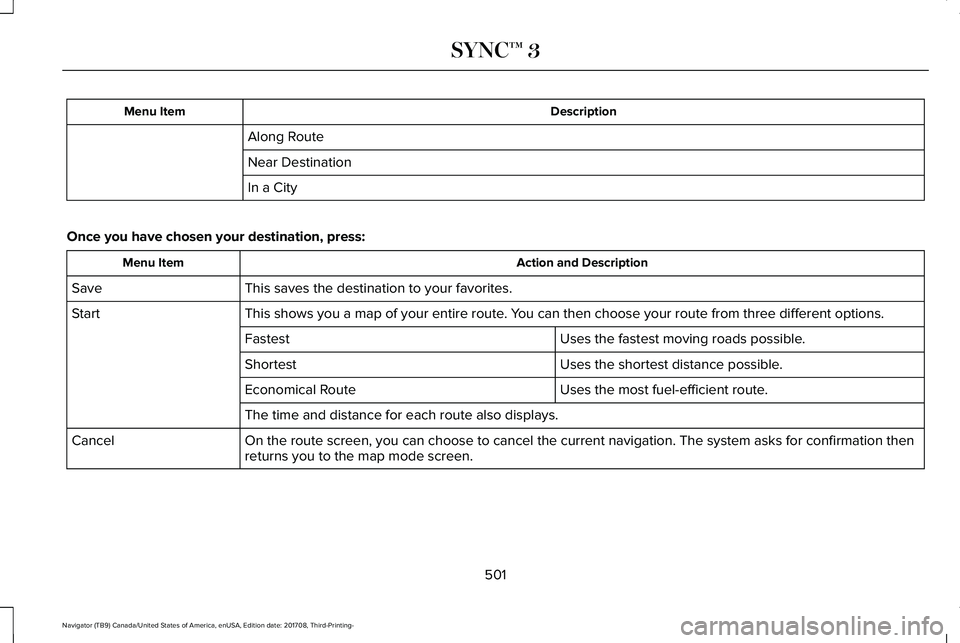
DescriptionMenu Item
Along Route
Near Destination
In a City
Once you have chosen your destination, press:
Action and DescriptionMenu Item
This saves the destination to your favorites.Save
This shows you a map of your entire route. You can then choose your route from three different options.Start
Uses the fastest moving roads possible.Fastest
Uses the shortest distance possible.Shortest
Uses the most fuel-efficient route.Economical Route
The time and distance for each route also displays.
On the route screen, you can choose to cancel the current navigation. The system asks for confirmation thenreturns you to the map mode screen.Cancel
501
Navigator (TB9) Canada/United States of America, enUSA, Edition date: 201708, Third-Printing-
SYNC™ 3