ignition LINCOLN NAVIGATOR 2018 Repair Manual
[x] Cancel search | Manufacturer: LINCOLN, Model Year: 2018, Model line: NAVIGATOR, Model: LINCOLN NAVIGATOR 2018Pages: 649, PDF Size: 4.96 MB
Page 235 of 649
PRINCIPLE OF OPERATION
The traction control system helps avoid drivewheel spin and loss of traction.
If your vehicle begins to slide, the systemapplies the brakes to individual wheels and,when needed, reduces engine power at thesame time. If the wheels spin whenaccelerating on slippery or loose surfaces,the system reduces engine power in orderto increase traction.
USING TRACTION CONTROL
WARNING: The stability and tractioncontrol light illuminates steadily if thesystem detects a failure. Make sure youdid not manually disable the tractioncontrol system using the informationdisplay controls or the switch. If the stabilitycontrol and traction control light is still
illuminating steadily, have the systemserviced by an authorized dealerimmediately. Operating your vehicle withthe traction control disabled could lead toan increased risk of loss of vehicle control,vehicle rollover, personal injury and death.
The system automatically turns on each timeyou switch the ignition on.
If your vehicle is stuck in mud or snow,switching traction control off may bebeneficial as this allows the wheels to spin.
Note:When you switch traction control off,stability control remains fully active.
Switching the System On and Off
You can switch traction control on and offthrough the information display controls. SeeGeneral Information (page 119).
When you switch the system off, a messageand an illuminated icon appear on theinstrument cluster.
Switch traction control on again to return thesystem to normal operations.
Note:Your vehicle may have MyKeyrestrictions regarding this feature. SeePrinciple of Operation (page 68).
System Indicator Lights and Messages
The stability and traction controllight temporarily illuminates onengine start-up and flashes:
•When a driving condition activates eitherof the systems.
•If a problem occurs in either of thesystems.
The stability and traction controloff light temporarily illuminates onengine start-up and stays on whenyou switch the traction control system off.
232
Navigator (TB9) Canada/United States of America, enUSA, Edition date: 201708, Third-Printing-
Traction ControlE138639 E130458
Page 236 of 649
PRINCIPLE OF OPERATION
WARNING: Vehicle modificationsinvolving braking system, aftermarket roofracks, suspension, steering system, tireconstruction and wheel and tire size maychange the handling characteristics of yourvehicle and may adversely affect theperformance of the electronic stabilitycontrol system. In addition, installing anystereo loudspeakers may interfere withand adversely affect the electronic stabilitycontrol system. Install any aftermarketstereo loudspeaker as far as possible fromthe front center console, the tunnel, andthe front seats in order to minimize the riskof interfering with the electronic stabilitycontrol sensors. Reducing theeffectiveness of the electronic stabilitycontrol system could lead to an increasedrisk of loss of vehicle control, vehiclerollover, personal injury and death.
WARNING: Remember that evenadvanced technology cannot defy the lawsof physics. It’s always possible to losecontrol of a vehicle due to inappropriatedriver input for the conditions. Aggressivedriving on any road condition can causeyou to lose control of your vehicleincreasing the risk of personal injury orproperty damage. Activation of theelectronic stability control system is anindication that at least some of the tireshave exceeded their ability to grip theroad; this could reduce the operator’sability to control the vehicle potentiallyresulting in a loss of vehicle control, vehiclerollover, personal injury and death. If yourelectronic stability control system activates,SLOW DOWN.
The system automatically turns on each timeyou switch the ignition on.
If a fault occurs in either the stability controlor the traction control system, you mayexperience the following conditions:
•The stability and traction control lightilluminates steadily.
•The stability control and traction controlsystems do not enhance your vehicle'sability to maintain traction of the wheels.
If a driving condition activates either thestability control or the traction control systemyou may experience the following conditions:
•The stability and traction control lightflashes.
•Your vehicle slows down.
•Reduced engine power.
•A vibration in the brake pedal.
•The brake pedal is stiffer than usual.
•If the driving condition is severe and yourfoot is not on the brake, the brake pedalmay move as the system applies higherbrake force.
The stability control system has severalfeatures built into it to help you maintaincontrol of your vehicle:
233
Navigator (TB9) Canada/United States of America, enUSA, Edition date: 201708, Third-Printing-
Stability Control
Page 240 of 649
PRINCIPLE OF OPERATION
WARNING: To help avoid personalinjury, always use caution when in reverse(R) and when using the sensing system.
WARNING: The system may notdetect objects with surfaces that absorbreflection. Always drive with due care andattention. Failure to take care may resultin a crash.
WARNING: Traffic control systems,inclement weather, air brakes, externalmotors and fans may affect the correctoperation of the sensing system.This maycause reduced performance or false alerts.
WARNING: The system may notdetect small or moving objects, particularlythose close to the ground.
Note:Certain add-on devices installedaround the bumper or fascia may createfalse beeps. For example, large trailerhitches, bike or surfboard racks, license platebrackets, bumper covers or any other devicethat may block the normal detection zoneof the system.
Note:Keep the sensors, located on thebumper or fascia, free from snow, ice andlarge accumulations of dirt. If the sensorsare covered, the system’s accuracy can beaffected. Do not clean the sensors with sharpobjects.
Note:If your vehicle sustains damage to thebumper or fascia, leaving it misaligned orbent, the sensing zone may be alteredcausing inaccurate measurement ofobstacles or false alarms. See yourauthorized technician.
Note:When a trailer is connected to yourvehicle, the rear parking aid may detect thetrailer and therefore provide warnings.Disable the rear parking aid when a traileris connected to prevent these warnings.
Note:The sensing system cannot be turnedoff when a MyKey is present. See Principleof Operation (page 68).
We recommend that you take some time toget to know the system and its limitations byreading this section.
The sensing system warns the driver ofobstacles within a certain range of yourvehicle. The system automatically turns oneach time you switch the ignition on.
When receiving a detection warning, theradio volume reduces to a predeterminedlevel. After the warning goes away, the radiovolume returns to the previous level.
You can turn the system on or offby pressing the parking aid button.If your vehicle does not have aparking aid button, the system can beswitched off through the information displaymenu or from the pop-up message thatappears once you shift the transmission intoreverse (R). See General Information (page119).
237
Navigator (TB9) Canada/United States of America, enUSA, Edition date: 201708, Third-Printing-
Parking AidsE139213
Page 244 of 649
When you shift to reverse (R), the sidesensing system provides audible warningswhen your vehicle is moving and obstaclesare detected within 24 in (60 cm) and areinside the driving path of your vehicle. Whenyou stop your vehicle the audible warningstops after two seconds.
Note:Visual distance indication remains onwhen the transmission is in reverse (R).
When you shift to drive (D) or any otherforward gear, for example, low (L), sport (S)or any forward gear in manual transmission,the side sensing system provides audibleand visual distance warnings when yourvehicle is moving below a speed of 5 mph(8 km/h) and obstacles are detected within24 in (60 cm) and are inside the driving pathof your vehicle. Once your vehicle reachesa standstill condition, the audible warningstops after two seconds and visual indicationstops after four seconds.
If the transmission is in neutral (N), the sidesensing system provides visual distanceindication only when your vehicle is movingbelow a speed of 5 mph (8 km/h) and thereis a front or rear parking aid obstacledetected, and the side obstacle is within24 in (60 cm) from the side of your vehicle.When you stop your vehicle the visualdistance indication stops after four seconds.
If the side sensing system is not available,the side distance indicator blocks do notappear.
The side sensing system is not availableunder the following condition:
•If you switch the traction control systemoff.
The side sensing system may not beavailable until you have driven approximatelythe length of your vehicle in order for thesystem to reinitialize if:
•You switch the ignition on, off and backon.
•Your vehicle remains stationary for overtwo minutes.
•The anti-lock brake system is activated.
•The traction control system is activated.
•When the steering wheel angleinformation is not available, the sidesensing system is not available. Thevehicle must be driven at least 492 ft(150 m) above 19 mph (30 km/h) torecover the steering wheel angleinformation.
ACTIVE PARK ASSIST (IF EQUIPPED)
WARNING: You must remain in yourvehicle when the system turns on. At alltimes, you are responsible for controllingyour vehicle, supervising the system andintervening, if required. Failure to take caremay result in the loss of control of yourvehicle, serious personal injury or death.
WARNING: The sensors may notdetect objects in heavy rain or otherconditions that cause interference.
241
Navigator (TB9) Canada/United States of America, enUSA, Edition date: 201708, Third-Printing-
Parking Aids
Page 246 of 649
Using Active Park Assist
Selecting an Active Park Assist Mode
Press the button once to activateparallel parking. Press the buttona second time to activateperpendicular parking. If you press thebutton again the system switches off.
If your vehicle is parked and after you switchthe ignition on, you can use the informationdisplay to toggle through the modes. Pressthe button to switch the system on and openthe system menu in the information display.
Note:If your vehicle is parked, the defaultmode is parallel park out assist. However, ifyou did not use active park assist to parallelpark your vehicle, use the informationdisplay to select park out assist.
Note:You can repeatedly press the activepark assist button to toggle through themodes only after moving your vehicleapproximately 33 ft (10 m).
To toggle through the modes, use thebuttons on the information display to selectthe following:
•Parallel parking.
•Perpendicular parking.
•Parallel park out assist.
•Switch the system off.
Note:There is no time limit for togglingthrough the modes.
Parallel Parking
The system detects available parallel parkingspaces and steers your vehicle into thespace. You control the accelerator, gearshiftand brakes. The system visually and audiblyguides you into a parallel parking space.
Press the button once to searchfor a parking space.
Note:You can also switch the system onafter you have already driven partially orcompletely past a parking space. Press theactive park assist button and the systeminforms you if you have recently passed asuitable parking space.
When the vehicle speed is less than 22 mph(35 km/h), the system scans both sides ofyour vehicle for an available parking space.A message and a graphic appear in theinformation display to indicate the system issearching for a parking space. Use thedirection indicator lever to search for aparking space on the driver or passengerside of your vehicle.
Note:The system scans both sides of yourvehicle and offers parking spaces one sideat a time if you do not use the directionindicator.
Note:The system defaults to the passengerside if you do not use the direction indicator.
Drive your vehicle approximately 3 ft (1 m)and parallel to the other parked vehicleswhen searching for a parking space.
243
Navigator (TB9) Canada/United States of America, enUSA, Edition date: 201708, Third-Printing-
Parking AidsE146186 E146186 E130107
Page 260 of 649
Resuming the Set Speed
Press RES.
Switching Cruise Control Off
Note:You erase the set speed when youswitch the system off.
Press OFF when the system is in standbymode, or switch the ignition off.
USING ADAPTIVE CRUISE
CONTROL (IF EQUIPPED)
WARNING: Always pay closeattention to changing road conditions whenusing adaptive cruise control. The systemdoes not replace attentive driving. Failingto pay attention to the road may result ina crash, serious injury or death.
WARNING: Do not use the adaptivecruise control when entering or leaving ahighway, on roads with intersections orroundabouts or non-vehicular traffic orroads that are winding, slippery, unpaved,or steep slopes.
WARNING: Do not use the systemin poor visibility, for example fog, heavyrain, spray or snow.
WARNING: Do not use the systemwhen towing a trailer with aftermarkettrailer brake controls. Aftermarket trailerbrakes will not function properly when youswitch the system on because the brakesare electronically controlled. Failing to doso may result in loss of vehicle control,which could result in serious injury.
WARNING: Do not use tire sizesother than those recommended becausethis can affect the normal operation of thesystem. Failure to do so may result in a lossof vehicle control, which could result inserious injury.
WARNING: Adaptive cruise controlmay not detect stationary or slow movingvehicles below 6 mph (10 km/h).
WARNING: Adaptive cruise controldoes not detect pedestrians or objects inthe road.
WARNING: Adaptive cruise controldoes not detect oncoming vehicles in thesame lane.
WARNING: Adaptive cruise controlis not a crash warning or avoidancesystem.
Note:It is your responsibility to stay alert,drive safely and be in control of the vehicleat all times.
The system adjusts your vehicle speed tomaintain the set gap between you and thevehicle in front of you in the same lane. Youcan select four gap settings.
The system uses a radar sensor that projectsa beam directly in front of your vehicle.
257
Navigator (TB9) Canada/United States of America, enUSA, Edition date: 201708, Third-Printing-
Cruise Control
Page 264 of 649
Changing the Set Speed
•Press RES+ or SET- to change the setspeed in small increments.
•Press the accelerator or brake pedal untilyou reach the desired speed. Press RES+or SET-.
•Press and hold RES+ or SET- to changethe set speed in large increments.Release the control when you reach thedesired speed.
The system may apply the brakes to slowthe vehicle to the new set speed. The setspeed displays continuously in theinformation display when the system isactive.
Canceling the Set Speed
Press CAN or tap the brake pedal. The setspeed does not erase.
Resuming the Set Speed
Note:Only use resume if you are aware ofthe set speed and intend to return to it.
Press RES+. Your vehicle speed returns tothe previously set speed and gap setting. The set speed displays continuously in theinformation display when the system isactive.
Automatic Cancellation
Automatic cancellation can also occur if:
•The tires lose traction.
•You apply the parking brake.
Park Brake Application
Automatic parking brake application andcancellation occurs if:
•You unbuckle the seatbelt and open thedoor after you stop the vehicle.
•You hold the vehicle at a stopcontinuously for more than three minutes.
Hilly Condition and Trailer Tow Usage
Note:An audible alarm sounds and thesystem shuts down if it applies brakes for anextended period of time. This allows thebrakes to cool. The system functionsnormally again after the brakes cool.
Note:When towing with adaptive cruisecontrol, switch on Tow/Haul Mode.
Note:Tow/Haul mode increases the timegaps and allows more distance for braking.
Select a lower gear when the system isactive in situations such as prolongeddownhill driving on steep grades, forexample in mountainous areas. The systemneeds additional engine braking in thesesituations to reduce the load on the vehicle’sregular brake system to prevent it fromoverheating.
Switching Adaptive Cruise Control Off
Note:You erase the set speed and gapsetting when you switch the system off.
Press OFF when the system is in standbymode, or switch the ignition off.
261
Navigator (TB9) Canada/United States of America, enUSA, Edition date: 201708, Third-Printing-
Cruise Control
Page 269 of 649
Using Driver Alert
Switching the system on and off
You may switch the system on or off throughthe information display. See GeneralInformation (page 119). When activated, thesystem monitors your alertness level basedupon your driving behavior in relation to thelane markings, and other factors.
System Warnings
Note: The system does not issue warningsbelow approximately 40 mph (64 km/h).
The warning system is in two stages. At firstthe system issues a temporary warning thatyou need to take a rest. This message willonly appear for a short time. If the systemdetects further reduction in driving alertness,another warning may be issued which willremain in the information display for a longertime. Press OK on the steering wheel controlto clear the warning. When active the systemwill run automatically in the background andonly issue a warning if required.
Resetting the System
You can reset the system by either:
•Switching the ignition off and on.
•Stopping your vehicle and then openingand closing the driver’s door.
LANE KEEPING SYSTEM (IF EQUIPPED)
WARNING: You are responsible forcontrolling your vehicle at all times. Thesystem is designed to be an aid and doesnot relieve you of your responsibility todrive with due care and attention. Failureto follow this instruction could result in theloss of control of your vehicle, personalinjury or death.
WARNING: Always drive with duecare and attention when using andoperating the controls and features on yourvehicle.
WARNING: In cold and severeweather conditions the system may notfunction. Rain, snow and spray can all limitsensor performance.
WARNING: The system will notoperate if the sensor cannot track the roadlane markings.
WARNING: The sensor mayincorrectly track lane markings as otherstructures or objects. This can result in afalse or missed warning.
WARNING: Large contrasts in outsidelighting can limit sensor performance.
WARNING: The system may notoperate properly if the sensor is blocked.Keep the windshield free from obstruction.
WARNING: If damage occurs in theimmediate area surrounding the sensor,have your vehicle checked as soon aspossible.
266
Navigator (TB9) Canada/United States of America, enUSA, Edition date: 201708, Third-Printing-
Driving Aids
Page 283 of 649
Note:The system turns on each time youswitch the ignition on and you shift intoreverse (R). If you temporarily switch thesystem off, it turns on the next time youswitch the ignition on.
Note:The system may not correctly operatewhen towing a trailer. For vehicles with atrailer tow module and tow bar approved byus, the system turns off when you attach atrailer. For vehicles with an aftermarkettrailer tow module or tow bar, werecommend that you switch the system offwhen you attach a trailer.
To permanently switch the system off,contact an authorized dealer.
STEERING
Electric Power Steering
WARNING: The electric powersteering system has diagnostic checks thatcontinuously monitor the system. If a faultis detected, a message displays in theinformation display. Stop your vehicle assoon as it is safe to do so. Switch theignition off. After at least 10 seconds,switch the ignition on and watch theinformation display for a steering systemwarning message. If a steering systemwarning message returns, have the systemchecked by an authorized dealer.
WARNING: If the system detects anerror, you may not feel a difference in thesteering, however a serious condition mayexist. Obtain immediate service from anauthorized dealer, failure to do so mayresult in loss of steering control.
Your vehicle has an electric power steeringsystem. There is no fluid reservoir. Nomaintenance is required.
If your vehicle loses electrical power whileyou are driving, electric power steeringassistance is lost. The steering system stilloperates and you can steer your vehiclemanually. Manually steering your vehiclerequires more effort.
Extreme continuous steering may increasethe effort required for you to steer yourvehicle. This increased effort preventsoverheating and permanent damage to thesteering system. You do not lose the abilityto steer your vehicle manually. Typicalsteering and driving maneuvers allow thesystem to cool and return to normaloperation.
Steering Tips
If the steering wanders or pulls, check for:
•Correct tire pressures.
•Uneven tire wear.
•Loose or worn suspension components.
•Loose or worn steering components.
•Improper vehicle alignment.
280
Navigator (TB9) Canada/United States of America, enUSA, Edition date: 201708, Third-Printing-
Driving Aids
Page 287 of 649
Adjusting the Pre-Collision AssistSettings
You can adjust the following settings byusing the information display controls. SeeGeneral Information (page 119).
•You can adjust the Alert and DistanceAlert sensitivity to one of three possiblesettings.
•You can switch the Distance Indicationand Alert function on or off.
•If required, you can switch Active Brakingon or off.
Note:Active braking automatically turns onevery time you switch the ignition on.
Blocked Sensors
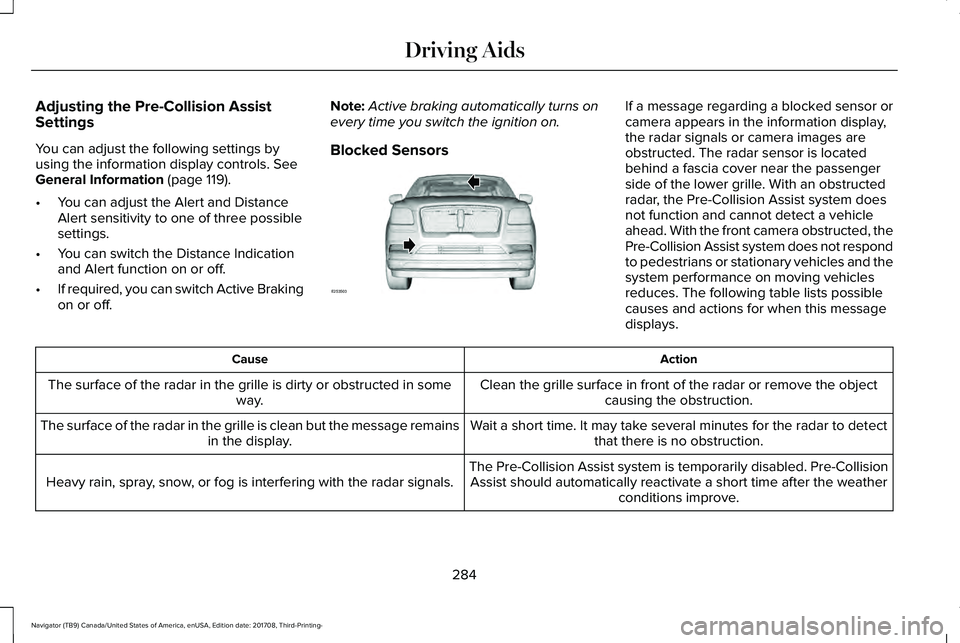
If a message regarding a blocked sensor orcamera appears in the information display,the radar signals or camera images areobstructed. The radar sensor is locatedbehind a fascia cover near the passengerside of the lower grille. With an obstructedradar, the Pre-Collision Assist system doesnot function and cannot detect a vehicleahead. With the front camera obstructed, thePre-Collision Assist system does not respondto pedestrians or stationary vehicles and thesystem performance on moving vehiclesreduces. The following table lists possiblecauses and actions for when this messagedisplays.
ActionCause
Clean the grille surface in front of the radar or remove the objectcausing the obstruction.The surface of the radar in the grille is dirty or obstructed in someway.
Wait a short time. It may take several minutes for the radar to detectthat there is no obstruction.The surface of the radar in the grille is clean but the message remainsin the display.
The Pre-Collision Assist system is temporarily disabled. Pre-CollisionAssist should automatically reactivate a short time after the weatherconditions improve.Heavy rain, spray, snow, or fog is interfering with the radar signals.
284
Navigator (TB9) Canada/United States of America, enUSA, Edition date: 201708, Third-Printing-
Driving AidsE253503