brake LINCOLN NAVIGATOR 2019 Owners Manual
[x] Cancel search | Manufacturer: LINCOLN, Model Year: 2019, Model line: NAVIGATOR, Model: LINCOLN NAVIGATOR 2019Pages: 645, PDF Size: 5.02 MB
Page 413 of 645
When Inflating Your Tires
WARNING: Do not use the tirepressure displayed in the informationdisplay as a tire pressure gauge. Failure tofollow this instruction could result inpersonal injury or death.
When putting air into your tires (such as at agas station or in your garage), the tirepressure monitoring system may not respondimmediately to the air added to your tires.
It may take up to two minutes of driving over20 mph (32 km/h) for the light to turn off afteryou have filled your tires to therecommended inflation pressure.
How Temperature Affects Your TirePressure
The tire pressure monitoring system monitorstire pressure in each pneumatic tire. Whiledriving in a normal manner, a typicalpassenger tire inflation pressure mayincrease about 2–4 psi (14–28 kPa) from acold start situation. If the vehicle is stationaryovernight with the outside temperature
significantly lower than the daytimetemperature, the tire pressure may decreaseabout 3 psi (21 kPa) for a drop of 30°F (17°C)in ambient temperature. This lower pressurevalue may be detected by the tire pressuremonitoring system as being significantlylower than the recommended inflationpressure and activate the system warninglight for low tire pressure. If the low tirepressure warning light is on, visually checkeach tire to verify that no tire is flat. If one ormore tires are flat, repair as necessary.Check the air pressure in the road tires. Ifany tire is under-inflated, carefully drive thevehicle to the nearest location where air canbe added to the tires. Inflate all the tires tothe recommended inflation pressure.
CHANGING A ROAD WHEEL
WARNING: If the tire pressuremonitor sensor becomes damaged it maynot function.
Note:You should only use tire sealants inroadside emergencies as they may causedamage to the tire pressure monitoringsystem sensor.
Note:The tire pressure monitoring systemindicator light illuminates when the sparetire is in use. To restore the full function ofthe monitoring system, all road wheelsequipped with tire pressure monitoringsensors must be mounted on this vehicle.
If you get a flat tire when driving, do notapply the brake heavily. Instead, graduallydecrease your speed. Hold the steeringwheel firmly and slowly move to a safe placeon the side of the road.
Have a flat serviced by an authorized dealerin order to prevent damage to the systemsensors. See Tire Pressure MonitoringSystem (page 405). Replace the spare tirewith a road tire as soon as possible. Duringrepairing or replacing of the flat tire, havethe authorized dealer inspect the systemsensor for damage.
410
Navigator (TB9) Canada/United States of America, enUSA, Edition date: 201808, First-Printing
Wheels and Tires
Page 415 of 645
LocationItem
Under the vehicle, just forward of the rear bumperSpare tire
Under the access panel located in the floor compartment behind therear seatJack and tool kit bag
Tire Change Procedure
WARNING: Only use replacementtires and wheels that are the same size,load index, speed rating and type (such asP-metric versus LT-metric or all-seasonversus all-terrain) as those originallyprovided by Ford. The recommended tireand wheel size may be found on either theSafety Compliance Certification Label(affixed to either the door hinge pillar,door-latch post, or the door edge thatmeets the door-latch post, next to thedriver's seating position), or the Tire Labelwhich is located on the B-Pillar or edge ofthe driver's door. If this information is notfound on these labels, then you shouldcontact your authorized dealer as soon as
possible. Use of any tire or wheel notrecommended by Ford can affect thesafety and performance of your vehicle,which could result in an increased risk ofloss of vehicle control, vehicle rollover,personal injury and death.
WARNING: When one of the frontwheels is off the ground, the transmissionalone will not prevent the vehicle frommoving or slipping off the jack, even if thetransmission is in park (P).
WARNING: To help prevent yourvehicle from moving when changing awheel, shift the transmission into park (P),set the parking brake and use anappropriate block or wheel chock tosecure the wheel diagonally opposite tothe wheel being changed. For example,when changing the front left wheel, placean appropriate block or wheel chock onthe right rear wheel.
WARNING: Do not attempt to changea tire on the side of the vehicle close tomoving traffic. Pull far enough off the roadto avoid the danger of being hit whenoperating the jack or changing the wheel.
412
Navigator (TB9) Canada/United States of America, enUSA, Edition date: 201808, First-Printing
Wheels and Tires
Page 416 of 645
WARNING: Always use the jackprovided as original equipment with yourvehicle. If using a jack other than the oneprovided, make sure the jack capacity isadequate for the vehicle weight, includingany vehicle cargo or modifications. If youare unsure if the jack capacity is adequate,contact the authorized dealer.
WARNING: Switch off the runningboards before jacking or placing any objectunder your vehicle. Never place your handbetween the extended running board andyour vehicle. A moving running board maycause injury.
WARNING: Only use the spare wheelcarrier to stow the wheel provided withyour vehicle. Other wheel sizes couldcause the spare wheel carrier to fail if itdoes not fit securely or is too heavy.
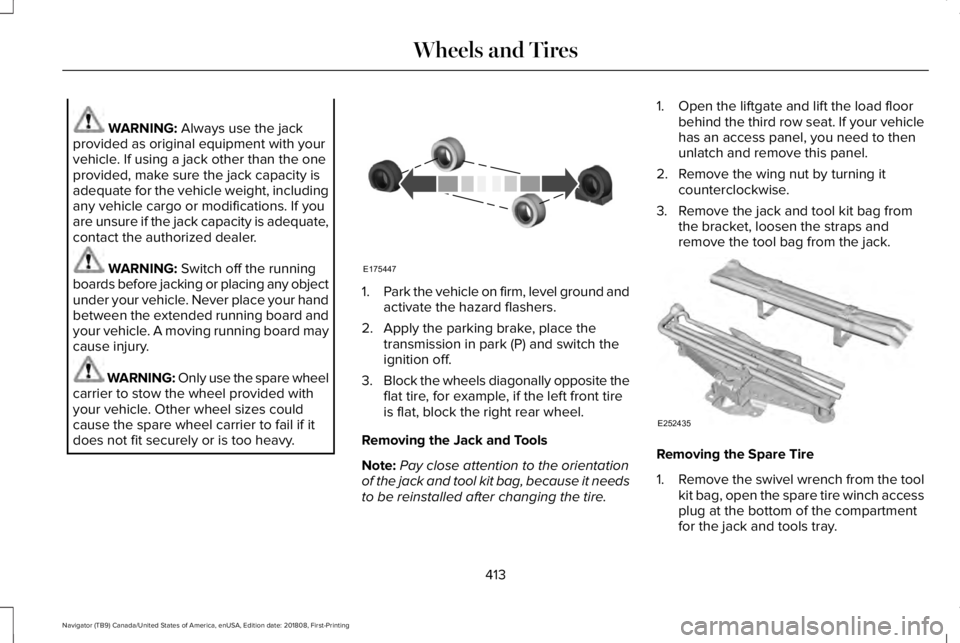
1.Park the vehicle on firm, level ground andactivate the hazard flashers.
2. Apply the parking brake, place thetransmission in park (P) and switch theignition off.
3.Block the wheels diagonally opposite theflat tire, for example, if the left front tireis flat, block the right rear wheel.
Removing the Jack and Tools
Note:Pay close attention to the orientationof the jack and tool kit bag, because it needsto be reinstalled after changing the tire.
1. Open the liftgate and lift the load floorbehind the third row seat. If your vehiclehas an access panel, you need to thenunlatch and remove this panel.
2. Remove the wing nut by turning itcounterclockwise.
3. Remove the jack and tool kit bag fromthe bracket, loosen the straps andremove the tool bag from the jack.
Removing the Spare Tire
1.Remove the swivel wrench from the toolkit bag, open the spare tire winch accessplug at the bottom of the compartmentfor the jack and tools tray.
413
Navigator (TB9) Canada/United States of America, enUSA, Edition date: 201808, First-Printing
Wheels and TiresE175447 E252435
Page 419 of 645
Stowing the Flat or Spare Tire
1.Lay the tire on the ground, near the rearof the vehicle, with the valve stem sidefacing up.
2. Slide the wheel partially under thevehicle and install the retainer throughthe wheel center. You may have toremove the wheel center cap prior topushing the retainer through the centerof the wheel. To remove the center cap,press it off with the jack tool from theinner side of the wheel. Pull on the cableto align the components at the end of thecable.
3.Using the swivel wrench, insert it throughthe access hole behind the third row seatand engage the winch.
4. Turn the swivel wrench clockwise untilthe tire is raised to its stowed positionunderneath the vehicle. The wrenchbecomes harder to turn and the sparetire winch ratchets or slips when the tireis raised to maximum tightness. A clickingsound can be heard from the winchindicating that the tire is properly stowed.
5.Carefully place all tools back into the toolkit bag.
6.Reinstall the tool kit bag on the jack andtighten the straps.
7.Reinstall the jack properly on the bracketand secure with the wing nut.
8. Close the access hole with the rubberplug.
9. If the vehicle has an access panel,reinstall.
10. Unblock the wheel.
TECHNICAL SPECIFICATIONS
Wheel Lug Nut Torque Specifications
WARNING: When you install a wheel, always remove any corrosion, dirt or foreign materials present on the mounting surfaces of thewheel or the surface of the wheel hub, brake drum or brake disc that contacts the wheel. Make sure to secure any fasteners that attachthe rotor to the hub so they do not interfere with the mounting surfaces of the wheel. Installing wheels without correct metal-to-metal contactat the wheel mounting surfaces can cause the wheel nuts to loosen and the wheel to come off while your vehicle is in motion, resulting inloss of vehicle control, personal injury or death.
416
Navigator (TB9) Canada/United States of America, enUSA, Edition date: 201808, First-Printing
Wheels and Tires
Page 423 of 645
VEHICLE IDENTIFICATION
NUMBER
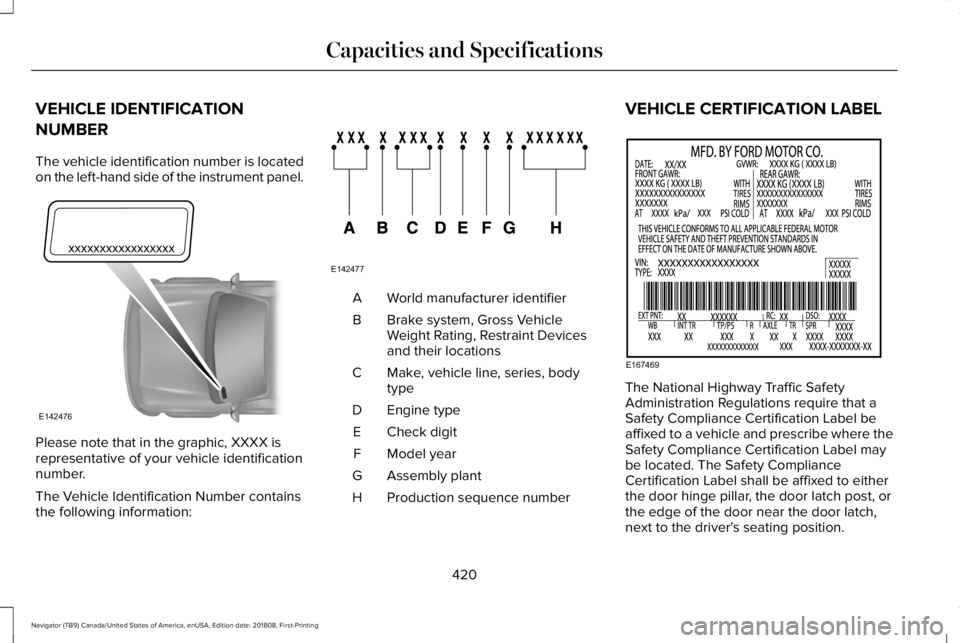
The vehicle identification number is locatedon the left-hand side of the instrument panel.
Please note that in the graphic, XXXX isrepresentative of your vehicle identificationnumber.
The Vehicle Identification Number containsthe following information:
World manufacturer identifierA
Brake system, Gross VehicleWeight Rating, Restraint Devicesand their locations
B
Make, vehicle line, series, bodytypeC
Engine typeD
Check digitE
Model yearF
Assembly plantG
Production sequence numberH
VEHICLE CERTIFICATION LABEL
The National Highway Traffic SafetyAdministration Regulations require that aSafety Compliance Certification Label beaffixed to a vehicle and prescribe where theSafety Compliance Certification Label maybe located. The Safety ComplianceCertification Label shall be affixed to eitherthe door hinge pillar, the door latch post, orthe edge of the door near the door latch,next to the driver's seating position.
420
Navigator (TB9) Canada/United States of America, enUSA, Edition date: 201808, First-Printing
Capacities and SpecificationsE142476 E142477 E167469
Page 425 of 645
CAPACITIES AND SPECIFICATIONS
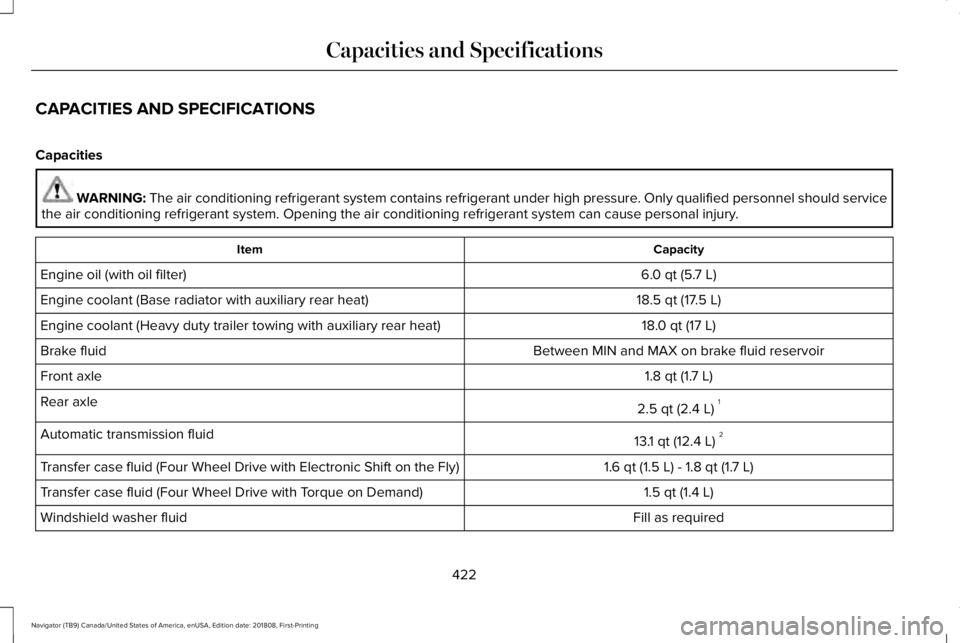
Capacities
WARNING: The air conditioning refrigerant system contains refrigerant under high pressure. Only qualified personnel should servicethe air conditioning refrigerant system. Opening the air conditioning refrigerant system can cause personal injury.
CapacityItem
6.0 qt (5.7 L)Engine oil (with oil filter)
18.5 qt (17.5 L)Engine coolant (Base radiator with auxiliary rear heat)
18.0 qt (17 L)Engine coolant (Heavy duty trailer towing with auxiliary rear heat)
Between MIN and MAX on brake fluid reservoirBrake fluid
1.8 qt (1.7 L)Front axle
2.5 qt (2.4 L)1Rear axle
13.1 qt (12.4 L)2Automatic transmission fluid
1.6 qt (1.5 L) - 1.8 qt (1.7 L)Transfer case fluid (Four Wheel Drive with Electronic Shift on the Fly)
1.5 qt (1.4 L)Transfer case fluid (Four Wheel Drive with Torque on Demand)
Fill as requiredWindshield washer fluid
422
Navigator (TB9) Canada/United States of America, enUSA, Edition date: 201808, First-Printing
Capacities and Specifications
Page 427 of 645
Specifications
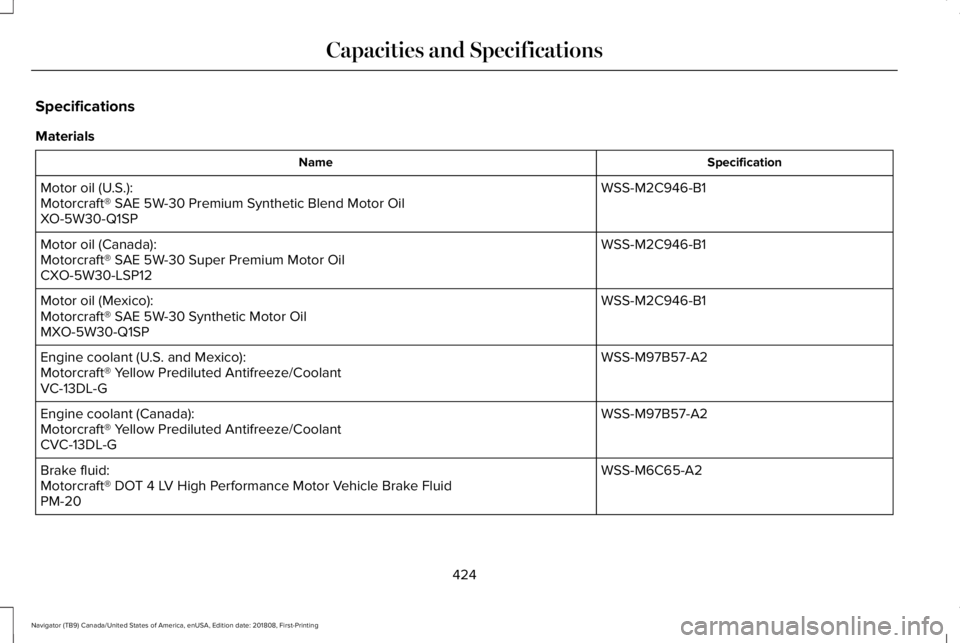
Materials
SpecificationName
WSS-M2C946-B1Motor oil (U.S.):Motorcraft® SAE 5W-30 Premium Synthetic Blend Motor OilXO-5W30-Q1SP
WSS-M2C946-B1Motor oil (Canada):Motorcraft® SAE 5W-30 Super Premium Motor OilCXO-5W30-LSP12
WSS-M2C946-B1Motor oil (Mexico):Motorcraft® SAE 5W-30 Synthetic Motor OilMXO-5W30-Q1SP
WSS-M97B57-A2Engine coolant (U.S. and Mexico):Motorcraft® Yellow Prediluted Antifreeze/CoolantVC-13DL-G
WSS-M97B57-A2Engine coolant (Canada):Motorcraft® Yellow Prediluted Antifreeze/CoolantCVC-13DL-G
WSS-M6C65-A2Brake fluid:Motorcraft® DOT 4 LV High Performance Motor Vehicle Brake FluidPM-20
424
Navigator (TB9) Canada/United States of America, enUSA, Edition date: 201808, First-Printing
Capacities and Specifications
Page 430 of 645
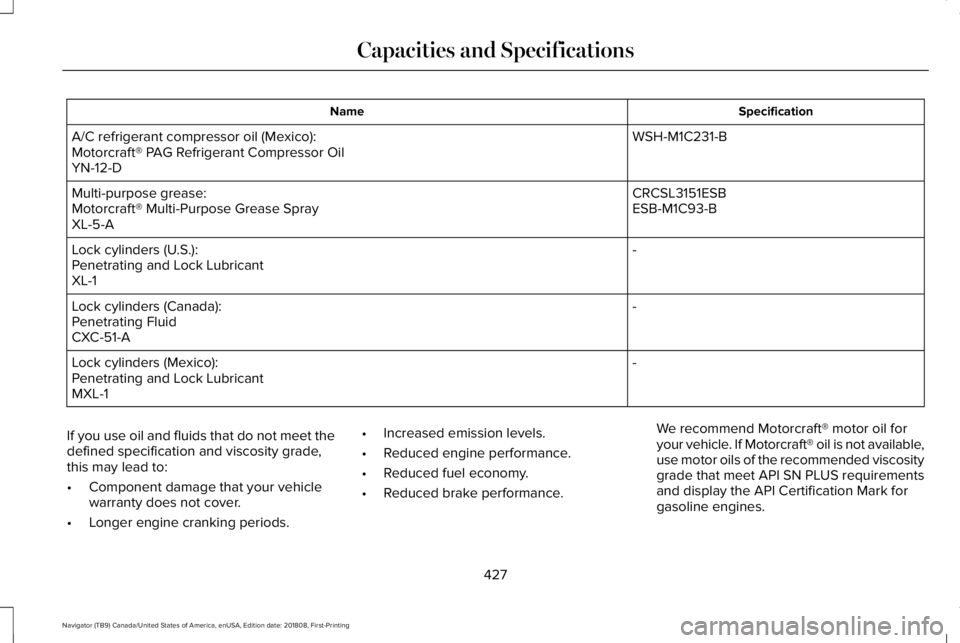
SpecificationName
WSH-M1C231-BA/C refrigerant compressor oil (Mexico):Motorcraft® PAG Refrigerant Compressor OilYN-12-D
CRCSL3151ESBMulti-purpose grease:ESB-M1C93-BMotorcraft® Multi-Purpose Grease SprayXL-5-A
-Lock cylinders (U.S.):Penetrating and Lock LubricantXL-1
-Lock cylinders (Canada):Penetrating FluidCXC-51-A
-Lock cylinders (Mexico):Penetrating and Lock LubricantMXL-1
If you use oil and fluids that do not meet thedefined specification and viscosity grade,this may lead to:
•Component damage that your vehiclewarranty does not cover.
•Longer engine cranking periods.
•Increased emission levels.
•Reduced engine performance.
•Reduced fuel economy.
•Reduced brake performance.
We recommend Motorcraft® motor oil foryour vehicle. If Motorcraft® oil is not available,use motor oils of the recommended viscositygrade that meet API SN PLUS requirementsand display the API Certification Mark forgasoline engines.
427
Navigator (TB9) Canada/United States of America, enUSA, Edition date: 201808, First-Printing
Capacities and Specifications
Page 431 of 645
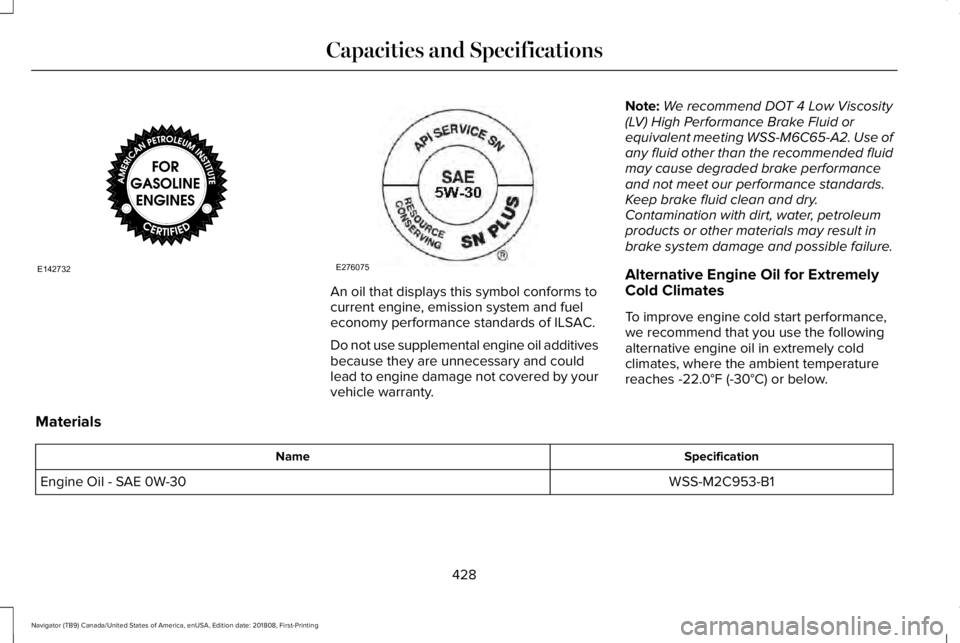
An oil that displays this symbol conforms tocurrent engine, emission system and fueleconomy performance standards of ILSAC.
Do not use supplemental engine oil additivesbecause they are unnecessary and couldlead to engine damage not covered by yourvehicle warranty.
Note:We recommend DOT 4 Low Viscosity(LV) High Performance Brake Fluid orequivalent meeting WSS-M6C65-A2. Use ofany fluid other than the recommended fluidmay cause degraded brake performanceand not meet our performance standards.Keep brake fluid clean and dry.Contamination with dirt, water, petroleumproducts or other materials may result inbrake system damage and possible failure.
Alternative Engine Oil for ExtremelyCold Climates
To improve engine cold start performance,we recommend that you use the followingalternative engine oil in extremely coldclimates, where the ambient temperaturereaches -22.0°F (-30°C) or below.
Materials
SpecificationName
WSS-M2C953-B1Engine Oil - SAE 0W-30
428
Navigator (TB9) Canada/United States of America, enUSA, Edition date: 201808, First-Printing
Capacities and SpecificationsE142732 E276075
Page 433 of 645
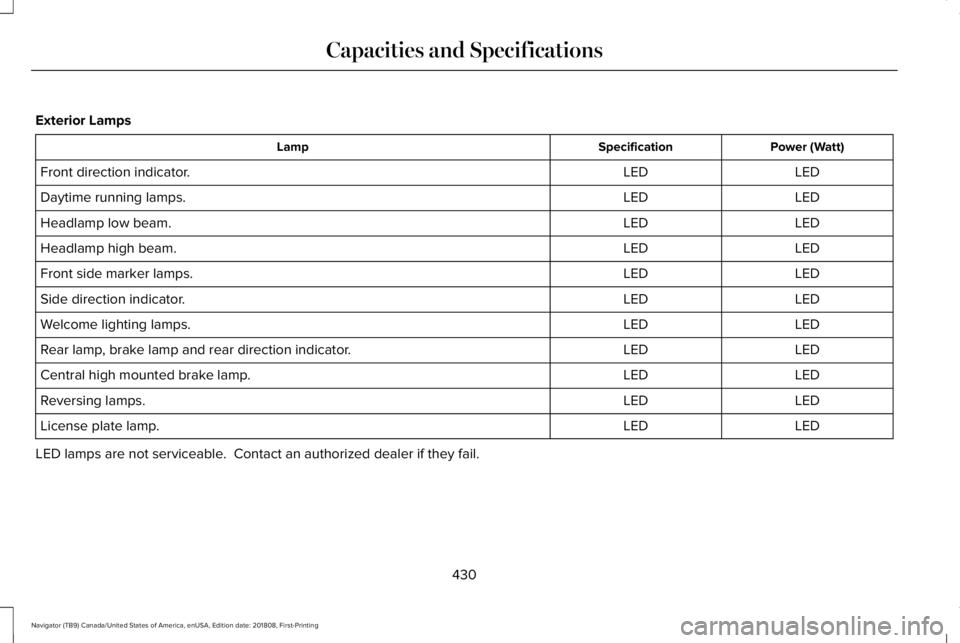
Exterior Lamps
Power (Watt)SpecificationLamp
LEDLEDFront direction indicator.
LEDLEDDaytime running lamps.
LEDLEDHeadlamp low beam.
LEDLEDHeadlamp high beam.
LEDLEDFront side marker lamps.
LEDLEDSide direction indicator.
LEDLEDWelcome lighting lamps.
LEDLEDRear lamp, brake lamp and rear direction indicator.
LEDLEDCentral high mounted brake lamp.
LEDLEDReversing lamps.
LEDLEDLicense plate lamp.
LED lamps are not serviceable. Contact an authorized dealer if they fail.
430
Navigator (TB9) Canada/United States of America, enUSA, Edition date: 201808, First-Printing
Capacities and Specifications