warning LINCOLN NAVIGATOR 2019 Owners Manual
[x] Cancel search | Manufacturer: LINCOLN, Model Year: 2019, Model line: NAVIGATOR, Model: LINCOLN NAVIGATOR 2019Pages: 645, PDF Size: 5.02 MB
Page 274 of 645
BLIND SPOT INFORMATION
SYSTEM
WARNING: Do not use the blind spotinformation system as a replacement forusing the interior and exterior mirrors orlooking over your shoulder beforechanging lanes. The blind spot informationsystem is not a replacement for carefuldriving.
WARNING: The system may notoperate properly during severe weatherconditions, for example snow, ice, heavyrain and spray. Always drive with due careand attention. Failure to take care mayresult in a crash.
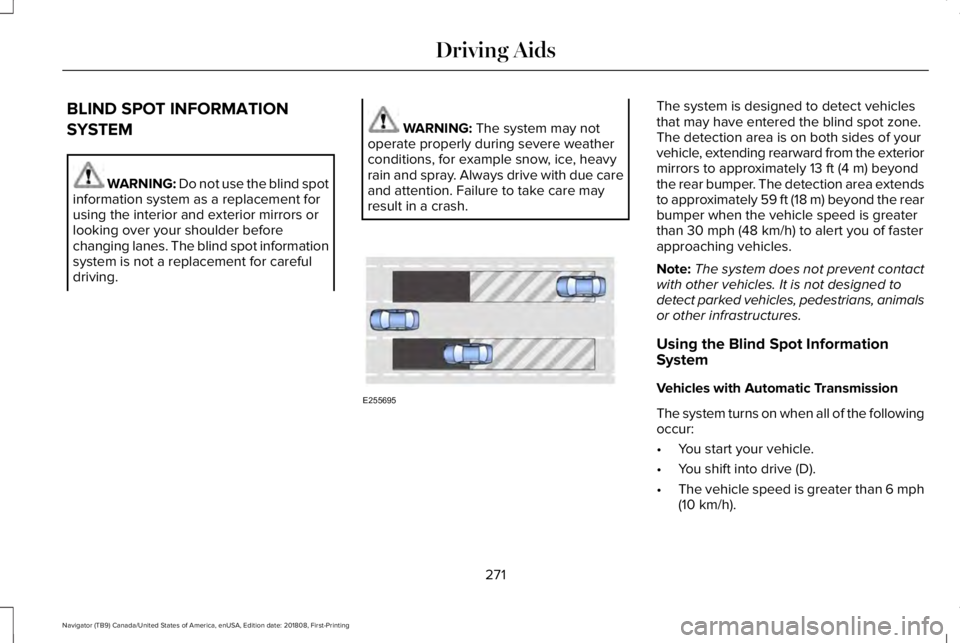
The system is designed to detect vehiclesthat may have entered the blind spot zone.The detection area is on both sides of yourvehicle, extending rearward from the exteriormirrors to approximately 13 ft (4 m) beyondthe rear bumper. The detection area extendsto approximately 59 ft (18 m) beyond the rearbumper when the vehicle speed is greaterthan 30 mph (48 km/h) to alert you of fasterapproaching vehicles.
Note:The system does not prevent contactwith other vehicles. It is not designed todetect parked vehicles, pedestrians, animalsor other infrastructures.
Using the Blind Spot InformationSystem
Vehicles with Automatic Transmission
The system turns on when all of the followingoccur:
•You start your vehicle.
•You shift into drive (D).
•The vehicle speed is greater than 6 mph(10 km/h).
271
Navigator (TB9) Canada/United States of America, enUSA, Edition date: 201808, First-Printing
Driving AidsE255695
Page 276 of 645
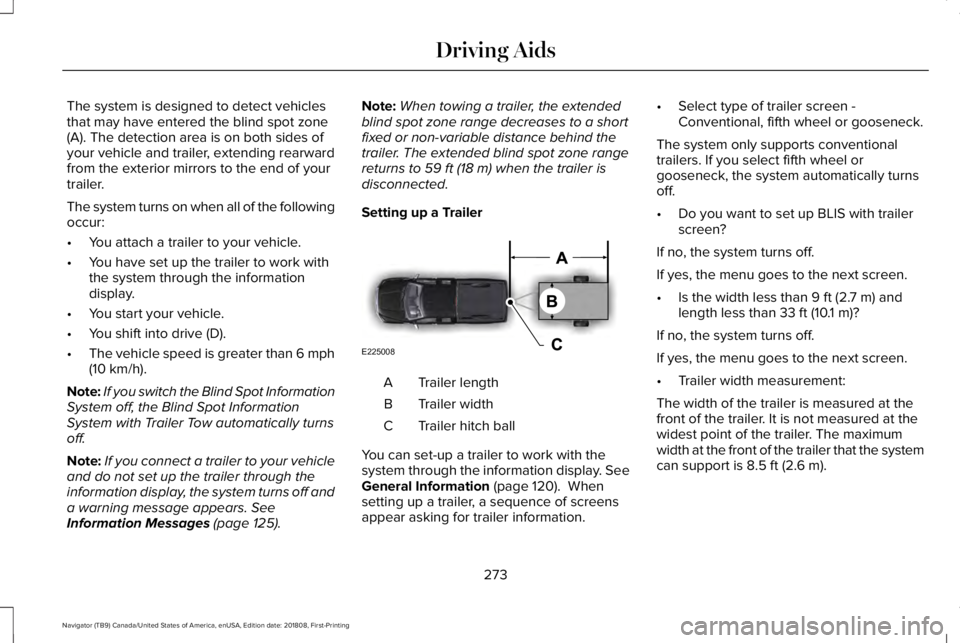
The system is designed to detect vehiclesthat may have entered the blind spot zone(A). The detection area is on both sides ofyour vehicle and trailer, extending rearwardfrom the exterior mirrors to the end of yourtrailer.
The system turns on when all of the followingoccur:
•You attach a trailer to your vehicle.
•You have set up the trailer to work withthe system through the informationdisplay.
•You start your vehicle.
•You shift into drive (D).
•The vehicle speed is greater than 6 mph(10 km/h).
Note:If you switch the Blind Spot InformationSystem off, the Blind Spot InformationSystem with Trailer Tow automatically turnsoff.
Note:If you connect a trailer to your vehicleand do not set up the trailer through theinformation display, the system turns off anda warning message appears. SeeInformation Messages (page 125).
Note:When towing a trailer, the extendedblind spot zone range decreases to a shortfixed or non-variable distance behind thetrailer. The extended blind spot zone rangereturns to 59 ft (18 m) when the trailer isdisconnected.
Setting up a Trailer
Trailer lengthA
Trailer widthB
Trailer hitch ballC
You can set-up a trailer to work with thesystem through the information display. SeeGeneral Information (page 120). Whensetting up a trailer, a sequence of screensappear asking for trailer information.
•Select type of trailer screen -Conventional, fifth wheel or gooseneck.
The system only supports conventionaltrailers. If you select fifth wheel orgooseneck, the system automatically turnsoff.
•Do you want to set up BLIS with trailerscreen?
If no, the system turns off.
If yes, the menu goes to the next screen.
•Is the width less than 9 ft (2.7 m) andlength less than 33 ft (10.1 m)?
If no, the system turns off.
If yes, the menu goes to the next screen.
•Trailer width measurement:
The width of the trailer is measured at thefront of the trailer. It is not measured at thewidest point of the trailer. The maximumwidth at the front of the trailer that the systemcan support is 8.5 ft (2.6 m).
273
Navigator (TB9) Canada/United States of America, enUSA, Edition date: 201808, First-Printing
Driving AidsE225008
Page 277 of 645
Note:You do not need to enter an exacttrailer width measurement. You only needto confirm that the width of the trailer is 8.5 ft(2.6 m) or less.
•Trailer length measurement:
The trailer length is the distance betweenthe trailer hitch ball and the rear of the trailer.The maximum length that the system cansupport is 33 ft (10.1 m).
•Enter length of trailer:
The default setting is 18 ft (5.5 m). Togglingup or down using the menu buttonsincreases or decreases the measurement by3 ft (1 m). Select a length that is equal to orwithin 3 ft (1 m) of the actual measuredlength. For example, if the actual measuredlength is 25 ft (7.6 m), toggle the length inthe menu to 27 ft (8.2 m). When you enterthe length of the trailer, the system setup issaved.
Note:If the trailer is actually a bike rack orcargo rack with electrical lighting, enter alength of 3 ft (1 m). Cross Traffic Alert remainson for trailers with a length of 3 ft (1 m) orless.
Note:Proper measurement andmeasurement entry is required for thesystem to function as designed.
System Operation
When you connect a trailer to your vehicle,the trailer set up menu appears in theinformation display. This menu allows you toset up a new trailer or choose from apreviously set up trailer. A warning messageappears and the system turns off if you donot choose or add a new trailer.
Note:The warning message may not appearuntil your vehicle speed reaches 22 mph(35 km/h).
If you select a trailer in the informationdisplay before connecting a trailer to yourvehicle, the system loads the configurationfor the selected trailer. When a trailer isconnected, a warning message appears.
Note:A second warning message mayappear stating that the Cross Traffic Alertsystem has turned off. The Blind SpotInformation System with Trailer Towcontinues to function normally in thissituation.
Note:The system remembers the lastselected trailer set up when you start yourvehicle.
Trailer Considerations
The system is designed to work with a trailerwith a front width of 8.5 ft (2.6 m) or less, anda total length from the trailer hitch ball to therear of the trailer of 33 ft (10.1 m) or less.
Some trailers may cause a slight change insystem performance:
•Large box trailers may cause false alertsto occur when driving next toinfrastructures or near parked cars. Afalse alert may also occur while makinga 90-degree turn.
•Trailers that have a width greater than8.5 ft (2.6 m) at the front and have a totallength greater than 20 ft (6 m) may causedelayed alerts when a vehicle is passingat high speed.
274
Navigator (TB9) Canada/United States of America, enUSA, Edition date: 201808, First-Printing
Driving Aids
Page 278 of 645
•Box trailers that have a width greater than8.5 ft (2.6 m) at the front may cause earlyalerts when you pass a vehicle.
•Clam shell or V-Nose box trailers with awidth greater than 8.5 ft (2.6 m) at thefront may cause delayed alerts when avehicle traveling the same speed as yourvehicle merges lanes.
System Errors
If the system detects a fault, a warning lampilluminates and a message displays. SeeInformation Messages (page 125).
Switching the System On and Off
You can switch the system off using theinformation display. See General Information(page 120). When you switch the system off,a warning lamp illuminates and a messagedisplays. When you switch the system on oroff, the alert indicators flash twice.
Note:The system remembers the last settingwhen you start your vehicle.
Note:The system may not correctly operatewhen towing a trailer. For vehicles with atrailer tow module and tow bar approved byus, the system turns off when you attach atrailer. For vehicles with an aftermarkettrailer tow module or tow bar, werecommend that you switch the system offwhen you attach a trailer.
To permanently switch the system off,contact an authorized dealer.
CROSS TRAFFIC ALERT
WARNING: Do not use the crosstraffic alert system as a replacement forusing the interior and exterior mirrors orlooking over your shoulder beforereversing out of a parking space. The crosstraffic alert system is not a replacement forcareful driving.
WARNING: The system may notoperate properly during severe weatherconditions, for example snow, ice, heavyrain and spray. Always drive with due careand attention. Failure to take care mayresult in a crash.
The system is designed to alert you ofvehicles approaching from the sides whenyou shift into reverse (R).
Using the Cross Traffic Alert System
The system is designed to detect vehiclesthat approach with a speed up to 37 mph(60 km/h). Coverage decreases when thesensors are partially, mostly or fullyobstructed. Slowly reversing helps increasethe coverage area and effectiveness.
The system turns on when you start theengine and you shift into reverse (R). Thesystem turns off when you shift out of reverse(R).
275
Navigator (TB9) Canada/United States of America, enUSA, Edition date: 201808, First-Printing
Driving Aids
Page 282 of 645
Note:The system turns on each time youswitch the ignition on and you shift intoreverse (R). If you temporarily switch thesystem off, it turns on the next time youswitch the ignition on.
Note:The system may not correctly operatewhen towing a trailer. For vehicles with atrailer tow module and tow bar approved byus, the system turns off when you attach atrailer. For vehicles with an aftermarkettrailer tow module or tow bar, werecommend that you switch the system offwhen you attach a trailer.
To permanently switch the system off,contact an authorized dealer.
STEERING
Electric Power Steering
WARNING: The electric powersteering system has diagnostic checks thatcontinuously monitor the system. If a faultis detected, a message displays in theinformation display. Stop your vehicle assoon as it is safe to do so. Switch theignition off. After at least 10 seconds,switch the ignition on and watch theinformation display for a steering systemwarning message. If a steering systemwarning message returns, have the systemchecked by an authorized dealer.
WARNING: If the system detects anerror, you may not feel a difference in thesteering, however a serious condition mayexist. Obtain immediate service from anauthorized dealer, failure to do so mayresult in loss of steering control.
Your vehicle has an electric power steeringsystem. There is no fluid reservoir. Nomaintenance is required.
If your vehicle loses electrical power whileyou are driving, electric power steeringassistance is lost. The steering system stilloperates and you can steer your vehiclemanually. Manually steering your vehiclerequires more effort.
Extreme continuous steering may increasethe effort required for you to steer yourvehicle. This increased effort preventsoverheating and permanent damage to thesteering system. You do not lose the abilityto steer your vehicle manually. Typicalsteering and driving maneuvers allow thesystem to cool and return to normaloperation.
Steering Tips
If the steering wanders or pulls, check for:
•Correct tire pressures.
•Uneven tire wear.
•Loose or worn suspension components.
•Loose or worn steering components.
•Improper vehicle alignment.
279
Navigator (TB9) Canada/United States of America, enUSA, Edition date: 201808, First-Printing
Driving Aids
Page 283 of 645
Note:A high crown in the road or highcrosswinds may also make the steeringseem to wander or pull.
Adaptive Learning
The electronic power steering systemadaptive learning helps correct roadirregularities and improves overall handlingand steering feel. It communicates with thebrake system to help operate advancedstability control and accident avoidancesystems. Additionally, whenever the batteryis disconnected or a new battery installed,you must drive your vehicle a short distancebefore the system relearns the strategy andreactivates all systems.
PRE-COLLISION ASSIST (IF EQUIPPED)
WARNING: You are responsible forcontrolling your vehicle at all times. Thesystem is designed to be an aid and doesnot relieve you of your responsibility todrive with due care and attention. Failureto follow this instruction could result in theloss of control of your vehicle, personalinjury or death.
WARNING: The system does notdetect vehicles that are driving in adifferent direction, cyclists or animals.Failure to take care may result in the lossof control of your vehicle, serious personalinjury or death.
WARNING: The system does notoperate during hard acceleration orsteering. Failure to take care may lead toa crash or personal injury.
WARNING: The system may fail oroperate with reduced function during coldand severe weather conditions. Snow, ice,rain, spray and fog can adversely affect thesystem. Keep the front camera and radarfree of snow and ice. Failure to take caremay result in the loss of control of yourvehicle, serious personal injury or death.
WARNING: In situations where thevehicle camera has limited detectioncapability, this may reduce systemperformance. These situations include butare not limited to direct or low sunlight,vehicles at night without tail lights,unconventional vehicle types, pedestrianswith complex backgrounds, runningpedestrians, partly obscured pedestrians,or pedestrians that the system cannotdistinguish from a group. Failure to takecare may result in the loss of control ofyour vehicle, serious personal injury ordeath.
280
Navigator (TB9) Canada/United States of America, enUSA, Edition date: 201808, First-Printing
Driving Aids
Page 284 of 645
WARNING: The system cannot helpprevent all crashes. Do not rely on thissystem to replace driver judgment and theneed to maintain a safe distance andspeed.
Using the Pre-Collision Assist System
The Pre-Collision Assist system is active atspeeds above approximately 3 mph (5 km/h)and pedestrian detection is active at speedsup to 50 mph (80 km/h).
If your vehicle is rapidly approaching anotherstationary vehicle, a vehicle traveling in thesame direction as yours, or a pedestrianwithin your driving path, the system isdesigned to provide three levels offunctionality:
1. Alert
2. Brake Support
3. Active Braking
Alert: When active, a flashing visual warningappears and an audible warning tonesounds.
Brake Support: The system is designed tohelp reduce the impact speed by preparingthe brakes for rapid braking. Brake supportdoes not automatically apply the brakes. Ifyou press the brake pedal, the system couldapply additional braking up to maximumbraking force, even if you lightly press thebrake pedal.
Active Braking: Active braking may activateif the system determines that a collision isimminent. The system may help the driverreduce impact damage or avoid the crashcompletely.
Note:The Active Braking capability of thesystem is disabled when you select theSLOW CLIMB drive mode.
Note:If you perceive Pre-Collision Assistalerts as being too frequent or disturbing,then you can reduce the alert sensitivity,though the manufacturer recommends usingthe highest sensitivity setting where possible.Setting lower sensitivity would lead to fewerand later system warnings.
Distance Indication and Alert
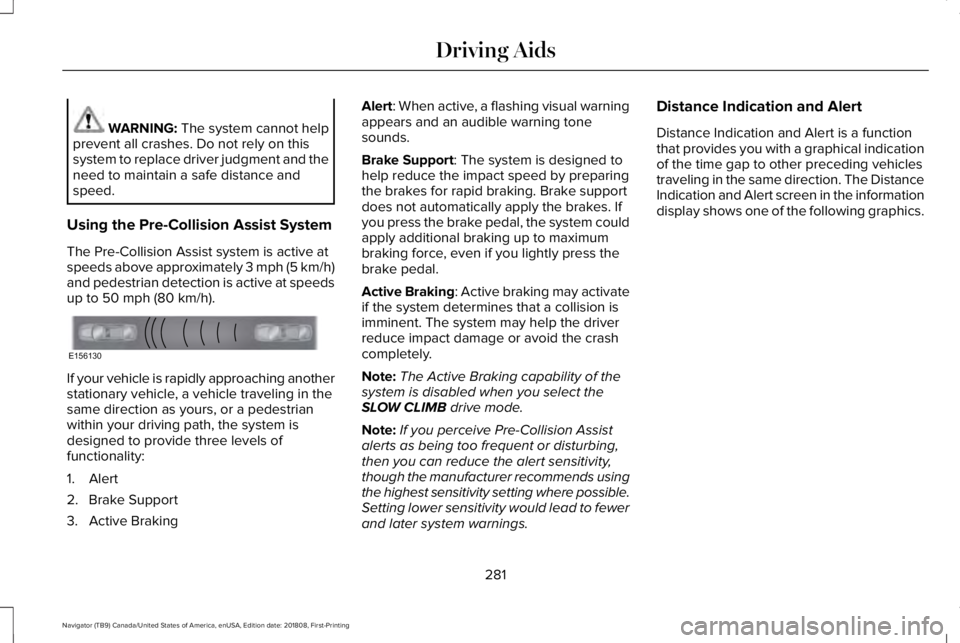
Distance Indication and Alert is a functionthat provides you with a graphical indicationof the time gap to other preceding vehiclestraveling in the same direction. The DistanceIndication and Alert screen in the informationdisplay shows one of the following graphics.
281
Navigator (TB9) Canada/United States of America, enUSA, Edition date: 201808, First-Printing
Driving AidsE156130
Page 291 of 645
Advanced System: Forward Divider,Cargo Shelf and Rear Barrier (BulkheadPosition) (If Equipped)
WARNING: Do not load any objectson the shelf that may obstruct your visionor strike occupants of the vehicle in thecase of a sudden stop or collision.
WARNING: Do not place people orpets on or under the parcel shelf.
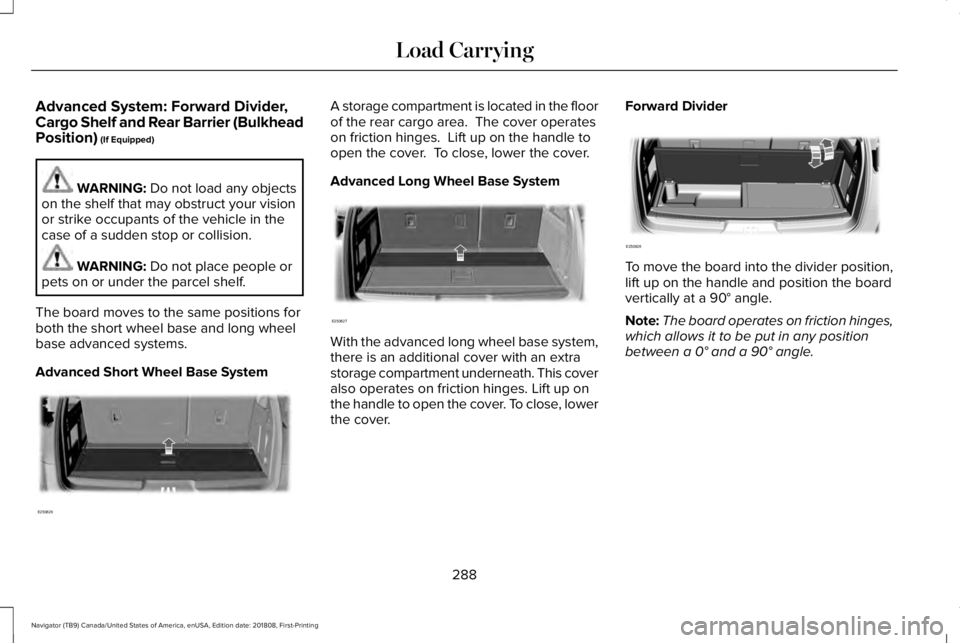
The board moves to the same positions forboth the short wheel base and long wheelbase advanced systems.
Advanced Short Wheel Base System
A storage compartment is located in the floorof the rear cargo area. The cover operateson friction hinges. Lift up on the handle toopen the cover. To close, lower the cover.
Advanced Long Wheel Base System
With the advanced long wheel base system,there is an additional cover with an extrastorage compartment underneath. This coveralso operates on friction hinges. Lift up onthe handle to open the cover. To close, lowerthe cover.
Forward Divider
To move the board into the divider position,lift up on the handle and position the boardvertically at a 90° angle.
Note:The board operates on friction hinges,which allows it to be put in any positionbetween a 0° and a 90° angle.
288
Navigator (TB9) Canada/United States of America, enUSA, Edition date: 201808, First-Printing
Load CarryingE250826 E250827 E250828
Page 292 of 645
Cargo Shelf
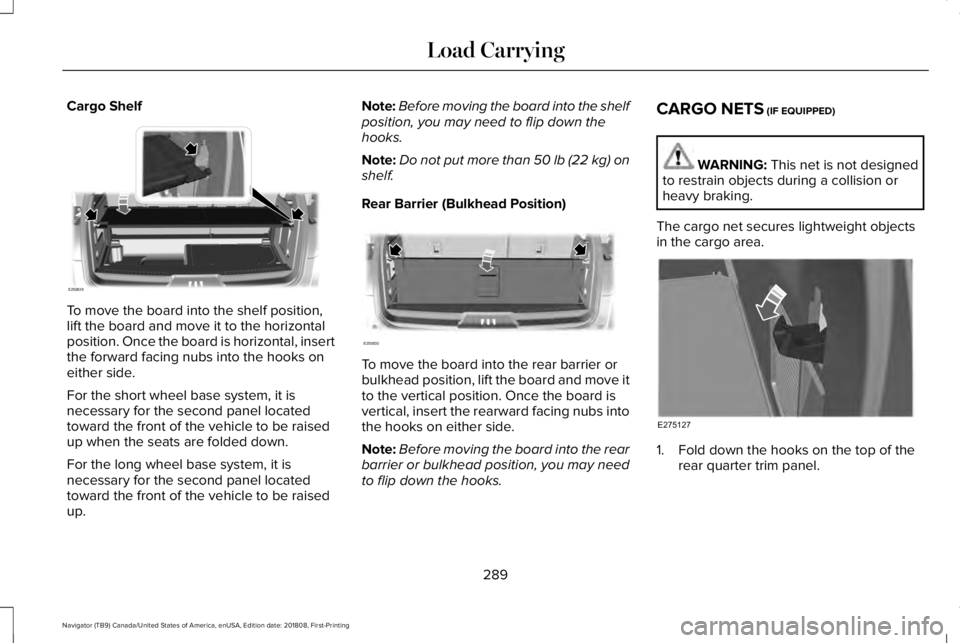
To move the board into the shelf position,lift the board and move it to the horizontalposition. Once the board is horizontal, insertthe forward facing nubs into the hooks oneither side.
For the short wheel base system, it isnecessary for the second panel locatedtoward the front of the vehicle to be raisedup when the seats are folded down.
For the long wheel base system, it isnecessary for the second panel locatedtoward the front of the vehicle to be raisedup.
Note:Before moving the board into the shelfposition, you may need to flip down thehooks.
Note:Do not put more than 50 lb (22 kg) onshelf.
Rear Barrier (Bulkhead Position)
To move the board into the rear barrier orbulkhead position, lift the board and move itto the vertical position. Once the board isvertical, insert the rearward facing nubs intothe hooks on either side.
Note:Before moving the board into the rearbarrier or bulkhead position, you may needto flip down the hooks.
CARGO NETS (IF EQUIPPED)
WARNING: This net is not designedto restrain objects during a collision orheavy braking.
The cargo net secures lightweight objectsin the cargo area.
1. Fold down the hooks on the top of therear quarter trim panel.
289
Navigator (TB9) Canada/United States of America, enUSA, Edition date: 201808, First-Printing
Load CarryingE250829 E250830 E275127
Page 293 of 645
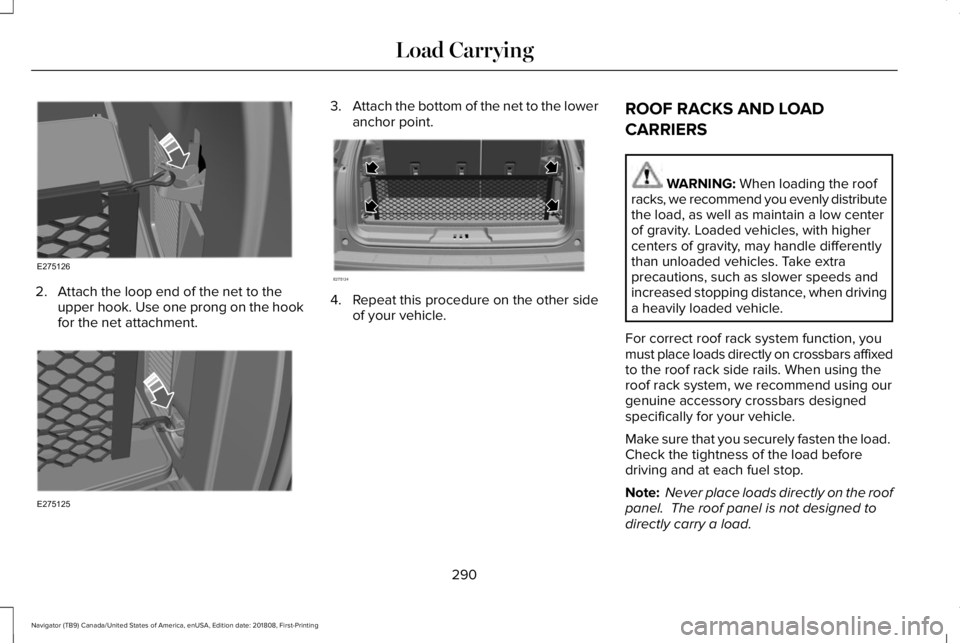
2. Attach the loop end of the net to theupper hook. Use one prong on the hookfor the net attachment.
3.Attach the bottom of the net to the loweranchor point.
4. Repeat this procedure on the other sideof your vehicle.
ROOF RACKS AND LOAD
CARRIERS
WARNING: When loading the roofracks, we recommend you evenly distributethe load, as well as maintain a low centerof gravity. Loaded vehicles, with highercenters of gravity, may handle differentlythan unloaded vehicles. Take extraprecautions, such as slower speeds andincreased stopping distance, when drivinga heavily loaded vehicle.
For correct roof rack system function, youmust place loads directly on crossbars affixedto the roof rack side rails. When using theroof rack system, we recommend using ourgenuine accessory crossbars designedspecifically for your vehicle.
Make sure that you securely fasten the load. Check the tightness of the load beforedriving and at each fuel stop.
Note: Never place loads directly on the roofpanel. The roof panel is not designed todirectly carry a load.
290
Navigator (TB9) Canada/United States of America, enUSA, Edition date: 201808, First-Printing
Load CarryingE275126 E275125 E275124