warning LINCOLN NAVIGATOR 2019 Owners Manual
[x] Cancel search | Manufacturer: LINCOLN, Model Year: 2019, Model line: NAVIGATOR, Model: LINCOLN NAVIGATOR 2019Pages: 645, PDF Size: 5.02 MB
Page 373 of 645
1. Clean the area around the filler plug.
2. Remove the filler plug.
3. Inspect the fluid level. The fluid levelshould be within 0.20 in (5 mm) from thebottom of the hole.
4. Add fluid through the filler opening. Fillto the bottom of the opening.
Use only fluid that meets our specifications.See Capacities and Specifications (page418).
BRAKE FLUID CHECK
WARNING: Do not use any fluid otherthan the recommended brake fluid as thiswill reduce brake efficiency. Use ofincorrect fluid could result in the loss ofvehicle control, serious personal injury ordeath.
WARNING: Only use brake fluid froma sealed container. Contamination with dirt,water, petroleum products or othermaterials may result in brake systemdamage or failure. Failure to adhere to thiswarning could result in the loss of vehiclecontrol, serious personal injury or death.
WARNING: Do not allow the fluid totouch your skin or eyes. If this happens,rinse the affected areas immediately withplenty of water and contact your physician.
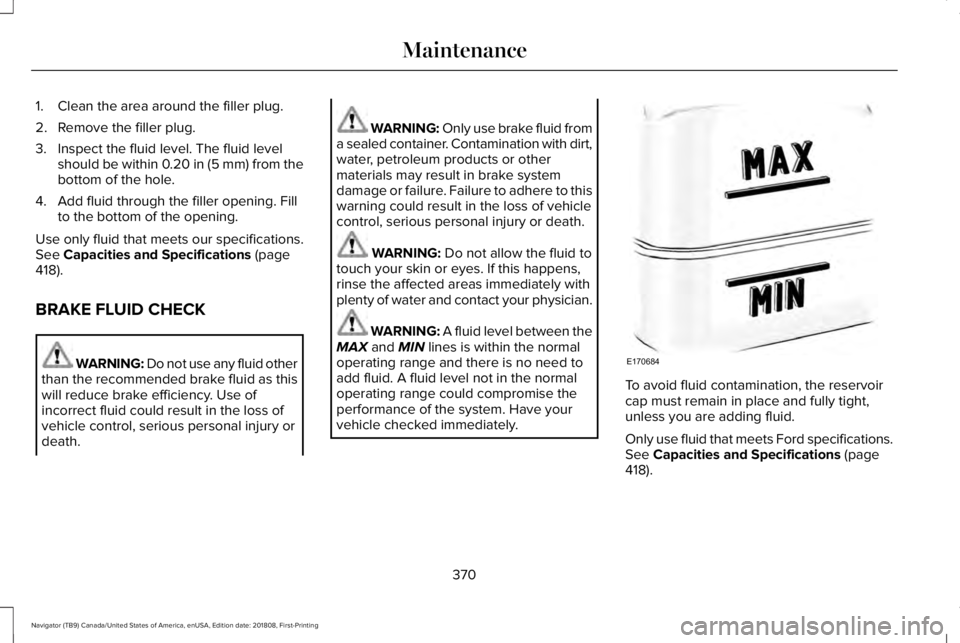
WARNING: A fluid level between theMAX and MIN lines is within the normaloperating range and there is no need toadd fluid. A fluid level not in the normaloperating range could compromise theperformance of the system. Have yourvehicle checked immediately.
To avoid fluid contamination, the reservoircap must remain in place and fully tight,unless you are adding fluid.
Only use fluid that meets Ford specifications.See Capacities and Specifications (page418).
370
Navigator (TB9) Canada/United States of America, enUSA, Edition date: 201808, First-Printing
MaintenanceE170684
Page 374 of 645
WASHER FLUID CHECK
WARNING: If you operate yourvehicle in temperatures below 41.0°F (5°C),use washer fluid with antifreeze protection.Failure to use washer fluid with antifreezeprotection in cold weather could result inimpaired windshield vision and increasethe risk of injury or accident.
Note:The front and rear washer systemsare supplied from the same reservoir.
Add fluid to fill the reservoir if the level is low.Only use a washer fluid that meets ourspecifications. See Capacities andSpecifications (page 418).
State or local regulations on volatile organiccompounds may restrict the use of methanol,a common windshield washer antifreezeadditive. Washer fluids containingnon-methanol antifreeze agents should beused only if they provide cold weatherprotection without damaging the vehicle’spaint finish, wiper blades or washer system.
FUEL FILTER
Your vehicle is equipped with a lifetime fuelfilter that is integrated with the fuel tank.Regular maintenance or replacement is notneeded.
CHANGING THE 12V BATTERY
WARNING: Batteries normallyproduce explosive gases which can causepersonal injury. Therefore, do not allowflames, sparks or lighted substances tocome near the battery. When working nearthe battery, always shield your face andprotect your eyes. Always provide correctventilation.
WARNING: When lifting aplastic-cased battery, excessive pressureon the end walls could cause acid to flowthrough the vent caps, resulting in personalinjury and damage to the vehicle or battery.Lift the battery with a battery carrier or withyour hands on opposite corners.
WARNING: Keep batteries out ofreach of children. Batteries contain sulfuricacid. Avoid contact with skin, eyes orclothing. Shield your eyes when workingnear the battery to protect against possiblesplashing of acid solution. In case of acidcontact with skin or eyes, flush immediatelywith water for a minimum of 15 minutes andget prompt medical attention. If acid isswallowed, call a physician immediately.
WARNING: Battery posts, terminalsand related accessories contain lead andlead compounds, chemicals known to theState of California to cause cancer andreproductive harm. Wash your hands afterhandling.
371
Navigator (TB9) Canada/United States of America, enUSA, Edition date: 201808, First-Printing
Maintenance
Page 375 of 645
WARNING: This vehicle may havemore than one battery. Removing thebattery cables from only one battery doesnot disconnect your vehicle electricalsystem. Make sure you disconnect thebattery cables from all batteries whendisconnecting power. Failure to do so maycause serious personal injury or propertydamage.
Your vehicle is fitted with a Motorcraftmaintenance-free battery which normallydoes not require additional water.
When a battery replacement is required, youmust use a recommended replacementbattery that matches the electricalrequirements of the vehicle.
Note:After cleaning or replacing the battery,make sure you reinstall the battery cover orshield.
Note:If you add electrical accessories orcomponents to the vehicle, it may adverselyaffect the low voltage battery performanceand durability. This may also affect theperformance of other electrical systems inthe vehicle.
For longer, trouble-free operation, keep thetop of the battery clean and dry.
If you see any corrosion on the battery orterminals, remove the cables from theterminals and clean with a wire brush. Youcan neutralize the acid with a solution ofbaking soda and water.
Because your vehicle’s engine iselectronically controlled by a computer, somecontrol conditions are maintained by powerfrom the battery. When the battery isdisconnected or a new battery is installed,the engine must relearn its idle and fuel trimstrategy for optimum driveability andperformance. Flexible fuel vehicles (FFV)must also relearn the ethanol content of thefuel for optimum driveability andperformance.
To restore the settings, do the following:
1. Apply the parking brake.
2. Shift into park (P) or neutral (N).
3. Switch off all accessories.
4. Press the brake pedal and start yourvehicle.
5. Run the engine until it reaches normaloperating temperature. While the engineis warming up, complete the following:Reset the clock. Reset the powerwindows bounce-back feature. SeeWindows and Mirrors (page 105). Resetthe radio station presets. See AudioSystem (page 432).
6. Allow the engine to idle for at least oneminute.
7.Drive the vehicle at least 10 mi (16 km) tocompletely relearn the idle trim and fueltrim strategy.
Note:If you do not allow the engine torelearn the idle and fuel trim strategy, theidle quality of your vehicle may be adverselyaffected until the engine computereventually relearns the idle trim and fuel trimstrategy.
372
Navigator (TB9) Canada/United States of America, enUSA, Edition date: 201808, First-Printing
Maintenance
Page 379 of 645
6. Repeat Steps 3 through 7 to adjust theother headlamp.
7. Close the hood and turn off the lamps.
Horizontal Aim Adjustment
Horizontal aim is not required for this vehicleand is not adjustable.
CHANGING A BULB
WARNING: Bulbs can become hot.Let the bulb cool down before removingit. Failure to do so could result in personalinjury.
Note: Vehicles with LED headlamps do notcontain serviceable bulbs. See anauthorized dealer if they fail.
LED Lamps
These lamps operate at a high voltage. Contact an authorized dealer.
The following lamps are LED:
•Headlamp Low/high.
•Front parking lamps.
•Front side marker lamps.
•Daytime running lamps.
•Front direction indicators.
•Rear direction indicators.
•Brake and rear lamps.
•Reversing lamps.
•License plate lamps.
CHANGING THE ENGINE AIR
FILTER
WARNING: To reduce the risk ofvehicle damage and personal burn injuries,do not start your engine with the aircleaner removed and do not remove itwhile the engine is running.
Note: Failure to use the correct air filterelement may result in severe enginedamage. Resulting component damage maynot be covered by the vehicle Warranty.
When changing the air filter element, useonly the air filter element listed. SeeMotorcraft Parts (page 419).
Change the air filter element at the correctinterval. See Scheduled Maintenance (page547).
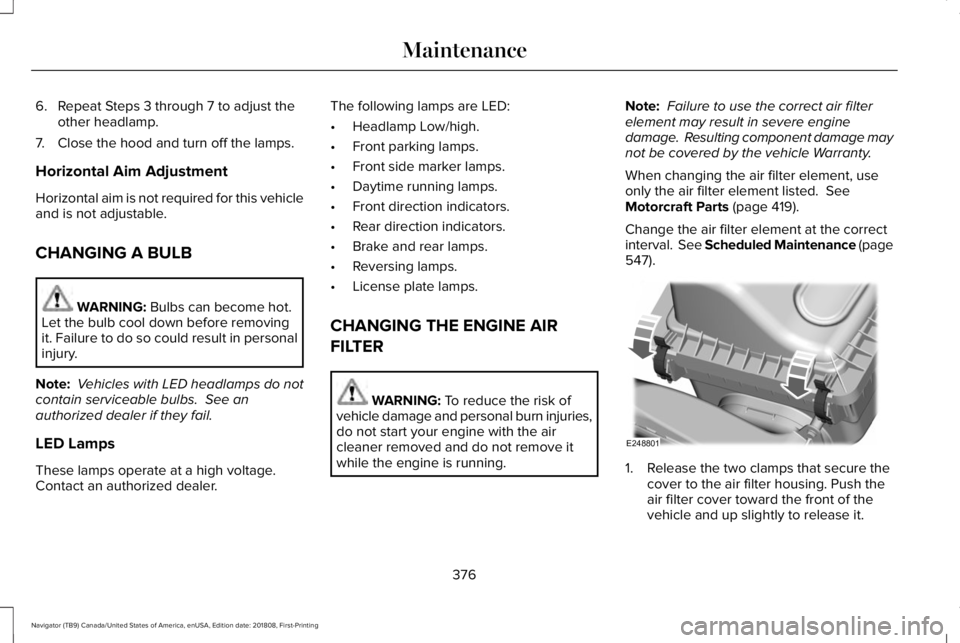
1. Release the two clamps that secure thecover to the air filter housing. Push theair filter cover toward the front of thevehicle and up slightly to release it.
376
Navigator (TB9) Canada/United States of America, enUSA, Edition date: 201808, First-Printing
MaintenanceE248801
Page 385 of 645
Note: Do not use razor blades or othersharp objects to clean or remove decals fromthe inside of the heated rear window. Thevehicle warranty does not cover damagecaused to the heated rear window grid lines.
CLEANING THE INTERIOR
WARNING: Do not use cleaningsolvents, bleach or dye on the vehicle'sseatbelts, as these actions may weakenthe belt webbing.
WARNING: On vehicles equippedwith seat-mounted airbags, do not usechemical solvents or strong detergents.Such products could contaminate the sideairbag system and affect performance ofthe side airbag in a crash.
Note:Follow the same procedure forcleaning leather seats when cleaning leatherinterior. See Cleaning Leather Seats (page384).
Note:Do not use household cleaningproducts or glass cleaners, which can stainand discolor the fabric and affect the flameretardant abilities of the seat materials.
For fabric, carpets, cloth seats, safety beltsand seats equipped with side airbags:
•Remove dust and loose dirt with avacuum cleaner.
•Remove light stains and soil withMotorcraft® Professional Strength Carpet& Upholstery Cleaner.
For grease or tar stains:
•Spot clean the area with Motorcraft® Spotand Stain Remover. In Canada, useMotorcraft® Multi-Purpose Cleaner.
•If a ring forms on the fabric after spotcleaning, clean the entire areaimmediately, but do not oversaturate orthe ring will set.
Cleaning Black Label or PresidentialInterior (If Equipped)
Note:Alcantara microfiber cloth fabric ismade of polyester microfiber withmicro-porous polyurethane. Usingcommercially available fabric cleaners cancause permanent damage.
Note:Do not use commercially availableleather and vinyl cleaning products onAlcantara microfiber cloth fabric.
Note:Lincoln Black Label or Presidentialvehicles may have Alcantara microfiber clothfabric on the seats, headliner, floor mats anddoor panels.
Depending on the type of stain, use water,lemon juice or pure ethyl alcohol whencleaning. For cleaning Alcantara microfibercloth, refer to the following chart:
382
Navigator (TB9) Canada/United States of America, enUSA, Edition date: 201808, First-Printing
Vehicle Care
Page 387 of 645
CLEANING THE INSTRUMENT
PANEL AND INSTRUMENT
CLUSTER LENS
WARNING: Do not use chemicalsolvents or strong detergents whencleaning the steering wheel or instrumentpanel to avoid contamination of the airbagsystem.
Note:Follow the same procedure ascleaning leather seats for cleaning leatherinstrument panels and leather interior trimsurfaces. See Cleaning Leather Seats (page384).
Clean the instrument panel and cluster lenswith a clean, damp and soft cloth, then usea clean, dry and soft cloth to dry these areas.
•Avoid cleaners or polishes that increasethe gloss of the upper portion of theinstrument panel. The dull finish in thisarea helps protect you from undesirablewindshield reflection.
•Do not use any household cleaningproducts or glass cleaners as these maydamage the finish of the instrumentpanel, interior trim and cluster lens.
•Wash or wipe your hands clean if youhave been in contact with certainproducts such as insect repellent andsuntan lotion to avoid possible damageto the interior painted surfaces.
•Do not allow air fresheners and handsanitizers to spill onto interior surfaces.If a spill occurs, wipe off immediately.Your warranty may not cover thesedamages.
If a staining liquid like coffee or juice hasbeen spilled on the instrument panel or oninterior trim surfaces:
1.Wipe up spilled liquid using a clean, softcloth as quickly as possible.
2. Use Motorcraft Premium Leather andVinyl Cleaner or a commercially availableleather cleaning product for automotiveinteriors. Test any cleaner or stainremover on an inconspicuous area.
3. Alternatively, wipe the surface with aclean, soft cloth and a mild soap andwater solution. Dry the area with a clean,soft cloth.
4.If necessary, apply more soap and watersolution or cleaning product to a clean,soft cloth and press it onto the soiledarea. Allow this to set at roomtemperature for 30 minutes.
5. Remove the soaked cloth, then with aclean, damp cloth, use a rubbing motionfor 60 seconds on the soiled area.
6. Dry the area with a clean, soft cloth.
CLEANING LEATHER SEATS
Note:Follow the same procedure ascleaning leather seats for cleaning leatherinstrument panels and leather interior trimsurfaces.
384
Navigator (TB9) Canada/United States of America, enUSA, Edition date: 201808, First-Printing
Vehicle Care
Page 391 of 645
GENERAL INFORMATION
Use only approved wheel and tire sizes,using other sizes could damage your vehicle.If you change the diameter of the tires fromthat fitted at the factory, the speedometermay not display the correct speed. If youintend to change the size of the wheels fromthat fitted by the manufacturer, you cancheck the suitability with an authorizeddealer.
Additional information related to thefunctionality and maintenance of your tirescan be found later in this chapter. See TireCare (page 390).
You can find the recommended tire inflationpressures can on the Tire Label, which is onthe B-pillar or the edge of the driver door.You can also find this information on theSafety Compliance Certification Label, affixedto either the door hinge pillar, door-latchpost, or the door edge that meets the doorlatch post; next to the driver seating position.
We strongly recommend maintaining thesetire pressures at all times. Failure to followthe tire pressure recommendations cancause uneven treadwear patterns, reducedfuel economy, and adversely affect the wayyour vehicle handles.
Note:Check and set the tire pressure at theambient temperature in which you areintending to drive your vehicle and when thetires are cold.
Note:Check your tire pressures at least onceper month.
If your vehicle has a spare tire, set thepressure to the highest value given for yourvehicle and tire size combination.
Notice to utility vehicle and truckowners
WARNING: Utility vehicles have asignificantly higher rollover rate than othertypes of vehicles.
WARNING: Vehicles with a highercenter of gravity (utility and four-wheeldrive vehicles) handle differently thanvehicles with a lower center of gravity(passenger cars). Avoid sharp turns,excessive speed and abrupt steering inthese vehicles. Failure to drive cautiouslyincreases the risk of losing control of yourvehicle, vehicle rollover, personal injuryand death.
WARNING: In a rollover crash, anunbelted person is significantly more likelyto die than a person wearing a seatbelt.
WARNING: Do not becomeoverconfident in the ability of four-wheeldrive vehicles. Although a four-wheel drivevehicle may accelerate better than atwo-wheel drive vehicle in low tractionsituations, it won't stop any faster thantwo-wheel drive vehicles. Always drive ata safe speed.
388
Navigator (TB9) Canada/United States of America, enUSA, Edition date: 201808, First-Printing
Wheels and Tires
Page 392 of 645
Utility vehicles and trucks handle differentlythan passenger cars in the various drivingconditions that are encountered on streets,highways and off-road. Utility vehicles andtrucks are not designed for cornering atspeeds as high as passenger cars any morethan low-slung sports cars are designed toperform satisfactorily under off-roadconditions.
Study your owner's manual and anysupplements for specific information aboutequipment features, instructions for safedriving and additional precautions to reducethe risk of an accident or serious injury.
Four-wheel drive system (If Equipped)
WARNING: Do not becomeoverconfident in the ability of four-wheeldrive vehicles. Although a four-wheel drivevehicle may accelerate better than atwo-wheel drive vehicle in low tractionsituations, it won't stop any faster thantwo-wheel drive vehicles. Always drive ata safe speed.
A vehicle equipped with four-wheel drive,when selected, has the ability to use all fourwheels to power itself. This increases tractionwhich may enable you to safely drive overterrain and road conditions that aconventional two-wheel drive vehicle cannot.
Power is supplied to all four wheels througha transfer case or power transfer unit.Four-wheel drive vehicles allow you to selectdifferent modes as necessary. Forinformation on transfer case operation andshifting procedures, See Four-Wheel Drive(page 216). For information on transfer casemaintenance, See Maintenance (page 359).You should become thoroughly familiar withthis information before you operate yourvehicle.
On some four-wheel drive vehicles, the initialshift from two-wheel to four-wheel drivewhen the vehicle is moving can cause amomentary clunk and ratcheting sound.These sounds are normal and are not causefor concern.
In four-wheel drive vehicles, the size of thespare tire relative to the remaining tires canhave an effect on the 4x4 system. If there isa significant difference between the size ofa spare and the remaining tires, four-wheeldrive functionality may be limited. See UsingFour-Wheel Drive (page 216).
How your vehicle differs from othervehicles
Sport utility vehicles and trucks can differfrom some other vehicles in a few noticeableways. Your vehicle may be:
389
Navigator (TB9) Canada/United States of America, enUSA, Edition date: 201808, First-Printing
Wheels and Tires
Page 394 of 645
Treadwear
The treadwear grade is a comparativerating based on the wear rate of the tirewhen tested under controlled conditionson a specified government test course.For example, a tire graded 150 wouldwear one and one-half (1 ½) times as wellon the government course as a tiregraded 100. The relative performanceof tires depends upon the actualconditions of their use, however, andmay depart significantly from the normdue to variations in driving habits,service practices, and differences inroad characteristics and climate.
Traction AA A B C
WARNING: The traction gradeassigned to this tire is based onstraight-ahead braking traction tests,and does not include acceleration,cornering, hydroplaning or peaktraction characteristics.
The traction grades, from highest tolowest are AA, A, B, and C. The gradesrepresent the tire’s ability to stop on wetpavement as measured under controlledconditions on specified government testsurfaces of asphalt and concrete. A tiremarked C may have poor tractionperformance.
Temperature A B C
WARNING: The temperaturegrade for this tire is established for atire that is properly inflated and notoverloaded. Excessive speed,underinflation, or excessive loading,either separately or in combination,can cause heat buildup and possibletire failure.
The temperature grades are A (thehighest), B and C, representing the tire’sresistance to the generation of heat andits ability to dissipate heat when testedunder controlled conditions on aspecified indoor laboratory test wheel.Sustained high temperature can cause
the material of the tire to degenerateand reduce tire life, and excessivetemperature can lead to sudden tirefailure. The grade C corresponds to alevel of performance which allpassenger car tires must meet under theFederal Motor Vehicle Safety StandardNo. 139. Grades B and A representhigher levels of performance on thelaboratory test wheel than the minimumrequired by law.
Glossary of Tire Terminology
*Tire label: A label showing the originalequipment tire sizes, recommendedinflation pressure and the maximumweight the vehicle can carry.
*Tire Identification Number (TIN): A
number on the sidewall of each tireproviding information about the tirebrand and manufacturing plant, tire sizeand date of manufacture. Also referredto as DOT code.
*Inflation pressure: A measure of theamount of air in a tire.
391
Navigator (TB9) Canada/United States of America, enUSA, Edition date: 201808, First-Printing
Wheels and Tires
Page 398 of 645
K. Maximum Load: Indicates themaximum load in kilograms and poundsthat can be carried by the tire (affixed toeither the door hinge pillar, door-latchpost, or the door edge that meets thedoor-latch post, next to the driver'sseating position), or Tire Label locatedon the B-pillar or the edge of the driver'sdoor.
L. Treadwear, Traction andTemperature Grades:
*Treadwear: The treadwear grade is acomparative rating based on the wearrate of the tire when tested undercontrolled conditions on a specifiedgovernment test course. For example,a tire graded 150 would wear 1½ timesas well on the government course as a
tire graded 100.
*Traction: The traction grades, fromhighest to lowest are AA, A, B, and C.The grades represent the tire's ability tostop on wet pavement as measuredunder controlled conditions on specifiedgovernment test surfaces of asphalt andconcrete. A tire marked C may havepoor traction performance.
*Temperature: The temperature gradesare A (the highest), B and C,representing the tire's resistance to thegeneration of heat and its ability todissipate heat when tested undercontrolled conditions on a specifiedindoor laboratory test wheel.
M. Maximum Inflation Pressure:Indicates the tire manufacturers'maximum permissible pressure or the
pressure at which the maximum loadcan be carried by the tire. This pressureis normally higher than the vehiclemanufacturer's recommended coldinflation pressure which can be foundon the Safety Compliance CertificationLabel (affixed to either the door hingepillar, door-latch post, or the door edgethat meets the door-latch post, next to
the driver's seating position), or TireLabel located on the B-pillar or the edgeof the driver's door. The cold inflationpressure should never be set lower thanthe recommended pressure on thevehicle label.
The tire suppliers may have additionalmarkings, notes or warnings such asstandard load or radial tubeless.
Additional Information Contained onthe Tire Sidewall for LT Type Tires
Note:Tire Quality Grades do not applyto this type of tire.
395
Navigator (TB9) Canada/United States of America, enUSA, Edition date: 201808, First-Printing
Wheels and Tires