ABS LINCOLN NAVIGATOR 2019 User Guide
[x] Cancel search | Manufacturer: LINCOLN, Model Year: 2019, Model line: NAVIGATOR, Model: LINCOLN NAVIGATOR 2019Pages: 645, PDF Size: 5.02 MB
Page 335 of 645
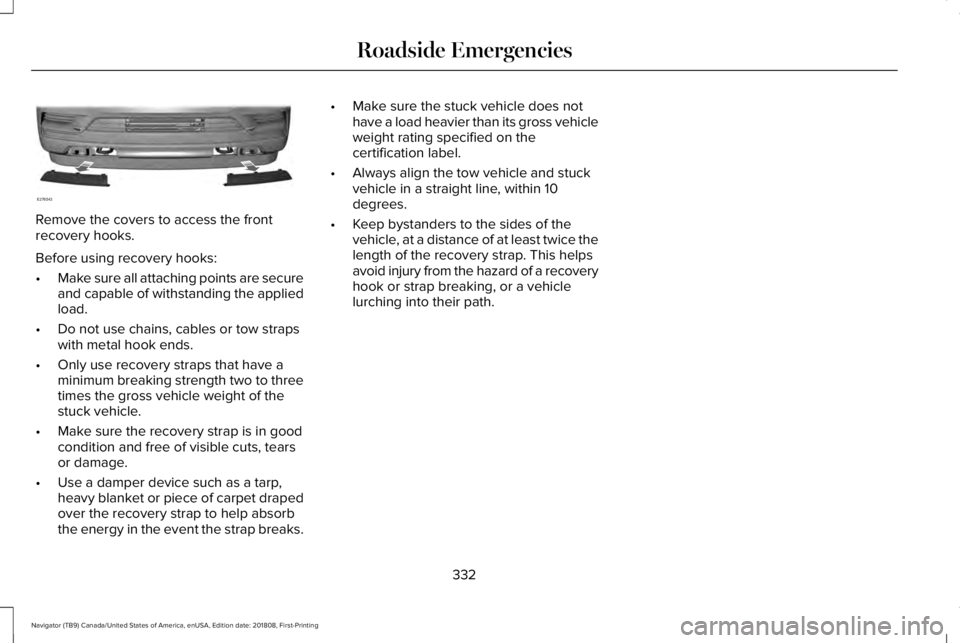
Remove the covers to access the frontrecovery hooks.
Before using recovery hooks:
•Make sure all attaching points are secureand capable of withstanding the appliedload.
•Do not use chains, cables or tow strapswith metal hook ends.
•Only use recovery straps that have aminimum breaking strength two to threetimes the gross vehicle weight of thestuck vehicle.
•Make sure the recovery strap is in goodcondition and free of visible cuts, tearsor damage.
•Use a damper device such as a tarp,heavy blanket or piece of carpet drapedover the recovery strap to help absorbthe energy in the event the strap breaks.
•Make sure the stuck vehicle does nothave a load heavier than its gross vehicleweight rating specified on thecertification label.
•Always align the tow vehicle and stuckvehicle in a straight line, within 10degrees.
•Keep bystanders to the sides of thevehicle, at a distance of at least twice thelength of the recovery strap. This helpsavoid injury from the hazard of a recoveryhook or strap breaking, or a vehiclelurching into their path.
332
Navigator (TB9) Canada/United States of America, enUSA, Edition date: 201808, First-Printing
Roadside EmergenciesE276543
Page 347 of 645
Protected ComponentFuse RatingFuse Number
RH-LDM, LH-LDM.15A115Voltage quality module.Blindspot information system.Cruise control module.Tailgate applique.Image processing module B.
Powertrain control module (PCM) run/start feed.10A116
Anti-lock brake system (ABS) run/start feed.10A117
Electronic power assist steering, run/start feed.10A118
Not used.—19
Front blower.40A220
Passenger seat motors.40A221
Not used.—22
Alternator A-line.10A123
Trailer brake control module.30A224
Body control module power 1.50A225
344
Navigator (TB9) Canada/United States of America, enUSA, Edition date: 201808, First-Printing
Fuses
Page 350 of 645
Protected ComponentFuse RatingFuse Number
Auxiliary blower.40A255
Power point #4.20A256
Front driver and passenger seats - belt tension reducer5A158
Not used.—59
Lincoln start lamp5A160
Right-hand enhanced exterior lighting (EEL) module (R64).25A161
Left-hand enhanced exterior lighting (EEL) module (R64)25A162
4X4 module.25A163
Not used.—64
Not used.—65
Not used.—66
Not used.—67
Not used.—69
Anti-lock brake system (ABS) / park brake module.40A270
347
Navigator (TB9) Canada/United States of America, enUSA, Edition date: 201808, First-Printing
Fuses
Page 354 of 645
Passenger Compartment Fuse Panel
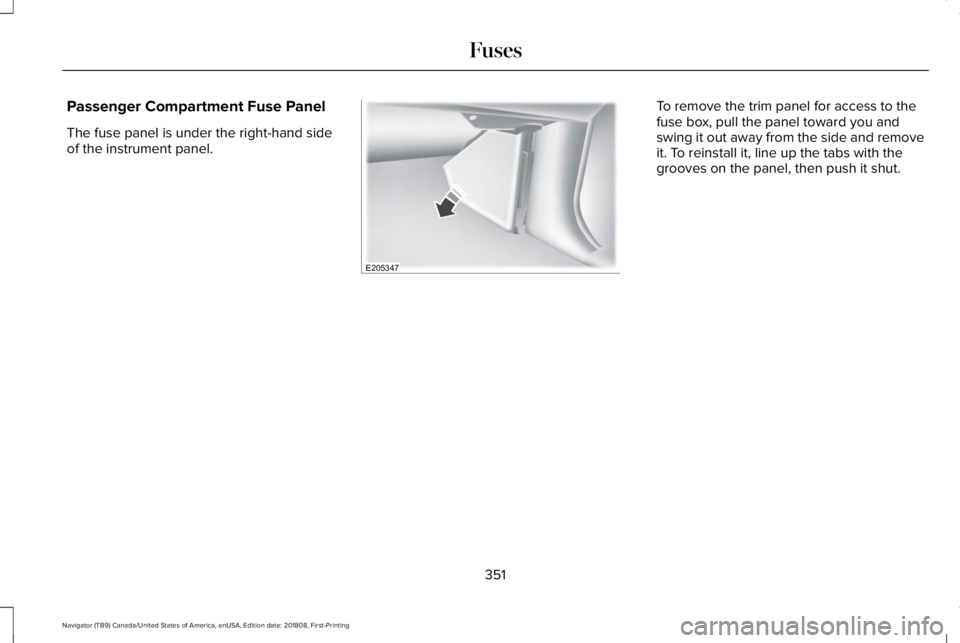
The fuse panel is under the right-hand sideof the instrument panel.
To remove the trim panel for access to thefuse box, pull the panel toward you andswing it out away from the side and removeit. To reinstall it, line up the tabs with thegrooves on the panel, then push it shut.
351
Navigator (TB9) Canada/United States of America, enUSA, Edition date: 201808, First-Printing
FusesE205347
Page 366 of 645
Note:Do not remove the dipstick when theengine is running.
Note: If the oil level is between themaximum and minimum marks, the oil levelis acceptable. Do not add oil.
Note:The oil consumption of new enginesreaches its normal level after approximately3,000 mi (5,000 km).
Adding Engine Oil
WARNING: Do not remove the fillercap when the engine is running.
Do not use supplemental engine oil additivesbecause they are unnecessary and couldlead to engine damage that may not becovered by the vehicle Warranty.
Only use oils certified for gasoline enginesby the American Petroleum Institute (API). An oil with this trademark symbol conformsto the current engine and emission systemprotection standards and fuel economyrequirements of the International LubricantsSpecification Advisory Committee (ILSAC).
To top up the engine oil level do thefollowing:
1. Clean the area surrounding the engineoil filler cap before you remove it.
2. Remove the engine oil filler cap. SeeUnder Hood Overview (page 360). Turnit counterclockwise and remove it.
3. Add engine oil that meets ourspecifications. See Capacities andSpecifications (page 422). You may haveto use a funnel to pour the engine oil intothe opening.
4. Recheck the oil level.
5. If the oil level is correct, replace thedipstick and make sure it is fully seated.
6. Replace the engine oil filler cap. Turn itclockwise until you feel a strongresistance.
Note: Do not add oil further than themaximum mark. Oil levels above themaximum mark may cause engine damage.
Note:Make sure you install the oil filler capcorrectly.
Note:Soak up any spillage with anabsorbent cloth immediately.
OIL CHANGE INDICATOR RESET
Use the information display controls on thesteering wheel to reset the oil changeindicator.
363
Navigator (TB9) Canada/United States of America, enUSA, Edition date: 201808, First-Printing
MaintenanceE142732
Page 380 of 645
2.Remove the air filter element from the airfilter housing.
3. Install the new air filter element.
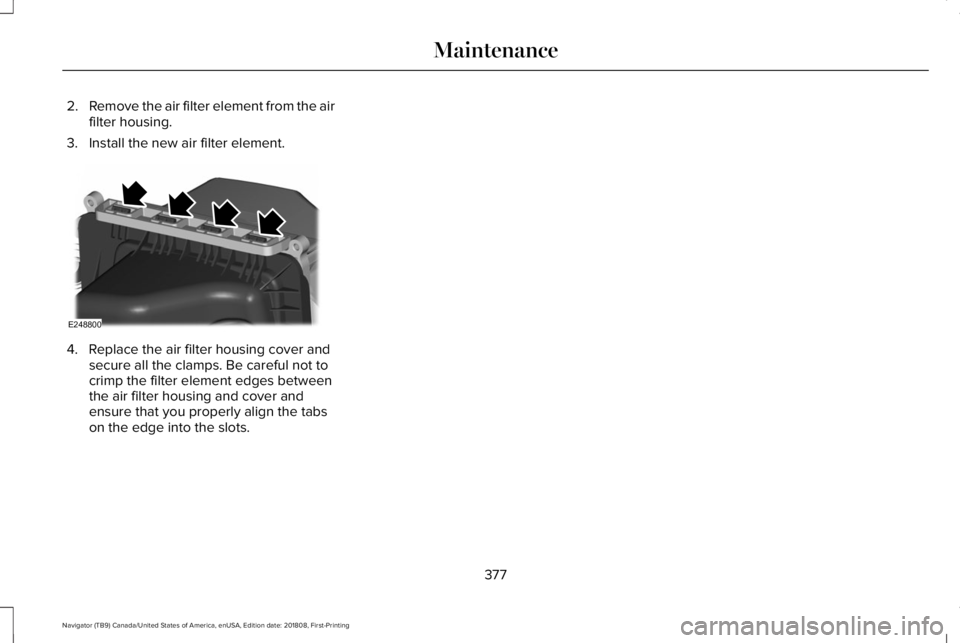
4. Replace the air filter housing cover andsecure all the clamps. Be careful not tocrimp the filter element edges betweenthe air filter housing and cover andensure that you properly align the tabson the edge into the slots.
377
Navigator (TB9) Canada/United States of America, enUSA, Edition date: 201808, First-Printing
MaintenanceE248800
Page 459 of 645
Times are subject to change due to holidays.
Privacy Information
When you connect a cellular phone to SYNC3, the system creates a profile within yourvehicle that links to that cellular phone. Thisprofile helps in offering you more cellularfeatures and operating more efficiently.Among other things, this profile may containdata about your cellular phone book, textmessages (read and unread), and call history,including history of calls when your cellphone was not connected to the system. Inaddition, if you connect a media device, thesystem creates and retains an index of
supported media content. The system alsorecords a short diagnostic log ofapproximately 10 minutes of all recent systemactivity. The log profile and other system datamay be used to improve the system and helpdiagnose any problems that may occur.
The cellular profile, media device index, anddiagnostic log remain in your vehicle unlessyou delete them and are generally accessibleonly in your vehicle when the cellular phoneor media player is connected.
If you no longer plan to use the system oryour vehicle, we recommend you perform aMaster Reset to erase all stored information.You can find more information about theMaster Reset in General Settings. SeeSettings (page 504). System data cannot beaccessed without special equipment andaccess to your vehicle's SYNC 3 module. TheLincoln Motor Company does not access thesystem data for any purpose other than asdescribed absent consent, a court order, orwhere required by law enforcement, othergovernment authorities, or other third partiesacting with lawful authority. Other partiesmay seek to access the informationindependently of The Lincoln MotorCompany.
HOME SCREEN
456
Navigator (TB9) Canada/United States of America, enUSA, Edition date: 201808, First-Printing
SYNC™ 3
Page 548 of 645
Transferable Coverage
If you sell your vehicle before your LincolnProtect extended service plan coverageexpires, you can transfer any remainingcoverage to the new owner. Which shouldgive you and your potential buyer a littlemore peace of mind.
Less Cost to Properly Maintain Your Vehicle
Lincoln Protect extended service plan alsooffers a Premium Maintenance Plan thatcovers all scheduled maintenance, andselected wear items. The coverage isprepaid, so you never have to worry aboutthe cost of your vehicle’s maintenance.
Covered maintenance includes:
•Windshield wiper blades.
•Spark plugs.
•The clutch disc (if equipped).
•Brake pads and linings.
•Shock absorbers and struts.
•Engine cooling hoses, clamps ando-rings.
•Engine belts.
•Diesel exhaust fluid replenishment (ifequipped).
Interest Free Finance Options
Just a 10% down payment will provide youwith an affordable, no interest, no feepayment program allowing you all thesecurity and benefits Lincoln Protectextended service plan has to offer whilepaying over time. You are pre-approved withno credit check or hassles. To learn more,call our Lincoln Protect extended serviceplan specialists at 800-367-3377.
Complete the information below and mail to:
Lincoln Protect Extended Service PlanP.O. Box 321067Detroit, MI 48232
Lincoln Protect (CANADA ONLY)
You can get more protection for your vehicleby purchasing a Lincoln Protect extendedservice plan. Lincoln Protect extendedservice plan is the only service contractbacked by Lincoln Motor Company ofCanada, Limited. Depending on the plan youpurchase, Lincoln Protect extended serviceplan provides benefits such as:
•Rental reimbursement.
•Coverage for certain maintenance andwear items.
•Protection against repair costs after yourNew Vehicle Limited Warranty Coverageexpires.
•Roadside Assistance benefits.
545
Navigator (TB9) Canada/United States of America, enUSA, Edition date: 201808, First-Printing
Lincoln Protect
Page 553 of 645
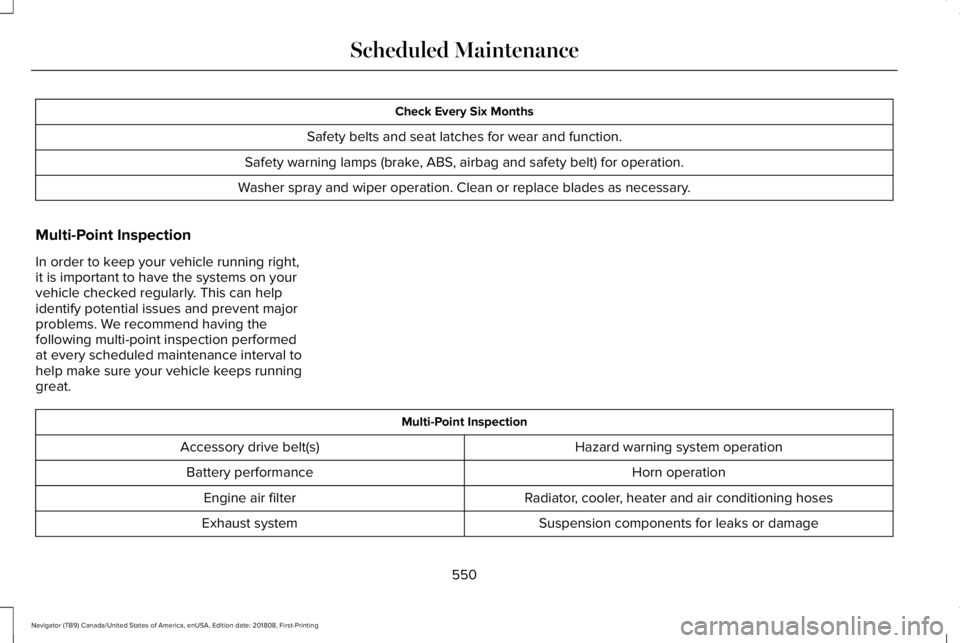
Check Every Six Months
Safety belts and seat latches for wear and function.
Safety warning lamps (brake, ABS, airbag and safety belt) for operation.
Washer spray and wiper operation. Clean or replace blades as necessary.
Multi-Point Inspection
In order to keep your vehicle running right,it is important to have the systems on yourvehicle checked regularly. This can helpidentify potential issues and prevent majorproblems. We recommend having thefollowing multi-point inspection performedat every scheduled maintenance interval tohelp make sure your vehicle keeps runninggreat.
Multi-Point Inspection
Hazard warning system operationAccessory drive belt(s)
Horn operationBattery performance
Radiator, cooler, heater and air conditioning hosesEngine air filter
Suspension components for leaks or damageExhaust system
550
Navigator (TB9) Canada/United States of America, enUSA, Edition date: 201808, First-Printing
Scheduled Maintenance
Page 632 of 645
3
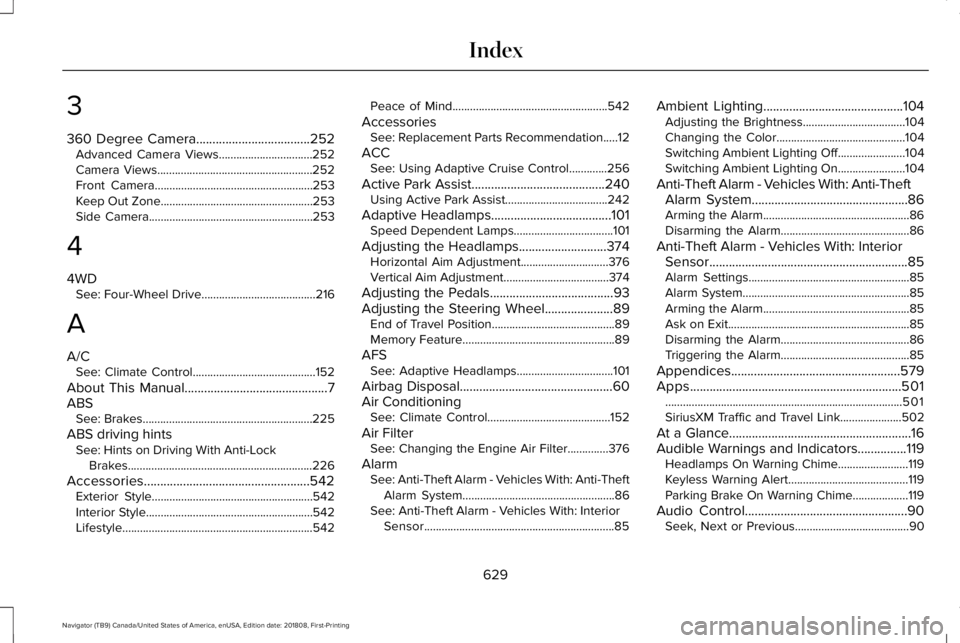
360 Degree Camera...................................252Advanced Camera Views................................252Camera Views.....................................................252Front Camera......................................................253Keep Out Zone....................................................253Side Camera........................................................253
4
4WDSee: Four-Wheel Drive.......................................216
A
A/CSee: Climate Control..........................................152
About This Manual............................................7ABSSee: Brakes..........................................................225
ABS driving hintsSee: Hints on Driving With Anti-LockBrakes...............................................................226
Accessories...................................................542Exterior Style.......................................................542Interior Style.........................................................542Lifestyle.................................................................542
Peace of Mind.....................................................542
AccessoriesSee: Replacement Parts Recommendation.....12
ACCSee: Using Adaptive Cruise Control.............256
Active Park Assist.........................................240Using Active Park Assist...................................242
Adaptive Headlamps.....................................101Speed Dependent Lamps..................................101
Adjusting the Headlamps...........................374Horizontal Aim Adjustment..............................376Vertical Aim Adjustment....................................374
Adjusting the Pedals......................................93Adjusting the Steering Wheel.....................89End of Travel Position..........................................89Memory Feature....................................................89
AFSSee: Adaptive Headlamps.................................101
Airbag Disposal...............................................60Air ConditioningSee: Climate Control..........................................152
Air FilterSee: Changing the Engine Air Filter..............376
AlarmSee: Anti-Theft Alarm - Vehicles With: Anti-TheftAlarm System....................................................86See: Anti-Theft Alarm - Vehicles With: InteriorSensor.................................................................85
Ambient Lighting...........................................104Adjusting the Brightness...................................104Changing the Color............................................104Switching Ambient Lighting Off.......................104Switching Ambient Lighting On.......................104
Anti-Theft Alarm - Vehicles With: Anti-TheftAlarm System................................................86Arming the Alarm..................................................86Disarming the Alarm............................................86
Anti-Theft Alarm - Vehicles With: InteriorSensor.............................................................85Alarm Settings.......................................................85Alarm System.........................................................85Arming the Alarm..................................................85Ask on Exit..............................................................85Disarming the Alarm............................................86Triggering the Alarm............................................85
Appendices....................................................579Apps.................................................................501.................................................................................501SiriusXM Traffic and Travel Link.....................502
At a Glance........................................................16Audible Warnings and Indicators...............119Headlamps On Warning Chime........................119Keyless Warning Alert.........................................119Parking Brake On Warning Chime...................119
Audio Control..................................................90Seek, Next or Previous.......................................90
629
Navigator (TB9) Canada/United States of America, enUSA, Edition date: 201808, First-Printing
Index