roof LINCOLN NAVIGATOR 2019 User Guide
[x] Cancel search | Manufacturer: LINCOLN, Model Year: 2019, Model line: NAVIGATOR, Model: LINCOLN NAVIGATOR 2019Pages: 645, PDF Size: 5.02 MB
Page 294 of 645
Maximum Recommended Load Amounts
Maximum Recommended LoadDescription
125 lb (56 kg)Vehicles with moonroof.
200 lb (90 kg)Vehicles without moonroof.
125 lb (56 kg)Vehicles equipped with 20 in (50 cm) wheels and without moonroof.
Note:The maximum recommended load isbased on the load being evenly distributedon the crossbars.
Adjusting the Crossbar (If Equipped)
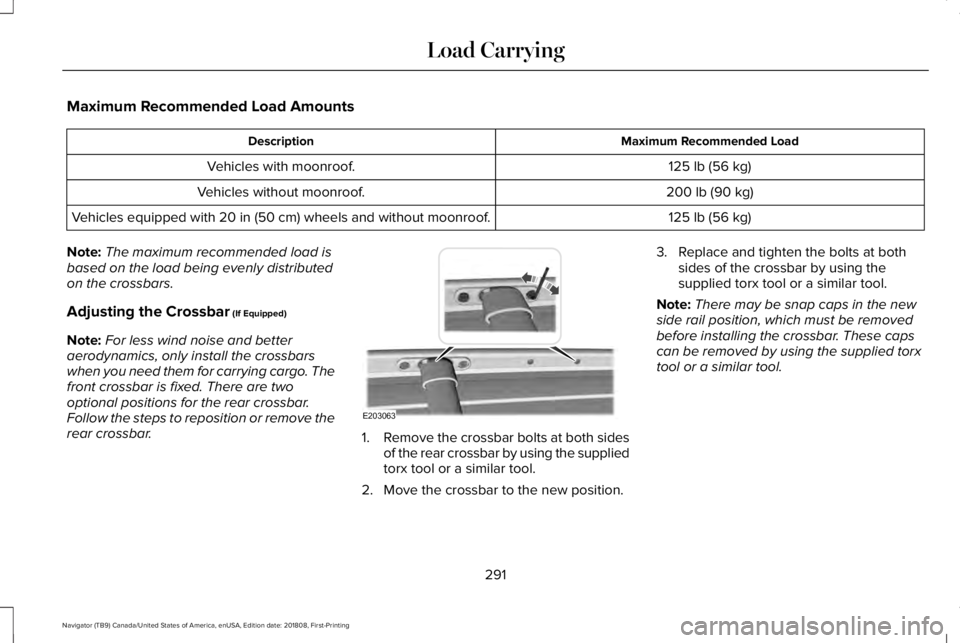
Note:For less wind noise and betteraerodynamics, only install the crossbarswhen you need them for carrying cargo. Thefront crossbar is fixed. There are twooptional positions for the rear crossbar.Follow the steps to reposition or remove therear crossbar.1.Remove the crossbar bolts at both sidesof the rear crossbar by using the suppliedtorx tool or a similar tool.
2. Move the crossbar to the new position.
3. Replace and tighten the bolts at bothsides of the crossbar by using thesupplied torx tool or a similar tool.
Note:There may be snap caps in the newside rail position, which must be removedbefore installing the crossbar. These capscan be removed by using the supplied torxtool or a similar tool.
291
Navigator (TB9) Canada/United States of America, enUSA, Edition date: 201808, First-Printing
Load CarryingE203063
Page 299 of 645
Special Loading Instructions forOwners of Pick-up Trucks and Utility-type Vehicles
WARNING: When loading theroof racks, we recommend you evenlydistribute the load, as well as maintaina low center of gravity. Loadedvehicles, with higher centers of gravity,may handle differently than unloadedvehicles. Take extra precautions, suchas slower speeds and increasedstopping distance, when driving aheavily loaded vehicle.
296
Navigator (TB9) Canada/United States of America, enUSA, Edition date: 201808, First-Printing
Load Carrying
Page 339 of 645
Disputes submitted to the BBB AUTO LINEprogram are usually decided within forty daysafter you file your claim with the BBB. Youare not bound by the decision, and mayreject the decision and proceed to courtwhere all findings of the BBB Auto Linedispute, and decision, are admissible in thecourt action. Should you choose to acceptthe BBB AUTO LINE decision, Ford is thenbound by the decision, and must comply withthe decision within 30 days of receipt of youracceptance letter.
BBB AUTO LINE Application: Using theinformation provided below, please call orwrite to request a program application. Youwill be asked for your name and address,general information about your new vehicle,information about your warranty concerns,and any steps you have already taken to tryto resolve them. A Customer Claim Form willbe mailed that will need to be completed,signed and returned to the BBB along withproof of ownership. Upon receipt, the BBBwill review the claim for eligibility under theProgram Summary Guidelines.
You can get more information by callingBBB AUTO LINE at 1-800-955-5100, orwriting to:
BBB AUTO LINE3033 Wilson Boulevard, Suite 600Arlington, Virginia 22201
BBB AUTO LINE applications can also berequested by calling the Ford MotorCompany Customer Relationship Center at1-800-392-3673.
Note:Ford Motor Company reserves theright to change eligibility limitations, modifyprocedures, or to discontinue this processat any time without notice and withoutobligation.
UTILIZING THE
MEDIATION/ARBITRATION
PROGRAM (CANADA ONLY)
For vehicles delivered to authorizedCanadian dealers. In those cases where youcontinue to feel that the efforts by Ford ofCanada and the authorized dealer to resolvea factory-related vehicle service concernhave been unsatisfactory, Ford of Canadaparticipates in an impartial third partymediation/arbitration program administeredby the Canadian Motor Vehicle ArbitrationPlan (CAMVAP).
The CAMVAP program is a straight forwardand relatively speedy alternative to resolvea disagreement when all other efforts toproduce a settlement have failed. Thisprocedure is without cost to you and isdesigned to eliminate the need for lengthyand expensive legal proceedings.
336
Navigator (TB9) Canada/United States of America, enUSA, Edition date: 201808, First-Printing
Customer Assistance
Page 357 of 645
Protected ComponentFuse RatingFuse or Relay Number
Extended power mode module (EPM).10A214Brake Switch.
Smart datalink connector Power (SDLC).10A215
Liftglass release relay.15A116
Telematics control unit - modem.5A217
Push-button start switch.5A218
Not used (spare).7.5A219
Headlamp control module (HCM).7.5A220
In-car temperature and humidity sensor.5A221
Electrochromic (EC)mirror.5A2222nd row heated seat module.
Moonroof (logic).10A123Inverter (LIN logic).Power window switch.Power mirror switch.DVD player (if equipped).
354
Navigator (TB9) Canada/United States of America, enUSA, Edition date: 201808, First-Printing
Fuses
Page 358 of 645
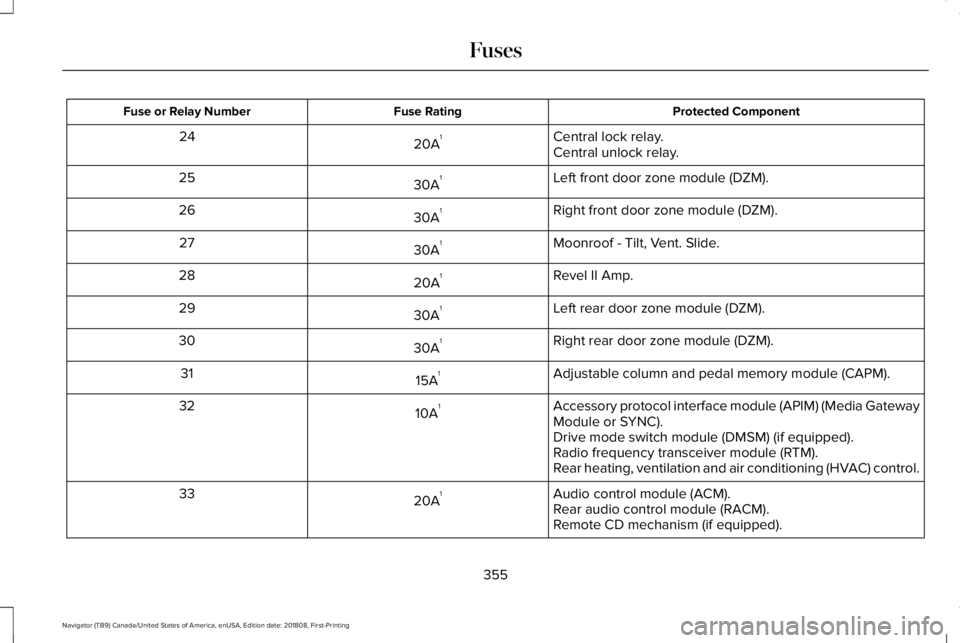
Protected ComponentFuse RatingFuse or Relay Number
Central lock relay.20A124Central unlock relay.
Left front door zone module (DZM).30A125
Right front door zone module (DZM).30A126
Moonroof - Tilt, Vent. Slide.30A127
Revel II Amp.20A128
Left rear door zone module (DZM).30A129
Right rear door zone module (DZM).30A130
Adjustable column and pedal memory module (CAPM).15A131
Accessory protocol interface module (APIM) (Media GatewayModule or SYNC).10A132
Drive mode switch module (DMSM) (if equipped).Radio frequency transceiver module (RTM).Rear heating, ventilation and air conditioning (HVAC) control.
Audio control module (ACM).20A133Rear audio control module (RACM).Remote CD mechanism (if equipped).
355
Navigator (TB9) Canada/United States of America, enUSA, Edition date: 201808, First-Printing
Fuses
Page 384 of 645
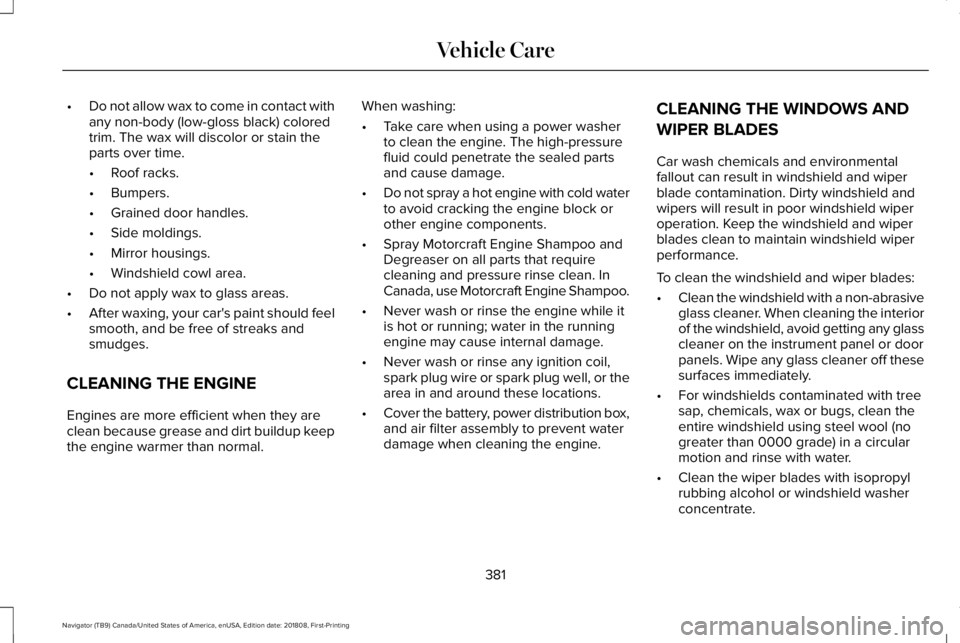
•Do not allow wax to come in contact withany non-body (low-gloss black) coloredtrim. The wax will discolor or stain theparts over time.
•Roof racks.
•Bumpers.
•Grained door handles.
•Side moldings.
•Mirror housings.
•Windshield cowl area.
•Do not apply wax to glass areas.
•After waxing, your car's paint should feelsmooth, and be free of streaks andsmudges.
CLEANING THE ENGINE
Engines are more efficient when they areclean because grease and dirt buildup keepthe engine warmer than normal.
When washing:
•Take care when using a power washerto clean the engine. The high-pressurefluid could penetrate the sealed partsand cause damage.
•Do not spray a hot engine with cold waterto avoid cracking the engine block orother engine components.
•Spray Motorcraft Engine Shampoo andDegreaser on all parts that requirecleaning and pressure rinse clean. InCanada, use Motorcraft Engine Shampoo.
•Never wash or rinse the engine while itis hot or running; water in the runningengine may cause internal damage.
•Never wash or rinse any ignition coil,spark plug wire or spark plug well, or thearea in and around these locations.
•Cover the battery, power distribution box,and air filter assembly to prevent waterdamage when cleaning the engine.
CLEANING THE WINDOWS AND
WIPER BLADES
Car wash chemicals and environmentalfallout can result in windshield and wiperblade contamination. Dirty windshield andwipers will result in poor windshield wiperoperation. Keep the windshield and wiperblades clean to maintain windshield wiperperformance.
To clean the windshield and wiper blades:
•Clean the windshield with a non-abrasiveglass cleaner. When cleaning the interiorof the windshield, avoid getting any glasscleaner on the instrument panel or doorpanels. Wipe any glass cleaner off thesesurfaces immediately.
•For windshields contaminated with treesap, chemicals, wax or bugs, clean theentire windshield using steel wool (nogreater than 0000 grade) in a circularmotion and rinse with water.
•Clean the wiper blades with isopropylrubbing alcohol or windshield washerconcentrate.
381
Navigator (TB9) Canada/United States of America, enUSA, Edition date: 201808, First-Printing
Vehicle Care
Page 545 of 645
For a complete listing of the accessories thatare available for your vehicle, please contactyour authorized dealer or visit the onlinestore web site:
Web Address (United States)
www.Accessories.Lincoln.com
Web Address (Canada)
www.LincolnCanada.com
Lincoln Motor Company will repair or replaceany properly authorized dealer-installedLincoln Original Accessory found to bedefective in factory-supplied materials orworkmanship during the warranty period, aswell as any component damaged by thedefective accessories.
Lincoln Motor Company will warrant yourLincoln Original Accessory through thewarranty that provides the greatest benefit:
•24 months, unlimited mileage.
•The remainder of your new vehiclelimited warranty.
Contact an authorized dealer for details anda copy of the warranty.
Exterior Style
•Side window deflectors*.
•Splash guards.
Interior Style
•Floor mats.
•Rear seat entertainment system*.
Lifestyle
•Ash cup or coin holder.
•Cargo organization and management.
•Portable audio speaker*.
•Roof rack and carriers*.
•SUV camping tent*.
•Trailer hitches, wiring harnesses andaccessories.
Peace of Mind
•Car cover*.
•Remote start.
•Roadside assistance kits*.
•Vehicle security.
•Wheel locks.
•Window sunscreen*.
*Lincoln Licensed Accessory. The accessorymanufacturer designs, develops andtherefore warrants Lincoln LicensedAccessories, and does not design or testthese accessories to Lincoln Motor Companyengineering requirements. Contact anauthorized Lincoln dealer for the accessorymanufacturer's limited warranty details andrequest a copy of the Lincoln LicensedAccessories product limited warranty fromthe accessory manufacturer.
542
Navigator (TB9) Canada/United States of America, enUSA, Edition date: 201808, First-Printing
Accessories
Page 612 of 645
it, and (ii) save it, provided that you do notremove any copyright notices that appearand do not modify the Data in any way. Youagree not to otherwise reproduce, copy,modify, decompile, disassemble or reverseengineer any portion of this Data, and maynot transfer or distribute it in any form, forany purpose, except to the extent permittedby mandatory laws.
Restrictions
Except where you have been specificallylicensed to do so by NAV2 , and withoutlimiting the preceding paragraph, you maynot (a) use this Data with any products,systems, or applications installed orotherwise connected to or in communicationwith vehicles, capable of vehicle navigation,positioning, dispatch, real time routeguidance, fleet management or similarapplications; or (b) with or in communicationwith any positioning devices or any mobileor wireless-connected electronic or computer
devices, including without limitation cellularphones, palmtop and handheld computers,pagers, and personal digital assistants orPDAs. You agree to cease using this Data ifyou fail to comply with these terms andconditions.
Limited Warranty
NAV2 warrants that (a) the Data will performsubstantially in accordance with theaccompanying written materials for a periodof ninety (90) days from the date of receipt,and (b) any support services provided byNAV2 shall be substantially as described inapplicable written materials provided to youby NAV2, and NAV2’s support engineers willmake commercially reasonable efforts tosolve any problem issues.
rigCustomer Remedies
NAV2 and its suppliers’ entire liability andyour exclusive remedy shall be, at NAV2’ssole discretion, either (a) return of the pricepaid, if any, or (b) repair or replacement ofthe Data that do not meet NAV2’s LimitedWarranty and that are returned to NAV2 witha copy of your receipt. This Limited Warranty
is void if failure of the Data has resulted fromaccident, abuse, or misapplication. Anyreplacement Data will be warranted for theremainder of the original warranty period orthirty (30) days, whichever is longer. Neitherthese remedies nor any product supportservices offered by NAV2 are availablewithout proof of purchase from an authorizedinternational source.
No Other Warranty:
EXCEPT FOR THE LMITED WARRANTY SETFORTH ABOVE AND TO THE EXTENTPERMITTED BY APPLICABLE LAW, NAV2AND ITS LICENSORS (INCLUDING THEIRLICENSORS AND SUPPLIERS) DISCLAIMANY WARRANTIES, EXPRESS OR IMPLIED,OF QUALITY, PERFORMANCE,MERCHANTABILITY, FITNESS FOR APARTICULAR PURPOSE, OWNERSHIP ORNON-INFRINGEMENT. Certain warrantyexclusions may not be permitted underapplicable law, so to that extent the aboveexclusion may not apply to you.
609
Navigator (TB9) Canada/United States of America, enUSA, Edition date: 201808, First-Printing
Appendices
Page 638 of 645
Remote Start.........................................................143Seats.......................................................................143Stability Control....................................................143Starting System ...................................................144Tire Pressure Monitoring System....................144Trailer......................................................................145Transmission.........................................................146
Installing Child Restraints.............................20Child Seats.............................................................20Combining Seatbelt and LATCH LowerAnchors for Attaching Child SafetySeats....................................................................28Using Lap and Shoulder Belts...........................20Using Lower Anchors and Tethers forCHildren (LATCH).............................................26Using Tether Straps..............................................28
Instrument Cluster..........................................113Instrument Lighting Dimmer........................99Instrument Panel Overview...........................16Interior Lamps................................................103Front Interior Lamp.............................................103Rear Interior Lamps.............................................104
Interior Mirror.................................................108Auto-Dimming Mirror..........................................109
Introduction.........................................................7
J
Jump Starting the Vehicle..........................328Connecting the Jumper Cables......................328Jump Starting......................................................329Preparing Your Vehicle.....................................328Removing the Jumper Cables.........................330
K
Keyless Entry....................................................76Displaying the Factory-Set Code......................78Locking and Unlocking........................................77SECURICODE™ KEYLESS ENTRYKEYPAD...............................................................76
Keyless Starting..............................................191Switching the Ignition On...................................191
Keys and Remote Controls............................61
L
Lane Keeping System.................................265Switching the System On and Off..................266System Display...................................................268System Settings..................................................267Troubleshooting.................................................269
Liftgate...............................................................79
Liftgate Window...............................................111Opening the Liftgate Window............................111
Lighting Control...............................................97Flashing the Headlamp High Beam.................98Headlamp High Beam.........................................98
Lighting..............................................................97General Information.............................................97
Limited Slip Differential..............................224Spare Tire.............................................................224Trailer Towing......................................................224
Lincoln Automotive Financial Services......12Lincoln Protect..............................................544Lincoln Protect (CANADA ONLY)...................545Lincoln Protect Extended Service Plans (U.S.Only)..................................................................544
Load CarriersSee: Roof Racks and Load Carriers...............290
Load Carrying................................................287Load Limit.......................................................292Special Loading Instructions for Owners ofPick-up Trucks and Utility-typeVehicles............................................................296Vehicle Loading - with and without aTrailer................................................................292
Locking and Unlocking..................................72Activating Intelligent Access..............................73Approach Detection Illumination......................76Autolock..................................................................75
635
Navigator (TB9) Canada/United States of America, enUSA, Edition date: 201808, First-Printing
Index
Page 639 of 645
Battery Saver..........................................................76Illuminated Entry....................................................76Illuminated Exit......................................................76Locking and Unlocking the Doors with theKey Blade............................................................75Power Door Locks................................................72Remote Control.....................................................72Smart Unlocks for Intelligent AccessKeys......................................................................75
Lug NutsSee: Changing a Road Wheel..........................410
M
Maintenance..................................................359General Information...........................................359
Media Hub......................................................440Memory Function...........................................167Driver Seat Memory............................................167Easy Entry and Exit Feature..............................168Passenger Seat Memory...................................168Personal Profiles..................................................169Saving a PreSet Position...................................167
Message CenterSee: Information Displays.................................120
MirrorsSee: Windows and Mirrors................................105
Mobile Communications Equipment...........14
Moonroof..........................................................110Bounce-Back..........................................................111Opening and Closing the Moonroof................111
Motorcraft Parts.............................................419MyKey — Troubleshooting............................70MyKey™..............................................................67Principle of Operation..........................................67
N
Navigation......................................................490cityseeker.............................................................499Destination Mode................................................491Map Mode............................................................490Navigation Map Updates.................................500Navigation Menu................................................496SiriusXM Traffic and Travel Link.....................500SYNC AppLink....................................................499Waypoints.............................................................498
Normal Scheduled Maintenance..............551Intelligent Oil-Life Monitor................................551Normal Maintenance Intervals........................553
O
Oil Change Indicator Reset........................363Oil CheckSee: Engine Oil Check......................................362
Opening and Closing the Hood...............359Ordering Additional Owner'sLiterature......................................................339Obtaining a French Owner’s Manual............339
Overhead Console.......................................189
P
Parking Aids...................................................236Principle of Operation.......................................236
Passive Anti-Theft System............................83SecuriLock™............................................................83
PATSSee: Passive Anti-Theft System........................83
Pedals................................................................93Perchlorate........................................................12Personal Safety System™..............................50How Does the Personal Safety SystemWork?..................................................................50
Phone..............................................................482During a Phone Call...........................................487Making Calls........................................................486Pairing Your Cell Phone for the FirstTime...................................................................483Phone Menu........................................................483Receiving Calls....................................................487Smartphone Connectivity.................................489Text Messaging...................................................488
636
Navigator (TB9) Canada/United States of America, enUSA, Edition date: 201808, First-Printing
Index