roof LINCOLN NAVIGATOR 2019 Owners Manual
[x] Cancel search | Manufacturer: LINCOLN, Model Year: 2019, Model line: NAVIGATOR, Model: LINCOLN NAVIGATOR 2019Pages: 645, PDF Size: 5.02 MB
Page 5 of 645
Liftgate
Power Liftgate.................................................79
Security
Passive Anti-Theft System...........................83
Anti-Theft Alarm - Vehicles With: InteriorSensor..........................................................85
Anti-Theft Alarm - Vehicles With: Anti-TheftAlarm System.............................................86
Power Running Boards
Using Power Running Boards .....................87
Steering Wheel
Adjusting the Steering Wheel....................89
Audio Control.................................................90
Voice Control..................................................90
Cruise Control................................................90
Information Display Control.........................91
Heated Steering Wheel...............................92
Pedals
Adjusting the Pedals.....................................93
Wipers and Washers
Autowipers......................................................94
Windshield Washers.....................................95
Rear Window Wiper and Washers............95
Lighting
General Information......................................97
Lighting Control..............................................97
Autolamps.......................................................98
Instrument Lighting Dimmer.......................99
Headlamp Exit Delay....................................99
Daytime Running Lamps..............................99
Automatic High Beam Control.................100
Front Fog Lamps...........................................101
Headlamp Leveling......................................101
Adaptive Headlamps...................................101
Direction Indicators.....................................102
Welcome Lighting........................................102
Interior Lamps...............................................103
Ambient Lighting..........................................104
Windows and Mirrors
Power Windows............................................105
Global Opening and Closing....................106
Exterior Mirrors.............................................106
Interior Mirror................................................108
Childminder Mirror.......................................109
Toll Reader.....................................................109
Sun Visors.......................................................110
Moonroof.........................................................110
Liftgate Window..............................................111
Instrument Cluster
Gauges.............................................................113
Warning Lamps and Indicators..................114
Audible Warnings and Indicators..............119
Information Displays
General Information....................................120
Information Messages................................125
Head Up Display..........................................148
Climate Control
Automatic Climate Control........................152
Hints on Controlling the Interior Climate.......................................................................154
2
Navigator (TB9) Canada/United States of America, enUSA, Edition date: 201808, First-Printing
Table of Contents
Page 7 of 645
Using Traction Control................................231
Stability Control
Principle of Operation................................232
Using Stability Control...............................233
Hill Descent Control
Principle of Operation................................235
Using Hill Descent Control.......................235
Parking Aids
Principle of Operation................................236
Rear Parking Aid..........................................237
Front Parking Aid........................................238
Side Sensing System.................................239
Active Park Assist.......................................240
Rear View Camera......................................249
360 Degree Camera..................................252
Cruise Control
Principle of Operation................................255
Using Cruise Control..................................255
Using Adaptive Cruise Control................256
Driving Aids
Driver Alert....................................................264
Lane Keeping System................................265
Blind Spot Information System.................271
Cross Traffic Alert........................................275
Steering.........................................................279
Pre-Collision Assist.....................................280
Drive Mode Control....................................284
Load Carrying
Rear Under Floor Storage.........................287
Cargo Nets....................................................289
Roof Racks and Load Carriers.................290
Load Limit......................................................292
Towing
Towing a Trailer............................................297
Trailer Reversing Aids................................298
Trailer Sway Control...................................308
Recommended Towing Weights.............309
Essential Towing Checks.............................311
Towing the Vehicle on Four Wheels.......319
Driving Hints
Breaking-In....................................................323
Reduced Engine Performance.................323
Economical Driving.....................................323
Driving Through Water..............................324
Floor Mats.....................................................324
Roadside Emergencies
Roadside Assistance..................................326
Hazard Flashers...........................................327
Fuel Shutoff...................................................327
Jump Starting the Vehicle.........................328
Post-Crash Alert System...........................330
Transporting the Vehicle............................331
Towing Points................................................331
Customer Assistance
Getting the Services You Need...............333
In California (U.S. Only)..............................334
The Better Business Bureau (BBB) AutoLine Program (U.S. Only).......................335
Utilizing the Mediation/Arbitration Program(Canada Only)..........................................336
4
Navigator (TB9) Canada/United States of America, enUSA, Edition date: 201808, First-Printing
Table of Contents
Page 44 of 645
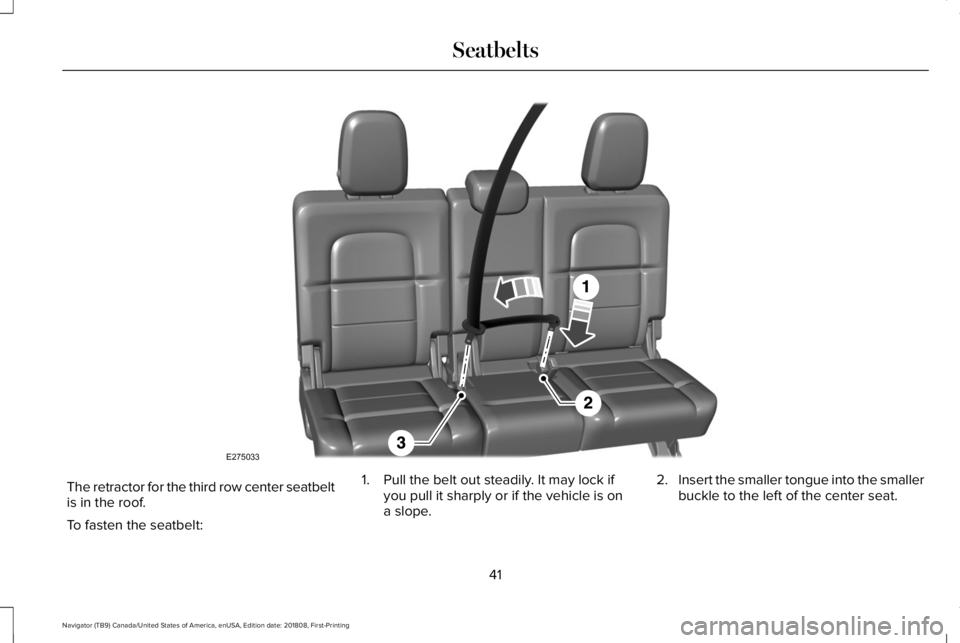
The retractor for the third row center seatbeltis in the roof.
To fasten the seatbelt:
1. Pull the belt out steadily. It may lock ifyou pull it sharply or if the vehicle is ona slope.
2.Insert the smaller tongue into the smallerbuckle to the left of the center seat.
41
Navigator (TB9) Canada/United States of America, enUSA, Edition date: 201808, First-Printing
SeatbeltsE275033
Page 61 of 645
WARNING: Do not attempt to service,repair, or modify the supplementaryrestraint system or associated components.Failure to follow this instruction could resultin personal injury or death.
WARNING: All occupants of yourvehicle, including the driver, should alwaysproperly wear their seatbelts, even whenan airbag supplemental restraint system isprovided. Failure to properly wear yourseatbelt could seriously increase the riskof injury or death.
WARNING: To reduce risk of injury,do not obstruct or place objects in thedeployment path of the airbag.
WARNING: If a supplementaryrestraint system component has deployed,it will not function again. Have the systemand associated components inspected assoon as possible. Failure to follow thisinstruction could result in personal injuryor death.
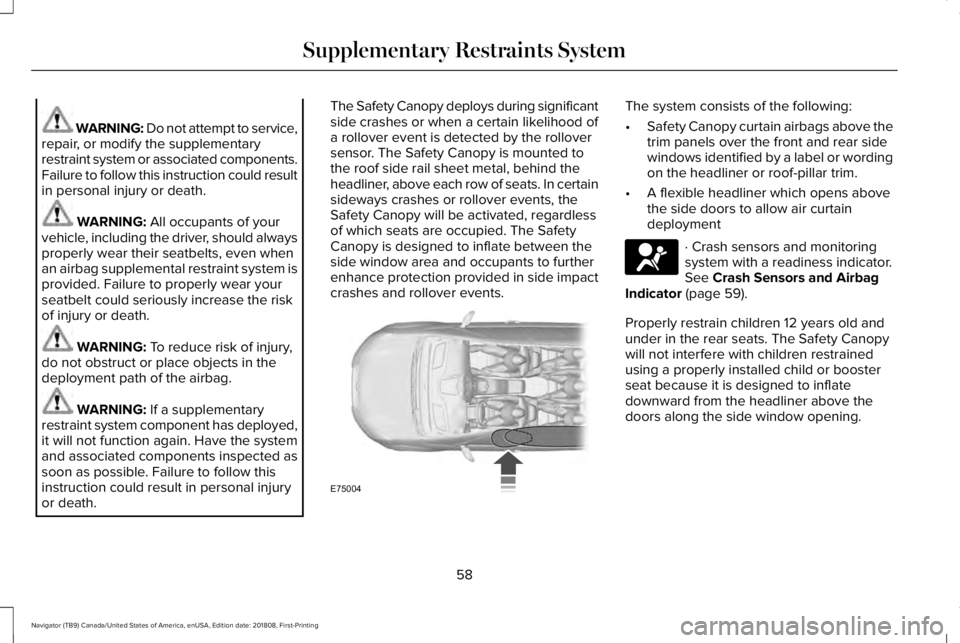
The Safety Canopy deploys during significantside crashes or when a certain likelihood ofa rollover event is detected by the rolloversensor. The Safety Canopy is mounted tothe roof side rail sheet metal, behind theheadliner, above each row of seats. In certainsideways crashes or rollover events, theSafety Canopy will be activated, regardlessof which seats are occupied. The SafetyCanopy is designed to inflate between theside window area and occupants to furtherenhance protection provided in side impactcrashes and rollover events.
The system consists of the following:
•Safety Canopy curtain airbags above thetrim panels over the front and rear sidewindows identified by a label or wordingon the headliner or roof-pillar trim.
•A flexible headliner which opens abovethe side doors to allow air curtaindeployment
· Crash sensors and monitoringsystem with a readiness indicator.See Crash Sensors and AirbagIndicator (page 59).
Properly restrain children 12 years old andunder in the rear seats. The Safety Canopywill not interfere with children restrainedusing a properly installed child or boosterseat because it is designed to inflatedownward from the headliner above thedoors along the side window opening.
58
Navigator (TB9) Canada/United States of America, enUSA, Edition date: 201808, First-Printing
Supplementary Restraints SystemE75004 E67017
Page 91 of 645
Manual Power Deploy
You can manually operate the runningboards in the advanced settings of theinformation display. See GeneralInformation (page 120).
Set the running boards in the deployedposition to access the roof.
The running boards return to the stowedposition and enter automatic mode when thevehicle speed exceeds 5 mph (8 km/h).
Enabling and Disabling
You can enable and disable the powerrunning board feature in the advancedsettings of the information display. SeeGeneral Information (page 120).
•When disabled (OFF), the running boardsmove to the stowed position regardlessof the door position.
•When enabled (AUTO), the runningboards move back to the correctpositions based on the door position.
Bounce-back
The running board will reverse direction andmove to the end of travel if it encounters anobject while moving.
88
Navigator (TB9) Canada/United States of America, enUSA, Edition date: 201808, First-Printing
Power Running Boards (If Equipped)
Page 113 of 645
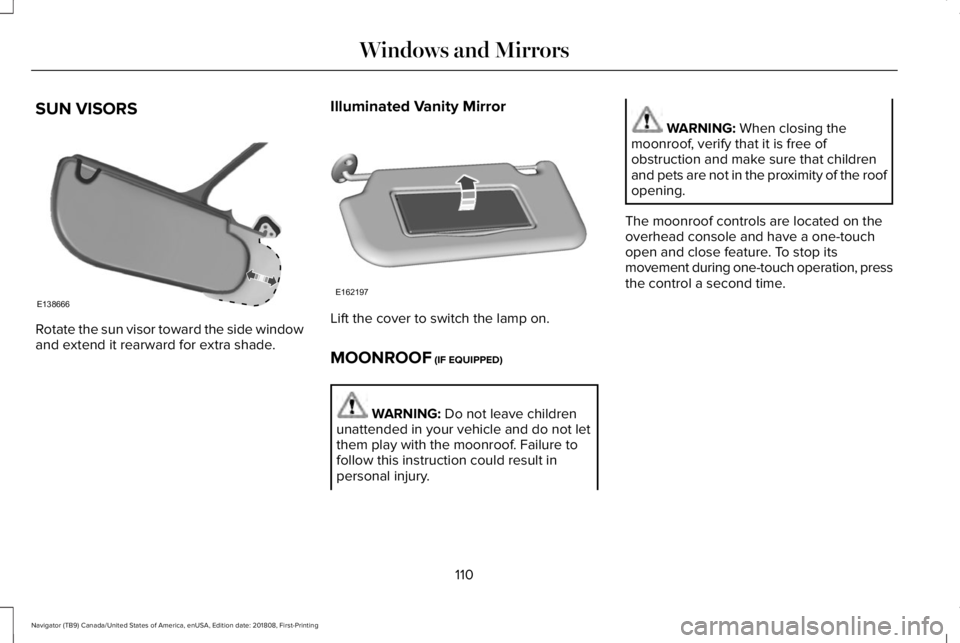
SUN VISORS
Rotate the sun visor toward the side windowand extend it rearward for extra shade.
Illuminated Vanity Mirror
Lift the cover to switch the lamp on.
MOONROOF (IF EQUIPPED)
WARNING: Do not leave childrenunattended in your vehicle and do not letthem play with the moonroof. Failure tofollow this instruction could result inpersonal injury.
WARNING: When closing themoonroof, verify that it is free ofobstruction and make sure that childrenand pets are not in the proximity of the roofopening.
The moonroof controls are located on theoverhead console and have a one-touchopen and close feature. To stop itsmovement during one-touch operation, pressthe control a second time.
110
Navigator (TB9) Canada/United States of America, enUSA, Edition date: 201808, First-Printing
Windows and MirrorsE138666 E162197
Page 114 of 645
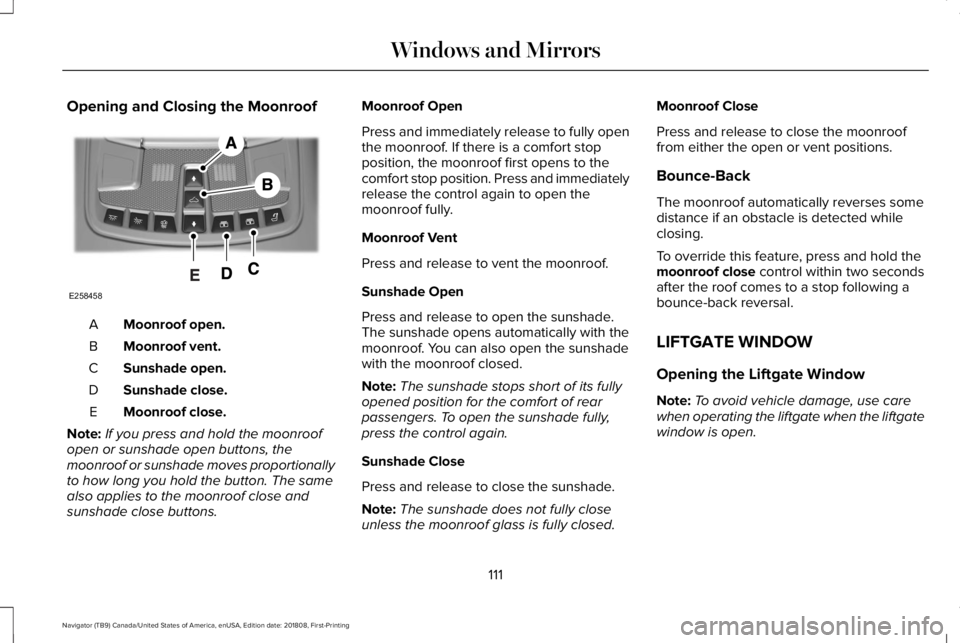
Opening and Closing the Moonroof
Moonroof open.A
Moonroof vent.B
Sunshade open.C
Sunshade close.D
Moonroof close.E
Note:If you press and hold the moonroofopen or sunshade open buttons, themoonroof or sunshade moves proportionallyto how long you hold the button. The samealso applies to the moonroof close andsunshade close buttons.
Moonroof Open
Press and immediately release to fully openthe moonroof. If there is a comfort stopposition, the moonroof first opens to thecomfort stop position. Press and immediatelyrelease the control again to open themoonroof fully.
Moonroof Vent
Press and release to vent the moonroof.
Sunshade Open
Press and release to open the sunshade.The sunshade opens automatically with themoonroof. You can also open the sunshadewith the moonroof closed.
Note:The sunshade stops short of its fullyopened position for the comfort of rearpassengers. To open the sunshade fully,press the control again.
Sunshade Close
Press and release to close the sunshade.
Note:The sunshade does not fully closeunless the moonroof glass is fully closed.
Moonroof Close
Press and release to close the moonrooffrom either the open or vent positions.
Bounce-Back
The moonroof automatically reverses somedistance if an obstacle is detected whileclosing.
To override this feature, press and hold themoonroof close control within two secondsafter the roof comes to a stop following abounce-back reversal.
LIFTGATE WINDOW
Opening the Liftgate Window
Note:To avoid vehicle damage, use carewhen operating the liftgate when the liftgatewindow is open.
111
Navigator (TB9) Canada/United States of America, enUSA, Edition date: 201808, First-Printing
Windows and MirrorsE258458
Page 235 of 645
PRINCIPLE OF OPERATION
WARNING: Vehicle modificationsinvolving braking system, aftermarket roofracks, suspension, steering system, tireconstruction and wheel and tire size maychange the handling characteristics of yourvehicle and may adversely affect theperformance of the electronic stabilitycontrol system. In addition, installing anystereo loudspeakers may interfere withand adversely affect the electronic stabilitycontrol system. Install any aftermarketstereo loudspeaker as far as possible fromthe front center console, the tunnel, andthe front seats in order to minimize the riskof interfering with the electronic stabilitycontrol sensors. Reducing theeffectiveness of the electronic stabilitycontrol system could lead to an increasedrisk of loss of vehicle control, vehiclerollover, personal injury and death.
WARNING: Remember that evenadvanced technology cannot defy the lawsof physics. It’s always possible to losecontrol of a vehicle due to inappropriatedriver input for the conditions. Aggressivedriving on any road condition can causeyou to lose control of your vehicleincreasing the risk of personal injury orproperty damage. Activation of theelectronic stability control system is anindication that at least some of the tireshave exceeded their ability to grip theroad; this could reduce the operator’sability to control the vehicle potentiallyresulting in a loss of vehicle control, vehiclerollover, personal injury and death. If yourelectronic stability control system activates,SLOW DOWN.
The system automatically turns on each timeyou switch the ignition on.
If a fault occurs in either the stability controlor the traction control system, you mayexperience the following conditions:
•The stability and traction control lightilluminates steadily.
•The stability control and traction controlsystems do not enhance your vehicle'sability to maintain traction of the wheels.
If a driving condition activates either thestability control or the traction control systemyou may experience the following conditions:
•The stability and traction control lightflashes.
•Your vehicle slows down.
•Reduced engine power.
•A vibration in the brake pedal.
•The brake pedal is stiffer than usual.
•If the driving condition is severe and yourfoot is not on the brake, the brake pedalmay move as the system applies higherbrake force.
The stability control system has severalfeatures built into it to help you maintaincontrol of your vehicle:
232
Navigator (TB9) Canada/United States of America, enUSA, Edition date: 201808, First-Printing
Stability Control
Page 244 of 645
WARNING: Active park assist doesnot apply the brakes under anycircumstances.
WARNING: You are responsible forcontrolling your vehicle at all times. Thesystem is designed to be an aid and doesnot relieve you of your responsibility todrive with due care and attention. Failureto follow this instruction could result in theloss of control of your vehicle, personalinjury or death.
Active park assist is a multi-step process andmay require you to shift the transmissionmultiple times. Follow the onscreeninstructions until the parking maneuver iscomplete.
If you are uncomfortable with the proximityto any vehicle or object, you may choose tooverride the system by grabbing the steeringwheel, or by taking full control of your vehicleafter pressing the active park assist button.
Keep your hands, hair, clothing and anyloose items clear of the steering wheel whenusing active park assist.
The sensors are on the front and rearbumpers.
Note:Keep the sensors free from snow, iceand large accumulations of dirt.
Note:Do not cover up the sensors.
Note:Do not clean the sensors with sharpobjects.
Note:The sensors may not detect objectswith surfaces that absorb ultrasonic waves.The sensors may falsely detect objects dueto ultrasonic interference caused bymotorcycle exhausts, truck air brakes orhorns, for example.
Note:If you change any tires, the systemmust recalibrate and may not correctlyoperate for a short time.
The system may not correctly operate in anyof the following conditions:
•You use a spare tire or a tire that issignificantly worn more than the othertires.
•One or more tires are incorrectly inflated.
•You try to park on a tight curve.
•Something passes between the frontbumper and the parking space. Forexample, a pedestrian or cyclist.
•The edge of the neighboring parkedvehicle is high off the ground. Forexample, a bus, tow truck or flatbedtruck.
•The weather conditions are poor. Forexample, during heavy rain, snow, fog,high humidity and high temperatures.
Do not use the system if:
•You have attached an add-on accessoryclose to the sensors on the front or rearof your vehicle. For example, a bike rackor trailer.
•You have attached an overhangingobject to the roof. For example, asurfboard.
•The front bumper, rear bumper or theside sensors are damaged.
•The correct tire size is not in use on yourvehicle. For example, a mini-spare tire.
241
Navigator (TB9) Canada/United States of America, enUSA, Edition date: 201808, First-Printing
Parking Aids
Page 293 of 645
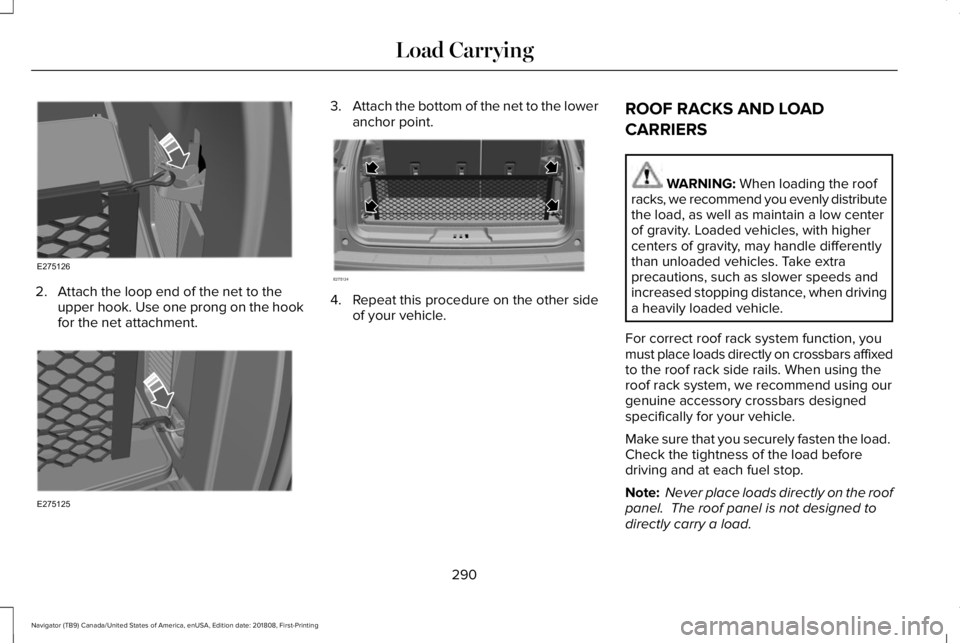
2. Attach the loop end of the net to theupper hook. Use one prong on the hookfor the net attachment.
3.Attach the bottom of the net to the loweranchor point.
4. Repeat this procedure on the other sideof your vehicle.
ROOF RACKS AND LOAD
CARRIERS
WARNING: When loading the roofracks, we recommend you evenly distributethe load, as well as maintain a low centerof gravity. Loaded vehicles, with highercenters of gravity, may handle differentlythan unloaded vehicles. Take extraprecautions, such as slower speeds andincreased stopping distance, when drivinga heavily loaded vehicle.
For correct roof rack system function, youmust place loads directly on crossbars affixedto the roof rack side rails. When using theroof rack system, we recommend using ourgenuine accessory crossbars designedspecifically for your vehicle.
Make sure that you securely fasten the load. Check the tightness of the load beforedriving and at each fuel stop.
Note: Never place loads directly on the roofpanel. The roof panel is not designed todirectly carry a load.
290
Navigator (TB9) Canada/United States of America, enUSA, Edition date: 201808, First-Printing
Load CarryingE275126 E275125 E275124