service LINCOLN NAVIGATOR 2019 User Guide
[x] Cancel search | Manufacturer: LINCOLN, Model Year: 2019, Model line: NAVIGATOR, Model: LINCOLN NAVIGATOR 2019Pages: 645, PDF Size: 5.02 MB
Page 59 of 645
Make sure the front passengersensing system is operatingproperly. See Crash Sensors andAirbag Indicator (page 59).
If the airbag readiness light is lit, do thefollowing:
The driver and adult passengers shouldcheck for objects lodged underneath thefront passenger seat or cargo interfering withthe seat.
If objects are lodged or cargo is interferingwith the seat, please take the following stepsto remove the obstruction:
•Pull your vehicle over.
•Switch your vehicle off.
•Driver or adult passengers should checkfor any objects lodged underneath thefront passenger seat or cargo interferingwith the seat.
•Remove the obstruction(s) (if found).
•Restart your vehicle.
•Wait at least two minutes and verify thatthe airbag readiness light in theinstrument cluster is no longerilluminated.
•If the airbag readiness light in theinstrument cluster remains illuminated,this may or may not be a problem due tothe front passenger sensing system.
Do not attempt to repair or service thesystem. Take your vehicle immediately to anauthorized dealer.
If it is necessary to modify an advanced frontairbag system to accommodate a personwith disabilities, contact your CustomerRelationship Center.
SIDE AIRBAGS
WARNING: Do not place objects ormount equipment on or near the airbagcover, on the side of the front or rearseatbacks, or in areas that may come intocontact with a deploying airbag. Failure tofollow these instructions may increase therisk of personal injury in the event of acrash.
WARNING: Do not use accessoryseat covers. The use of accessory seatcovers may prevent the deployment of theside airbags and increase the risk of injuryin an accident.
WARNING: Do not lean your headon the door. The side airbag could injureyou as it deploys from the side of theseatback.
56
Navigator (TB9) Canada/United States of America, enUSA, Edition date: 201808, First-Printing
Supplementary Restraints SystemE67017
Page 60 of 645
WARNING: Do not attempt to service,repair, or modify the supplementaryrestraint system or associated components.Failure to follow this instruction could resultin personal injury or death.
WARNING: If a supplementaryrestraint system component has deployed,it will not function again. Have the systemand associated components inspected assoon as possible. Failure to follow thisinstruction could result in personal injuryor death.
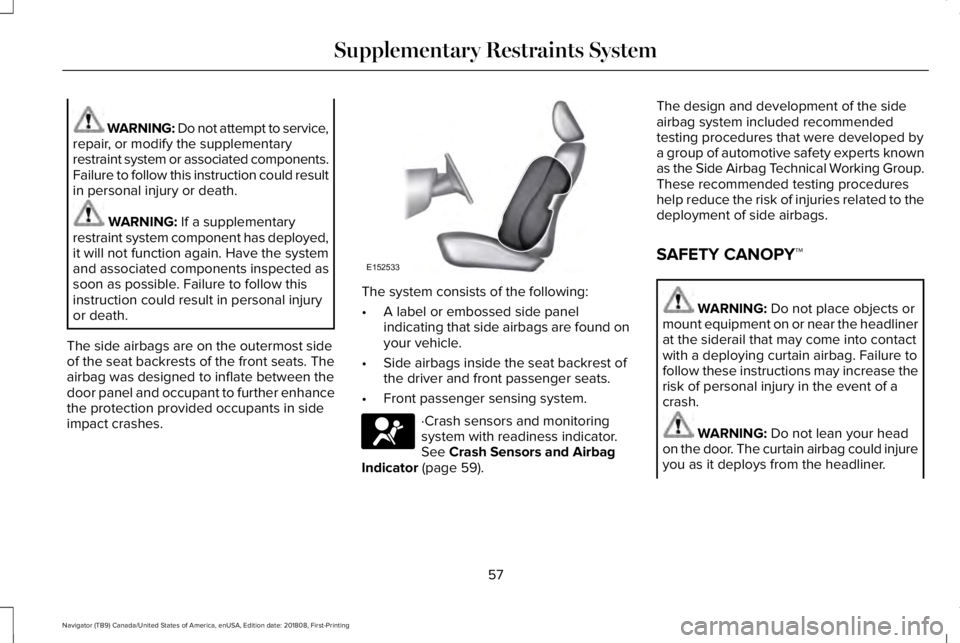
The side airbags are on the outermost sideof the seat backrests of the front seats. Theairbag was designed to inflate between thedoor panel and occupant to further enhancethe protection provided occupants in sideimpact crashes.
The system consists of the following:
•A label or embossed side panelindicating that side airbags are found onyour vehicle.
•Side airbags inside the seat backrest ofthe driver and front passenger seats.
•Front passenger sensing system.
·Crash sensors and monitoringsystem with readiness indicator.See Crash Sensors and AirbagIndicator (page 59).
The design and development of the sideairbag system included recommendedtesting procedures that were developed bya group of automotive safety experts knownas the Side Airbag Technical Working Group.These recommended testing procedureshelp reduce the risk of injuries related to thedeployment of side airbags.
SAFETY CANOPY™
WARNING: Do not place objects ormount equipment on or near the headlinerat the siderail that may come into contactwith a deploying curtain airbag. Failure tofollow these instructions may increase therisk of personal injury in the event of acrash.
WARNING: Do not lean your headon the door. The curtain airbag could injureyou as it deploys from the headliner.
57
Navigator (TB9) Canada/United States of America, enUSA, Edition date: 201808, First-Printing
Supplementary Restraints SystemE152533 E67017
Page 61 of 645
WARNING: Do not attempt to service,repair, or modify the supplementaryrestraint system or associated components.Failure to follow this instruction could resultin personal injury or death.
WARNING: All occupants of yourvehicle, including the driver, should alwaysproperly wear their seatbelts, even whenan airbag supplemental restraint system isprovided. Failure to properly wear yourseatbelt could seriously increase the riskof injury or death.
WARNING: To reduce risk of injury,do not obstruct or place objects in thedeployment path of the airbag.
WARNING: If a supplementaryrestraint system component has deployed,it will not function again. Have the systemand associated components inspected assoon as possible. Failure to follow thisinstruction could result in personal injuryor death.
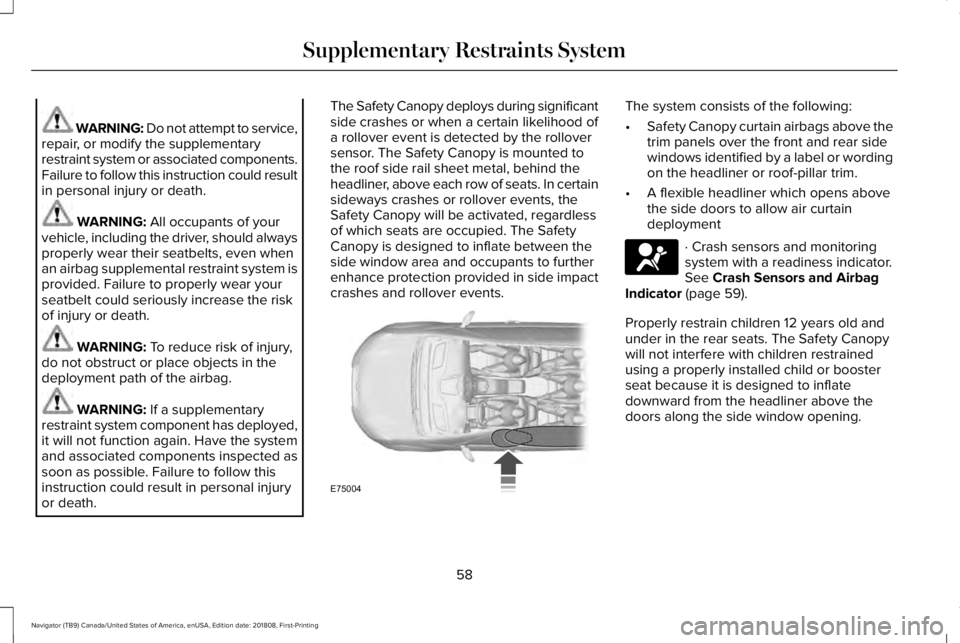
The Safety Canopy deploys during significantside crashes or when a certain likelihood ofa rollover event is detected by the rolloversensor. The Safety Canopy is mounted tothe roof side rail sheet metal, behind theheadliner, above each row of seats. In certainsideways crashes or rollover events, theSafety Canopy will be activated, regardlessof which seats are occupied. The SafetyCanopy is designed to inflate between theside window area and occupants to furtherenhance protection provided in side impactcrashes and rollover events.
The system consists of the following:
•Safety Canopy curtain airbags above thetrim panels over the front and rear sidewindows identified by a label or wordingon the headliner or roof-pillar trim.
•A flexible headliner which opens abovethe side doors to allow air curtaindeployment
· Crash sensors and monitoringsystem with a readiness indicator.See Crash Sensors and AirbagIndicator (page 59).
Properly restrain children 12 years old andunder in the rear seats. The Safety Canopywill not interfere with children restrainedusing a properly installed child or boosterseat because it is designed to inflatedownward from the headliner above thedoors along the side window opening.
58
Navigator (TB9) Canada/United States of America, enUSA, Edition date: 201808, First-Printing
Supplementary Restraints SystemE75004 E67017
Page 62 of 645
The design and development of the SafetyCanopy included recommended testingprocedures that were developed by a groupof automotive safety experts known as theSide Airbag Technical Working Group. Theserecommended testing procedures helpreduce the risk of injuries related to thedeployment of side airbags (including theSafety Canopy).
CRASH SENSORS AND AIRBAG
INDICATOR
WARNING: Modifying or addingequipment to the front end of your vehicle(including hood, bumper system, frame,front end body structure, tow hooks andhood pins) may affect the performance ofthe airbag system, increasing the risk ofinjury. Do not modify or add equipment tothe front end of your vehicle.
Your vehicle has a collection of crash andoccupant sensors which provide informationto the restraints control module whichdeploys (activates) the front seatbeltpretensioners, driver airbag, passengerairbag, rear inflatable belts, seat mountedside airbags, and the Safety Canopy. Basedon the type of crash, the restraints controlmodule will deploy the appropriate safetydevices.
The restraints control module also monitorsthe readiness of the above safety devicesplus the crash and occupant sensors. Thereadiness of the safety system is indicatedby a warning indicator light in the instrumentcluster or by a backup tone if the warninglight is not working. See Instrument Cluster(page 113). Routine maintenance of theairbag is not required.
A difficulty with the system is indicated byone or more of the following:
The readiness light will notilluminate immediately after youswitch the ignition on.
•The readiness light either flashes or stayslit.
•A series of five beeps will be heard. Thetone pattern will repeat periodically untilthe problem, the light or both arerepaired.
If any of these things happen, evenintermittently, have the supplementalrestraint system serviced at an authorizeddealer immediately. Unless serviced, thesystem may not function properly in theevent of a crash.
59
Navigator (TB9) Canada/United States of America, enUSA, Edition date: 201808, First-Printing
Supplementary Restraints SystemE67017
Page 121 of 645
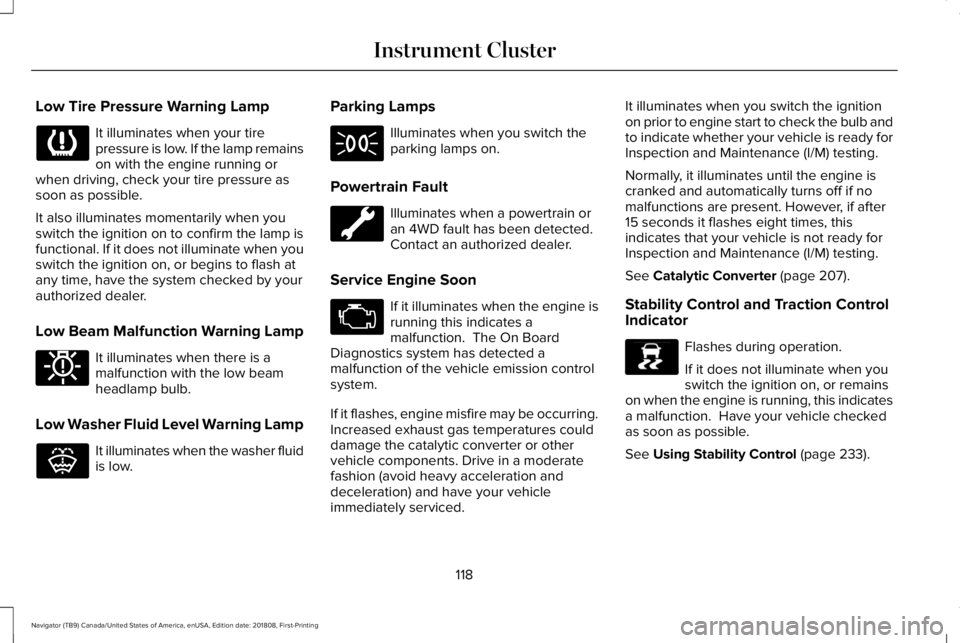
Low Tire Pressure Warning Lamp
It illuminates when your tirepressure is low. If the lamp remainson with the engine running orwhen driving, check your tire pressure assoon as possible.
It also illuminates momentarily when youswitch the ignition on to confirm the lamp isfunctional. If it does not illuminate when youswitch the ignition on, or begins to flash atany time, have the system checked by yourauthorized dealer.
Low Beam Malfunction Warning Lamp
It illuminates when there is amalfunction with the low beamheadlamp bulb.
Low Washer Fluid Level Warning Lamp
It illuminates when the washer fluidis low.
Parking Lamps
Illuminates when you switch theparking lamps on.
Powertrain Fault
Illuminates when a powertrain oran 4WD fault has been detected. Contact an authorized dealer.
Service Engine Soon
If it illuminates when the engine isrunning this indicates amalfunction. The On BoardDiagnostics system has detected amalfunction of the vehicle emission controlsystem.
If it flashes, engine misfire may be occurring.Increased exhaust gas temperatures coulddamage the catalytic converter or othervehicle components. Drive in a moderatefashion (avoid heavy acceleration anddeceleration) and have your vehicleimmediately serviced.
It illuminates when you switch the ignitionon prior to engine start to check the bulb andto indicate whether your vehicle is ready forInspection and Maintenance (I/M) testing.
Normally, it illuminates until the engine iscranked and automatically turns off if nomalfunctions are present. However, if after15 seconds it flashes eight times, thisindicates that your vehicle is not ready forInspection and Maintenance (I/M) testing.
See Catalytic Converter (page 207).
Stability Control and Traction ControlIndicator
Flashes during operation.
If it does not illuminate when youswitch the ignition on, or remainson when the engine is running, this indicatesa malfunction. Have your vehicle checkedas soon as possible.
See Using Stability Control (page 233).
118
Navigator (TB9) Canada/United States of America, enUSA, Edition date: 201808, First-Printing
Instrument Cluster E181350 E132353 E138639
Page 129 of 645
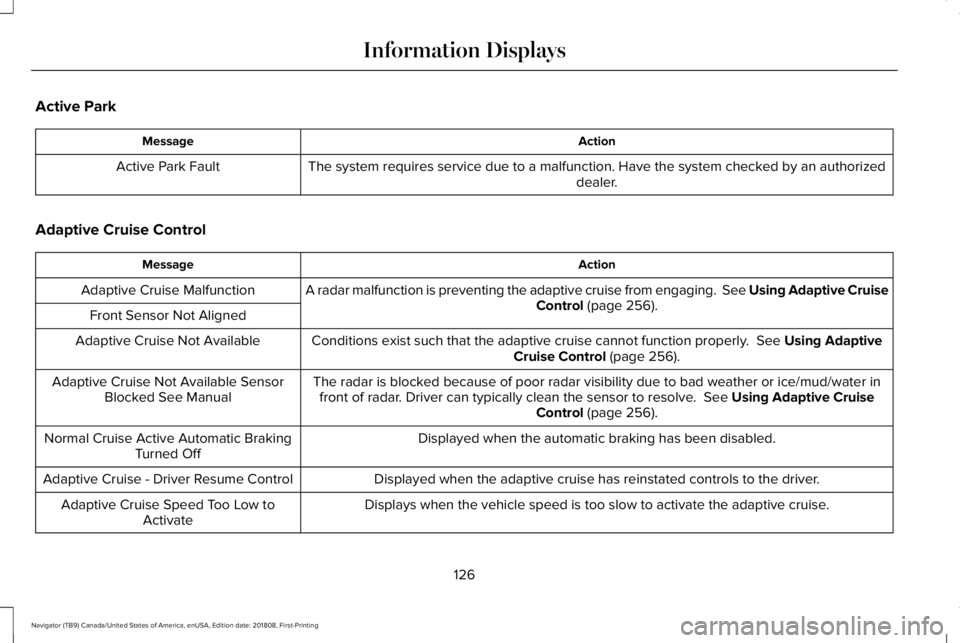
Active Park
ActionMessage
The system requires service due to a malfunction. Have the system checked by an authorizeddealer.Active Park Fault
Adaptive Cruise Control
ActionMessage
A radar malfunction is preventing the adaptive cruise from engaging. See Using Adaptive CruiseControl (page 256).Adaptive Cruise Malfunction
Front Sensor Not Aligned
Conditions exist such that the adaptive cruise cannot function properly. See Using AdaptiveCruise Control (page 256).Adaptive Cruise Not Available
The radar is blocked because of poor radar visibility due to bad weather or ice/mud/water infront of radar. Driver can typically clean the sensor to resolve. See Using Adaptive CruiseControl (page 256).
Adaptive Cruise Not Available SensorBlocked See Manual
Displayed when the automatic braking has been disabled.Normal Cruise Active Automatic BrakingTurned Off
Displayed when the adaptive cruise has reinstated controls to the driver.Adaptive Cruise - Driver Resume Control
Displays when the vehicle speed is too slow to activate the adaptive cruise.Adaptive Cruise Speed Too Low toActivate
126
Navigator (TB9) Canada/United States of America, enUSA, Edition date: 201808, First-Printing
Information Displays
Page 131 of 645
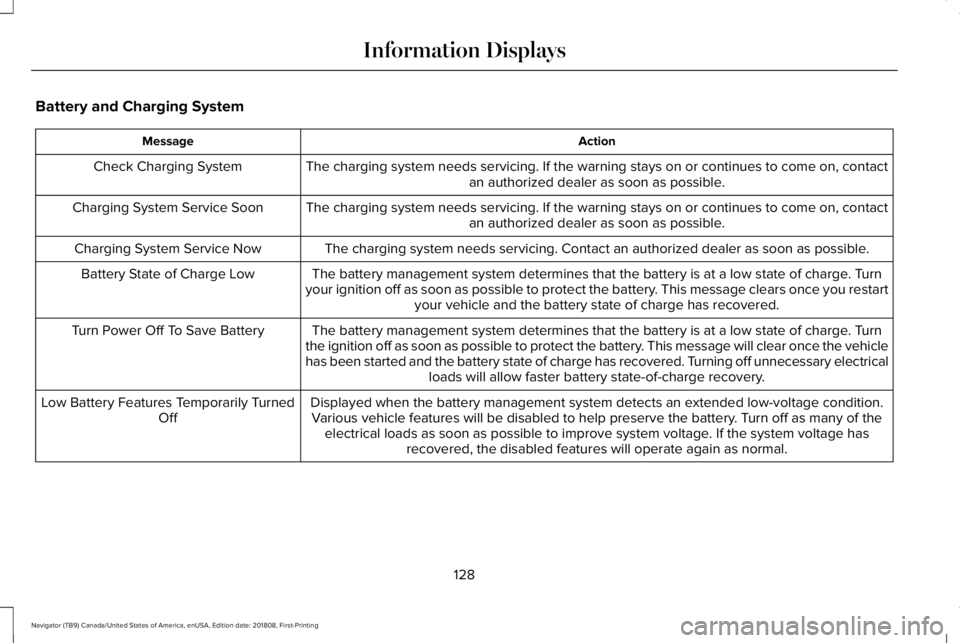
Battery and Charging System
ActionMessage
The charging system needs servicing. If the warning stays on or continues to come on, contactan authorized dealer as soon as possible.Check Charging System
The charging system needs servicing. If the warning stays on or continues to come on, contactan authorized dealer as soon as possible.Charging System Service Soon
The charging system needs servicing. Contact an authorized dealer as soon as possible.Charging System Service Now
The battery management system determines that the battery is at a low state of charge. Turnyour ignition off as soon as possible to protect the battery. This message clears once you restartyour vehicle and the battery state of charge has recovered.
Battery State of Charge Low
The battery management system determines that the battery is at a low state of charge. Turnthe ignition off as soon as possible to protect the battery. This message will clear once the vehiclehas been started and the battery state of charge has recovered. Turning off unnecessary electricalloads will allow faster battery state-of-charge recovery.
Turn Power Off To Save Battery
Displayed when the battery management system detects an extended low-voltage condition.Various vehicle features will be disabled to help preserve the battery. Turn off as many of theelectrical loads as soon as possible to improve system voltage. If the system voltage hasrecovered, the disabled features will operate again as normal.
Low Battery Features Temporarily TurnedOff
128
Navigator (TB9) Canada/United States of America, enUSA, Edition date: 201808, First-Printing
Information Displays
Page 133 of 645
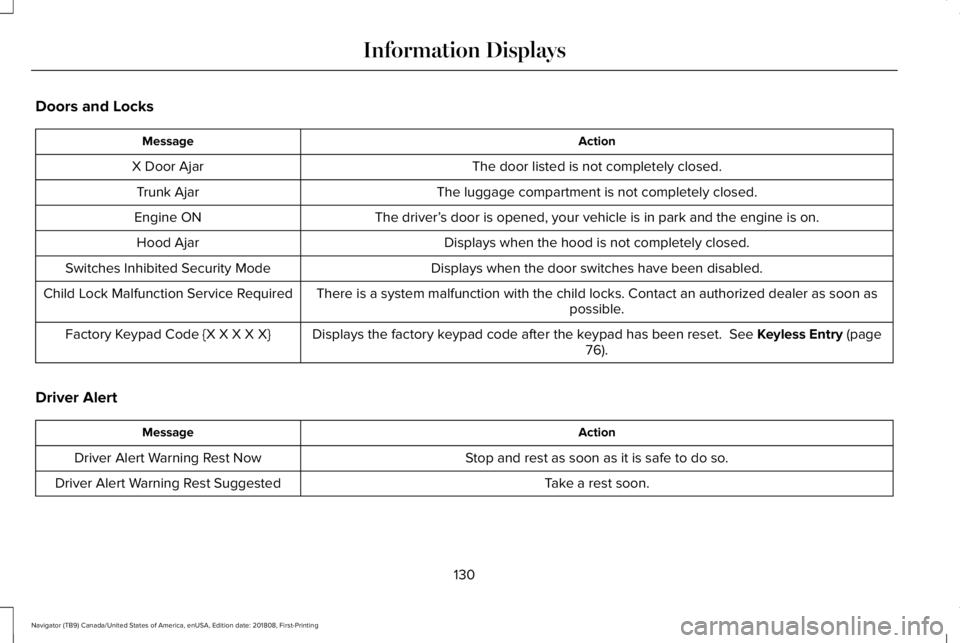
Doors and Locks
ActionMessage
The door listed is not completely closed.X Door Ajar
The luggage compartment is not completely closed.Trunk Ajar
The driver’s door is opened, your vehicle is in park and the engine is on.Engine ON
Displays when the hood is not completely closed.Hood Ajar
Displays when the door switches have been disabled.Switches Inhibited Security Mode
There is a system malfunction with the child locks. Contact an authorized dealer as soon aspossible.Child Lock Malfunction Service Required
Displays the factory keypad code after the keypad has been reset. See Keyless Entry (page76).Factory Keypad Code {X X X X X}
Driver Alert
ActionMessage
Stop and rest as soon as it is safe to do so.Driver Alert Warning Rest Now
Take a rest soon.Driver Alert Warning Rest Suggested
130
Navigator (TB9) Canada/United States of America, enUSA, Edition date: 201808, First-Printing
Information Displays
Page 137 of 645
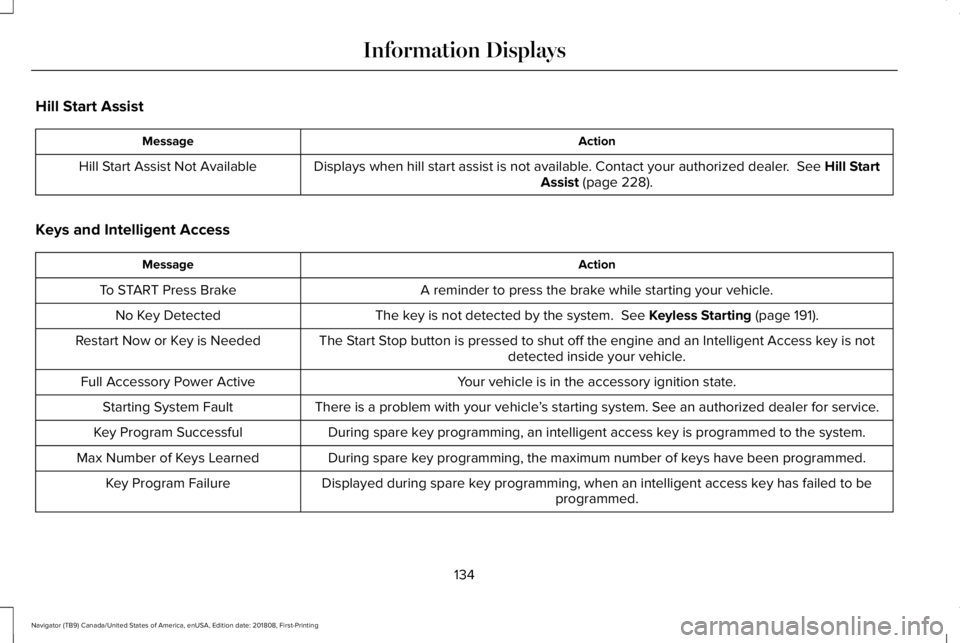
Hill Start Assist
ActionMessage
Displays when hill start assist is not available. Contact your authorized dealer. See Hill StartAssist (page 228).Hill Start Assist Not Available
Keys and Intelligent Access
ActionMessage
A reminder to press the brake while starting your vehicle.To START Press Brake
The key is not detected by the system. See Keyless Starting (page 191).No Key Detected
The Start Stop button is pressed to shut off the engine and an Intelligent Access key is notdetected inside your vehicle.Restart Now or Key is Needed
Your vehicle is in the accessory ignition state.Full Accessory Power Active
There is a problem with your vehicle’s starting system. See an authorized dealer for service.Starting System Fault
During spare key programming, an intelligent access key is programmed to the system.Key Program Successful
During spare key programming, the maximum number of keys have been programmed.Max Number of Keys Learned
Displayed during spare key programming, when an intelligent access key has failed to beprogrammed.Key Program Failure
134
Navigator (TB9) Canada/United States of America, enUSA, Edition date: 201808, First-Printing
Information Displays
Page 138 of 645
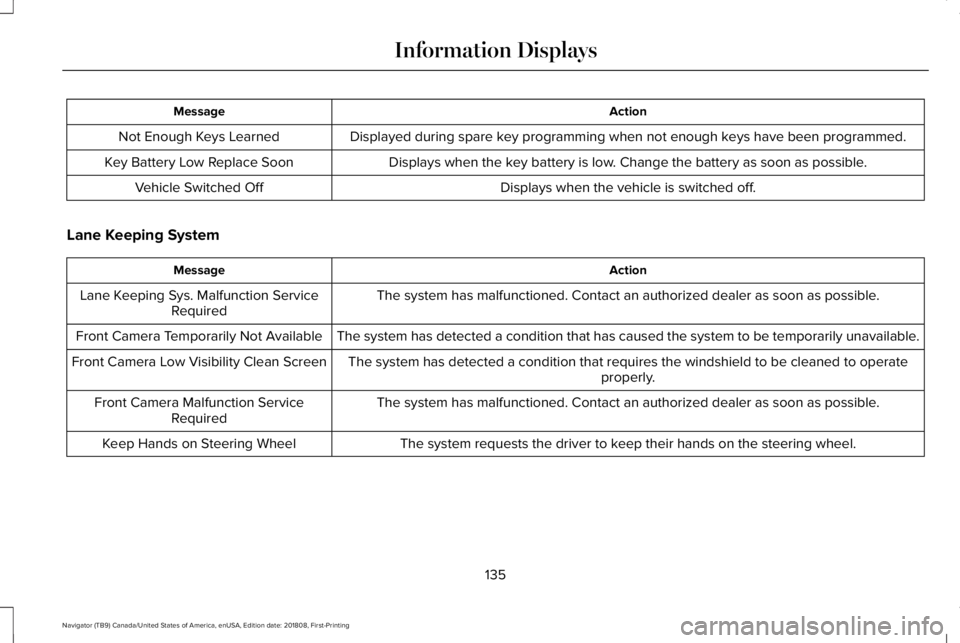
ActionMessage
Displayed during spare key programming when not enough keys have been programmed.Not Enough Keys Learned
Displays when the key battery is low. Change the battery as soon as possible.Key Battery Low Replace Soon
Displays when the vehicle is switched off.Vehicle Switched Off
Lane Keeping System
ActionMessage
The system has malfunctioned. Contact an authorized dealer as soon as possible.Lane Keeping Sys. Malfunction ServiceRequired
The system has detected a condition that has caused the system to be temporarily unavailable.Front Camera Temporarily Not Available
The system has detected a condition that requires the windshield to be cleaned to operateproperly.Front Camera Low Visibility Clean Screen
The system has malfunctioned. Contact an authorized dealer as soon as possible.Front Camera Malfunction ServiceRequired
The system requests the driver to keep their hands on the steering wheel.Keep Hands on Steering Wheel
135
Navigator (TB9) Canada/United States of America, enUSA, Edition date: 201808, First-Printing
Information Displays