transmission LINCOLN NAVIGATOR 2019 User Guide
[x] Cancel search | Manufacturer: LINCOLN, Model Year: 2019, Model line: NAVIGATOR, Model: LINCOLN NAVIGATOR 2019Pages: 645, PDF Size: 5.02 MB
Page 103 of 645
Type Two - Configurable
Switch the daytime running lamps on or offusing the information display. SeeInformation Displays (page 120).
The daytime running lamps turn on when:
1. The lamps are on in the informationdisplay.
2. Switching the ignition on.
3. The transmission is not in park (P) forvehicles with automatic transmissions, orreleasing the parking brake for vehicleswith manual transmissions.
4. The lighting control is in the autolampsposition.
5. The headlamps are off.
The other lighting control switch positionsdo not turn on the daytime running lamps.
If the daytime running lamps are off in theinformation display, the lamps stay off in allswitch positions.
AUTOMATIC HIGH BEAM
CONTROL (IF EQUIPPED)
WARNING: The system does notrelieve you of your responsibility to drivewith due care and attention. You may needto override the system if it does not turnthe high beams on or off.
The system turns on high beams if it is darkenough and no other traffic is present. If itdetects an approaching vehicle’s headlampsor tail lamps, or street lighting ahead, thesystem turns off high beams before they candistract other road users. Low beams remainon.
Note:The system may not operate properlyif the sensor is blocked. Keep the windshieldfree from obstruction or damage.
Note:The system may not operate properlyin cold or inclement conditions. You canswitch on the high beams by overriding thesystem.
Note:If the system detects a blockage, forexample bird droppings, bug splatter, snowor ice, the system goes into low beam modeuntil you clear the blockage. A message mayappear in the information display if thecamera is blocked.
Note:Using much larger tires or equippingvehicle accessories such as snowplows canmodify your vehicle's ride height anddegrade automatic high beam controlperformance.
A camera sensor, centrally mounted behindthe windshield of your vehicle, continuouslymonitors conditions to turn the high beamson and off.
Once the system is active, the high beamsturn on if:
•The ambient light level is low enough.
•There is no traffic in front of your vehicle.
•The vehicle speed is greater thanapproximately 32 mph (51 km/h).
100
Navigator (TB9) Canada/United States of America, enUSA, Edition date: 201808, First-Printing
Lighting
Page 110 of 645
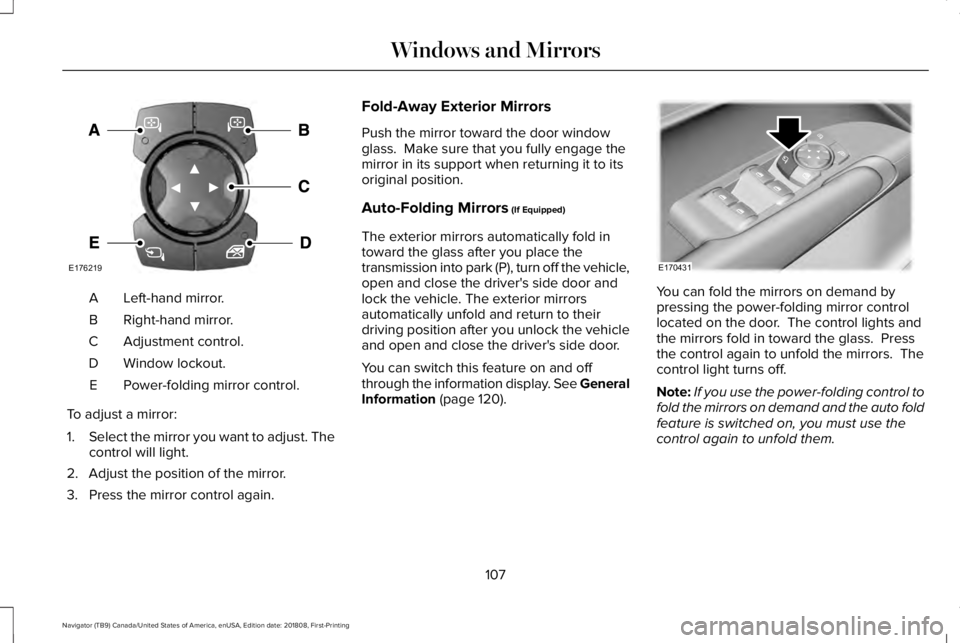
Left-hand mirror.A
Right-hand mirror.B
Adjustment control.C
Window lockout.D
Power-folding mirror control.E
To adjust a mirror:
1.Select the mirror you want to adjust. Thecontrol will light.
2. Adjust the position of the mirror.
3. Press the mirror control again.
Fold-Away Exterior Mirrors
Push the mirror toward the door windowglass. Make sure that you fully engage themirror in its support when returning it to itsoriginal position.
Auto-Folding Mirrors (If Equipped)
The exterior mirrors automatically fold intoward the glass after you place thetransmission into park (P), turn off the vehicle,open and close the driver's side door andlock the vehicle. The exterior mirrorsautomatically unfold and return to theirdriving position after you unlock the vehicleand open and close the driver's side door.
You can switch this feature on and offthrough the information display. See GeneralInformation (page 120).
You can fold the mirrors on demand bypressing the power-folding mirror controllocated on the door. The control lights andthe mirrors fold in toward the glass. Pressthe control again to unfold the mirrors. Thecontrol light turns off.
Note:If you use the power-folding control tofold the mirrors on demand and the auto foldfeature is switched on, you must use thecontrol again to unfold them.
107
Navigator (TB9) Canada/United States of America, enUSA, Edition date: 201808, First-Printing
Windows and MirrorsE176219 E170431
Page 128 of 645
INFO/TRIP/FUEL
TIRE PRESSURE
TRAILER INFORMATION
•NO CONTENT - Displays a blank area.
•TRIP 1 - Displays distance traveled,average fuel economy, and time spentfor trip. Press and hold OK to reset.
•TRIP 2 information is the same asTRIP 1.
•FUEL ECONOMY - Displays yourvehicle's average fuel economy. Pressand hold OK to reset.
•SEATBELTS - Displays a graphic of theconnection status of the rear seatbelts.
•TIRE PRESSURE - Displays a graphic ofcurrent vehicle tire pressures.
•TRAILER INFORMATION - Displays thetransmission temperature and trailer gain.
Head Up Display (If Equipped)
See Head Up Display (page 148).
Phone
See General Information (page 441).
Audio
See General Information (page 441).
Navigation (If Equipped)
See General Information (page 441).
INFORMATION MESSAGES
Note: Depending on your vehicle optionsand instrument cluster type, not all of themessages will display or be available. Certain messages may be abbreviated orshortened depending upon which clustertype you have.
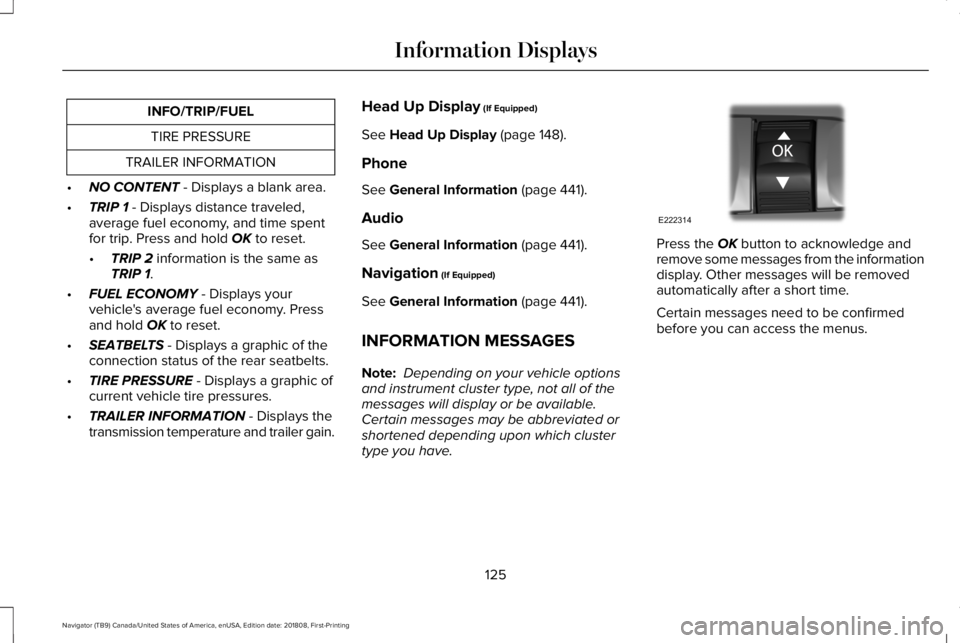
Press the OK button to acknowledge andremove some messages from the informationdisplay. Other messages will be removedautomatically after a short time.
Certain messages need to be confirmedbefore you can access the menus.
125
Navigator (TB9) Canada/United States of America, enUSA, Edition date: 201808, First-Printing
Information DisplaysE222314
Page 135 of 645
ActionMessage
Displays when you select a drive mode that does not allow the electronic limited slip differentialto turn on. This may also display when the electronic limited slip differential has a fault and thevehicle requests the locking feature.
Electronic Limited Slip Differential LockingFeature Not Available
The transfer case is in the neutral position. This message indicates that your vehicle is safe tobe towed with all four wheels on the ground.Neutral Tow Enabled Leave Transmissionin Neutral
The transfer case is NOT in the neutral position. This message indicates that your vehicle is NOTsafe to be towed with all four wheels on the ground.Neutral Tow Disabled
Four-Wheel Drive
ActionMessage
A 4X4 system fault is present. Contact an authorized dealer as soon as possible.Check 4x4
The 4X4 system is making a shift.4x4 Shift in Progress
Displays when you attempt to switch to 4X4 LOW and you do not shift thetransmission to neutral (N).For 4x4 LOW Shift to N
Displays when you attempt to switch to 4X4 LOW and your vehicle's speed isgreater than 3 mph (5 km/h).For 4x4 LOW Slow to 3 MPH
Displays when you attempt to switch from 4X4 LOW and you do not shift thetransmission to neutral (N).To Exit 4x4 LOW Shift to N
132
Navigator (TB9) Canada/United States of America, enUSA, Edition date: 201808, First-Printing
Information Displays
Page 141 of 645
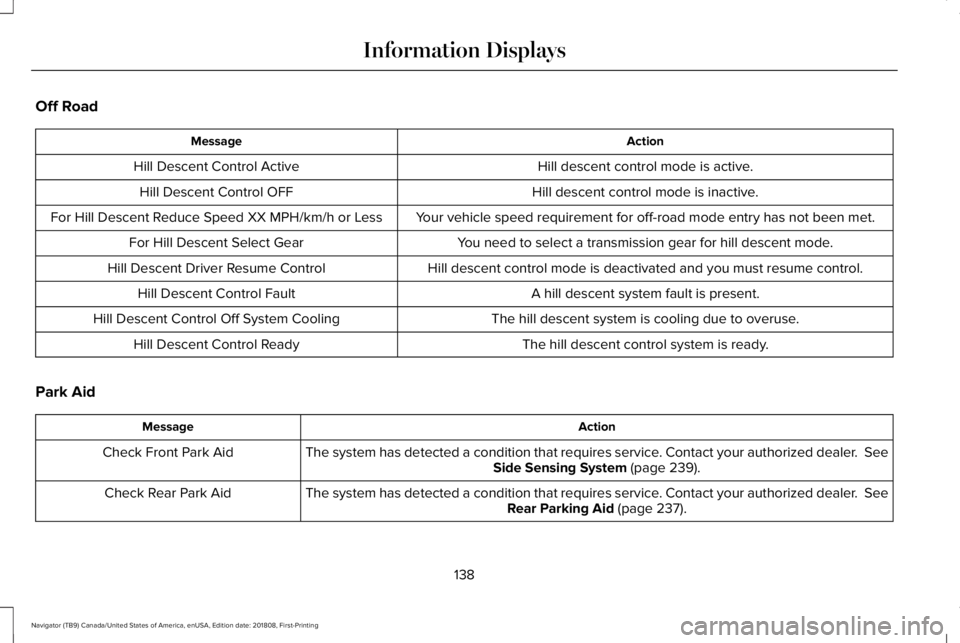
Off Road
ActionMessage
Hill descent control mode is active.Hill Descent Control Active
Hill descent control mode is inactive.Hill Descent Control OFF
Your vehicle speed requirement for off-road mode entry has not been met.For Hill Descent Reduce Speed XX MPH/km/h or Less
You need to select a transmission gear for hill descent mode.For Hill Descent Select Gear
Hill descent control mode is deactivated and you must resume control.Hill Descent Driver Resume Control
A hill descent system fault is present.Hill Descent Control Fault
The hill descent system is cooling due to overuse.Hill Descent Control Off System Cooling
The hill descent control system is ready.Hill Descent Control Ready
Park Aid
ActionMessage
The system has detected a condition that requires service. Contact your authorized dealer. SeeSide Sensing System (page 239).Check Front Park Aid
The system has detected a condition that requires service. Contact your authorized dealer. SeeRear Parking Aid (page 237).Check Rear Park Aid
138
Navigator (TB9) Canada/United States of America, enUSA, Edition date: 201808, First-Printing
Information Displays
Page 149 of 645
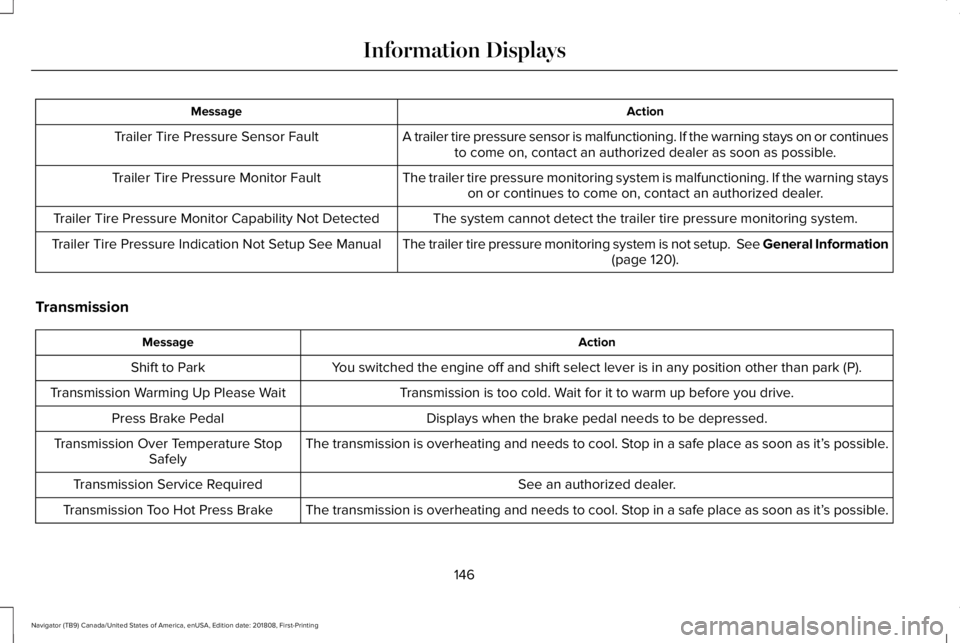
ActionMessage
A trailer tire pressure sensor is malfunctioning. If the warning stays on or continuesto come on, contact an authorized dealer as soon as possible.Trailer Tire Pressure Sensor Fault
The trailer tire pressure monitoring system is malfunctioning. If the warning stayson or continues to come on, contact an authorized dealer.Trailer Tire Pressure Monitor Fault
The system cannot detect the trailer tire pressure monitoring system.Trailer Tire Pressure Monitor Capability Not Detected
The trailer tire pressure monitoring system is not setup. See General Information(page 120).Trailer Tire Pressure Indication Not Setup See Manual
Transmission
ActionMessage
You switched the engine off and shift select lever is in any position other than park (P).Shift to Park
Transmission is too cold. Wait for it to warm up before you drive.Transmission Warming Up Please Wait
Displays when the brake pedal needs to be depressed.Press Brake Pedal
The transmission is overheating and needs to cool. Stop in a safe place as soon as it’s possible.Transmission Over Temperature StopSafely
See an authorized dealer.Transmission Service Required
The transmission is overheating and needs to cool. Stop in a safe place as soon as it’s possible.Transmission Too Hot Press Brake
146
Navigator (TB9) Canada/United States of America, enUSA, Edition date: 201808, First-Printing
Information Displays
Page 150 of 645
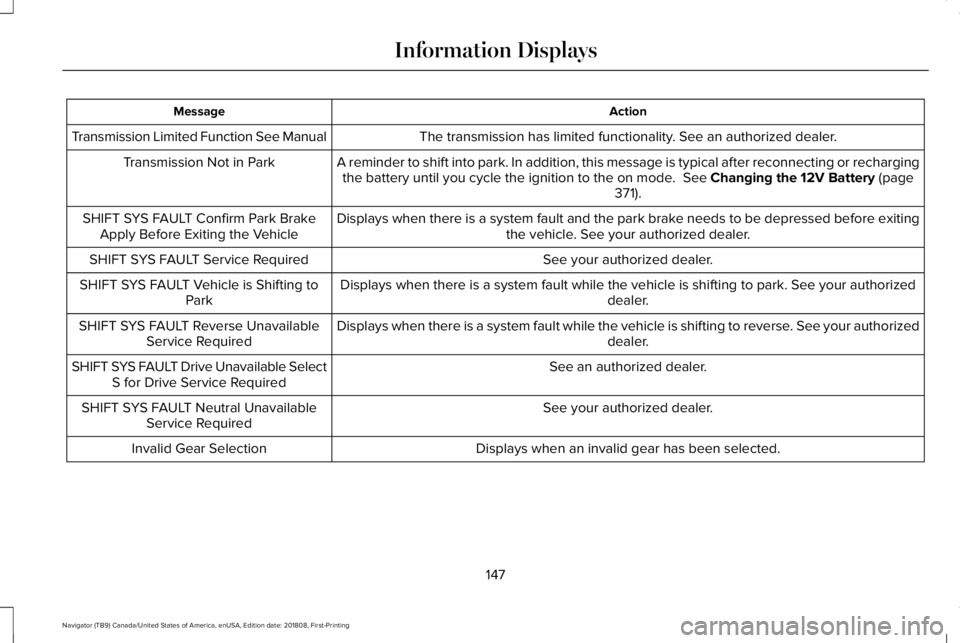
ActionMessage
The transmission has limited functionality. See an authorized dealer.Transmission Limited Function See Manual
A reminder to shift into park. In addition, this message is typical after reconnecting or rechargingthe battery until you cycle the ignition to the on mode. See Changing the 12V Battery (page371).
Transmission Not in Park
Displays when there is a system fault and the park brake needs to be depressed before exitingthe vehicle. See your authorized dealer.SHIFT SYS FAULT Confirm Park BrakeApply Before Exiting the Vehicle
See your authorized dealer.SHIFT SYS FAULT Service Required
Displays when there is a system fault while the vehicle is shifting to park. See your authorizeddealer.SHIFT SYS FAULT Vehicle is Shifting toPark
Displays when there is a system fault while the vehicle is shifting to reverse. See your authorizeddealer.SHIFT SYS FAULT Reverse UnavailableService Required
See an authorized dealer.SHIFT SYS FAULT Drive Unavailable SelectS for Drive Service Required
See your authorized dealer.SHIFT SYS FAULT Neutral UnavailableService Required
Displays when an invalid gear has been selected.Invalid Gear Selection
147
Navigator (TB9) Canada/United States of America, enUSA, Edition date: 201808, First-Printing
Information Displays
Page 151 of 645
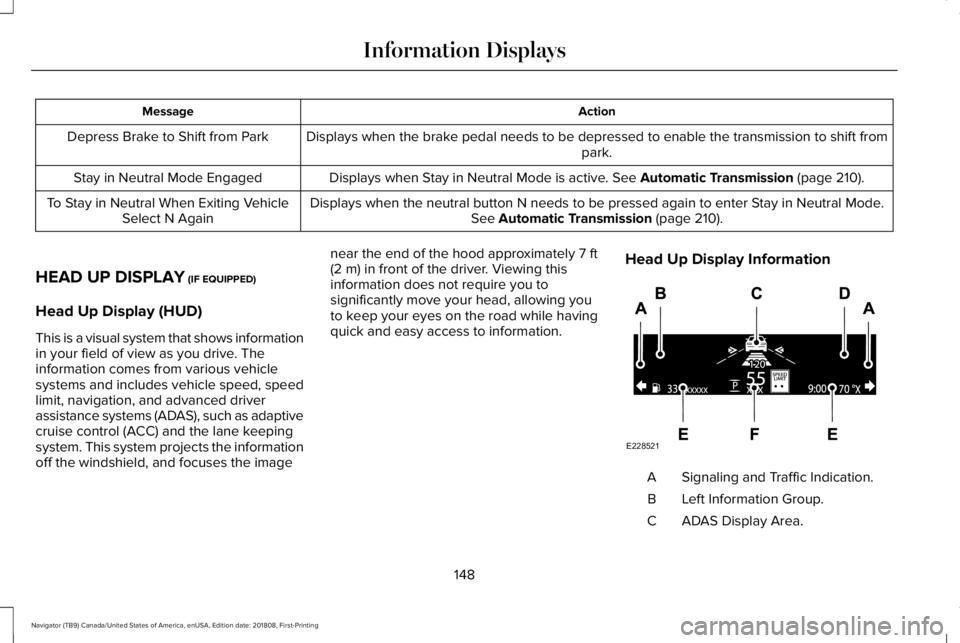
ActionMessage
Displays when the brake pedal needs to be depressed to enable the transmission to shift frompark.Depress Brake to Shift from Park
Displays when Stay in Neutral Mode is active. See Automatic Transmission (page 210).Stay in Neutral Mode Engaged
Displays when the neutral button N needs to be pressed again to enter Stay in Neutral Mode.See Automatic Transmission (page 210).To Stay in Neutral When Exiting VehicleSelect N Again
HEAD UP DISPLAY (IF EQUIPPED)
Head Up Display (HUD)
This is a visual system that shows informationin your field of view as you drive. Theinformation comes from various vehiclesystems and includes vehicle speed, speedlimit, navigation, and advanced driverassistance systems (ADAS), such as adaptivecruise control (ACC) and the lane keepingsystem. This system projects the informationoff the windshield, and focuses the image
near the end of the hood approximately 7 ft(2 m) in front of the driver. Viewing thisinformation does not require you tosignificantly move your head, allowing youto keep your eyes on the road while havingquick and easy access to information.
Head Up Display Information
Signaling and Traffic Indication.A
Left Information Group.B
ADAS Display Area.C
148
Navigator (TB9) Canada/United States of America, enUSA, Edition date: 201808, First-Printing
Information DisplaysE228521
Page 152 of 645
Navigation Display Area.D
Status Bar.E
Speedometer Display Area.F
Signaling and Traffic Indication
Displays direction indicators, blind spotinformation (if direction indicators are active)and cross traffic alert.
Left Information Group
Displays incoming call information.
ADAS Display Area
Displays ACC and lane keeping systemstatus and warnings.
Navigation Display Area
Displays navigation next turn instructions.
Status Bar
Displays distance to empty (DTE), time andoutside air temperature. Next to DTE, thefuel gauge fill color changes to yellow in lowfuel conditions. You can switch off the statusbar in the HUD settings menu.
Speedometer Display Area
Displays current vehicle speed, speed limit(if available in the map database) and yourtransmission gear selection.
Configuring The Head Up Display
You can control the system's options throughthe information display by using the HUD,OK and arrow buttons on the right-hand sideof your steering wheel. See GeneralInformation (page 120). You can adjust thedisplay according to your height to makeviewing the content easier. You can alsoadjust what content displays and thebrightness of the content. The system'soptions appear in the instrument clusterwhile the updates happen in the HUD.
Note:If HUD On is unchecked, other optionsof the system are hidden.
Note:The HUD menu automatically closesafter a certain period of inactivity.
Note:The HUD image brightnessautomatically adjusts to the brightness ofthe ambient environment. You have theability to adjust the brightness furtheraccording to your preference.
Note:In some instances, sunlight can causesome reflections in and around the HUDimage.
149
Navigator (TB9) Canada/United States of America, enUSA, Edition date: 201808, First-Printing
Information Displays
Page 171 of 645
You can save up to three preset memorypositions. You can save a memory preset atany time.
Recalling a PreSet Position
Press and release the preset buttonassociated with your desired driving position.The memory features move to the positionstored for that preset.
Note:You can only recall a driver seat presetmemory position when the ignition is off, orwhen the transmission is in park (P) orneutral (N) (and your vehicle is not moving)if the ignition is on.
You can also recall a preset memory positionby:
•Pressing the unlock button on yourintelligent access key fob if it is linked toa preset position.
•Unlocking the intelligent driver doorhandle if a linked key fob is present.
•Recalling a personal profile in your SYNC3 menu.
Note:Using a linked keyfob to recall yourmemory position when the ignition is offmoves the seat to the Easy Entry position.
Note:Pressing any active memory featureadjustment control (or any memory button)during a memory recall cancels theoperation.
Easy Entry and Exit Feature
If you enable the easy entry and exit feature,it automatically moves the driver seatposition rearward up to 2 in (5 cm) when youswitch the ignition off.
The driver seat returns to its previousposition when you switch the ignition on.
You can switch this feature on or off in theinformation display. See InformationDisplays (page 120).
Passenger Seat Memory
This feature automatically recalls the positionof the passenger seat. The memory controlis on the passenger door.
Saving a PreSet Position
1. Adjust the passenger seat to yourdesired position.
2.Press and hold the desired preset buttonuntil you hear a single tone.
You can save up to three preset memorypositions. You can save a memory preset atany time.
Recalling a PreSet Position
Press and release the preset buttonassociated with your desired position. Thepassenger seat features move to the positionstored for that preset. You can recall apassenger seat preset memory at any time.
168
Navigator (TB9) Canada/United States of America, enUSA, Edition date: 201808, First-Printing
Seats