instrument cluster LINCOLN NAVIGATOR 2019 Owner's Manual
[x] Cancel search | Manufacturer: LINCOLN, Model Year: 2019, Model line: NAVIGATOR, Model: LINCOLN NAVIGATOR 2019Pages: 645, PDF Size: 5.02 MB
Page 227 of 645
LIMITED SLIP DIFFERENTIAL (IF
EQUIPPED)
The Electronic Limited Slip Differential (eLSD)system directs torque, enabling the vehicleto drive over terrain and road conditions thata conventional axle cannot. The system isactive at all times and requires no input fromthe driver.
Note:If your vehicle is not at optimaloperating conditions or a system fault ispresent, a warning may be displayed in theinstrument cluster. Depending on thewarning, your vehicle may need to beserviced. You can find more informationregarding the system information messagesin the Information Displays chapter. SeeInformation Messages (page 125).
Spare Tire
If your vehicle has an Electronic Limited SlipDifferential, do not use a spare tire of adifferent size than the tire provided. If a sparetire is installed, a message may appear,indicating the system has disabledautomatically or reduced function to prevent
system overheat and damage. It isrecommended to reinstall the repaired orreplaced road tire as soon as possible. Whenthe road tire is replaced, the system willresume normal operation on the next keycycle.
Trailer Towing
The Electronic Limited Slip Differentialenhances vehicle stability during trailer towoperation. During high demand traileringevents, such as steep slopes, high speedsor with a spare tire, the system may providea warning in the instrument cluster andreduce function or enter a temporarilydisabled state. To resume normal function,stop the vehicle in a safe location and allowthe unit to adequately cool. Once the systemhas reached normal operating temperatures,system function will be restored and theElectronic Limited Slip Differential Restoredmessage will be displayed.
224
Navigator (TB9) Canada/United States of America, enUSA, Edition date: 201808, First-Printing
Rear Axle
Page 233 of 645
Note:You can only switch the system on ifyou close the door and fasten your seatbelt.
Note:The system turns off every time youpower down your vehicle.
Note:The system remembers the last settingwhen you start your vehicle.
Note:When in reverse (R), Auto Hold doesnot function.
When the system is off, your vehicle behavesthe same as a vehicle without Auto Hold.
There is an indicator lamp in the instrumentcluster that has two modes, active andunavailable:
The auto hold active indicatorilluminates in the informationdisplay when the system holdsyour vehicle stationary. When in active mode,press the brake pedal and the Auto Holdbutton to switch the system off.
The auto hold unavailable indicatorilluminates in the informationdisplay when the system is on butunavailable to hold your vehicle (for example,during Active Park Assist, Stay in NeutralMode, or when you do not fasten yourseatbelt or close the door).
Note:Make sure you switch off Auto Holdor use the Stay in Neutral mode before youenter a car wash. See AutomaticTransmission (page 210).
Using Auto Hold
1. Use the brakes to bring your vehicle toa complete stop. The auto hold activeindicator illuminates in the informationdisplay.
2. Release the brake pedal. The systemholds your vehicle at a standstill. Theauto hold active indicator remainsilluminated in the information display.
3. When you press the accelerator pedal,the system releases the brakes and youwill be able to drive off. Once you driveoff, the auto hold active indicator nolonger illuminates in the informationdisplay.
Note:The auto-start-stop system (ifequipped) may stop the engine when youpress the brake pedal. If this occurs, itrestarts once you press the acceleratorpedal. Auto Hold still holds your vehicle ata standstill with the engine off.
230
Navigator (TB9) Canada/United States of America, enUSA, Edition date: 201808, First-Printing
BrakesE197933 E197934
Page 234 of 645
PRINCIPLE OF OPERATION
The traction control system helps avoid drivewheel spin and loss of traction.
If your vehicle begins to slide, the systemapplies the brakes to individual wheels and,when needed, reduces engine power at thesame time. If the wheels spin whenaccelerating on slippery or loose surfaces,the system reduces engine power in orderto increase traction.
USING TRACTION CONTROL
WARNING: The stability and tractioncontrol light illuminates steadily if thesystem detects a failure. Make sure youdid not manually disable the tractioncontrol system using the informationdisplay controls or the switch. If the stabilitycontrol and traction control light is still
illuminating steadily, have the systemserviced by an authorized dealerimmediately. Operating your vehicle withthe traction control disabled could lead toan increased risk of loss of vehicle control,vehicle rollover, personal injury and death.
The system automatically turns on each timeyou switch the ignition on.
If your vehicle is stuck in mud or snow,switching traction control off may bebeneficial as this allows the wheels to spin.
Note:When you switch traction control off,stability control remains fully active.
Switching the System On and Off
You can switch traction control on and offthrough the information display controls. SeeGeneral Information (page 120).
When you switch the system off, a messageand an illuminated icon appear on theinstrument cluster.
Switch traction control on again to return thesystem to normal operations.
Note:Your vehicle may have MyKeyrestrictions regarding this feature. SeePrinciple of Operation (page 67).
System Indicator Lights and Messages
The stability and traction controllight temporarily illuminates onengine start-up and flashes:
•When a driving condition activates eitherof the systems.
•If a problem occurs in either of thesystems.
The stability and traction controloff light temporarily illuminates onengine start-up and stays on whenyou switch the traction control system off.
231
Navigator (TB9) Canada/United States of America, enUSA, Edition date: 201808, First-Printing
Traction ControlE138639 E130458
Page 261 of 645
Following a Vehicle
WARNING: When following a vehicle,your vehicle does not always deceleratequickly enough to avoid a crash withoutdriver intervention. Always apply thebrakes when necessary. Failing to do somay result in a crash, serious injury ordeath.
WARNING: Adaptive cruise controlonly warns of vehicles detected by theradar sensor. In some cases there may beno warning or a delayed warning. Youshould always apply the brakes whennecessary. Failure to do so may result in acrash, serious injury or death.
When a vehicle ahead of you enters thesame lane or a slower vehicle is ahead in thesame lane, the vehicle speed adjusts tomaintain a preset gap distance. A vehiclegraphic illuminates in the instrument cluster.
Note:The brakes may emit noise whenapplied by the system.
Note:When you are following a vehicle andyou switch on a direction indicator, adaptivecruise control may provide a small temporaryacceleration to help you pass.
Your vehicle maintains a consistent gap fromthe vehicle ahead until:
•The vehicle in front of you accelerates toa speed above the set speed.
•The vehicle in front of you moves out ofthe lane you are in.
•You set a new gap distance.
The system applies the brakes to slow yourvehicle to maintain a safe gap distance fromthe vehicle in front. The system only applieslimited braking. You can override the systemby applying the brakes.
If the system determines that its maximumbraking level is not sufficient, an audiblewarning sounds when the system continuesto brake. A red warning bar displays on thewindshield and you must take immediateaction.
Following a Vehicle to a Complete Stop
If your vehicle follows a vehicle to a completestop and remains stationary for less thanthree seconds, your vehicle accelerates froma stationary position to follow the vehicleahead.
If your vehicle follows a vehicle toa complete stop and remainsstationary for more than threeseconds, press to follow the vehicle ahead.Or press the accelerator pedal.
Setting the Gap Distance
You can decrease or increase the distancebetween your vehicle and the vehicle in frontby pressing the gap control.
Press and release to decrease thegap distance.
Press and release to increase thegap distance.
258
Navigator (TB9) Canada/United States of America, enUSA, Edition date: 201808, First-Printing
Cruise ControlE265299 E263697 E263696
Page 307 of 645
Setup
The system is designed to be used with awide variety of trailers. However there aresome trailers that do not have a propersurface and location to mount the sticker.These trailers are not supported. Attemptsto place the sticker on a surface that doesnot meet the sticker placement requirementlisted in Step 3 of the setup instruction orentering inaccurate measurements toproceed through setup can result in impropersystem function.
Accurate measurements are critical to correctsystem function. If you need to checkmeasurements entered or change them youcan access them through the trailer menusin the instrument cluster. Choose the optionto change the sticker from the change trailersettings menu. It is not necessary to removethe sticker if you are just reviewing orchanging measurements.
The following menu warnings or difficultiesmay occur during setup. Tips to resolve themare listed below.
Note:If you still experience issues with thesystem's ability to detect the sticker, see theinformation in the next section regardingsticker lost during system operation.
Measurement A has reached maximum orminimum value:
•The system is designed to work withdrawbars that have a bumper to hitch ballcenter measurement of 4 in (10 cm) to11 in (28 cm) when installed. Do notattempt to use drawbars that have alength outside this range as the systemperformance will be degraded and couldcause improper system function.
•Make sure that the measurement beingmade is the horizontal distance only frombumper and the hitch ball center. Astraight line distance that includes anyvertical rise or drop will increase themeasurement and make it inaccurate.Inaccurate measurements will degradesystem performance and could causeimproper system function. See step 4 ofthe setup instruction to reviewmeasurement instructions.
Measurement B has reached maximum orminimum value:
•Make sure that the sticker placementinstruction in step 3 of the setup hasbeen followed. Stickers placed outsidethe allowed zone will adversely affect thesystem performance and could causeimproper feature function.
•Make sure that the measurement beingmade is the horizontal distance only fromcenter of sticker to the hitch ball center.A straight line distance that includes anyvertical rise or drop will increase themeasurement and cause an inaccuratevalue to be entered into the system. Seestep 4 of the setup for additionalmeasurement instructions.
Measurement C has reached maximum orminimum value:
•Make sure that the sticker placementinstructions in step 3 of the setup havebeen followed. Stickers placed outsidethe allowed zone will adversely affect thesystem performance and could causeimproper feature function. If you havemet all the criteria for sticker placementand you see this message this sticker is
304
Navigator (TB9) Canada/United States of America, enUSA, Edition date: 201808, First-Printing
Towing
Page 324 of 645
WARNING: Do not disconnect thebattery during recreational towing. Itprevents the transfer case from shiftingproperly and may cause the vehicle to roll,even if the transmission is in park (P).
WARNING: Shifting the transfer caseto its neutral position for recreationaltowing may cause the vehicle to roll, evenif the transmission is in park (P). It mayinjure the driver and others. Make sure youpress the foot brake and the vehicle is ina secure, safe position when you shift toneutral (N).
Note:Failing to put the transfer case in itsneutral position can damage vehiclecomponents.
Note:You can check four-wheel-downtowing status at any time by opening thedriver's door or turning the ignition to theaccessory or on position. A messageappears in the information display confirmingyour vehicle is in neutral tow.
To exit four-wheel-down towing and returnthe transfer case to its 2H position:
1. With your vehicle still properly securedto the tow vehicle, press the brake pedaland start the engine.
2. Switch your vehicle off by pressing theengine START/STOP button once.
3.Place your vehicle in accessory mode bypressing the start button once withoutpressing the brake pedal.
4. Press the brake pedal.
5.Place the transmission back into park (P).
6. Release the brake pedal.
Note:If completed successfully, theinformation display shows 2H and NeutralTow Disabled.
Note:If the indicator light and message donot display, you must perform the procedureagain from the beginning.
Note:You may hear an audible noise as thetransfer case shifts out of its neutral position,this is normal.
Note:If Shift Delayed Pull Forward displaysin the instrument cluster, transfer case geartooth blockage is present. See theinstructions following this section.
7.Apply the parking brake, then disconnectyour vehicle from the tow vehicle.
8. Release the parking brake, start theengine, and shift the transmission intodrive (D) to make sure the transfer caseis out of the neutral tow position.
9.If the transfer case does not successfullyshift out of neutral (N), set the parkingbrake until you can have your vehicleserviced.
Resolving the Shift Delayed Pull Forwardor To Exit 4x4 LOW Shift to N Message
If the instrument cluster displays thesemessages, perform the following:
1. Press and hold the brake pedal.
2.Put the transmission into neutral (N), thenstart the engine.
3. With the engine running, shift thetransmission into drive (D) and let thevehicle roll forward, up to 3 ft (1 m). Youmay hear an audible noise as the transfercase shifts out of its neutral position. Thisis normal.
321
Navigator (TB9) Canada/United States of America, enUSA, Edition date: 201808, First-Printing
Towing
Page 325 of 645
4.Make sure the instrument cluster displaysNeutral Tow Disabled.
322
Navigator (TB9) Canada/United States of America, enUSA, Edition date: 201808, First-Printing
Towing
Page 367 of 645
From the main menu scroll to:
Action and descriptionMessage
Press the right arrow button,then from this menu scroll tothe following message.
Settings
Press the right arrow button,then from this menu scroll tothe following message.
Vehicle
Press the right arrow button,then from this menu scroll tothe following message.
Oil Life
Press and hold the OK buttonuntil the instrument clusterdisplays the followingmessage.
Hold OK toReset
Reset Successful
When the oil change indicatorresets the instrument clusterdisplays 100%.
Remaining Life
{00}%
Action and descriptionMessage
If the instrument clusterdisplays one of the followingmessages, repeat theprocess.
Not Reset
Reset Cancelled
ENGINE COOLANT CHECK
WARNING: Do not remove thecoolant reservoir cap when the coolingsystem is hot. Wait 10 minutes for thecooling system to cool down. Cover thecoolant reservoir cap with a thick cloth toprevent the possibility of scalding andslowly remove the cap. Failure to followthis instruction could result in personalinjury.
WARNING: Do not put coolant in thewindshield washer reservoir. If sprayed onthe windshield, coolant could make itdifficult to see through the windshield.
WARNING: To reduce the risk ofpersonal injury, make sure the engine iscool before unscrewing the coolantpressure relief cap. The cooling system isunder pressure. Steam and hot liquid cancome out forcefully when you loosen thecap slightly.
WARNING: Do not add coolantfurther than the MAX mark.
When the engine is cold, check theconcentration and level of the coolant at theintervals listed in the scheduled maintenanceinformation. See Scheduled Maintenance(page 547).
Note:Make sure that the coolant level isbetween the MIN and MAX marks on thecoolant reservoir.
Note: Coolant expands when it is hot. Thelevel may extend beyond the MAX mark.
364
Navigator (TB9) Canada/United States of America, enUSA, Edition date: 201808, First-Printing
Maintenance
Page 387 of 645
CLEANING THE INSTRUMENT
PANEL AND INSTRUMENT
CLUSTER LENS
WARNING: Do not use chemicalsolvents or strong detergents whencleaning the steering wheel or instrumentpanel to avoid contamination of the airbagsystem.
Note:Follow the same procedure ascleaning leather seats for cleaning leatherinstrument panels and leather interior trimsurfaces. See Cleaning Leather Seats (page384).
Clean the instrument panel and cluster lenswith a clean, damp and soft cloth, then usea clean, dry and soft cloth to dry these areas.
•Avoid cleaners or polishes that increasethe gloss of the upper portion of theinstrument panel. The dull finish in thisarea helps protect you from undesirablewindshield reflection.
•Do not use any household cleaningproducts or glass cleaners as these maydamage the finish of the instrumentpanel, interior trim and cluster lens.
•Wash or wipe your hands clean if youhave been in contact with certainproducts such as insect repellent andsuntan lotion to avoid possible damageto the interior painted surfaces.
•Do not allow air fresheners and handsanitizers to spill onto interior surfaces.If a spill occurs, wipe off immediately.Your warranty may not cover thesedamages.
If a staining liquid like coffee or juice hasbeen spilled on the instrument panel or oninterior trim surfaces:
1.Wipe up spilled liquid using a clean, softcloth as quickly as possible.
2. Use Motorcraft Premium Leather andVinyl Cleaner or a commercially availableleather cleaning product for automotiveinteriors. Test any cleaner or stainremover on an inconspicuous area.
3. Alternatively, wipe the surface with aclean, soft cloth and a mild soap andwater solution. Dry the area with a clean,soft cloth.
4.If necessary, apply more soap and watersolution or cleaning product to a clean,soft cloth and press it onto the soiledarea. Allow this to set at roomtemperature for 30 minutes.
5. Remove the soaked cloth, then with aclean, damp cloth, use a rubbing motionfor 60 seconds on the soiled area.
6. Dry the area with a clean, soft cloth.
CLEANING LEATHER SEATS
Note:Follow the same procedure ascleaning leather seats for cleaning leatherinstrument panels and leather interior trimsurfaces.
384
Navigator (TB9) Canada/United States of America, enUSA, Edition date: 201808, First-Printing
Vehicle Care
Page 543 of 645
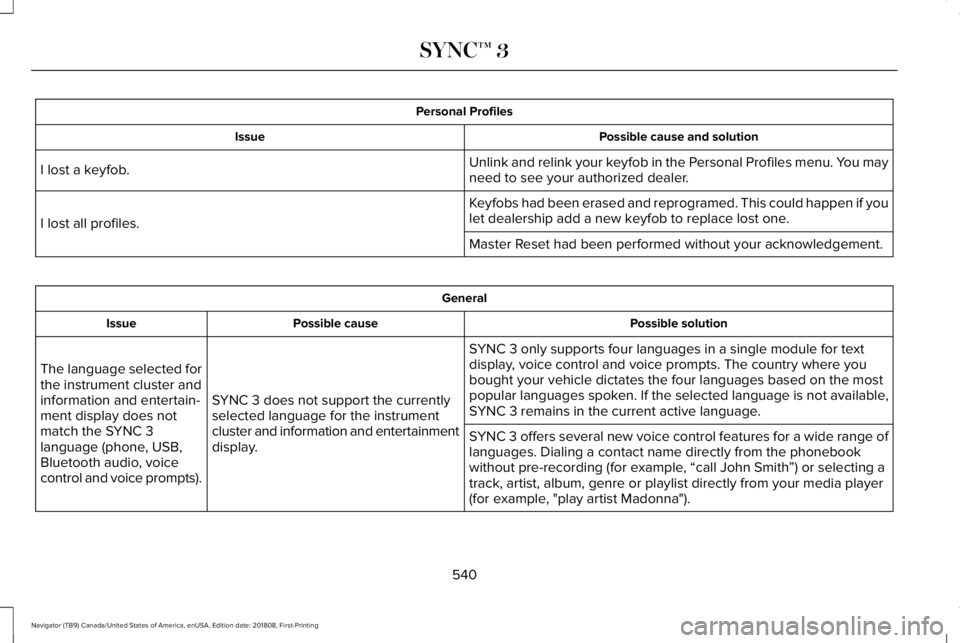
Personal Profiles
Possible cause and solutionIssue
Unlink and relink your keyfob in the Personal Profiles menu. You mayneed to see your authorized dealer.I lost a keyfob.
Keyfobs had been erased and reprogramed. This could happen if youlet dealership add a new keyfob to replace lost one.I lost all profiles.
Master Reset had been performed without your acknowledgement.
General
Possible solutionPossible causeIssue
SYNC 3 only supports four languages in a single module for textdisplay, voice control and voice prompts. The country where youbought your vehicle dictates the four languages based on the mostpopular languages spoken. If the selected language is not available,SYNC 3 remains in the current active language.SYNC 3 does not support the currentlyselected language for the instrumentcluster and information and entertainmentdisplay.
The language selected forthe instrument cluster andinformation and entertain-ment display does notmatch the SYNC 3language (phone, USB,Bluetooth audio, voicecontrol and voice prompts).
SYNC 3 offers several new voice control features for a wide range oflanguages. Dialing a contact name directly from the phonebookwithout pre-recording (for example, “call John Smith”) or selecting atrack, artist, album, genre or playlist directly from your media player(for example, "play artist Madonna").
540
Navigator (TB9) Canada/United States of America, enUSA, Edition date: 201808, First-Printing
SYNC™ 3