steering LINCOLN NAVIGATOR 2019 Repair Manual
[x] Cancel search | Manufacturer: LINCOLN, Model Year: 2019, Model line: NAVIGATOR, Model: LINCOLN NAVIGATOR 2019Pages: 645, PDF Size: 5.02 MB
Page 308 of 645
either too far below or too close to thecamera to properly recognize the sticker.In order for the system to operatecorrectly the sticker height must belowered if you receive the minimumwarning or the sticker height must beraised if you receive the maximumwarning.
•Only one sticker can be placed on thetrailer for correct system function. Theprevious sticker must be removed orcovered so only one sticker is visible tothe camera.
•Measurement B and C must be measuredagain if a new sticker is placed on thetrailer.
Measurement D has reached maximum orminimum value:
•Make sure that the measurement beingmade is the horizontal distance only fromthe bumper to the center of the singleaxle or the center of all the axles on thetrailer. See step 4 of the setup foradditional measurement instructions. TheTBA system does not support trailerlengths outside the range allowed by theinformation display.
System is circling something beside thesticker or system cannot find the sticker:
•Make sure the rear camera is clean andthe sticker is clearly visible in the cameraimage. Clean the camera and sticker ifnecessary.
•The camera system uses the enteredmeasurements to help locate the sticker.Inaccurate sticker measurements willdegrade the system’s ability to locate thesticker. Verify the measurements enteredinto the system are accurate.
•Remove the incorrectly circled label ordecal if possible.
•If you cannot resolve the issue a newsticker location should be tried. Thesticker location must still meet therequirements noted in step 3 of the setupinstructions. Only one sticker can beplaced on the trailer for correct systemfunction. The previous sticker must beremoved or covered so only one stickeris visible to the camera.
Calibration
The system monitors various vehicleparameters to ensure your vehicle is beingdriven straight and the trailer straight behindyour vehicle. Any steering input or trailermovement will pause the calibration.
For best results:
•Use a long, straight, smooth and levelroad when attempting to calibrate.
•Drive straight forward.
•Drive between 4 mph (6 km/h) and24 mph (39 km/h).
System Operation
The following warnings or difficulties mayoccur during feature operation. Tips toresolve them are listed below.
305
Navigator (TB9) Canada/United States of America, enUSA, Edition date: 201808, First-Printing
Towing
Page 311 of 645
•If the sticker location needs to bechanged, the previous sticker must beremoved and a new sticker needs to beplaced on the trailer. ONLY ONESTICKER SHOULD BE PLACED ON THETRAILER FOR PROPER SYSTEMFUNCTION.
•Disregard the prompt to remove thissticker and continue to the next step ifyou only plan to update themeasurements for the current stickerlocation.
System consistently shows Stop now takecontrol of steering warning:
•The system displays this warning whenit can no longer steer the vehicle and youmust take over steering. There are fourreasons why this warning displays andadditional information regarding thereason for the warning is available on thecenter display.
•The steering wheel is touched while thesystem is controlling it. Avoid touchingthe wheel during system operation.
•The maximum speed for featureoperation is exceeded. Systemperformance is optimized at slowerspeeds. Backup slowly.
•The sticker was lost by the camerasystem. Once your vehicle is stoppedadditional warnings will indicate thesticker was lost. Refer to sticker losttrouble shooting tips.
•An internal condition for systemoperation was not met which requiresyour vehicle return to manual control ofthe steering.
Note:The system is designed to be usedwith the same trailer connection every timethe trailer is chosen from the selection menu.Using a different drawbar or a different pinhole (on drawbars with more than one) whenconnecting the drawbar to your vehicleaffects the trailer measurements. Take themeasurements again and update if required.
TRAILER SWAY CONTROL
WARNING: Turning off trailer swaycontrol increases the risk of loss of vehiclecontrol, serious injury or death. Ford doesnot recommend disabling this featureexcept in situations where speed reductionmay be detrimental (such as hill climbing),the driver has significant trailer towingexperience, and can control trailer swayand maintain safe operation.
Note:This feature does not prevent trailersway, but reduces it once it begins.
Note:This feature cannot stop all trailersfrom swaying.
Note:In some cases, if vehicle speed is toohigh, the system may activate multiple times,gradually reducing vehicle speed.
308
Navigator (TB9) Canada/United States of America, enUSA, Edition date: 201808, First-Printing
Towing
Page 321 of 645
Before Towing a Trailer
Practice turning, stopping and backing up toget the feel of your vehicle-trailercombination before starting on a trip. Whenturning, make wider turns so the trailerwheels clear curbs and other obstacles.
When Towing a Trailer
•Do not drive faster than 70 mph(113 km/h) during the first 500 mi(800 km).
•Do not make full-throttle starts.
•Check your hitch, electrical connectionsand trailer wheel lug nuts thoroughly afteryou have traveled 50 mi (80 km).
•When stopped in congested or heavytraffic during hot weather, place thetransmission in park (P) to aid engine andtransmission cooling and to help A/Cperformance.
•Turn off the speed control when carryingheavy loads or in hilly terrain. The speedcontrol may turn off automatically whenyou are towing on long, steep grades.
•Shift to a lower gear when driving downa long or steep hill. Do not apply thebrakes continuously, as they mayoverheat and become less effective.
•If your transmission has a Grade Assistor Tow/Haul feature, use this featurewhen towing. This provides enginebraking and helps eliminate excessivetransmission shifting for optimum fueleconomy and transmission cooling.
•If your vehicle has AdvanceTrac withRSC, this system may turn on duringtypical cornering maneuvers with aheavily loaded trailer. This is normal.Turning the corner at a slower speedwhile towing may reduce this tendency.
•If your vehicle has Adaptive suspension,you can select NORMAL or SPORT drivecontrol modes for better experiencewhen towing a trailer. See InformationDisplays (page 120).
•If you are towing a trailer frequently inhot weather, hilly conditions, at the grosscombined weight rating (or anycombination of these factors), considerrefilling your rear axle with synthetic gearlubricant (if the axle is not already filledwith it). See Capacities andSpecifications (page 418).
•Allow more distance for stopping with atrailer attached. Anticipate stops andbrake gradually.
•Avoid parking on a grade. However, ifyou must park on a grade:
1. Turn the steering wheel to point yourvehicle tires away from traffic flow.
2. Set your vehicle parking brake.
3. Place the transmission in park (P).
4.Place wheel chocks in the front and backof the trailer wheels.
Note:Chocks are not included with yourvehicle.
318
Navigator (TB9) Canada/United States of America, enUSA, Edition date: 201808, First-Printing
Towing
Page 322 of 645
Your vehicle may be equipped with atemporary or conventional spare tire. Atemporary spare tire is different in size(diameter or width), tread-type (All-Seasonor All-Terrain) or is from a differentmanufacturer than the road tires on yourvehicle. Consult information on the tire labelor Safety Compliance label for limitationswhen using.
Launching or Retrieving a Boat orPersonal Watercraft (PWC)
Note:Disconnect the wiring to the trailerbefore backing the trailer into the water.
Note:Reconnect the wiring to the trailerafter removing the trailer from the water.
When backing down a ramp during boatlaunching or retrieval:
•Do not allow the static water level to riseabove the bottom edge of the rearbumper.
•Do not allow waves to break higher than6 in (15 cm) above the bottom edge ofthe rear bumper.
Exceeding these limits may allow water toenter vehicle components:
•Causing internal damage to thecomponents.
•Affecting driveability, emissions, andreliability.
Replace the rear axle lubricant anytime therear axle has been submerged in water.Water may have contaminated the rear axlelubricant, which is not normally checked orchanged unless a leak is suspected or otheraxle repair is required.
TOWING THE VEHICLE ON FOUR
WHEELS
WARNING: If your vehicle has asteering wheel lock make sure the ignitionis in the accessory or on position whenbeing towed.
Recreational Towing
Note:Put your climate control system inrecirculated air mode to prevent exhaustfumes from entering your vehicle. SeeClimate Control (page 152).
Follow these guidelines if you have a needfor recreational towing, such as towing yourvehicle behind a motorhome. Theseguidelines are designed to prevent damageto your transmission.
Two-wheel Drive Vehicles
You cannot tow a two-wheel drive vehiclewith any wheels on the ground as vehicle ortransmission damage may occur. You musttow your vehicle with all four wheels off theground, for example when using acar-hauling trailer.
319
Navigator (TB9) Canada/United States of America, enUSA, Edition date: 201808, First-Printing
Towing
Page 327 of 645
There are also some things you may want toavoid doing because they reduce your fueleconomy:
•Avoid sudden or hard accelerations.
•Avoid revving the engine before turningoff the car.
•Avoid long idle periods.
•Do not warm up your vehicle on coldmornings.
•Reduce the use of air conditioning andheat.
•Avoid using speed control in hilly terrain.
•Do not rest your foot on the brake pedalwhile driving.
•Avoid carrying unnecessary weight.
•Avoid adding particular accessories toyour vehicle (e.g. bug deflectors,rollbars/light bars, running boards, skiracks).
•Avoid driving with the wheels out ofalignment.
DRIVING THROUGH WATER
WARNING: Do not drive throughflowing or deep water as you may losecontrol of your vehicle.
Note:Driving through standing water cancause vehicle damage.
Note:Engine damage can occur if waterenters the air filter.
Before driving through standing water, checkthe depth. Never drive through water that ishigher than the bottom of the wheel hubs.
When driving through standing water, drivevery slowly and do not stop your vehicle.Your brake performance and traction maybe limited. After driving through water andas soon as it is safe to do so:
•Lightly press the brake pedal to dry thebrakes and to check that they work.
•Check that the horn works.
•Check that the exterior lights work.
•Turn the steering wheel to check that thesteering power assist works.
FLOOR MATS
WARNING: Use a floor mat designedto fit the footwell of your vehicle that doesnot obstruct the pedal area. Failure tofollow this instruction could result in theloss of control of your vehicle, personalinjury or death.
WARNING: Pedals that cannot movefreely can cause loss of vehicle control andincrease the risk of serious personal injury.
324
Navigator (TB9) Canada/United States of America, enUSA, Edition date: 201808, First-Printing
Driving HintsE176913
Page 347 of 645
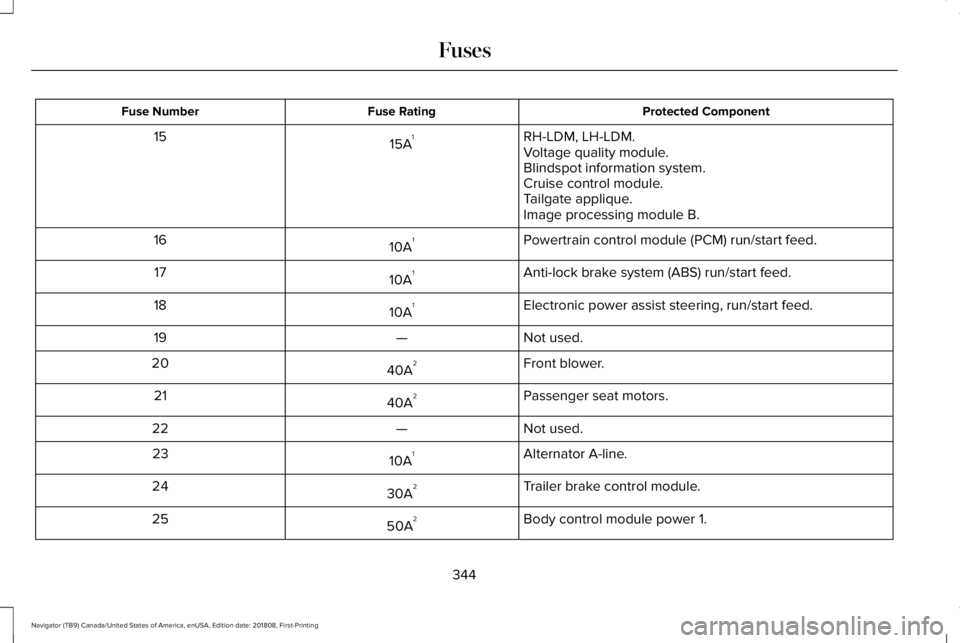
Protected ComponentFuse RatingFuse Number
RH-LDM, LH-LDM.15A115Voltage quality module.Blindspot information system.Cruise control module.Tailgate applique.Image processing module B.
Powertrain control module (PCM) run/start feed.10A116
Anti-lock brake system (ABS) run/start feed.10A117
Electronic power assist steering, run/start feed.10A118
Not used.—19
Front blower.40A220
Passenger seat motors.40A221
Not used.—22
Alternator A-line.10A123
Trailer brake control module.30A224
Body control module power 1.50A225
344
Navigator (TB9) Canada/United States of America, enUSA, Edition date: 201808, First-Printing
Fuses
Page 356 of 645
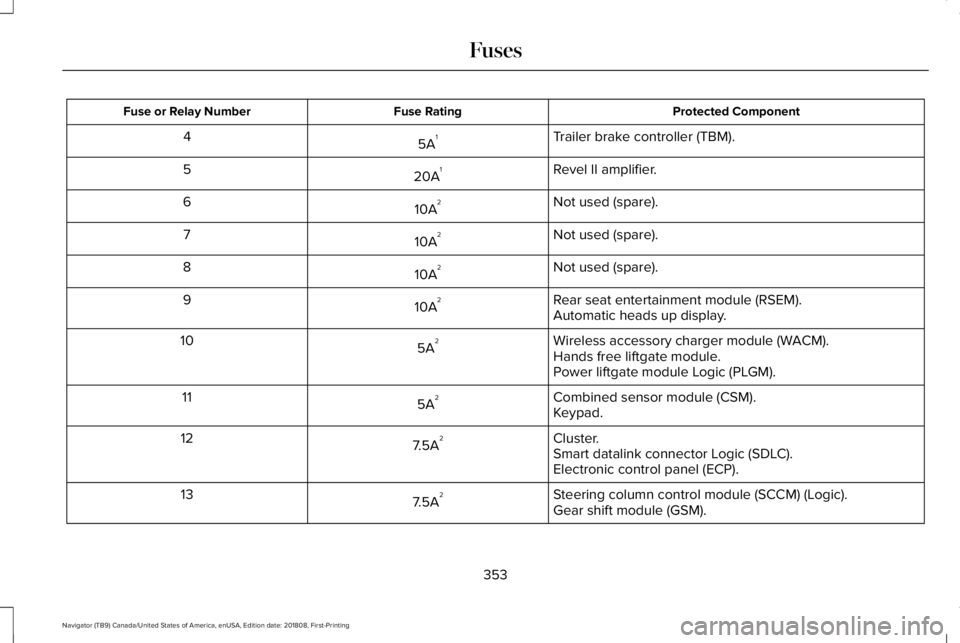
Protected ComponentFuse RatingFuse or Relay Number
Trailer brake controller (TBM).5A14
Revel II amplifier.20A15
Not used (spare).10A26
Not used (spare).10A27
Not used (spare).10A28
Rear seat entertainment module (RSEM).10A29Automatic heads up display.
Wireless accessory charger module (WACM).5A210Hands free liftgate module.Power liftgate module Logic (PLGM).
Combined sensor module (CSM).5A211Keypad.
Cluster.7.5A212Smart datalink connector Logic (SDLC).Electronic control panel (ECP).
Steering column control module (SCCM) (Logic).7.5A213Gear shift module (GSM).
353
Navigator (TB9) Canada/United States of America, enUSA, Edition date: 201808, First-Printing
Fuses
Page 359 of 645
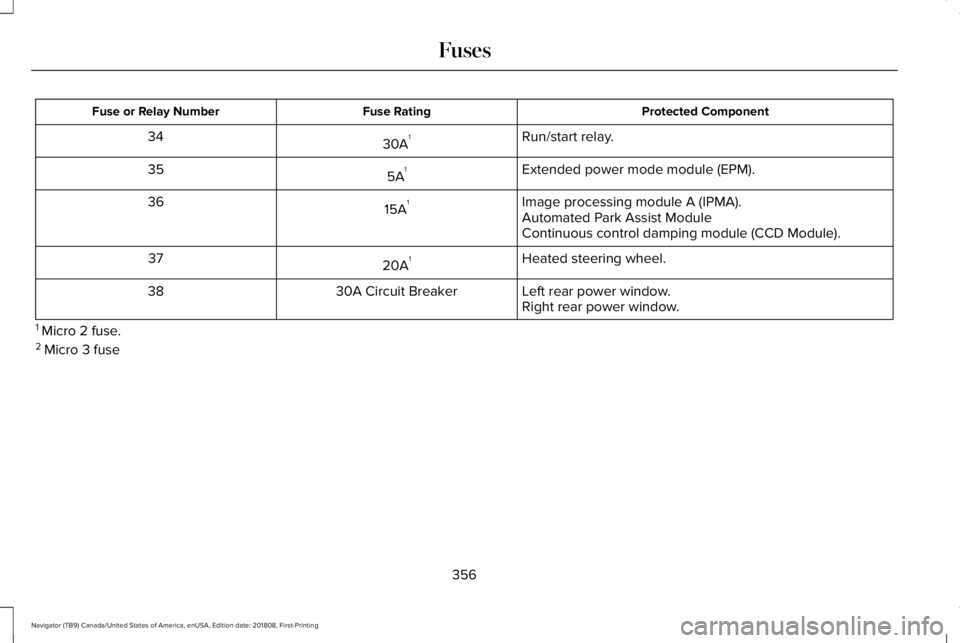
Protected ComponentFuse RatingFuse or Relay Number
Run/start relay.30A134
Extended power mode module (EPM).5A135
Image processing module A (IPMA).15A136Automated Park Assist ModuleContinuous control damping module (CCD Module).
Heated steering wheel.20A137
Left rear power window.30A Circuit Breaker38Right rear power window.
1 Micro 2 fuse.2 Micro 3 fuse
356
Navigator (TB9) Canada/United States of America, enUSA, Edition date: 201808, First-Printing
Fuses
Page 366 of 645
Note:Do not remove the dipstick when theengine is running.
Note: If the oil level is between themaximum and minimum marks, the oil levelis acceptable. Do not add oil.
Note:The oil consumption of new enginesreaches its normal level after approximately3,000 mi (5,000 km).
Adding Engine Oil
WARNING: Do not remove the fillercap when the engine is running.
Do not use supplemental engine oil additivesbecause they are unnecessary and couldlead to engine damage that may not becovered by the vehicle Warranty.
Only use oils certified for gasoline enginesby the American Petroleum Institute (API). An oil with this trademark symbol conformsto the current engine and emission systemprotection standards and fuel economyrequirements of the International LubricantsSpecification Advisory Committee (ILSAC).
To top up the engine oil level do thefollowing:
1. Clean the area surrounding the engineoil filler cap before you remove it.
2. Remove the engine oil filler cap. SeeUnder Hood Overview (page 360). Turnit counterclockwise and remove it.
3. Add engine oil that meets ourspecifications. See Capacities andSpecifications (page 422). You may haveto use a funnel to pour the engine oil intothe opening.
4. Recheck the oil level.
5. If the oil level is correct, replace thedipstick and make sure it is fully seated.
6. Replace the engine oil filler cap. Turn itclockwise until you feel a strongresistance.
Note: Do not add oil further than themaximum mark. Oil levels above themaximum mark may cause engine damage.
Note:Make sure you install the oil filler capcorrectly.
Note:Soak up any spillage with anabsorbent cloth immediately.
OIL CHANGE INDICATOR RESET
Use the information display controls on thesteering wheel to reset the oil changeindicator.
363
Navigator (TB9) Canada/United States of America, enUSA, Edition date: 201808, First-Printing
MaintenanceE142732
Page 370 of 645
Coolant Change
At specific mileage intervals, as listed in thescheduled maintenance information, thecoolant should be changed. Add predilutedcoolant approved to the correct specification.See Capacities and Specifications (page418).
Fail-Safe Cooling
Fail-safe cooling allows you to temporarilydrive your vehicle before any incrementalcomponent damage occurs. The fail-safedistance depends on ambient temperature,vehicle load and terrain.
How Fail-Safe Cooling Works
If the engine begins to overheat,the coolant temperature gaugemoves toward the red zone:
A warning lamp illuminates and amessage may appear in theinformation display.
If the engine reaches a presetover-temperature condition, the engineautomatically switches to alternating cylinderoperation. Each disabled cylinder acts as anair pump and cools the engine.
When this occurs, your vehicle still operates,however:
•Engine power is limited.
•The air conditioning system turns off.
Continued operation increases the enginetemperature, causing the engine tocompletely shut down. Your steering andbraking effort increases in this situation.
When the engine temperature cools, you canre-start the engine. Have your vehiclechecked as soon as possible to minimizeengine damage.
When Fail-Safe Mode Is Activated
WARNING: Fail-safe mode is for useduring emergencies only. Operate yourvehicle in fail-safe mode only as long asnecessary to bring your vehicle to rest ina safe location and seek immediate repairs.When in fail-safe mode, your vehicle willhave limited power, will not be able tomaintain high-speed operation, and maycompletely shut down without warning,potentially losing engine power, powersteering assist, and power brake assist,which may increase the possibility of acrash resulting in serious injury.
WARNING: Do not remove thecoolant reservoir cap when the coolingsystem is hot. Wait 10 minutes for thecooling system to cool down. Cover thecoolant reservoir cap with a thick cloth toprevent the possibility of scalding andslowly remove the cap. Failure to followthis instruction could result in personalinjury.
367
Navigator (TB9) Canada/United States of America, enUSA, Edition date: 201808, First-Printing
Maintenance