steering LINCOLN NAVIGATOR 2019 Manual PDF
[x] Cancel search | Manufacturer: LINCOLN, Model Year: 2019, Model line: NAVIGATOR, Model: LINCOLN NAVIGATOR 2019Pages: 645, PDF Size: 5.02 MB
Page 376 of 645
Note:For flexible fuel vehicles, if you areoperating on E85, you may experience poorstarts or an inability to start the engine anddriveability problems until the fuel trim andethanol content have been relearned.
Make sure that you dispose of old batteriesin an environmentally friendly way. Seekadvice from your local authority aboutrecycling old batteries.
If storing your vehicle for more than 30 dayswithout recharging the battery, werecommend that you disconnect the negativebattery cable to maintain battery charge forquick starting.
Battery Management System (If Equipped)
The battery management system monitorsbattery conditions and takes actions toextend battery life. If excessive battery drainis detected, the system temporarily disablessome electrical systems to protect thebattery.
Systems included are:
•Heated rear window.
•Heated seats.
•Climate control.
•Heated steering wheel.
•Audio unit.
•Navigation system.
A message may appear in the informationdisplays to alert you that battery protectionactions are active. These messages are onlyfor notification that an action is taking place,and not intended to indicate an electricalproblem or that the battery requiresreplacement.
After battery replacement, or in some casesafter charging the battery with an externalcharger, the battery management systemrequires eight hours of vehicle sleep time torelearn the battery state of charge. Duringthis time your vehicle must remain fullylocked with the ignition switched off.
Note:Prior to relearning the battery state ofcharge, the battery management systemmay temporarily disable some electricalsystems.
Electrical Accessory Installation
To make sure the battery managementsystem works correctly, do not connect anelectrical device ground connection directlyto the battery negative post. This can causeinaccurate measurements of the batterycondition and potential incorrect systemoperation.
Note:If you add electrical accessories orcomponents to the vehicle, it may adverselyaffect battery performance and durability.This may also affect the performance ofother electrical systems in the vehicle.
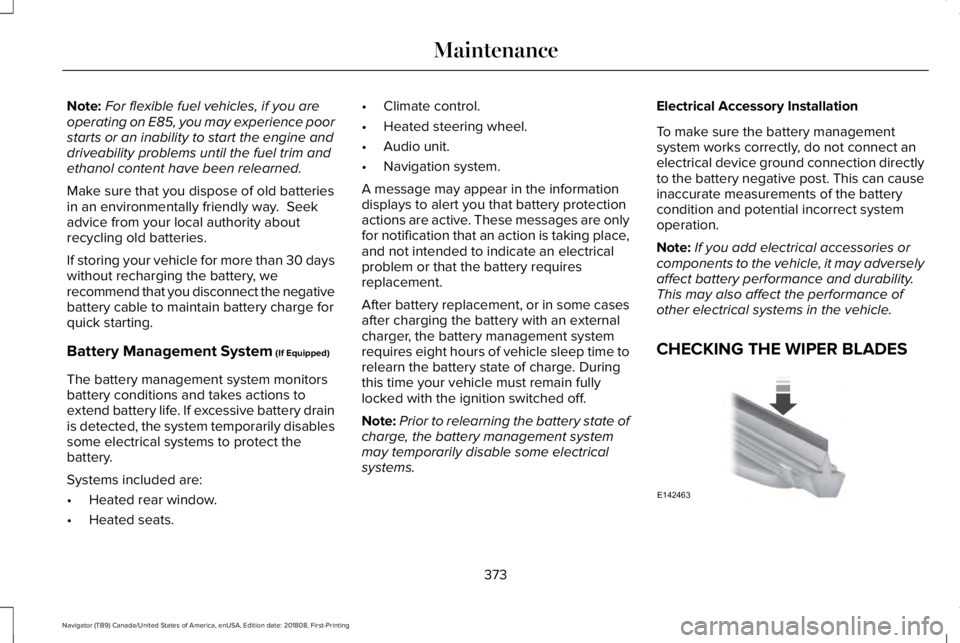
CHECKING THE WIPER BLADES
373
Navigator (TB9) Canada/United States of America, enUSA, Edition date: 201808, First-Printing
MaintenanceE142463
Page 387 of 645
CLEANING THE INSTRUMENT
PANEL AND INSTRUMENT
CLUSTER LENS
WARNING: Do not use chemicalsolvents or strong detergents whencleaning the steering wheel or instrumentpanel to avoid contamination of the airbagsystem.
Note:Follow the same procedure ascleaning leather seats for cleaning leatherinstrument panels and leather interior trimsurfaces. See Cleaning Leather Seats (page384).
Clean the instrument panel and cluster lenswith a clean, damp and soft cloth, then usea clean, dry and soft cloth to dry these areas.
•Avoid cleaners or polishes that increasethe gloss of the upper portion of theinstrument panel. The dull finish in thisarea helps protect you from undesirablewindshield reflection.
•Do not use any household cleaningproducts or glass cleaners as these maydamage the finish of the instrumentpanel, interior trim and cluster lens.
•Wash or wipe your hands clean if youhave been in contact with certainproducts such as insect repellent andsuntan lotion to avoid possible damageto the interior painted surfaces.
•Do not allow air fresheners and handsanitizers to spill onto interior surfaces.If a spill occurs, wipe off immediately.Your warranty may not cover thesedamages.
If a staining liquid like coffee or juice hasbeen spilled on the instrument panel or oninterior trim surfaces:
1.Wipe up spilled liquid using a clean, softcloth as quickly as possible.
2. Use Motorcraft Premium Leather andVinyl Cleaner or a commercially availableleather cleaning product for automotiveinteriors. Test any cleaner or stainremover on an inconspicuous area.
3. Alternatively, wipe the surface with aclean, soft cloth and a mild soap andwater solution. Dry the area with a clean,soft cloth.
4.If necessary, apply more soap and watersolution or cleaning product to a clean,soft cloth and press it onto the soiledarea. Allow this to set at roomtemperature for 30 minutes.
5. Remove the soaked cloth, then with aclean, damp cloth, use a rubbing motionfor 60 seconds on the soiled area.
6. Dry the area with a clean, soft cloth.
CLEANING LEATHER SEATS
Note:Follow the same procedure ascleaning leather seats for cleaning leatherinstrument panels and leather interior trimsurfaces.
384
Navigator (TB9) Canada/United States of America, enUSA, Edition date: 201808, First-Printing
Vehicle Care
Page 391 of 645
GENERAL INFORMATION
Use only approved wheel and tire sizes,using other sizes could damage your vehicle.If you change the diameter of the tires fromthat fitted at the factory, the speedometermay not display the correct speed. If youintend to change the size of the wheels fromthat fitted by the manufacturer, you cancheck the suitability with an authorizeddealer.
Additional information related to thefunctionality and maintenance of your tirescan be found later in this chapter. See TireCare (page 390).
You can find the recommended tire inflationpressures can on the Tire Label, which is onthe B-pillar or the edge of the driver door.You can also find this information on theSafety Compliance Certification Label, affixedto either the door hinge pillar, door-latchpost, or the door edge that meets the doorlatch post; next to the driver seating position.
We strongly recommend maintaining thesetire pressures at all times. Failure to followthe tire pressure recommendations cancause uneven treadwear patterns, reducedfuel economy, and adversely affect the wayyour vehicle handles.
Note:Check and set the tire pressure at theambient temperature in which you areintending to drive your vehicle and when thetires are cold.
Note:Check your tire pressures at least onceper month.
If your vehicle has a spare tire, set thepressure to the highest value given for yourvehicle and tire size combination.
Notice to utility vehicle and truckowners
WARNING: Utility vehicles have asignificantly higher rollover rate than othertypes of vehicles.
WARNING: Vehicles with a highercenter of gravity (utility and four-wheeldrive vehicles) handle differently thanvehicles with a lower center of gravity(passenger cars). Avoid sharp turns,excessive speed and abrupt steering inthese vehicles. Failure to drive cautiouslyincreases the risk of losing control of yourvehicle, vehicle rollover, personal injuryand death.
WARNING: In a rollover crash, anunbelted person is significantly more likelyto die than a person wearing a seatbelt.
WARNING: Do not becomeoverconfident in the ability of four-wheeldrive vehicles. Although a four-wheel drivevehicle may accelerate better than atwo-wheel drive vehicle in low tractionsituations, it won't stop any faster thantwo-wheel drive vehicles. Always drive ata safe speed.
388
Navigator (TB9) Canada/United States of America, enUSA, Edition date: 201808, First-Printing
Wheels and Tires
Page 393 of 645
•Higher - to allow higher load carryingcapacity and to allow it to travel overrough terrain without getting hung up ordamaging underbody components.
•Shorter - to give it the capability toapproach inclines and drive over thecrest of a hill without getting hung up ordamaging underbody components. Allother things held equal, a shorterwheelbase may make your vehiclequicker to respond to steering inputsthan a vehicle with a longer wheelbase.
•Narrower - to provide greatermaneuverability in tight spaces,particularly in off-road use.
As a result of the above dimensionaldifferences, Sport utility vehicles and trucksoften have a higher center of gravity and agreater difference in center of gravitybetween the loaded and unloaded condition.These differences that make your vehicle soversatile also make it handle differently thanan ordinary passenger car.
TIRE CARE
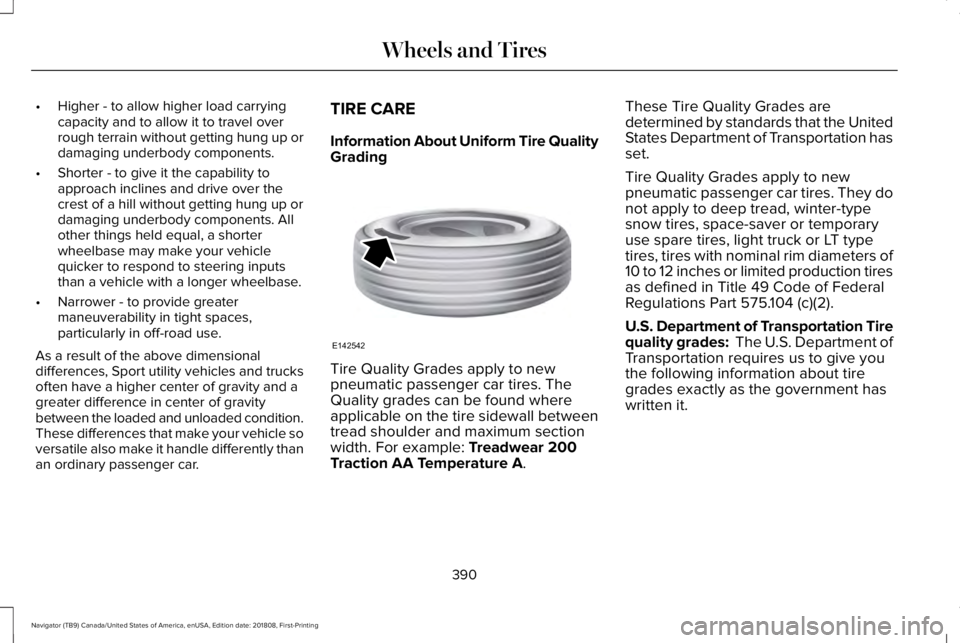
Information About Uniform Tire QualityGrading
Tire Quality Grades apply to newpneumatic passenger car tires. TheQuality grades can be found whereapplicable on the tire sidewall betweentread shoulder and maximum sectionwidth. For example: Treadwear 200Traction AA Temperature A.
These Tire Quality Grades aredetermined by standards that the UnitedStates Department of Transportation hasset.
Tire Quality Grades apply to newpneumatic passenger car tires. They donot apply to deep tread, winter-typesnow tires, space-saver or temporaryuse spare tires, light truck or LT typetires, tires with nominal rim diameters of10 to 12 inches or limited production tiresas defined in Title 49 Code of FederalRegulations Part 575.104 (c)(2).
U.S. Department of Transportation Tirequality grades: The U.S. Department ofTransportation requires us to give youthe following information about tiregrades exactly as the government has
written it.
390
Navigator (TB9) Canada/United States of America, enUSA, Edition date: 201808, First-Printing
Wheels and TiresE142542
Page 401 of 645
and internal damage to the tire. It alsomay result in unnecessary tire stress,irregular wear, loss of vehicle controland accidents. A tire can lose up tohalf of its air pressure and not appearto be flat!
Always inflate your tires to the ourrecommended inflation pressure evenif it is less than the maximum inflationpressure information found on the tire.Our recommended tire inflation pressureis found on the Safety ComplianceCertification Label or Tire Label (affixedto either the door hinge pillar, door-latchpost, or the door edge that meets thedoor-latch post, next to the driver'sseating position), or Tire Label locatedon the B-pillar or the edge of the driver's
door. Failure to follow the tire pressurerecommendations can cause uneventreadwear patterns and adversely affectthe way your vehicle handles.
Note:Do not reduce tire pressure tochange the ride characteristics of thevehicle. If you do not maintain theinflation pressure at the levels specifiedby us, your vehicle may experience acondition known as shimmy. Shimmy isa severe vibration and oscillation in thesteering wheel after the vehicle travelsover a bump or dip in the road that doesnot dampen out by itself. Shimmy mayresult from significant under-inflation ofthe tires, improper tires (load range, size,or type), or vehicle modifications suchas lift-kits. In the event that your vehicleexperiences shimmy, you should slowlyreduce speed by either lifting off theaccelerator pedal or lightly applying thebrakes. The shimmy will cease as thevehicle speed decreases.
Maximum Inflation Pressure is the tiremanufacturer's maximum permissiblepressure and the pressure at which themaximum load can be carried by the tire.This pressure is normally higher than themanufacturer’s recommended coldinflation pressure which can be foundon the Safety Compliance Certification
Label (affixed to either the door hingepillar, door-latch post, or the door edgethat meets the door-latch post, next tothe driver's seating position), or TireLabel located on the B-pillar or the edgeof the driver's door. The cold inflationpressure should never be set lower thanthe recommended pressure on theSafety Compliance Certification Labelor Tire Label.
When weather temperature changesoccur, tire inflation pressures alsochange. A 10°F (6°C) temperature dropcan cause a corresponding drop of 1 psi(7 kPa) in inflation pressure. Check yourtire pressures frequently and adjustthem to the proper pressure which canbe found on the Safety ComplianceCertification Label or Tire Label.
To check the pressure in your tire(s):
1. Make sure the tires are cool, meaningthey are not hot from driving even amile.
398
Navigator (TB9) Canada/United States of America, enUSA, Edition date: 201808, First-Printing
Wheels and Tires
Page 407 of 645
Note:Your vehicle may be equippedwith a dissimilar spare wheel and tireassembly. A dissimilar spare wheel andtire assembly is defined as a sparewheel and tire assembly that is differentin brand, size or appearance from theroad tires and wheels. If you have adissimilar spare wheel and tire assemblyit is intended for temporary use only andshould not be used in a tire rotation.
Note:After having your tires rotated,inflation pressure must be checked andadjusted to the vehicle requirements.
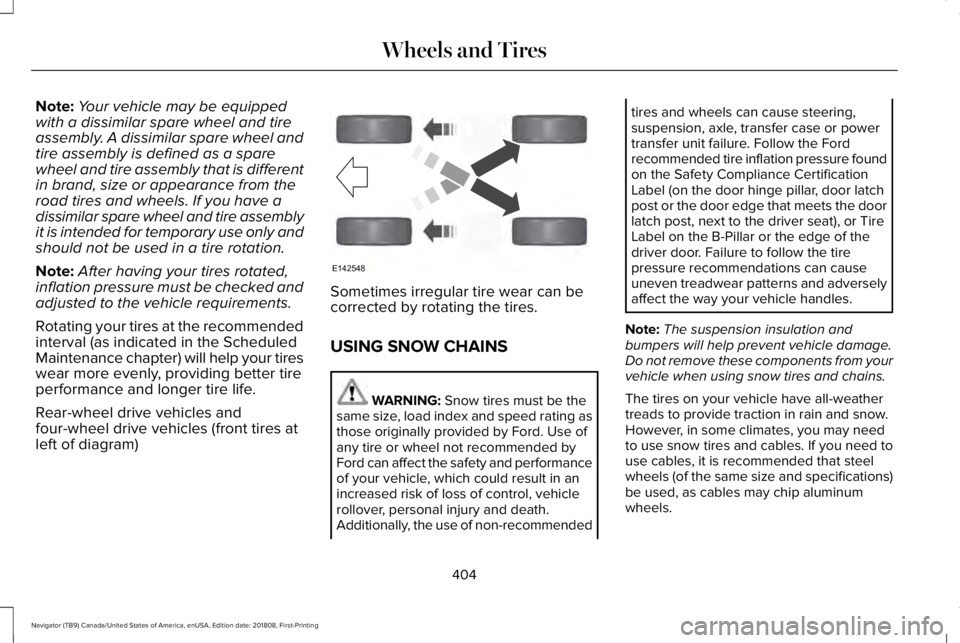
Rotating your tires at the recommendedinterval (as indicated in the ScheduledMaintenance chapter) will help your tireswear more evenly, providing better tireperformance and longer tire life.
Rear-wheel drive vehicles andfour-wheel drive vehicles (front tires atleft of diagram)
Sometimes irregular tire wear can becorrected by rotating the tires.
USING SNOW CHAINS
WARNING: Snow tires must be thesame size, load index and speed rating asthose originally provided by Ford. Use ofany tire or wheel not recommended byFord can affect the safety and performanceof your vehicle, which could result in anincreased risk of loss of control, vehiclerollover, personal injury and death.Additionally, the use of non-recommended
tires and wheels can cause steering,suspension, axle, transfer case or powertransfer unit failure. Follow the Fordrecommended tire inflation pressure foundon the Safety Compliance CertificationLabel (on the door hinge pillar, door latchpost or the door edge that meets the doorlatch post, next to the driver seat), or TireLabel on the B-Pillar or the edge of thedriver door. Failure to follow the tirepressure recommendations can causeuneven treadwear patterns and adverselyaffect the way your vehicle handles.
Note:The suspension insulation andbumpers will help prevent vehicle damage.Do not remove these components from yourvehicle when using snow tires and chains.
The tires on your vehicle have all-weathertreads to provide traction in rain and snow.However, in some climates, you may needto use snow tires and cables. If you need touse cables, it is recommended that steelwheels (of the same size and specifications)be used, as cables may chip aluminumwheels.
404
Navigator (TB9) Canada/United States of America, enUSA, Edition date: 201808, First-Printing
Wheels and TiresE142548
Page 413 of 645
When Inflating Your Tires
WARNING: Do not use the tirepressure displayed in the informationdisplay as a tire pressure gauge. Failure tofollow this instruction could result inpersonal injury or death.
When putting air into your tires (such as at agas station or in your garage), the tirepressure monitoring system may not respondimmediately to the air added to your tires.
It may take up to two minutes of driving over20 mph (32 km/h) for the light to turn off afteryou have filled your tires to therecommended inflation pressure.
How Temperature Affects Your TirePressure
The tire pressure monitoring system monitorstire pressure in each pneumatic tire. Whiledriving in a normal manner, a typicalpassenger tire inflation pressure mayincrease about 2–4 psi (14–28 kPa) from acold start situation. If the vehicle is stationaryovernight with the outside temperature
significantly lower than the daytimetemperature, the tire pressure may decreaseabout 3 psi (21 kPa) for a drop of 30°F (17°C)in ambient temperature. This lower pressurevalue may be detected by the tire pressuremonitoring system as being significantlylower than the recommended inflationpressure and activate the system warninglight for low tire pressure. If the low tirepressure warning light is on, visually checkeach tire to verify that no tire is flat. If one ormore tires are flat, repair as necessary.Check the air pressure in the road tires. Ifany tire is under-inflated, carefully drive thevehicle to the nearest location where air canbe added to the tires. Inflate all the tires tothe recommended inflation pressure.
CHANGING A ROAD WHEEL
WARNING: If the tire pressuremonitor sensor becomes damaged it maynot function.
Note:You should only use tire sealants inroadside emergencies as they may causedamage to the tire pressure monitoringsystem sensor.
Note:The tire pressure monitoring systemindicator light illuminates when the sparetire is in use. To restore the full function ofthe monitoring system, all road wheelsequipped with tire pressure monitoringsensors must be mounted on this vehicle.
If you get a flat tire when driving, do notapply the brake heavily. Instead, graduallydecrease your speed. Hold the steeringwheel firmly and slowly move to a safe placeon the side of the road.
Have a flat serviced by an authorized dealerin order to prevent damage to the systemsensors. See Tire Pressure MonitoringSystem (page 405). Replace the spare tirewith a road tire as soon as possible. Duringrepairing or replacing of the flat tire, havethe authorized dealer inspect the systemsensor for damage.
410
Navigator (TB9) Canada/United States of America, enUSA, Edition date: 201808, First-Printing
Wheels and Tires
Page 448 of 645
DescriptionItemCallout
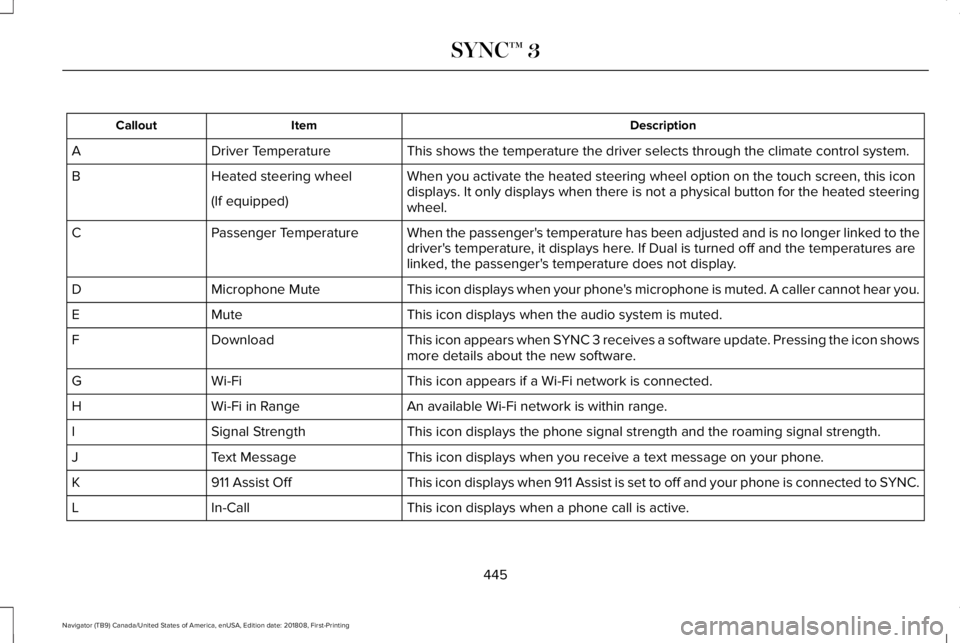
This shows the temperature the driver selects through the climate control system.Driver TemperatureA
When you activate the heated steering wheel option on the touch screen, this icondisplays. It only displays when there is not a physical button for the heated steeringwheel.
Heated steering wheelB
(If equipped)
When the passenger's temperature has been adjusted and is no longer linked to thedriver's temperature, it displays here. If Dual is turned off and the temperatures arelinked, the passenger's temperature does not display.
Passenger TemperatureC
This icon displays when your phone's microphone is muted. A caller cannot hear you.Microphone MuteD
This icon displays when the audio system is muted.MuteE
This icon appears when SYNC 3 receives a software update. Pressing the icon showsmore details about the new software.DownloadF
This icon appears if a Wi-Fi network is connected.Wi-FiG
An available Wi-Fi network is within range.Wi-Fi in RangeH
This icon displays the phone signal strength and the roaming signal strength.Signal StrengthI
This icon displays when you receive a text message on your phone.Text MessageJ
This icon displays when 911 Assist is set to off and your phone is connected to SYNC.911 Assist OffK
This icon displays when a phone call is active.In-CallL
445
Navigator (TB9) Canada/United States of America, enUSA, Edition date: 201808, First-Printing
SYNC™ 3
Page 451 of 645
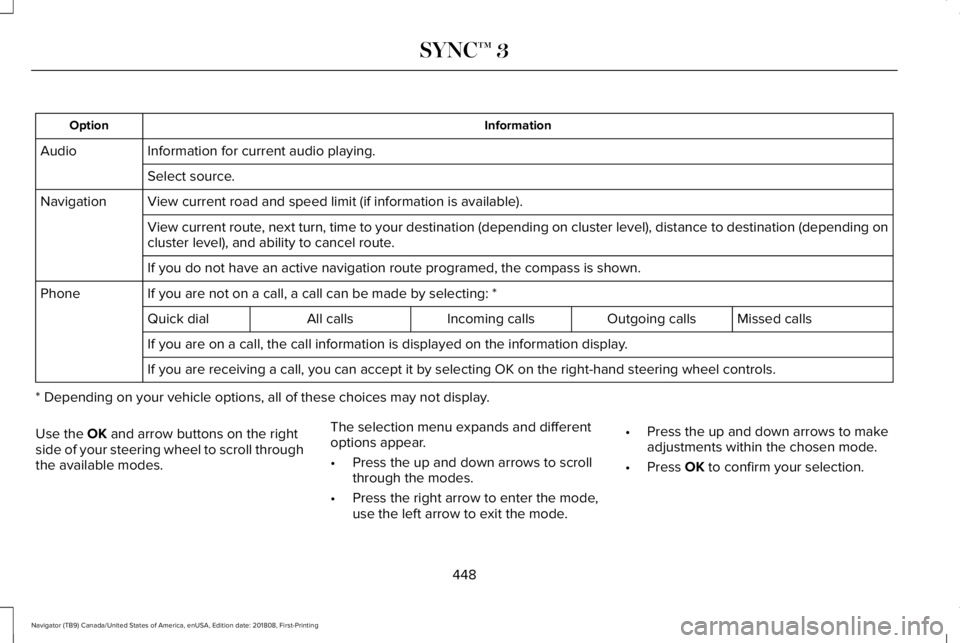
InformationOption
Information for current audio playing.Audio
Select source.
View current road and speed limit (if information is available).Navigation
View current route, next turn, time to your destination (depending on cluster level), distance to destination (depending oncluster level), and ability to cancel route.
If you do not have an active navigation route programed, the compass is shown.
If you are not on a call, a call can be made by selecting: *Phone
Missed callsOutgoing callsIncoming callsAll callsQuick dial
If you are on a call, the call information is displayed on the information display.
If you are receiving a call, you can accept it by selecting OK on the right-hand steering wheel controls.
* Depending on your vehicle options, all of these choices may not display.
Use the OK and arrow buttons on the rightside of your steering wheel to scroll throughthe available modes.
The selection menu expands and differentoptions appear.
•Press the up and down arrows to scrollthrough the modes.
•Press the right arrow to enter the mode,use the left arrow to exit the mode.
•Press the up and down arrows to makeadjustments within the chosen mode.
•Press OK to confirm your selection.
448
Navigator (TB9) Canada/United States of America, enUSA, Edition date: 201808, First-Printing
SYNC™ 3
Page 452 of 645
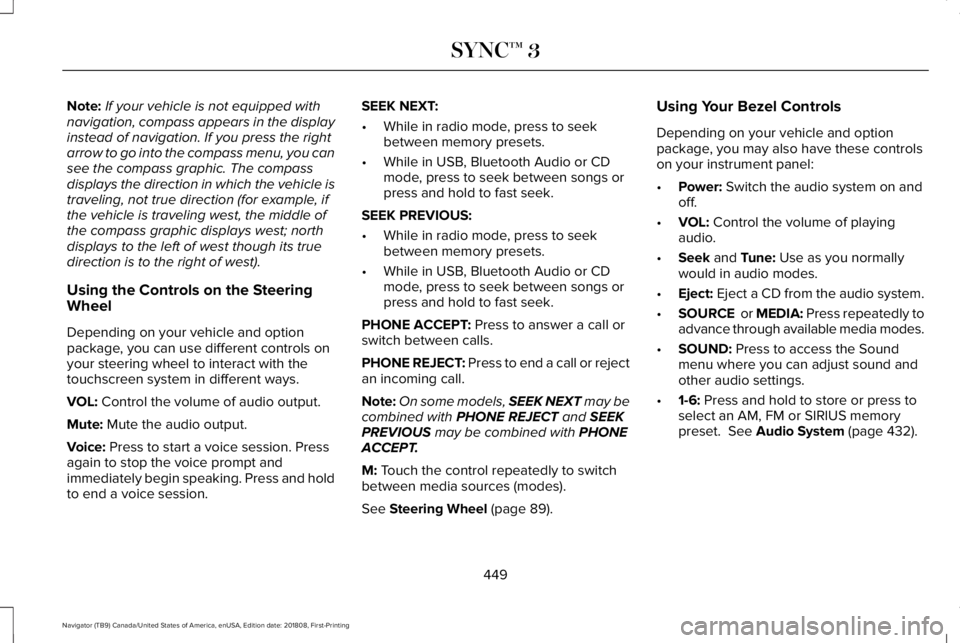
Note:If your vehicle is not equipped withnavigation, compass appears in the displayinstead of navigation. If you press the rightarrow to go into the compass menu, you cansee the compass graphic. The compassdisplays the direction in which the vehicle istraveling, not true direction (for example, ifthe vehicle is traveling west, the middle ofthe compass graphic displays west; northdisplays to the left of west though its truedirection is to the right of west).
Using the Controls on the SteeringWheel
Depending on your vehicle and optionpackage, you can use different controls onyour steering wheel to interact with thetouchscreen system in different ways.
VOL: Control the volume of audio output.
Mute: Mute the audio output.
Voice: Press to start a voice session. Pressagain to stop the voice prompt andimmediately begin speaking. Press and holdto end a voice session.
SEEK NEXT:
•While in radio mode, press to seekbetween memory presets.
•While in USB, Bluetooth Audio or CDmode, press to seek between songs orpress and hold to fast seek.
SEEK PREVIOUS:
•While in radio mode, press to seekbetween memory presets.
•While in USB, Bluetooth Audio or CDmode, press to seek between songs orpress and hold to fast seek.
PHONE ACCEPT: Press to answer a call orswitch between calls.
PHONE REJECT: Press to end a call or rejectan incoming call.
Note:On some models, SEEK NEXT may becombined with PHONE REJECT and SEEKPREVIOUS may be combined with PHONEACCEPT.
M: Touch the control repeatedly to switchbetween media sources (modes).
See Steering Wheel (page 89).
Using Your Bezel Controls
Depending on your vehicle and optionpackage, you may also have these controlson your instrument panel:
•Power: Switch the audio system on andoff.
•VOL: Control the volume of playingaudio.
•Seek and Tune: Use as you normallywould in audio modes.
•Eject: Eject a CD from the audio system.
•SOURCE or MEDIA: Press repeatedly toadvance through available media modes.
•SOUND: Press to access the Soundmenu where you can adjust sound andother audio settings.
•1-6: Press and hold to store or press toselect an AM, FM or SIRIUS memorypreset. See Audio System (page 432).
449
Navigator (TB9) Canada/United States of America, enUSA, Edition date: 201808, First-Printing
SYNC™ 3