wheel LINCOLN NAVIGATOR 2019 Repair Manual
[x] Cancel search | Manufacturer: LINCOLN, Model Year: 2019, Model line: NAVIGATOR, Model: LINCOLN NAVIGATOR 2019Pages: 645, PDF Size: 5.02 MB
Page 291 of 645
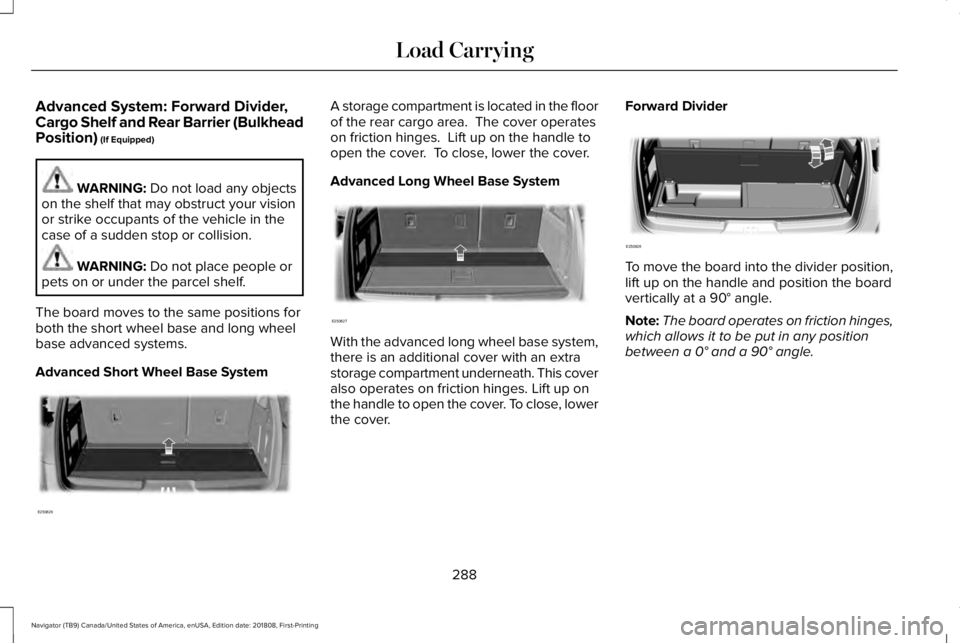
Advanced System: Forward Divider,Cargo Shelf and Rear Barrier (BulkheadPosition) (If Equipped)
WARNING: Do not load any objectson the shelf that may obstruct your visionor strike occupants of the vehicle in thecase of a sudden stop or collision.
WARNING: Do not place people orpets on or under the parcel shelf.
The board moves to the same positions forboth the short wheel base and long wheelbase advanced systems.
Advanced Short Wheel Base System
A storage compartment is located in the floorof the rear cargo area. The cover operateson friction hinges. Lift up on the handle toopen the cover. To close, lower the cover.
Advanced Long Wheel Base System
With the advanced long wheel base system,there is an additional cover with an extrastorage compartment underneath. This coveralso operates on friction hinges. Lift up onthe handle to open the cover. To close, lowerthe cover.
Forward Divider
To move the board into the divider position,lift up on the handle and position the boardvertically at a 90° angle.
Note:The board operates on friction hinges,which allows it to be put in any positionbetween a 0° and a 90° angle.
288
Navigator (TB9) Canada/United States of America, enUSA, Edition date: 201808, First-Printing
Load CarryingE250826 E250827 E250828
Page 292 of 645
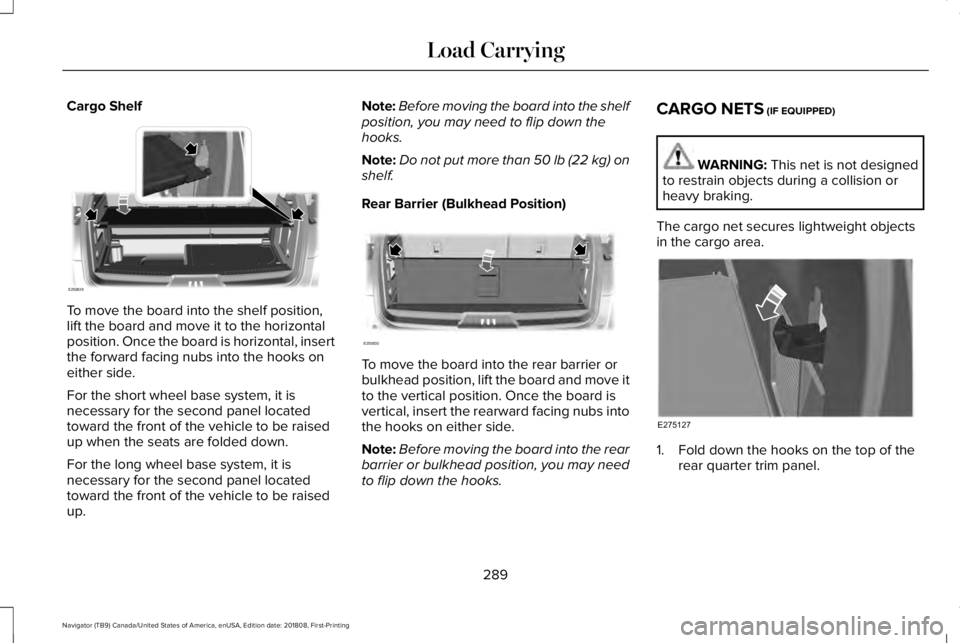
Cargo Shelf
To move the board into the shelf position,lift the board and move it to the horizontalposition. Once the board is horizontal, insertthe forward facing nubs into the hooks oneither side.
For the short wheel base system, it isnecessary for the second panel locatedtoward the front of the vehicle to be raisedup when the seats are folded down.
For the long wheel base system, it isnecessary for the second panel locatedtoward the front of the vehicle to be raisedup.
Note:Before moving the board into the shelfposition, you may need to flip down thehooks.
Note:Do not put more than 50 lb (22 kg) onshelf.
Rear Barrier (Bulkhead Position)
To move the board into the rear barrier orbulkhead position, lift the board and move itto the vertical position. Once the board isvertical, insert the rearward facing nubs intothe hooks on either side.
Note:Before moving the board into the rearbarrier or bulkhead position, you may needto flip down the hooks.
CARGO NETS (IF EQUIPPED)
WARNING: This net is not designedto restrain objects during a collision orheavy braking.
The cargo net secures lightweight objectsin the cargo area.
1. Fold down the hooks on the top of therear quarter trim panel.
289
Navigator (TB9) Canada/United States of America, enUSA, Edition date: 201808, First-Printing
Load CarryingE250829 E250830 E275127
Page 294 of 645
Maximum Recommended Load Amounts
Maximum Recommended LoadDescription
125 lb (56 kg)Vehicles with moonroof.
200 lb (90 kg)Vehicles without moonroof.
125 lb (56 kg)Vehicles equipped with 20 in (50 cm) wheels and without moonroof.
Note:The maximum recommended load isbased on the load being evenly distributedon the crossbars.
Adjusting the Crossbar (If Equipped)
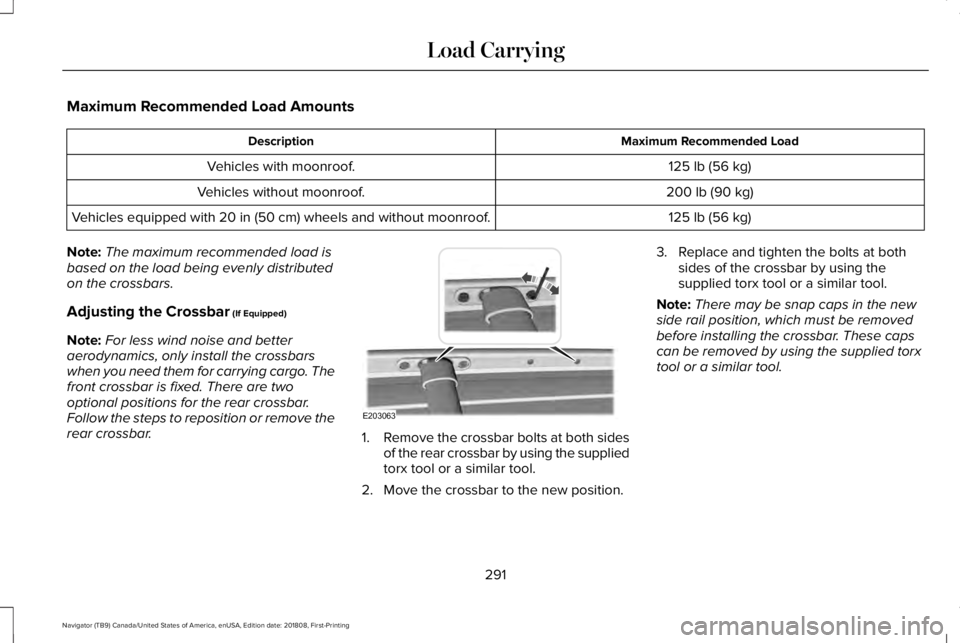
Note:For less wind noise and betteraerodynamics, only install the crossbarswhen you need them for carrying cargo. Thefront crossbar is fixed. There are twooptional positions for the rear crossbar.Follow the steps to reposition or remove therear crossbar.1.Remove the crossbar bolts at both sidesof the rear crossbar by using the suppliedtorx tool or a similar tool.
2. Move the crossbar to the new position.
3. Replace and tighten the bolts at bothsides of the crossbar by using thesupplied torx tool or a similar tool.
Note:There may be snap caps in the newside rail position, which must be removedbefore installing the crossbar. These capscan be removed by using the supplied torxtool or a similar tool.
291
Navigator (TB9) Canada/United States of America, enUSA, Edition date: 201808, First-Printing
Load CarryingE203063
Page 302 of 645
You have to set up each trailer you use withyour vehicle. You must accurately follow thesetup process to make sure you correctlyplace the sticker.
Contact your dealership if you needassistance in setting up your trailer.
Setting Up Pro Trailer Backup Assist
Note:Once you enter a trailer's information,the system stores it for easy recall. You canadd a maximum of 10 trailers to the system.
Step 1: Position your Vehicle and Trailer
Hitch the conventional trailer to your vehicle.See Essential Towing Checks (page 311).
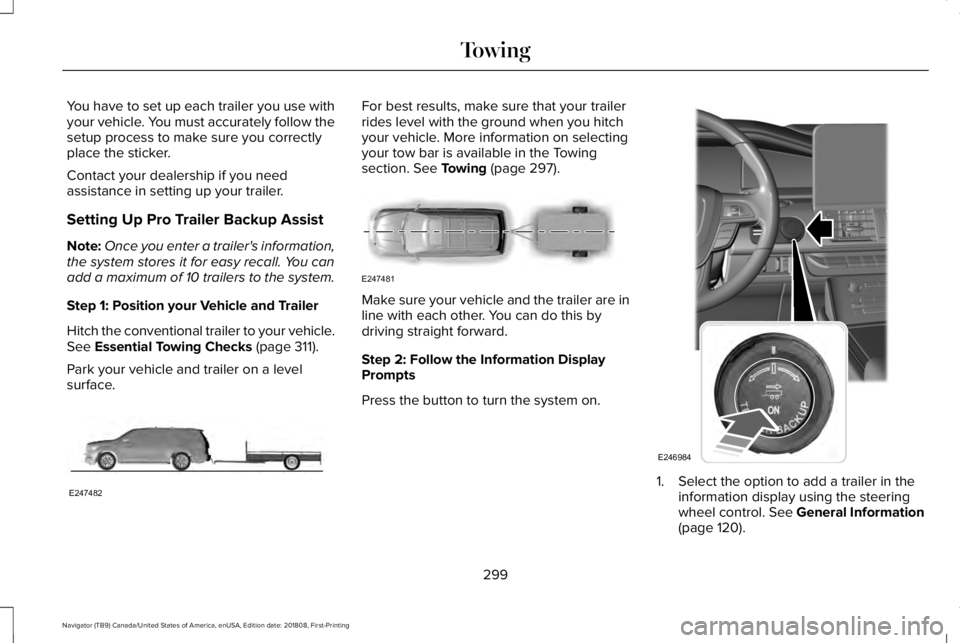
Park your vehicle and trailer on a levelsurface.
For best results, make sure that your trailerrides level with the ground when you hitchyour vehicle. More information on selectingyour tow bar is available in the Towingsection. See Towing (page 297).
Make sure your vehicle and the trailer are inline with each other. You can do this bydriving straight forward.
Step 2: Follow the Information DisplayPrompts
Press the button to turn the system on.
1. Select the option to add a trailer in theinformation display using the steeringwheel control. See General Information(page 120).
299
Navigator (TB9) Canada/United States of America, enUSA, Edition date: 201808, First-Printing
TowingE247482 E247481 E246984
Page 303 of 645
2. Add a personalized name for the trailerusing the screen prompts. Use the downarrow to scroll to the desired letter andthen press the toggle switch to advanceto the next letter. Press OK to continue.
3.Select the type of trailer brake system forthe trailer you are adding.
4.Select the brake effort level for the trailer.
Note:The default option is low. Werecommend this for most trailers. If thetrailer's brakes require more initial voltage,or if you prefer more aggressive braking,then select the other options as required.
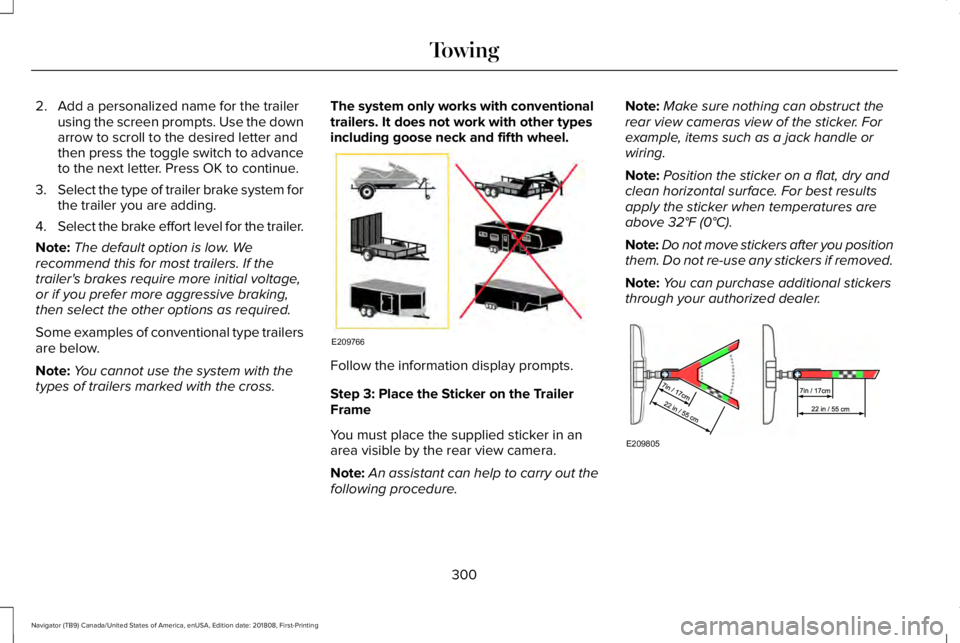
Some examples of conventional type trailersare below.
Note:You cannot use the system with thetypes of trailers marked with the cross.
The system only works with conventionaltrailers. It does not work with other typesincluding goose neck and fifth wheel.
Follow the information display prompts.
Step 3: Place the Sticker on the TrailerFrame
You must place the supplied sticker in anarea visible by the rear view camera.
Note:An assistant can help to carry out thefollowing procedure.
Note:Make sure nothing can obstruct therear view cameras view of the sticker. Forexample, items such as a jack handle orwiring.
Note:Position the sticker on a flat, dry andclean horizontal surface. For best resultsapply the sticker when temperatures areabove 32°F (0°C).
Note:Do not move stickers after you positionthem. Do not re-use any stickers if removed.
Note:You can purchase additional stickersthrough your authorized dealer.
300
Navigator (TB9) Canada/United States of America, enUSA, Edition date: 201808, First-Printing
TowingE209766 E209805
Page 305 of 645
Distance D
The horizontal distance from the bumper tothe center of the trailer axle (single axletrailers), or the center of the axles (trailerswith dual axles or more).
Step 5: Enter Measurements Using theInformation Display
Using the recorded measurements, enter therequired data into the system. Follow the onscreen prompts to enter each of themeasurements taken in step 4. When all fourdistances have been entered, a confirmationdisplay will appear. Check the values arecorrect before proceeding, or go back tochange any if required.
Step 6: Confirming the Sticker Location
Check the rear view camera display to seeif the sticker is identified by the system andmarked with a red circle.
Confirm that the red circle is correctly locatedover the sticker image in the display. The onscreen prompt will ask you to confirm this.
Note:If the system cannot locate the stickertry cleaning the camera lens, and also makesure the sticker is within the green zone asindicated in step 3.
Calibrating the System
To complete setup, drive your vehiclestraight forward between 4 mph (6 km/h) and24 mph (39 km/h) following the on screenprompt.
Note:Check your measurements to makesure you measured from the correct points.
Note:If you move the steering wheel duringthis procedure, the calibration pauses.
Note:We recommend that you do not dothis at night.
A message will be displayed duringcalibration and after calibration is complete.
Using Pro Trailer Backup Assist
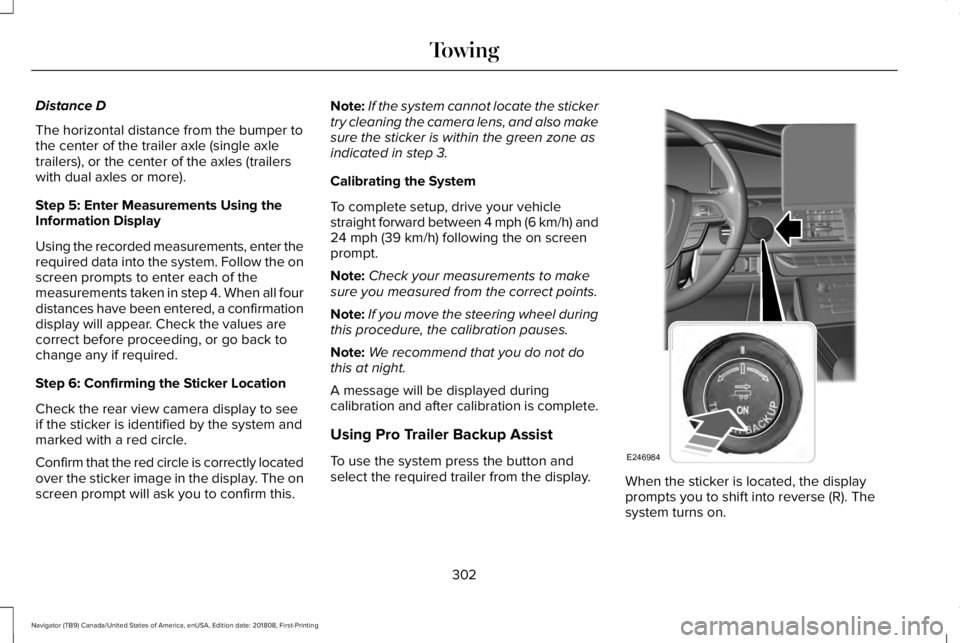
To use the system press the button andselect the required trailer from the display.When the sticker is located, the displayprompts you to shift into reverse (R). Thesystem turns on.
302
Navigator (TB9) Canada/United States of America, enUSA, Edition date: 201808, First-Printing
TowingE246984
Page 306 of 645
Note:The system does not function if yourhands are on the steering wheel. Removeyour hands to resume operation.
Follow the screen prompts to steer yourvehicle and trailer.
Note:You may have to drive forward tostraighten the trailer.
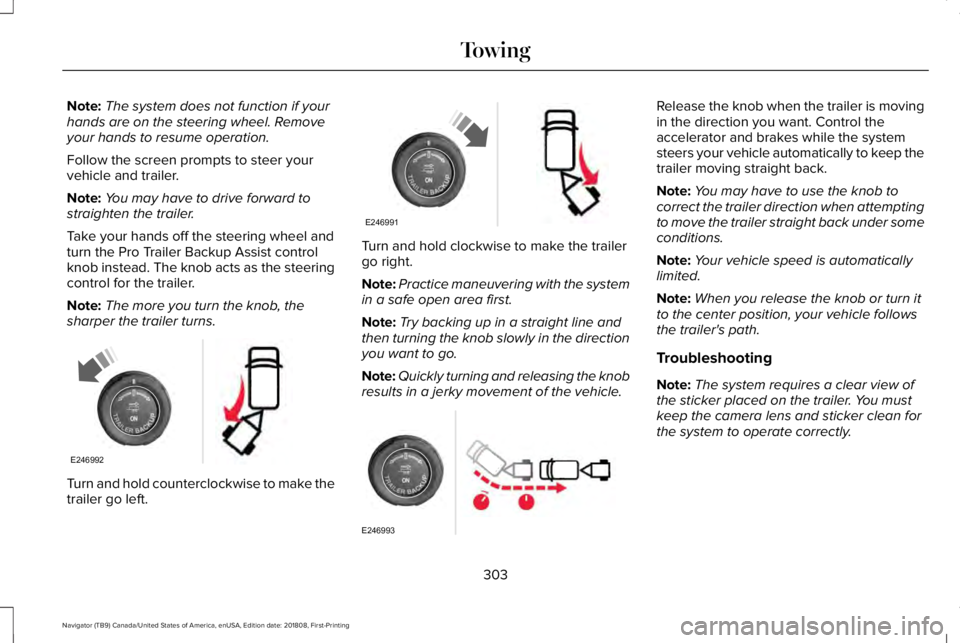
Take your hands off the steering wheel andturn the Pro Trailer Backup Assist controlknob instead. The knob acts as the steeringcontrol for the trailer.
Note:The more you turn the knob, thesharper the trailer turns.
Turn and hold counterclockwise to make thetrailer go left.
Turn and hold clockwise to make the trailergo right.
Note:Practice maneuvering with the systemin a safe open area first.
Note:Try backing up in a straight line andthen turning the knob slowly in the directionyou want to go.
Note:Quickly turning and releasing the knobresults in a jerky movement of the vehicle.
Release the knob when the trailer is movingin the direction you want. Control theaccelerator and brakes while the systemsteers your vehicle automatically to keep thetrailer moving straight back.
Note:You may have to use the knob tocorrect the trailer direction when attemptingto move the trailer straight back under someconditions.
Note:Your vehicle speed is automaticallylimited.
Note:When you release the knob or turn itto the center position, your vehicle followsthe trailer's path.
Troubleshooting
Note:The system requires a clear view ofthe sticker placed on the trailer. You mustkeep the camera lens and sticker clean forthe system to operate correctly.
303
Navigator (TB9) Canada/United States of America, enUSA, Edition date: 201808, First-Printing
TowingE246992 E246991 E246993
Page 311 of 645
•If the sticker location needs to bechanged, the previous sticker must beremoved and a new sticker needs to beplaced on the trailer. ONLY ONESTICKER SHOULD BE PLACED ON THETRAILER FOR PROPER SYSTEMFUNCTION.
•Disregard the prompt to remove thissticker and continue to the next step ifyou only plan to update themeasurements for the current stickerlocation.
System consistently shows Stop now takecontrol of steering warning:
•The system displays this warning whenit can no longer steer the vehicle and youmust take over steering. There are fourreasons why this warning displays andadditional information regarding thereason for the warning is available on thecenter display.
•The steering wheel is touched while thesystem is controlling it. Avoid touchingthe wheel during system operation.
•The maximum speed for featureoperation is exceeded. Systemperformance is optimized at slowerspeeds. Backup slowly.
•The sticker was lost by the camerasystem. Once your vehicle is stoppedadditional warnings will indicate thesticker was lost. Refer to sticker losttrouble shooting tips.
•An internal condition for systemoperation was not met which requiresyour vehicle return to manual control ofthe steering.
Note:The system is designed to be usedwith the same trailer connection every timethe trailer is chosen from the selection menu.Using a different drawbar or a different pinhole (on drawbars with more than one) whenconnecting the drawbar to your vehicleaffects the trailer measurements. Take themeasurements again and update if required.
TRAILER SWAY CONTROL
WARNING: Turning off trailer swaycontrol increases the risk of loss of vehiclecontrol, serious injury or death. Ford doesnot recommend disabling this featureexcept in situations where speed reductionmay be detrimental (such as hill climbing),the driver has significant trailer towingexperience, and can control trailer swayand maintain safe operation.
Note:This feature does not prevent trailersway, but reduces it once it begins.
Note:This feature cannot stop all trailersfrom swaying.
Note:In some cases, if vehicle speed is toohigh, the system may activate multiple times,gradually reducing vehicle speed.
308
Navigator (TB9) Canada/United States of America, enUSA, Edition date: 201808, First-Printing
Towing
Page 312 of 645
This feature applies your vehicle brakes atindividual wheels and, if necessary, reducesengine power. If the trailer begins to sway,the stability control light flashes and themessage TRAILER SWAY REDUCE SPEEDappears in the information display. The firstthing to do is slow your vehicle down, thenpull safely to the side of the road and checkfor proper tongue load and trailer loaddistribution. See Load Carrying (page 287).
RECOMMENDED TOWING
WEIGHTS
Note:Do not exceed the trailer weightfor your vehicle configuration listed inthe chart below.
Note:Make sure to take intoconsideration trailer frontal area. Do notexceed 36.5 feet² (3.39 meters²) if yourvehicle is equipped with the standardtowing package, or 60 feet² (5.57meters²) if your vehicle is equipped withthe optional heavy duty package.
Note:Exceeding this limitation maysignificantly reduce the performance ofyour towing vehicle. Selecting a trailerwith a low aerodynamic drag androunded front design helps optimizeperformance and fuel economy.
Note:For high altitude operation,reduce the gross combined weight by2% per 1,000 ft (300 m) starting at the1,000 ft (300 m) elevation point.
Note:Certain states require electrictrailer brakes for trailers over a specifiedweight. Be sure to check stateregulations for this specified weight. Themaximum trailer weights listed may belimited to this specified weight, as thevehicle’s electrical system may notinclude the wiring connector needed to
activate electric trailer brakes.
Your vehicle may tow a trailer providedthe maximum trailer weight is less thanor equal to the maximum trailer weightlisted for your vehicle configuration onthe following chart.
To calculate the maximum loaded trailerweight for your vehicle:
1.Start with the gross combined weightrating for your vehicle model andaxle ratio. See the following chart.
2.Subtract all of the following that
apply to your vehicle:
•Vehicle curb weight.
•Hitch hardware weight, such as adraw bar, ball, locks or weightdistributing.
•Driver weight.
•Passenger weight.
•Payload, cargo and luggageweight.
•Aftermarket equipment weight.
3. This equals the maximum loadedtrailer weight for this combination.
Note:The trailer tongue load figuresinto the payload for your vehicle.Reduce the total payload by the finaltrailer tongue weight.
309
Navigator (TB9) Canada/United States of America, enUSA, Edition date: 201808, First-Printing
Towing
Page 313 of 645
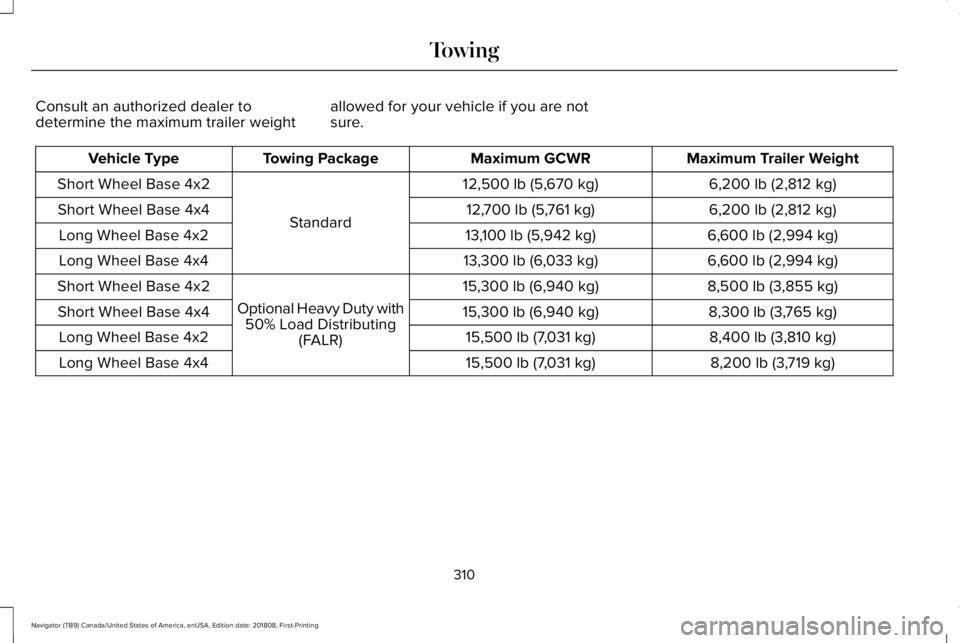
Consult an authorized dealer todetermine the maximum trailer weightallowed for your vehicle if you are notsure.
Maximum Trailer WeightMaximum GCWRTowing PackageVehicle Type
6,200 lb (2,812 kg)12,500 lb (5,670 kg)
Standard
Short Wheel Base 4x2
6,200 lb (2,812 kg)12,700 lb (5,761 kg)Short Wheel Base 4x4
6,600 lb (2,994 kg)13,100 lb (5,942 kg)Long Wheel Base 4x2
6,600 lb (2,994 kg)13,300 lb (6,033 kg)Long Wheel Base 4x4
8,500 lb (3,855 kg)15,300 lb (6,940 kg)
Optional Heavy Duty with50% Load Distributing(FALR)
Short Wheel Base 4x2
8,300 lb (3,765 kg)15,300 lb (6,940 kg)Short Wheel Base 4x4
8,400 lb (3,810 kg)15,500 lb (7,031 kg)Long Wheel Base 4x2
8,200 lb (3,719 kg)15,500 lb (7,031 kg)Long Wheel Base 4x4
310
Navigator (TB9) Canada/United States of America, enUSA, Edition date: 201808, First-Printing
Towing