warning LINCOLN NAVIGATOR 2020 Owners Manual
[x] Cancel search | Manufacturer: LINCOLN, Model Year: 2020, Model line: NAVIGATOR, Model: LINCOLN NAVIGATOR 2020Pages: 622, PDF Size: 6.47 MB
Page 314 of 622
TOWING A TRAILER
WARNING: Towing trailers
beyond the maximum recommended
gross trailer weight exceeds the limit
of your vehicle and could result in
engine damage, transmission damage,
structural damage, loss of vehicle
control, vehicle rollover and personal
injury. WARNING:
Do not exceed the
GVWR or the GAWR specified on the
certification label.
Note: See
Recommended Towing
Weights (page 323).
Your vehicle may have electrical items,
such as fuses or relays, related to
towing.
See Fuses (page 356). Your vehicle's load capacity designation
is by weight, not by volume, so you
cannot necessarily use all available
space when loading a vehicle or trailer.
Towing a trailer places an extra load on
your vehicle's engine, transmission, axle,
brakes, tires and suspension. Inspect
these components periodically during,
and after, any towing operation.
Load Placement
To help minimize how trailer movement
affects your vehicle when driving:
•
Load the heaviest items closest to
the trailer floor.
• Load the heaviest items centered
between the left and right side trailer
tires. •
Load the heaviest items above the
trailer axles or just slightly forward
toward the trailer tongue. Do not
allow the final trailer tongue weight
to go above or below 10-15% of the
loaded trailer weight.
• Select a ball mount with the correct
rise or drop and load capacity. When
both the loaded vehicle and trailer
are connected, the trailer frame
should be level, or slightly angled
down toward your vehicle, when
viewed from the side.
When driving with a trailer or payload, a
slight takeoff vibration or shudder may
be present due to the increased payload
weight. Additional information regarding
proper trailer loading and setting your
vehicle up for towing is located in
another chapter of this manual.
See
Load Limit (page 305).
You can also find information in the
RV
& Trailer Towing Guide available at your
authorized dealer, or online.
311
Navigator (TB9) Canada/United States of America, enUSA, Edition date: 201907, Second-Printing Towing
Page 315 of 622
RV & Trailer Towing Guide Online
http://www.fleet.ford.com/towing-guides/
Website
TRAILER REVERSING AIDS (IF
EQUIPPED)
Pro Trailer Backup Assist™ WARNING:
Driving while distracted
can result in loss of vehicle control, crash
and injury. We strongly recommend that
you use extreme caution when using any
device that may take your focus off the
road. Your primary responsibility is the safe
operation of your vehicle. We recommend
against the use of any hand-held device
while driving and encourage the use of
voice-operated systems when possible.
Make sure you are aware of all applicable
local laws that may affect the use of
electronic devices while driving. WARNING:
This system is an extra
driving aid. It does not replace your
attention and judgment, or the need to
apply the brakes. This system does NOT
automatically brake your vehicle. If you fail
to press the brake pedal when necessary,
you may collide with another vehicle.
Note: The system is not a substitute for safe
driving practices.
Note: You must always be aware of the
vehicle and trailer combination and the
surrounding environment.
Note: The system does not detect or prevent
the vehicle or trailer from making contact
with obstacles in the surrounding
environment.
Note: Keep in mind that the front end of the
vehicle swings out when changing the
direction of the trailer. Note:
The system relies on user
measurements to determine sticker
placement and system limits. It is critical to
take the key measurements correctly.
Incorrect measurements can result in the
improper function of the system up to and
including contact between the vehicle and
trailer.
Note: The system limits vehicle speed when
backing up. The system is not a replacement
for proper use of the throttle and brake
pedals.
Principle of Operation
This feature helps you to steer your vehicle
when reversing with a trailer attached. Turn
and hold the control knob in the direction
you want the trailer to go and the system
takes over the steering. This allows you to
focus on checking the mirrors and operating
the brake and accelerator.
312
Navigator (TB9) Canada/United States of America, enUSA, Edition date: 201907, Second-Printing Towing
Page 321 of 622
Release the knob when the trailer is moving
in the direction you want. Control the
accelerator and brakes while the system
steers your vehicle automatically to keep the
trailer moving straight back.
Note:
You may have to use the knob to
correct the trailer direction when attempting
to move the trailer straight back under some
conditions.
Note: Your vehicle speed is automatically
limited.
Note: When you release the knob or turn it
to the center position, your vehicle follows
the trailer's path.
Troubleshooting
Note: The system requires a clear view of
the sticker placed on the trailer. You must
keep the camera lens and sticker clean for
the system to operate correctly. Setup
The system is designed to be used with a
wide variety of trailers. However there are
some trailers that do not have a proper
surface and location to mount the sticker.
These trailers are not supported. Attempts
to place the sticker on a surface that does
not meet the sticker placement requirement
listed in Step 3 of the setup instruction or
entering inaccurate measurements to
proceed through setup can result in improper
system function.
Accurate measurements are critical to correct
system function. If you need to check
measurements entered or change them you
can access them through the trailer menus
in the instrument cluster. Choose the option
to change the sticker from the change trailer
settings menu. It is not necessary to remove
the sticker if you are just reviewing or
changing measurements.
The following menu warnings or difficulties
may occur during setup. Tips to resolve them
are listed below.Note:
If you still experience issues with the
system's ability to detect the sticker, see the
information in the next section regarding
sticker lost during system operation.
Measurement A has reached maximum or
minimum value:
• The system is designed to work with
drawbars that have a bumper to hitch ball
center measurement of 4 in (10 cm) to
11 in (28 cm) when installed. Do not
attempt to use drawbars that have a
length outside this range as the system
performance will be degraded and could
cause improper system function.
• Make sure that the measurement being
made is the horizontal distance only from
bumper and the hitch ball center. A
straight line distance that includes any
vertical rise or drop will increase the
measurement and make it inaccurate.
Inaccurate measurements will degrade
system performance and could cause
improper system function. See step 4 of
the setup instruction to review
measurement instructions.
318
Navigator (TB9) Canada/United States of America, enUSA, Edition date: 201907, Second-Printing Towing
Page 322 of 622
Measurement B has reached maximum or
minimum value:
•
Make sure that the sticker placement
instruction in step 3 of the setup has
been followed. Stickers placed outside
the allowed zone will adversely affect the
system performance and could cause
improper feature function.
• Make sure that the measurement being
made is the horizontal distance only from
center of sticker to the hitch ball center.
A straight line distance that includes any
vertical rise or drop will increase the
measurement and cause an inaccurate
value to be entered into the system. See
step 4 of the setup for additional
measurement instructions.
Measurement C has reached maximum or
minimum value:
• Make sure that the sticker placement
instructions in step 3 of the setup have
been followed. Stickers placed outside
the allowed zone will adversely affect the
system performance and could cause
improper feature function. If you have
met all the criteria for sticker placement
and you see this message this sticker is either too far below or too close to the
camera to properly recognize the sticker.
In order for the system to operate
correctly the sticker height must be
lowered if you receive the minimum
warning or the sticker height must be
raised if you receive the maximum
warning.
• Only one sticker can be placed on the
trailer for correct system function. The
previous sticker must be removed or
covered so only one sticker is visible to
the camera.
• Measurement B and C must be measured
again if a new sticker is placed on the
trailer.
Measurement D has reached maximum or
minimum value:
• Make sure that the measurement being
made is the horizontal distance only from
the bumper to the center of the single
axle or the center of all the axles on the
trailer. See step 4 of the setup for
additional measurement instructions. The
TBA system does not support trailer
lengths outside the range allowed by the
information display. System is circling something beside the
sticker or system cannot find the sticker:
•
Make sure the rear camera is clean and
the sticker is clearly visible in the camera
image. Clean the camera and sticker if
necessary.
• The camera system uses the entered
measurements to help locate the sticker.
Inaccurate sticker measurements will
degrade the system ’s ability to locate the
sticker. Verify the measurements entered
into the system are accurate.
• Remove the incorrectly circled label or
decal if possible.
• If you cannot resolve the issue a new
sticker location should be tried. The
sticker location must still meet the
requirements noted in step 3 of the setup
instructions. Only one sticker can be
placed on the trailer for correct system
function. The previous sticker must be
removed or covered so only one sticker
is visible to the camera.
319
Navigator (TB9) Canada/United States of America, enUSA, Edition date: 201907, Second-Printing Towing
Page 323 of 622
Calibration
The system monitors various vehicle
parameters to ensure your vehicle is being
driven straight and the trailer straight behind
your vehicle. Any steering input or trailer
movement will pause the calibration.
For best results:
•
Use a long, straight, smooth and level
road when attempting to calibrate.
• Drive straight forward.
• Drive between 4 mph (6 km/h) and
24 mph (39 km/h).
System Operation
The following warnings or difficulties may
occur during feature operation. Tips to
resolve them are listed below. The system is not available:
•
The system relies on many sub-systems
in your vehicle to operate correctly. If
those sub-systems are not operating
correctly the system may not be
available.
• Low battery voltage is a condition which
will prevent the system from operating.
Please make sure the battery is correctly
charged if the system is not available.
• You may need to drive your vehicle
straight forward above 25 mph (40 km/h)
before the system is available again.
• If the message still displays take your
vehicle to an authorized dealer for
service.
Sticker lost:
• If the system cannot initially find the
sticker, it may be necessary for you to
change the lighting conditions by moving
the vehicle and trailer or waiting until
conditions change.
• Check for the following if you receive the
lost sticker message while using the
system. •
Stop your vehicle as soon as the
message displays.
• Make sure the sticker is visible and the
pattern is discernable in the rear view
camera image.
• Clean the sticker and camera to make
sure they are unobstructed.
• Clean the lens with a soft, lint-free cloth
and water.
• Clean the sticker with isopropyl rubbing
alcohol sprayed directly onto the sticker,
and then wipe clean with a soft cloth.
• Remove any items that may be blocking
the view of the sticker. Depending on
your trailer configuration and any
equipment mounted to your trailer it is
possible for the sticker to be blocked
from view of the camera as it rotates on
the hitch ball but not be blocked during
setup. Remove the obstruction if
possible. It will be necessary to remove
the sticker from it’ s current location if the
obstruction cannot be cleared and place
a new sticker that will be visible to the
camera in all positions of the trailer
behind your vehicle.
320
Navigator (TB9) Canada/United States of America, enUSA, Edition date: 201907, Second-Printing Towing
Page 325 of 622
System consistently shows Stop Now Max
trailer angle reached warning:
•
The system uses your measurements to
determine sticker position and establish
system limits. Accurate sticker placement
and trailer measurements will provide the
best system performance. If you are
consistently receiving this warning it is
likely there is an issue with sticker
placement or the entered measurements.
Make sure that the sticker is placed
correctly based on steps 3 and the
measurements were made correctly
according to Step 4. The troubleshooting
guide for trailer measurements can also
be reviewed for help in making
measurements.
• To change sticker location or change
trailer measurements, go into the Towing
menu, select trailer options, select
change trailer setting and then select the
change sticker option. •
If the sticker location needs to be
changed, the previous sticker must be
removed and a new sticker needs to be
placed on the trailer. ONLY ONE
STICKER SHOULD BE PLACED ON THE
TRAILER FOR PROPER SYSTEM
FUNCTION.
• Disregard the prompt to remove this
sticker and continue to the next step if
you only plan to update the
measurements for the current sticker
location.
System consistently shows Stop now take
control of steering warning:
• The system displays this warning when
it can no longer steer the vehicle and you
must take over steering. There are four
reasons why this warning displays and
additional information regarding the
reason for the warning is available on the
center display.
• The steering wheel is touched while the
system is controlling it. Avoid touching
the wheel during system operation. •
The maximum speed for feature
operation is exceeded. System
performance is optimized at slower
speeds. Backup slowly.
• The sticker was lost by the camera
system. Once your vehicle is stopped
additional warnings will indicate the
sticker was lost. Refer to sticker lost
trouble shooting tips.
• An internal condition for system
operation was not met which requires
your vehicle return to manual control of
the steering.
Note: The system is designed to be used
with the same trailer connection every time
the trailer is chosen from the selection menu.
Using a different drawbar or a different pin
hole (on drawbars with more than one) when
connecting the drawbar to your vehicle
affects the trailer measurements. Take the
measurements again and update if required.
322
Navigator (TB9) Canada/United States of America, enUSA, Edition date: 201907, Second-Printing Towing
Page 326 of 622
TRAILER SWAY CONTROL (IF EQUIPPED)
WARNING: Turning off trailer sway
control increases the risk of loss of vehicle
control, serious injury or death. Ford does
not recommend disabling this feature
except in situations where speed reduction
may be detrimental (such as hill climbing),
the driver has significant trailer towing
experience, and can control trailer sway
and maintain safe operation.
Note: This feature does not prevent trailer
sway, but reduces it once it begins.
Note: This feature cannot stop all trailers
from swaying.
Note: In some cases, if vehicle speed is too
high, the system may activate multiple times,
gradually reducing vehicle speed. This feature applies your vehicle brakes at
individual wheels and, if necessary, reduces
engine power. If the trailer begins to sway,
the stability control light flashes and the
message TRAILER SWAY REDUCE SPEED
appears in the information display. The first
thing to do is slow your vehicle down, then
pull safely to the side of the road and check
for proper tongue load and trailer load
distribution.
See Load Carrying (page 301).
RECOMMENDED TOWING
WEIGHTS
Note: Do not exceed the trailer weight
for your vehicle configuration listed in
the chart below.
Note: Make sure to take into
consideration trailer frontal area. Do not
exceed 55 ft² (5.11 m²) if your vehicle has
the standard towing package, or 60 ft²
(5.57 m²) if your vehicle has the heavy
duty package. Note:
Exceeding this limitation may
significantly reduce the performance of
your towing vehicle. Selecting a trailer
with a low aerodynamic drag and
rounded front design helps optimize
performance and fuel economy.
Note: For high altitude operation,
reduce the gross combined weight by
2% per 1,000 ft (300 m) starting at the
1,000 ft (300 m) elevation point.
Note: Certain states require electric
trailer brakes for trailers over a specified
weight. Be sure to check state
regulations for this specified weight. The
maximum trailer weights listed may be
limited to this specified weight, as the
vehicle ’s electrical system may not
include the wiring connector needed to
activate electric trailer brakes.
Your vehicle may tow a trailer provided
the maximum trailer weight is less than
or equal to the maximum trailer weight
listed for your vehicle configuration on
the following chart.
323
Navigator (TB9) Canada/United States of America, enUSA, Edition date: 201907, Second-Printing Towing
Page 330 of 622
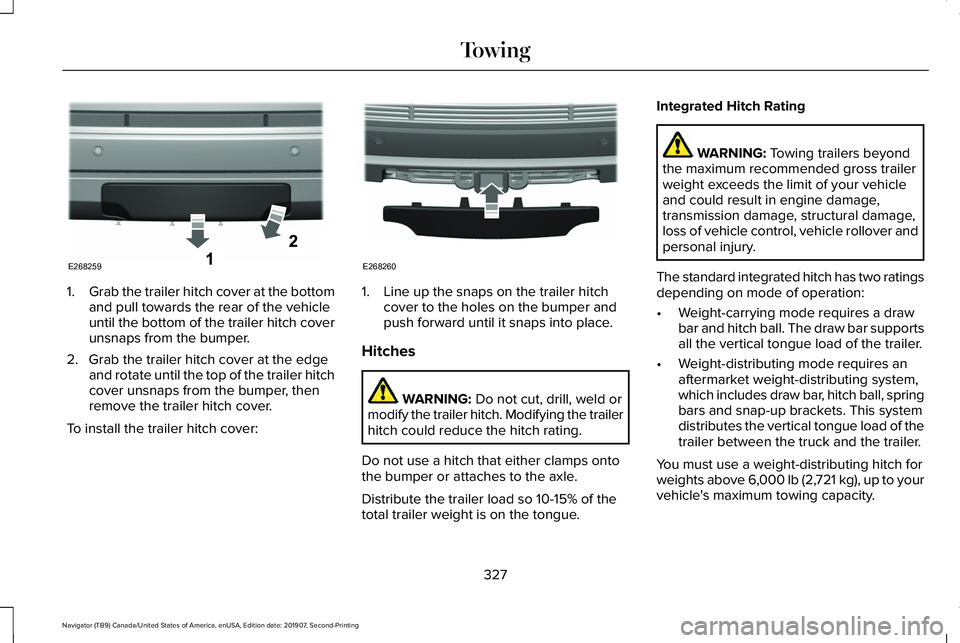
1.
Grab the trailer hitch cover at the bottom
and pull towards the rear of the vehicle
until the bottom of the trailer hitch cover
unsnaps from the bumper.
2. Grab the trailer hitch cover at the edge and rotate until the top of the trailer hitch
cover unsnaps from the bumper, then
remove the trailer hitch cover.
To install the trailer hitch cover: 1. Line up the snaps on the trailer hitch
cover to the holes on the bumper and
push forward until it snaps into place.
Hitches WARNING: Do not cut, drill, weld or
modify the trailer hitch. Modifying the trailer
hitch could reduce the hitch rating.
Do not use a hitch that either clamps onto
the bumper or attaches to the axle.
Distribute the trailer load so 10-15% of the
total trailer weight is on the tongue. Integrated Hitch Rating WARNING:
Towing trailers beyond
the maximum recommended gross trailer
weight exceeds the limit of your vehicle
and could result in engine damage,
transmission damage, structural damage,
loss of vehicle control, vehicle rollover and
personal injury.
The standard integrated hitch has two ratings
depending on mode of operation:
• Weight-carrying mode requires a draw
bar and hitch ball. The draw bar supports
all the vertical tongue load of the trailer.
• Weight-distributing mode requires an
aftermarket weight-distributing system,
which includes draw bar, hitch ball, spring
bars and snap-up brackets. This system
distributes the vertical tongue load of the
trailer between the truck and the trailer.
You must use a weight-distributing hitch for
weights above 6,000 lb (2,721 kg), up to your
vehicle's maximum towing capacity.
327
Navigator (TB9) Canada/United States of America, enUSA, Edition date: 201907, Second-Printing TowingE268259 E268260
Page 331 of 622
Note:
These are hitch ratings only. Actual
vehicle ratings are dependent on engine,
transmission and axle combinations.
Weight-distributing Hitch WARNING: Do not adjust the spring
bars so that your vehicle's rear bumper is
higher than before attaching the trailer.
Doing so will defeat the function of the
weight-distributing hitch, which may cause
unpredictable handling, and could result
in serious personal injury.
When hooking-up a trailer using a
weight-distributing hitch, always use the
following procedure:
1. Park the loaded vehicle, without the trailer, on a level surface.
2. Measure the height to the top of your vehicle's front wheel opening on the
fender. This is H1.
3. Attach the loaded trailer to your vehicle without the weight-distributing bars
connected. 4. Measure the height to the top of your
vehicle's front wheel opening on the
fender a second time. This is H2.
5. Install and adjust the tension in the weight-distributing bars so that the height
of your vehicle's front wheel opening on
the fender is approximately half the way
down from H2, toward H1.
6. Check that the trailer is level or slightly nose down toward your vehicle. If not,
adjust the ball height accordingly and
repeat Steps 2-6.
When the trailer is level or slightly nose down
toward the vehicle:
• Lock the bar tension adjuster in place.
• Check that the trailer tongue securely
attaches and locks onto the hitch.
• Install safety chains, lighting and trailer
brake controls as required by law or the
trailer manufacturer. Safety Chains
Note:
Do not attach safety chains to the
bumper. Always connect the safety chains
to the frame or hook retainers of your trailer
hitch.
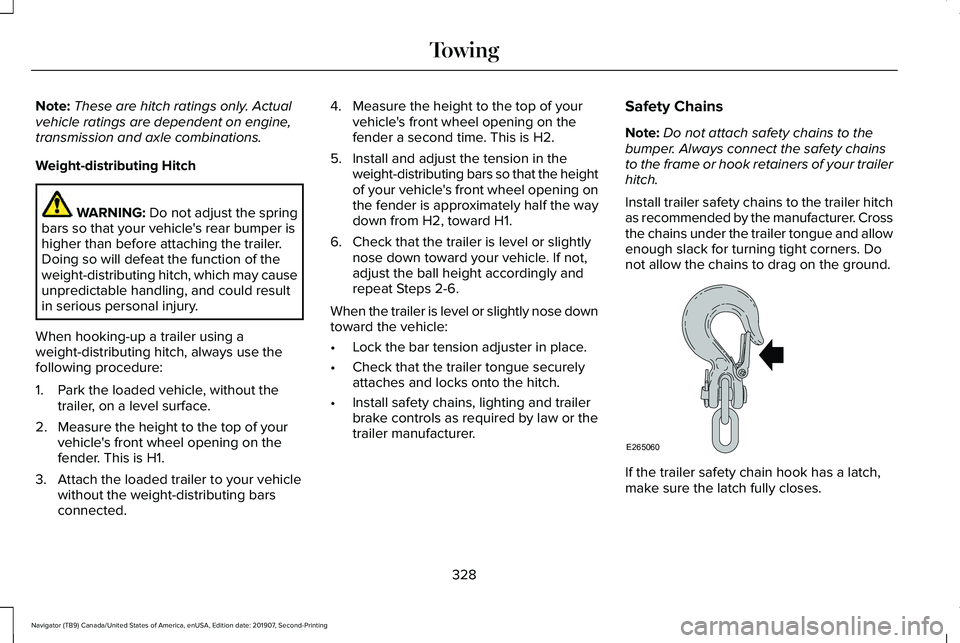
Install trailer safety chains to the trailer hitch
as recommended by the manufacturer. Cross
the chains under the trailer tongue and allow
enough slack for turning tight corners. Do
not allow the chains to drag on the ground. If the trailer safety chain hook has a latch,
make sure the latch fully closes.
328
Navigator (TB9) Canada/United States of America, enUSA, Edition date: 201907, Second-Printing TowingE265060
Page 332 of 622
Trailer Brakes (If Equipped)
WARNING:
Do not connect a trailer's
hydraulic brake system directly to your
vehicle's brake system. Your vehicle may
not have enough braking power and your
chances of having a collision greatly
increase.
Electric brakes and manual, automatic or
surge-type trailer brakes are safe if you install
them properly and adjust them to the
manufacturer's specifications. The trailer
brakes must meet local and federal
regulations.
The rating for the tow vehicle's braking
system operation is at the gross vehicle
weight rating, not the gross combined
weight rating.
Separate functioning brake systems are
required for safe control of towed vehicles
and trailers weighing more than 1500 lb
(680 kg) when loaded. Integrated Trailer Brake Controller
(If
Equipped) WARNING:
Use the integrated trailer
brake controller to properly adjust the
trailer brakes and check all connections
before towing a trailer. Failure to follow
this instruction could result in the loss of
control of your vehicle, personal injury or
death. When used properly, the trailer brake
controller assists in smooth and effective
trailer braking by powering the trailer’
s
electric or electric-over-hydraulic brakes with
a proportional output based on the towing
vehicle ’s brake pressure.
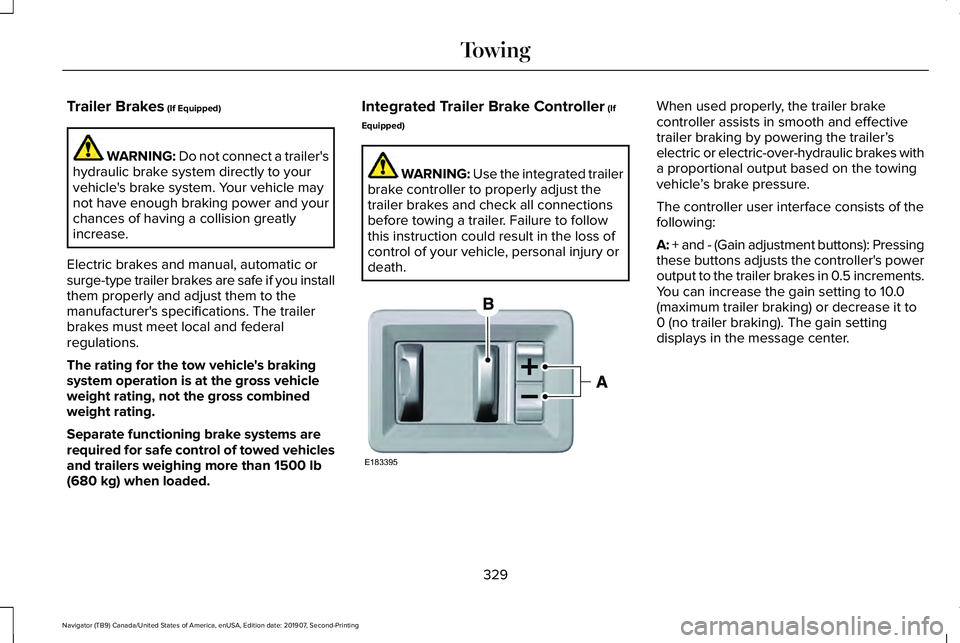
The controller user interface consists of the
following:
A: + and - (Gain adjustment buttons): Pressing
these buttons adjusts the controller's power
output to the trailer brakes in 0.5 increments.
You can increase the gain setting to 10.0
(maximum trailer braking) or decrease it to
0 (no trailer braking). The gain setting
displays in the message center.
329
Navigator (TB9) Canada/United States of America, enUSA, Edition date: 201907, Second-Printing TowingE183395