door lock LINCOLN NAVIGATOR 2020 Owner's Guide
[x] Cancel search | Manufacturer: LINCOLN, Model Year: 2020, Model line: NAVIGATOR, Model: LINCOLN NAVIGATOR 2020Pages: 622, PDF Size: 6.47 MB
Page 339 of 622
WARNING: Shifting the transfer case
to its neutral position for recreational
towing may cause the vehicle to roll, even
if the transmission is in park (P). It may
injure the driver and others. Make sure you
press the foot brake and the vehicle is in
a secure, safe position when you shift to
neutral (N).
Note: Failing to put the transfer case in its
neutral position can damage vehicle
components.
Note: You can check four-wheel-down
towing status at any time by opening the
driver's door or turning the ignition to the
accessory or on position. A message
appears in the information display confirming
your vehicle is in neutral tow.
To exit four-wheel-down towing and return
the transfer case to its
2H position:
1. With your vehicle still properly secured to the tow vehicle, press the brake pedal
and start the engine.
2. Switch your vehicle off by pressing the engine
START/STOP button once. 3.
Place your vehicle in accessory mode by
pressing the start button once without
pressing the brake pedal.
4. Press the brake pedal.
5. Place the transmission back into park (P).
6. Release the brake pedal.
Note: If completed successfully, the
information display shows
2H and Neutral
Tow Disabled.
Note: If the indicator light and message do
not display, you must perform the procedure
again from the beginning.
Note: You may hear an audible noise as the
transfer case shifts out of its neutral position,
this is normal.
Note: If Shift Delayed Pull Forward displays
in the instrument cluster, transfer case gear
tooth blockage is present. See the
instructions following this section.
7. Apply the parking brake, then disconnect
your vehicle from the tow vehicle. 8. Release the parking brake, start the
engine, and shift the transmission into
drive (D) to make sure the transfer case
is out of the neutral tow position.
9. If the transfer case does not successfully
shift out of neutral (N), set the parking
brake until you can have your vehicle
serviced.
Resolving the Shift Delayed Pull Forward
or To Exit 4x4 LOW Shift to N Message
If the instrument cluster displays these
messages, perform the following:
1. Press and hold the brake pedal.
2. Put the transmission into neutral (N), then
start the engine.
3. With the engine running, shift the transmission into drive (D) and let the
vehicle roll forward, up to
3 ft (1 m). You
may hear an audible noise as the transfer
case shifts out of its neutral position. This
is normal.
4. Make sure the instrument cluster displays
Neutral Tow Disabled
.
336
Navigator (TB9) Canada/United States of America, enUSA, Edition date: 201907, Second-Printing Towing
Page 369 of 622
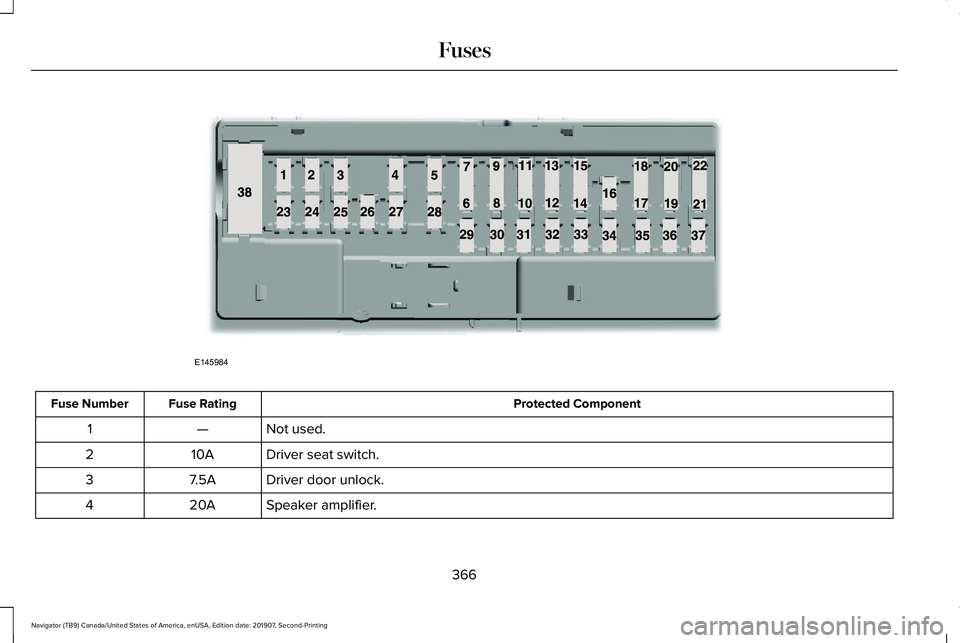
Protected Component
Fuse Rating
Fuse Number
Not used.
—
1
Driver seat switch.
10A
2
Driver door unlock.
7.5A
3
Speaker amplifier.
20A
4
366
Navigator (TB9) Canada/United States of America, enUSA, Edition date: 201907, Second-Printing FusesE145984
Page 399 of 622
•
Do not allow wax to come in contact with
any non-body (low-gloss black) colored
trim. The wax will discolor or stain the
parts over time.
•Roof racks.
• Bumpers.
• Grained door handles.
• Side moldings.
• Mirror housings.
• Windshield cowl area.
• Do not apply wax to glass areas.
• After waxing, your car's paint should feel
smooth, and be free of streaks and
smudges.
CLEANING THE ENGINE
Engines are more efficient when they are
clean because grease and dirt buildup keep
the engine warmer than normal. When washing:
•
Take care when using a power washer
to clean the engine. The high-pressure
fluid could penetrate the sealed parts
and cause damage.
• Do not spray a hot engine with cold water
to avoid cracking the engine block or
other engine components.
• Spray Motorcraft Engine Shampoo and
Degreaser on all parts that require
cleaning and pressure rinse clean. In
Canada, use Motorcraft Engine Shampoo.
Note: If your vehicle has an engine cover
remove the cover before application of
Motorcraft Engine Shampoo and Degreaser.
Immediately rinse away any over spray.
• Never wash or rinse the engine while it
is hot or running; water in the running
engine may cause internal damage.
• Never wash or rinse any ignition coil,
spark plug wire or spark plug well, or the
area in and around these locations.
• Cover the battery, power distribution box,
and air filter assembly to prevent water
damage when cleaning the engine. CLEANING THE WINDOWS AND
WIPER BLADES
Car wash chemicals and environmental
fallout can result in windshield and wiper
blade contamination. Dirty windshield and
wipers will result in poor windshield wiper
operation. Keep the windshield and wiper
blades clean to maintain windshield wiper
performance.
To clean the windshield and wiper blades:
•
Clean the windshield with a non-abrasive
glass cleaner. When cleaning the interior
of the windshield, avoid getting any glass
cleaner on the instrument panel or door
panels. Wipe any glass cleaner off these
surfaces immediately.
• For windshields contaminated with tree
sap, chemicals, wax or bugs, clean the
entire windshield using steel wool (no
greater than 0000 grade) in a circular
motion and rinse with water.
• Clean the wiper blades with isopropyl
rubbing alcohol or windshield washer
concentrate.
396
Navigator (TB9) Canada/United States of America, enUSA, Edition date: 201907, Second-Printing Vehicle Care
Page 431 of 622
Location
Item
Under the vehicle, just forward of the rear bumper
Spare tire
Under the access panel located in the floor compartment behind therear seat
Jack and tool kit bag
Tire Change Procedure WARNING: Only use replacement
tires and wheels that are the same size,
load index, speed rating and type (such as
P-metric versus LT-metric or all-season
versus all-terrain) as those originally
provided by Ford. The recommended tire
and wheel size may be found on either the
Safety Compliance Certification Label
(affixed to either the door hinge pillar,
door-latch post, or the door edge that
meets the door-latch post, next to the
driver's seating position), or the Tire Label
which is located on the B-Pillar or edge of
the driver's door. If this information is not
found on these labels, then you should
contact your authorized dealer as soon as possible. Use of any tire or wheel not
recommended by Ford can affect the
safety and performance of your vehicle,
which could result in an increased risk of
loss of vehicle control, vehicle rollover,
personal injury and death.
WARNING:
To help prevent your
vehicle from moving when changing a
wheel, shift the transmission into park (P),
set the parking brake and use an
appropriate block or wheel chock to
secure the wheel diagonally opposite to
the wheel being changed. For example,
when changing the front left wheel, place
an appropriate block or wheel chock on
the right rear wheel. WARNING: Do not attempt to change
a tire on the side of the vehicle close to
moving traffic. Pull far enough off the road
to avoid the danger of being hit when
operating the jack or changing the wheel. WARNING: Always use the jack
provided as original equipment with your
vehicle. If using a jack other than the one
provided, make sure the jack capacity is
adequate for the vehicle weight, including
any vehicle cargo or modifications. If you
are unsure if the jack capacity is adequate,
contact the authorized dealer.
428
Navigator (TB9) Canada/United States of America, enUSA, Edition date: 201907, Second-Printing Wheels and Tires
Page 475 of 622
GENERAL INFORMATION
WARNING: Driving while distracted
can result in loss of vehicle control, crash
and injury. We strongly recommend that
you use extreme caution when using any
device that may take your focus off the
road. Your primary responsibility is the safe
operation of your vehicle. We recommend
against the use of any hand-held device
while driving and encourage the use of
voice-operated systems when possible.
Make sure you are aware of all applicable
local laws that may affect the use of
electronic devices while driving.
About SYNC
The system allows you to interact with the
entertainment, information and
communication systems on your vehicle
using voice commands and a touchscreen.
The system provides easy interaction with
audio, phone, navigation, mobile apps and
settings. Note:
You can switch the system on and use
it for up to an hour without switching the
ignition on.
Note: You can use the system after you
switch the ignition off for up to 10 minutes or
until you open a door.
Note: For your safety, some features are
speed-dependent. Their use is limited to
when your vehicle speed is less than 3 mph
(5 km/h)
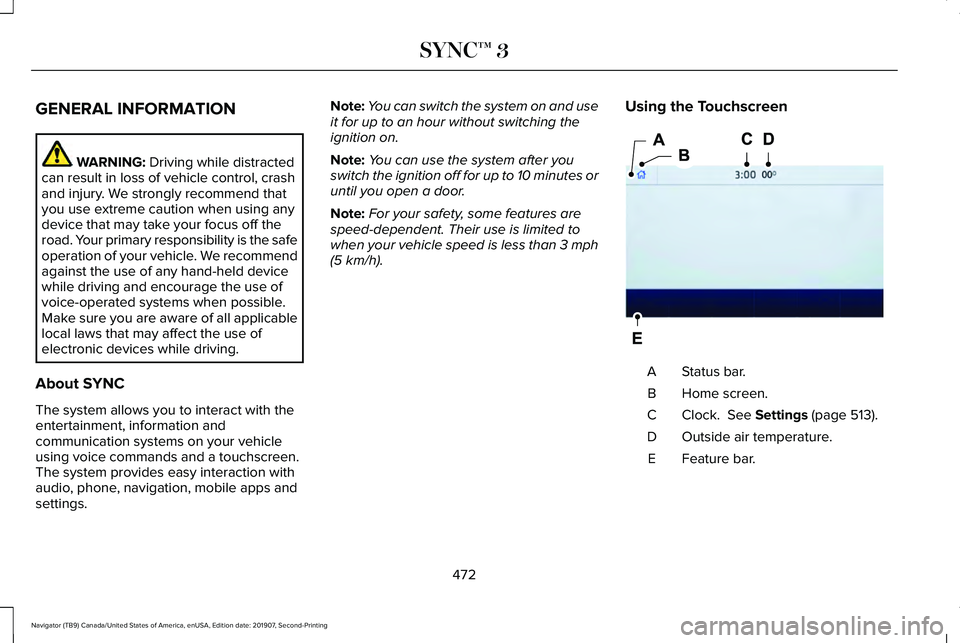
. Using the Touchscreen Status bar.
A
Home screen.
B
Clock.
See Settings (page 513).
C
Outside air temperature.
D
Feature bar.
E
472
Navigator (TB9) Canada/United States of America, enUSA, Edition date: 201907, Second-Printing SYNC™ 3E293823
Page 524 of 622
Phone
Possible Cause and Resolution
Symptom
During a call, I can hear excessive background
noise. –
Incorrect cell phone settings.
•Check and adjust the audio settings on your cell phone. Refer to your cell phone's
user manual.
– Cell phone malfunction.
•Switch your cell phone off, reset it and try again.
– Cell phone microphone muted.
•Unmute your cell phone microphone.
During a call, I can hear the other person but
they cannot hear me.
During a call, I cannot hear the other person
and they cannot hear me.
–
System restart required.
•Restart the system. Switch the ignition off and open the door. Close the door and lock
the vehicle. Wait until the touchscreen is off and any illuminated USB ports are not
illuminated. Unlock the vehicle, switch the ignition on and try again.
I cannot download phonebook. –Incompatible cell phone.
•Check the compatibility of your cell phone on our website.
– Incorrect cell phone settings.
•Allow the system to retrieve contacts from your cell phone. Refer to your cell phone's
user manual.
521
Navigator (TB9) Canada/United States of America, enUSA, Edition date: 201907, Second-Printing SYNC™ 3
Page 542 of 622
Check Every Month
Engine oil level.
Function of all interior and exterior lights.
Tires (including spare) for wear and proper pressure. Windshield washer fluid level.
Fuel and water separator. Drain if necessary (or if indicated by the information display). Holes and slots in the tail pipe to make sure they are functional and clear of debris. Check Every Six Months
Battery connections. Clean if necessary.
Body and door drain holes for obstructions. Clean if necessary. Cooling system fluid level and coolant strength.
Door weatherstrips for wear. Lubricate if necessary.
Hinges, latches and outside locks for proper operation. Lubricate if necessary. Parking brake for proper operation.
539
Navigator (TB9) Canada/United States of America, enUSA, Edition date: 201907, Second-Printing Scheduled Maintenance
Page 612 of 622
Services That We Provide....................................14
Vehicles With a Modem.......................................15
Vehicles With an Emergency Call System.......16
Vehicles With SYNC..............................................15
Daytime Running Lamps - Vehicles With: Configurable Daytime Running
Lamps..............................................................111
Daytime Running Lamps - Vehicles With: Daytime Running Lamps (DRL).................111
Declaration of Conformity..........................604
Digital Radio...................................................464
HD Radio Reception and Station
Troubleshooting.............................................465
Direction Indicators........................................113 Lane Change.........................................................113
Doors and Locks.............................................83
Drive Mode Control.....................................299 Lincoln Drive Modes.........................................299
Driver Alert
.....................................................277
Using Driver Alert...............................................278
Driver and Passenger Airbags....................58 Children and Airbags...........................................59
Proper Driver and Front Passenger Seating
Adjustment.........................................................59
Driving Aids
....................................................277
Driving Hints..................................................337
Driving Through Water................................338 DRL
See: Daytime Running Lamps - Vehicles With:
Configurable Daytime Running Lamps.......111
See: Daytime Running Lamps - Vehicles With: Daytime Running Lamps (DRL)......................111
E
Economical Driving......................................337
Electric Parking Brake.................................238 Applying the Electric Parking Brake..............238
Automatically Releasing the Electric Parking
Brake.................................................................239
Manually Releasing the Electric Parking Brake.................................................................239
Releasing the Electric Parking Brake if the Vehicle Battery is Running Out of
Charge..............................................................239
Electromagnetic Compatibility.................569
Emergency Call Limitations.........................68
Emergency Call Requirements
....................67
Emission Law..................................................218 Noise Emissions Warranty, Prohibited
Tampering Acts and Maintenance.............219
Tampering With a Noise Control System...............................................................218 End User License Agreement...................574
VEHICLE SOFTWARE END USER LICENSE
AGREEMENT (EULA) ....................................574
Engine Block Heater
...................................206
Using the Engine Block Heater......................207
Engine Coolant Check................................380 Adding Coolant...................................................380
Coolant Change..................................................382
Engine Coolant Temperature
Management...................................................384
Fail-Safe Cooling................................................382
Recycled Coolant...............................................382
Severe Climates.................................................382
Engine Emission Control.............................218
Engine Immobilizer See: Passive Anti-Theft System........................94
Engine Oil Check
..........................................377
Adding Engine Oil...............................................377
Engine Oil Dipstick
.......................................377
Engine Specifications..................................435
Drivebelt Routing................................................435
Entertainment................................................485 AM/FM Radio.......................................................486
Apps.......................................................................497
Bluetooth Stereo or USB..................................495
CD (If equipped)..................................................494
HD Radio ™ Information (If Available)..............490
SiriusXM® Satellite Radio (If Activated).........487
609
Navigator (TB9) Canada/United States of America, enUSA, Edition date: 201907, Second-Printing Index
Page 613 of 622
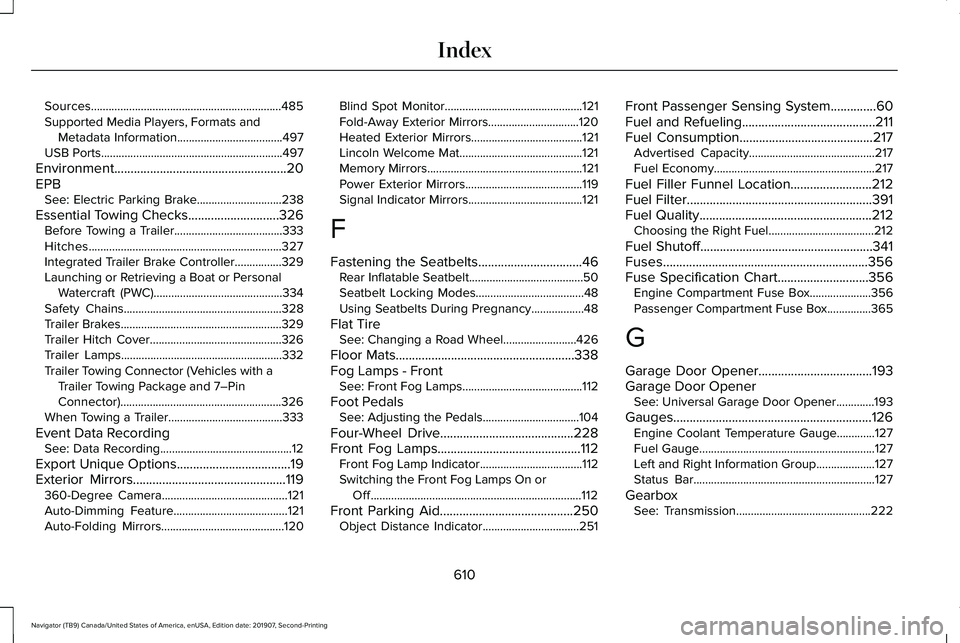
Sources.................................................................485
Supported Media Players, Formats and
Metadata Information....................................497
USB Ports..............................................................497
Environment.....................................................20
EPB See: Electric Parking Brake.............................238
Essential Towing Checks............................326
Before Towing a Trailer.....................................333
Hitches..................................................................327
Integrated Trailer Brake Controller................329
Launching or Retrieving a Boat or Personal
Watercraft (PWC)............................................334
Safety Chains......................................................328
Trailer Brakes.......................................................329
Trailer Hitch Cover.............................................326
Trailer Lamps.......................................................332
Trailer Towing Connector (Vehicles with a Trailer Towing Package and 7–Pin
Connector).......................................................326
When Towing a Trailer.......................................333
Event Data Recording See: Data Recording.............................................12
Export Unique Options
...................................19
Exterior Mirrors...............................................119 360-Degree Camera...........................................121
Auto-Dimming Feature.......................................121
Auto-Folding Mirrors..........................................120 Blind Spot Monitor...............................................121
Fold-Away Exterior Mirrors...............................120
Heated Exterior Mirrors......................................121
Lincoln Welcome Mat..........................................121
Memory Mirrors.....................................................121
Power Exterior Mirrors........................................119
Signal Indicator Mirrors.......................................121
F
Fastening the Seatbelts
................................46
Rear Inflatable Seatbelt.......................................50
Seatbelt Locking Modes.....................................48
Using Seatbelts During Pregnancy..................48
Flat Tire See: Changing a Road Wheel.........................
426
Floor Mats
.......................................................338
Fog Lamps - Front See: Front Fog Lamps.........................................112
Foot Pedals See: Adjusting the Pedals.................................104
Four-Wheel Drive
.........................................228
Front Fog Lamps............................................112 Front Fog Lamp Indicator...................................112
Switching the Front Fog Lamps On or
Off........................................................................\
112
Front Parking Aid
.........................................250
Object Distance Indicator.................................251 Front Passenger Sensing System..............60
Fuel and Refueling.........................................211
Fuel Consumption
.........................................217
Advertised Capacity...........................................217
Fuel Economy.......................................................217
Fuel Filler Funnel Location.........................212
Fuel Filter.........................................................391
Fuel Quality
.....................................................212
Choosing the Right Fuel....................................212
Fuel Shutoff
.....................................................341
Fuses...............................................................356
Fuse Specification Chart............................356 Engine Compartment Fuse Box.....................356
Passenger Compartment Fuse Box...............365
G
Garage Door Opener...................................193
Garage Door Opener See: Universal Garage Door Opener.............193
Gauges.............................................................126 Engine Coolant Temperature Gauge.............127
Fuel Gauge............................................................127
Left and Right Information Group....................127
Status Bar..............................................................127
Gearbox See: Transmission..............................................222
610
Navigator (TB9) Canada/United States of America, enUSA, Edition date: 201907, Second-Printing Index
Page 614 of 622
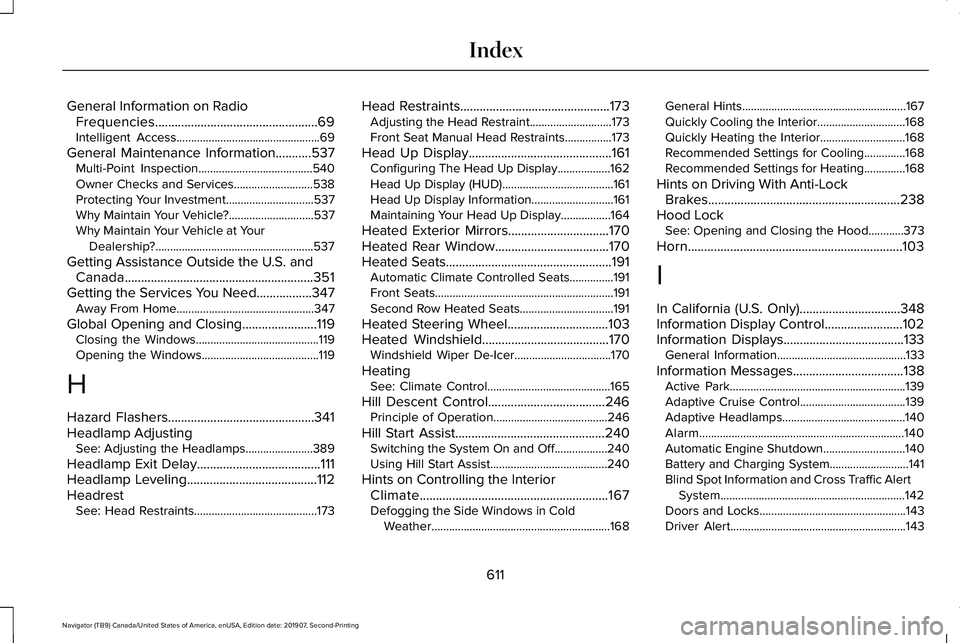
General Information on Radio
Frequencies..................................................69
Intelligent Access.................................................69
General Maintenance Information...........537 Multi-Point Inspection.......................................540
Owner Checks and Services...........................538
Protecting Your Investment..............................537
Why Maintain Your Vehicle?.............................537
Why Maintain Your Vehicle at Your
Dealership?......................................................537
Getting Assistance Outside the U.S. and Canada..........................................................351
Getting the Services You Need.................347 Away From Home...............................................347
Global Opening and Closing.......................119 Closing the Windows..........................................119
Opening the Windows........................................119
H
Hazard Flashers.............................................341
Headlamp Adjusting See: Adjusting the Headlamps.......................389
Headlamp Exit Delay......................................111
Headlamp Leveling
........................................112
Headrest See: Head Restraints..........................................173 Head Restraints
..............................................173
Adjusting the Head Restraint............................173
Front Seat Manual Head Restraints................173
Head Up Display
............................................161
Configuring The Head Up Display..................162
Head Up Display (HUD)......................................161
Head Up Display Information............................161
Maintaining Your Head Up Display.................164
Heated Exterior Mirrors...............................170
Heated Rear Window
...................................170
Heated Seats...................................................191 Automatic Climate Controlled Seats...............191
Front Seats.............................................................191
Second Row Heated Seats................................191
Heated Steering Wheel...............................103
Heated Windshield.......................................170 Windshield Wiper De-Icer.................................170
Heating See: Climate Control..........................................165
Hill Descent Control....................................246 Principle of Operation.......................................246
Hill Start Assist..............................................240 Switching the System On and Off..................240
Using Hill Start Assist........................................240
Hints on Controlling the Interior Climate..........................................................167
Defogging the Side Windows in Cold Weather.............................................................168 General Hints........................................................167
Quickly Cooling the Interior..............................168
Quickly Heating the Interior.............................168
Recommended Settings for Cooling..............168
Recommended Settings for Heating..............168
Hints on Driving With Anti-Lock Brakes...........................................................238
Hood Lock See: Opening and Closing the Hood............
373
Horn..................................................................103
I
In California (U.S. Only)...............................348
Information Display Control........................102
Information Displays
.....................................133
General Information............................................133
Information Messages..................................138 Active Park............................................................139
Adaptive Cruise Control....................................139
Adaptive Headlamps..........................................140
Alarm......................................................................140
Automatic Engine Shutdown............................140
Battery and Charging System...........................
141
Blind Spot Information and Cross Traffic Alert System...............................................................142
Doors and Locks..................................................143
Driver Alert............................................................143
611
Navigator (TB9) Canada/United States of America, enUSA, Edition date: 201907, Second-Printing Index