transmission LINCOLN NAVIGATOR 2020 Manual Online
[x] Cancel search | Manufacturer: LINCOLN, Model Year: 2020, Model line: NAVIGATOR, Model: LINCOLN NAVIGATOR 2020Pages: 622, PDF Size: 6.47 MB
Page 450 of 622
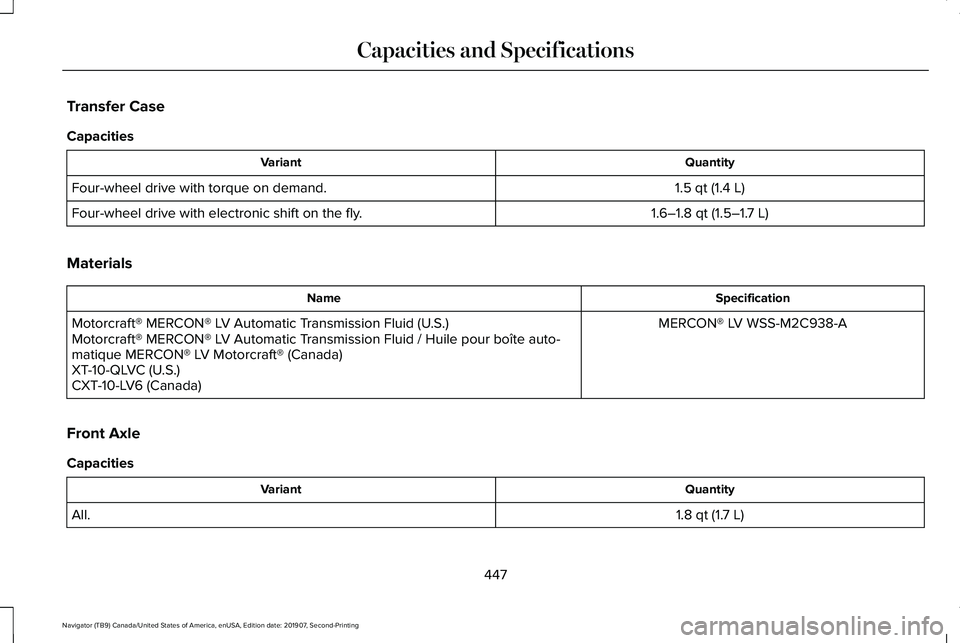
Transfer Case
Capacities
Quantity
Variant
1.5 qt (1.4 L)
Four-wheel drive with torque on demand.
1.6–1.8 qt (1.5–1.7 L)
Four-wheel drive with electronic shift on the fly.
Materials Specification
Name
MERCON® LV WSS-M2C938-A
Motorcraft® MERCON® LV Automatic Transmission Fluid (U.S.)
Motorcraft® MERCON® LV Automatic Transmission Fluid / Huile pour boîte auto-
matique MERCON® LV Motorcraft® (Canada)
XT-10-QLVC (U.S.)
CXT-10-LV6 (Canada)
Front Axle
Capacities Quantity
Variant
1.8 qt (1.7 L)
All.
447
Navigator (TB9) Canada/United States of America, enUSA, Edition date: 201907, Second-Printing Capacities and Specifications
Page 544 of 622
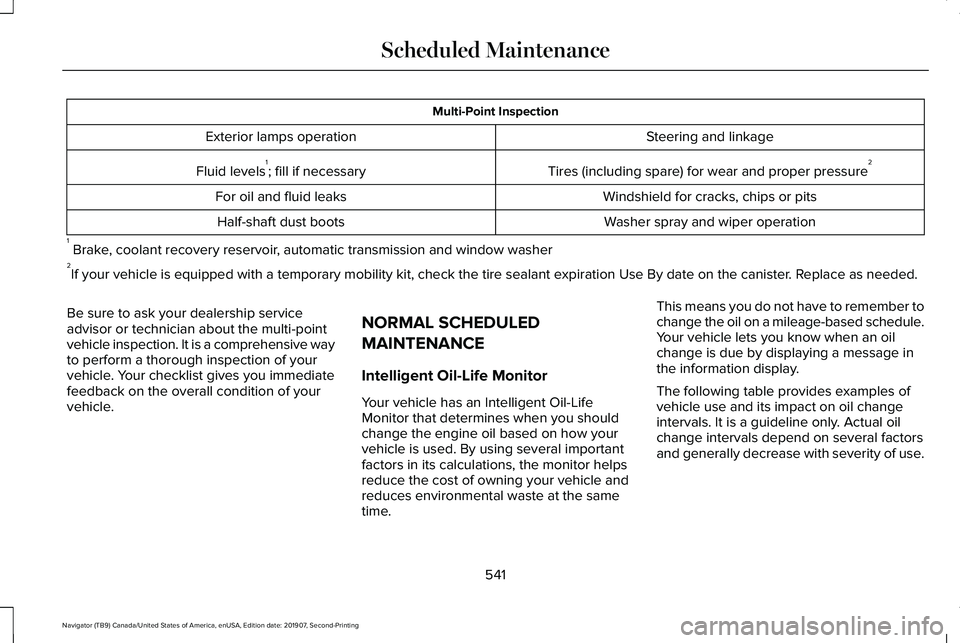
Multi-Point Inspection
Steering and linkage
Exterior lamps operation
Tires (including spare) for wear and proper pressure2
Fluid levels 1
; fill if necessary
Windshield for cracks, chips or pits
For oil and fluid leaks
Washer spray and wiper operation
Half-shaft dust boots
1 Brake, coolant recovery reservoir, automatic transmission and window washer
2 If your vehicle is equipped with a temporary mobility kit, check the tir\
e sealant expiration Use By date on the canister. Replace as needed.
Be sure to ask your dealership service
advisor or technician about the multi-point
vehicle inspection. It is a comprehensive way
to perform a thorough inspection of your
vehicle. Your checklist gives you immediate
feedback on the overall condition of your
vehicle. NORMAL SCHEDULED
MAINTENANCE
Intelligent Oil-Life Monitor
Your vehicle has an Intelligent Oil-Life
Monitor that determines when you should
change the engine oil based on how your
vehicle is used. By using several important
factors in its calculations, the monitor helps
reduce the cost of owning your vehicle and
reduces environmental waste at the same
time.This means you do not have to remember to
change the oil on a mileage-based schedule.
Your vehicle lets you know when an oil
change is due by displaying a message in
the information display.
The following table provides examples of
vehicle use and its impact on oil change
intervals. It is a guideline only. Actual oil
change intervals depend on several factors
and generally decrease with severity of use.
541
Navigator (TB9) Canada/United States of America, enUSA, Edition date: 201907, Second-Printing Scheduled Maintenance
Page 546 of 622
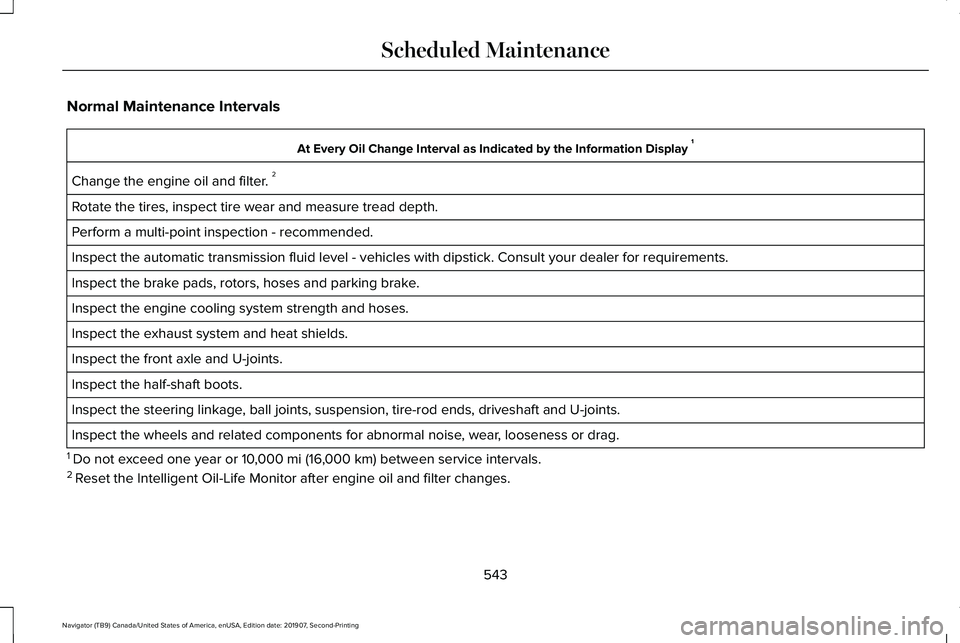
Normal Maintenance Intervals
At Every Oil Change Interval as Indicated by the Information Display
1
Change the engine oil and filter. 2
Rotate the tires, inspect tire wear and measure tread depth.
Perform a multi-point inspection - recommended.
Inspect the automatic transmission fluid level - vehicles with dipstick.\
Consult your dealer for requirements.
Inspect the brake pads, rotors, hoses and parking brake.
Inspect the engine cooling system strength and hoses.
Inspect the exhaust system and heat shields.
Inspect the front axle and U-joints.
Inspect the half-shaft boots.
Inspect the steering linkage, ball joints, suspension, tire-rod ends, driveshaft and U-joints.
Inspect the wheels and related components for abnormal noise, wear, looseness or drag.
1 Do not exceed one year or 10,000 mi (16,000 km) between service intervals.
2 Reset the Intelligent Oil-Life Monitor after engine oil and filter change\
s.
543
Navigator (TB9) Canada/United States of America, enUSA, Edition date: 201907, Second-Printing Scheduled Maintenance
Page 547 of 622
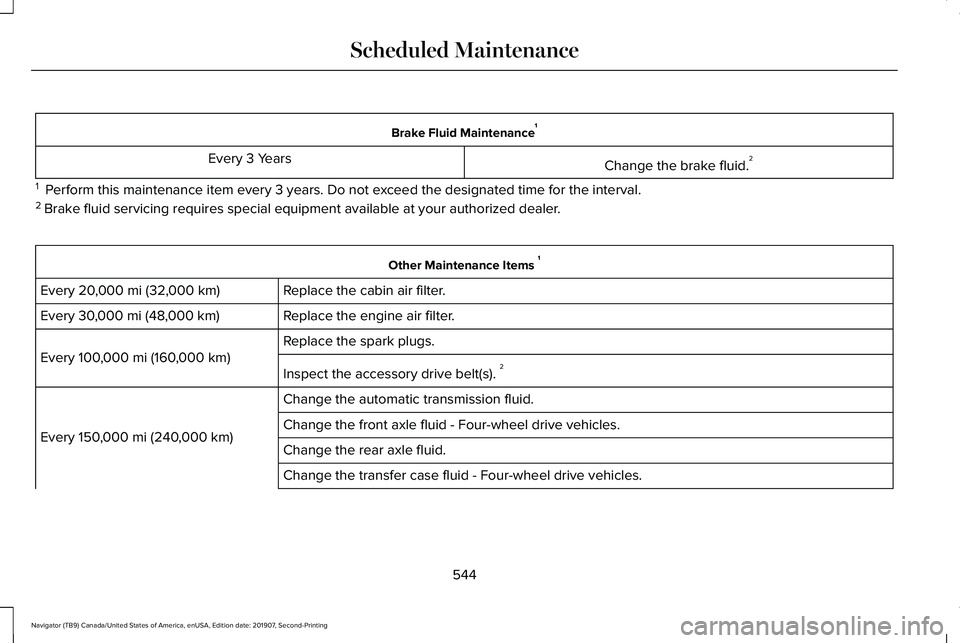
Brake Fluid Maintenance
1
Change the brake fluid. 2
Every 3 Years
1 Perform this maintenance item every 3 years. Do not exceed the designated time for the interval.
2 Brake fluid servicing requires special equipment available at your authorize\
d dealer. Other Maintenance Items
1
Replace the cabin air filter.
Every 20,000 mi (32,000 km)
Replace the engine air filter.
Every
30,000 mi (48,000 km)
Replace the spark plugs.
Every
100,000 mi (160,000 km)
Inspect the accessory drive belt(s). 2
Change the automatic transmission fluid.
Every
150,000 mi (240,000 km) Change the front axle fluid - Four-wheel drive vehicles.
Change the rear axle fluid.
Change the transfer case fluid - Four-wheel drive vehicles.
544
Navigator (TB9) Canada/United States of America, enUSA, Edition date: 201907, Second-Printing Scheduled Maintenance
Page 548 of 622
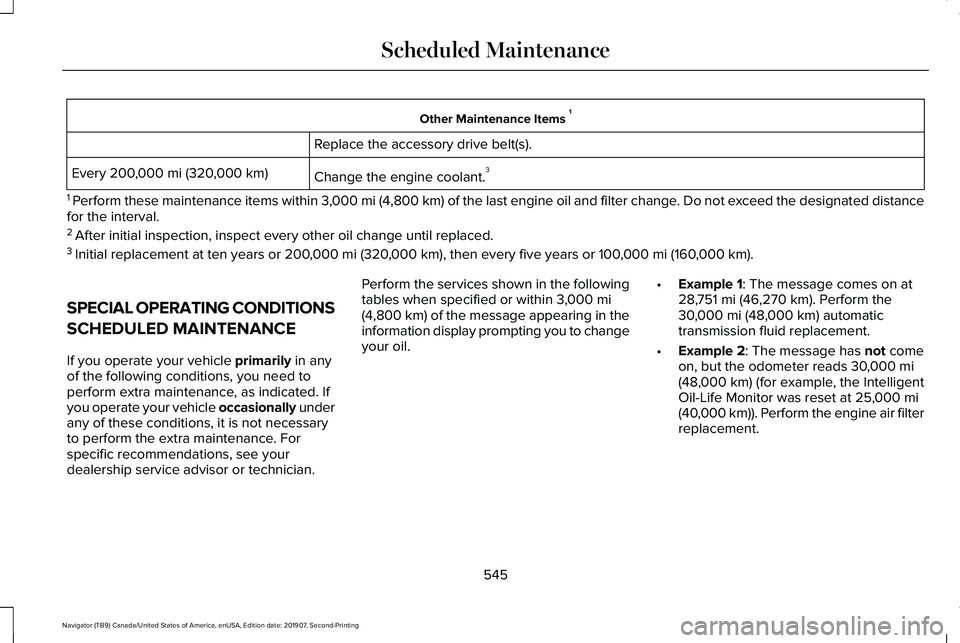
Other Maintenance Items
1
Replace the accessory drive belt(s).
Change the engine coolant. 3
Every 200,000 mi (320,000 km)
1 Perform these maintenance items within 3,000 mi (4,800 km) of the last engine oil and filter change. Do not exceed the designated distance
for the interval.
2 After initial inspection, inspect every other oil change until replaced.\
3 Initial replacement at ten years or 200,000 mi (320,000 km), then every five years or 100,000 mi (160,000 km).
SPECIAL OPERATING CONDITIONS
SCHEDULED MAINTENANCE
If you operate your vehicle
primarily in any
of the following conditions, you need to
perform extra maintenance, as indicated. If
you operate your vehicle occasionally under
any of these conditions, it is not necessary
to perform the extra maintenance. For
specific recommendations, see your
dealership service advisor or technician. Perform the services shown in the following
tables when specified or within
3,000 mi
(4,800 km) of the message appearing in the
information display prompting you to change
your oil. •
Example 1: The message comes on at
28,751 mi (46,270 km). Perform the
30,000 mi (48,000 km) automatic
transmission fluid replacement.
• Example 2
: The message has not come
on, but the odometer reads 30,000 mi
(48,000 km) (for example, the Intelligent
Oil-Life Monitor was reset at 25,000 mi
(40,000 km)). Perform the engine air filter
replacement.
545
Navigator (TB9) Canada/United States of America, enUSA, Edition date: 201907, Second-Printing Scheduled Maintenance
Page 580 of 622
•
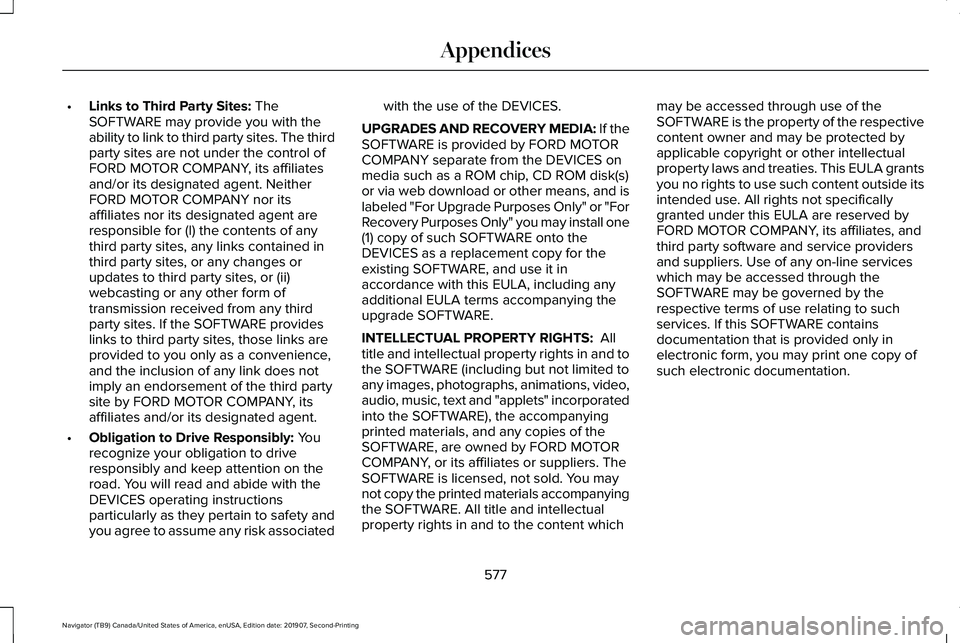
Links to Third Party Sites: The
SOFTWARE may provide you with the
ability to link to third party sites. The third
party sites are not under the control of
FORD MOTOR COMPANY, its affiliates
and/or its designated agent. Neither
FORD MOTOR COMPANY nor its
affiliates nor its designated agent are
responsible for (I) the contents of any
third party sites, any links contained in
third party sites, or any changes or
updates to third party sites, or (ii)
webcasting or any other form of
transmission received from any third
party sites. If the SOFTWARE provides
links to third party sites, those links are
provided to you only as a convenience,
and the inclusion of any link does not
imply an endorsement of the third party
site by FORD MOTOR COMPANY, its
affiliates and/or its designated agent.
• Obligation to Drive Responsibly:
You
recognize your obligation to drive
responsibly and keep attention on the
road. You will read and abide with the
DEVICES operating instructions
particularly as they pertain to safety and
you agree to assume any risk associated with the use of the DEVICES.
UPGRADES AND RECOVERY MEDIA: If the
SOFTWARE is provided by FORD MOTOR
COMPANY separate from the DEVICES on
media such as a ROM chip, CD ROM disk(s)
or via web download or other means, and is
labeled "For Upgrade Purposes Only" or "For
Recovery Purposes Only" you may install one
(1) copy of such SOFTWARE onto the
DEVICES as a replacement copy for the
existing SOFTWARE, and use it in
accordance with this EULA, including any
additional EULA terms accompanying the
upgrade SOFTWARE.
INTELLECTUAL PROPERTY RIGHTS:
All
title and intellectual property rights in and to
the SOFTWARE (including but not limited to
any images, photographs, animations, video,
audio, music, text and "applets" incorporated
into the SOFTWARE), the accompanying
printed materials, and any copies of the
SOFTWARE, are owned by FORD MOTOR
COMPANY, or its affiliates or suppliers. The
SOFTWARE is licensed, not sold. You may
not copy the printed materials accompanying
the SOFTWARE. All title and intellectual
property rights in and to the content which may be accessed through use of the
SOFTWARE is the property of the respective
content owner and may be protected by
applicable copyright or other intellectual
property laws and treaties. This EULA grants
you no rights to use such content outside its
intended use. All rights not specifically
granted under this EULA are reserved by
FORD MOTOR COMPANY, its affiliates, and
third party software and service providers
and suppliers. Use of any on-line services
which may be accessed through the
SOFTWARE may be governed by the
respective terms of use relating to such
services. If this SOFTWARE contains
documentation that is provided only in
electronic form, you may print one copy of
such electronic documentation.
577
Navigator (TB9) Canada/United States of America, enUSA, Edition date: 201907, Second-Printing Appendices
Page 601 of 622
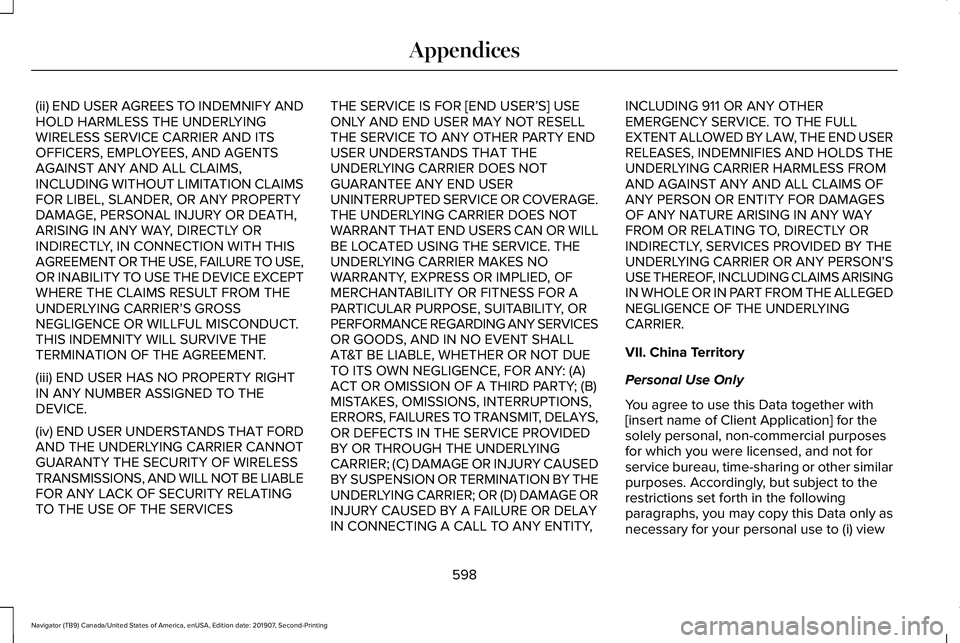
(ii) END USER AGREES TO INDEMNIFY AND
HOLD HARMLESS THE UNDERLYING
WIRELESS SERVICE CARRIER AND ITS
OFFICERS, EMPLOYEES, AND AGENTS
AGAINST ANY AND ALL CLAIMS,
INCLUDING WITHOUT LIMITATION CLAIMS
FOR LIBEL, SLANDER, OR ANY PROPERTY
DAMAGE, PERSONAL INJURY OR DEATH,
ARISING IN ANY WAY, DIRECTLY OR
INDIRECTLY, IN CONNECTION WITH THIS
AGREEMENT OR THE USE, FAILURE TO USE,
OR INABILITY TO USE THE DEVICE EXCEPT
WHERE THE CLAIMS RESULT FROM THE
UNDERLYING CARRIER
’S GROSS
NEGLIGENCE OR WILLFUL MISCONDUCT.
THIS INDEMNITY WILL SURVIVE THE
TERMINATION OF THE AGREEMENT.
(iii) END USER HAS NO PROPERTY RIGHT
IN ANY NUMBER ASSIGNED TO THE
DEVICE.
(iv) END USER UNDERSTANDS THAT FORD
AND THE UNDERLYING CARRIER CANNOT
GUARANTY THE SECURITY OF WIRELESS
TRANSMISSIONS, AND WILL NOT BE LIABLE
FOR ANY LACK OF SECURITY RELATING
TO THE USE OF THE SERVICES THE SERVICE IS FOR [END USER
’S] USE
ONLY AND END USER MAY NOT RESELL
THE SERVICE TO ANY OTHER PARTY END
USER UNDERSTANDS THAT THE
UNDERLYING CARRIER DOES NOT
GUARANTEE ANY END USER
UNINTERRUPTED SERVICE OR COVERAGE.
THE UNDERLYING CARRIER DOES NOT
WARRANT THAT END USERS CAN OR WILL
BE LOCATED USING THE SERVICE. THE
UNDERLYING CARRIER MAKES NO
WARRANTY, EXPRESS OR IMPLIED, OF
MERCHANTABILITY OR FITNESS FOR A
PARTICULAR PURPOSE, SUITABILITY, OR
PERFORMANCE REGARDING ANY SERVICES
OR GOODS, AND IN NO EVENT SHALL
AT&T BE LIABLE, WHETHER OR NOT DUE
TO ITS OWN NEGLIGENCE, FOR ANY: (A)
ACT OR OMISSION OF A THIRD PARTY; (B)
MISTAKES, OMISSIONS, INTERRUPTIONS,
ERRORS, FAILURES TO TRANSMIT, DELAYS,
OR DEFECTS IN THE SERVICE PROVIDED
BY OR THROUGH THE UNDERLYING
CARRIER; (C) DAMAGE OR INJURY CAUSED
BY SUSPENSION OR TERMINATION BY THE
UNDERLYING CARRIER; OR (D) DAMAGE OR
INJURY CAUSED BY A FAILURE OR DELAY
IN CONNECTING A CALL TO ANY ENTITY, INCLUDING 911 OR ANY OTHER
EMERGENCY SERVICE. TO THE FULL
EXTENT ALLOWED BY LAW, THE END USER
RELEASES, INDEMNIFIES AND HOLDS THE
UNDERLYING CARRIER HARMLESS FROM
AND AGAINST ANY AND ALL CLAIMS OF
ANY PERSON OR ENTITY FOR DAMAGES
OF ANY NATURE ARISING IN ANY WAY
FROM OR RELATING TO, DIRECTLY OR
INDIRECTLY, SERVICES PROVIDED BY THE
UNDERLYING CARRIER OR ANY PERSON’S
USE THEREOF, INCLUDING CLAIMS ARISING
IN WHOLE OR IN PART FROM THE ALLEGED
NEGLIGENCE OF THE UNDERLYING
CARRIER.
VII. China Territory
Personal Use Only
You agree to use this Data together with
[insert name of Client Application] for the
solely personal, non-commercial purposes
for which you were licensed, and not for
service bureau, time-sharing or other similar
purposes. Accordingly, but subject to the
restrictions set forth in the following
paragraphs, you may copy this Data only as
necessary for your personal use to (i) view
598
Navigator (TB9) Canada/United States of America, enUSA, Edition date: 201907, Second-Printing Appendices
Page 609 of 622
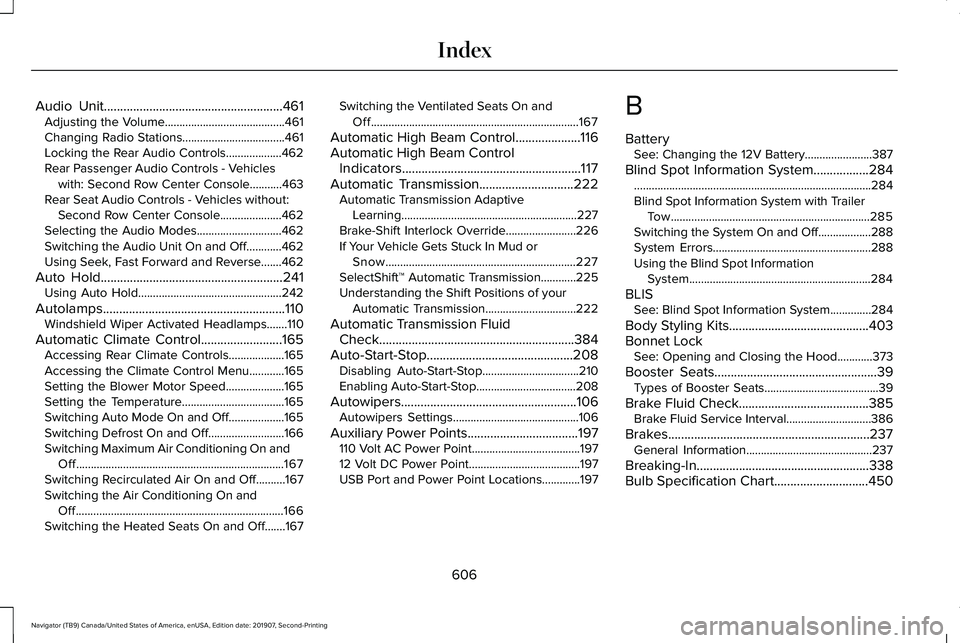
Audio Unit.......................................................461
Adjusting the Volume.........................................461
Changing Radio Stations...................................461
Locking the Rear Audio Controls...................462
Rear Passenger Audio Controls - Vehicles
with: Second Row Center Console...........463
Rear Seat Audio Controls - Vehicles without: Second Row Center Console.....................462
Selecting the Audio Modes.............................462
Switching the Audio Unit On and Off............462
Using Seek, Fast Forward and Reverse.......462
Auto Hold
........................................................241
Using Auto Hold.................................................242
Autolamps........................................................110 Windshield Wiper Activated Headlamps.......110
Automatic Climate Control
.........................165
Accessing Rear Climate Controls...................165
Accessing the Climate Control Menu............165
Setting the Blower Motor Speed....................165
Setting the Temperature...................................165
Switching Auto Mode On and Off...................
165
Switching Defrost On and Off..........................166
Switching Maximum Air Conditioning On and Off.......................................................................167
Switching Recirculated Air On and Off..........167
Switching the Air Conditioning On and Off.......................................................................166
Switching the Heated Seats On and Off.......
167 Switching the Ventilated Seats On and
Off.......................................................................167
Automatic High Beam Control
....................116
Automatic High Beam Control Indicators.......................................................117
Automatic Transmission
.............................222
Automatic Transmission Adaptive
Learning............................................................227
Brake-Shift Interlock Override........................226
If Your Vehicle Gets Stuck In Mud or Snow.................................................................227
SelectShift™ Automatic Transmission............225
Understanding the Shift Positions of your Automatic Transmission...............................222
Automatic Transmission Fluid Check............................................................384
Auto-Start-Stop.............................................208 Disabling Auto-Start-Stop.................................210
Enabling Auto-Start-Stop..................................208
Autowipers......................................................106 Autowipers Settings...........................................106
Auxiliary Power Points
..................................197
110 Volt AC Power Point.....................................197
12 Volt DC Power Point......................................197
USB Port and Power Point Locations.............197 B
Battery
See: Changing the 12V Battery.......................
387
Blind Spot Information System.................284 ........................................................................\
.........284
Blind Spot Information System with Trailer
Tow....................................................................285
Switching the System On and Off..................288
System Errors......................................................288
Using the Blind Spot Information System..............................................................284
BLIS See: Blind Spot Information System..............284
Body Styling Kits...........................................403
Bonnet Lock See: Opening and Closing the Hood............
373
Booster Seats..................................................39 Types of Booster Seats.......................................39
Brake Fluid Check
........................................385
Brake Fluid Service Interval.............................386
Brakes ..............................................................
237
General Information...........................................237
Breaking-In.....................................................338
Bulb Specification Chart
.............................450
606
Navigator (TB9) Canada/United States of America, enUSA, Edition date: 201907, Second-Printing Index
Page 610 of 622
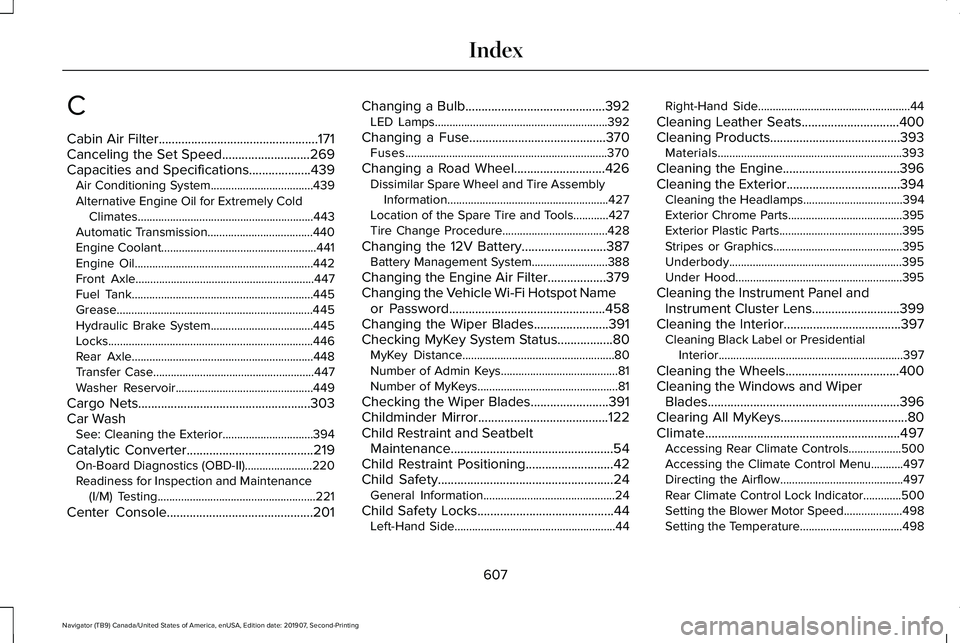
C
Cabin Air Filter.................................................171
Canceling the Set Speed...........................269
Capacities and Specifications...................439
Air Conditioning System...................................439
Alternative Engine Oil for Extremely Cold Climates............................................................443
Automatic Transmission....................................440
Engine Coolant.....................................................441
Engine Oil.............................................................442
Front Axle.............................................................447
Fuel Tank..............................................................445
Grease...................................................................445
Hydraulic Brake System...................................445
Locks......................................................................446
Rear Axle..............................................................448
Transfer Case.......................................................447
Washer Reservoir...............................................449
Cargo Nets
.....................................................303
Car Wash See: Cleaning the Exterior...............................394
Catalytic Converter
.......................................219
On-Board Diagnostics (OBD-II).......................220
Readiness for Inspection and Maintenance
(I/M) Testing......................................................221
Center Console
.............................................201 Changing a Bulb
...........................................392
LED Lamps...........................................................392
Changing a Fuse
..........................................370
Fuses.....................................................................370
Changing a Road Wheel............................426 Dissimilar Spare Wheel and Tire Assembly
Information.......................................................427
Location of the Spare Tire and Tools............427
Tire Change Procedure....................................428
Changing the 12V Battery..........................387 Battery Management System..........................388
Changing the Engine Air Filter..................379
Changing the Vehicle Wi-Fi Hotspot Name or Password
................................................458
Changing the Wiper Blades.......................391
Checking MyKey System Status.................80 MyKey Distance....................................................80
Number of Admin Keys........................................81
Number of MyKeys................................................81
Checking the Wiper Blades........................391
Childminder Mirror........................................122
Child Restraint and Seatbelt Maintenance..................................................54
Child Restraint Positioning
...........................42
Child Safety......................................................24
General Information.............................................24
Child Safety Locks
..........................................44
Left-Hand Side.......................................................44 Right-Hand Side....................................................44
Cleaning Leather Seats..............................400
Cleaning Products
........................................393
Materials...............................................................393
Cleaning the Engine
....................................396
Cleaning the Exterior...................................394
Cleaning the Headlamps..................................394
Exterior Chrome Parts.......................................395
Exterior Plastic Parts..........................................395
Stripes or Graphics............................................395
Underbody...........................................................395
Under Hood.........................................................395
Cleaning the Instrument Panel and Instrument Cluster Lens...........................399
Cleaning the Interior....................................397 Cleaning Black Label or Presidential
Interior...............................................................397
Cleaning the Wheels...................................400
Cleaning the Windows and Wiper Blades...........................................................396
Clearing All MyKeys.......................................80
Climate............................................................497 Accessing Rear Climate Controls..................500
Accessing the Climate Control Menu...........
497
Directing the Airflow..........................................497
Rear Climate Control Lock Indicator.............500
Setting the Blower Motor Speed....................498
Setting the Temperature...................................498
607
Navigator (TB9) Canada/United States of America, enUSA, Edition date: 201907, Second-Printing Index
Page 613 of 622
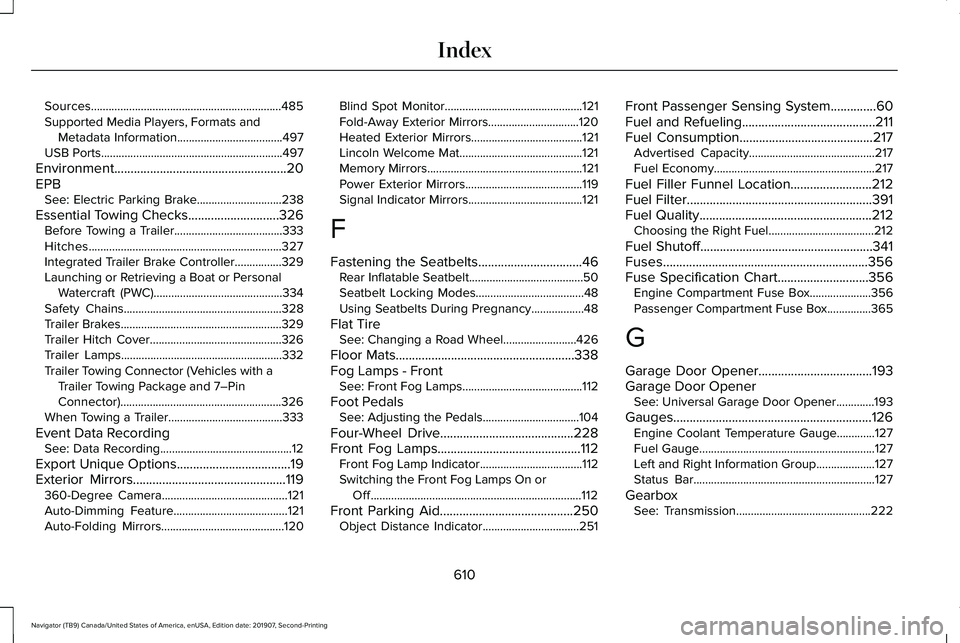
Sources.................................................................485
Supported Media Players, Formats and
Metadata Information....................................497
USB Ports..............................................................497
Environment.....................................................20
EPB See: Electric Parking Brake.............................238
Essential Towing Checks............................326
Before Towing a Trailer.....................................333
Hitches..................................................................327
Integrated Trailer Brake Controller................329
Launching or Retrieving a Boat or Personal
Watercraft (PWC)............................................334
Safety Chains......................................................328
Trailer Brakes.......................................................329
Trailer Hitch Cover.............................................326
Trailer Lamps.......................................................332
Trailer Towing Connector (Vehicles with a Trailer Towing Package and 7–Pin
Connector).......................................................326
When Towing a Trailer.......................................333
Event Data Recording See: Data Recording.............................................12
Export Unique Options
...................................19
Exterior Mirrors...............................................119 360-Degree Camera...........................................121
Auto-Dimming Feature.......................................121
Auto-Folding Mirrors..........................................120 Blind Spot Monitor...............................................121
Fold-Away Exterior Mirrors...............................120
Heated Exterior Mirrors......................................121
Lincoln Welcome Mat..........................................121
Memory Mirrors.....................................................121
Power Exterior Mirrors........................................119
Signal Indicator Mirrors.......................................121
F
Fastening the Seatbelts
................................46
Rear Inflatable Seatbelt.......................................50
Seatbelt Locking Modes.....................................48
Using Seatbelts During Pregnancy..................48
Flat Tire See: Changing a Road Wheel.........................
426
Floor Mats
.......................................................338
Fog Lamps - Front See: Front Fog Lamps.........................................112
Foot Pedals See: Adjusting the Pedals.................................104
Four-Wheel Drive
.........................................228
Front Fog Lamps............................................112 Front Fog Lamp Indicator...................................112
Switching the Front Fog Lamps On or
Off........................................................................\
112
Front Parking Aid
.........................................250
Object Distance Indicator.................................251 Front Passenger Sensing System..............60
Fuel and Refueling.........................................211
Fuel Consumption
.........................................217
Advertised Capacity...........................................217
Fuel Economy.......................................................217
Fuel Filler Funnel Location.........................212
Fuel Filter.........................................................391
Fuel Quality
.....................................................212
Choosing the Right Fuel....................................212
Fuel Shutoff
.....................................................341
Fuses...............................................................356
Fuse Specification Chart............................356 Engine Compartment Fuse Box.....................356
Passenger Compartment Fuse Box...............365
G
Garage Door Opener...................................193
Garage Door Opener See: Universal Garage Door Opener.............193
Gauges.............................................................126 Engine Coolant Temperature Gauge.............127
Fuel Gauge............................................................127
Left and Right Information Group....................127
Status Bar..............................................................127
Gearbox See: Transmission..............................................222
610
Navigator (TB9) Canada/United States of America, enUSA, Edition date: 201907, Second-Printing Index