horn LINCOLN NAVIGATOR 2021 User Guide
[x] Cancel search | Manufacturer: LINCOLN, Model Year: 2021, Model line: NAVIGATOR, Model: LINCOLN NAVIGATOR 2021Pages: 639, PDF Size: 6.09 MB
Page 107 of 639
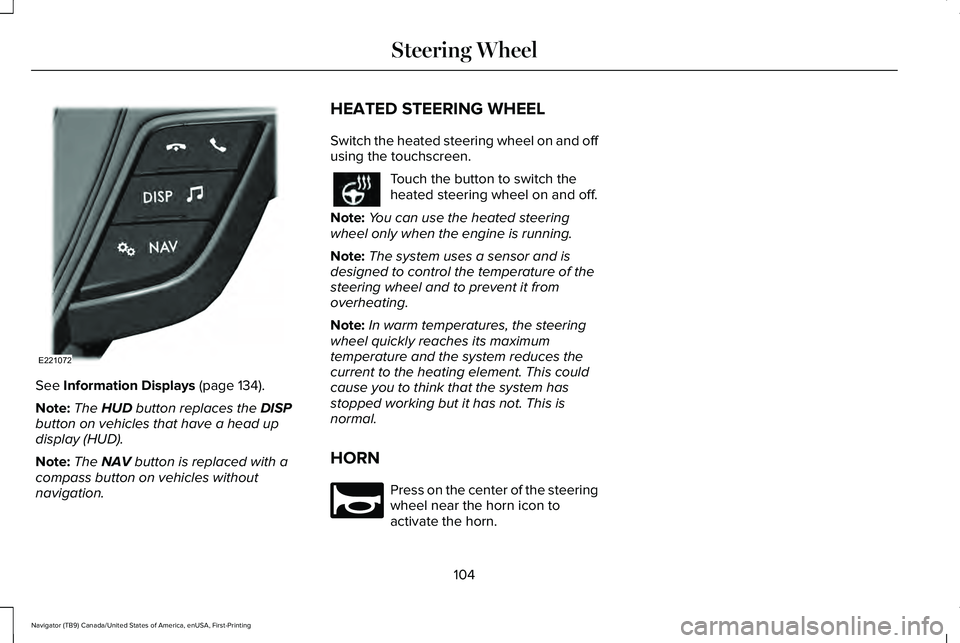
See Information Displays (page 134).
Note: The
HUD button replaces the DISP
button on vehicles that have a head up
display (HUD).
Note: The
NAV button is replaced with a
compass button on vehicles without
navigation. HEATED STEERING WHEEL
Switch the heated steering wheel on and off
using the touchscreen. Touch the button to switch the
heated steering wheel on and off.
Note: You can use the heated steering
wheel only when the engine is running.
Note: The system uses a sensor and is
designed to control the temperature of the
steering wheel and to prevent it from
overheating.
Note: In warm temperatures, the steering
wheel quickly reaches its maximum
temperature and the system reduces the
current to the heating element. This could
cause you to think that the system has
stopped working but it has not. This is
normal.
HORN Press on the center of the steering
wheel near the horn icon to
activate the horn.
104
Navigator (TB9) Canada/United States of America, enUSA, First-Printing Steering WheelE221072 E270945
Page 136 of 639
Stability Control and Traction Control
Off Warning Lamp
It illuminates when you switch the
system off.
Tow Haul Indicator (If Equipped) It illuminates when your vehicle
detects a heavy trailer.
AUDIBLE WARNINGS AND
INDICATORS
Keyless Warning Alert
The horn will sound twice when you exit your
vehicle with the intelligent access key and
your vehicle is in RUN, indicating your vehicle
is still on.
Headlamps On Warning Chime
Sounds when you have left the headlamps
or parking lamps on and open the driver door
with the vehicle off. Parking Brake On Warning Chime
Sounds when you have left the parking brake
on and drive your vehicle. If the warning
chime remains on after you have released
the parking brake, have the system checked
by your authorized dealer immediately.
133
Navigator (TB9) Canada/United States of America, enUSA, First-Printing Instrument ClusterE130458 E246592
Page 261 of 639
If the system is not available, the side
distance indicator blocks do not display.
ACTIVE PARK ASSIST
WARNING: You must remain in your
vehicle when the system turns on. At all
times, you are responsible for controlling
your vehicle, supervising the system and
intervening, if required. Failure to take care
may result in the loss of control of your
vehicle, serious personal injury or death. WARNING: The sensors may not
detect objects in heavy rain or other
conditions that cause interference. WARNING:
Active park assist does
not apply the brakes under any
circumstances. WARNING:
You are responsible for
controlling your vehicle at all times. The
system is designed to be an aid and does
not relieve you of your responsibility to
drive with due care and attention. Failure
to follow this instruction could result in the
loss of control of your vehicle, personal
injury or death.
Active park assist is a multi-step process and
may require you to shift the transmission
multiple times. Follow the onscreen
instructions until the parking maneuver is
complete.
If you are uncomfortable with the proximity
to any vehicle or object, you may choose to
override the system by grabbing the steering
wheel, or by taking full control of your vehicle
after pressing the active park assist button.
Keep your hands, hair, clothing and any
loose items clear of the steering wheel when
using active park assist.
The sensors are on the front and rear
bumpers. Note:
Keep the sensors free from snow, ice
and large accumulations of dirt.
Note: Do not cover up the sensors.
Note: Do not clean the sensors with sharp
objects.
Note: The sensors may not detect objects
with surfaces that absorb ultrasonic waves.
The sensors may falsely detect objects due
to ultrasonic interference caused by
motorcycle exhausts, truck air brakes or
horns, for example.
Note: If you change any tires, the system
must recalibrate and may not correctly
operate for a short time.
The system may not correctly operate in any
of the following conditions:
• You use a spare tire or a tire that is
significantly worn more than the other
tires.
• One or more tires are incorrectly inflated.
• You try to park on a tight curve.
• Something passes between the front
bumper and the parking space. For
example, a pedestrian or cyclist.
258
Navigator (TB9) Canada/United States of America, enUSA, First-Printing Parking Aids
Page 345 of 639
•
Do not rest your foot on the brake pedal
while driving.
• Avoid carrying unnecessary weight.
• Avoid adding particular accessories to
your vehicle (e.g. bug deflectors,
rollbars/light bars, running boards, ski
racks).
• Avoid driving with the wheels out of
alignment.
BREAKING-IN
You need to break in new tires for
approximately 300 mi (480 km). During this
time, your vehicle may exhibit some unusual
driving characteristics.
DRIVING THROUGH WATER WARNING:
Do not drive through
flowing or deep water as you may lose
control of your vehicle. Note:
Driving through standing water can
cause vehicle damage.
Note: Engine damage can occur if water
enters the air filter.
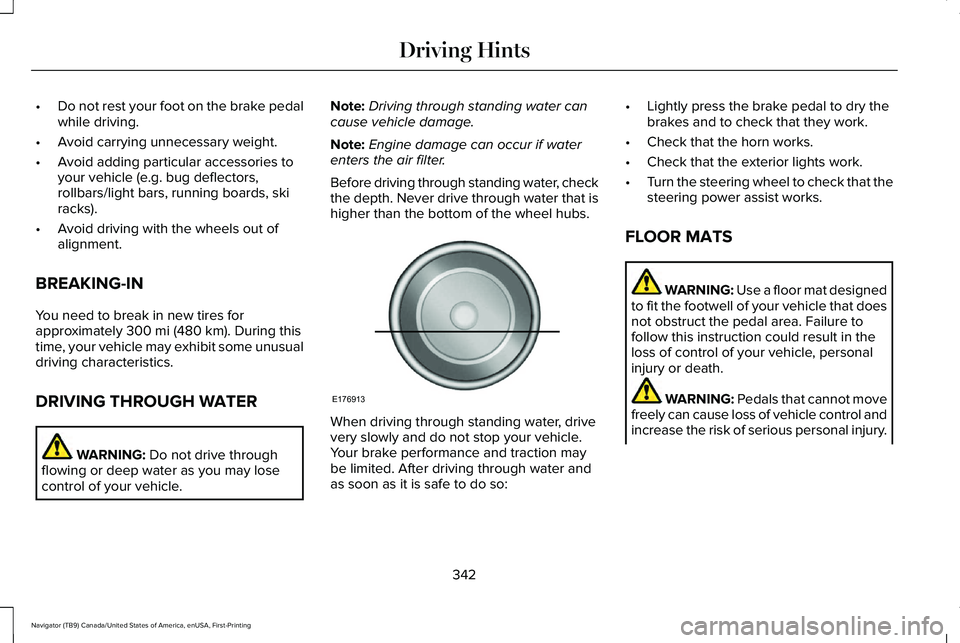
Before driving through standing water, check
the depth. Never drive through water that is
higher than the bottom of the wheel hubs. When driving through standing water, drive
very slowly and do not stop your vehicle.
Your brake performance and traction may
be limited. After driving through water and
as soon as it is safe to do so:•
Lightly press the brake pedal to dry the
brakes and to check that they work.
• Check that the horn works.
• Check that the exterior lights work.
• Turn the steering wheel to check that the
steering power assist works.
FLOOR MATS WARNING:
Use a floor mat designed
to fit the footwell of your vehicle that does
not obstruct the pedal area. Failure to
follow this instruction could result in the
loss of control of your vehicle, personal
injury or death. WARNING:
Pedals that cannot move
freely can cause loss of vehicle control and
increase the risk of serious personal injury.
342
Navigator (TB9) Canada/United States of America, enUSA, First-Printing Driving HintsE176913
Page 351 of 639
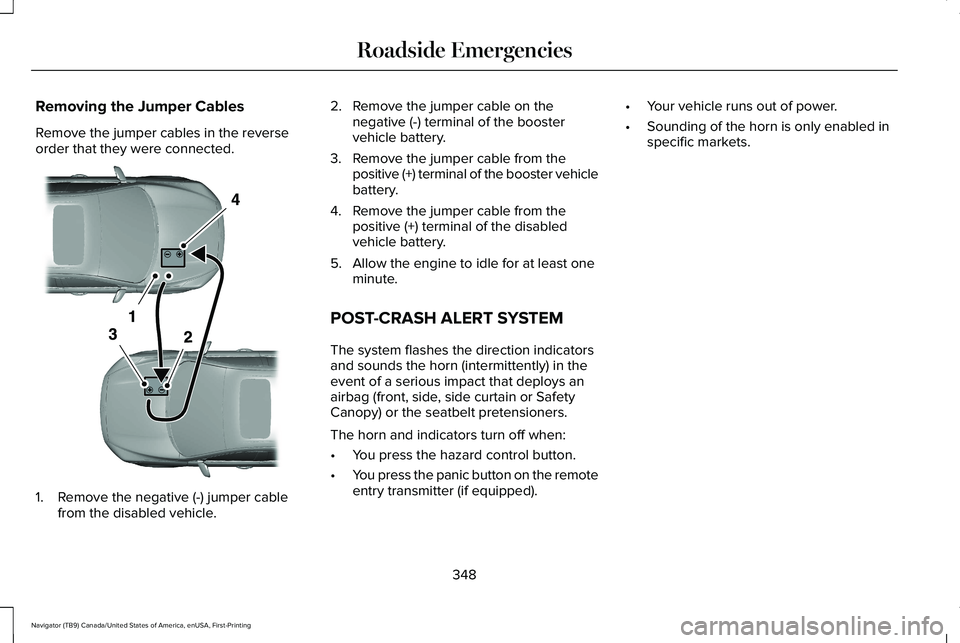
Removing the Jumper Cables
Remove the jumper cables in the reverse
order that they were connected.
1. Remove the negative (-) jumper cable
from the disabled vehicle. 2. Remove the jumper cable on the
negative (-) terminal of the booster
vehicle battery.
3. Remove the jumper cable from the positive (+) terminal of the booster vehicle
battery.
4. Remove the jumper cable from the positive (+) terminal of the disabled
vehicle battery.
5. Allow the engine to idle for at least one minute.
POST-CRASH ALERT SYSTEM
The system flashes the direction indicators
and sounds the horn (intermittently) in the
event of a serious impact that deploys an
airbag (front, side, side curtain or Safety
Canopy) or the seatbelt pretensioners.
The horn and indicators turn off when:
• You press the hazard control button.
• You press the panic button on the remote
entry transmitter (if equipped). •
Your vehicle runs out of power.
• Sounding of the horn is only enabled in
specific markets.
348
Navigator (TB9) Canada/United States of America, enUSA, First-Printing Roadside EmergenciesE320800
Page 365 of 639
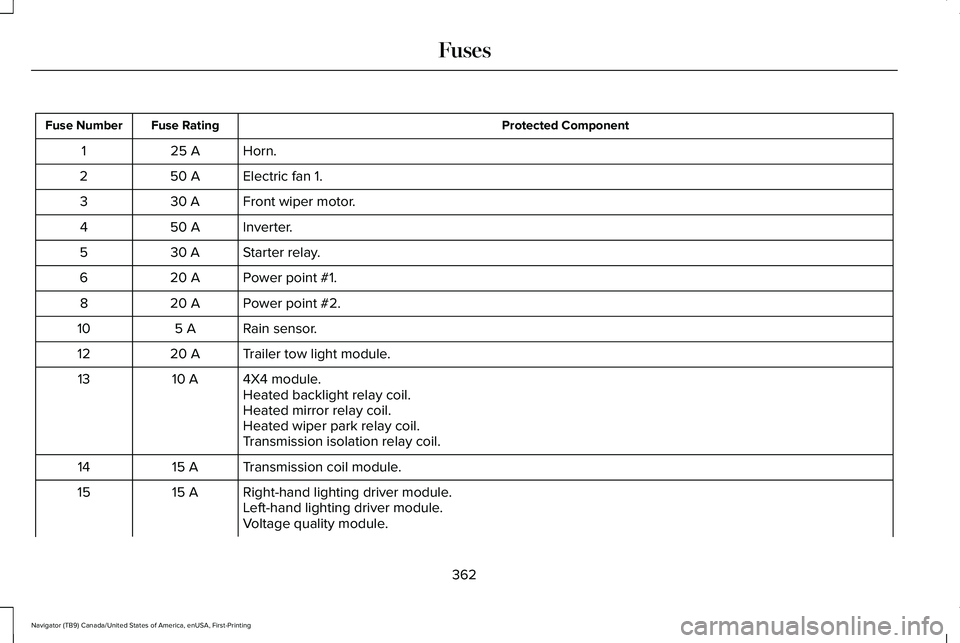
Protected Component
Fuse Rating
Fuse Number
Horn.
25 A
1
Electric fan 1.
50 A
2
Front wiper motor.
30 A
3
Inverter.
50 A
4
Starter relay.
30 A
5
Power point #1.
20 A
6
Power point #2.
20 A
8
Rain sensor.
5 A
10
Trailer tow light module.
20 A
12
4X4 module.
10 A
13
Heated backlight relay coil.
Heated mirror relay coil.
Heated wiper park relay coil.
Transmission isolation relay coil.
Transmission coil module.
15 A
14
Right-hand lighting driver module.
15 A
15
Left-hand lighting driver module.
Voltage quality module.
362
Navigator (TB9) Canada/United States of America, enUSA, First-Printing Fuses
Page 545 of 639
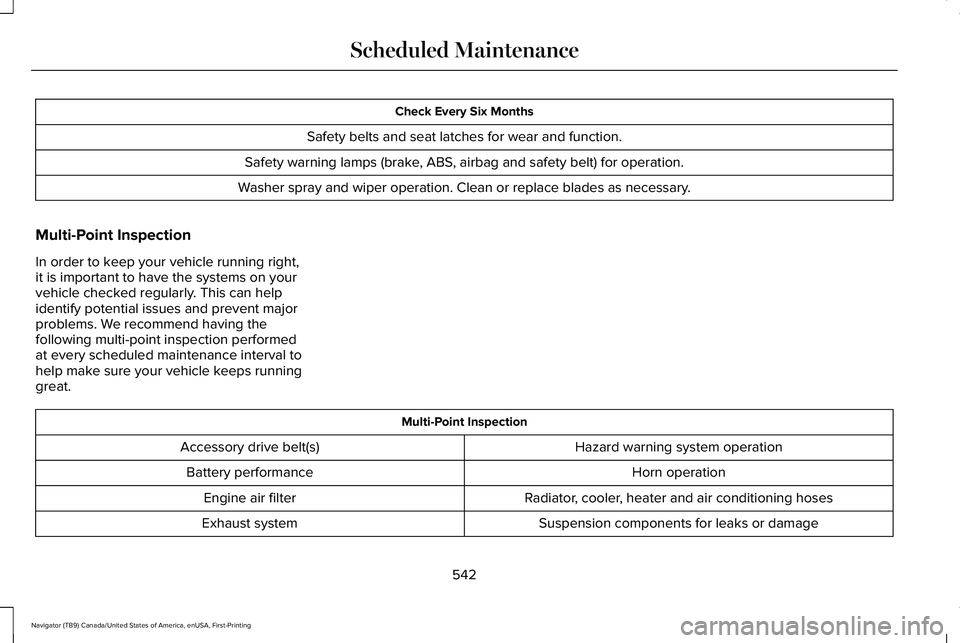
Check Every Six Months
Safety belts and seat latches for wear and function.
Safety warning lamps (brake, ABS, airbag and safety belt) for operation.
Washer spray and wiper operation. Clean or replace blades as necessary.
Multi-Point Inspection
In order to keep your vehicle running right,
it is important to have the systems on your
vehicle checked regularly. This can help
identify potential issues and prevent major
problems. We recommend having the
following multi-point inspection performed
at every scheduled maintenance interval to
help make sure your vehicle keeps running
great. Multi-Point Inspection
Hazard warning system operation
Accessory drive belt(s)
Horn operation
Battery performance
Radiator, cooler, heater and air conditioning hoses
Engine air filter
Suspension components for leaks or damage
Exhaust system
542
Navigator (TB9) Canada/United States of America, enUSA, First-Printing Scheduled Maintenance
Page 630 of 639
General Information on Radio
Frequencies..................................................69
Intelligent Access.................................................69
General Maintenance Information...........539 Multi-Point Inspection........................................542
Owner Checks and Services...........................540
Protecting Your Investment.............................539
Why Maintain Your Vehicle?............................539
Why Maintain Your Vehicle at Your
Dealership?......................................................539
Getting Assistance Outside the U.S. and Canada.........................................................355
Getting the Services You Need.................351 Away From Home...............................................351
Global Opening and Closing ......................120
Closing the Windows.........................................120
Opening the Windows.......................................120
H
Hazard Flashers............................................345
Headlamp Adjusting See: Adjusting the Headlamps.......................392
Headlamp Exit Delay.....................................112
Headlamp Leveling
........................................113
Headrest See: Head Restraints..........................................175 Head Restraints
..............................................175
Adjusting the Head Restraint...........................175
Front Seat Manual Head Restraints................
175
Head Up Display
...........................................162
Configuring The Head Up Display..................163
Head Up Display (HUD).....................................162
Head Up Display Information...........................162
Maintaining Your Head Up Display.................165
Heated Exterior Mirrors
................................171
Heated Rear Window....................................171
Heated Steering Wheel...............................104
Heating See: Climate Control..........................................166
Hill Descent Control....................................250 Principle of Operation.......................................250
Hill Start Assist..............................................244 Switching the System On and Off..................244
Using Hill Start Assist........................................244
Hints on Controlling the Interior Climate
..........................................................168
Defogging the Side Windows in Cold
Weather.............................................................169
General Hints.......................................................168
Quickly Cooling the Interior.............................
169
Quickly Heating the Interior.............................169
Recommended Settings for Cooling..............169
Recommended Settings for Heating..............169 Hints on Driving With Anti-Lock
Brakes..........................................................242
Hood Lock See: Opening and Closing the Hood............377
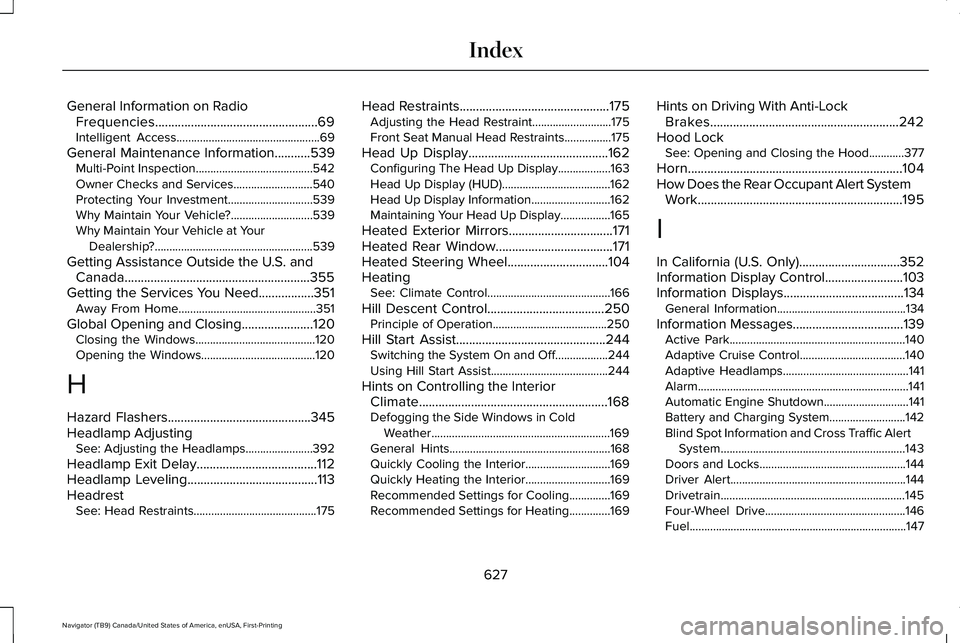
Horn..................................................................104
How Does the Rear Occupant Alert System Work...............................................................195
I
In California (U.S. Only)...............................352
Information Display Control........................103
Information Displays
.....................................134
General Information............................................134
Information Messages..................................139 Active Park............................................................140
Adaptive Cruise Control....................................140
Adaptive Headlamps...........................................141
Alarm........................................................................\
141
Automatic Engine Shutdown.............................141
Battery and Charging System..........................142
Blind Spot Information and Cross Traffic Alert
System...............................................................143
Doors and Locks..................................................144
Driver Alert............................................................144
Drivetrain...............................................................145
Four-Wheel Drive................................................146
Fuel........................................................................\
..147
627
Navigator (TB9) Canada/United States of America, enUSA, First-Printing Index