brake LINCOLN NAVIGATOR 2021 Owner's Manual
[x] Cancel search | Manufacturer: LINCOLN, Model Year: 2021, Model line: NAVIGATOR, Model: LINCOLN NAVIGATOR 2021Pages: 639, PDF Size: 6.09 MB
Page 159 of 639
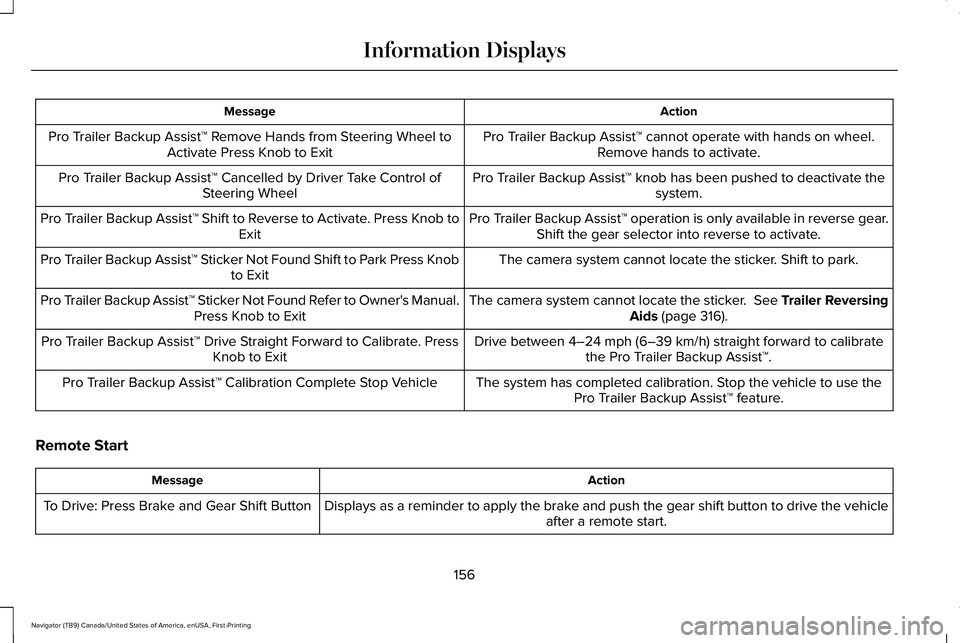
Action
Message
Pro Trailer Backup Assist™ cannot operate with hands on wheel.Remove hands to activate.
Pro Trailer Backup Assist™ Remove Hands from Steering Wheel to
Activate Press Knob to Exit
Pro Trailer Backup Assist™ knob has been pushed to deactivate thesystem.
Pro Trailer Backup Assist™ Cancelled by Driver Take Control of
Steering Wheel
Pro Trailer Backup Assist™ operation is only available in reverse gear.Shift the gear selector into reverse to activate.
Pro Trailer Backup Assist™ Shift to Reverse to Activate. Press Knob to
Exit
The camera system cannot locate the sticker. Shift to park.
Pro Trailer Backup Assist™ Sticker Not Found Shift to Park Press Knob
to Exit
The camera system cannot locate the sticker. See Trailer ReversingAids (page 316).
Pro Trailer Backup Assist™ Sticker Not Found Refer to Owner's Manual.
Press Knob to Exit
Drive between
4–24 mph (6–39 km/h) straight forward to calibrate
the Pro Trailer Backup Assist™.
Pro Trailer Backup Assist™ Drive Straight Forward to Calibrate. Press
Knob to Exit
The system has completed calibration. Stop the vehicle to use thePro Trailer Backup Assist™ feature.
Pro Trailer Backup Assist™ Calibration Complete Stop Vehicle
Remote Start Action
Message
Displays as a reminder to apply the brake and push the gear shift button to drive the vehicle after a remote start.
To Drive: Press Brake and Gear Shift Button
156
Navigator (TB9) Canada/United States of America, enUSA, First-Printing Information Displays
Page 161 of 639
Starting System
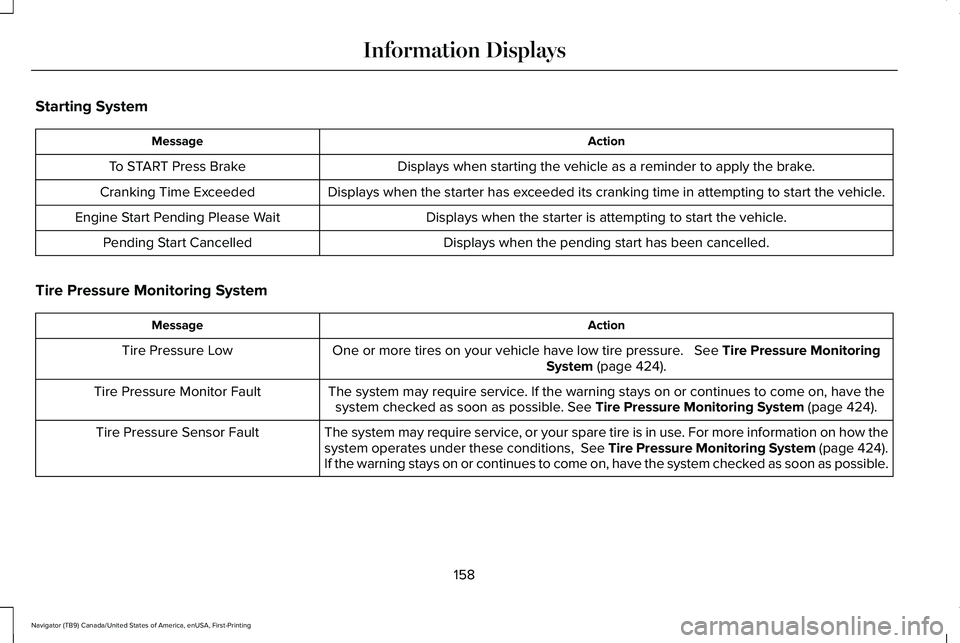
Action
Message
Displays when starting the vehicle as a reminder to apply the brake.
To START Press Brake
Displays when the starter has exceeded its cranking time in attempting to start the vehicle.
Cranking Time Exceeded
Displays when the starter is attempting to start the vehicle.
Engine Start Pending Please Wait
Displays when the pending start has been cancelled.
Pending Start Cancelled
Tire Pressure Monitoring System Action
Message
One or more tires on your vehicle have low tire pressure. See Tire Pressure Monitoring
System (page 424).
Tire Pressure Low
The system may require service. If the warning stays on or continues to come on, have thesystem checked as soon as possible.
See Tire Pressure Monitoring System (page 424).
Tire Pressure Monitor Fault
The system may require service, or your spare tire is in use. For more information on how the
system operates under these conditions, See Tire Pressure Monitoring System (page 424).
If the warning stays on or continues to come on, have the system checked as soon as possible.
Tire Pressure Sensor Fault
158
Navigator (TB9) Canada/United States of America, enUSA, First-Printing Information Displays
Page 162 of 639
Trailer
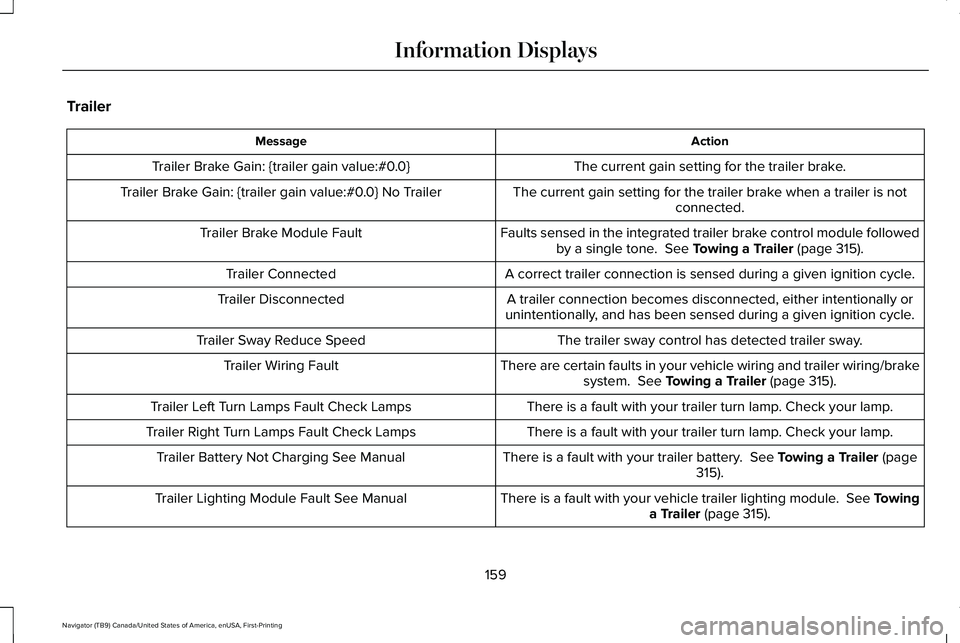
Action
Message
The current gain setting for the trailer brake.
Trailer Brake Gain: {trailer gain value:#0.0}
The current gain setting for the trailer brake when a trailer is notconnected.
Trailer Brake Gain: {trailer gain value:#0.0} No Trailer
Faults sensed in the integrated trailer brake control module followedby a single tone. See Towing a Trailer (page 315).
Trailer Brake Module Fault
A correct trailer connection is sensed during a given ignition cycle.
Trailer Connected
A trailer connection becomes disconnected, either intentionally or
unintentionally, and has been sensed during a given ignition cycle.
Trailer Disconnected
The trailer sway control has detected trailer sway.
Trailer Sway Reduce Speed
There are certain faults in your vehicle wiring and trailer wiring/brakesystem.
See Towing a Trailer (page 315).
Trailer Wiring Fault
There is a fault with your trailer turn lamp. Check your lamp.
Trailer Left Turn Lamps Fault Check Lamps
There is a fault with your trailer turn lamp. Check your lamp.
Trailer Right Turn Lamps Fault Check Lamps
There is a fault with your trailer battery.
See Towing a Trailer (page
315).
Trailer Battery Not Charging See Manual
There is a fault with your vehicle trailer lighting module. See Towinga Trailer
(page 315).
Trailer Lighting Module Fault See Manual
159
Navigator (TB9) Canada/United States of America, enUSA, First-Printing Information Displays
Page 163 of 639
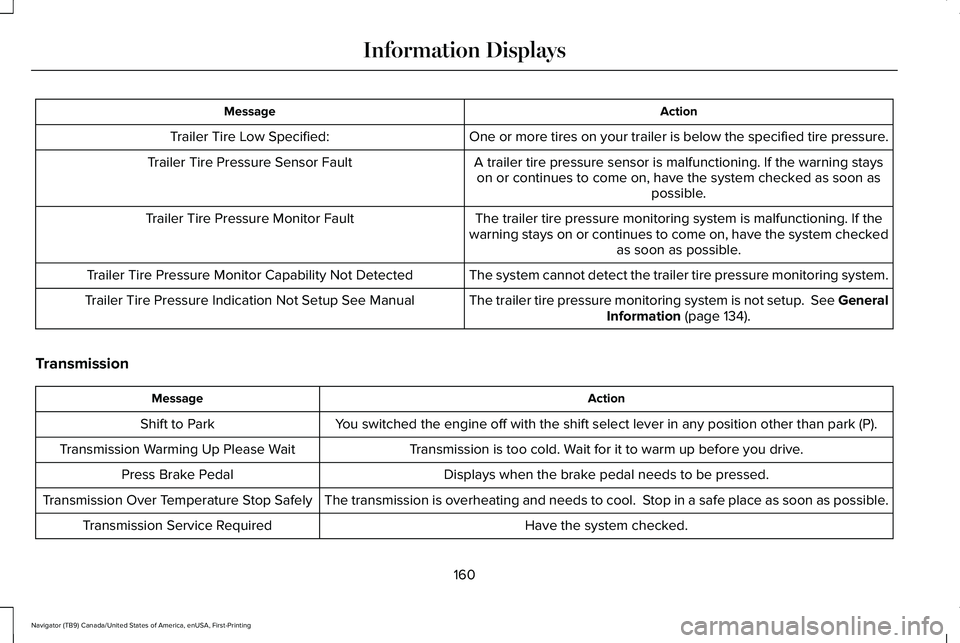
Action
Message
One or more tires on your trailer is below the specified tire pressure.
Trailer Tire Low Specified:
A trailer tire pressure sensor is malfunctioning. If the warning stayson or continues to come on, have the system checked as soon as possible.
Trailer Tire Pressure Sensor Fault
The trailer tire pressure monitoring system is malfunctioning. If the
warning stays on or continues to come on, have the system checked as soon as possible.
Trailer Tire Pressure Monitor Fault
The system cannot detect the trailer tire pressure monitoring system.
Trailer Tire Pressure Monitor Capability Not Detected
The trailer tire pressure monitoring system is not setup. See GeneralInformation (page 134).
Trailer Tire Pressure Indication Not Setup See Manual
Transmission Action
Message
You switched the engine off with the shift select lever in any position o\
ther than park (P).
Shift to Park
Transmission is too cold. Wait for it to warm up before you drive.
Transmission Warming Up Please Wait
Displays when the brake pedal needs to be pressed.
Press Brake Pedal
The transmission is overheating and needs to cool. Stop in a safe place as soon as possible.
Transmission Over Temperature Stop Safely
Have the system checked.
Transmission Service Required
160
Navigator (TB9) Canada/United States of America, enUSA, First-Printing Information Displays
Page 164 of 639
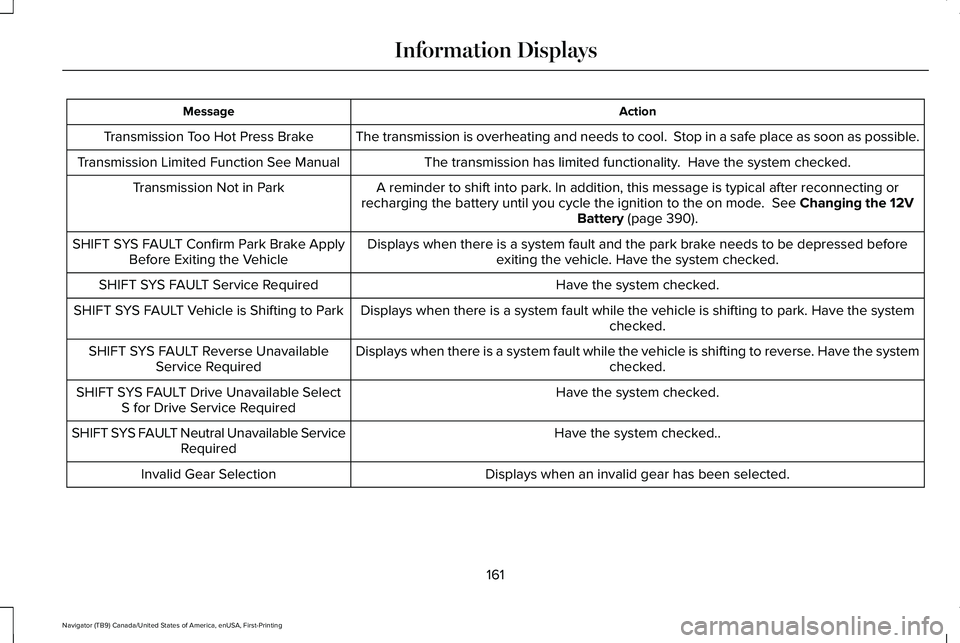
Action
Message
The transmission is overheating and needs to cool. Stop in a safe place as soon as possible.
Transmission Too Hot Press Brake
The transmission has limited functionality. Have the system checked.
Transmission Limited Function See Manual
A reminder to shift into park. In addition, this message is typical afte\
r reconnecting or
recharging the battery until you cycle the ignition to the on mode. See Changing the 12V
Battery (page 390).
Transmission Not in Park
Displays when there is a system fault and the park brake needs to be depressed beforeexiting the vehicle. Have the system checked.
SHIFT SYS FAULT Confirm Park Brake Apply
Before Exiting the Vehicle
Have the system checked.
SHIFT SYS FAULT Service Required
Displays when there is a system fault while the vehicle is shifting to p\
ark. Have the systemchecked.
SHIFT SYS FAULT Vehicle is Shifting to Park
Displays when there is a system fault while the vehicle is shifting to r\
everse. Have the systemchecked.
SHIFT SYS FAULT Reverse Unavailable
Service Required
Have the system checked.
SHIFT SYS FAULT Drive Unavailable Select
S for Drive Service Required
Have the system checked..
SHIFT SYS FAULT Neutral Unavailable Service
Required
Displays when an invalid gear has been selected.
Invalid Gear Selection
161
Navigator (TB9) Canada/United States of America, enUSA, First-Printing Information Displays
Page 165 of 639
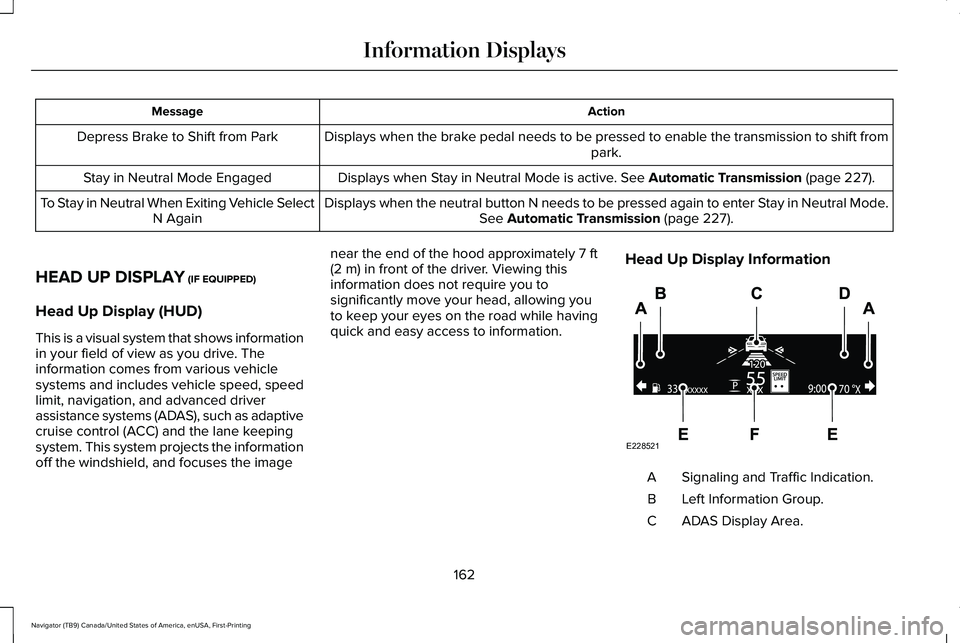
Action
Message
Displays when the brake pedal needs to be pressed to enable the transmission to shift from park.
Depress Brake to Shift from Park
Displays when Stay in Neutral Mode is active. See Automatic Transmission (page 227).
Stay in Neutral Mode Engaged
Displays when the neutral button N needs to be pressed again to enter Stay in Neutral Mode.See
Automatic Transmission (page 227).
To Stay in Neutral When Exiting Vehicle Select
N Again
HEAD UP DISPLAY
(IF EQUIPPED)
Head Up Display (HUD)
This is a visual system that shows information
in your field of view as you drive. The
information comes from various vehicle
systems and includes vehicle speed, speed
limit, navigation, and advanced driver
assistance systems (ADAS), such as adaptive
cruise control (ACC) and the lane keeping
system. This system projects the information
off the windshield, and focuses the image near the end of the hood approximately
7 ft
(2 m) in front of the driver. Viewing this
information does not require you to
significantly move your head, allowing you
to keep your eyes on the road while having
quick and easy access to information. Head Up Display Information Signaling and Traffic Indication.
A
Left Information Group.
B
ADAS Display Area.
C
162
Navigator (TB9) Canada/United States of America, enUSA, First-Printing Information DisplaysE228521
Page 208 of 639
CENTER CONSOLE
Stow items in the cup holder carefully as
items may become loose during hard
braking, acceleration or crashes, including
hot drinks which may spill.
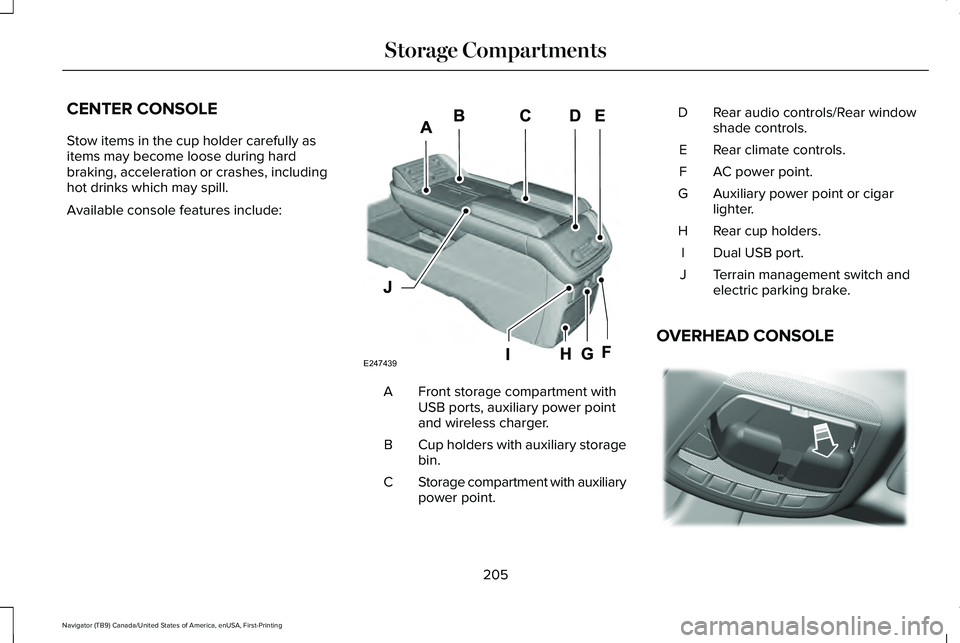
Available console features include:
Front storage compartment with
USB ports, auxiliary power point
and wireless charger.
A
Cup holders with auxiliary storage
bin.
B
Storage compartment with auxiliary
power point.
C Rear audio controls/Rear window
shade controls.
D
Rear climate controls.
E
AC power point.
F
Auxiliary power point or cigar
lighter.
G
Rear cup holders.
H
Dual USB port.
I
Terrain management switch and
electric parking brake.
J
OVERHEAD CONSOLE 205
Navigator (TB9) Canada/United States of America, enUSA, First-Printing Storage CompartmentsE247439 E332434
Page 211 of 639
Press the push button ignition switch once
without your foot on the brake pedal. It is on
the instrument panel near the steering wheel.
All electrical circuits and accessories are
operational and the warning lamps and
indicators illuminate.
Press the push button ignition switch again
without your foot on the brake pedal to
switch the ignition off.
STARTING A GASOLINE ENGINE
When you start the engine, the idle speed
increases.
This helps to warm up the engine. If the
engine idle speed does not slow down
automatically, have your vehicle checked by
an authorized dealer.
Note:
You can crank the engine for a total
of 60 seconds without the engine starting
before the starting system temporarily
disables. The 60 seconds does not have to
be all at once. For example, if you crank the
engine three times for 20 seconds each time,
without the engine starting, you reached the
60-second time limit. You cannot attempt
to start the engine for at least 15 minutes.
After 15 minutes, you are limited to a
15-second engine cranking time. You need
to wait 60 minutes before you can crank the
engine for 60 seconds again.
Before starting your vehicle, check the
following:
• Make sure all occupants have fastened
their seatbelts.
• Make sure the headlamps and electrical
accessories are off.
• Make sure the parking brake is on.
• Make sure the transmission is in park (P).
Note: Do not touch the accelerator pedal.
Note: You must have your intelligent access
key in your vehicle to shift the transmission
out of park (P). 1. Fully depress the brake pedal.
2. Press the push button ignition switch.
The system does not function if:
•
The passive key frequencies are jammed.
• The key battery has no charge.
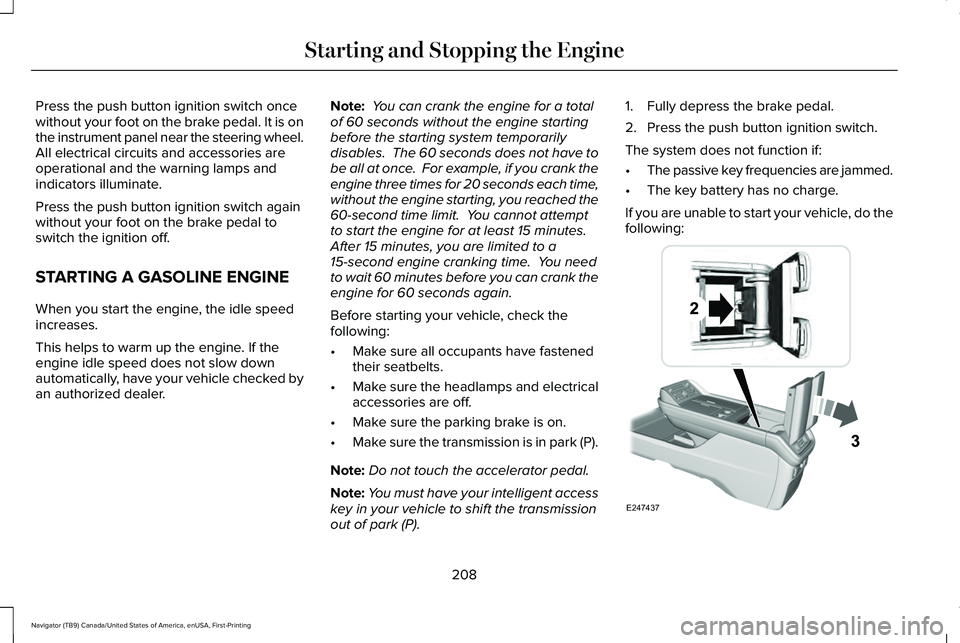
If you are unable to start your vehicle, do the
following: 208
Navigator (TB9) Canada/United States of America, enUSA, First-Printing Starting and Stopping the EngineE247437
Page 212 of 639
1. Open the floor console storage
compartment lid.
2. Insert the passive key into the backup slot.
3. With the passive key in this position, you
can use the push button ignition switch
to switch the ignition on and start your
vehicle.
Fast Restart
The fast restart feature allows you to restart
your vehicle within 20 seconds of switching
it off, even if it does not detect a valid
passive key.
Within 20 seconds of switching the engine
off, press the brake pedal and press the push
button ignition switch. After 20 seconds, you
can no longer start your vehicle if it does not
detect a valid passive key. Once your vehicle starts, it remains running
until you press the push button ignition
switch, even if your vehicle does not detect
a valid passive key. If you open and close a
door while your vehicle is running, the
system searches for a valid passive key. You
cannot start your vehicle if the system does
not detect a valid passive key within 20
seconds.
Failure to Start
If you cannot start the engine after three
attempts, wait 10 seconds and follow this
procedure:
1. Fully depress the brake pedal.
2. Shift into park (P).
3. Fully press the accelerator pedal and
hold it there.
4. Start the engine. Automatic Engine Shutdown
For vehicles with a keyless ignition, this
automatically shuts down your vehicle if it
has been idling for an extended period. The
ignition also turns off to save battery power.
Before your vehicle shuts down, a message
appears in the information display showing
a timer counting down. If you do not
intervene within 30 seconds, your vehicle
shuts down. Another message appears in
the information display to inform you that
your vehicle has shut down to save fuel.
Start your vehicle as normal.
Automatic Engine Shutdown Override
Note:
You cannot permanently switch off
the automatic shutdown. When you switch
it off temporarily, it turns on at the next
ignition cycle.
209
Navigator (TB9) Canada/United States of America, enUSA, First-Printing Starting and Stopping the Engine
Page 213 of 639
You can stop the shutdown, or reset the
timer, at any point before the 30-second
countdown has expired by doing any of the
following:
•
Interacting with your vehicle, for example
pressing the brake or accelerator pedal.
• You can temporarily switch off the
shutdown feature any time the ignition is
on using the information display. See
Information Displays (page 134). The
feature only remains off for the current
ignition cycle.
• During the 30-second countdown, the
system prompts you to press OK or
RESET to temporarily switch the feature
off for the current ignition cycle only.
Stopping the Engine When Your
Vehicle is Stationary
1. Shift into park (P).
2. Press the push button ignition switch.
3. Apply the parking brake.
Note: The ignition, all electrical circuits and
all warning lamps and indicators will be
turned off. Note:
If the engine is idling for 30 minutes,
the ignition and engine automatically shuts
down.
Stopping the Engine When Your
Vehicle is Moving WARNING:
Switching off the engine
when the vehicle is still moving will result
in a loss of brake and steering assistance.
The steering will not lock, but higher effort
will be required. When the ignition is
switched off, some electrical circuits,
including air bags, warning lamps and
indicators may also be off. If the ignition
was turned off accidentally, you can shift
into neutral (N) and re-start the engine.
1. Shift into neutral and use the brakes to bring your vehicle to a safe stop.
2. When your vehicle has stopped, shift into
park (P).
3. Press and hold the push button ignition switch, or press it three times within two
seconds.
4. Apply the parking brake. Guarding Against Exhaust Fumes WARNING: Exhaust leaks may result
in entry of harmful and potentially lethal
fumes into the passenger compartment. If
you smell exhaust fumes inside your
vehicle, have your vehicle inspected
immediately. Do not drive if you smell
exhaust fumes.
Important Ventilating Information
If you stop your vehicle and then leave the
engine idling for long periods, we
recommend that you do one of the following:
• Open the windows at least
1 in (3 cm).
• Set your climate control to outside air.
ENGINE BLOCK HEATER
(IF EQUIPPED) WARNING:
Failure to follow engine
block heater instructions could result in
property damage or serious personal
injury.
210
Navigator (TB9) Canada/United States of America, enUSA, First-Printing Starting and Stopping the Engine