lock LINCOLN NAVIGATOR 2021 Workshop Manual
[x] Cancel search | Manufacturer: LINCOLN, Model Year: 2021, Model line: NAVIGATOR, Model: LINCOLN NAVIGATOR 2021Pages: 639, PDF Size: 6.09 MB
Page 168 of 639
Maintaining Your Head Up Display
•
Do not place objects onto the transparent
cover, as they may block you from seeing
portions of the image. These objects
could also damage the cover and affect
the quality of the projected image.
• The system uses a special windshield
designed to provide the optimum image
quality. You must replace the windshield
in a vehicle with this system with a
certified original equipment
manufactured (OEM) head up display
windshield. Replacing this system's
windshield with a non-head up display
windshield causes a double image or
distorted image. Have an authorized
dealer or authorized repair facility replace
the windshield.
• Light conditions such as oncoming
headlamps, sunrise, sunset or reflections
off of wet road surfaces can affect the
driver's ability to see the HUD image.
• Clean the windshield often for optimal
HUD performance. See Cleaning the
Windows and Wiper Blades (page 399).
165
Navigator (TB9) Canada/United States of America, enUSA, First-Printing Information Displays
Page 173 of 639
Directing Air to the Rear Footwell Air
Vents
Press and release the button to
direct airflow to rear footwell air
vents.
Note: Air can be directed through any
combination of air vents.
Rear Climate Control Lock Indicator Illuminates when the rear climate
controls are locked through the
front climate controls.
Note: If the rear climate controls are locked
and the rear climate system is turned off, the
indicator illuminates for a few seconds when
you try to use any of the rear climate
controls. Setting the Rear Blower Motor Speed
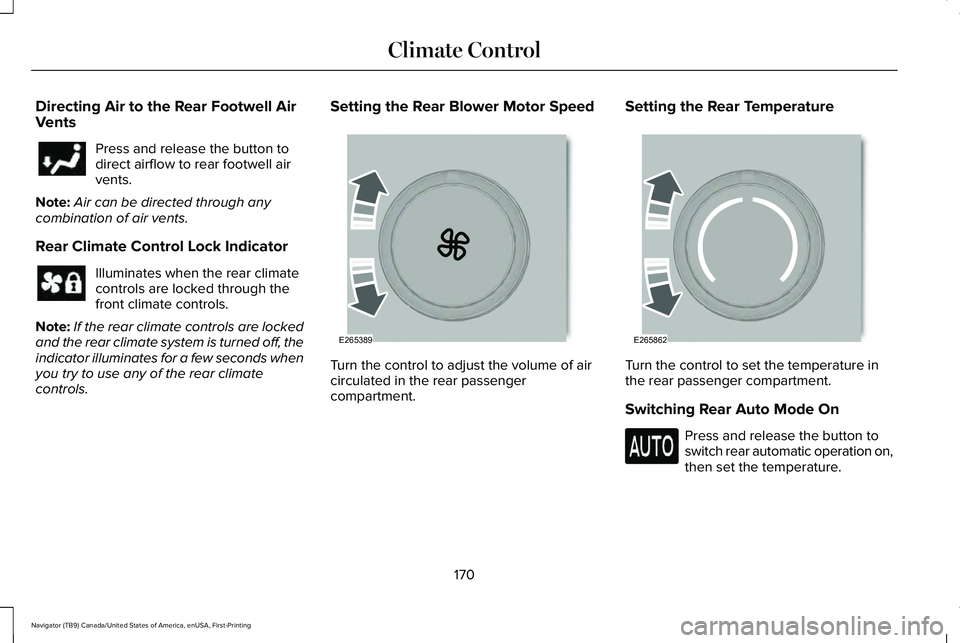
Turn the control to adjust the volume of air
circulated in the rear passenger
compartment.Setting the Rear Temperature
Turn the control to set the temperature in
the rear passenger compartment.
Switching Rear Auto Mode On
Press and release the button to
switch rear automatic operation on,
then set the temperature.
170
Navigator (TB9) Canada/United States of America, enUSA, First-Printing Climate Control E265389 E265862
Page 178 of 639
HEAD RESTRAINTS
WARNING: Fully adjust the head
restraint before you sit in or operate your
vehicle. This will help minimize the risk of
neck injury in the event of a crash. Do not
adjust the head restraint when your vehicle
is moving. WARNING:
The head restraint is a
safety device. Whenever possible it should
be installed and properly adjusted when
the seat is occupied. Failure to adjust the
head restraint properly could reduce its
effectiveness during certain impacts.
Note: Adjust the seat backrest to an upright
driving position before adjusting the head
restraint. Adjust the head restraint so that
the top of it is level with the top of your head
and as far forward as possible. Make sure
that you remain comfortable. If you are
extremely tall, adjust the head restraint to
its highest position. Front Seat Manual Head Restraints
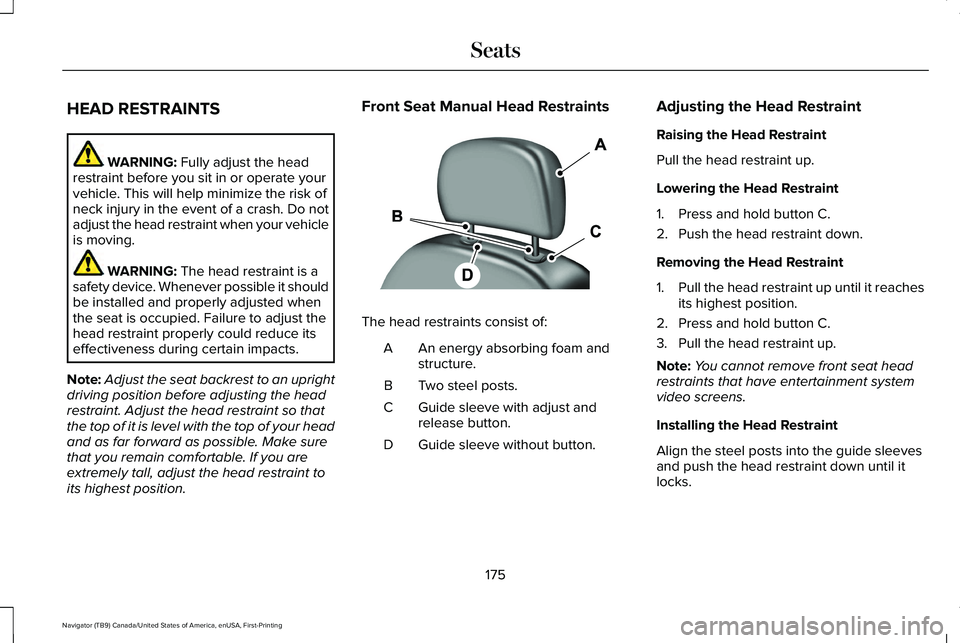
The head restraints consist of:
An energy absorbing foam and
structure.
A
Two steel posts.
B
Guide sleeve with adjust and
release button.
C
Guide sleeve without button.
D Adjusting the Head Restraint
Raising the Head Restraint
Pull the head restraint up.
Lowering the Head Restraint
1. Press and hold button C.
2. Push the head restraint down.
Removing the Head Restraint
1.
Pull the head restraint up until it reaches
its highest position.
2. Press and hold button C.
3. Pull the head restraint up.
Note: You cannot remove front seat head
restraints that have entertainment system
video screens.
Installing the Head Restraint
Align the steel posts into the guide sleeves
and push the head restraint down until it
locks.
175
Navigator (TB9) Canada/United States of America, enUSA, First-Printing SeatsE138642
Page 180 of 639
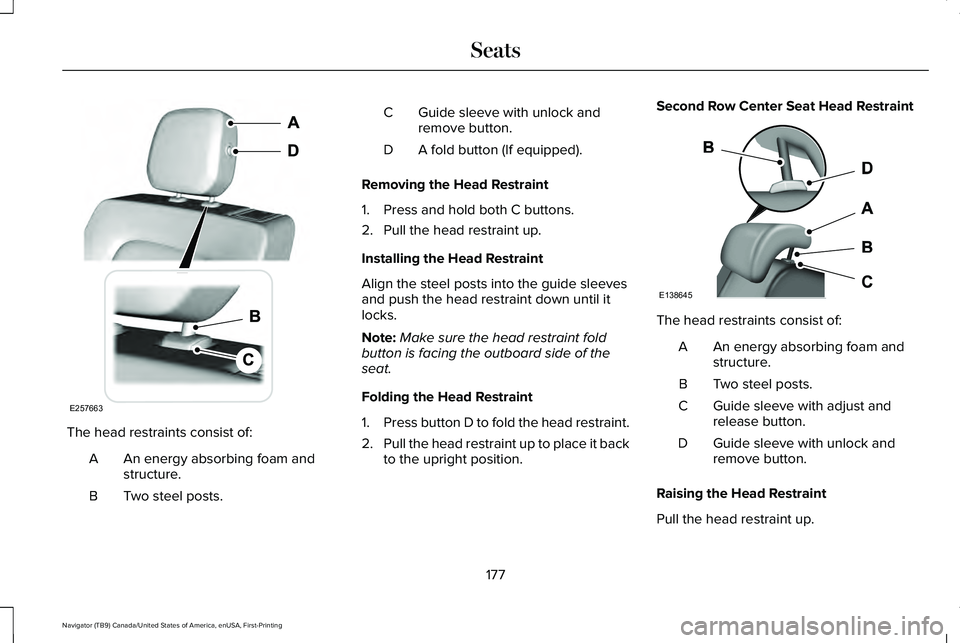
The head restraints consist of:
An energy absorbing foam and
structure.
A
Two steel posts.
B Guide sleeve with unlock and
remove button.
C
A fold button (If equipped).
D
Removing the Head Restraint
1. Press and hold both C buttons.
2. Pull the head restraint up.
Installing the Head Restraint
Align the steel posts into the guide sleeves
and push the head restraint down until it
locks.
Note: Make sure the head restraint fold
button is facing the outboard side of the
seat.
Folding the Head Restraint
1. Press button D to fold the head restraint.
2. Pull the head restraint up to place it back
to the upright position. Second Row Center Seat Head Restraint
The head restraints consist of:
An energy absorbing foam and
structure.
A
Two steel posts.
B
Guide sleeve with adjust and
release button.
C
Guide sleeve with unlock and
remove button.
D
Raising the Head Restraint
Pull the head restraint up.
177
Navigator (TB9) Canada/United States of America, enUSA, First-Printing SeatsE257663 E138645
Page 181 of 639
Lowering the Head Restraint
1. Press and hold button C.
2. Push the head restraint down.
Removing the Head Restraint
1.
Pull the head restraint up until it reaches
its highest position.
2. Press and hold buttons C and D.
3. Pull the head restraint up.
Installing the Head Restraint
Align the steel posts into the guide sleeves
and push the head restraint down until it
locks.
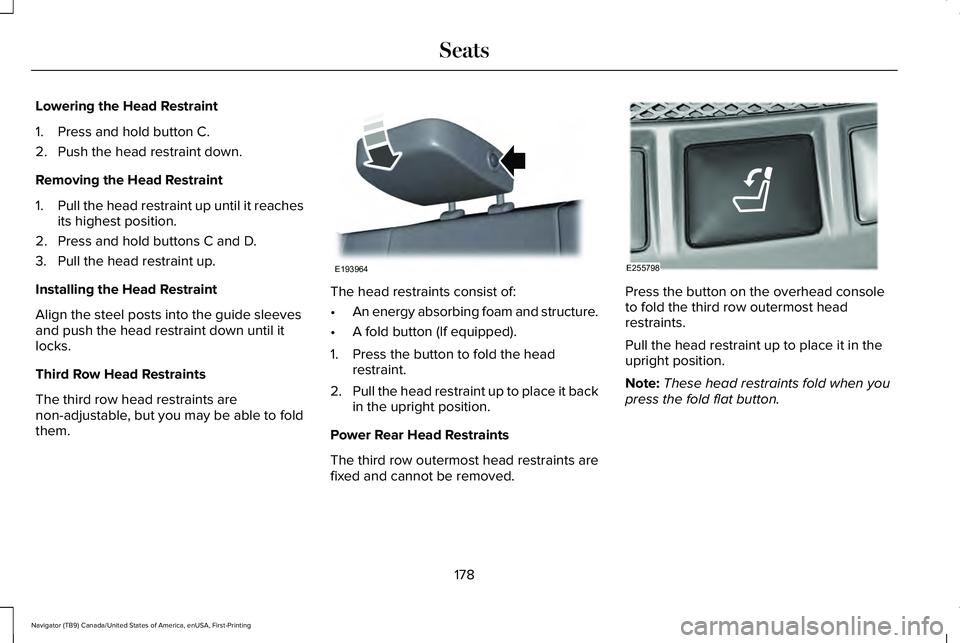
Third Row Head Restraints
The third row head restraints are
non-adjustable, but you may be able to fold
them. The head restraints consist of:
•
An energy absorbing foam and structure.
• A fold button (If equipped).
1. Press the button to fold the head restraint.
2. Pull the head restraint up to place it back
in the upright position.
Power Rear Head Restraints
The third row outermost head restraints are
fixed and cannot be removed. Press the button on the overhead console
to fold the third row outermost head
restraints.
Pull the head restraint up to place it in the
upright position.
Note:
These head restraints fold when you
press the fold flat button.
178
Navigator (TB9) Canada/United States of America, enUSA, First-Printing SeatsE193964 E255798
Page 187 of 639
You can save up to three preset memory
positions. You can save a memory preset at
any time.
Recalling a PreSet Position
Press and release the preset button
associated with your preferred driving
position. The memory features move to the
position stored for that preset.
Note:
You can only recall a driver seat preset
memory position when the ignition is off, or
when the transmission is in park (P) or
neutral (N) (and your vehicle is not moving)
if the ignition is on.
You can also recall a preset memory position
by:
• Pressing the unlock button on your
intelligent access key fob if it is linked to
a preset position.
• Unlocking the intelligent driver door
handle if a linked key fob is present.
• Recalling a personal profile in your SYNC
3 menu. Note:
Using a linked remote control to recall
your memory position when the ignition is
off moves the seat to the Easy Entry position.
Note: Pressing any active memory feature
adjustment control (or any memory button)
during a memory recall cancels the
operation.
Easy Entry and Exit Feature
If you enable the easy entry and exit feature,
it automatically moves the driver seat
position rearward up to 2 in (5 cm) when you
switch the ignition off.
The driver seat returns to its previous
position when you switch the ignition on.
You can switch this feature on or off in the
information display.
See Information
Displays (page 134).
Passenger Seat Memory
This feature recalls the position of the
passenger seat. The memory control is on
the passenger door. Saving a PreSet Position
1. Adjust the passenger seat to your
preferred position.
2. Press and hold the preferred preset button until you hear a single tone.
You can save up to three preset memory
positions. You can save a memory preset at
any time.
Recalling a PreSet Position
Press and release the preset button
associated with your preferred position. The
passenger seat features move to the position
stored for that preset. You can recall a
passenger seat preset memory at any time.
184
Navigator (TB9) Canada/United States of America, enUSA, First-Printing Seats
Page 189 of 639
Note:
Non-positional settings are saved to
the active driver profile whenever you
change a setting.
Note: You can save positional settings if you
press and hold a memory seat button. See
Settings (page 515).
Recalling and Changing a Profile
You can recall a profile by:
• Using a remote control or mobile device
that has been linked to a driver profile to
access the remote start feature, press an
unlock button or open the door with the
exterior door handle.
• Pressing a memory seat button that has
been linked to a driver profile.
• Using the Personal Profiles menu on the
SYNC touchscreen.
Note: The recalled profile replaces the
previously active profile. If the active profile
is not your preferred profile, you can change
it using any of the three methods listed. When you switch on the personal profiles
feature:
•
Unlocking a door with a remote control
or mobile device that is not linked to a
driver profile recalls non-positional
settings from the guest profile. It will not
change the positional settings.
• Pressing a memory seat button that is
not linked to a driver profile or has not
been saved to a preset setting recalls
non-positional settings from the guest
profile. It will not change the positional
settings.
• Pressing a memory seat button that is
not linked to a driver profile but has been
saved to a preset setting recalls
non-positional settings from the guest
profile. It recalls the positional settings
that you saved to that memory seat
button.
See
SYNC™ 3 Troubleshooting (page 517). When you switch off the personal profiles
feature:
•
Unlocking a door with a remote control
or mobile device recalls non-positional
settings from the guest profile and still
recalls positional settings from the driver
profile which the keyfob had been linked
to.
• Pressing a memory seat button that has
not been linked to a driver profile or has
not been saved to a preset setting recalls
non-positional settings from the guest
profile. It will not change the positional
settings.
• Pressing a memory seat button that has
been linked to a driver profile or has
saved to a preset setting recalls
non-positional settings from the guest
profile. It recalls the positional settings
that you saved to that memory seat
button.
186
Navigator (TB9) Canada/United States of America, enUSA, First-Printing Seats
Page 190 of 639
REAR SEATS
Folding the Second Row Outermost
Seats
WARNING: Do not place cargo or
any objects behind the seat backrest
before returning it to the original position.
Pull on the seat backrest to make sure that
it has fully latched after returning the seat
backrest to its original position. An
unlatched seat may become dangerous if
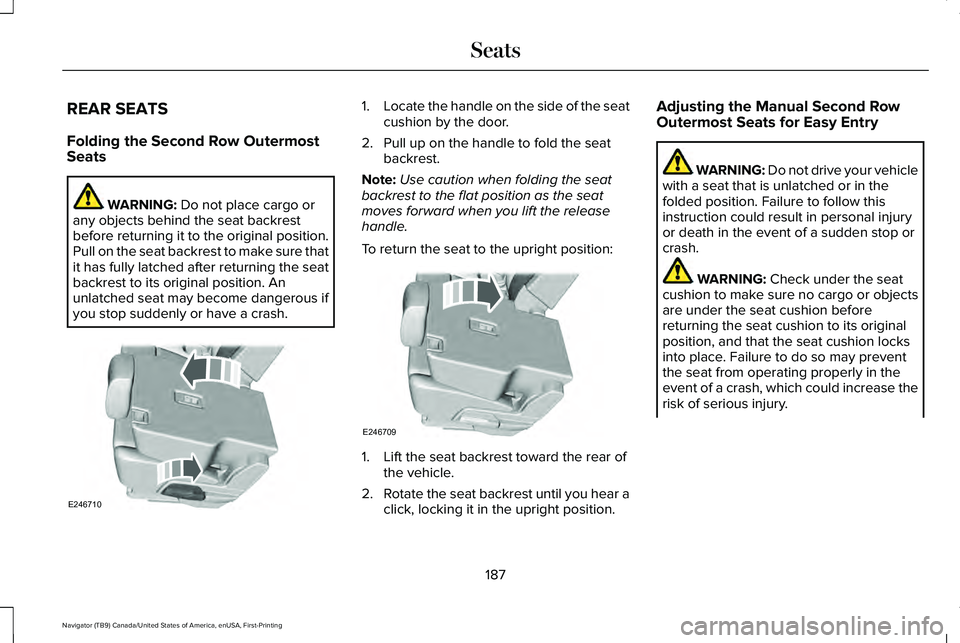
you stop suddenly or have a crash. 1.
Locate the handle on the side of the seat
cushion by the door.
2. Pull up on the handle to fold the seat backrest.
Note: Use caution when folding the seat
backrest to the flat position as the seat
moves forward when you lift the release
handle.
To return the seat to the upright position: 1. Lift the seat backrest toward the rear of
the vehicle.
2. Rotate the seat backrest until you hear a
click, locking it in the upright position. Adjusting the Manual Second Row
Outermost Seats for Easy Entry WARNING: Do not drive your vehicle
with a seat that is unlatched or in the
folded position. Failure to follow this
instruction could result in personal injury
or death in the event of a sudden stop or
crash. WARNING:
Check under the seat
cushion to make sure no cargo or objects
are under the seat cushion before
returning the seat cushion to its original
position, and that the seat cushion locks
into place. Failure to do so may prevent
the seat from operating properly in the
event of a crash, which could increase the
risk of serious injury.
187
Navigator (TB9) Canada/United States of America, enUSA, First-Printing SeatsE246710 E246709
Page 192 of 639
WARNING: Check under the seat
cushion to make sure no cargo or objects
are under the seat cushion before
returning the seat cushion to its original
position, and that the seat cushion locks
into place. Failure to do so may prevent
the seat from operating properly in the
event of a crash, which could increase the
risk of serious injury. WARNING:
Do not place cargo or
any objects behind the seat backrest
before returning it to the original position.
Pull on the seat backrest to make sure that
it has fully latched after returning the seat
backrest to its original position. An
unlatched seat may become dangerous if
you stop suddenly or have a crash.
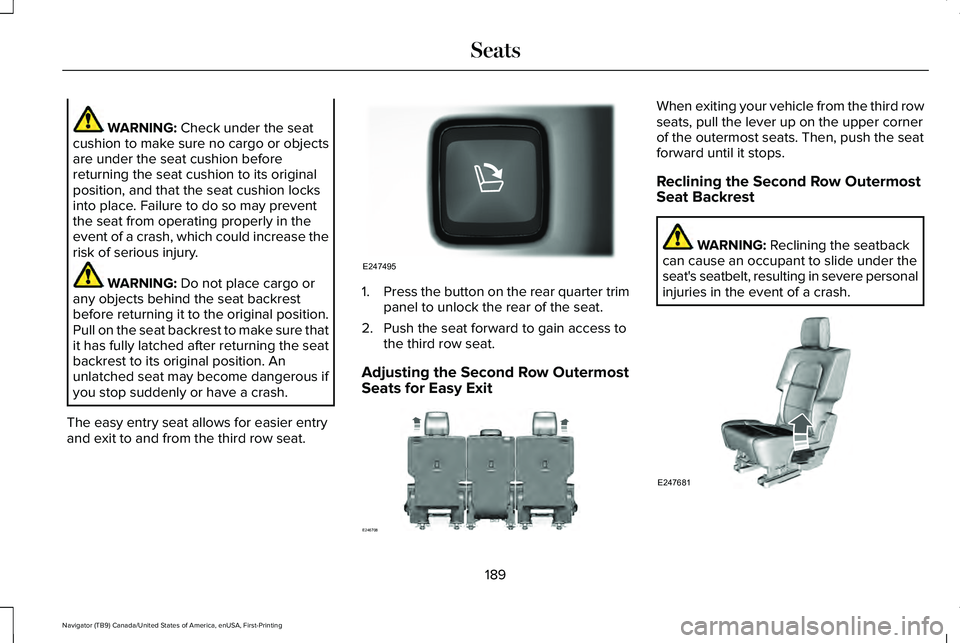
The easy entry seat allows for easier entry
and exit to and from the third row seat. 1.
Press the button on the rear quarter trim
panel to unlock the rear of the seat.
2. Push the seat forward to gain access to the third row seat.
Adjusting the Second Row Outermost
Seats for Easy Exit When exiting your vehicle from the third row
seats, pull the lever up on the upper corner
of the outermost seats. Then, push the seat
forward until it stops.
Reclining the Second Row Outermost
Seat Backrest
WARNING:
Reclining the seatback
can cause an occupant to slide under the
seat's seatbelt, resulting in severe personal
injuries in the event of a crash. 189
Navigator (TB9) Canada/United States of America, enUSA, First-Printing SeatsE247495 E246708 E247681
Page 193 of 639
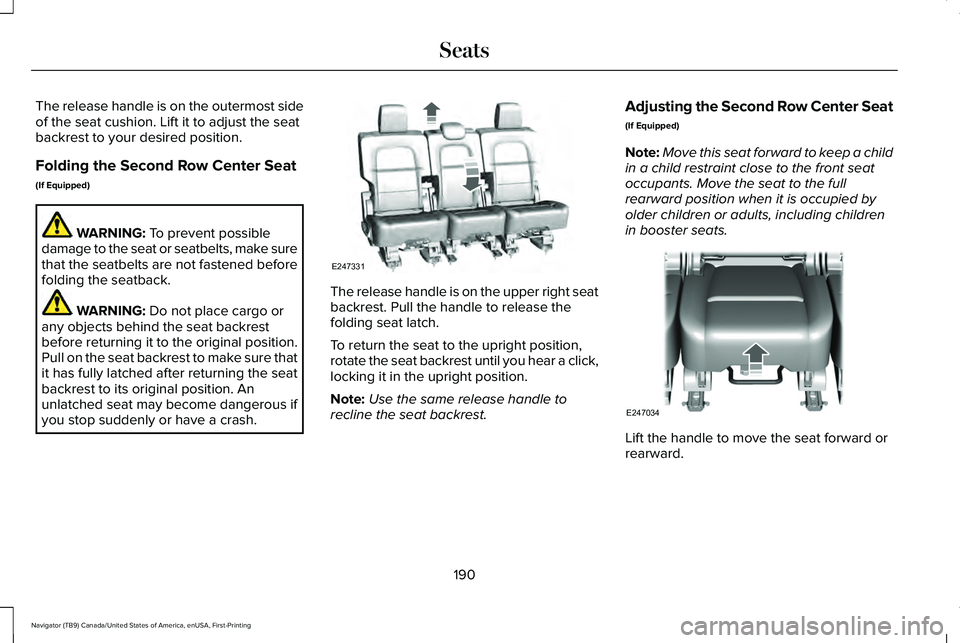
The release handle is on the outermost side
of the seat cushion. Lift it to adjust the seat
backrest to your desired position.
Folding the Second Row Center Seat
(If Equipped)
WARNING: To prevent possible
damage to the seat or seatbelts, make sure
that the seatbelts are not fastened before
folding the seatback. WARNING:
Do not place cargo or
any objects behind the seat backrest
before returning it to the original position.
Pull on the seat backrest to make sure that
it has fully latched after returning the seat
backrest to its original position. An
unlatched seat may become dangerous if
you stop suddenly or have a crash. The release handle is on the upper right seat
backrest. Pull the handle to release the
folding seat latch.
To return the seat to the upright position,
rotate the seat backrest until you hear a click,
locking it in the upright position.
Note:
Use the same release handle to
recline the seat backrest. Adjusting the Second Row Center Seat
(If Equipped)
Note:
Move this seat forward to keep a child
in a child restraint close to the front seat
occupants. Move the seat to the full
rearward position when it is occupied by
older children or adults, including children
in booster seats. Lift the handle to move the seat forward or
rearward.
190
Navigator (TB9) Canada/United States of America, enUSA, First-Printing SeatsE247331 E247034