sensor LINCOLN NAVIGATOR 2021 Workshop Manual
[x] Cancel search | Manufacturer: LINCOLN, Model Year: 2021, Model line: NAVIGATOR, Model: LINCOLN NAVIGATOR 2021Pages: 639, PDF Size: 6.09 MB
Page 302 of 639
Brake Support: The system helps reduce
the impact speed by preparing the brakes
for rapid braking. Brake support does not
apply the brakes. If you press the brake
pedal, the system could apply additional
braking up to maximum braking force, even
if you lightly press the brake pedal.
Active Braking
: Active braking may activate
if the system determines that a collision is
imminent. The system may help the driver
reduce impact damage or avoid the crash
completely.
Note: Brake Support and Active Braking are
active at speeds up to 74.6 mph (120 km/h).
If the vehicle has a radar sensor or Adaptive
Cruise Control, then Brake Support and
Active Braking are active up to the maximum
speed of the vehicle.
Note: The system disables when you select
the Slow Climb or Deep Conditions drive
modes. Note:
If you perceive Pre-Collision Assist
alerts as being too frequent or disturbing,
then you can reduce the alert sensitivity,
though the manufacturer recommends using
the highest sensitivity setting where possible.
Setting lower sensitivity would lead to fewer
and later system warnings.
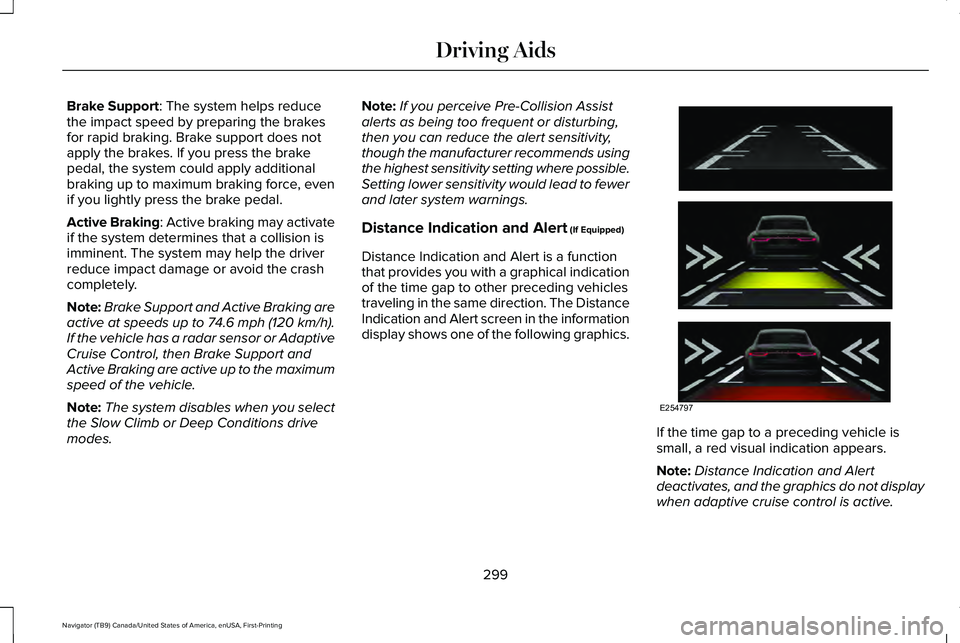
Distance Indication and Alert (If Equipped)
Distance Indication and Alert is a function
that provides you with a graphical indication
of the time gap to other preceding vehicles
traveling in the same direction. The Distance
Indication and Alert screen in the information
display shows one of the following graphics. If the time gap to a preceding vehicle is
small, a red visual indication appears.
Note:
Distance Indication and Alert
deactivates, and the graphics do not display
when adaptive cruise control is active.
299
Navigator (TB9) Canada/United States of America, enUSA, First-Printing Driving AidsE254797
Page 303 of 639
Time Gap
Distance Gap
Graphics
Sensitivity
Speed
>0.9sec
>82 ft (25 m)
Grey
Normal
62 mph (100 km/h)
0.6sec — 0.9sec
56–82 ft (17–25 m)
Yellow
Normal
62 mph (100 km/h)
<0.6sec
<
56 ft (17 m)
Red
Normal
62 mph (100 km/h)
Adjusting the Pre-Collision Assist
Settings
You can adjust the following settings by
using the information display controls.
See
General Information (page 134).
• You can adjust the Alert and Distance
Alert sensitivity to one of three settings.
• You can switch the Distance Indication
and Alert function on or off.
• If required, you can switch Active Braking
on or off.
Note: Active braking automatically turns on
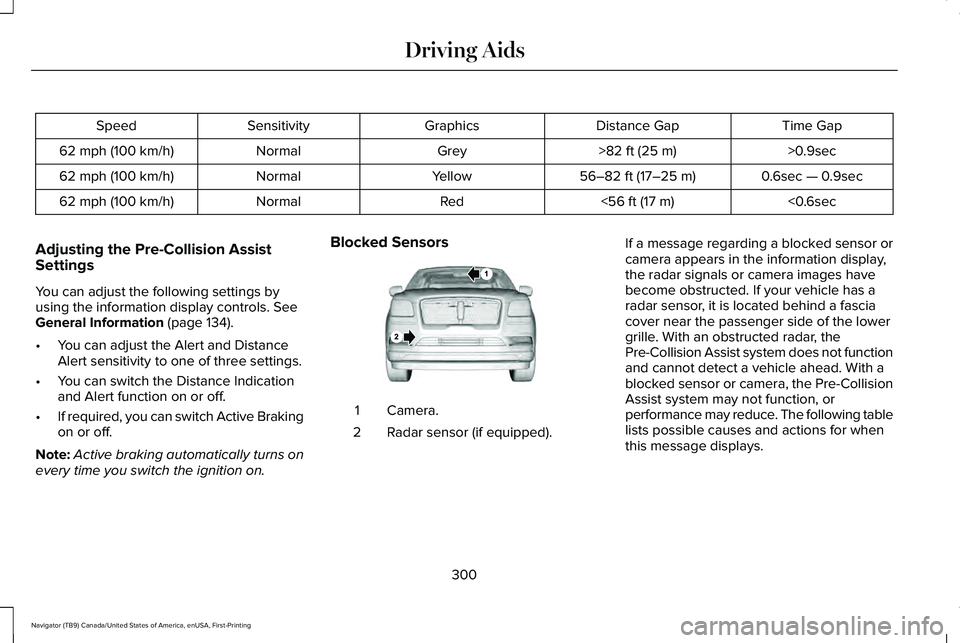
every time you switch the ignition on. Blocked Sensors
Camera.
1
Radar sensor (if equipped).
2 If a message regarding a blocked sensor or
camera appears in the information display,
the radar signals or camera images have
become obstructed. If your vehicle has a
radar sensor, it is located behind a fascia
cover near the passenger side of the lower
grille. With an obstructed radar, the
Pre-Collision Assist system does not function
and cannot detect a vehicle ahead. With a
blocked sensor or camera, the Pre-Collision
Assist system may not function, or
performance may reduce. The following table
lists possible causes and actions for when
this message displays.
300
Navigator (TB9) Canada/United States of America, enUSA, First-Printing Driving AidsE253503
Page 306 of 639
Note:
If your vehicle detects excessive heat
at the camera or a potential misalignment
condition, a message may display in the
information display indicating temporary
sensor unavailability. When operational
conditions are correct, the message
deactivates. For example, when the ambient
temperature around the sensor decreases
or the sensor automatically recalibrates
successfully.
DRIVE MODE CONTROL
Lincoln Drive Modes
Lincoln Drive Modes deliver a driving
experience through a suite of sophisticated
electronic vehicle systems. These systems
optimize steering, handling and powertrain
response. You can control performance
settings for multiple systems from this single
location.
Changing the drive mode automatically
changes the functionality of the following
systems: •
Electronically power-assisted steering
system adjusts steering effort and feel
based on the mode you select. See
Steering (page 297).
• Electronic stability control and traction
control maintain your vehicle control in
adverse conditions or high performance
driving. See Stability Control (page 248).
• Electronic throttle control enhances the
powertrain response to your inputs.
• Transmission controls optimize with shift
schedules tuned to each mode.
• Driveline settings optimize for each
mode.
Using the System
The system automatically tailors your vehicle
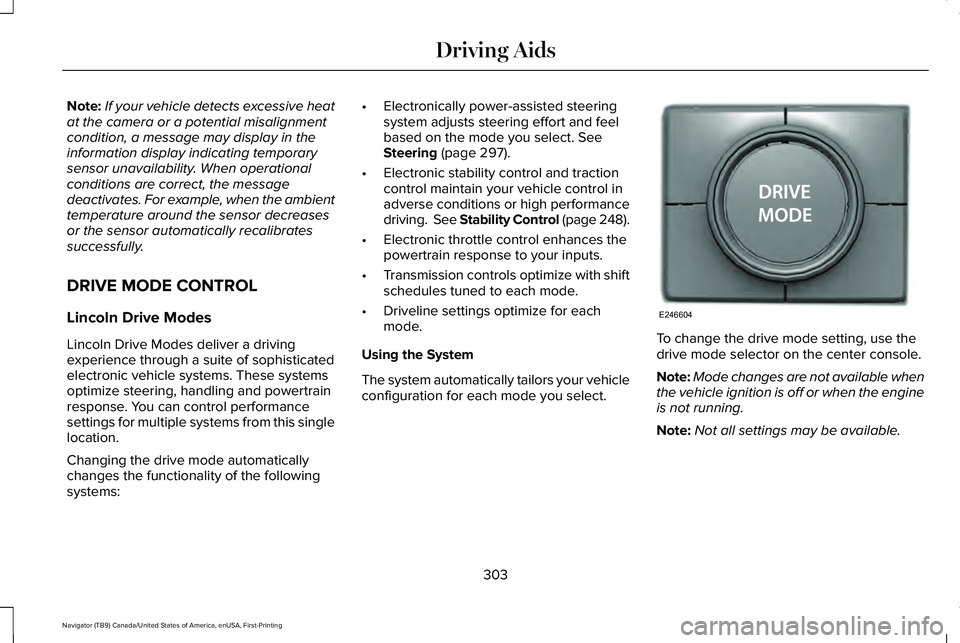
configuration for each mode you select. To change the drive mode setting, use the
drive mode selector on the center console.
Note:
Mode changes are not available when
the vehicle ignition is off or when the engine
is not running.
Note: Not all settings may be available.
303
Navigator (TB9) Canada/United States of America, enUSA, First-Printing Driving AidsE246604
Page 365 of 639
Protected Component
Fuse Rating
Fuse Number
Horn.
25 A
1
Electric fan 1.
50 A
2
Front wiper motor.
30 A
3
Inverter.
50 A
4
Starter relay.
30 A
5
Power point #1.
20 A
6
Power point #2.
20 A
8
Rain sensor.
5 A
10
Trailer tow light module.
20 A
12
4X4 module.
10 A
13
Heated backlight relay coil.
Heated mirror relay coil.
Heated wiper park relay coil.
Transmission isolation relay coil.
Transmission coil module.
15 A
14
Right-hand lighting driver module.
15 A
15
Left-hand lighting driver module.
Voltage quality module.
362
Navigator (TB9) Canada/United States of America, enUSA, First-Printing Fuses
Page 366 of 639
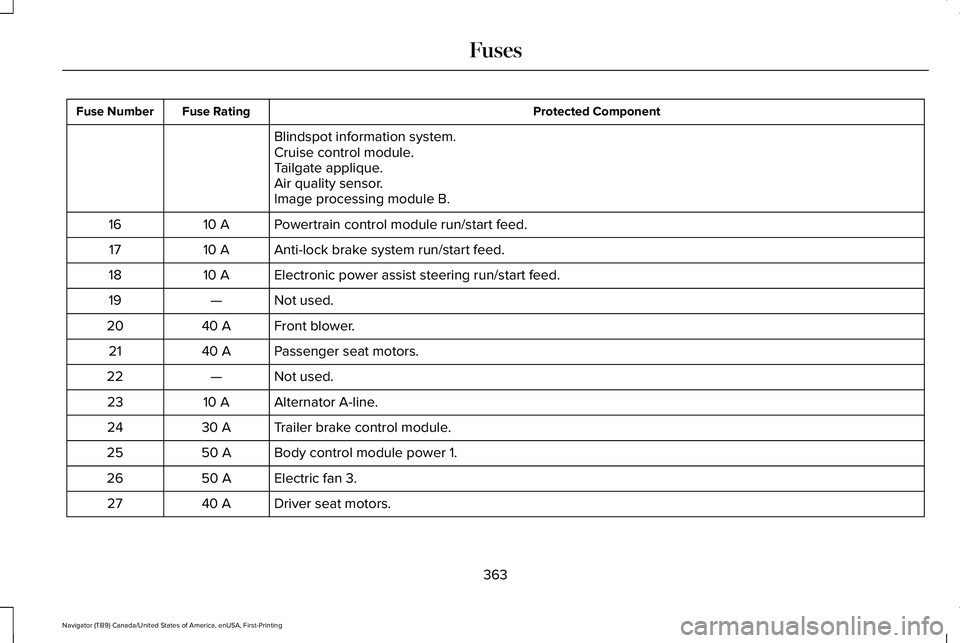
Protected Component
Fuse Rating
Fuse Number
Blindspot information system.
Cruise control module.
Tailgate applique.
Air quality sensor.
Image processing module B.
Powertrain control module run/start feed.
10 A
16
Anti-lock brake system run/start feed.
10 A
17
Electronic power assist steering run/start feed.
10 A
18
Not used.
—
19
Front blower.
40 A
20
Passenger seat motors.
40 A
21
Not used.
—
22
Alternator A-line.
10 A
23
Trailer brake control module.
30 A
24
Body control module power 1.
50 A
25
Electric fan 3.
50 A
26
Driver seat motors.
40 A
27
363
Navigator (TB9) Canada/United States of America, enUSA, First-Printing Fuses
Page 374 of 639
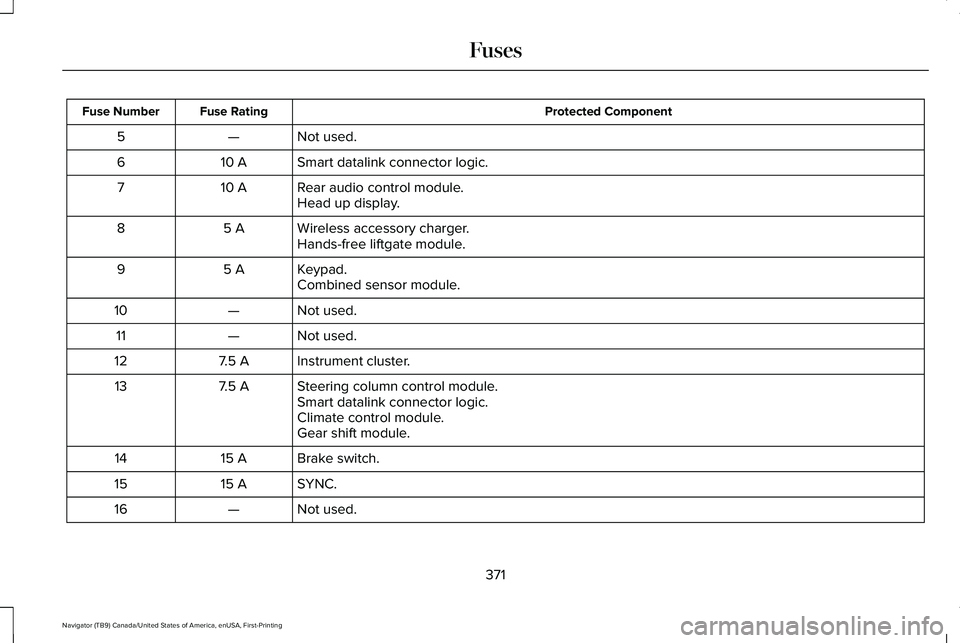
Protected Component
Fuse Rating
Fuse Number
Not used.
—
5
Smart datalink connector logic.
10 A
6
Rear audio control module.
10 A
7
Head up display.
Wireless accessory charger.
5 A
8
Hands-free liftgate module.
Keypad.
5 A
9
Combined sensor module.
Not used.
—
10
Not used.
—
11
Instrument cluster.
7.5 A
12
Steering column control module.
7.5 A
13
Smart datalink connector logic.
Climate control module.
Gear shift module.
Brake switch.
15 A
14
SYNC.
15 A
15
Not used.
—
16
371
Navigator (TB9) Canada/United States of America, enUSA, First-Printing Fuses
Page 375 of 639
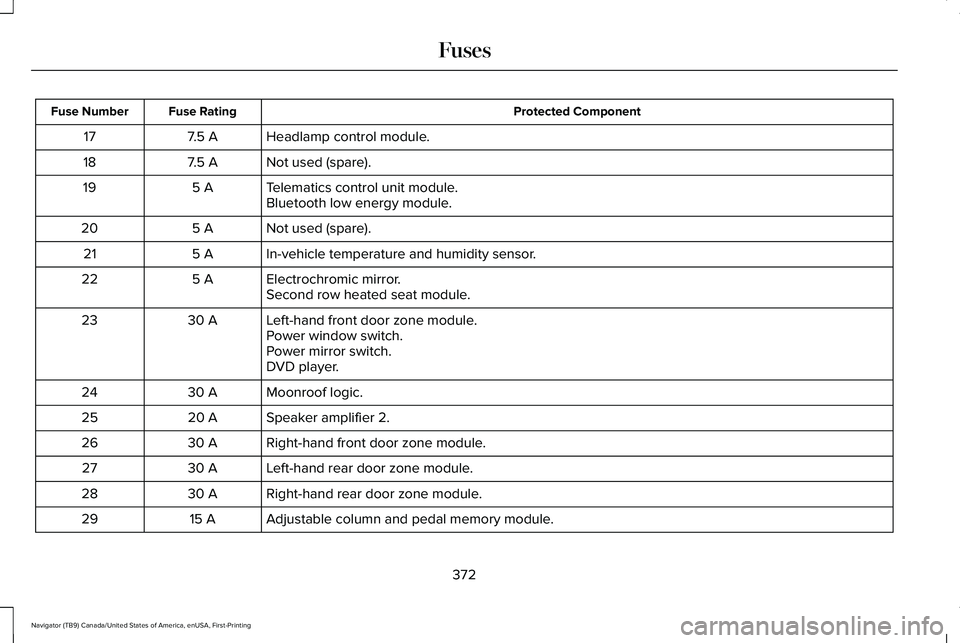
Protected Component
Fuse Rating
Fuse Number
Headlamp control module.
7.5 A
17
Not used (spare).
7.5 A
18
Telematics control unit module.
5 A
19
Bluetooth low energy module.
Not used (spare).
5 A
20
In-vehicle temperature and humidity sensor.
5 A
21
Electrochromic mirror.
5 A
22
Second row heated seat module.
Left-hand front door zone module.
30 A
23
Power window switch.
Power mirror switch.
DVD player.
Moonroof logic.
30 A
24
Speaker amplifier 2.
20 A
25
Right-hand front door zone module.
30 A
26
Left-hand rear door zone module.
30 A
27
Right-hand rear door zone module.
30 A
28
Adjustable column and pedal memory module.
15 A
29
372
Navigator (TB9) Canada/United States of America, enUSA, First-Printing Fuses
Page 376 of 639
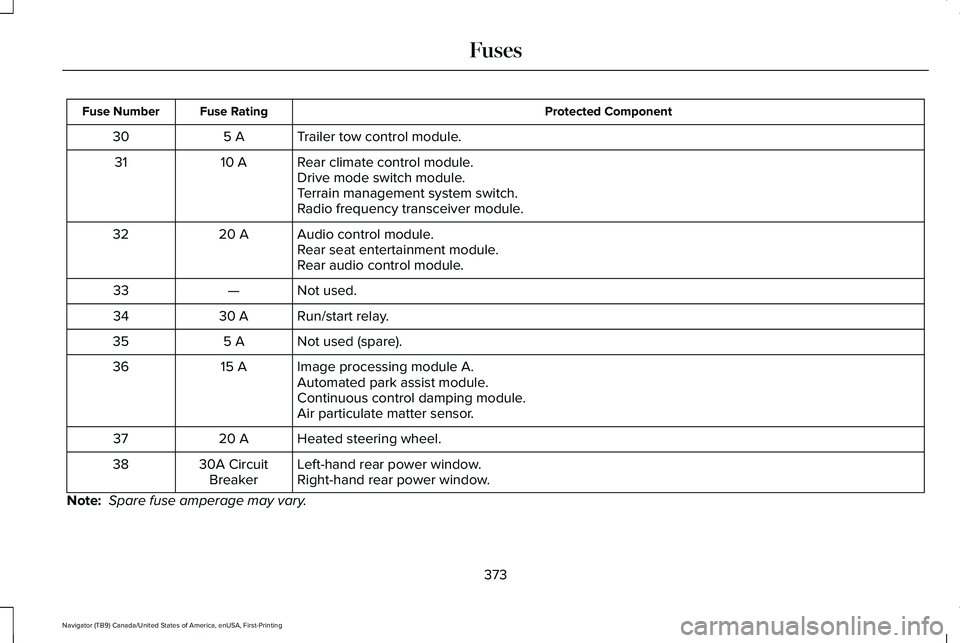
Protected Component
Fuse Rating
Fuse Number
Trailer tow control module.
5 A
30
Rear climate control module.
10 A
31
Drive mode switch module.
Terrain management system switch.
Radio frequency transceiver module.
Audio control module.
20 A
32
Rear seat entertainment module.
Rear audio control module.
Not used.
—
33
Run/start relay.
30 A
34
Not used (spare).
5 A
35
Image processing module A.
15 A
36
Automated park assist module.
Continuous control damping module.
Air particulate matter sensor.
Heated steering wheel.
20 A
37
Left-hand rear power window.
30A Circuit
Breaker
38
Right-hand rear power window.
Note: Spare fuse amperage may vary.
373
Navigator (TB9) Canada/United States of America, enUSA, First-Printing Fuses
Page 424 of 639
•
Make sure that you have the correct
tire and wheel size.
• Lubricate the tire bead and wheel
bead seat area again.
• Stand at a minimum of 12 ft (3.66 m)
away from the wheel and tire
assembly.
• Use both eye and ear protection. WARNING:
For a mounting
pressure more than 20 psi (1.38 bar)
greater than the maximum pressure,
a Ford dealer or other tire service
professional should do the mounting. WARNING:
Always inflate steel
carcass tires with a remote air fill with
the person inflating standing at a
minimum of
12 ft (3.66 m) away from
the wheel and tire assembly.
Important:
Remember to replace the
wheel valve stems when the road tires
are replaced on your vehicle. The two front tires or two rear tires
should generally be replaced as a pair,
except if the vehicle is equipped with
four wheel drive. Vehicles equipped with
four wheel drive should have all four
tires replaced simultaneously. Unevenly
worn tires, mismatched makes, models
or brands can be different in size,
resulting in potential damage to the four
wheel drive system.
The tire pressure sensors mounted in
the wheels are not designed to be used
in aftermarket wheels.
The use of wheels or tires not
recommended by us may affect the
operation of your tire pressure
monitoring system.
If the tire pressure monitoring system
indicator is flashing, the system is
malfunctioning. Your replacement tire
might be incompatible with your tire
pressure monitoring system, or some
component of the system may be
damaged.
Safety Practices WARNING:
If your vehicle is
stuck in snow, mud or sand, do not
rapidly spin the tires; spinning the tires
can tear the tire and cause an
explosion. A tire can explode in as little
as three to five seconds. WARNING:
Do not spin the
wheels at over 34 mph (55 km/h). The
tires may fail and injure a passenger
or bystander.
Driving habits have a great deal to do
with your tire mileage and safety.
*Observe posted speed limits
*Avoid fast starts, stops and turns
*Avoid potholes and objects on the road
*Do not run over curbs or hit the tire
against a curb when parking
421
Navigator (TB9) Canada/United States of America, enUSA, First-Printing Wheels and Tires
Page 425 of 639
Highway Hazards
No matter how carefully you drive
there
’s always the possibility that you
may eventually have a flat tire on the
highway. Drive slowly to the closest safe
area out of traffic. This may further
damage the flat tire, but your safety is
more important.
If you feel a sudden vibration or ride
disturbance while driving, or you suspect
your tire or vehicle has been damaged,
immediately reduce your speed. Drive
with caution until you can safely pull off
the road. Stop and inspect the tires for
damage. If a tire is under-inflated or
damaged, deflate it, remove wheel and
replace it with your spare tire and wheel.
If you cannot detect a cause, have the
vehicle towed to the nearest repair
facility or tire dealer to have the vehicle
inspected. Tire and Wheel Alignment
A bad jolt from hitting a curb or pothole
can cause the front end of your vehicle
to become misaligned or cause damage
to your tires. If your vehicle seems to
pull to one side when you’re driving, the
wheels may be out of alignment. Have
an authorized dealer check the wheel
alignment periodically.
Wheel misalignment in the front or the
rear can cause uneven and rapid
treadwear of your tires and should be
corrected by an authorized dealer.
Front-wheel drive vehicles and those
with an independent rear suspension
may require alignment of all four wheels.
The tires should also be balanced
periodically. An unbalanced tire and
wheel assembly may result in irregular
tire wear.
Tire Rotation WARNING: If the tire label shows
different tire pressures for the front
and rear tires and the vehicle has a
tire pressure monitoring system, then
you need to update the settings for
the system sensors. Always perform
the system reset procedure after tire
rotation. If you do not reset the system,
it may not provide a low tire pressure
warning when necessary.
Note: If your tires show uneven wear
ask an authorized dealer to check for
and correct any wheel misalignment,
tire imbalance or mechanical problem
involved before tire rotation.
422
Navigator (TB9) Canada/United States of America, enUSA, First-Printing Wheels and Tires