wheel LINCOLN NAVIGATOR 2022 Owners Manual
[x] Cancel search | Manufacturer: LINCOLN, Model Year: 2022, Model line: NAVIGATOR, Model: LINCOLN NAVIGATOR 2022Pages: 646, PDF Size: 7.29 MB
Page 471 of 646
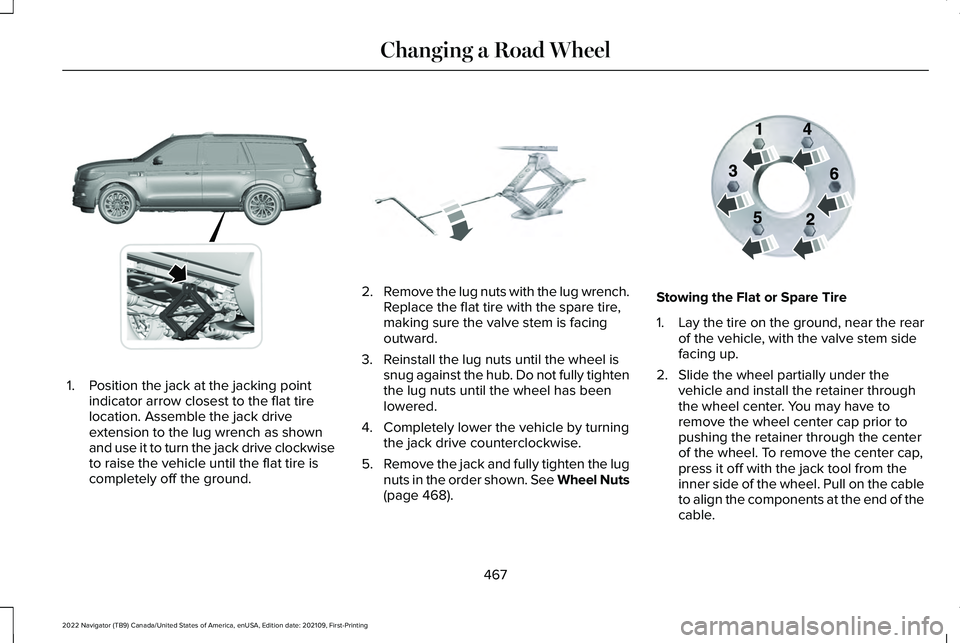
1. Position the jack at the jacking point
indicator arrow closest to the flat tire
location. Assemble the jack drive
extension to the lug wrench as shown
and use it to turn the jack drive clockwise
to raise the vehicle until the flat tire is
completely off the ground. 2.
Remove the lug nuts with the lug wrench.
Replace the flat tire with the spare tire,
making sure the valve stem is facing
outward.
3. Reinstall the lug nuts until the wheel is snug against the hub. Do not fully tighten
the lug nuts until the wheel has been
lowered.
4. Completely lower the vehicle by turning the jack drive counterclockwise.
5. Remove the jack and fully tighten the lug
nuts in the order shown. See Wheel Nuts
(page 468). Stowing the Flat or Spare Tire
1.
Lay the tire on the ground, near the rear
of the vehicle, with the valve stem side
facing up.
2. Slide the wheel partially under the vehicle and install the retainer through
the wheel center. You may have to
remove the wheel center cap prior to
pushing the retainer through the center
of the wheel. To remove the center cap,
press it off with the jack tool from the
inner side of the wheel. Pull on the cable
to align the components at the end of the
cable.
467
2022 Navigator (TB9) Canada/United States of America, enUSA, Edition date: 202109, First-Printing Changing a Road WheelE360357 E325278 E166719
Page 472 of 646
3.
Using the swivel wrench, insert it through
the access hole behind the third row seat
and engage the winch.
4. Turn the swivel wrench clockwise until the tire is raised to its stowed position
underneath the vehicle. The wrench
becomes harder to turn and the spare
tire winch ratchets or slips when the tire
is raised to maximum tightness. A clicking
sound can be heard from the winch
indicating that the tire is properly stowed.
5. Carefully place all tools back into the tool
kit bag.
6. Reinstall the tool kit bag on the jack and
tighten the straps.
7. Reinstall the jack properly on the bracket
and secure with the wing nut.
8. Close the access hole with the rubber plug.
9. If the vehicle has an access panel, reinstall.
10. Unblock the wheel. WHEEL NUTS WARNING: When you install a wheel,
always remove any corrosion, dirt or
foreign materials present on the mounting
surfaces of the wheel or the surface of the
wheel hub, brake drum or brake disc that
contacts the wheel. Make sure to secure
any fasteners that attach the rotor to the
hub so they do not interfere with the
mounting surfaces of the wheel. Installing
wheels without correct metal-to-metal
contact at the wheel mounting surfaces
can cause the wheel nuts to loosen and
the wheel to come off while your vehicle
is in motion, resulting in loss of vehicle
control, personal injury or death. lb.ft (Nm)
1
Bolt Size
150 lb.ft (204 Nm)
M14 x 1.5
1 Torque specifications are for nut and bolt
threads free of dirt and rust. Use only our
recommended replacement wheel nuts and
or wheel bolts. Retighten the wheel nuts to the specified
torque within 100 mi (160 km) after any wheel
disturbance, such as tire rotation, changing
a flat tire or wheel removal.
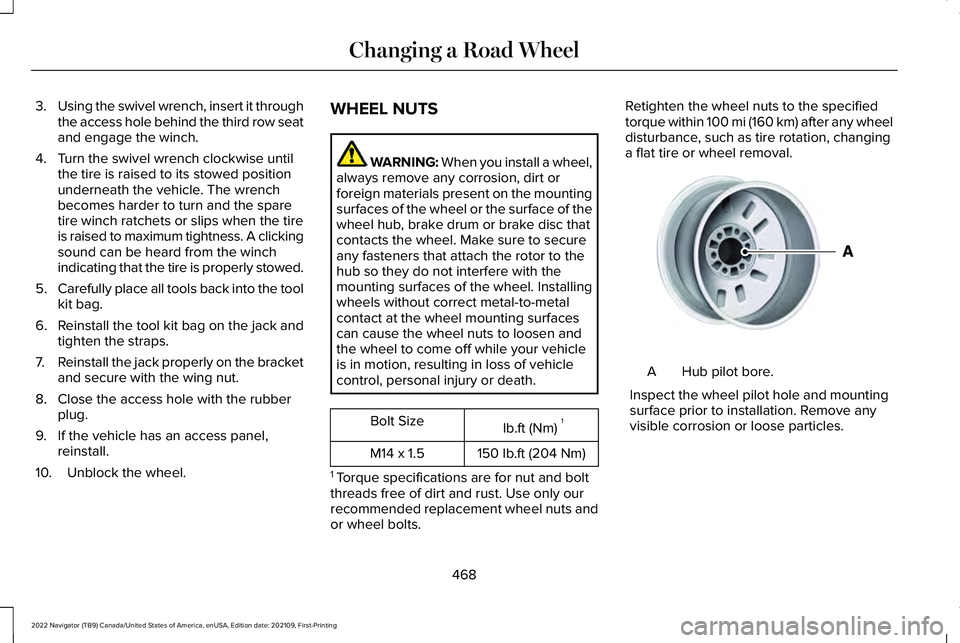
Hub pilot bore.
A
Inspect the wheel pilot hole and mounting
surface prior to installation. Remove any
visible corrosion or loose particles.
468
2022 Navigator (TB9) Canada/United States of America, enUSA, Edition date: 202109, First-Printing Changing a Road WheelE145950
Page 483 of 646
FRONT AXLE FLUID CAPACITY
AND SPECIFICATION
Use fluid that meets the defined specification
and viscosity grade.
If you do not use fluid that meets the defined
specification and viscosity grade, it could
result in:
•
Component damage that your vehicle
warranty does not cover.
• Reduced vehicle performance.
Capacities Quantity
Variant
1.8 qt (1.7 L)
Four-wheel drive.
Materials Specification
Name
WSS-M2C942-A
Motorcraft® SAE 75W-85 Premium Synthetic Hypoid Gear Lubricant(U.S.)
Motorcraft® SAE 75W-85 Premium Synthetic Hypoid Gear Lubricant / Huile
synthétique de haute qualité pour engrenages hypoïdes SAE 75W-85 Motor-
craft®(Canada)
XY-75W85-QL(U.S. & Canada)
479
2022 Navigator (TB9) Canada/United States of America, enUSA, Edition date: 202109, First-Printing Capacities and Specifications
Page 493 of 646
Touchscreen
Press the button to pause
playback. Press again to resume
playback.
Note: Not all sources can be paused.
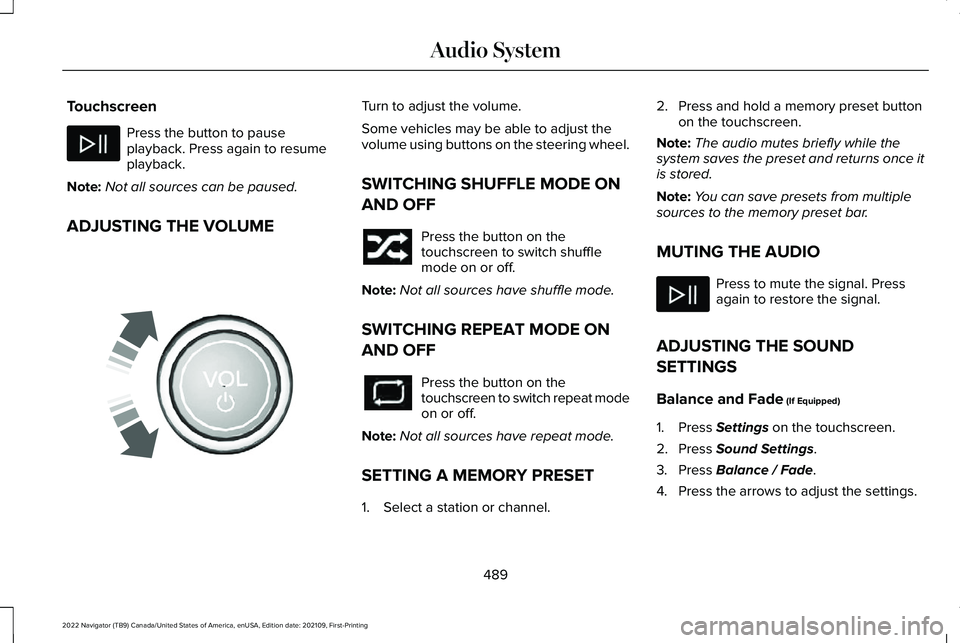
ADJUSTING THE VOLUME Turn to adjust the volume.
Some vehicles may be able to adjust the
volume using buttons on the steering wheel.
SWITCHING SHUFFLE MODE ON
AND OFF
Press the button on the
touchscreen to switch shuffle
mode on or off.
Note: Not all sources have shuffle mode.
SWITCHING REPEAT MODE ON
AND OFF Press the button on the
touchscreen to switch repeat mode
on or off.
Note: Not all sources have repeat mode.
SETTING A MEMORY PRESET
1. Select a station or channel. 2. Press and hold a memory preset button
on the touchscreen.
Note: The audio mutes briefly while the
system saves the preset and returns once it
is stored.
Note: You can save presets from multiple
sources to the memory preset bar.
MUTING THE AUDIO Press to mute the signal. Press
again to restore the signal.
ADJUSTING THE SOUND
SETTINGS
Balance and Fade (If Equipped)
1. Press
Settings on the touchscreen.
2. Press
Sound Settings.
3. Press
Balance / Fade.
4. Press the arrows to adjust the settings.
489
2022 Navigator (TB9) Canada/United States of America, enUSA, Edition date: 202109, First-Printing Audio System E248939
Page 508 of 646
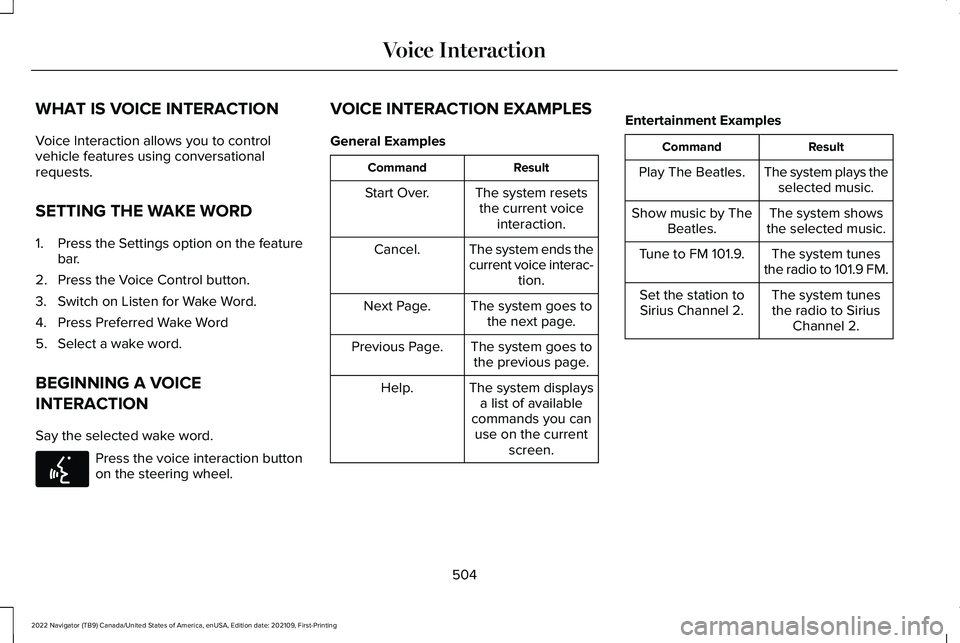
WHAT IS VOICE INTERACTION
Voice Interaction allows you to control
vehicle features using conversational
requests.
SETTING THE WAKE WORD
1. Press the Settings option on the feature
bar.
2. Press the Voice Control button.
3. Switch on Listen for Wake Word.
4. Press Preferred Wake Word
5. Select a wake word.
BEGINNING A VOICE
INTERACTION
Say the selected wake word. Press the voice interaction button
on the steering wheel. VOICE INTERACTION EXAMPLES
General Examples Result
Command
The system resetsthe current voice interaction.
Start Over.
The system ends the
current voice interac-tion.
Cancel.
The system goes tothe next page.
Next Page.
The system goes tothe previous page.
Previous Page.
The system displaysa list of available
commands you can use on the current screen.
Help. Entertainment Examples Result
Command
The system plays theselected music.
Play The Beatles.
The system shows
the selected music.
Show music by The
Beatles.
The system tunes
the radio to 101.9 FM.
Tune to FM 101.9.
The system tunesthe radio to Sirius Channel 2.
Set the station to
Sirius Channel 2.
504
2022 Navigator (TB9) Canada/United States of America, enUSA, Edition date: 202109, First-Printing Voice InteractionE142599
Page 512 of 646
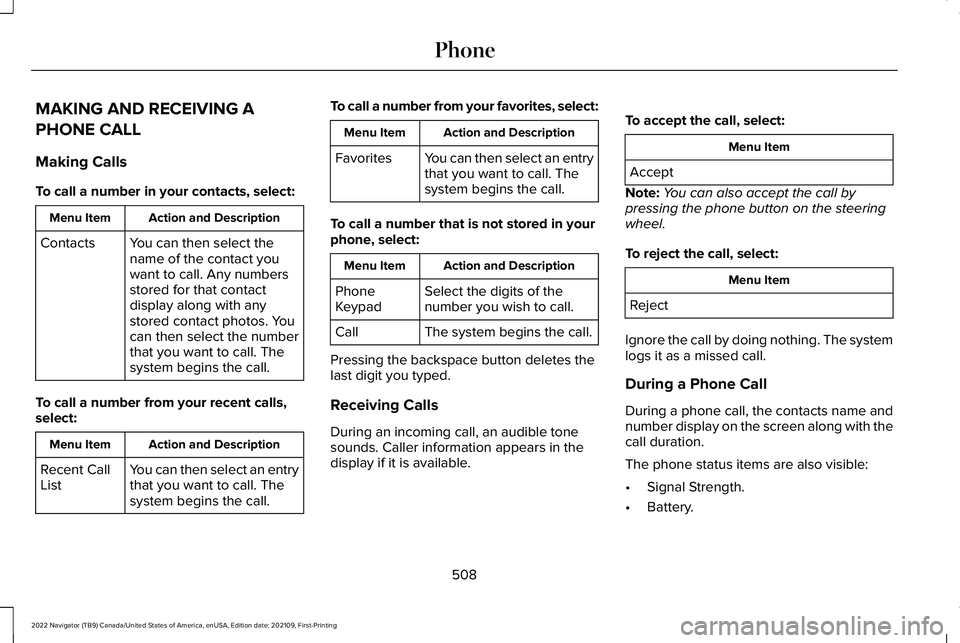
MAKING AND RECEIVING A
PHONE CALL
Making Calls
To call a number in your contacts, select:
Action and Description
Menu Item
You can then select the
name of the contact you
want to call. Any numbers
stored for that contact
display along with any
stored contact photos. You
can then select the number
that you want to call. The
system begins the call.
Contacts
To call a number from your recent calls,
select: Action and Description
Menu Item
You can then select an entry
that you want to call. The
system begins the call.
Recent Call
List To call a number from your favorites, select: Action and Description
Menu Item
You can then select an entry
that you want to call. The
system begins the call.
Favorites
To call a number that is not stored in your
phone, select: Action and Description
Menu Item
Select the digits of the
number you wish to call.
Phone
Keypad
The system begins the call.
Call
Pressing the backspace button deletes the
last digit you typed.
Receiving Calls
During an incoming call, an audible tone
sounds. Caller information appears in the
display if it is available. To accept the call, select: Menu Item
Accept
Note: You can also accept the call by
pressing the phone button on the steering
wheel.
To reject the call, select: Menu Item
Reject
Ignore the call by doing nothing. The system
logs it as a missed call.
During a Phone Call
During a phone call, the contacts name and
number display on the screen along with the
call duration.
The phone status items are also visible:
• Signal Strength.
• Battery.
508
2022 Navigator (TB9) Canada/United States of America, enUSA, Edition date: 202109, First-Printing Phone
Page 513 of 646
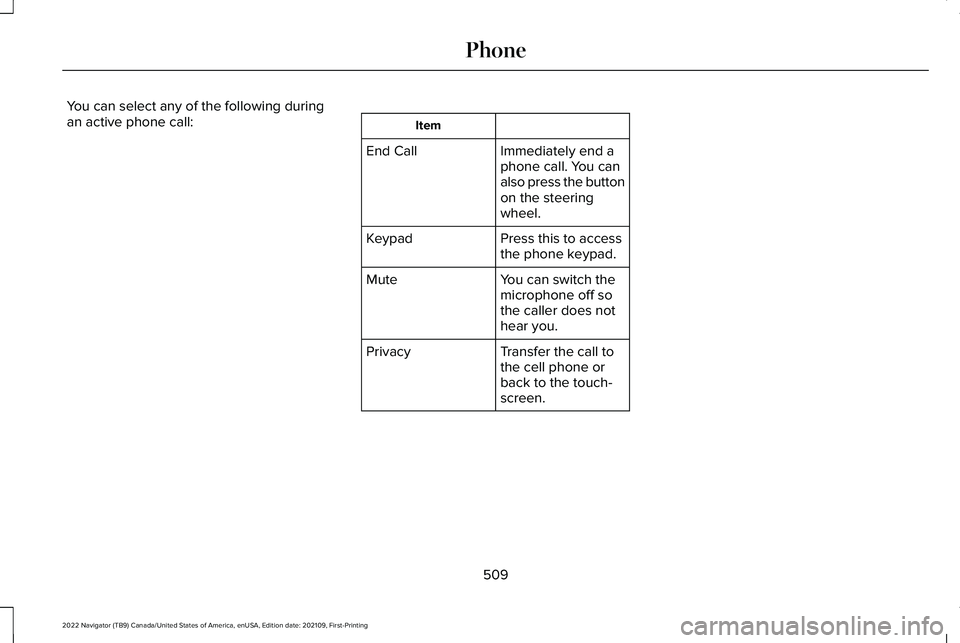
You can select any of the following during
an active phone call:
Item
Immediately end a
phone call. You can
also press the button
on the steering
wheel.
End Call
Press this to access
the phone keypad.
Keypad
You can switch the
microphone off so
the caller does not
hear you.
Mute
Transfer the call to
the cell phone or
back to the touch-
screen.
Privacy
509
2022 Navigator (TB9) Canada/United States of America, enUSA, Edition date: 202109, First-Printing Phone
Page 538 of 646
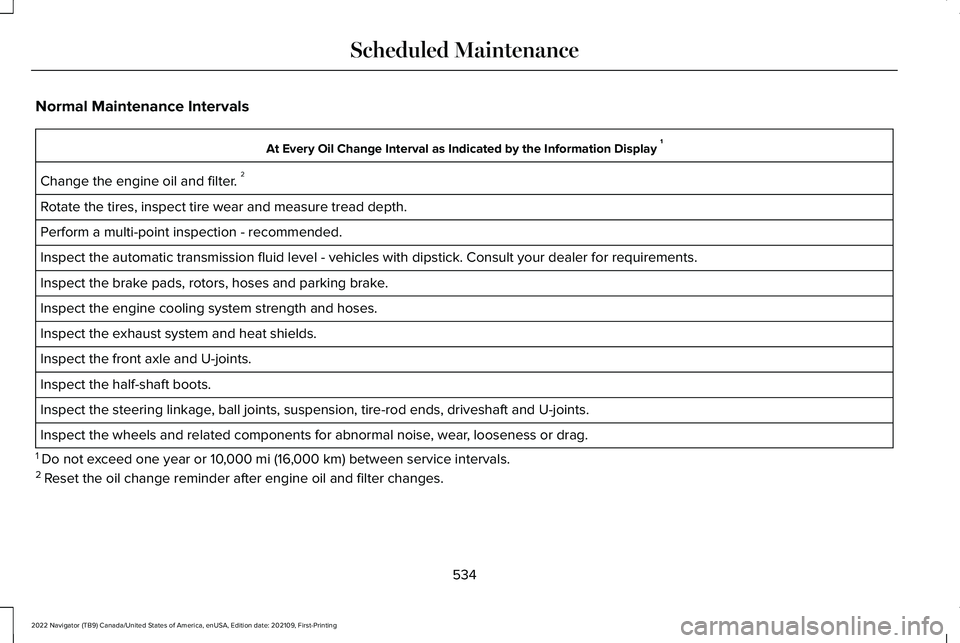
Normal Maintenance Intervals
At Every Oil Change Interval as Indicated by the Information Display
1
Change the engine oil and filter. 2
Rotate the tires, inspect tire wear and measure tread depth.
Perform a multi-point inspection - recommended.
Inspect the automatic transmission fluid level - vehicles with dipstick.\
Consult your dealer for requirements.
Inspect the brake pads, rotors, hoses and parking brake.
Inspect the engine cooling system strength and hoses.
Inspect the exhaust system and heat shields.
Inspect the front axle and U-joints.
Inspect the half-shaft boots.
Inspect the steering linkage, ball joints, suspension, tire-rod ends, driveshaft and U-joints.
Inspect the wheels and related components for abnormal noise, wear, looseness or drag.
1 Do not exceed one year or 10,000 mi (16,000 km) between service intervals.
2 Reset the oil change reminder after engine oil and filter changes.
534
2022 Navigator (TB9) Canada/United States of America, enUSA, Edition date: 202109, First-Printing Scheduled Maintenance
Page 539 of 646
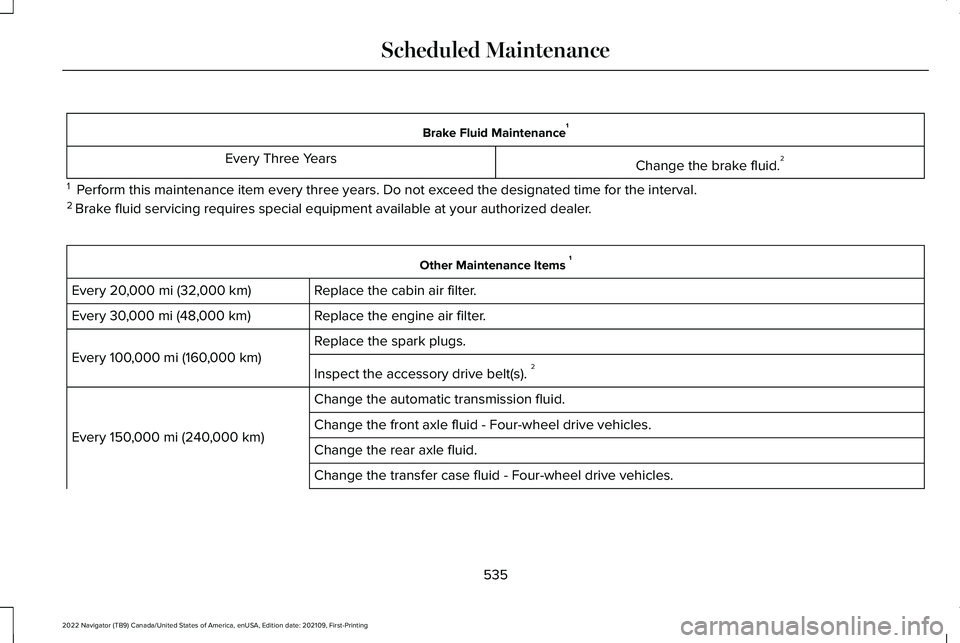
Brake Fluid Maintenance
1
Change the brake fluid. 2
Every Three Years
1 Perform this maintenance item every three years. Do not exceed the designated time for the interval.
2 Brake fluid servicing requires special equipment available at your authorize\
d dealer. Other Maintenance Items
1
Replace the cabin air filter.
Every 20,000 mi (32,000 km)
Replace the engine air filter.
Every
30,000 mi (48,000 km)
Replace the spark plugs.
Every
100,000 mi (160,000 km)
Inspect the accessory drive belt(s). 2
Change the automatic transmission fluid.
Every
150,000 mi (240,000 km) Change the front axle fluid - Four-wheel drive vehicles.
Change the rear axle fluid.
Change the transfer case fluid - Four-wheel drive vehicles.
535
2022 Navigator (TB9) Canada/United States of America, enUSA, Edition date: 202109, First-Printing Scheduled Maintenance
Page 541 of 646

Towing a Trailer or Using a Car-top Carrier
Change engine oil and filter as indicated by the information display and\
perform services listed in the Normal
Scheduled Maintenance chart.
As required
Inspect and lubricate U-joints (if equipped with grease fittings).
Inspect frequently, service
as required
See axle maintenance items under Exceptions.
Change transfer case fluid (Four-wheel drive vehicles).
Every
60,000 mi
(96,000 km) Replace spark plugs. Extensive Idling or Low-speed Driving for Long Distances, as in Heavy Commercial Use
Change engine oil and filter as indicated by the information display and\
perform services listed in the Normal
Scheduled Maintenance chart.
As required
Replace engine air filter.
Inspect frequently, service
as required
Replace cabin air filter.
Change transfer case fluid (Four-wheel drive vehicles).
Every
60,000 mi
(96,000 km) Replace spark plugs.
537
2022 Navigator (TB9) Canada/United States of America, enUSA, Edition date: 202109, First-Printing Scheduled Maintenance